Ch 1: The Mobile Risk
Ecosystem
CNIT 128:
Hacking Mobile
Devices
Updated 1-12-16
The Mobile Ecosystem
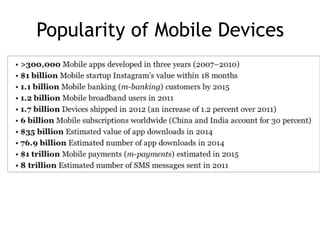
Popularity of Mobile Devices
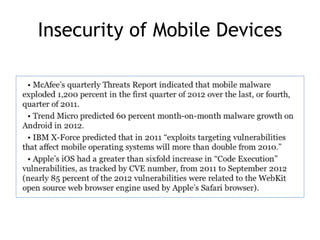
Insecurity of Mobile Devices
The Mobile Risk Model
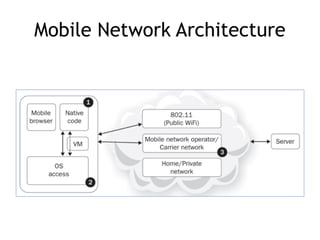
Mobile Network Architecture
1. Native Code
• Some languages like Java operate in a
virtual machine
– Run in a sandbox
– Limited access to resources
• Other languages like Objective-C run
directly on the OS
– More access to resources
– Less safe
2. OS Access
• Software running in a browser has limited
access to the OS
– Libraries
– File system access
– Interprocess communications
– System calls
3. Internet Access
• Mobile devices commonly use the mobile
carrier's network and public WiFi networks
to connect to the Internet
• Increased opportunity for Man-in-the-
Middle (MiTM) attacks
• Most mobile threats are variations on MiTM
– MiTB (Man in the Browser)
– MiTOS (Man in the OS)
Risk Model
• Identify stakeholders
• Enumerate assets
• Find relevant risks
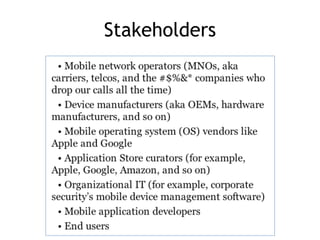
Stakeholders
Assets
• OS manufacturer values phone as a source
of revenue
– Threats include
• Apps that may crash the OS
• Users who may jailbreak the phone
• Users value their privacy
– Threats include
• The OS which may send data back to the carrier
for "statistical purposes"
• Apps preloaded by the MNO which might send data
out
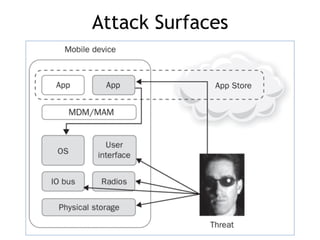
Attack Surfaces
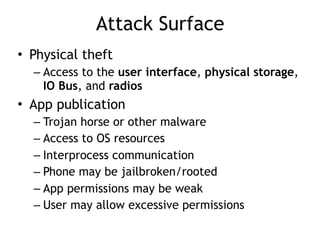
Attack Surface
• Physical theft
– Access to the user interface, physical storage,
IO Bus, and radios
• App publication
– Trojan horse or other malware
– Access to OS resources
– Interprocess communication
– Phone may be jailbroken/rooted
– App permissions may be weak
– User may allow excessive permissions
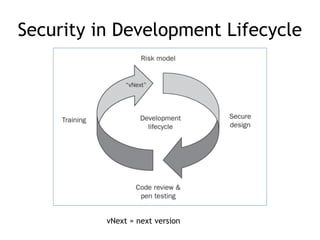
Security in Development Lifecycle
vNext = next version
Special Risks
• Mobile devices are connected to many
networks
– Often insecure or unknown ones
• Mobile devices are used for personal,
private purposes
– Banking, selfies, SMS messages, phone calls
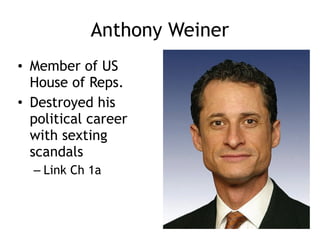
Anthony Weiner
• Member of US
House of Reps.
• Destroyed his
political career
with sexting
scandals
– Link Ch 1a
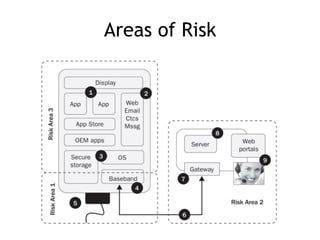
Areas of Risk
1. Physical Access
• Attacker with physical access to the
device can overcome almost any security
barrier
• Rooting/Jailbreaking continues to be
popular
• Neither Apple nor Google can stop it
• No information stored indefinitely on a
mobile device can be regarded as secure
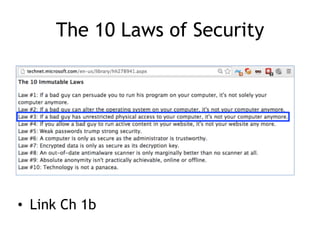
The 10 Laws of Security
• Link Ch 1b
5. USB Port
• USB connection gives direct access to the
phone's storage, in "debug" mode
• Commonly used by law enforcement to
collect all data from a phone
4. Baseband Attack
• If an attacker can get close to your phone,
she can:
– Trick your phone into connecting to a rogue
cellular base station
– Own your device almost completely, unless it's
in Airplane Mode
• Baseband stack of radio chip hardware and
firmware drives
– WiFi, Bluetooth, GPS, Near Field
Communication (NFC), etc.
2. Web, Email, Contacts, SMS
• 8. Most code is on the server side of apps
– Most bugs and security errors are there too
• 9. Tech support will often give attackers
access to your account or device with a
phone call
– Social engineering
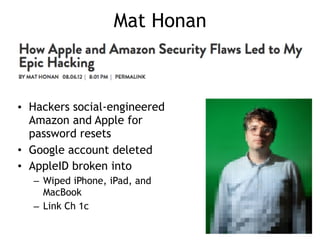
Mat Honan
• Hackers social-engineered
Amazon and Apple for
password resets
• Google account deleted
• AppleID broken into
– Wiped iPhone, iPad, and
MacBook
– Link Ch 1c
Axway API Gateway
• Linux-based server
• Performs protocol translation
• Can block attacks
• Recommended by author
– Links Ch 1d, 1e
App Risks
App Risks
• Apps are the primary attack surface for
mobile devices
• Major security issues
– Fragmentation
– Sensitive information leakage
– "Secure" on-device storage
– Weak authentication
– Failure to properly implement specs
– BYOD
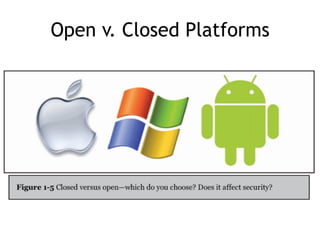
Open v. Closed Platforms
• Apple is closed and more secure
– Code must be signed by Apple to run
– Has Address Space Layout Randomization (ASLR)
– Better code sandbox
– No shell
• Android is open and less secure
– Custom OS versions for each device
manufacturer
– Updates often blocked by MNOs
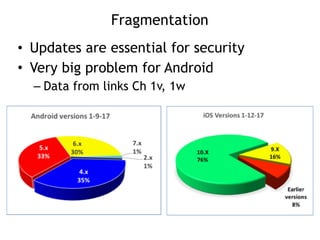
Fragmentation
• Updates are essential for security
• Very big problem for Android
– Data from links Ch 1v, 1w
App Store Security
• Before appearing in the App Store, apps
are
– Manually reviewed by Apple for flaws and
malware
– Screened with a static analyzer
• Apps run in a sandbox
• Memory is segmented
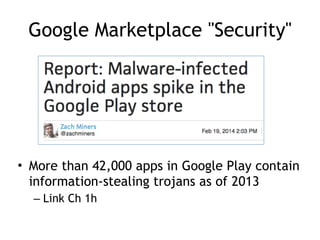
Google Marketplace "Security"
• More than 42,000 apps in Google Play contain
information-stealing trojans as of 2013
– Link Ch 1h
Installing Apps from Untrusted
Sources (Side-Loading)
• Android devices can install apps posted
directly to the Web by developers
• Not screened by Google at all
Xcode 7 allows anyone to download,
build and ‘sideload’ iOS apps for free
• Apple has changed its policy regarding
permissions required to build and run apps on
devices. Until now, Apple required users to pay
$99/year to become a member of Apple’s
Developer Program in order to run code on
physical iPhone and iPads. As part of the new
Developer Program, this is no longer required.
Apps can be tested on devices, no purchase
necessary.
• June 10, 2015 (Link Ch 1s)
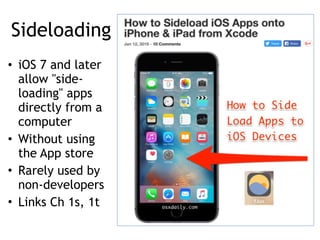
Sideloading
• iOS 7 and later
allow "side-
loading" apps
directly from a
computer
• Without using
the App store
• Rarely used by
non-developers
• Links Ch 1s, 1t
Android Antivirus
• Many options
• Pick one and use it
– Link Ch 1i
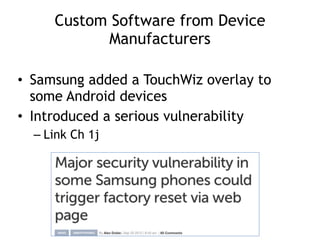
Custom Software from Device
Manufacturers
• Samsung added a TouchWiz overlay to
some Android devices
• Introduced a serious vulnerability
– Link Ch 1j
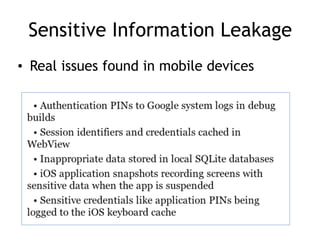
Sensitive Information Leakage
• Real issues found in mobile devices
dmesg
• Samsung devices stored sensitive user-
input data into device driver logs (the
"dmesg" buffer)
• Those logs could be read by non-root
users and other apps
• Software that sends information about device
usage back to the carrier for "quality of service
monitoring"
– Apparently including keylogging
• Concerns emerged that this data was excessive
and not handled properly
– Link Ch 1l
Input Validation
• Many attacks rely on input to one app that
does unexpected things when passed on to
another app
– JavaScript injection to run code, including
"eval"
– URL query strings that execute application
functions
"Secure" On-Device Storage
• All data on a mobile device is at risk
• Balance value of data with the risk
• Poor software has stored
– Hard-coded passwords
– AES encryption keys
Advice for Storing Sensitive Data
• Don't do it (if possible)
• Use existing storage facilities
– Like iOS KeyChain
– Much safer than custom code
• Use specially designed hardware to store
secrets
– SE (Secure Element) chip can be embedded in
device, or on a SIM or SD card
– Good security, if implemented correctly
• Link Ch 1m
Weak Authentication
• Falsely assume that tokens on the mobile
device are secret
– Mobile Device Number (MDN)
– Allowed password resets without a security
question
• Popular authentication standards
– OAuth
– SAML
• Security will be analyzed in chapter 6
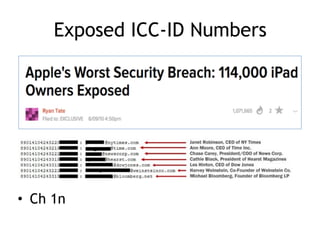
Exposed ICC-ID Numbers
• Ch 1n
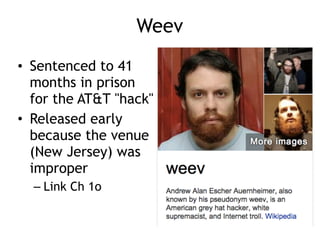
Weev
• Sentenced to 41
months in prison
for the AT&T "hack"
• Released early
because the venue
(New Jersey) was
improper
– Link Ch 1o
Failure to Properly Implement Specs
• Using cleartext username and password in
a "WS-Security" header (link Ch 1p)
• Leaving debug mode on in production
systems
– SSL certificate validation disabled
• Fast development leads to insecure code
– Speed to market is valued more highly than
security
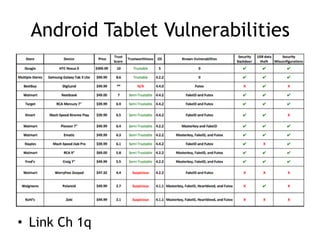
Android Tablet Vulnerabilities
• Link Ch 1q
BYOD
• Bring Your Own Device to work
• Recommendation
– Keep sensitive data on servers
– Only put non-sensitive data on mobile devices
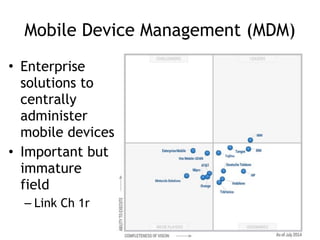
Mobile Device Management (MDM)
• Enterprise
solutions to
centrally
administer
mobile devices
• Important but
immature
field
– Link Ch 1r
Key Countermeasures for App
Developers
• Architecture and design
– Align architecture with value of assets in play
• Input/Output validation
• Caching and logging
– Disable or mitigate logging of confidential
data
• Error handling
– Don't just fail-open; enforce security checks
Key Countermeasures for App
Developers
• Device loss or capture
– Prepare for phone theft
– Enable remote wipe of your data
• Server-side strength
– Implement strong controls
– Application-level protections
– Strengthen self-help password reset system

CNIT 128 Ch 1: The mobile risk ecosystem

  • 1.
    Ch 1: TheMobile Risk Ecosystem CNIT 128: Hacking Mobile Devices Updated 1-12-16
  • 2.
  • 3.
  • 4.
  • 5.
  • 6.
  • 7.
    1. Native Code •Some languages like Java operate in a virtual machine – Run in a sandbox – Limited access to resources • Other languages like Objective-C run directly on the OS – More access to resources – Less safe
  • 8.
    2. OS Access •Software running in a browser has limited access to the OS – Libraries – File system access – Interprocess communications – System calls
  • 9.
    3. Internet Access •Mobile devices commonly use the mobile carrier's network and public WiFi networks to connect to the Internet • Increased opportunity for Man-in-the- Middle (MiTM) attacks • Most mobile threats are variations on MiTM – MiTB (Man in the Browser) – MiTOS (Man in the OS)
  • 10.
    Risk Model • Identifystakeholders • Enumerate assets • Find relevant risks
  • 11.
  • 12.
    Assets • OS manufacturervalues phone as a source of revenue – Threats include • Apps that may crash the OS • Users who may jailbreak the phone • Users value their privacy – Threats include • The OS which may send data back to the carrier for "statistical purposes" • Apps preloaded by the MNO which might send data out
  • 13.
  • 14.
    Attack Surface • Physicaltheft – Access to the user interface, physical storage, IO Bus, and radios • App publication – Trojan horse or other malware – Access to OS resources – Interprocess communication – Phone may be jailbroken/rooted – App permissions may be weak – User may allow excessive permissions
  • 15.
    Security in DevelopmentLifecycle vNext = next version
  • 16.
    Special Risks • Mobiledevices are connected to many networks – Often insecure or unknown ones • Mobile devices are used for personal, private purposes – Banking, selfies, SMS messages, phone calls
  • 17.
    Anthony Weiner • Memberof US House of Reps. • Destroyed his political career with sexting scandals – Link Ch 1a
  • 18.
  • 19.
    1. Physical Access •Attacker with physical access to the device can overcome almost any security barrier • Rooting/Jailbreaking continues to be popular • Neither Apple nor Google can stop it • No information stored indefinitely on a mobile device can be regarded as secure
  • 20.
    The 10 Lawsof Security • Link Ch 1b
  • 21.
    5. USB Port •USB connection gives direct access to the phone's storage, in "debug" mode • Commonly used by law enforcement to collect all data from a phone
  • 22.
    4. Baseband Attack •If an attacker can get close to your phone, she can: – Trick your phone into connecting to a rogue cellular base station – Own your device almost completely, unless it's in Airplane Mode • Baseband stack of radio chip hardware and firmware drives – WiFi, Bluetooth, GPS, Near Field Communication (NFC), etc.
  • 23.
    2. Web, Email,Contacts, SMS • 8. Most code is on the server side of apps – Most bugs and security errors are there too • 9. Tech support will often give attackers access to your account or device with a phone call – Social engineering
  • 24.
    Mat Honan • Hackerssocial-engineered Amazon and Apple for password resets • Google account deleted • AppleID broken into – Wiped iPhone, iPad, and MacBook – Link Ch 1c
  • 25.
    Axway API Gateway •Linux-based server • Performs protocol translation • Can block attacks • Recommended by author – Links Ch 1d, 1e
  • 26.
  • 27.
    App Risks • Appsare the primary attack surface for mobile devices • Major security issues – Fragmentation – Sensitive information leakage – "Secure" on-device storage – Weak authentication – Failure to properly implement specs – BYOD
  • 28.
    Open v. ClosedPlatforms
  • 29.
    Open v. ClosedPlatforms • Apple is closed and more secure – Code must be signed by Apple to run – Has Address Space Layout Randomization (ASLR) – Better code sandbox – No shell • Android is open and less secure – Custom OS versions for each device manufacturer – Updates often blocked by MNOs
  • 30.
    Fragmentation • Updates areessential for security • Very big problem for Android – Data from links Ch 1v, 1w
  • 31.
    App Store Security •Before appearing in the App Store, apps are – Manually reviewed by Apple for flaws and malware – Screened with a static analyzer • Apps run in a sandbox • Memory is segmented
  • 32.
    Google Marketplace "Security" •More than 42,000 apps in Google Play contain information-stealing trojans as of 2013 – Link Ch 1h
  • 33.
    Installing Apps fromUntrusted Sources (Side-Loading) • Android devices can install apps posted directly to the Web by developers • Not screened by Google at all
  • 34.
    Xcode 7 allowsanyone to download, build and ‘sideload’ iOS apps for free • Apple has changed its policy regarding permissions required to build and run apps on devices. Until now, Apple required users to pay $99/year to become a member of Apple’s Developer Program in order to run code on physical iPhone and iPads. As part of the new Developer Program, this is no longer required. Apps can be tested on devices, no purchase necessary. • June 10, 2015 (Link Ch 1s)
  • 35.
    Sideloading • iOS 7and later allow "side- loading" apps directly from a computer • Without using the App store • Rarely used by non-developers • Links Ch 1s, 1t
  • 36.
    Android Antivirus • Manyoptions • Pick one and use it – Link Ch 1i
  • 37.
    Custom Software fromDevice Manufacturers • Samsung added a TouchWiz overlay to some Android devices • Introduced a serious vulnerability – Link Ch 1j
  • 38.
    Sensitive Information Leakage •Real issues found in mobile devices
  • 39.
    dmesg • Samsung devicesstored sensitive user- input data into device driver logs (the "dmesg" buffer) • Those logs could be read by non-root users and other apps
  • 40.
    • Software thatsends information about device usage back to the carrier for "quality of service monitoring" – Apparently including keylogging • Concerns emerged that this data was excessive and not handled properly – Link Ch 1l
  • 41.
    Input Validation • Manyattacks rely on input to one app that does unexpected things when passed on to another app – JavaScript injection to run code, including "eval" – URL query strings that execute application functions
  • 42.
    "Secure" On-Device Storage •All data on a mobile device is at risk • Balance value of data with the risk • Poor software has stored – Hard-coded passwords – AES encryption keys
  • 43.
    Advice for StoringSensitive Data • Don't do it (if possible) • Use existing storage facilities – Like iOS KeyChain – Much safer than custom code • Use specially designed hardware to store secrets – SE (Secure Element) chip can be embedded in device, or on a SIM or SD card – Good security, if implemented correctly • Link Ch 1m
  • 44.
    Weak Authentication • Falselyassume that tokens on the mobile device are secret – Mobile Device Number (MDN) – Allowed password resets without a security question • Popular authentication standards – OAuth – SAML • Security will be analyzed in chapter 6
  • 45.
  • 46.
    Weev • Sentenced to41 months in prison for the AT&T "hack" • Released early because the venue (New Jersey) was improper – Link Ch 1o
  • 47.
    Failure to ProperlyImplement Specs • Using cleartext username and password in a "WS-Security" header (link Ch 1p) • Leaving debug mode on in production systems – SSL certificate validation disabled • Fast development leads to insecure code – Speed to market is valued more highly than security
  • 48.
  • 49.
    BYOD • Bring YourOwn Device to work • Recommendation – Keep sensitive data on servers – Only put non-sensitive data on mobile devices
  • 50.
    Mobile Device Management(MDM) • Enterprise solutions to centrally administer mobile devices • Important but immature field – Link Ch 1r
  • 51.
    Key Countermeasures forApp Developers • Architecture and design – Align architecture with value of assets in play • Input/Output validation • Caching and logging – Disable or mitigate logging of confidential data • Error handling – Don't just fail-open; enforce security checks
  • 52.
    Key Countermeasures forApp Developers • Device loss or capture – Prepare for phone theft – Enable remote wipe of your data • Server-side strength – Implement strong controls – Application-level protections – Strengthen self-help password reset system