Assessing Wireless
Radio and Bluetooth
CNG 256 Vulnerability Assessment
Frank H. Vianzon, GPEN, GCWN, GISP, CompTIA A+, CompTIA Network+
Wi-Fi: Overview
 Standard is IEEE 802.11
 Exists in everything these days, from laptops to smartphones to IoT devices
Four Environments
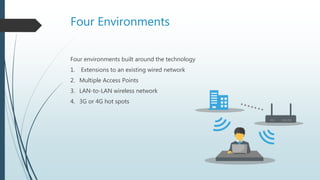
Four environments built around the technology
1. Extensions to an existing wired network
2. Multiple Access Points
3. LAN-to-LAN wireless network
4. 3G or 4G hot spots
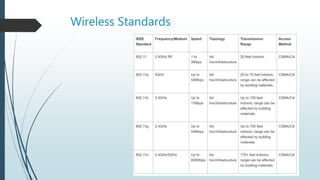
Wireless Standards
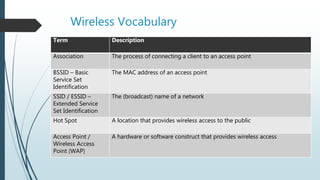
Wireless Vocabulary
Term Description
Association The process of connecting a client to an access point
BSSID – Basic
Service Set
Identification
The MAC address of an access point
SSID / ESSID –
Extended Service
Set Identification
The (broadcast) name of a network
Hot Spot A location that provides wireless access to the public
Access Point /
Wireless Access
Point (WAP)
A hardware or software construct that provides wireless access
Service Set Identifier (SSID)
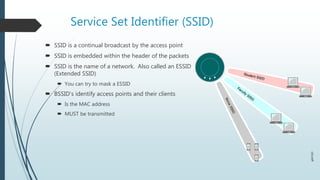
 SSID is a continual broadcast by the access point
 SSID is embedded within the header of the packets
 SSID is the name of a network. Also called an ESSID
(Extended SSID)
 You can try to mask a ESSID
 BSSID’s identify access points and their clients
 Is the MAC address
 MUST be transmitted
BSSID
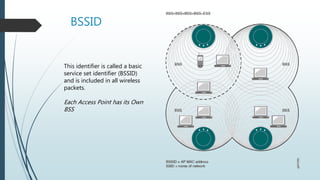
This identifier is called a basic
service set identifier (BSSID)
and is included in all wireless
packets.
Each Access Point has its Own
BSS
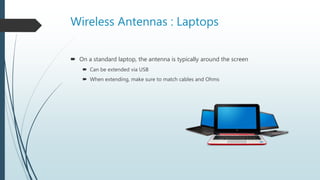
Wireless Antennas : Laptops
 On a standard laptop, the antenna is typically around the screen
 Can be extended via USB
 When extending, make sure to match cables and Ohms
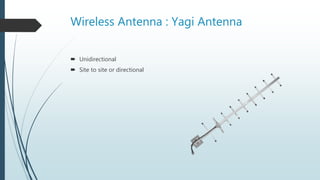
Wireless Antenna : Yagi Antenna
 Unidirectional
 Site to site or directional
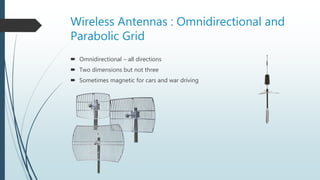
Wireless Antennas : Omnidirectional and
Parabolic Grid
 Omnidirectional – all directions
 Two dimensions but not three
 Sometimes magnetic for cars and war driving
Wireless Authentication Modes
 Open
 only requires a MAC address
 Shared Key
 All AP’s and clients use the same authentication key
 Hashing methods used to protect the key can be easily broken
 802.1X
 Authentication uses usernames and passwords, certificates or devices such as smart
cards. Requires one or both of these
 RADIUS server to centralize user accounts and authentication information
 A PKI for issuing certificates
Wireless Encryption
 WEP – Wireless Equivalent Privacy
 Oldest and weakest
 Initial solution
 WPA – Wi-Fi Protected Access
 Uses Temporal Key Integrity Protocol (TKIP)
 TKIP is a suite of algorithms that works as a "wrapper" to WEP, which allows users of legacy
WLAN equipment to upgrade to TKIP without replacing hardware.
 Uses Message Integrity Code (MIC)
 WPA2
 Uses AES
 Requires hardware
WEP Encryption:
 Introduced with the 802.11b standard
 11MBs, 2.4 GHz, RC4
 Design Parameters
 Defeat Eavesdropping on communications
 Check integrity of data
 Use Shared Secret
 Problems with WEP
 Designed w/o input from the academic community or the public, professional
cryptologist were never consulted
 Passively uncover the key
Breaking WEP
 Need to intercept as many IV’s (Initialization Vectors) as possible
1. Start the wireless interface in monitor mode
2. Fake authentication with the access point
3. ARP requests can be intercepted and reinjected
4. Run password cracking tool
Comcast Split Wireless
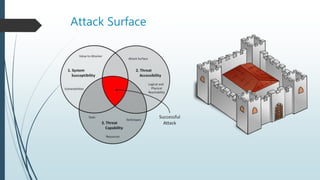
Attack Surface
Attacks and Vulnerabilities
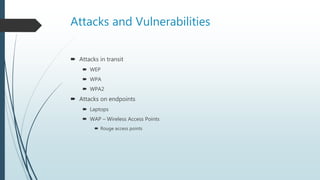
 Attacks in transit
 WEP
 WPA
 WPA2
 Attacks on endpoints
 Laptops
 WAP – Wireless Access Points
 Rouge access points
Access Points
Wireless access points transmits its SSID and BSSID
to anyone in range
Using monitor mode, we can see the BSSID and
then use a brute force utility to find the password
Access Points
Monitor Mode vs Managed Mode
Managed Mode is the mode you are mostly in to connect to
wireless networks
Monitor mode makes your wireless card passive. It is simply
listening in on every channel
Finding the MAC address
For Windows, you can use the inSSIDer tool
For Linux, you can use place the card in monitor mode and
use the airodump NG tool
Access Points
Testing Points
If you systems are using certificates or other PKI
authentication, try to join the network.
Egress Rules
Once you join, can you nmap the network?
User Laptops
 User laptops will continuously broadcast for saved networks
 We can attack the user MAC or answer the broadcast with a WiFi Pineapple
Bluetooth
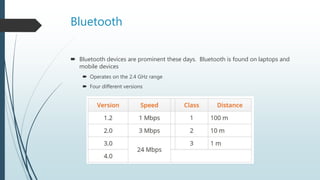
 Bluetooth devices are prominent these days. Bluetooth is found on laptops and
mobile devices
 Operates on the 2.4 GHz range
 Four different versions
Bluetooth Modes
 Discoverable
 Allows the device to be scanned and located by other Bluetooth devices
 Limited Discoverable
 Mode is becoming more common. This put it into discovery mode for a short period of
time
 Non-discoverable
 As the name suggests, it cannot be located
 Pairing
 We have to pair devices in a peer to peer type connection
Bluetooth Threats
 What type of information do you exchange with Bluetooth?
 Calendars and Address Books
 Photos, cameras, microphones
 Attacker can inject microphone

CNG 256 wireless wi-fi and bluetooth

  • 1.
    Assessing Wireless Radio andBluetooth CNG 256 Vulnerability Assessment Frank H. Vianzon, GPEN, GCWN, GISP, CompTIA A+, CompTIA Network+
  • 2.
    Wi-Fi: Overview  Standardis IEEE 802.11  Exists in everything these days, from laptops to smartphones to IoT devices
  • 3.
    Four Environments Four environmentsbuilt around the technology 1. Extensions to an existing wired network 2. Multiple Access Points 3. LAN-to-LAN wireless network 4. 3G or 4G hot spots
  • 4.
  • 5.
    Wireless Vocabulary Term Description AssociationThe process of connecting a client to an access point BSSID – Basic Service Set Identification The MAC address of an access point SSID / ESSID – Extended Service Set Identification The (broadcast) name of a network Hot Spot A location that provides wireless access to the public Access Point / Wireless Access Point (WAP) A hardware or software construct that provides wireless access
  • 6.
    Service Set Identifier(SSID)  SSID is a continual broadcast by the access point  SSID is embedded within the header of the packets  SSID is the name of a network. Also called an ESSID (Extended SSID)  You can try to mask a ESSID  BSSID’s identify access points and their clients  Is the MAC address  MUST be transmitted
  • 7.
    BSSID This identifier iscalled a basic service set identifier (BSSID) and is included in all wireless packets. Each Access Point has its Own BSS
  • 8.
    Wireless Antennas :Laptops  On a standard laptop, the antenna is typically around the screen  Can be extended via USB  When extending, make sure to match cables and Ohms
  • 9.
    Wireless Antenna :Yagi Antenna  Unidirectional  Site to site or directional
  • 10.
    Wireless Antennas :Omnidirectional and Parabolic Grid  Omnidirectional – all directions  Two dimensions but not three  Sometimes magnetic for cars and war driving
  • 11.
    Wireless Authentication Modes Open  only requires a MAC address  Shared Key  All AP’s and clients use the same authentication key  Hashing methods used to protect the key can be easily broken  802.1X  Authentication uses usernames and passwords, certificates or devices such as smart cards. Requires one or both of these  RADIUS server to centralize user accounts and authentication information  A PKI for issuing certificates
  • 12.
    Wireless Encryption  WEP– Wireless Equivalent Privacy  Oldest and weakest  Initial solution  WPA – Wi-Fi Protected Access  Uses Temporal Key Integrity Protocol (TKIP)  TKIP is a suite of algorithms that works as a "wrapper" to WEP, which allows users of legacy WLAN equipment to upgrade to TKIP without replacing hardware.  Uses Message Integrity Code (MIC)  WPA2  Uses AES  Requires hardware
  • 13.
    WEP Encryption:  Introducedwith the 802.11b standard  11MBs, 2.4 GHz, RC4  Design Parameters  Defeat Eavesdropping on communications  Check integrity of data  Use Shared Secret  Problems with WEP  Designed w/o input from the academic community or the public, professional cryptologist were never consulted  Passively uncover the key
  • 14.
    Breaking WEP  Needto intercept as many IV’s (Initialization Vectors) as possible 1. Start the wireless interface in monitor mode 2. Fake authentication with the access point 3. ARP requests can be intercepted and reinjected 4. Run password cracking tool
  • 15.
  • 16.
  • 17.
    Attacks and Vulnerabilities Attacks in transit  WEP  WPA  WPA2  Attacks on endpoints  Laptops  WAP – Wireless Access Points  Rouge access points
  • 18.
    Access Points Wireless accesspoints transmits its SSID and BSSID to anyone in range Using monitor mode, we can see the BSSID and then use a brute force utility to find the password
  • 19.
    Access Points Monitor Modevs Managed Mode Managed Mode is the mode you are mostly in to connect to wireless networks Monitor mode makes your wireless card passive. It is simply listening in on every channel Finding the MAC address For Windows, you can use the inSSIDer tool For Linux, you can use place the card in monitor mode and use the airodump NG tool
  • 20.
    Access Points Testing Points Ifyou systems are using certificates or other PKI authentication, try to join the network. Egress Rules Once you join, can you nmap the network?
  • 21.
    User Laptops  Userlaptops will continuously broadcast for saved networks  We can attack the user MAC or answer the broadcast with a WiFi Pineapple
  • 22.
    Bluetooth  Bluetooth devicesare prominent these days. Bluetooth is found on laptops and mobile devices  Operates on the 2.4 GHz range  Four different versions
  • 23.
    Bluetooth Modes  Discoverable Allows the device to be scanned and located by other Bluetooth devices  Limited Discoverable  Mode is becoming more common. This put it into discovery mode for a short period of time  Non-discoverable  As the name suggests, it cannot be located  Pairing  We have to pair devices in a peer to peer type connection
  • 24.
    Bluetooth Threats  Whattype of information do you exchange with Bluetooth?  Calendars and Address Books  Photos, cameras, microphones  Attacker can inject microphone

Editor's Notes

  • #3 IoT devices: Nest Thermostat, Ring Doorbell, Refrigerators, Garage Doors
  • #7 https://www.juniper.net/documentation/en_US/junos-space-apps/network-director2.0/topics/concept/wireless-ssid-bssid-essid.html
  • #9 Standard laptops – works great for users Older laptops may have door on bottom. Newer laptops are typically intergrated
  • #12 Shared Key is the most common
  • #18 Lab – find the rouge access point
  • #20 Lab on placing in monitor mode Once you have the MAC address, you can launch deauth attacks. This is a form of DoS attack Bully to force the network connection
  • #21 Some of the PKI structures will let you join but not let you do anything Stop client to client access?