Hands-On Ethical Hacking and Network Defense Chapter 11 Hacking Wireless Networks Last revised 10-30-08 5 pm
Objectives Explain wireless technology Describe wireless networking standards Describe the process of authentication Describe wardriving Describe wireless hacking and tools used by hackers and security professionals
Understanding Wireless Technology For a wireless network to function, you must have the right hardware and software Wireless technology is part of our lives Baby monitors Cell and cordless phones Pagers GPS Remote controls Garage door openers Two-way radios Wireless PDAs
Components of a Wireless Network A wireless network has only three basic components Access Point (AP) Wireless network interface card (WNIC) Ethernet cable
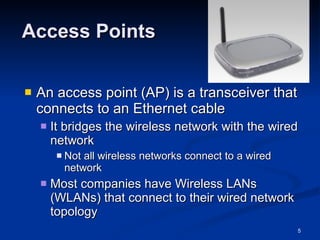
Access Points An access point (AP) is a transceiver that connects to an Ethernet cable It bridges the wireless network with the wired network Not all wireless networks connect to a wired network Most companies have Wireless LANs (WLANs) that connect to their wired network topology
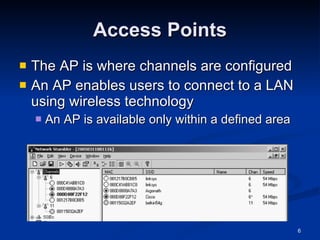
Access Points The AP is where channels are configured An AP enables users to connect to a LAN using wireless technology An AP is available only within a defined area
Service Set Identifiers (SSIDs) Name used to identify the wireless local area network (WLAN) The SSID is configured on the AP Unique 1- to 32-character alphanumeric name Name is case sensitive Wireless computers need to configure the SSID before connecting to a wireless network
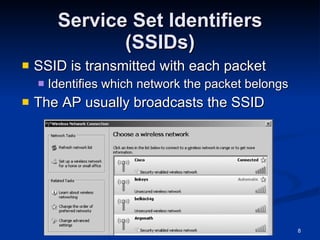
Service Set Identifiers (SSIDs) SSID is transmitted with each packet Identifies which network the packet belongs The AP usually broadcasts the SSID
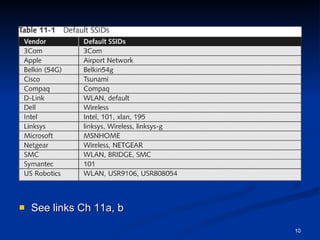
Service Set Identifiers (SSIDs) Many vendors have SSIDs set to a default value that companies never change An AP can be configured to not broadcast its SSID until after authentication Wireless hackers can attempt to guess the SSID Verify that your clients or customers are not using a default SSID
See links Ch 11a, b
Configuring an Access Point Configuring an AP varies depending on the hardware Most devices allow access through any Web browser Enter IP address on your Web browser and provide your user logon name and password
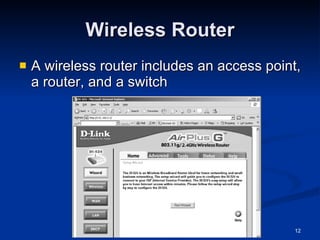
Wireless Router A wireless router includes an access point, a router, and a switch
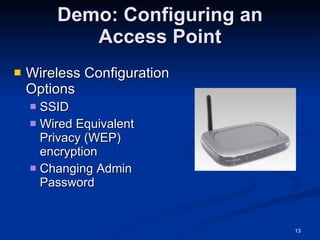
Demo: Configuring an Access Point Wireless Configuration Options SSID Wired Equivalent Privacy (WEP) encryption Changing Admin Password
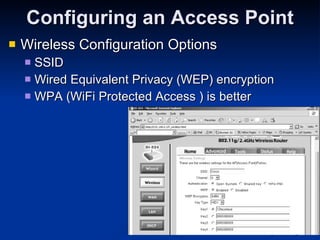
Configuring an Access Point Wireless Configuration Options SSID Wired Equivalent Privacy (WEP) encryption WPA (WiFi Protected Access ) is better
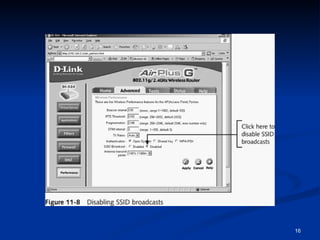
Configuring an Access Point (continued) Steps for configuring a D-Link wireless router (continued) Turn off SSID broadcast You should also change your SSID
 
Wireless NICs For wireless technology to work, each node or computer must have a wireless NIC NIC’s main function Converting the radio waves it receives into digital signals the computer understands
Wireless NICs There are many wireless NICs on the market Choose yours depending on how you plan to use it Some tools require certain specific brands of NICs
Understanding Wireless Network Standards A standard is a set of rules formulated by an organization Institute of Electrical and Electronics Engineers (IEEE) Defines several standards for wireless networks
IEEE: CCSF Student Chapter  Next meeting: Thurs, Nov 6, 2008 in Sci 37, 5:00 pm Email  [email_address]  for more info
IEEE Standards Standards pass through these groups: Working group (WG) Sponsor Executive Committee (SEC) Standards Review Committee (RevCom) IEEE Standards Board IEEE Project 802 LAN and WAN standards
The 802.11 Standard The first wireless technology standard Defined wireless connectivity at 1 Mbps and 2 Mbps within a LAN Applied to layers 1 and 2 of the OSI model Wireless networks cannot detect collisions Carrier sense multiple access/collision avoidance (CSMA/CA) is used instead of CSMA/CD
Addressing Wireless LANs do not have an address associated with a physical location An addressable unit is called a station (STA)
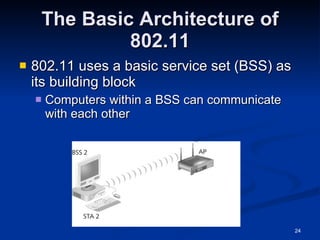
The Basic Architecture of 802.11 802.11 uses a basic service set (BSS) as its building block Computers within a BSS can communicate with each other
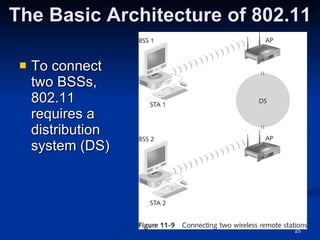
The Basic Architecture of 802.11 To connect two BSSs, 802.11 requires a distribution system (DS)
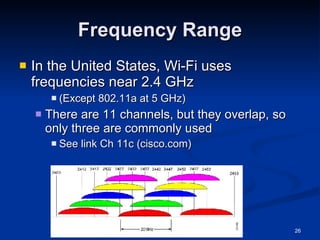
Frequency Range In the United States, Wi-Fi uses frequencies near 2.4 GHz (Except 802.11a at 5 GHz) There are 11 channels, but they overlap, so only three are commonly used See link Ch 11c (cisco.com)
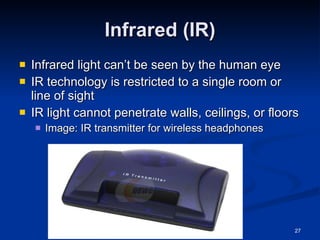
Infrared (IR) Infrared light can’t be seen by the human eye IR technology is restricted to a single room or line of sight IR light cannot penetrate walls, ceilings, or floors Image: IR transmitter for wireless headphones
IEEE Additional 802.11 Projects 802.11a Created in 1999 Operating frequency 5 GHz Throughput 54 Mbps
IEEE Additional 802.11 Projects (continued) 802.11b Operates in the 2.4 GHz range Throughput 11 Mbps Also referred as Wi-Fi (wireless fidelity) Allows for 11 channels to prevent overlapping signals Effectively only three channels (1, 6, and 11) can be used in combination without overlapping Introduced Wired Equivalent Privacy (WEP)
IEEE Additional 802.11 Projects (continued) 802.11e It has improvements to address the problem of interference When interference is detected, signals can jump to another frequency more quickly 802.11g Operates in the 2.4 GHz range Throughput increased from 11 Mbps to 54 Mbps
IEEE Additional 802.11 Projects (continued) 802.11i Introduced Wi-Fi Protected Access (WPA) Corrected many of the security vulnerabilities of 802.11b 802.11n (draft) Will be finalized in Dec 2009 Speeds up to 300 Mbps Aerohive AP runs at 264 Mbps now Links Ch 11zc, Ch 11zd
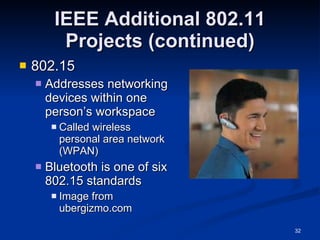
IEEE Additional 802.11 Projects (continued) 802.15 Addresses networking devices within one person’s workspace Called wireless personal area network (WPAN) Bluetooth is one of six 802.15 standards Image from ubergizmo.com
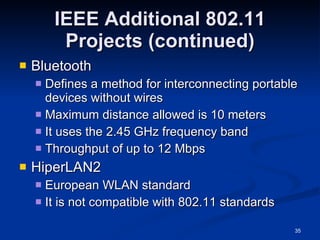
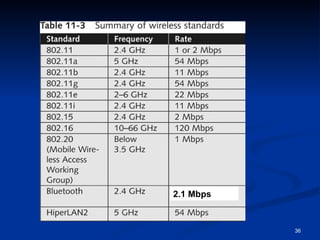
IEEE Additional 802.11 Projects (continued) Bluetooth Defines a method for interconnecting portable devices without wires Maximum distance allowed is 10 meters It uses the 2.45 GHz frequency band Throughput of up to 2.1 Mbps for Bluetooth 2.0 Note: the speed value of 12 Mbps in your book and the lecture notes is wrong Link Ch 11zg
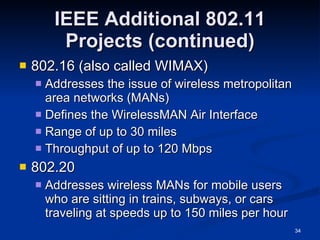
IEEE Additional 802.11 Projects (continued) 802.16 (also called WIMAX) Addresses the issue of wireless metropolitan area networks (MANs) Defines the WirelessMAN Air Interface Range of up to 30 miles Throughput of up to 120 Mbps 802.20 Addresses wireless MANs for mobile users who are sitting in trains, subways, or cars traveling at speeds up to 150 miles per hour
IEEE Additional 802.11 Projects (continued) Bluetooth Defines a method for interconnecting portable devices without wires Maximum distance allowed is 10 meters It uses the 2.45 GHz frequency band Throughput of up to 12 Mbps HiperLAN2 European WLAN standard It is not compatible with 802.11 standards
2.1 Mbps
Understanding Authentication Wireless technology brings new security risks to a network Authentication Establishing that a user is authentic—authorized to use the network If authentication fails, anyone in radio range can use your network
The 802.1X Standard Defines the process of authenticating and authorizing users on a WLAN Basic concepts Point-to-Point Protocol (PPP) Extensible Authentication Protocol (EAP) Wired Equivalent Privacy (WEP) Wi-Fi Protected Access (WPA)
Point-to-Point Protocol (PPP) Many ISPs use PPP to connect dial-up or DSL users PPP handles authentication with a user name and password, sent with PAP or CHAP PAP (Password Authentication Protocol) sends passwords unencrypted Vulnerable to trivial sniffing attacks See link Ch 11f
CHAP Vulnerability CHAP (Challenge-Handshake Authentication Protocol) Server sends a Challenge with a random value Client sends a Response, hashing the random value with the secret password This is still vulnerable to a sort of session hijacking attack (see links Ch 11e)
Extensible Authentication Protocol (EAP) EAP is an enhancement to PPP Allows a company to select its authentication method Certificates Kerberos Kerberos is used on LANs for authentication Uses Tickets and Keys Used by Windows 2000, XP, and 2003 Server by default Not common on WLANS (I think)
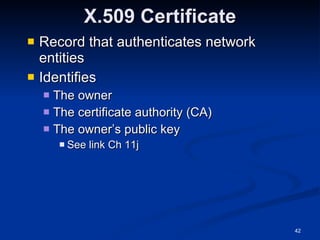
X.509 Certificate Record that authenticates network entities Identifies The owner The certificate authority (CA) The owner’s public key See link Ch 11j
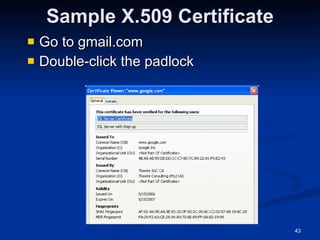
Sample X.509 Certificate Go to gmail.com Double-click the padlock
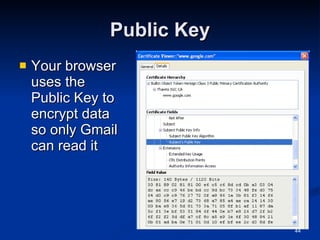
Public Key Your browser uses the Public Key to encrypt data so only Gmail can read it
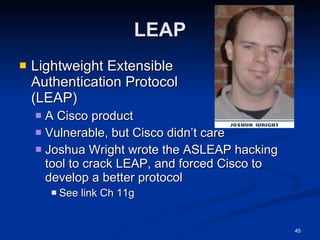
LEAP Lightweight Extensible  Authentication Protocol  (LEAP) A Cisco product Vulnerable, but Cisco didn’t care Joshua Wright wrote the ASLEAP hacking tool to crack LEAP, and forced Cisco to develop a better protocol See link Ch 11g
More Secure EAP Methods Extensible Authentication Protocol-Transport Layer Security (EAP-TLS) Secure but rarely used, because both client and server need certificates signed by a CA Protected EAP (PEAP) and Microsoft PEAP Very secure, only requires server to have a certificate signed by a CA See link Ch 11h
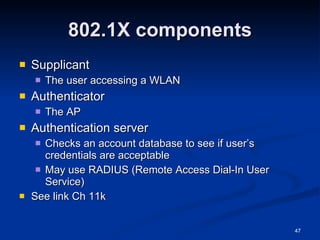
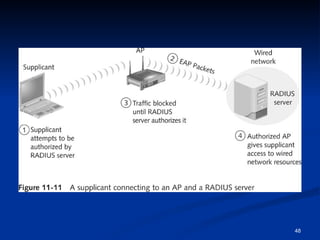
802.1X components Supplicant The user accessing a WLAN Authenticator The AP Authentication server Checks an account database to see if user’s credentials are acceptable May use RADIUS (Remote Access Dial-In User Service) See link Ch 11k
 
Wired Equivalent Privacy (WEP) Part of the 802.11b standard Encrypts data on a wireless network WEP has many vulnerabilities To crack WEP, see links Ch 11l, 11m
Wi-Fi Protected Access (WPA) Specified in the 802.11i standard Replaces WEP WPA improves encryption by using Temporal Key Integrity Protocol (TKIP)
TKIP Enhancements Message Integrity Check (MIC) Prevent attacker from injecting forged packets  Extended Initialization Vector (IV) with sequencing rules Prevent replays (attacker re-sending copied packets)
TKIP Enhancements Per-packet key mixing MAC addresses are used to create a key Each link uses a different key Rekeying mechanism Provides fresh keys Prevents attackers from reusing old keys
WPA Adds 802.1x WPA also adds an authentication mechanism implementing 802.1X and EAP This was not available in WEP
Understanding Wardriving Hackers use wardriving Finding insecure access points Using a laptop or palmtop computer Wardriving is not illegal But using the resources of these networks is illegal Warflying Variant where an airplane is used instead of a car
How It Works An attacker or security tester simply drives around with the following equipment Laptop computer Wireless NIC An antenna Software that scans the area for SSIDs Not all wireless NICs are compatible with scanning programs Antenna prices vary depending on the quality and the range they can cover
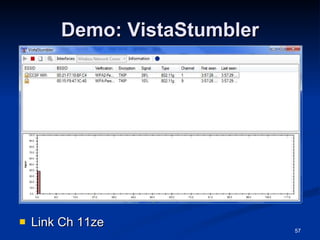
How It Works (continued) Scanning software can identify The company’s SSID The type of security enabled The signal strength Indicating how close the AP is to the attacker
Demo: VistaStumbler Link Ch 11ze
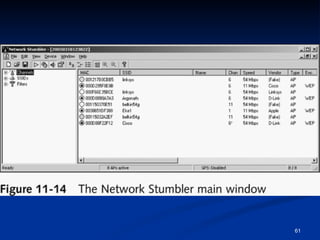
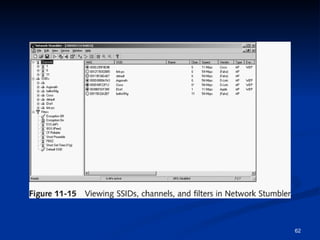
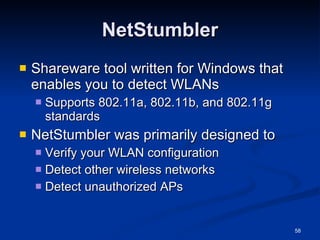
NetStumbler Shareware tool written for Windows that enables you to detect WLANs  Supports 802.11a, 802.11b, and 802.11g standards NetStumbler was primarily designed to Verify your WLAN configuration Detect other wireless networks Detect unauthorized APs
NetStumbler NetStumbler is capable of interface with a GPS Enabling a security tester or hacker to map out locations of all the WLANs the software detects
NetStumbler NetStumbler logs the following information SSID MAC address and Manufacturer of the AP Channel Signal Strength Encryption Can detect APs within a 350-foot radius With a good antenna, they can locate APs a couple of miles away
 
 
Kismet Another product for conducting wardriving attacks Runs on Linux, BSD, MAC OS X, and Linux PDAs Kismet is advertised also as a sniffer and IDS Kismet can sniff 802.11b, 802.11a, and 802.11g traffic
Kismet features Ethereal- and Tcpdump-compatible data logging AirSnort compatible Network IP range detection
Kismet features (continued) Hidden network SSID detection Graphical mapping of networks Client-server architecture Manufacturer and model identification of APs and clients Detection of known default access point configurations XML output Supports 20 card types
Understanding Wireless Hacking Hacking a wireless network is not much different from hacking a wired LAN Techniques for hacking wireless networks Port scanning Enumeration
Tools of the Trade Equipment Laptop computer A wireless NIC An antenna Sniffer software
AirSnort Created by Jeremy Bruestle and Blake Hegerle It is the tool most hackers wanting to access WEP-enabled WLANs use AirSnort limitations Runs on either Linux or Windows (textbook is wrong) Requires specific drivers Not all wireless NICs function with AirSnort See links Ch 11p, 11q
WEPCrack Another open-source tool used to crack WEP encryption WEPCrack was released about a week before AirSnort It also works on *NIX systems WEPCrack uses Perl scripts to carry out attacks on wireless systems AirSnort is considered better (link Ch 11r)
Countermeasures for Wireless Attacks Anti-wardriving software makes it more difficult for attackers to discover your wireless LAN Honeypots Servers with fake data to snare intruders Fakeap and Black Alchemy Fake AP Software that makes fake Access Points Link Ch 11s
Countermeasures for Wireless Attacks Use special paint to stop radio from escaping your building Allow only predetermined MAC addresses and IP addresses to have access to the wireless LAN Use an authentication server instead of relying on a wireless device to authenticate users
Countermeasures for Wireless Attacks  Use an EAP authentication protocol If you use WEP, use 104-bit encryption rather than 40-bit encryption But just use WPA instead Assign static IP addresses to wireless clients instead of using DHCP Don’t broadcast the SSID
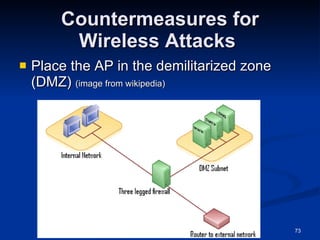
Countermeasures for Wireless Attacks  Place the AP in the demilitarized zone (DMZ)  (image from wikipedia)
Demo: Defeating MAC Address Filtering Link Ch 11zf

Ch11 Hacking Wireless Networks it-slideshares.blogspot.com

  • 1.
    Hands-On Ethical Hackingand Network Defense Chapter 11 Hacking Wireless Networks Last revised 10-30-08 5 pm
  • 2.
    Objectives Explain wirelesstechnology Describe wireless networking standards Describe the process of authentication Describe wardriving Describe wireless hacking and tools used by hackers and security professionals
  • 3.
    Understanding Wireless TechnologyFor a wireless network to function, you must have the right hardware and software Wireless technology is part of our lives Baby monitors Cell and cordless phones Pagers GPS Remote controls Garage door openers Two-way radios Wireless PDAs
  • 4.
    Components of aWireless Network A wireless network has only three basic components Access Point (AP) Wireless network interface card (WNIC) Ethernet cable
  • 5.
    Access Points Anaccess point (AP) is a transceiver that connects to an Ethernet cable It bridges the wireless network with the wired network Not all wireless networks connect to a wired network Most companies have Wireless LANs (WLANs) that connect to their wired network topology
  • 6.
    Access Points TheAP is where channels are configured An AP enables users to connect to a LAN using wireless technology An AP is available only within a defined area
  • 7.
    Service Set Identifiers(SSIDs) Name used to identify the wireless local area network (WLAN) The SSID is configured on the AP Unique 1- to 32-character alphanumeric name Name is case sensitive Wireless computers need to configure the SSID before connecting to a wireless network
  • 8.
    Service Set Identifiers(SSIDs) SSID is transmitted with each packet Identifies which network the packet belongs The AP usually broadcasts the SSID
  • 9.
    Service Set Identifiers(SSIDs) Many vendors have SSIDs set to a default value that companies never change An AP can be configured to not broadcast its SSID until after authentication Wireless hackers can attempt to guess the SSID Verify that your clients or customers are not using a default SSID
  • 10.
  • 11.
    Configuring an AccessPoint Configuring an AP varies depending on the hardware Most devices allow access through any Web browser Enter IP address on your Web browser and provide your user logon name and password
  • 12.
    Wireless Router Awireless router includes an access point, a router, and a switch
  • 13.
    Demo: Configuring anAccess Point Wireless Configuration Options SSID Wired Equivalent Privacy (WEP) encryption Changing Admin Password
  • 14.
    Configuring an AccessPoint Wireless Configuration Options SSID Wired Equivalent Privacy (WEP) encryption WPA (WiFi Protected Access ) is better
  • 15.
    Configuring an AccessPoint (continued) Steps for configuring a D-Link wireless router (continued) Turn off SSID broadcast You should also change your SSID
  • 16.
  • 17.
    Wireless NICs Forwireless technology to work, each node or computer must have a wireless NIC NIC’s main function Converting the radio waves it receives into digital signals the computer understands
  • 18.
    Wireless NICs Thereare many wireless NICs on the market Choose yours depending on how you plan to use it Some tools require certain specific brands of NICs
  • 19.
    Understanding Wireless NetworkStandards A standard is a set of rules formulated by an organization Institute of Electrical and Electronics Engineers (IEEE) Defines several standards for wireless networks
  • 20.
    IEEE: CCSF StudentChapter Next meeting: Thurs, Nov 6, 2008 in Sci 37, 5:00 pm Email [email_address] for more info
  • 21.
    IEEE Standards Standardspass through these groups: Working group (WG) Sponsor Executive Committee (SEC) Standards Review Committee (RevCom) IEEE Standards Board IEEE Project 802 LAN and WAN standards
  • 22.
    The 802.11 StandardThe first wireless technology standard Defined wireless connectivity at 1 Mbps and 2 Mbps within a LAN Applied to layers 1 and 2 of the OSI model Wireless networks cannot detect collisions Carrier sense multiple access/collision avoidance (CSMA/CA) is used instead of CSMA/CD
  • 23.
    Addressing Wireless LANsdo not have an address associated with a physical location An addressable unit is called a station (STA)
  • 24.
    The Basic Architectureof 802.11 802.11 uses a basic service set (BSS) as its building block Computers within a BSS can communicate with each other
  • 25.
    The Basic Architectureof 802.11 To connect two BSSs, 802.11 requires a distribution system (DS)
  • 26.
    Frequency Range Inthe United States, Wi-Fi uses frequencies near 2.4 GHz (Except 802.11a at 5 GHz) There are 11 channels, but they overlap, so only three are commonly used See link Ch 11c (cisco.com)
  • 27.
    Infrared (IR) Infraredlight can’t be seen by the human eye IR technology is restricted to a single room or line of sight IR light cannot penetrate walls, ceilings, or floors Image: IR transmitter for wireless headphones
  • 28.
    IEEE Additional 802.11Projects 802.11a Created in 1999 Operating frequency 5 GHz Throughput 54 Mbps
  • 29.
    IEEE Additional 802.11Projects (continued) 802.11b Operates in the 2.4 GHz range Throughput 11 Mbps Also referred as Wi-Fi (wireless fidelity) Allows for 11 channels to prevent overlapping signals Effectively only three channels (1, 6, and 11) can be used in combination without overlapping Introduced Wired Equivalent Privacy (WEP)
  • 30.
    IEEE Additional 802.11Projects (continued) 802.11e It has improvements to address the problem of interference When interference is detected, signals can jump to another frequency more quickly 802.11g Operates in the 2.4 GHz range Throughput increased from 11 Mbps to 54 Mbps
  • 31.
    IEEE Additional 802.11Projects (continued) 802.11i Introduced Wi-Fi Protected Access (WPA) Corrected many of the security vulnerabilities of 802.11b 802.11n (draft) Will be finalized in Dec 2009 Speeds up to 300 Mbps Aerohive AP runs at 264 Mbps now Links Ch 11zc, Ch 11zd
  • 32.
    IEEE Additional 802.11Projects (continued) 802.15 Addresses networking devices within one person’s workspace Called wireless personal area network (WPAN) Bluetooth is one of six 802.15 standards Image from ubergizmo.com
  • 33.
    IEEE Additional 802.11Projects (continued) Bluetooth Defines a method for interconnecting portable devices without wires Maximum distance allowed is 10 meters It uses the 2.45 GHz frequency band Throughput of up to 2.1 Mbps for Bluetooth 2.0 Note: the speed value of 12 Mbps in your book and the lecture notes is wrong Link Ch 11zg
  • 34.
    IEEE Additional 802.11Projects (continued) 802.16 (also called WIMAX) Addresses the issue of wireless metropolitan area networks (MANs) Defines the WirelessMAN Air Interface Range of up to 30 miles Throughput of up to 120 Mbps 802.20 Addresses wireless MANs for mobile users who are sitting in trains, subways, or cars traveling at speeds up to 150 miles per hour
  • 35.
    IEEE Additional 802.11Projects (continued) Bluetooth Defines a method for interconnecting portable devices without wires Maximum distance allowed is 10 meters It uses the 2.45 GHz frequency band Throughput of up to 12 Mbps HiperLAN2 European WLAN standard It is not compatible with 802.11 standards
  • 36.
  • 37.
    Understanding Authentication Wirelesstechnology brings new security risks to a network Authentication Establishing that a user is authentic—authorized to use the network If authentication fails, anyone in radio range can use your network
  • 38.
    The 802.1X StandardDefines the process of authenticating and authorizing users on a WLAN Basic concepts Point-to-Point Protocol (PPP) Extensible Authentication Protocol (EAP) Wired Equivalent Privacy (WEP) Wi-Fi Protected Access (WPA)
  • 39.
    Point-to-Point Protocol (PPP)Many ISPs use PPP to connect dial-up or DSL users PPP handles authentication with a user name and password, sent with PAP or CHAP PAP (Password Authentication Protocol) sends passwords unencrypted Vulnerable to trivial sniffing attacks See link Ch 11f
  • 40.
    CHAP Vulnerability CHAP(Challenge-Handshake Authentication Protocol) Server sends a Challenge with a random value Client sends a Response, hashing the random value with the secret password This is still vulnerable to a sort of session hijacking attack (see links Ch 11e)
  • 41.
    Extensible Authentication Protocol(EAP) EAP is an enhancement to PPP Allows a company to select its authentication method Certificates Kerberos Kerberos is used on LANs for authentication Uses Tickets and Keys Used by Windows 2000, XP, and 2003 Server by default Not common on WLANS (I think)
  • 42.
    X.509 Certificate Recordthat authenticates network entities Identifies The owner The certificate authority (CA) The owner’s public key See link Ch 11j
  • 43.
    Sample X.509 CertificateGo to gmail.com Double-click the padlock
  • 44.
    Public Key Yourbrowser uses the Public Key to encrypt data so only Gmail can read it
  • 45.
    LEAP Lightweight Extensible Authentication Protocol (LEAP) A Cisco product Vulnerable, but Cisco didn’t care Joshua Wright wrote the ASLEAP hacking tool to crack LEAP, and forced Cisco to develop a better protocol See link Ch 11g
  • 46.
    More Secure EAPMethods Extensible Authentication Protocol-Transport Layer Security (EAP-TLS) Secure but rarely used, because both client and server need certificates signed by a CA Protected EAP (PEAP) and Microsoft PEAP Very secure, only requires server to have a certificate signed by a CA See link Ch 11h
  • 47.
    802.1X components SupplicantThe user accessing a WLAN Authenticator The AP Authentication server Checks an account database to see if user’s credentials are acceptable May use RADIUS (Remote Access Dial-In User Service) See link Ch 11k
  • 48.
  • 49.
    Wired Equivalent Privacy(WEP) Part of the 802.11b standard Encrypts data on a wireless network WEP has many vulnerabilities To crack WEP, see links Ch 11l, 11m
  • 50.
    Wi-Fi Protected Access(WPA) Specified in the 802.11i standard Replaces WEP WPA improves encryption by using Temporal Key Integrity Protocol (TKIP)
  • 51.
    TKIP Enhancements MessageIntegrity Check (MIC) Prevent attacker from injecting forged packets Extended Initialization Vector (IV) with sequencing rules Prevent replays (attacker re-sending copied packets)
  • 52.
    TKIP Enhancements Per-packetkey mixing MAC addresses are used to create a key Each link uses a different key Rekeying mechanism Provides fresh keys Prevents attackers from reusing old keys
  • 53.
    WPA Adds 802.1xWPA also adds an authentication mechanism implementing 802.1X and EAP This was not available in WEP
  • 54.
    Understanding Wardriving Hackersuse wardriving Finding insecure access points Using a laptop or palmtop computer Wardriving is not illegal But using the resources of these networks is illegal Warflying Variant where an airplane is used instead of a car
  • 55.
    How It WorksAn attacker or security tester simply drives around with the following equipment Laptop computer Wireless NIC An antenna Software that scans the area for SSIDs Not all wireless NICs are compatible with scanning programs Antenna prices vary depending on the quality and the range they can cover
  • 56.
    How It Works(continued) Scanning software can identify The company’s SSID The type of security enabled The signal strength Indicating how close the AP is to the attacker
  • 57.
  • 58.
    NetStumbler Shareware toolwritten for Windows that enables you to detect WLANs Supports 802.11a, 802.11b, and 802.11g standards NetStumbler was primarily designed to Verify your WLAN configuration Detect other wireless networks Detect unauthorized APs
  • 59.
    NetStumbler NetStumbler iscapable of interface with a GPS Enabling a security tester or hacker to map out locations of all the WLANs the software detects
  • 60.
    NetStumbler NetStumbler logsthe following information SSID MAC address and Manufacturer of the AP Channel Signal Strength Encryption Can detect APs within a 350-foot radius With a good antenna, they can locate APs a couple of miles away
  • 61.
  • 62.
  • 63.
    Kismet Another productfor conducting wardriving attacks Runs on Linux, BSD, MAC OS X, and Linux PDAs Kismet is advertised also as a sniffer and IDS Kismet can sniff 802.11b, 802.11a, and 802.11g traffic
  • 64.
    Kismet features Ethereal-and Tcpdump-compatible data logging AirSnort compatible Network IP range detection
  • 65.
    Kismet features (continued)Hidden network SSID detection Graphical mapping of networks Client-server architecture Manufacturer and model identification of APs and clients Detection of known default access point configurations XML output Supports 20 card types
  • 66.
    Understanding Wireless HackingHacking a wireless network is not much different from hacking a wired LAN Techniques for hacking wireless networks Port scanning Enumeration
  • 67.
    Tools of theTrade Equipment Laptop computer A wireless NIC An antenna Sniffer software
  • 68.
    AirSnort Created byJeremy Bruestle and Blake Hegerle It is the tool most hackers wanting to access WEP-enabled WLANs use AirSnort limitations Runs on either Linux or Windows (textbook is wrong) Requires specific drivers Not all wireless NICs function with AirSnort See links Ch 11p, 11q
  • 69.
    WEPCrack Another open-sourcetool used to crack WEP encryption WEPCrack was released about a week before AirSnort It also works on *NIX systems WEPCrack uses Perl scripts to carry out attacks on wireless systems AirSnort is considered better (link Ch 11r)
  • 70.
    Countermeasures for WirelessAttacks Anti-wardriving software makes it more difficult for attackers to discover your wireless LAN Honeypots Servers with fake data to snare intruders Fakeap and Black Alchemy Fake AP Software that makes fake Access Points Link Ch 11s
  • 71.
    Countermeasures for WirelessAttacks Use special paint to stop radio from escaping your building Allow only predetermined MAC addresses and IP addresses to have access to the wireless LAN Use an authentication server instead of relying on a wireless device to authenticate users
  • 72.
    Countermeasures for WirelessAttacks Use an EAP authentication protocol If you use WEP, use 104-bit encryption rather than 40-bit encryption But just use WPA instead Assign static IP addresses to wireless clients instead of using DHCP Don’t broadcast the SSID
  • 73.
    Countermeasures for WirelessAttacks Place the AP in the demilitarized zone (DMZ) (image from wikipedia)
  • 74.
    Demo: Defeating MACAddress Filtering Link Ch 11zf