Wireless LAN Security
Kasturi Chakraborty
Shreosi Maitra
Suvadip Banerjee
Upasona Roy
Presented by
CONTENTS
 Introduction
 Wireless LAN Technology Options
 Types of Wireless LANs
 Basic Configuration
 Standards
 Advantages and Disadvantages
 Security issues and Solutions
Introduction
 Wireless LAN is a flexible communication system
implemented as an extension to a wired LAN, using
electromagnetic waves to transmit and receive data over
air, minimizing the need for wired connections.
 It is a communication network that provides connectivity to
wireless devices within a limited geographic area such as
home, school, single office, building or campus.
 "Wi-Fi" is the universal standard for wireless networks and is the
wireless equivalent of wired Ethernet networks.
Wireless LAN Technology Options
o Narrowband Technology
o Spread Spectrum Technology
o Frequency-Hopping Spread Spectrum Technology
o Direct Sequence Spread Spectrum Technology
o Infrared Technology
Basic Configuration
Types of Wireless LANs
Standards
1) IEEE 802.11
2) IEEE 802.11b
3) IEEE 802.11a
4) IEEE 802.11g
5) IEEE 802.11n
6) IEEE 802.11ac
Advantages
Key drivers are mobility and
accessibility.
Increased Productivity.
Improved collaboration.
No need to reconnect to the network.
Flexible installation and scalability.
Disadvantages
Very expensive.
Signal bleed over.
Environmental conditions.
Less capacity.
Is it Secure?
 Someone can block the entire radio communication
channel by transmitting junk on certain frequencies and
anonymously stage a denial of service attack from your
network.
 Anybody can plant viruses on our system.
 The webpages can be changed.
 As the number of WLAN cards grows so will the
opportunities for hackers to break into the wireless
networks.
 Regardless of the technology used , WLAN security will
always be limited because users will sidestep security
features.
Security Issues & Solutions
 War Driving
 Eavesdropping
 Denial of Service Attack
 Rogue Access Points
War Driving(Access Point
Mapping)
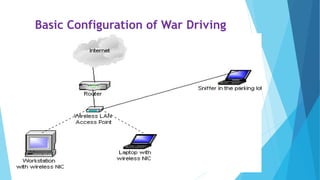
 It is the act of locating and possibly exploiting connections to
wireless local area networks while driving around a city or
elsewhere using a portable computer, smartphone or personal
digital assistant (PDA).
 Wireless NIC scans for wireless access points . The computer looks
for SSID (wireless network name) which is being constantly
transmitted by the access point , letting the computers know of its
presence.
 The wiredriver uses software like NetStumbler (Windows) or
Kismet (Linux) to scan the airwaves for SSIDS.
 The wiredriver generally configures his/her software to log any
strong unencrypted signal using GPS receiver and connect to the
access point.
Basic Configuration of War Driving
Solution for War Driving
o Do not broadcast your SSID.
o Change the default password.
o Encrypt your wireless connection using the encryption
schemes.
o Filter the MAC addresses that are allowed to connect to
your router.
o If you configure file sharing on your computer, make sure
it is password protected.
o Use personal firewall software.
Eavesdropping
 In wireless sensor networks ,any wireless network residing in the transmission
range of the transmitter can potentially decode the signal when both the
transmitter and receiver are unaware of the reconnaissance.
 This involves attacks against the confidentiality of the data that is being
transmitted across the network.
There are two types of eavesdropping:
I. Passive Eavesdropping: The malicious nodes detect the information by
listening to the message transmission in the wireless broadcasting medium.
II. Active Eavesdropping: The malicious nodes actively grab the information via
sending queries to transmitters by disguising themselves as friendly nodes.
Solution for Eavesdropping
o The best way to keep your traffic secure while on Wi-Fi
hotspots is to connect to a Virtual Private Network (VPN),
maybe to your work’s network, a server you set up at your
home, or a hosted service designed specifically for
hotspot security, such as Private Wifi or Hotspot Shield.
o We must make sure any services or sites you use while on
the hotspot are secured with SSL encryption.
o The Enterprise mode of WPA2 security (also called the
802.1X or EAP mode) requires an authentication server,
commonly called a Remote Authentication Dial In User
Service (RADIUS) which prevents users from reading each
other’s traffic.
Denial of Service Attack
 A denial of service (DoS) attack is an assault that can
cripple or disable a WLAN. It can slow the network to
crawling speeds or actually force it to quit working.
 One form of DoS attack is the "brute force" method. This
can come in one of two forms:
I. A huge flood of packets that uses up all of the network's
resources and forces it to shut down.
II. A very strong radio signal that totally dominates the
airwaves and renders access points and radio cards
useless.
Solution for Denial of Service
Attack
This type of attack can be prevented by:
o implementing and updating firewalls.
o maintaining updated virus protection.
o ensuring strong passwords and deploy DoS detection tools,
such as AirDefense and AirMagnet in addition.
o You can protect a WLAN against DoS attacks by making the
building as resistive as possible to incoming radio signals.
Rogue Access Points
 Rogue APs can be APs that are connected to the enterprise wired LAN
without authorization or APs that are not connected to the wired LAN
but that accept associations from clients.
 Rogue APs can even be APs with a wireless card and a special
software package that makes them act as an AP.
Types of Rogue Aps based on security categories:
I. Non-malicious APs: The majority of the cases consist of someone
installing a rogue AP with the intent being not to bypass the
corporation's security policy but to deploy wireless as a convenience
or productivity enhancer.
II. Malicious Aps: the attacker sets up the AP to gain access to the wired
network or to disrupt the performance of the WLAN.
Rogue AP Detection
Prevention of Rogue APs
o Use of commercial tools like AirMagnet and AirDefence to
scan for rogue Aps periodically and verify their legitimacy.
o Using network Wireless Intrusion Prevention System (WIPS)
to watch the air or by using a host-resident Wireless IPS to
monitor client activity.
o Use of WLAN analyzer for Rogue AP detection.
o Smaller businesses on more limited budgets may prefer to
install stand-alone host WIPS programs like Sana Security
Primary Response Air Cover.
Wlan security

Wlan security

  • 1.
    Wireless LAN Security KasturiChakraborty Shreosi Maitra Suvadip Banerjee Upasona Roy Presented by
  • 2.
    CONTENTS  Introduction  WirelessLAN Technology Options  Types of Wireless LANs  Basic Configuration  Standards  Advantages and Disadvantages  Security issues and Solutions
  • 3.
    Introduction  Wireless LANis a flexible communication system implemented as an extension to a wired LAN, using electromagnetic waves to transmit and receive data over air, minimizing the need for wired connections.  It is a communication network that provides connectivity to wireless devices within a limited geographic area such as home, school, single office, building or campus.  "Wi-Fi" is the universal standard for wireless networks and is the wireless equivalent of wired Ethernet networks.
  • 4.
    Wireless LAN TechnologyOptions o Narrowband Technology o Spread Spectrum Technology o Frequency-Hopping Spread Spectrum Technology o Direct Sequence Spread Spectrum Technology o Infrared Technology
  • 5.
  • 6.
  • 7.
    Standards 1) IEEE 802.11 2)IEEE 802.11b 3) IEEE 802.11a 4) IEEE 802.11g 5) IEEE 802.11n 6) IEEE 802.11ac
  • 8.
    Advantages Key drivers aremobility and accessibility. Increased Productivity. Improved collaboration. No need to reconnect to the network. Flexible installation and scalability.
  • 9.
    Disadvantages Very expensive. Signal bleedover. Environmental conditions. Less capacity.
  • 10.
    Is it Secure? Someone can block the entire radio communication channel by transmitting junk on certain frequencies and anonymously stage a denial of service attack from your network.  Anybody can plant viruses on our system.  The webpages can be changed.  As the number of WLAN cards grows so will the opportunities for hackers to break into the wireless networks.  Regardless of the technology used , WLAN security will always be limited because users will sidestep security features.
  • 11.
    Security Issues &Solutions  War Driving  Eavesdropping  Denial of Service Attack  Rogue Access Points
  • 12.
    War Driving(Access Point Mapping) It is the act of locating and possibly exploiting connections to wireless local area networks while driving around a city or elsewhere using a portable computer, smartphone or personal digital assistant (PDA).  Wireless NIC scans for wireless access points . The computer looks for SSID (wireless network name) which is being constantly transmitted by the access point , letting the computers know of its presence.  The wiredriver uses software like NetStumbler (Windows) or Kismet (Linux) to scan the airwaves for SSIDS.  The wiredriver generally configures his/her software to log any strong unencrypted signal using GPS receiver and connect to the access point.
  • 13.
  • 14.
    Solution for WarDriving o Do not broadcast your SSID. o Change the default password. o Encrypt your wireless connection using the encryption schemes. o Filter the MAC addresses that are allowed to connect to your router. o If you configure file sharing on your computer, make sure it is password protected. o Use personal firewall software.
  • 15.
    Eavesdropping  In wirelesssensor networks ,any wireless network residing in the transmission range of the transmitter can potentially decode the signal when both the transmitter and receiver are unaware of the reconnaissance.  This involves attacks against the confidentiality of the data that is being transmitted across the network. There are two types of eavesdropping: I. Passive Eavesdropping: The malicious nodes detect the information by listening to the message transmission in the wireless broadcasting medium. II. Active Eavesdropping: The malicious nodes actively grab the information via sending queries to transmitters by disguising themselves as friendly nodes.
  • 16.
    Solution for Eavesdropping oThe best way to keep your traffic secure while on Wi-Fi hotspots is to connect to a Virtual Private Network (VPN), maybe to your work’s network, a server you set up at your home, or a hosted service designed specifically for hotspot security, such as Private Wifi or Hotspot Shield. o We must make sure any services or sites you use while on the hotspot are secured with SSL encryption. o The Enterprise mode of WPA2 security (also called the 802.1X or EAP mode) requires an authentication server, commonly called a Remote Authentication Dial In User Service (RADIUS) which prevents users from reading each other’s traffic.
  • 17.
    Denial of ServiceAttack  A denial of service (DoS) attack is an assault that can cripple or disable a WLAN. It can slow the network to crawling speeds or actually force it to quit working.  One form of DoS attack is the "brute force" method. This can come in one of two forms: I. A huge flood of packets that uses up all of the network's resources and forces it to shut down. II. A very strong radio signal that totally dominates the airwaves and renders access points and radio cards useless.
  • 19.
    Solution for Denialof Service Attack This type of attack can be prevented by: o implementing and updating firewalls. o maintaining updated virus protection. o ensuring strong passwords and deploy DoS detection tools, such as AirDefense and AirMagnet in addition. o You can protect a WLAN against DoS attacks by making the building as resistive as possible to incoming radio signals.
  • 20.
    Rogue Access Points Rogue APs can be APs that are connected to the enterprise wired LAN without authorization or APs that are not connected to the wired LAN but that accept associations from clients.  Rogue APs can even be APs with a wireless card and a special software package that makes them act as an AP. Types of Rogue Aps based on security categories: I. Non-malicious APs: The majority of the cases consist of someone installing a rogue AP with the intent being not to bypass the corporation's security policy but to deploy wireless as a convenience or productivity enhancer. II. Malicious Aps: the attacker sets up the AP to gain access to the wired network or to disrupt the performance of the WLAN.
  • 21.
  • 22.
    Prevention of RogueAPs o Use of commercial tools like AirMagnet and AirDefence to scan for rogue Aps periodically and verify their legitimacy. o Using network Wireless Intrusion Prevention System (WIPS) to watch the air or by using a host-resident Wireless IPS to monitor client activity. o Use of WLAN analyzer for Rogue AP detection. o Smaller businesses on more limited budgets may prefer to install stand-alone host WIPS programs like Sana Security Primary Response Air Cover.

Editor's Notes

  • #5 To be explained by the presenter(each & every LAN technology