1
1.0 INTRODUCTION
The word β€œCNC” stands for β€œComputer Numerical Controlβ€œ. CNC separates between
a machine that has a β€œController” on it from one that is manually run. CNC software is
designed to read CNC programs and initiate a series of machine commands in sequential
order. As direction sets, CNC programs are written in a sentence-like format and with a
particular language structure. CNC words start with lettered addresses and define variables,
for example, speed and axis motion. At the point when gathered together, they form
commands that are read by the software-based CNC control.
Figure 1 : CNC software use in industry
Software-based CNC controllers may give abilities ranging from simple point-to-
point linear control to highly-complex calculations with multiple axes of control. Specialized
CNC and exclusive computer numerical control software is likewise accessible.
Commonly, CNC software runs on an off-the-shelf PC interfaced to the machine
tool’s servo system. Personal computers with CNC software do not require specific hardware,
for example, programmable logic controllers (PLCs) or movement control cards. The CNC
software performs all of the functions of a hardware-based CNC controller, including the
human-machine interface (HMI) and input/output (I/O) control [1].
2
2.0 OVERVIEW
2.1 2.5D AXIS OVERVIEW
In machining 2.5D used as reference to a surface which is a projection to the 3D
plane. Event thought, object in 3 dimension, there are no overhanging element possible.
These type of object mostly represent as a contour map that gives the height, length, or depth
of the object at every point. In addition, based on Google Wikipedia, 2.5D object are often
greatly preferred for machining and it easily to generate G-code for the process. It also can be
machine on a 3 axis milling machine and not require lot of features of higher axis machine
produce.
Besides that, 2.5D also can be called as a two and a half axis mill, it famous with
capability to process and translate in all three axes but perform the cutting only two or three
axis at one time. It’s also based on limitation of the software and machine that has a solenoid
rather than a genuine, straight Z axis. Regular example involves an XY table that hole
position with the spindle (z axis) then completes a fixed cycle for drilling by plugging and
retracting axially.
The advantages of the 2.5D itself prove the code to generate for 2.5D machining is
lesser than 3D contour machining, because of that software and hardware requirement are
inexpensive. Boring and tapping focuses are cheap, constrained obligation machining focuses
that started as a 2.5 axis show classification, albeit some late-demonstrate ones are 3 axis in
light of the fact that the product and equipment costs have dropped with advance innovation.
In the nutshell, lot of benefits in 2.5D axis that can help to make the job become
easier to do and it not time consuming. According to Michea (2017) 2.5D also has a 3rd axis
of a very limited utility depends on what it used for.
3
2.2 VIRTUAL CNC OVERVIEW
According to Lin and Fu (2006), virtual machining systems are related to the use of
machine tools for part manufacturing. They apply computers and different types of software
in manufacturing and production in order to simulate and model the behavior and errors of a
real environment in virtual reality systems. Meanwhile, based on Google Wikipedia, Virtual
CNC can provide useful means for products to be manufactured without the need of physical
testing on the shop floor. As a result, the time and cost of part production can be decreased.
Virtual CNC accepts standard APT-CL files and process them exactly like a real
CNC. With Virtual CNC system users can predict the actual positions delivered by the CNC,
and plot the reference and predicted actual paths, and the tolerance violation points along the
tool path. It is also help the users to identify the cycle time of CNC accurately by calculating
the feed fluctuations which caused by the acceleration or deceleration, motor current, and
position-displacement of each drive.
Virtual CNC allows testing of different control laws, friction fields, motors, sensors,
ball screws and etc. It also provides time and frequency domain response of individual drives,
as well as testing of the CNC on ISO standard test work pieces such as diamond and
circle. Virtual CNC can be used by manufacturing engineers as well as by the CNC
designers.
Nowadays, many Virtual CNCs come up with or offers other features like β€˜step-by-
step CNC Model Generation’, β€˜Detailed CNC Performance Simulation’, and β€˜CNC Advanced
Controller Design/Analysis Tools’.
4
3.0 SOFTWARE
3.1 EXAMPLE OF 2.5D AXIS SOFTWARE
The following is a list of major 2.5D axis software used in industry:
3.1.1 Solidcam
SolidCAM puts the most capable 2.5D programming arrangement at user fingertips, right
inside their CAD system. SolidCAM looks, feels and performs like user existing CAD
system. In addition to its powerful 2.5D milling Profiling, Pocketing and Drilling operations,
SolidCAM's 2.5D module includes Thread Milling operation for machining of standard
internal and external threads and many more [3]
3.1.2 Cambam
CamBam is an application to make CAM files (gcode) from CAD source documents or its
own internal geometry editor. CamBam has many users around the world, from CNC
specialists to professional machinists and engineers.
CamBam currently supports the following:
Reading from and writing to 2D DXF files.
2.5D profiling machine operations with auto-tab support
2.5D pocketing operations with auto island detection
Drilling (Normal,Peck,Spiral Milling and Custom Scripts)
Engraving
3.1.3 Hypermill
According to their official web homepage, HyperMILL is a modular and flexible CAM
solution for 2.5D, 3D and 5-axis milling as well as mill turning and machining operations
such as high-speed cutting (HSC) and high-performance cutting (HPC), with everything
integrated in a single interface. The special applications for milling impellers, blisks, turbine
blades, tubes and tire moulds round off the range of functions available in hyperMILL
5
3.2 EXAMPLE OF VIRTUAL CNC SOFTWARE
According to Kao, Chen and Nguyen (2014), nowadays CNC machine center is one
of the most important facilities in industrial manufacturing. So in order to operate these CNC
machines safely and efficiently, the engineer and worker who operate directly have to be
educated and trained carefully and strictly. But these education and training processes
consume much money, time, energy, and material. Besides, these processes also might cause
collision during the real cutting operation practices. Due to these disadvantages mentioned in
the above, Virtual CNC machining was constructed by integrating many software like
graphic designing, 3D simulation, and programming. The followings are some example of
Virtual CNCs;
ο‚· Swansoft CNC Simulator (SSCNC)
ο‚· Predator Virtual CNC
ο‚· Virtual Reality CNC Milling (VR CNC Milling)
ο‚· CAMWorks Virtual Machine
ο‚· Okuma 3D Virtual Monitor software
ο‚· BobCAD-CAM
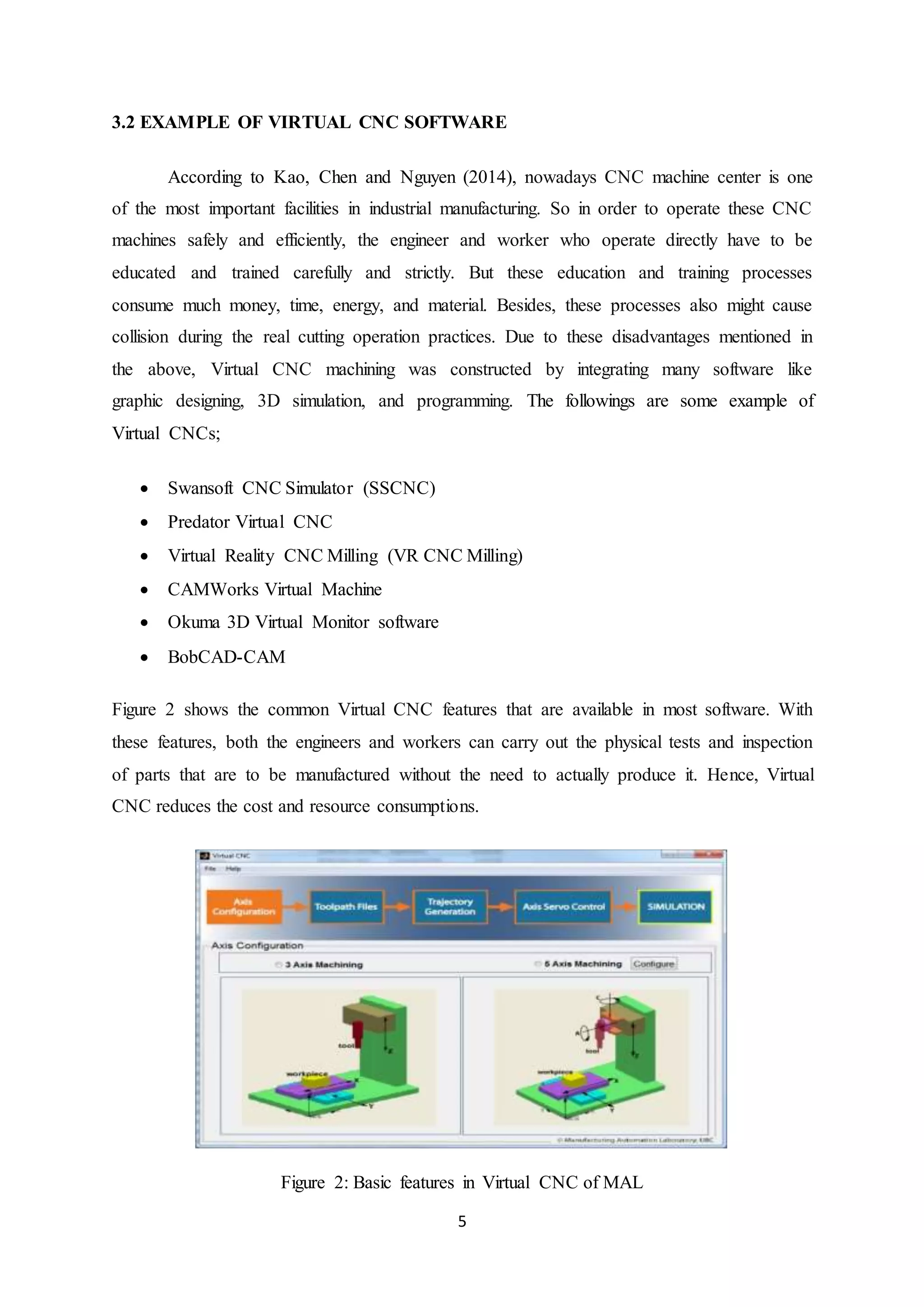
Figure 2 shows the common Virtual CNC features that are available in most software. With
these features, both the engineers and workers can carry out the physical tests and inspection
of parts that are to be manufactured without the need to actually produce it. Hence, Virtual
CNC reduces the cost and resource consumptions.
Figure 2: Basic features in Virtual CNC of MAL
6
4.0 THE ADVANTAGES AND DISADVANTAGES OF THE SOFTWARE
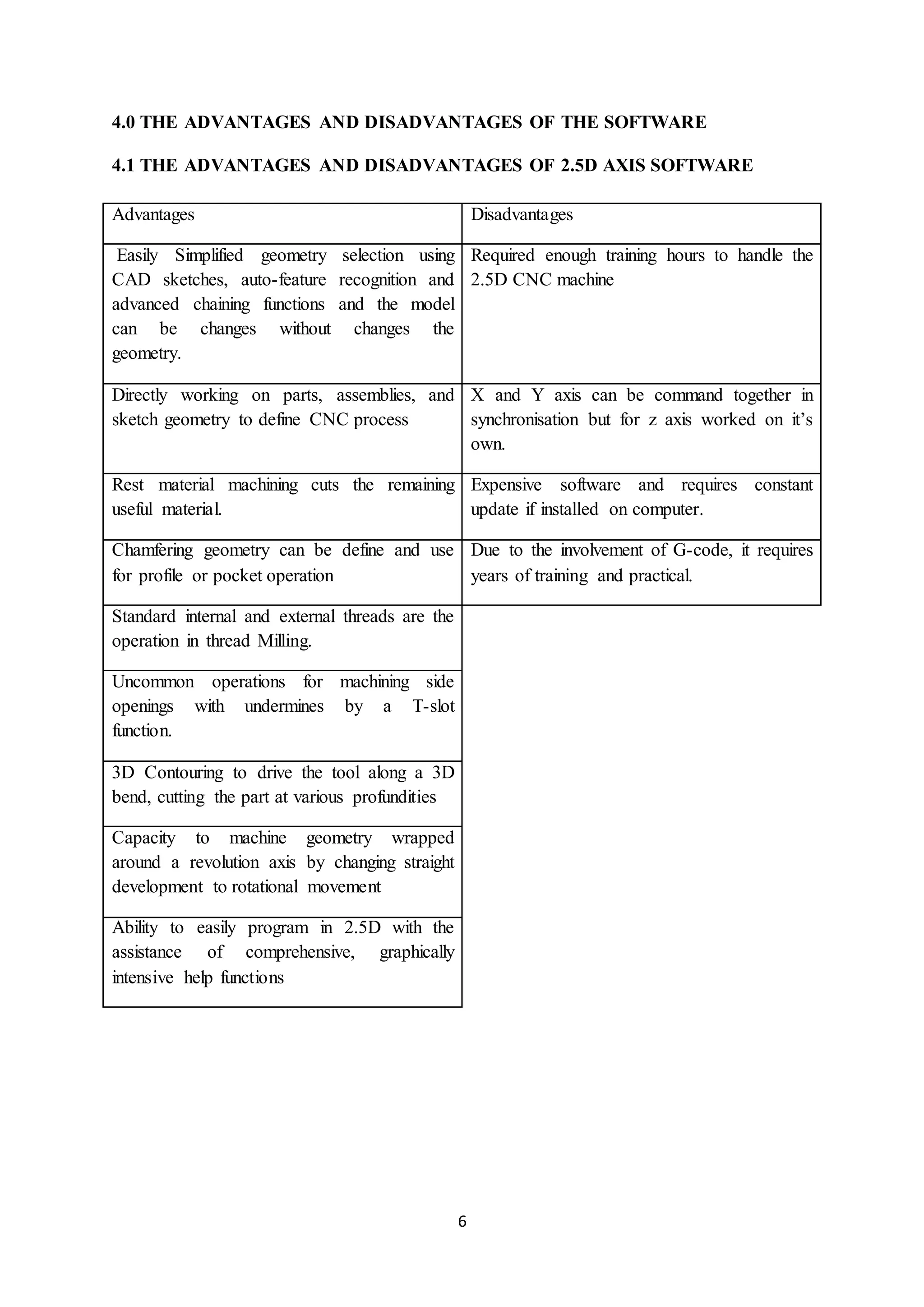
4.1 THE ADVANTAGES AND DISADVANTAGES OF 2.5D AXIS SOFTWARE
Advantages Disadvantages
Easily Simplified geometry selection using
CAD sketches, auto-feature recognition and
advanced chaining functions and the model
can be changes without changes the
geometry.
Required enough training hours to handle the
2.5D CNC machine
Directly working on parts, assemblies, and
sketch geometry to define CNC process
X and Y axis can be command together in
synchronisation but for z axis worked on it’s
own.
Rest material machining cuts the remaining
useful material.
Expensive software and requires constant
update if installed on computer.
Chamfering geometry can be define and use
for profile or pocket operation
Due to the involvement of G-code, it requires
years of training and practical.
Standard internal and external threads are the
operation in thread Milling.
Uncommon operations for machining side
openings with undermines by a T-slot
function.
3D Contouring to drive the tool along a 3D
bend, cutting the part at various profundities
Capacity to machine geometry wrapped
around a revolution axis by changing straight
development to rotational movement
Ability to easily program in 2.5D with the
assistance of comprehensive, graphically
intensive help functions
7
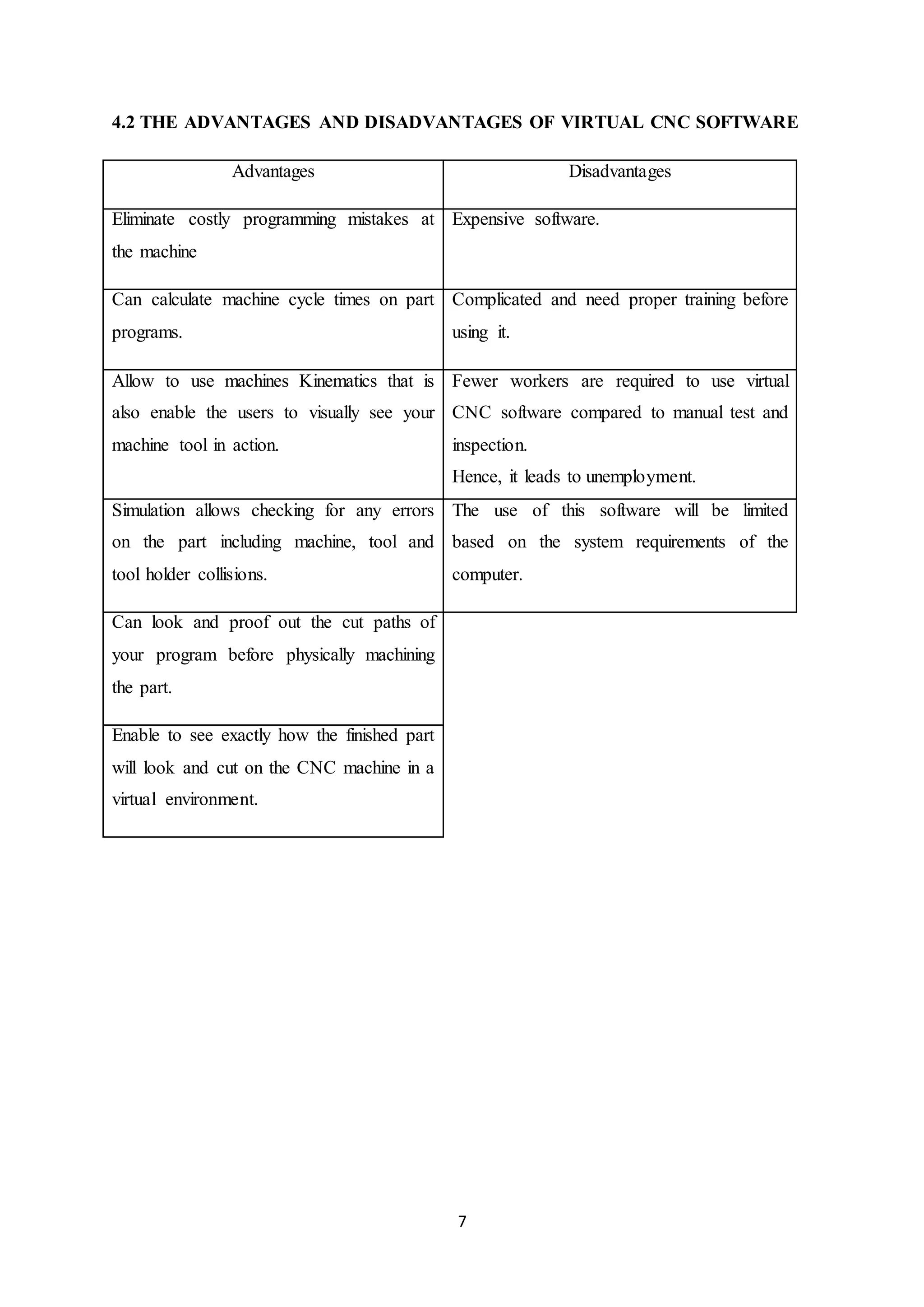
4.2 THE ADVANTAGES AND DISADVANTAGES OF VIRTUAL CNC SOFTWARE
Advantages Disadvantages
Eliminate costly programming mistakes at
the machine
Expensive software.
Can calculate machine cycle times on part
programs.
Complicated and need proper training before
using it.
Allow to use machines Kinematics that is
also enable the users to visually see your
machine tool in action.
Fewer workers are required to use virtual
CNC software compared to manual test and
inspection.
Hence, it leads to unemployment.
Simulation allows checking for any errors
on the part including machine, tool and
tool holder collisions.
The use of this software will be limited
based on the system requirements of the
computer.
Can look and proof out the cut paths of
your program before physically machining
the part.
Enable to see exactly how the finished part
will look and cut on the CNC machine in a
virtual environment.
8
5.0 SOFTWARE DESCRIPTION
5.1 GIBBSCAM
Figure 3: GibbsCam logo
GibbsCAM is a state-of-the-art, PC-based computer-aided manufacturing (CAM)
system for programming computer numerically controlled (CNC) machine tools. The
company was founded in 1982 by Bill Gibbs. The first release of the program was launched
in 1984 for the Macintosh platform. Since 1996, the software is being developed exclusively
for the Windows platform. The Gibbs CAM program is translated into 20 languages and is
represented in most countries in the world.
GibbsCAM comprises of various basic packages and countless modules. This
enables the user to begin with a simpler CAM program, and then build on more modules as
required. GibbsCAM’s graphical user interface was designed for engineers by engineers,
bringing a user environment that is both familiar and proficient. This manufacturing
orientation guarantees that GibbsCAM’s powerful capabilities is also extremely easy to learn
and use. GibbsCAM’s free-form interaction style enables user to move effectively between
geometry creation, toolpath creation, process visualization/verification and post processing.
GibbsCAM’s ease-of-use, programming productivity, speed and short training time make
GibbsCAM the CAM industry’s ease-of-use leader and the best software for programming
parts [2].
9
5.2 SWANSOFT CNC SIMULATOR (SSCNC)
Figure 4: SSCNC logo
According to their official web homepage, Swansoft CNC Simulatior (SSCNC) is an
innovative product designed and developed by Nanjing Swansoft Technology Company. It is
created based on the teaching experience acquired at manufacturing factories and industrial
training centers like Nanjing Swan Software Technology Company. SSCNC has developed
powerful and accurate virtual CNC machine simulation software that includes controls from
the following manufacturers: FANUC, SIMUMERIK, MITSUBISHI, GSK, HNK, KND,
WA, SKY, HAAS, GREAT, FAGOR, and DASEN.
It is involved in machining experiences of Machine Company and training
experiences of colleges. By using this software, students can operate real NC machine in
more short time and colleges can reduce greatly the expensive equipment investment.
SSCNC is easy to use for students and teacher. You can program by hand or import CAM NC
program then simulate in SSCNC. Teacher can get students' operation information through
SSCNC Server.
By using the software in PC, students can master operation of all kinds of NC lathe,
NC milling and machining center in short time. Teachers can gain current operation
information of students' at any time through network teaching. The software is the first
domestic NC simulation software which can be updated automatically on line for free.
10
6.0 FEATURES TAXONOMY
6.1 FEATURES TAXONOMY OF GIBBSCAM
The following are the most important features in this software that related to manufacturing
industry:
6.1.1 Production Milling
Supports 2-axis through simple 3-axis wireframe machining with full functionality for face
milling, pocketing with unlimited bosses/islands, contouring, thread milling, 2D/3D spiral
creation, drilling with support for many drill cycles, boring, and tapping. Simple fourth axis
positioning is also supported. Automatic cycles for face milling, for example, zig-zag, spiral,
one direction and back and forth, enable material to be cleaned off the highest point of a
section. GibbsCAM Production Milling provides simple to-utilize, powerful programming
capability for user machine devices.
Figure 5: Production milling using GibbsCam
6.1.2 Production Turning
Supports full 2-axis wireframe machining with full usefulness for tedious shape roughing,
drilling, contouring, automatic roughing, plunge roughing, multiple hills and valleys,
threading, boring and tapping [4]. Advanced functionalities, for example, keeping up an
attention of the current stock condition, make programming lathes easy as well as effective.
GibbsCAM Production Turning provides easy to use software, powerful capability for
programming user turning centers.
11
Figure 6: Production turning using GibbsCam
6.1.3 MTM (Multi-Task Machining)
Specifically designed to address the CNC programming requirements of multi-task machine
devices, giving powerful programming software that are easy to use and learn with the
ultimate in adaptability and configurability. Machining processes are easily defined with
GibbsCAM's intuitive graphical user interface that provides seamless access to both turning
and milling capabilities [4]. GibbsCAM's associativity enables operations to be updated
effectively when changes are made.
Figure 7: Multi-task machine tools
12
6.2 FEATURES TAXONOMY OF SWANSOFT CNC
SSCNC is a complete package that provides machine simulation that teaches the
student about the setup and operation of CNC machines, and G-code debugger programming.
Besides that, it also consists of and server module that allows the instructor to manage
students and tests. According to the information from the web page, SSCNC supports
simulation of 2, 2.5 and 3 axes CNC machines. This software includes 65 different systems
from different manufacturers (Fanuc, Mitsubishi and Siemens) and with 119 different
operator panels. The panels are very detailed to capture as close as possible the real work
environment. Since it is free to use, the updates from SSCNC also will be available at free for
life, which can be downloaded directly via internet.
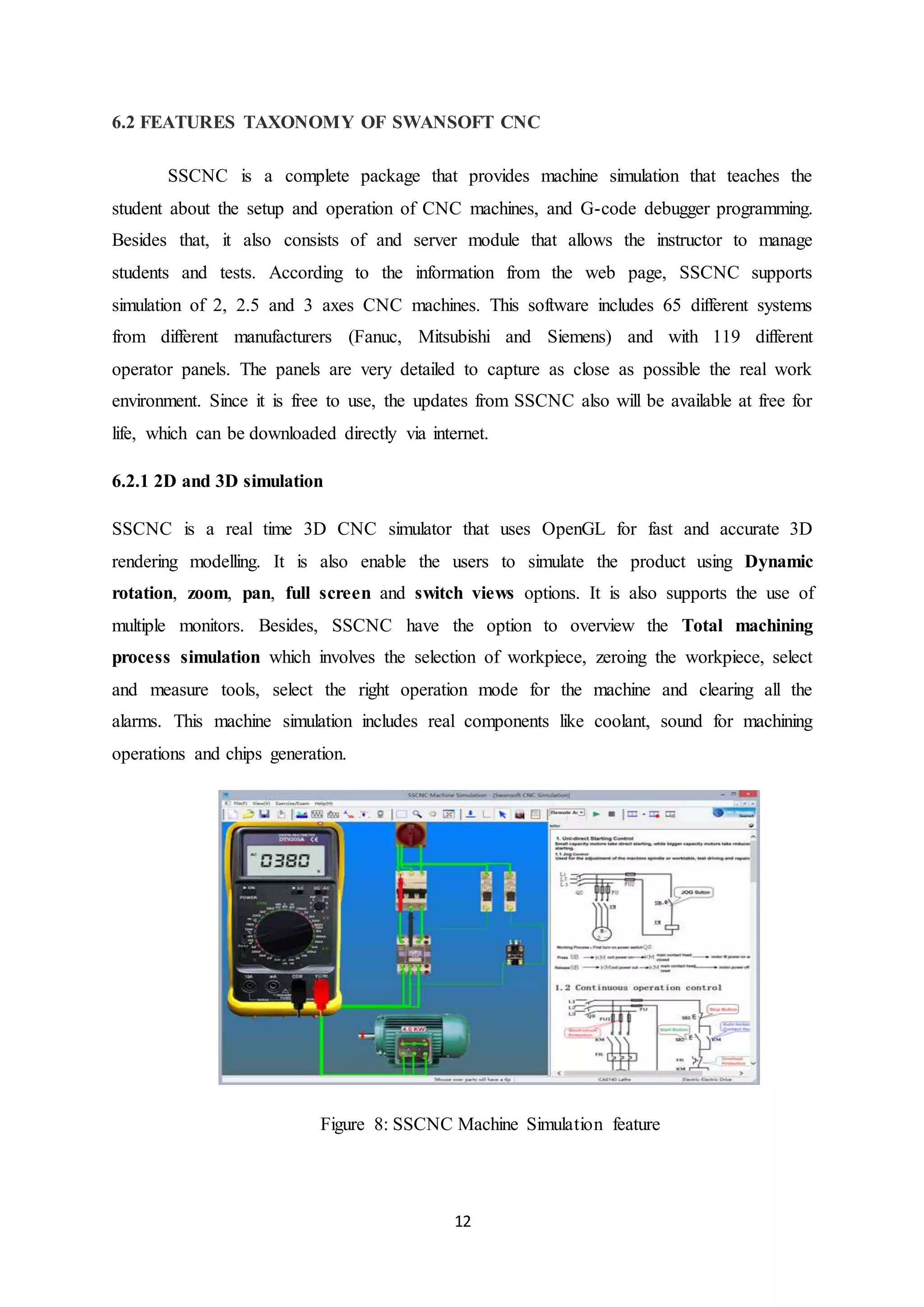
6.2.1 2D and 3D simulation
SSCNC is a real time 3D CNC simulator that uses OpenGL for fast and accurate 3D
rendering modelling. It is also enable the users to simulate the product using Dynamic
rotation, zoom, pan, full screen and switch views options. It is also supports the use of
multiple monitors. Besides, SSCNC have the option to overview the Total machining
process simulation which involves the selection of workpiece, zeroing the workpiece, select
and measure tools, select the right operation mode for the machine and clearing all the
alarms. This machine simulation includes real components like coolant, sound for machining
operations and chips generation.
Figure 8: SSCNC Machine Simulation feature
13
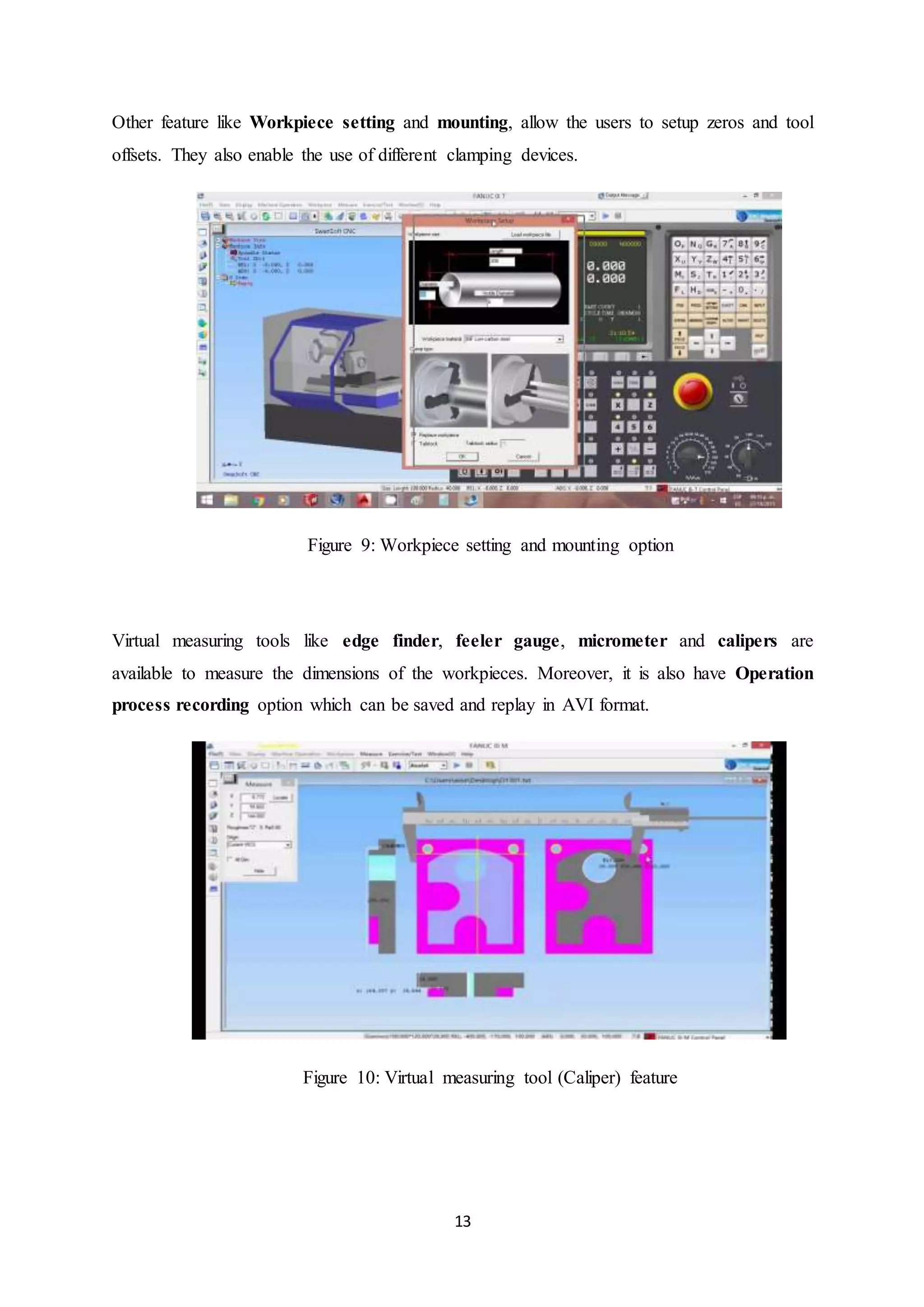
Other feature like Workpiece setting and mounting, allow the users to setup zeros and tool
offsets. They also enable the use of different clamping devices.
Figure 9: Workpiece setting and mounting option
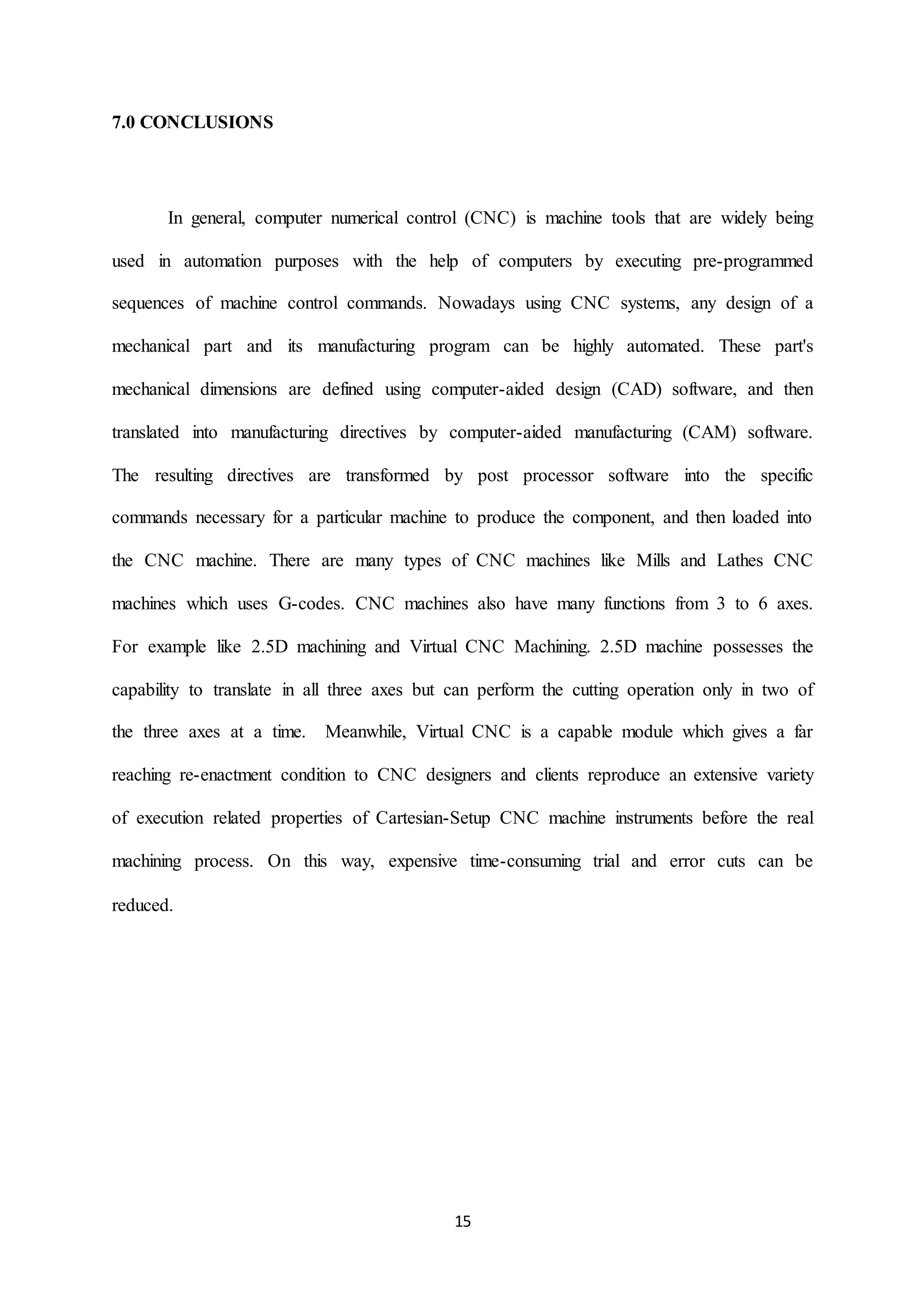
Virtual measuring tools like edge finder, feeler gauge, micrometer and calipers are
available to measure the dimensions of the workpieces. Moreover, it is also have Operation
process recording option which can be saved and replay in AVI format.
Figure 10: Virtual measuring tool (Caliper) feature
14
6.2.2 Program Editing
In SSCNC, the programs are easily created in ASCII format using any text editor. It has the
edition capabilities (cut, copy, paste). The options for numbering and renumbering of lines
are also available. Help option on screen for G/M codes also provided to ease the use of the
program especially for those who started to use this program.
Figure 11: Help option
6.2.3 Advanced programming functions
SSCNC supports ISO-1056 preparatory function codes (G codes) and assistant function codes
(M codes). This software has the G-code debugging tool which is being used to run the G-
codes. Moreover, SSCNC also supports custom codes and cycles from different NC systems.
SSCNC can simulate post processed files which are produced from other software like by
UGS, Pro-E, MasterCAM.
6.2.4 Operation of CNC machine
SSCNC have CNC features which are also available or can be found as in other CNC
softwares. For example like;
1) Preset zero point (G54, G55, G56, G57)
2) Preset tool axes X and Z (Lathe) and height of tool (Milling).
3) Electronic hand wheel option.
4) Adjustment of the cooling hose, parameters of the virtual machine and have alarm
option that sounds during collision with the piece, bench or other machine parts.
15
7.0 CONCLUSIONS
In general, computer numerical control (CNC) is machine tools that are widely being
used in automation purposes with the help of computers by executing pre-programmed
sequences of machine control commands. Nowadays using CNC systems, any design of a
mechanical part and its manufacturing program can be highly automated. These part's
mechanical dimensions are defined using computer-aided design (CAD) software, and then
translated into manufacturing directives by computer-aided manufacturing (CAM) software.
The resulting directives are transformed by post processor software into the specific
commands necessary for a particular machine to produce the component, and then loaded into
the CNC machine. There are many types of CNC machines like Mills and Lathes CNC
machines which uses G-codes. CNC machines also have many functions from 3 to 6 axes.
For example like 2.5D machining and Virtual CNC Machining. 2.5D machine possesses the
capability to translate in all three axes but can perform the cutting operation only in two of
the three axes at a time. Meanwhile, Virtual CNC is a capable module which gives a far
reaching re-enactment condition to CNC designers and clients reproduce an extensive variety
of execution related properties of Cartesian-Setup CNC machine instruments before the real
machining process. On this way, expensive time-consuming trial and error cuts can be
reduced.
16
8.0 REFERENCES
[1] Engineering 360. (n.d.). Retrieved 10, 10, 2017, from
http://www.globalspec.com/learnmore/industrial_engineering_software/industrial_con
trols_software/computer_numerical_control_software_cnc.
[2] SolidCam. (n.d.). Retrieved 11, 10, 2017, from https://www.solidcam.com/en-us/cam-
solutions/cam-modules/25d-milling/.
[3] Cimatron. (n.d.). Retrieved 14, 10, 2017, from
http://www.cimatron.com/SIP_STORAGE/FILES/7/2647.pdf.
[4] 3Dsystem. (n.d.). Retrieved 18, 10, 2017, from
https://www.3dsystems.com/software/gibbscam/features.
W. Lin & J. Fu. (2006). Modeling and application of virtual machine tool. Proceedings of the
16th international conference on artificial reality and telexistence workshops, ICAT,
9-16.
A.A. Kadir, X. Xu & E. HΓ€mmerle. (2011). Virtual machine tools and virtual machining. A
technological review. Robot Computer Integrated Manufacturing, 27, 494-508.
Y. Yao, H. Zhao, J. Li & Z. Yuan. (2006). Modeling of virtual workpiece with machining
errors representation in turning. Journal of Material Process Technology, 172,
437-444.
Y.C. Kao, M.S. Chen & N.T. Nguyen. (2014). Construction and application of a virtual CNC
milling simulation system In Education and Training. The 2nd international
Conference on Green Technology & Sustainable Development 2014 (GTSD14),
Ho Chi Minh City University of Technical Education, Vietnam, 182, 504-510.

CNC: 2.5D AXIS vs. VIRTUAL CNC

  • 1.
    1 1.0 INTRODUCTION The wordβ€œCNC” stands for β€œComputer Numerical Controlβ€œ. CNC separates between a machine that has a β€œController” on it from one that is manually run. CNC software is designed to read CNC programs and initiate a series of machine commands in sequential order. As direction sets, CNC programs are written in a sentence-like format and with a particular language structure. CNC words start with lettered addresses and define variables, for example, speed and axis motion. At the point when gathered together, they form commands that are read by the software-based CNC control. Figure 1 : CNC software use in industry Software-based CNC controllers may give abilities ranging from simple point-to- point linear control to highly-complex calculations with multiple axes of control. Specialized CNC and exclusive computer numerical control software is likewise accessible. Commonly, CNC software runs on an off-the-shelf PC interfaced to the machine tool’s servo system. Personal computers with CNC software do not require specific hardware, for example, programmable logic controllers (PLCs) or movement control cards. The CNC software performs all of the functions of a hardware-based CNC controller, including the human-machine interface (HMI) and input/output (I/O) control [1].
  • 2.
    2 2.0 OVERVIEW 2.1 2.5DAXIS OVERVIEW In machining 2.5D used as reference to a surface which is a projection to the 3D plane. Event thought, object in 3 dimension, there are no overhanging element possible. These type of object mostly represent as a contour map that gives the height, length, or depth of the object at every point. In addition, based on Google Wikipedia, 2.5D object are often greatly preferred for machining and it easily to generate G-code for the process. It also can be machine on a 3 axis milling machine and not require lot of features of higher axis machine produce. Besides that, 2.5D also can be called as a two and a half axis mill, it famous with capability to process and translate in all three axes but perform the cutting only two or three axis at one time. It’s also based on limitation of the software and machine that has a solenoid rather than a genuine, straight Z axis. Regular example involves an XY table that hole position with the spindle (z axis) then completes a fixed cycle for drilling by plugging and retracting axially. The advantages of the 2.5D itself prove the code to generate for 2.5D machining is lesser than 3D contour machining, because of that software and hardware requirement are inexpensive. Boring and tapping focuses are cheap, constrained obligation machining focuses that started as a 2.5 axis show classification, albeit some late-demonstrate ones are 3 axis in light of the fact that the product and equipment costs have dropped with advance innovation. In the nutshell, lot of benefits in 2.5D axis that can help to make the job become easier to do and it not time consuming. According to Michea (2017) 2.5D also has a 3rd axis of a very limited utility depends on what it used for.
  • 3.
    3 2.2 VIRTUAL CNCOVERVIEW According to Lin and Fu (2006), virtual machining systems are related to the use of machine tools for part manufacturing. They apply computers and different types of software in manufacturing and production in order to simulate and model the behavior and errors of a real environment in virtual reality systems. Meanwhile, based on Google Wikipedia, Virtual CNC can provide useful means for products to be manufactured without the need of physical testing on the shop floor. As a result, the time and cost of part production can be decreased. Virtual CNC accepts standard APT-CL files and process them exactly like a real CNC. With Virtual CNC system users can predict the actual positions delivered by the CNC, and plot the reference and predicted actual paths, and the tolerance violation points along the tool path. It is also help the users to identify the cycle time of CNC accurately by calculating the feed fluctuations which caused by the acceleration or deceleration, motor current, and position-displacement of each drive. Virtual CNC allows testing of different control laws, friction fields, motors, sensors, ball screws and etc. It also provides time and frequency domain response of individual drives, as well as testing of the CNC on ISO standard test work pieces such as diamond and circle. Virtual CNC can be used by manufacturing engineers as well as by the CNC designers. Nowadays, many Virtual CNCs come up with or offers other features like β€˜step-by- step CNC Model Generation’, β€˜Detailed CNC Performance Simulation’, and β€˜CNC Advanced Controller Design/Analysis Tools’.
  • 4.
    4 3.0 SOFTWARE 3.1 EXAMPLEOF 2.5D AXIS SOFTWARE The following is a list of major 2.5D axis software used in industry: 3.1.1 Solidcam SolidCAM puts the most capable 2.5D programming arrangement at user fingertips, right inside their CAD system. SolidCAM looks, feels and performs like user existing CAD system. In addition to its powerful 2.5D milling Profiling, Pocketing and Drilling operations, SolidCAM's 2.5D module includes Thread Milling operation for machining of standard internal and external threads and many more [3] 3.1.2 Cambam CamBam is an application to make CAM files (gcode) from CAD source documents or its own internal geometry editor. CamBam has many users around the world, from CNC specialists to professional machinists and engineers. CamBam currently supports the following: Reading from and writing to 2D DXF files. 2.5D profiling machine operations with auto-tab support 2.5D pocketing operations with auto island detection Drilling (Normal,Peck,Spiral Milling and Custom Scripts) Engraving 3.1.3 Hypermill According to their official web homepage, HyperMILL is a modular and flexible CAM solution for 2.5D, 3D and 5-axis milling as well as mill turning and machining operations such as high-speed cutting (HSC) and high-performance cutting (HPC), with everything integrated in a single interface. The special applications for milling impellers, blisks, turbine blades, tubes and tire moulds round off the range of functions available in hyperMILL
  • 5.
    5 3.2 EXAMPLE OFVIRTUAL CNC SOFTWARE According to Kao, Chen and Nguyen (2014), nowadays CNC machine center is one of the most important facilities in industrial manufacturing. So in order to operate these CNC machines safely and efficiently, the engineer and worker who operate directly have to be educated and trained carefully and strictly. But these education and training processes consume much money, time, energy, and material. Besides, these processes also might cause collision during the real cutting operation practices. Due to these disadvantages mentioned in the above, Virtual CNC machining was constructed by integrating many software like graphic designing, 3D simulation, and programming. The followings are some example of Virtual CNCs; ο‚· Swansoft CNC Simulator (SSCNC) ο‚· Predator Virtual CNC ο‚· Virtual Reality CNC Milling (VR CNC Milling) ο‚· CAMWorks Virtual Machine ο‚· Okuma 3D Virtual Monitor software ο‚· BobCAD-CAM Figure 2 shows the common Virtual CNC features that are available in most software. With these features, both the engineers and workers can carry out the physical tests and inspection of parts that are to be manufactured without the need to actually produce it. Hence, Virtual CNC reduces the cost and resource consumptions. Figure 2: Basic features in Virtual CNC of MAL
  • 6.
    6 4.0 THE ADVANTAGESAND DISADVANTAGES OF THE SOFTWARE 4.1 THE ADVANTAGES AND DISADVANTAGES OF 2.5D AXIS SOFTWARE Advantages Disadvantages Easily Simplified geometry selection using CAD sketches, auto-feature recognition and advanced chaining functions and the model can be changes without changes the geometry. Required enough training hours to handle the 2.5D CNC machine Directly working on parts, assemblies, and sketch geometry to define CNC process X and Y axis can be command together in synchronisation but for z axis worked on it’s own. Rest material machining cuts the remaining useful material. Expensive software and requires constant update if installed on computer. Chamfering geometry can be define and use for profile or pocket operation Due to the involvement of G-code, it requires years of training and practical. Standard internal and external threads are the operation in thread Milling. Uncommon operations for machining side openings with undermines by a T-slot function. 3D Contouring to drive the tool along a 3D bend, cutting the part at various profundities Capacity to machine geometry wrapped around a revolution axis by changing straight development to rotational movement Ability to easily program in 2.5D with the assistance of comprehensive, graphically intensive help functions
  • 7.
    7 4.2 THE ADVANTAGESAND DISADVANTAGES OF VIRTUAL CNC SOFTWARE Advantages Disadvantages Eliminate costly programming mistakes at the machine Expensive software. Can calculate machine cycle times on part programs. Complicated and need proper training before using it. Allow to use machines Kinematics that is also enable the users to visually see your machine tool in action. Fewer workers are required to use virtual CNC software compared to manual test and inspection. Hence, it leads to unemployment. Simulation allows checking for any errors on the part including machine, tool and tool holder collisions. The use of this software will be limited based on the system requirements of the computer. Can look and proof out the cut paths of your program before physically machining the part. Enable to see exactly how the finished part will look and cut on the CNC machine in a virtual environment.
  • 8.
    8 5.0 SOFTWARE DESCRIPTION 5.1GIBBSCAM Figure 3: GibbsCam logo GibbsCAM is a state-of-the-art, PC-based computer-aided manufacturing (CAM) system for programming computer numerically controlled (CNC) machine tools. The company was founded in 1982 by Bill Gibbs. The first release of the program was launched in 1984 for the Macintosh platform. Since 1996, the software is being developed exclusively for the Windows platform. The Gibbs CAM program is translated into 20 languages and is represented in most countries in the world. GibbsCAM comprises of various basic packages and countless modules. This enables the user to begin with a simpler CAM program, and then build on more modules as required. GibbsCAM’s graphical user interface was designed for engineers by engineers, bringing a user environment that is both familiar and proficient. This manufacturing orientation guarantees that GibbsCAM’s powerful capabilities is also extremely easy to learn and use. GibbsCAM’s free-form interaction style enables user to move effectively between geometry creation, toolpath creation, process visualization/verification and post processing. GibbsCAM’s ease-of-use, programming productivity, speed and short training time make GibbsCAM the CAM industry’s ease-of-use leader and the best software for programming parts [2].
  • 9.
    9 5.2 SWANSOFT CNCSIMULATOR (SSCNC) Figure 4: SSCNC logo According to their official web homepage, Swansoft CNC Simulatior (SSCNC) is an innovative product designed and developed by Nanjing Swansoft Technology Company. It is created based on the teaching experience acquired at manufacturing factories and industrial training centers like Nanjing Swan Software Technology Company. SSCNC has developed powerful and accurate virtual CNC machine simulation software that includes controls from the following manufacturers: FANUC, SIMUMERIK, MITSUBISHI, GSK, HNK, KND, WA, SKY, HAAS, GREAT, FAGOR, and DASEN. It is involved in machining experiences of Machine Company and training experiences of colleges. By using this software, students can operate real NC machine in more short time and colleges can reduce greatly the expensive equipment investment. SSCNC is easy to use for students and teacher. You can program by hand or import CAM NC program then simulate in SSCNC. Teacher can get students' operation information through SSCNC Server. By using the software in PC, students can master operation of all kinds of NC lathe, NC milling and machining center in short time. Teachers can gain current operation information of students' at any time through network teaching. The software is the first domestic NC simulation software which can be updated automatically on line for free.
  • 10.
    10 6.0 FEATURES TAXONOMY 6.1FEATURES TAXONOMY OF GIBBSCAM The following are the most important features in this software that related to manufacturing industry: 6.1.1 Production Milling Supports 2-axis through simple 3-axis wireframe machining with full functionality for face milling, pocketing with unlimited bosses/islands, contouring, thread milling, 2D/3D spiral creation, drilling with support for many drill cycles, boring, and tapping. Simple fourth axis positioning is also supported. Automatic cycles for face milling, for example, zig-zag, spiral, one direction and back and forth, enable material to be cleaned off the highest point of a section. GibbsCAM Production Milling provides simple to-utilize, powerful programming capability for user machine devices. Figure 5: Production milling using GibbsCam 6.1.2 Production Turning Supports full 2-axis wireframe machining with full usefulness for tedious shape roughing, drilling, contouring, automatic roughing, plunge roughing, multiple hills and valleys, threading, boring and tapping [4]. Advanced functionalities, for example, keeping up an attention of the current stock condition, make programming lathes easy as well as effective. GibbsCAM Production Turning provides easy to use software, powerful capability for programming user turning centers.
  • 11.
    11 Figure 6: Productionturning using GibbsCam 6.1.3 MTM (Multi-Task Machining) Specifically designed to address the CNC programming requirements of multi-task machine devices, giving powerful programming software that are easy to use and learn with the ultimate in adaptability and configurability. Machining processes are easily defined with GibbsCAM's intuitive graphical user interface that provides seamless access to both turning and milling capabilities [4]. GibbsCAM's associativity enables operations to be updated effectively when changes are made. Figure 7: Multi-task machine tools
  • 12.
    12 6.2 FEATURES TAXONOMYOF SWANSOFT CNC SSCNC is a complete package that provides machine simulation that teaches the student about the setup and operation of CNC machines, and G-code debugger programming. Besides that, it also consists of and server module that allows the instructor to manage students and tests. According to the information from the web page, SSCNC supports simulation of 2, 2.5 and 3 axes CNC machines. This software includes 65 different systems from different manufacturers (Fanuc, Mitsubishi and Siemens) and with 119 different operator panels. The panels are very detailed to capture as close as possible the real work environment. Since it is free to use, the updates from SSCNC also will be available at free for life, which can be downloaded directly via internet. 6.2.1 2D and 3D simulation SSCNC is a real time 3D CNC simulator that uses OpenGL for fast and accurate 3D rendering modelling. It is also enable the users to simulate the product using Dynamic rotation, zoom, pan, full screen and switch views options. It is also supports the use of multiple monitors. Besides, SSCNC have the option to overview the Total machining process simulation which involves the selection of workpiece, zeroing the workpiece, select and measure tools, select the right operation mode for the machine and clearing all the alarms. This machine simulation includes real components like coolant, sound for machining operations and chips generation. Figure 8: SSCNC Machine Simulation feature
  • 13.
    13 Other feature likeWorkpiece setting and mounting, allow the users to setup zeros and tool offsets. They also enable the use of different clamping devices. Figure 9: Workpiece setting and mounting option Virtual measuring tools like edge finder, feeler gauge, micrometer and calipers are available to measure the dimensions of the workpieces. Moreover, it is also have Operation process recording option which can be saved and replay in AVI format. Figure 10: Virtual measuring tool (Caliper) feature
  • 14.
    14 6.2.2 Program Editing InSSCNC, the programs are easily created in ASCII format using any text editor. It has the edition capabilities (cut, copy, paste). The options for numbering and renumbering of lines are also available. Help option on screen for G/M codes also provided to ease the use of the program especially for those who started to use this program. Figure 11: Help option 6.2.3 Advanced programming functions SSCNC supports ISO-1056 preparatory function codes (G codes) and assistant function codes (M codes). This software has the G-code debugging tool which is being used to run the G- codes. Moreover, SSCNC also supports custom codes and cycles from different NC systems. SSCNC can simulate post processed files which are produced from other software like by UGS, Pro-E, MasterCAM. 6.2.4 Operation of CNC machine SSCNC have CNC features which are also available or can be found as in other CNC softwares. For example like; 1) Preset zero point (G54, G55, G56, G57) 2) Preset tool axes X and Z (Lathe) and height of tool (Milling). 3) Electronic hand wheel option. 4) Adjustment of the cooling hose, parameters of the virtual machine and have alarm option that sounds during collision with the piece, bench or other machine parts.
  • 15.
    15 7.0 CONCLUSIONS In general,computer numerical control (CNC) is machine tools that are widely being used in automation purposes with the help of computers by executing pre-programmed sequences of machine control commands. Nowadays using CNC systems, any design of a mechanical part and its manufacturing program can be highly automated. These part's mechanical dimensions are defined using computer-aided design (CAD) software, and then translated into manufacturing directives by computer-aided manufacturing (CAM) software. The resulting directives are transformed by post processor software into the specific commands necessary for a particular machine to produce the component, and then loaded into the CNC machine. There are many types of CNC machines like Mills and Lathes CNC machines which uses G-codes. CNC machines also have many functions from 3 to 6 axes. For example like 2.5D machining and Virtual CNC Machining. 2.5D machine possesses the capability to translate in all three axes but can perform the cutting operation only in two of the three axes at a time. Meanwhile, Virtual CNC is a capable module which gives a far reaching re-enactment condition to CNC designers and clients reproduce an extensive variety of execution related properties of Cartesian-Setup CNC machine instruments before the real machining process. On this way, expensive time-consuming trial and error cuts can be reduced.
  • 16.
    16 8.0 REFERENCES [1] Engineering360. (n.d.). Retrieved 10, 10, 2017, from http://www.globalspec.com/learnmore/industrial_engineering_software/industrial_con trols_software/computer_numerical_control_software_cnc. [2] SolidCam. (n.d.). Retrieved 11, 10, 2017, from https://www.solidcam.com/en-us/cam- solutions/cam-modules/25d-milling/. [3] Cimatron. (n.d.). Retrieved 14, 10, 2017, from http://www.cimatron.com/SIP_STORAGE/FILES/7/2647.pdf. [4] 3Dsystem. (n.d.). Retrieved 18, 10, 2017, from https://www.3dsystems.com/software/gibbscam/features. W. Lin & J. Fu. (2006). Modeling and application of virtual machine tool. Proceedings of the 16th international conference on artificial reality and telexistence workshops, ICAT, 9-16. A.A. Kadir, X. Xu & E. HΓ€mmerle. (2011). Virtual machine tools and virtual machining. A technological review. Robot Computer Integrated Manufacturing, 27, 494-508. Y. Yao, H. Zhao, J. Li & Z. Yuan. (2006). Modeling of virtual workpiece with machining errors representation in turning. Journal of Material Process Technology, 172, 437-444. Y.C. Kao, M.S. Chen & N.T. Nguyen. (2014). Construction and application of a virtual CNC milling simulation system In Education and Training. The 2nd international Conference on Green Technology & Sustainable Development 2014 (GTSD14), Ho Chi Minh City University of Technical Education, Vietnam, 182, 504-510.