ClustalX is a Windows interface for the ClustalW multiple sequence alignment program, which enables users to perform and analyze multiple sequence alignments. It supports various input formats and provides options for profile alignment, incorporating secondary structure information to adjust gap penalties. The program uses a progressive method, relying on pairwise alignments and phylogenetic trees to achieve global multiple sequence alignments.

ClustalX Clustal Xis a new windows interface for the ClustalW multiple sequence alignment program. It provides an integrated environment for performing multiple sequence and profile alignments and analyzing the results. The sequence alignment is displayed in a window on the screen. The pull-down menus at the top of the window allow you to select all the options required for traditional multiple sequence and profile alignment.
3.
ClustalX-Platforms ClustalX isavailable for a number of different platforms including: SUN Solaris , IRIX5 .3 on Silicon Graphics, Digital UNIX on DECStations, Microsoft Windows (32 bit) for PC's , Linux ELF for x86 PC's and Macintosh PowerMac.
SEQUENCE INPUT Sequences (and profiles) are input using the FILE menu. All sequences must be in 1 file, one after another. 7 formats are automatically recognised: NBRF/PIR, EMBL/SWISSPROT, Pearson (Fasta), Clustal (*.aln), GCG/MSF (Pileup), GCG9 RSF and GDE flat file. All non-alphabetic characters (spaces, digits, punctuation marks) are ignored except "-" which is used to indicate a GAP
6.
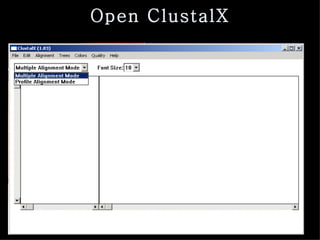
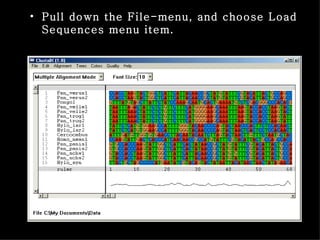
Pull down theFile-menu, and choose Load Sequences menu item.
7.
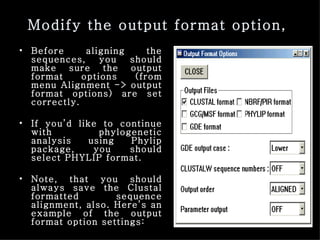
Modify the outputformat option, Before aligning the sequences, you should make sure the output format options (from menu Alignment -> output format options) are set correctly. If you’d like to continue with phylogenetic analysis using Phylip package, you should select PHYLIP format. Note, that you should always save the Clustal formatted sequence alignment, also. Here’s an example of the output format option settings:
8.
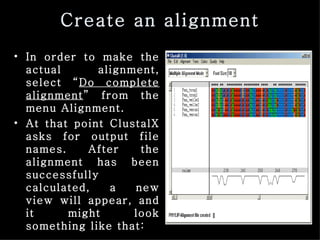
Create an alignmentIn order to make the actual alignment, select “ Do complete alignment ” from the menu Alignment. At that point ClustalX asks for output file names. After the alignment has been successfully calculated, a new view will appear, and it might look something like that:
9.
Multiple alignment theoryDynamic programming can be used to align multiple sequences also. It creates an optimal alignment, but cannot be used for more than five or so sequences because of the calculation time. Therefore, progressive method of multiple sequence alignment is often applied. Clustal performs a “ Global-multiple sequence alignment” by the progressive method. The steps include: a) Perform pair-wise alignment of all the sequences by dynamic programming b) Use the alignment scores to produce a phylogenetic tree by neighbor-joining c) Align the multiple sequences sequentially, guided by the phylogenetic tree
10.
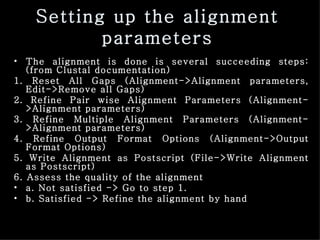
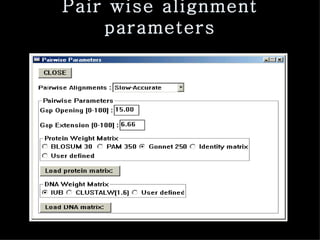
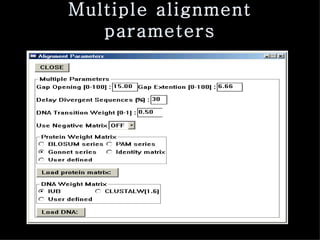
Setting up thealignment parameters The alignment is done is several succeeding steps: (from Clustal documentation) 1. Reset All Gaps (Alignment->Alignment parameters, Edit->Remove all Gaps) 2. Refine Pair wise Alignment Parameters (Alignment->Alignment parameters) 3. Refine Multiple Alignment Parameters (Alignment->Alignment parameters) 4. Refine Output Format Options (Alignment->Output Format Options) 5. Write Alignment as Postscript (File->Write Alignment as Postscript) 6. Assess the quality of the alignment a. Not satisfied -> Go to step 1. b. Satisfied -> Refine the alignment by hand
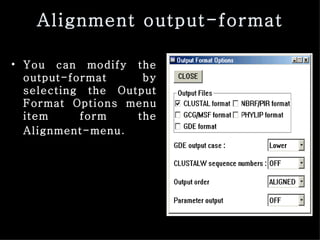
Alignment output-format Youcan modify the output-format by selecting the Output Format Options menu item form the Alignment-menu .
14.
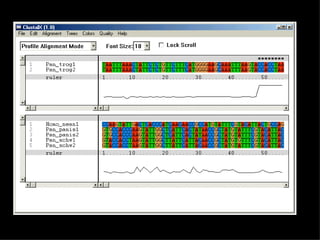
Profile alignment Profilealignment is used for a couple of purposes, From the menu change to Profile Alignment Mode. The Alignment view window is now split into two parts. The upper part contains the alignment we just created, and lower is empty. The upper part is called “profile 1” and the lower part is “profile 2”.
15.
16.
secondary structure informationin the profile alignment In ClustalX the gap penalties are raised at core alpha helix (A) or beta strand (B) residues. The structure information can be used only in the Profile Alignment Mode. These gap penalties cannot be used in the multiple alignment mode. There are two ways to include structure information in Clustal, but here we present only the easier one, which describes the domain areas of the protein. Then the penalties are adjusted in the ClustalX dialog box.
17.
First we needto create the input files. In the first input file, which the first sequence of all the sequences to aligned, a descriptions of the domains (helix or strand) is included. The second input file contains the rest of the sequences in the Fasta format. Find the relevant information from http://www.ebi.ac.uk/swissprot /, and after you have acquired the SRS results, click on the Accession Number link on the top of the page. This will take you to the plain text description.
18.
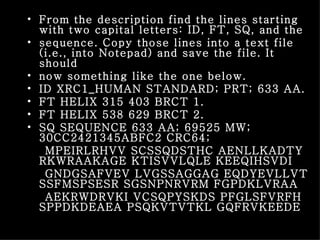
From the descriptionfind the lines starting with two capital letters: ID, FT, SQ, and the sequence. Copy those lines into a text file (i.e., into Notepad) and save the file. It should now something like the one below. ID XRC1_HUMAN STANDARD; PRT; 633 AA. FT HELIX 315 403 BRCT 1. FT HELIX 538 629 BRCT 2. SQ SEQUENCE 633 AA; 69525 MW; 30CC2421345ABFC2 CRC64; MPEIRLRHVV SCSSQDSTHC AENLLKADTY RKWRAAKAGE KTISVVLQLE KEEQIHSVDI GNDGSAFVEV LVGSSAGGAG EQDYEVLLVT SSFMSPSESR SGSNPNRVRM FGPDKLVRAA AEKRWDRVKI VCSQPYSKDS PFGLSFVRFH SPPDKDEAEA PSQKVTVTKL GQFRVKEEDE
19.
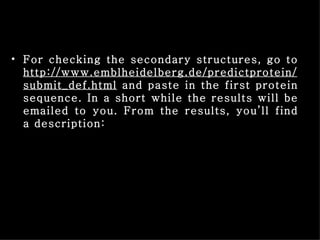
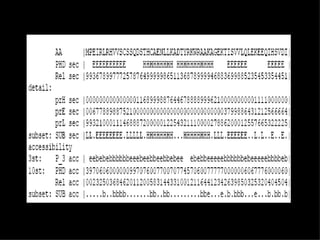
For checking thesecondary structures, go to http://www.emblheidelberg.de/predictprotein/submit_def.html and paste in the first protein sequence. In a short while the results will be emailed to you. From the results, you’ll find a description:
20.
21.
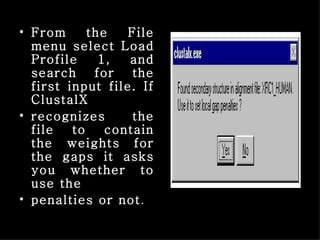
From the Filemenu select Load Profile 1, and search for the first input file. If ClustalX recognizes the file to contain the weights for the gaps it asks you whether to use the penalties or not .
22.
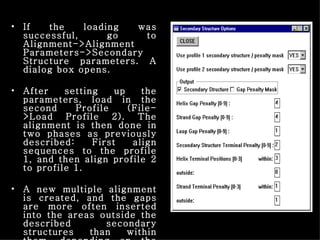
If the loadingwas successful, go to Alignment->Alignment Parameters->Secondary Structure parameters. A dialog box opens. After setting up the parameters, load in the second Profile (File->Load Profile 2). The alignment is then done in two phases as previously described: First align sequences to the profile 1, and then align profile 2 to profile 1. A new multiple alignment is created, and the gaps are more often inserted into the areas outside the described secondary structures than within them, depending on the parameters.