Bigtable : A Distributed
Storage System for Structured
Data
Fay Chang, Jeffrey Dean, Sanjay Ghemawat, Wilson C.Hsieh,
Deborah A. Wallach, Mike Burrows, Tushar Chandra, Andrew Fikes,
Robert E. Gruber
Google, Inc.
1
Index
 Introduction
 Data Model
 API
 Building Blocks
 Implementation
 Refinements
 Real Applications
 Conclusions
2
Introduction
1. Motivation
2. What is a Bigtable?
3. Why not a DBMS?
3
Introduction : Motivation
 Lot of structured data at Google
◦ Web page, Geographic Info. , User data,
Mail
 Millions of machines
 Different projects/applications
4
Introduction : Why not a
DBMS?
 Provide more than Google needs
 Required DB with wide scalability,
wide applicability, high performance
and high availability
 Low-level storage optimizations help
performance significantly
 Cost would be very high
◦ Most DBMSs require very expensive
infrastructure
5
Introduction : What is a
Bigtable?
 Bigtable is a distributed storage
system for managing structured data
 Achieved several goals
◦ wide applicability, scalability, high
performance
 Scalable
◦ Terabytes of in-memory data
◦ Petabyte of disk-based data
◦ Millions of reads/writes per second, efficient
scans
 Self-managing
◦ Servers can be added/removed
dynamically 6
Data Model
1. Row
2. Column families
3. Timestamps
7
Data Model : Row
 The row keys in a table are arbitrary
strings
 Data is maintained lexicographic older
by row key
 Row range is called a “tablet”, which is
the unit of distribution and load
balancing
 Sorted by row key in tablet
8
Data Model : Column Families
 Column keys are grouped into sets
called “column families”
 Basic unit of access control
 A column key is named using the this
syntax “ family:qualifier”
 Access control and disk/memory accounting
are performed at the columns-family level
9
Data Model : Timestamps
 Each cell in a Bigtable can contain
multiple versions of the same data
 sorted by timestamp order by
descending
 64-bit integers
 real time in microseconds or assigned
by client application
10
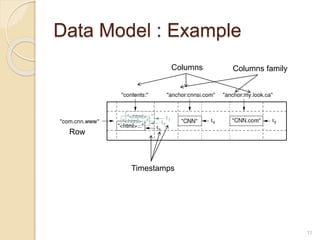
Data Model : Example
11
Row
Columns Columns family
Timestamps
API
 The Bigtable API provieds functions
◦ Create/delete table and column families
◦ Change table, column family metadata
◦ Look up values from individual rows
◦ Iterate over a subset of the data
 Supports single-row trancsactions
 Can be used with MapReduce(HBase)
12
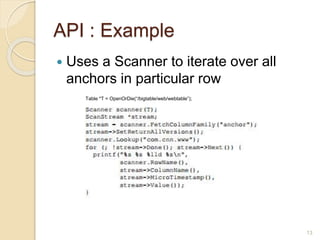
API : Example
 Uses a Scanner to iterate over all
anchors in particular row
Table *T = OpenOrDie(“/bigtable/web/webtable”);
13
Building Blocks
 Uses the distributed Google File
System(GFS) to store log and data
files
 A Bigtable cluster typically operates in
a shared pool of machines
 Depend on cluster management
system
 The Google SSTable file format is
used internally to store Bigtable data
 Relies on a highly-available and 14
Building Blocks :
GFS & SSTable & Chubby
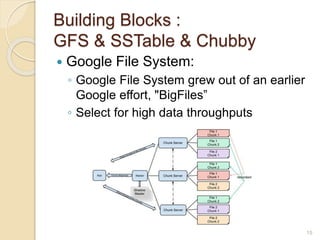
 Google File System:
◦ Google File System grew out of an earlier
Google effort, "BigFiles”
◦ Select for high data throughputs
15
Building Blocks :
GFS & SSTable & Chubby
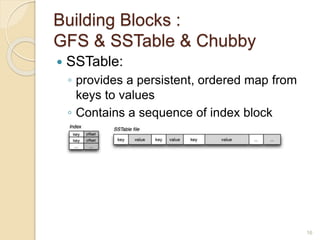
 SSTable:
◦ provides a persistent, ordered map from
keys to values
◦ Contains a sequence of index block
16
Building Blocks :
GFS & SSTable & Chubby
 Chubby:
◦ ensure that there is at most one active
master at any time
◦ store the bootstrap location of Bigtable
data
◦ discover tablet servers and finalize tablet
server deaths
◦ store Bigtable schema information (the
column family information for each table)
17
Implementation
1. Tablet Location
2. Tablet Assignment
3. Tablet Serving
18
Implementation
 Three major components
◦ Library that is linked every client
◦ One master server
◦ Many tablet servers
19
Implementation : Tablet
Location
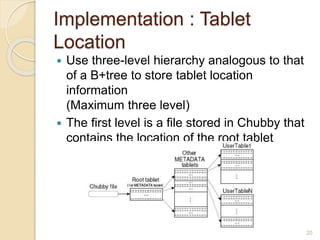
 Use three-level hierarchy analogous to that
of a B+tree to store tablet location
information
(Maximum three level)
 The first level is a file stored in Chubby that
contains the location of the root tablet
20
Implementation : Tablet
Location
 Root tablet
◦ First tablet in the METADATA table
◦ Never split to ensure that the tablet
location hierarchy has no more than three
levels
 METADATA tablet
◦ Stores the location of a tablet under a row
key that is an encoding of the tablet’s
table identifier and its end row
21
Implementation : Tablet
Assignment
 Master server
◦ assign tablets to tablet servers
◦ detect presence of absence(expiration) of
tablet servers
◦ balance tablet-server load
◦ handle schema changes such as table and
column family creations
 Tablet server
◦ manage a set of tablets(ten to a thousand
tablets per tablet server)
◦ handle read/write requests to the tablets
◦ split tablets that have grown too large
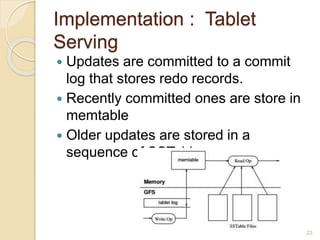
Implementation : Tablet
Serving
 Updates are committed to a commit
log that stores redo records.
 Recently committed ones are store in
memtable
 Older updates are stored in a
sequence of SSTables
23
Refinements
1. Locality groups
2. Compression
3. Caching for read performance
4. Bloom filters
5. Commit-log implementation
24
Refinements
 Locality groups
◦ Client can group multiple column families
together into a locality group
 Compression
◦ We benefit in that small portions of an
SSTable can be read without
decompressing the entire file
◦ Encode at 100-200MB/s
◦ Decode at 400-1000MB/s
◦ 10-to-1 reduction in space
25
Refinements
 Caching for read performance
◦ Tablet servers use two levels of caching
 Scan/Block Cache
 Bloom filters
◦ Should be created for SSTable in a
particular locality group
 Commit-log implementation
◦ Co-mingling mutations for different tablets
in the same physical log file
26
Real Applications
1. Google Analytics
2. Personalized Search
27
Real Applications
 Google Analytics
◦ Use two of the tables
 The raw click table(~200TB)
 The summary table(~20TB)
◦ Use a MapReduce
 Personalized Search
◦ History of users
◦ Use a MapReduce
28
Conclusions
 Bigtable clusters have been in
production use since April 2005 at
Google
 Provide Performance and high
availability
 Found that there are significant advantages
to building storage solution at Google
 Apache Hbase based on Bigtable
29
Thank you!
30

Google - Bigtable

  • 1.
    Bigtable : ADistributed Storage System for Structured Data Fay Chang, Jeffrey Dean, Sanjay Ghemawat, Wilson C.Hsieh, Deborah A. Wallach, Mike Burrows, Tushar Chandra, Andrew Fikes, Robert E. Gruber Google, Inc. 1
  • 2.
    Index  Introduction  DataModel  API  Building Blocks  Implementation  Refinements  Real Applications  Conclusions 2
  • 3.
    Introduction 1. Motivation 2. Whatis a Bigtable? 3. Why not a DBMS? 3
  • 4.
    Introduction : Motivation Lot of structured data at Google ◦ Web page, Geographic Info. , User data, Mail  Millions of machines  Different projects/applications 4
  • 5.
    Introduction : Whynot a DBMS?  Provide more than Google needs  Required DB with wide scalability, wide applicability, high performance and high availability  Low-level storage optimizations help performance significantly  Cost would be very high ◦ Most DBMSs require very expensive infrastructure 5
  • 6.
    Introduction : Whatis a Bigtable?  Bigtable is a distributed storage system for managing structured data  Achieved several goals ◦ wide applicability, scalability, high performance  Scalable ◦ Terabytes of in-memory data ◦ Petabyte of disk-based data ◦ Millions of reads/writes per second, efficient scans  Self-managing ◦ Servers can be added/removed dynamically 6
  • 7.
    Data Model 1. Row 2.Column families 3. Timestamps 7
  • 8.
    Data Model :Row  The row keys in a table are arbitrary strings  Data is maintained lexicographic older by row key  Row range is called a “tablet”, which is the unit of distribution and load balancing  Sorted by row key in tablet 8
  • 9.
    Data Model :Column Families  Column keys are grouped into sets called “column families”  Basic unit of access control  A column key is named using the this syntax “ family:qualifier”  Access control and disk/memory accounting are performed at the columns-family level 9
  • 10.
    Data Model :Timestamps  Each cell in a Bigtable can contain multiple versions of the same data  sorted by timestamp order by descending  64-bit integers  real time in microseconds or assigned by client application 10
  • 11.
    Data Model :Example 11 Row Columns Columns family Timestamps
  • 12.
    API  The BigtableAPI provieds functions ◦ Create/delete table and column families ◦ Change table, column family metadata ◦ Look up values from individual rows ◦ Iterate over a subset of the data  Supports single-row trancsactions  Can be used with MapReduce(HBase) 12
  • 13.
    API : Example Uses a Scanner to iterate over all anchors in particular row Table *T = OpenOrDie(“/bigtable/web/webtable”); 13
  • 14.
    Building Blocks  Usesthe distributed Google File System(GFS) to store log and data files  A Bigtable cluster typically operates in a shared pool of machines  Depend on cluster management system  The Google SSTable file format is used internally to store Bigtable data  Relies on a highly-available and 14
  • 15.
    Building Blocks : GFS& SSTable & Chubby  Google File System: ◦ Google File System grew out of an earlier Google effort, "BigFiles” ◦ Select for high data throughputs 15
  • 16.
    Building Blocks : GFS& SSTable & Chubby  SSTable: ◦ provides a persistent, ordered map from keys to values ◦ Contains a sequence of index block 16
  • 17.
    Building Blocks : GFS& SSTable & Chubby  Chubby: ◦ ensure that there is at most one active master at any time ◦ store the bootstrap location of Bigtable data ◦ discover tablet servers and finalize tablet server deaths ◦ store Bigtable schema information (the column family information for each table) 17
  • 18.
    Implementation 1. Tablet Location 2.Tablet Assignment 3. Tablet Serving 18
  • 19.
    Implementation  Three majorcomponents ◦ Library that is linked every client ◦ One master server ◦ Many tablet servers 19
  • 20.
    Implementation : Tablet Location Use three-level hierarchy analogous to that of a B+tree to store tablet location information (Maximum three level)  The first level is a file stored in Chubby that contains the location of the root tablet 20
  • 21.
    Implementation : Tablet Location Root tablet ◦ First tablet in the METADATA table ◦ Never split to ensure that the tablet location hierarchy has no more than three levels  METADATA tablet ◦ Stores the location of a tablet under a row key that is an encoding of the tablet’s table identifier and its end row 21
  • 22.
    Implementation : Tablet Assignment Master server ◦ assign tablets to tablet servers ◦ detect presence of absence(expiration) of tablet servers ◦ balance tablet-server load ◦ handle schema changes such as table and column family creations  Tablet server ◦ manage a set of tablets(ten to a thousand tablets per tablet server) ◦ handle read/write requests to the tablets ◦ split tablets that have grown too large
  • 23.
    Implementation : Tablet Serving Updates are committed to a commit log that stores redo records.  Recently committed ones are store in memtable  Older updates are stored in a sequence of SSTables 23
  • 24.
    Refinements 1. Locality groups 2.Compression 3. Caching for read performance 4. Bloom filters 5. Commit-log implementation 24
  • 25.
    Refinements  Locality groups ◦Client can group multiple column families together into a locality group  Compression ◦ We benefit in that small portions of an SSTable can be read without decompressing the entire file ◦ Encode at 100-200MB/s ◦ Decode at 400-1000MB/s ◦ 10-to-1 reduction in space 25
  • 26.
    Refinements  Caching forread performance ◦ Tablet servers use two levels of caching  Scan/Block Cache  Bloom filters ◦ Should be created for SSTable in a particular locality group  Commit-log implementation ◦ Co-mingling mutations for different tablets in the same physical log file 26
  • 27.
    Real Applications 1. GoogleAnalytics 2. Personalized Search 27
  • 28.
    Real Applications  GoogleAnalytics ◦ Use two of the tables  The raw click table(~200TB)  The summary table(~20TB) ◦ Use a MapReduce  Personalized Search ◦ History of users ◦ Use a MapReduce 28
  • 29.
    Conclusions  Bigtable clustershave been in production use since April 2005 at Google  Provide Performance and high availability  Found that there are significant advantages to building storage solution at Google  Apache Hbase based on Bigtable 29
  • 30.