Google Bigtable


   Aishwarya Panchbhai


                         1
Plan for today …
 Google Scale – Motivation for Bigtable
 How do existing storage solutions compare?
 Overview of Bigtable – Data Model
 A Typical Bigtable Cell
 Compactions
 Performance Evaluation
 Lessons learnt

                                               2
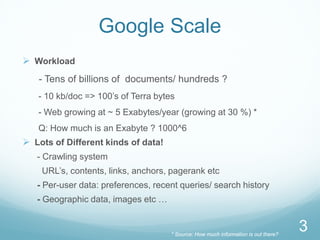
Google Scale
 Workload
   - Tens of billions of documents/ hundreds ?
   - 10 kb/doc => 100’s of Terra bytes
   - Web growing at ~ 5 Exabytes/year (growing at 30 %) *
   Q: How much is an Exabyte ? 1000^6
 Lots of Different kinds of data!
   - Crawling system
    URL’s, contents, links, anchors, pagerank etc
   - Per-user data: preferences, recent queries/ search history
   - Geographic data, images etc …


                                     * Source: How much information is out there?
                                                                                    3
Google Philosophy
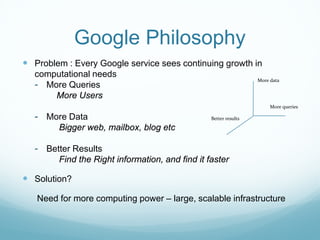
 Problem : Every Google service sees continuing growth in
  computational needs
                                                                  More data
  - More Queries
      More Users
                                                                       More queries

  - More Data                                    Better results

        Bigger web, mailbox, blog etc

  - Better Results
        Find the Right information, and find it faster

 Solution?

   Need for more computing power – large, scalable infrastructure
Existing storage solutions?
 Scale is too large for commercial databases
 May not run on their commodity hardware
 No dependence on other vendors
 Optimizations
 Better Price/Performance
 Building internally means the system can be applied
  across many projects for low incremental cost.
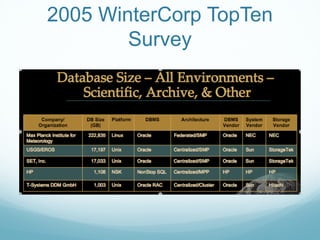
Q: How much is the largest database installation ?
2005 WinterCorp TopTen
        Survey
Bigtable
 Distributed multi-level map
 Fault-tolerant, persistent => GFS
 Scalable
  - 1000’s of servers
   - Millions of reads/writes, efficient scans
 Self-managing
  - Servers can be added/removed dynamically
  - Servers adjust to load-imbalance
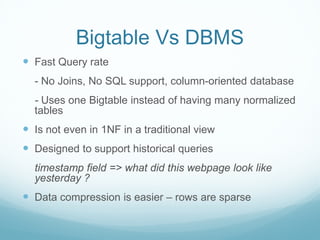
Bigtable Vs DBMS
 Fast Query rate
  - No Joins, No SQL support, column-oriented database
  - Uses one Bigtable instead of having many normalized
  tables
 Is not even in 1NF in a traditional view
 Designed to support historical queries
  timestamp field => what did this webpage look like
  yesterday ?
 Data compression is easier – rows are sparse
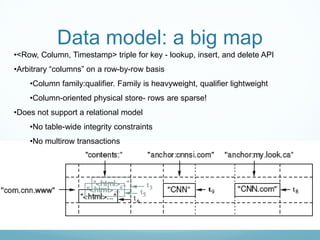
Data model: a big map
•<Row, Column, Timestamp> triple for key - lookup, insert, and delete API
•Arbitrary “columns” on a row-by-row basis
    •Column family:qualifier. Family is heavyweight, qualifier lightweight
    •Column-oriented physical store- rows are sparse!
•Does not support a relational model
    •No table-wide integrity constraints
    •No multirow transactions
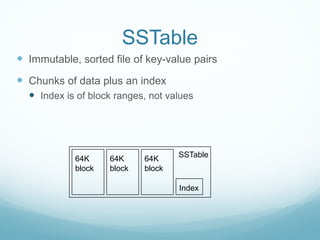
SSTable
 Immutable, sorted file of key-value pairs
 Chunks of data plus an index
   Index is of block ranges, not values


                                    SSTable
            64K     64K     64K
            block   block   block

                                    Index
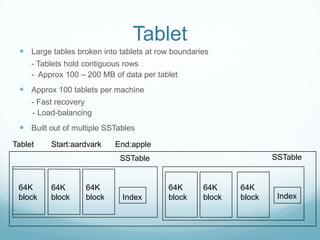
Tablet
  Large tables broken into tablets at row boundaries
     - Tablets hold contiguous rows
     - Approx 100 – 200 MB of data per tablet
  Approx 100 tablets per machine
     - Fast recovery
     - Load-balancing
  Built out of multiple SSTables
Tablet    Start:aardvark   End:apple
                             SSTable                               SSTable


 64K      64K      64K                    64K      64K     64K
 block    block    block     Index        block    block   block    Index
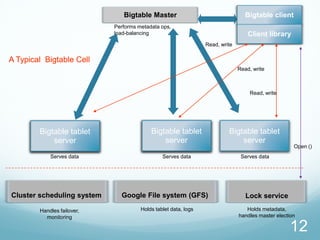
Bigtable Master                                   Bigtable client
                            Performs metadata ops,
                            load-balancing                                        Client library
                                                                Read, write

A Typical Bigtable Cell
                                                                              Read, write


                                                                                   Read, write


        Bigtable tablet                   Bigtable tablet                Bigtable tablet
            server                            server                         server
                                                                                                    Open ()
            Serves data                        Serves data                     Serves data


Cluster scheduling system     Google File system (GFS)                           Lock service

        Handles failover,             Holds tablet data, logs                    Holds metadata,
          monitoring                                                          handles master election

                                                                                                  12
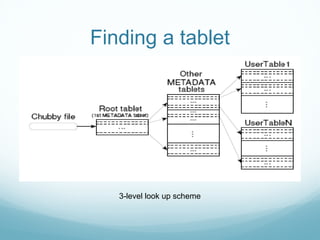
Finding a tablet


   3-level look up scheme
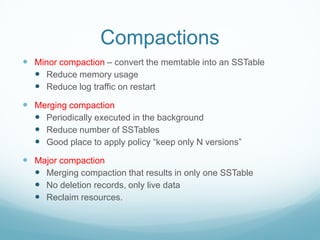
Compactions
 Minor compaction – convert the memtable into an SSTable
   Reduce memory usage
   Reduce log traffic on restart
 Merging compaction
   Periodically executed in the background
   Reduce number of SSTables
   Good place to apply policy “keep only N versions”
 Major compaction
   Merging compaction that results in only one SSTable
   No deletion records, only live data
   Reclaim resources.
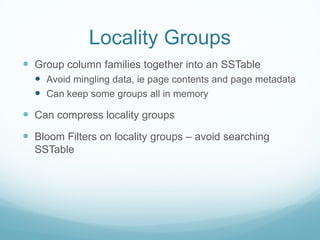
Locality Groups
 Group column families together into an SSTable
   Avoid mingling data, ie page contents and page metadata
   Can keep some groups all in memory
 Can compress locality groups
 Bloom Filters on locality groups – avoid searching
  SSTable
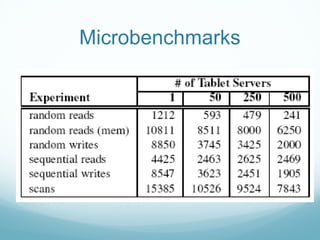
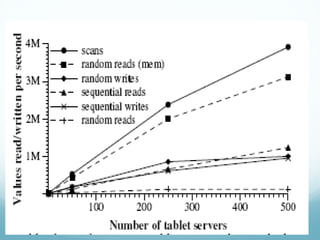
Microbenchmarks
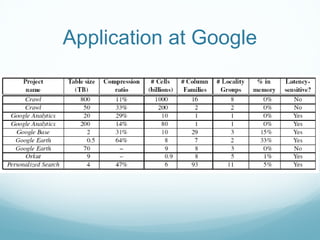
Application at Google
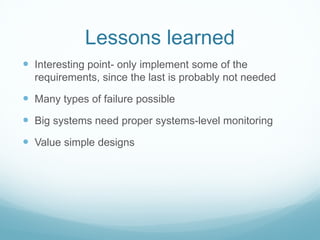
Lessons learned
 Interesting point- only implement some of the
  requirements, since the last is probably not needed

 Many types of failure possible
 Big systems need proper systems-level monitoring
 Value simple designs
Thank You For Your Time!


        QUESTIONS ?


                           20

google Bigtable

  • 1.
    Google Bigtable Aishwarya Panchbhai 1
  • 2.
    Plan for today…  Google Scale – Motivation for Bigtable  How do existing storage solutions compare?  Overview of Bigtable – Data Model  A Typical Bigtable Cell  Compactions  Performance Evaluation  Lessons learnt 2
  • 3.
    Google Scale  Workload - Tens of billions of documents/ hundreds ? - 10 kb/doc => 100’s of Terra bytes - Web growing at ~ 5 Exabytes/year (growing at 30 %) * Q: How much is an Exabyte ? 1000^6  Lots of Different kinds of data! - Crawling system URL’s, contents, links, anchors, pagerank etc - Per-user data: preferences, recent queries/ search history - Geographic data, images etc … * Source: How much information is out there? 3
  • 4.
    Google Philosophy  Problem: Every Google service sees continuing growth in computational needs More data - More Queries More Users More queries - More Data Better results Bigger web, mailbox, blog etc - Better Results Find the Right information, and find it faster  Solution? Need for more computing power – large, scalable infrastructure
  • 5.
    Existing storage solutions? Scale is too large for commercial databases  May not run on their commodity hardware  No dependence on other vendors  Optimizations  Better Price/Performance  Building internally means the system can be applied across many projects for low incremental cost. Q: How much is the largest database installation ?
  • 6.
  • 7.
    Bigtable  Distributed multi-levelmap  Fault-tolerant, persistent => GFS  Scalable - 1000’s of servers - Millions of reads/writes, efficient scans  Self-managing - Servers can be added/removed dynamically - Servers adjust to load-imbalance
  • 8.
    Bigtable Vs DBMS Fast Query rate - No Joins, No SQL support, column-oriented database - Uses one Bigtable instead of having many normalized tables  Is not even in 1NF in a traditional view  Designed to support historical queries timestamp field => what did this webpage look like yesterday ?  Data compression is easier – rows are sparse
  • 9.
    Data model: abig map •<Row, Column, Timestamp> triple for key - lookup, insert, and delete API •Arbitrary “columns” on a row-by-row basis •Column family:qualifier. Family is heavyweight, qualifier lightweight •Column-oriented physical store- rows are sparse! •Does not support a relational model •No table-wide integrity constraints •No multirow transactions
  • 10.
    SSTable  Immutable, sortedfile of key-value pairs  Chunks of data plus an index  Index is of block ranges, not values SSTable 64K 64K 64K block block block Index
  • 11.
    Tablet  Largetables broken into tablets at row boundaries - Tablets hold contiguous rows - Approx 100 – 200 MB of data per tablet  Approx 100 tablets per machine - Fast recovery - Load-balancing  Built out of multiple SSTables Tablet Start:aardvark End:apple SSTable SSTable 64K 64K 64K 64K 64K 64K block block block Index block block block Index
  • 12.
    Bigtable Master Bigtable client Performs metadata ops, load-balancing Client library Read, write A Typical Bigtable Cell Read, write Read, write Bigtable tablet Bigtable tablet Bigtable tablet server server server Open () Serves data Serves data Serves data Cluster scheduling system Google File system (GFS) Lock service Handles failover, Holds tablet data, logs Holds metadata, monitoring handles master election 12
  • 13.
    Finding a tablet 3-level look up scheme
  • 14.
    Compactions  Minor compaction– convert the memtable into an SSTable  Reduce memory usage  Reduce log traffic on restart  Merging compaction  Periodically executed in the background  Reduce number of SSTables  Good place to apply policy “keep only N versions”  Major compaction  Merging compaction that results in only one SSTable  No deletion records, only live data  Reclaim resources.
  • 15.
    Locality Groups  Groupcolumn families together into an SSTable  Avoid mingling data, ie page contents and page metadata  Can keep some groups all in memory  Can compress locality groups  Bloom Filters on locality groups – avoid searching SSTable
  • 16.
  • 18.
  • 19.
    Lessons learned  Interestingpoint- only implement some of the requirements, since the last is probably not needed  Many types of failure possible  Big systems need proper systems-level monitoring  Value simple designs
  • 20.
    Thank You ForYour Time! QUESTIONS ? 20