Virtualization
Prepared by: Pohandoi Aslamzai
1
Learning Objectives
↘ Understand the basics of virtualization
↘ Understand how the different resources such as
processors, memory, storage, and network can be
virtualized
↘ Understand the pros and cons of different approaches to
virtualization
↘ Understand the basics of hypervisor and its security
issues
↘ Understand how cloud computing is different from
virtualization
↘ Understand how cloud computing leverages the
virtualization for its different service models
2
Virtualization
↘Virtualization is the idea of partitioning or
dividing the resources of a single server into
multiple segregated VMs.
↘Virtualization is the idea of dividing a single
hard ware or software into multiple system
↘Virtualization technology has been proposed
and developed over a relatively long period.
↘The earliest use of VMs was by IBM in 1960,
intended to leverage investments in expensive
mainframe computers 3
Virtualization
↘Virtualization refers to the act of creating a
virtual (rather than actual) version of
something, including (but not limited to) a
virtual computer hardware platform,
operating system (OS), storage device, or
computer network resources.
4
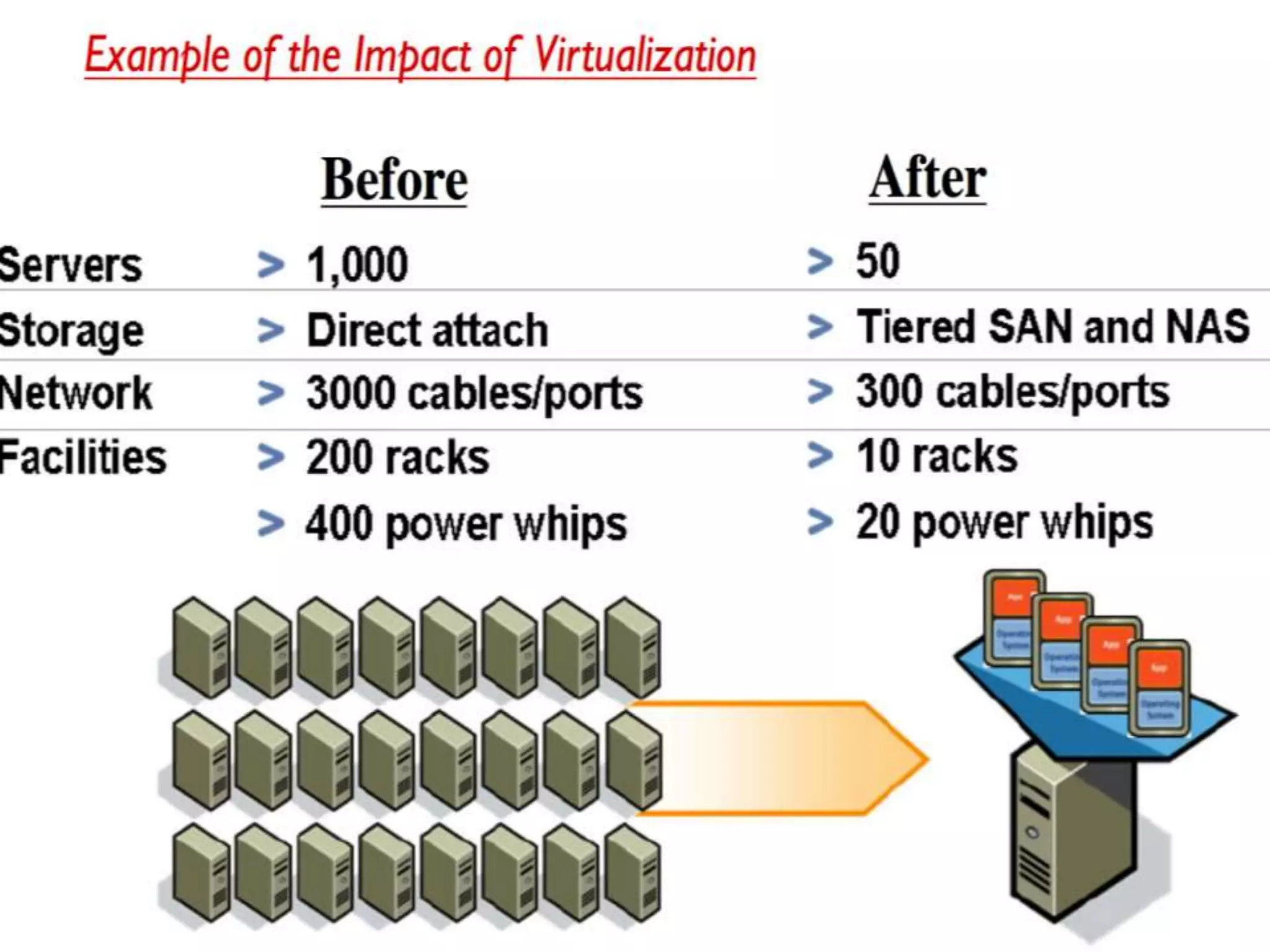
Cont..
•Before virtualization
5
Cont.…
•After Virtualization 6
Virtualization Opportunities
↘Virtualization is the process of abstracting the
physical resources to the pool of virtual resources
that can be given to any virtual machines (VMs).
The different resources can be virtualized:
1. memory
2. processors
3. storage
4. network
7
Processor Virtualization
Processor virtualization allows the VMs to share
the virtual processors that are abstracted from
the physical processors available at the
underlying infrastructure.
The virtualization layer abstracts the physical
processor to the pool of virtual processors that is
shared by the VMs. The virtualization layer will be
normally any hypervisors.
8
Cont..
9
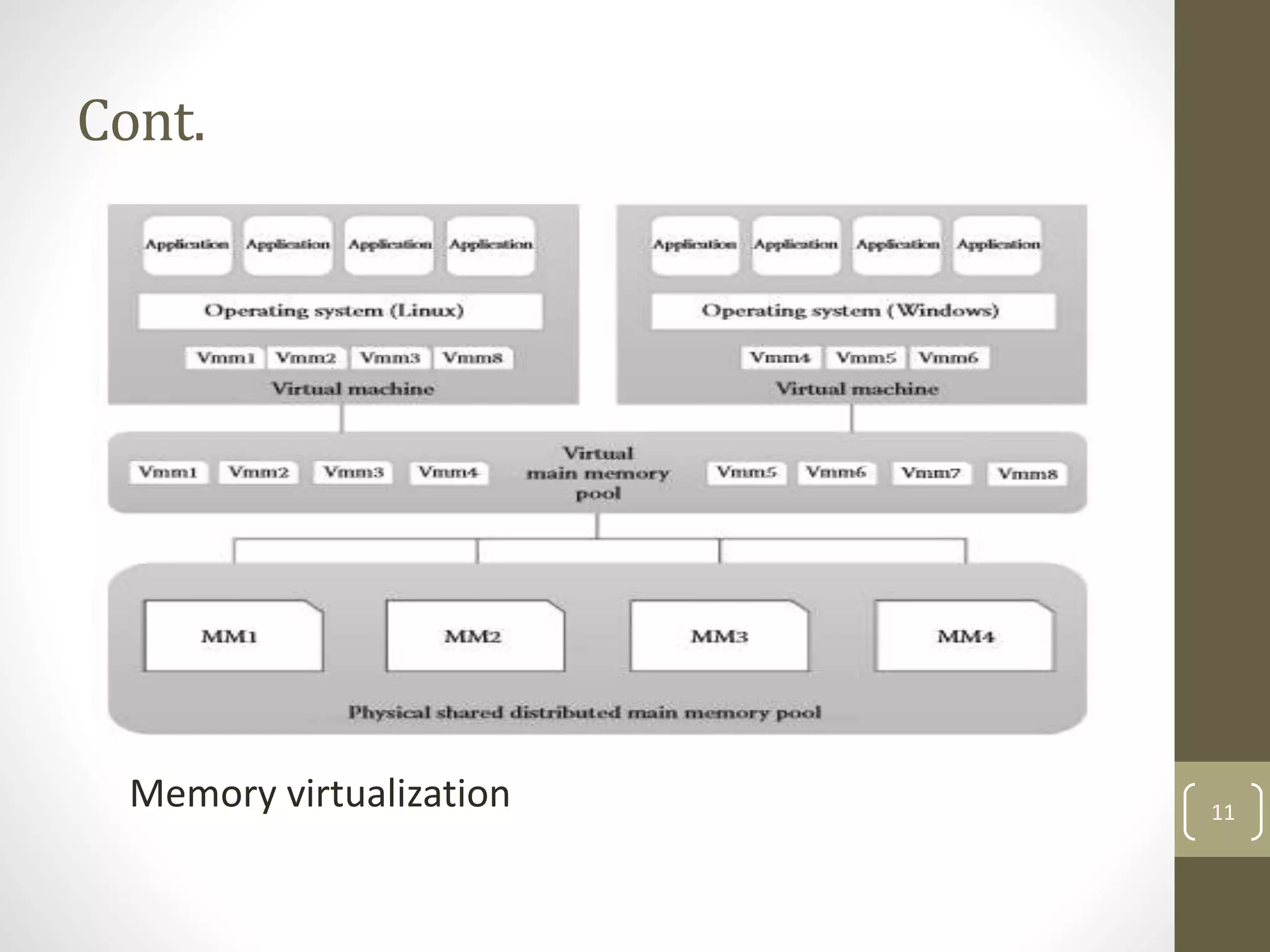
Memory Virtualization
The process of providing a virtual main memory to the
VMs is known as memory virtualization or main memory
virtualization.
Main memory virtualization can also be achieved by using
the hypervisor software. Normally, in the virtualized data
centers, the unused main memory of the different servers
will consolidate as a virtual main memory pool and can be
given to the VMs.
10
Cont.
Memory virtualization 11
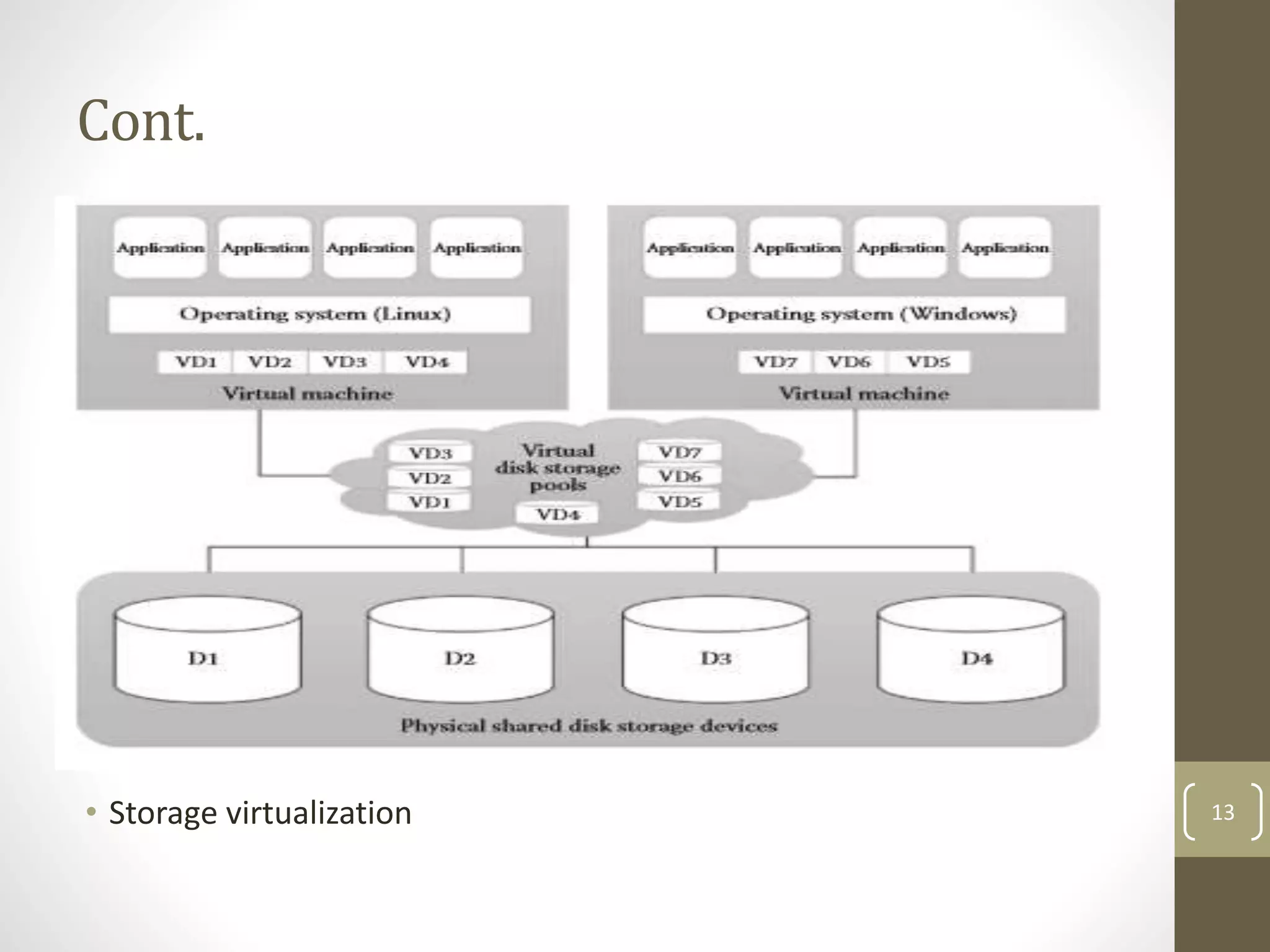
Storage Virtualization
Storage virtualization is a form of resource
virtualization where multiple physical storage disks
are abstracted as a pool of virtual storage disks to
the VMs. Normally, the virtualized storage will be
called a logical storage.
The other advanced storage virtualization
techniques are storage area networks (SAN) and
network-attached storage (NAS).
12
Cont.
• Storage virtualization 13
Network Virtualization
Network virtualization is a type of resource virtualization
in which the physical network can be abstracted to create
a virtual network.
Normally, the physical network components like router,
switch, and Network Interface Card (NIC) will be
controlled by the virtualization software to provide virtual
network components.
The virtual network is a single software-based entity that
contains the network hardware and software resources.
14
Cont.
• Network virtualization 15
Data Virtualization
Data virtualization is the ability to retrieve the data
without knowing its type and the physical location where
it is stored. It aggregates the heterogeneous data from
the different sources to a single logical/virtual volume of
data.
This logical data can be accessed from any applications
such as web services, E-commerce applications, web
portals, Software as a Service (SaaS) applications, and
mobile application.
16
Cont.
• Data virtualization
17
Application Virtualization
Application virtualization is the enabling technology for
SaaS of cloud computing.
The application virtualization offers the ability to the user to
use the application without the need to install any software
or tools in the machine. Normally, the applications will be
developed and hosted in the central server.
The hosted application will be again virtualized, and the
users will be given the separated/isolated virtual copy to
access.
18
Cont.
• Application virtualization 19
Briefly About Virtualization
Hypervisor/Virtual Machine
Monitor
Host Operating System
Guest Operating System
Every Virtual Machine is given a
set of virtual hardware.
Involves many software and
hardware architectural
modifications. (Memory
Management, CPU
Management)
20 of
42
When would we use virtualization
Running different operating system in one computer
To make best use of computer hardware
Maintaining capability with older system
21
Approaches to Virtualization
There are three different approaches to virtualization.
Before discussing them, it is important to know about
protection rings in OSs.
Protection rings are used to isolate the OS from
untrusted user applications.
The OS can be protected with different privilege levels. In
protection ring architecture, the rings are arranged in
hierarchical order from ring 0 to ring 3
22
Cont.
23
Cont.
 There are three types of approaches followed for
virtualization:
1. Full virtualization
2. Para virtualization
3. Hardware-assisted virtualization
24
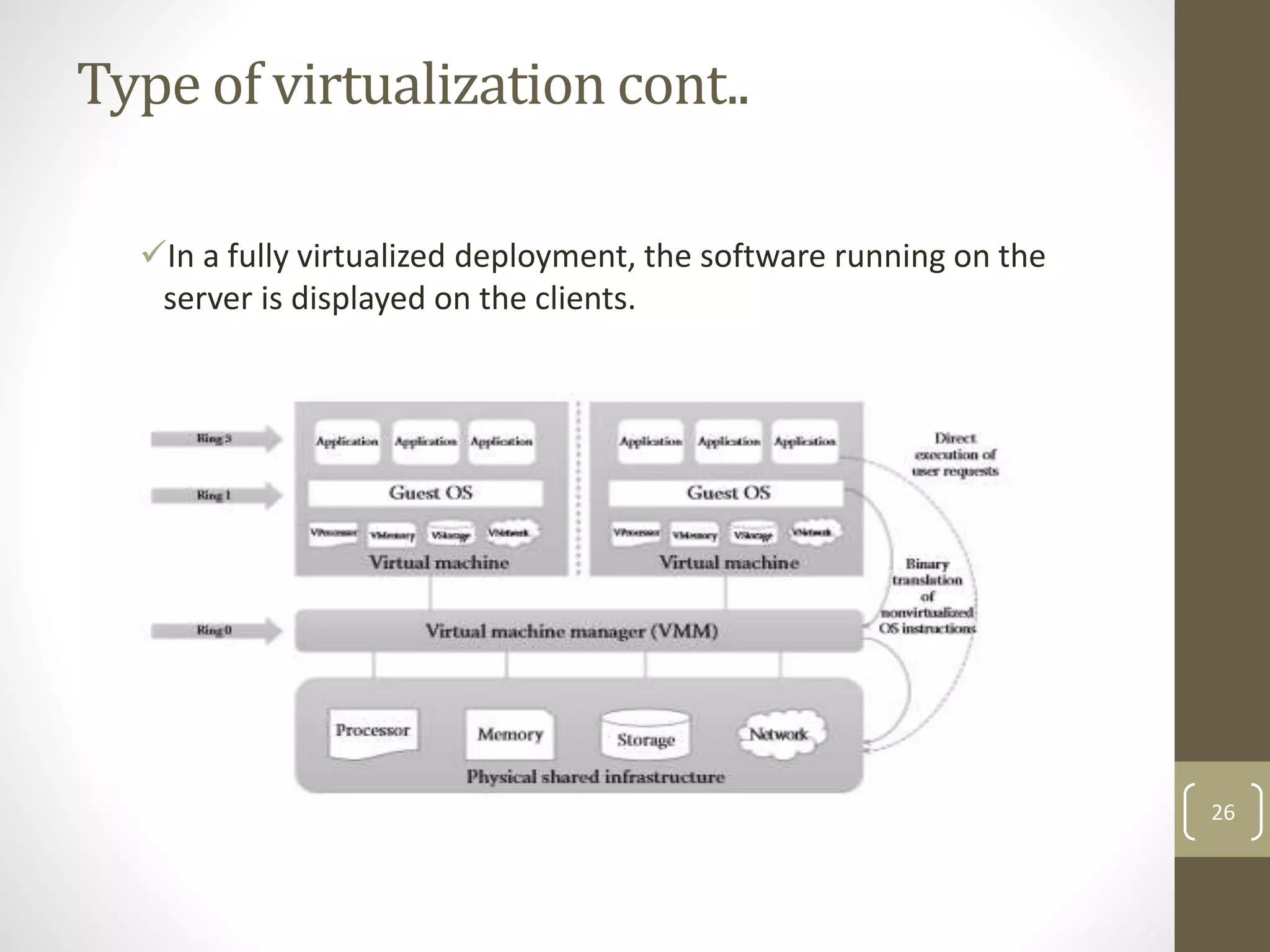
1.Full Virtualization
Full virtualization is a technique in which a complete
installation of one machine is run on another.
• –The result is a system in which all software running
on the server is within a virtual machine
25
Type of virtualization cont..
In a fully virtualized deployment, the software running on the
server is displayed on the clients.
26
Type of virtualization cont..
Virtualization is relevant to cloud computing because
it is one of the ways in which you will access services
on the cloud.
That is, the remote datacenter may be delivering
your services in a fully virtualized format.
27
Type of virtualization cont..
Full virtualization has been successful for several
purposes:
Sharing a computer system among multiple users
Isolating users from each other and from the control
program
28
Partial virtualization
Partial virtualization allows multiple operating
systems to run on a single hardware device at the same
time by more efficiently using system resources, like
processors and memory
Partial virtualization typically runs better than the full
virtualization model.
29
Partial virtualization
In Partial virtualization deployment, many different operating
systems can run simultaneously.
30
Hardware-Assisted Virtualization
In the two previous approaches, there is an additional
overhead of binary translation or modification of guest OS
to achieve virtualization.
But in this approach, hardware vendors itself, like Intel and
AMD, offer the support for virtualization, which eliminates
much overhead involved in the binary translation and guest
OS modification.
Popular hardware vendors like Intel and AMD has given
the hardware extension to their x86-based processor to
support virtualization. For example, the Intel releases its
Intel Virtualization Technology (VT-x) and AMD releases its
AMD-v to simplify the virtualization techniques.
31
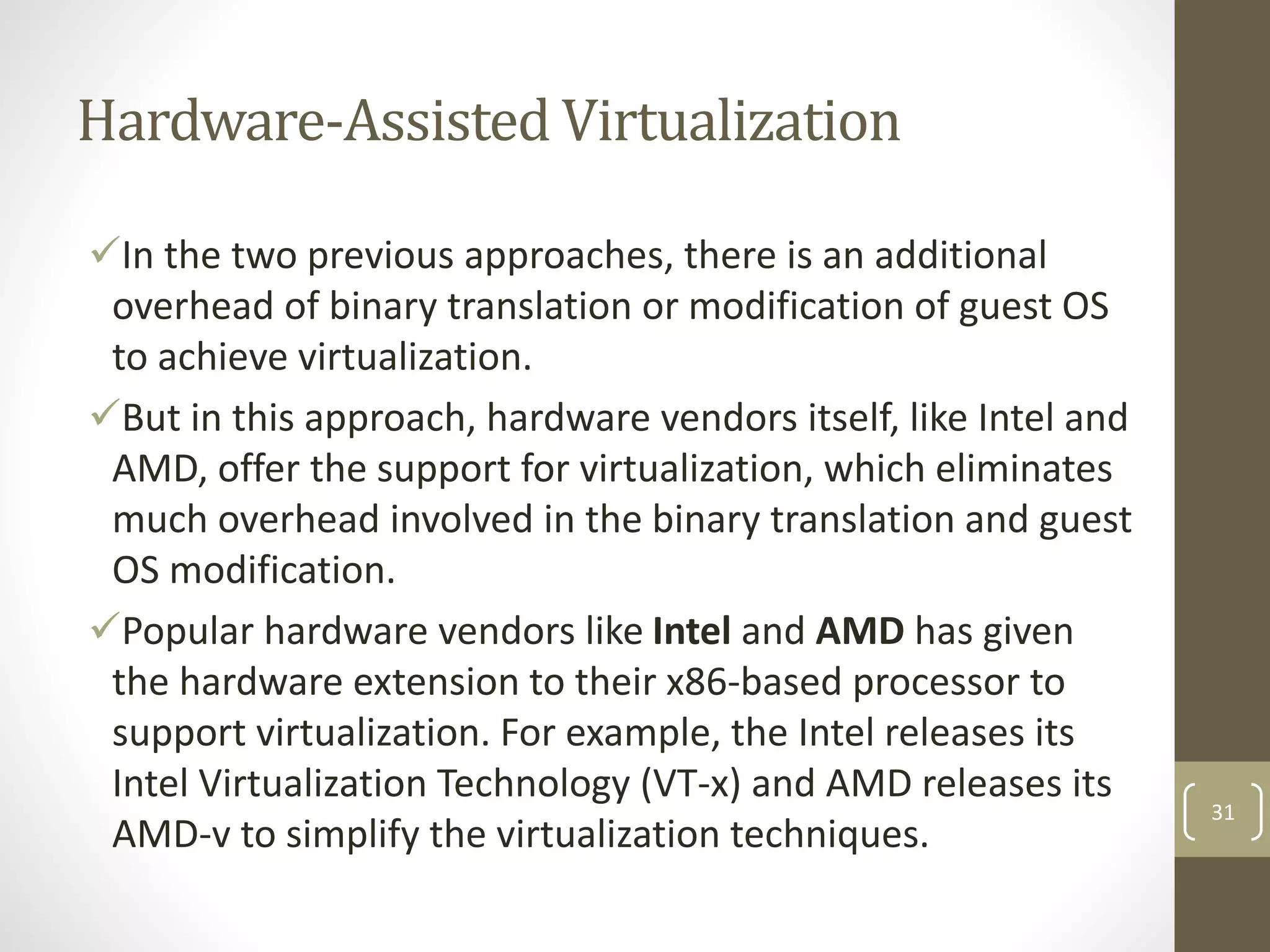
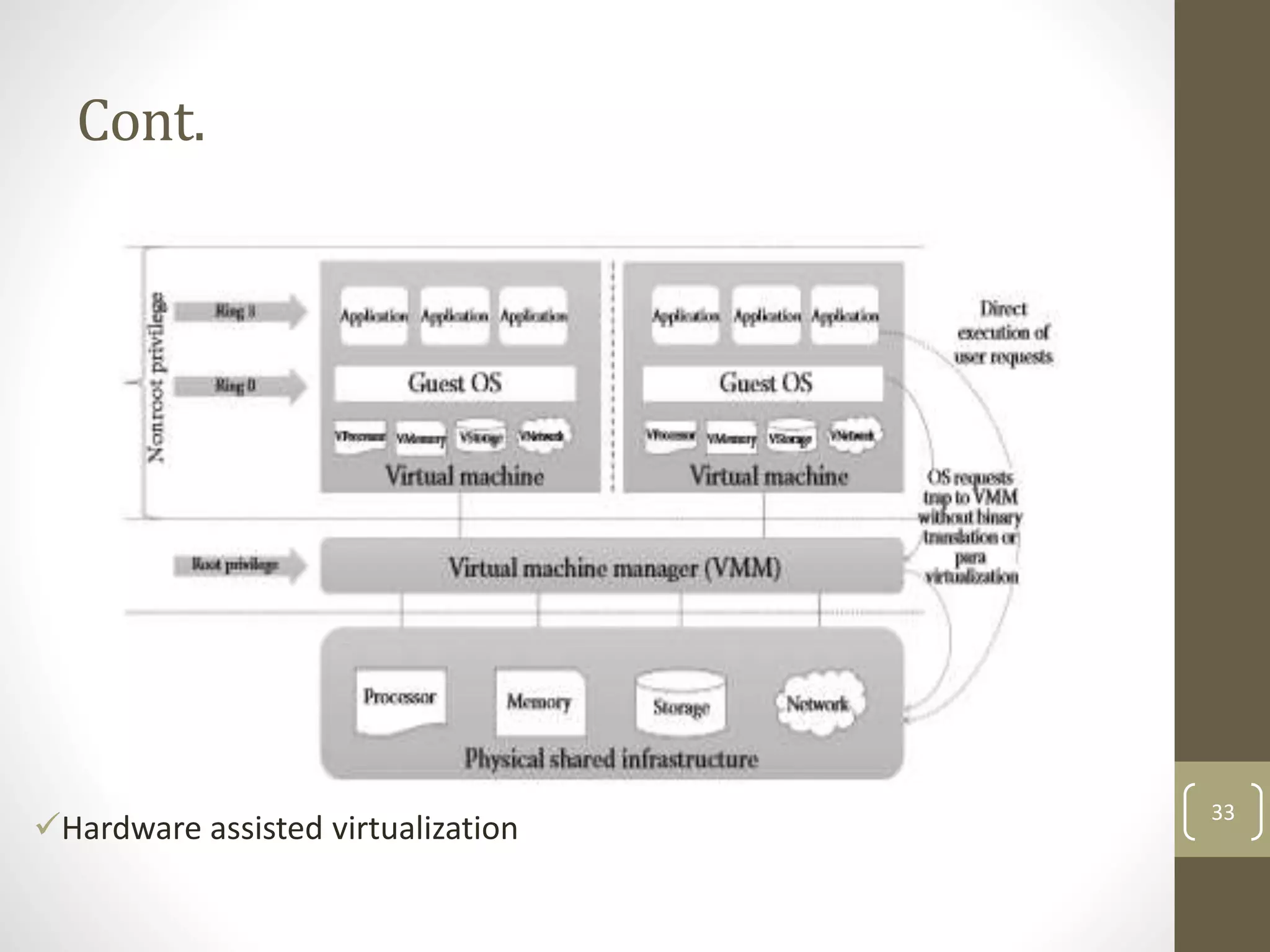
Cont.
In hardware-assisted virtualization, the VMM has the
highest privilege (root privilege) level even though it is
working below ring 0.
The OS resides at ring 0 and the user application at ring 3.
Unlike the other virtualization approaches, the guest OS
and the user applications are having the same privilege
level (non root privilege level).
32
Cont.
Hardware assisted virtualization
33
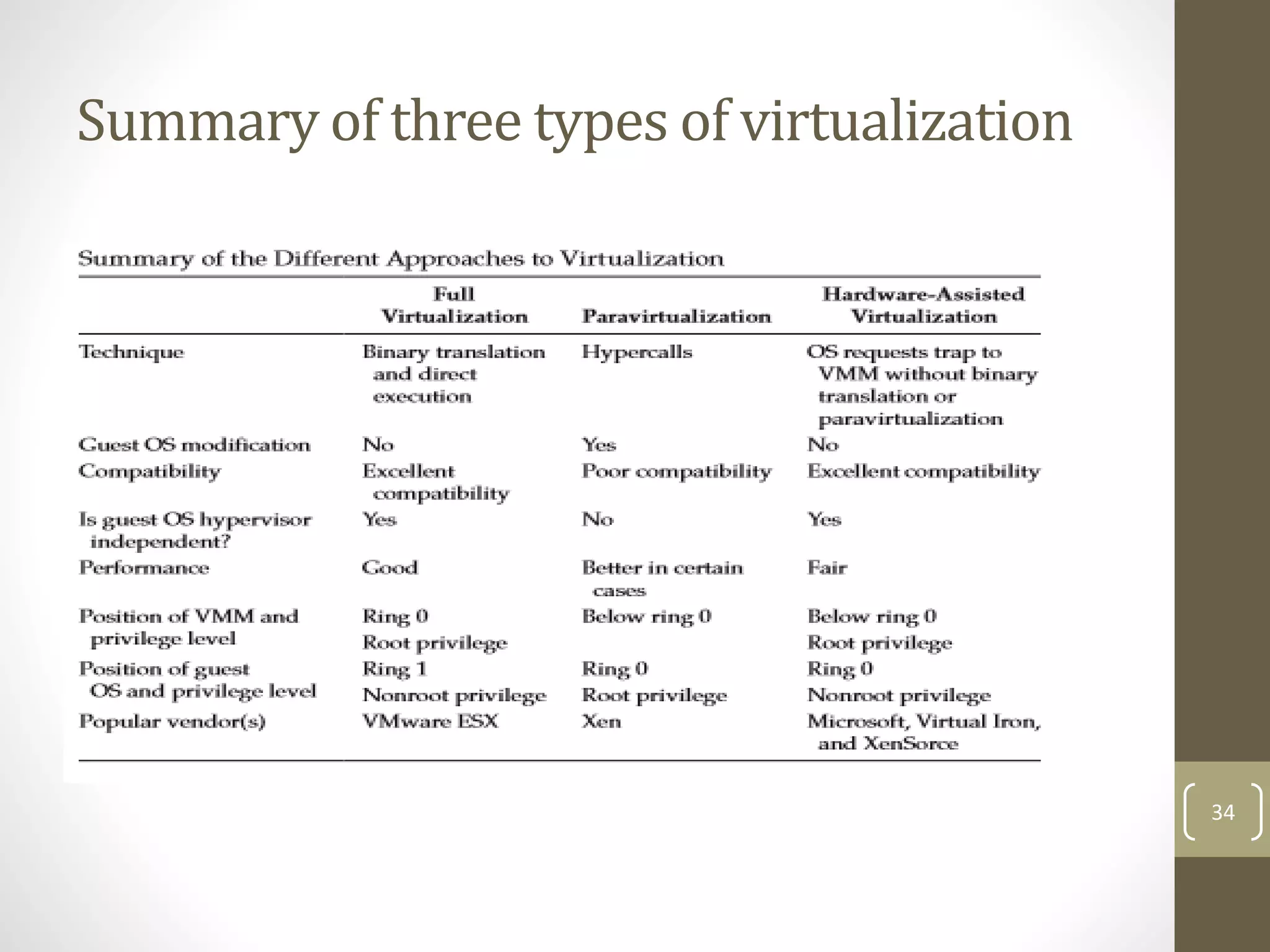
Summary of three types of virtualization
34
Benefits
Virtualization can help companies maximize the value of
IT investments, decreasing the server hardware, energy
consumption, and cost and complexity of managing IT
systems while increasing the flexibility of the overall
environment.
35
Benefits
But there are also reduced costs across your organization.
If you reduce the number of physical servers you use, then
you save money on hardware, cooling, and electricity.
36
hypervisor
A hypervisor, also called a virtual machine manager
(VMM), is a program that allows multiple operating
systems to share a single hardware host.
 Each operating system appears to have the host's
processor, memory, and other resources all to itself.
37
What is a hypervisor?
The virtualization tools or hypervisor is the low level
program that allows multiple operating systems to run
concurrently on a single host computer.
hypervisor has two type:
1.native or bare-metal hypervisors
2.hosted hypervisors
38
Native or bare-metal hypervisors
These hypervisors run directly on the host's hardware to
control the hardware and to manage guest operating
systems.
For this reason, they are sometimes called bare metal
hypervisors. A guest operating system runs as a process
on the host.
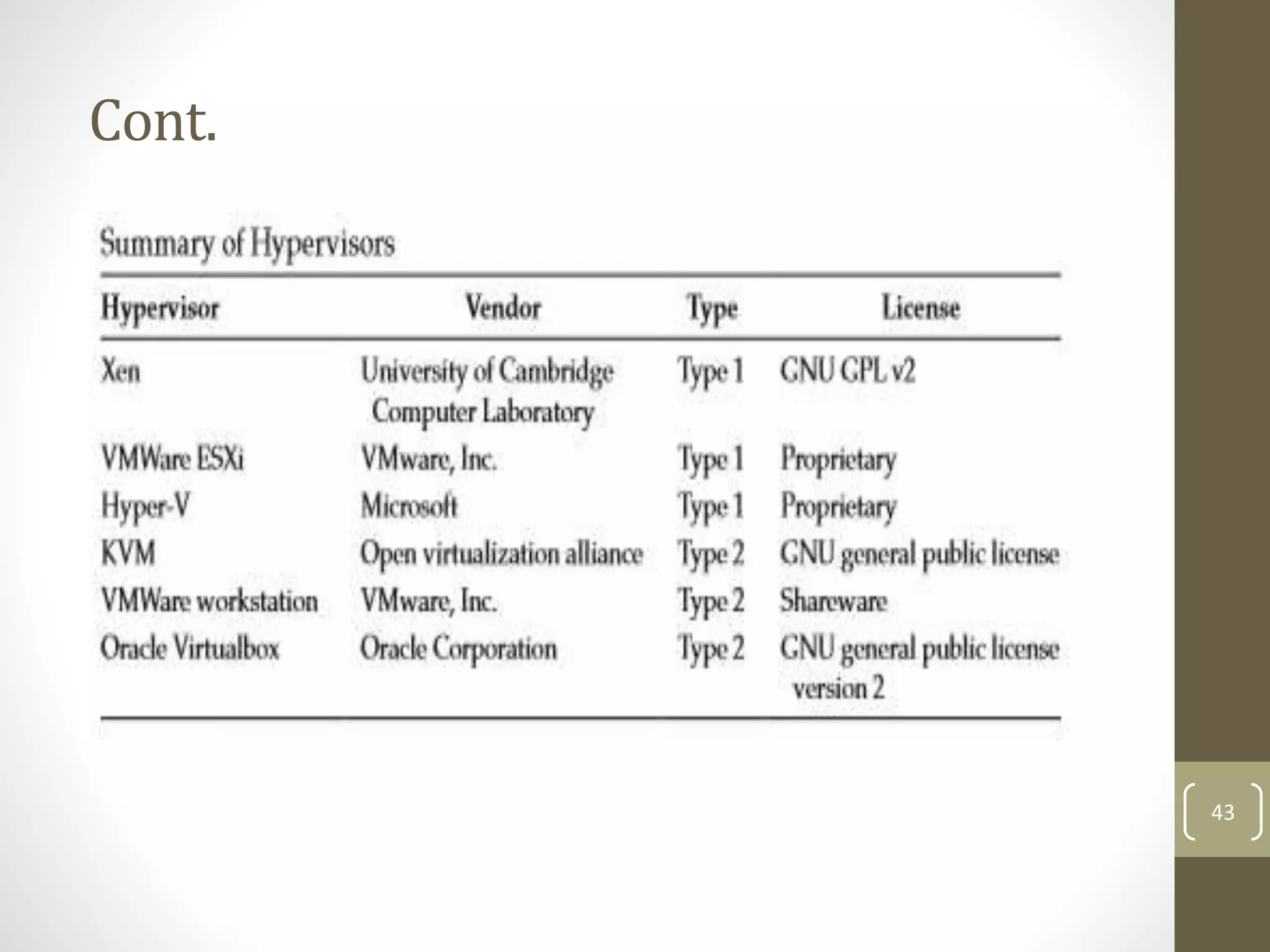
Example: Xen Server, VMware ESX/ESXi and Microsoft
Hyper-V 2008/2012.
39
Native or bare-metal hypervisors
40
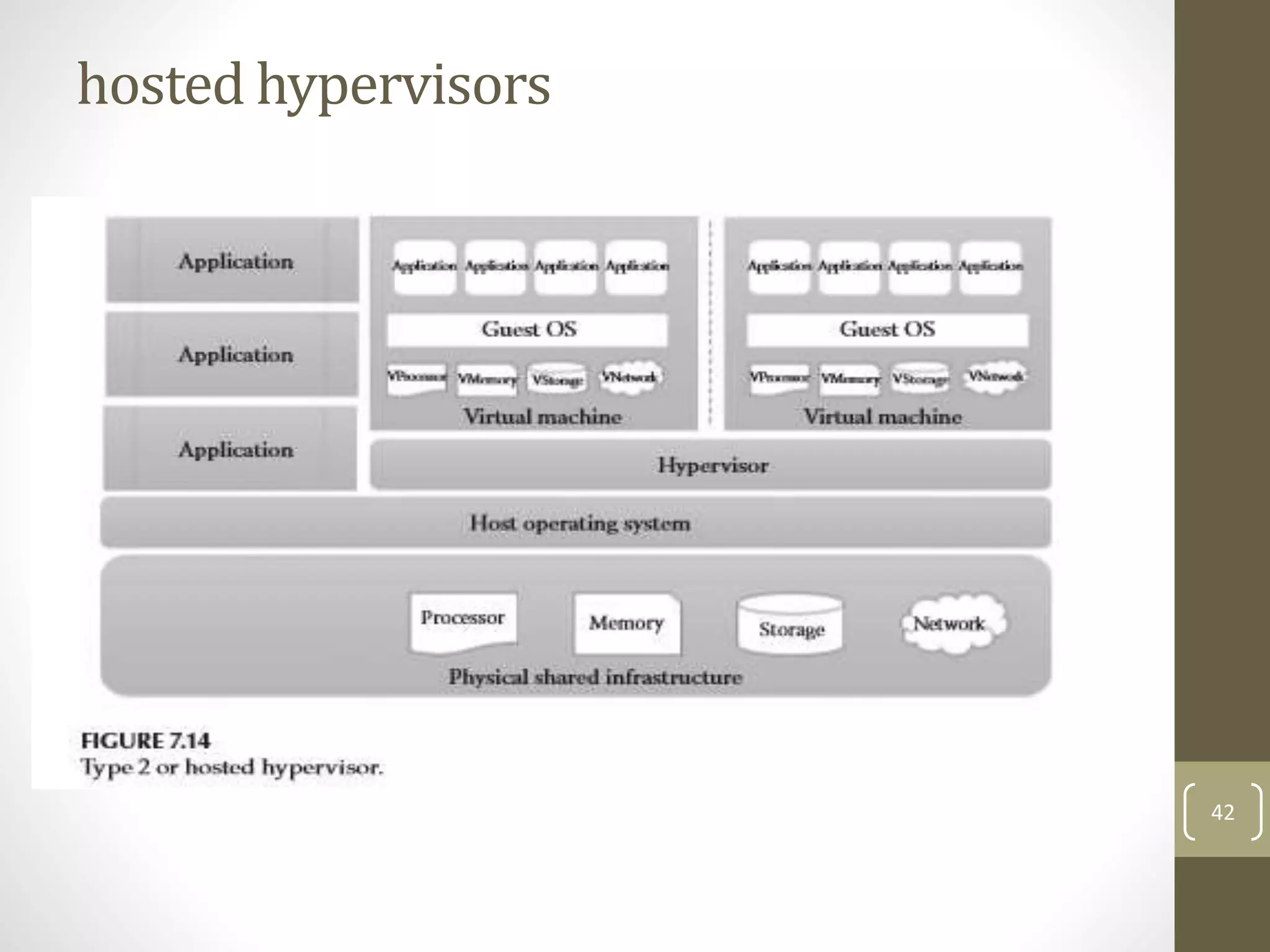
hosted hypervisors
These hypervisors run on a conventional operating
system just as other computer programs do.
 Type-2 hypervisors abstract guest operating systems
from the host operating system.
For example: VMware Workstation, VMware Player and
Virtual Box
41
hosted hypervisors
42
Cont.
43
ESX & ESXi
ESX (Elastic Sky X) is the VMware’s enterprise server
virtualization platform.
 In ESX, VMkernel is the virtualization kernel which is
managed by a console operating system which is also called
as Service console.
Which is linux based and its main purpose is to provide a
Management interface for the host and lot of management
agents and other third party software agents are installed
on the service console to provide the functionalists like
hardware management and monitoring of ESX hypervisor. 44
ESX
45
ESXi Compare to ESX
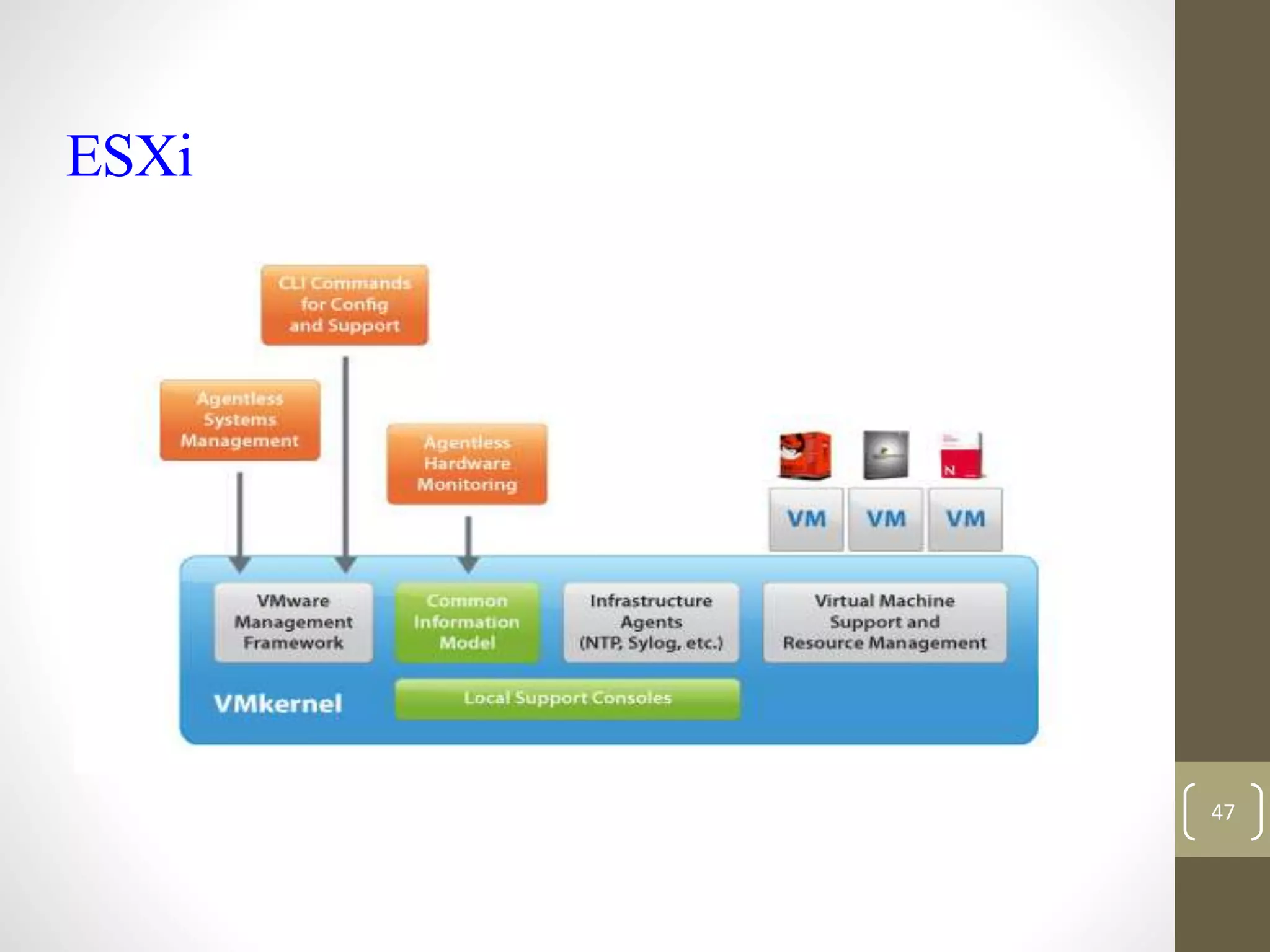
ESXi (Elastic sky X Integrated) is also the VMware’s enterprise
server virtualization platform.
In ESXi, Service console is removed. All the VMware related
agents and third party agents such as management and
monitoring agents can also run directly on the VMkernel.
 ESXi uses Direct Console User Interface (DCUI) instead of a
service console to perform management of ESXi server. ESXi
installation will happen very quickly as compared to ESX
installation.
46
ESXi
47
Techniques of VMware
VMotion
Storage VMotion
High Availability
48
VMotion
VMotion allows you to
quickly move an entire
running virtual machine
from one host to
another.
The entire state of a
virtual machine is
encapsulated and the
VMFS file system allows
both the source and the
target ESX host to access
the virtual machine files
concurrently.
49
Storage VMotion
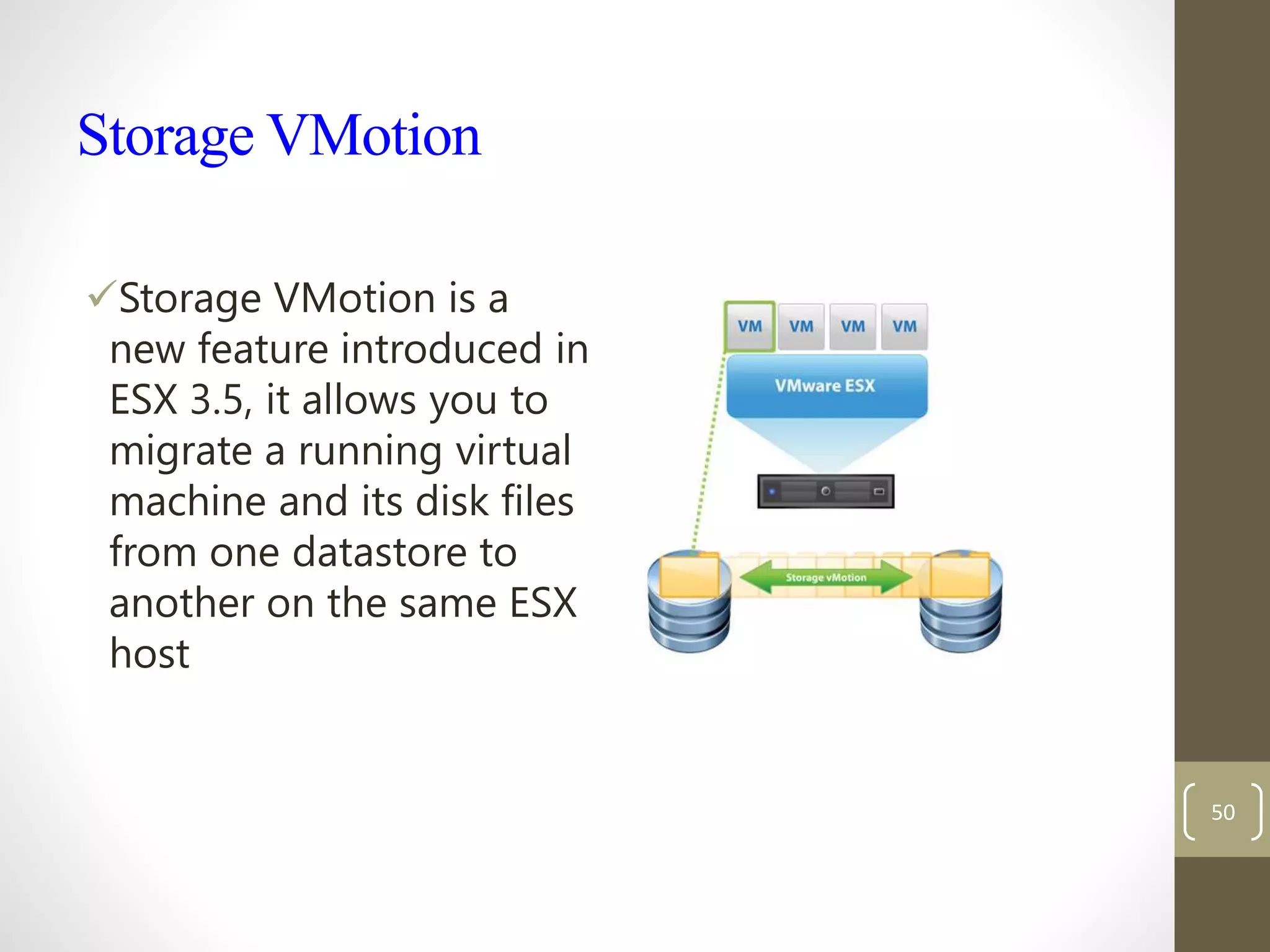
Storage VMotion is a
new feature introduced in
ESX 3.5, it allows you to
migrate a running virtual
machine and its disk files
from one datastore to
another on the same ESX
host
50
HighAvailability (HA)
Continuously monitors all hosts
in a cluster and restarts virtual
machines affected by a host
failure on other hosts
Can also monitor guest OS's for a
failure via a heartbeat and restart
them on the same host in case of
a failure
Continuously monitors and
chooses the optimal physical
servers within a resource pool on
which to restart virtual machines 51
52
Summary
• Virtualization is a widely used technology in the IT industry to increase resource
utilization and ROI. It allows the same physical infrastructure to be shared between
multiple OSs and applications. The other benefits of virtualization include dynamic
data center, green IT support, ease of administration, and improved disaster
recovery. There are three types of approaches used to achieve virtualization, namely
full virtualization, paravirtualization, and hardware-assisted virtualization. Full
virtualization completely abstracts the guest OS from the underlying infrastructure.
Paravirtualization provides partial abstraction of the guest OS from the underlying
infrastructure with slight modification of the guest OS. In hardware-assisted
virtualization, the hardware vendor itself offers the support for virtualization.
Hypervisors are the key drivers in enabling virtualization in large-scale cloud data
centers. There are two types of hypervisors available, namely type 1 or bare metal
hypervisor and type 2 or hosted hypervisors.
53
Thanks
54

Virtualizaiton-3.pptx

  • 1.
  • 2.
    Learning Objectives ↘ Understandthe basics of virtualization ↘ Understand how the different resources such as processors, memory, storage, and network can be virtualized ↘ Understand the pros and cons of different approaches to virtualization ↘ Understand the basics of hypervisor and its security issues ↘ Understand how cloud computing is different from virtualization ↘ Understand how cloud computing leverages the virtualization for its different service models 2
  • 3.
    Virtualization ↘Virtualization is theidea of partitioning or dividing the resources of a single server into multiple segregated VMs. ↘Virtualization is the idea of dividing a single hard ware or software into multiple system ↘Virtualization technology has been proposed and developed over a relatively long period. ↘The earliest use of VMs was by IBM in 1960, intended to leverage investments in expensive mainframe computers 3
  • 4.
    Virtualization ↘Virtualization refers tothe act of creating a virtual (rather than actual) version of something, including (but not limited to) a virtual computer hardware platform, operating system (OS), storage device, or computer network resources. 4
  • 5.
  • 6.
  • 7.
    Virtualization Opportunities ↘Virtualization isthe process of abstracting the physical resources to the pool of virtual resources that can be given to any virtual machines (VMs). The different resources can be virtualized: 1. memory 2. processors 3. storage 4. network 7
  • 8.
    Processor Virtualization Processor virtualizationallows the VMs to share the virtual processors that are abstracted from the physical processors available at the underlying infrastructure. The virtualization layer abstracts the physical processor to the pool of virtual processors that is shared by the VMs. The virtualization layer will be normally any hypervisors. 8
  • 9.
  • 10.
    Memory Virtualization The processof providing a virtual main memory to the VMs is known as memory virtualization or main memory virtualization. Main memory virtualization can also be achieved by using the hypervisor software. Normally, in the virtualized data centers, the unused main memory of the different servers will consolidate as a virtual main memory pool and can be given to the VMs. 10
  • 11.
  • 12.
    Storage Virtualization Storage virtualizationis a form of resource virtualization where multiple physical storage disks are abstracted as a pool of virtual storage disks to the VMs. Normally, the virtualized storage will be called a logical storage. The other advanced storage virtualization techniques are storage area networks (SAN) and network-attached storage (NAS). 12
  • 13.
  • 14.
    Network Virtualization Network virtualizationis a type of resource virtualization in which the physical network can be abstracted to create a virtual network. Normally, the physical network components like router, switch, and Network Interface Card (NIC) will be controlled by the virtualization software to provide virtual network components. The virtual network is a single software-based entity that contains the network hardware and software resources. 14
  • 15.
  • 16.
    Data Virtualization Data virtualizationis the ability to retrieve the data without knowing its type and the physical location where it is stored. It aggregates the heterogeneous data from the different sources to a single logical/virtual volume of data. This logical data can be accessed from any applications such as web services, E-commerce applications, web portals, Software as a Service (SaaS) applications, and mobile application. 16
  • 17.
  • 18.
    Application Virtualization Application virtualizationis the enabling technology for SaaS of cloud computing. The application virtualization offers the ability to the user to use the application without the need to install any software or tools in the machine. Normally, the applications will be developed and hosted in the central server. The hosted application will be again virtualized, and the users will be given the separated/isolated virtual copy to access. 18
  • 19.
  • 20.
    Briefly About Virtualization Hypervisor/VirtualMachine Monitor Host Operating System Guest Operating System Every Virtual Machine is given a set of virtual hardware. Involves many software and hardware architectural modifications. (Memory Management, CPU Management) 20 of 42
  • 21.
    When would weuse virtualization Running different operating system in one computer To make best use of computer hardware Maintaining capability with older system 21
  • 22.
    Approaches to Virtualization Thereare three different approaches to virtualization. Before discussing them, it is important to know about protection rings in OSs. Protection rings are used to isolate the OS from untrusted user applications. The OS can be protected with different privilege levels. In protection ring architecture, the rings are arranged in hierarchical order from ring 0 to ring 3 22
  • 23.
  • 24.
    Cont.  There arethree types of approaches followed for virtualization: 1. Full virtualization 2. Para virtualization 3. Hardware-assisted virtualization 24
  • 25.
    1.Full Virtualization Full virtualizationis a technique in which a complete installation of one machine is run on another. • –The result is a system in which all software running on the server is within a virtual machine 25
  • 26.
    Type of virtualizationcont.. In a fully virtualized deployment, the software running on the server is displayed on the clients. 26
  • 27.
    Type of virtualizationcont.. Virtualization is relevant to cloud computing because it is one of the ways in which you will access services on the cloud. That is, the remote datacenter may be delivering your services in a fully virtualized format. 27
  • 28.
    Type of virtualizationcont.. Full virtualization has been successful for several purposes: Sharing a computer system among multiple users Isolating users from each other and from the control program 28
  • 29.
    Partial virtualization Partial virtualizationallows multiple operating systems to run on a single hardware device at the same time by more efficiently using system resources, like processors and memory Partial virtualization typically runs better than the full virtualization model. 29
  • 30.
    Partial virtualization In Partialvirtualization deployment, many different operating systems can run simultaneously. 30
  • 31.
    Hardware-Assisted Virtualization In thetwo previous approaches, there is an additional overhead of binary translation or modification of guest OS to achieve virtualization. But in this approach, hardware vendors itself, like Intel and AMD, offer the support for virtualization, which eliminates much overhead involved in the binary translation and guest OS modification. Popular hardware vendors like Intel and AMD has given the hardware extension to their x86-based processor to support virtualization. For example, the Intel releases its Intel Virtualization Technology (VT-x) and AMD releases its AMD-v to simplify the virtualization techniques. 31
  • 32.
    Cont. In hardware-assisted virtualization,the VMM has the highest privilege (root privilege) level even though it is working below ring 0. The OS resides at ring 0 and the user application at ring 3. Unlike the other virtualization approaches, the guest OS and the user applications are having the same privilege level (non root privilege level). 32
  • 33.
  • 34.
    Summary of threetypes of virtualization 34
  • 35.
    Benefits Virtualization can helpcompanies maximize the value of IT investments, decreasing the server hardware, energy consumption, and cost and complexity of managing IT systems while increasing the flexibility of the overall environment. 35
  • 36.
    Benefits But there arealso reduced costs across your organization. If you reduce the number of physical servers you use, then you save money on hardware, cooling, and electricity. 36
  • 37.
    hypervisor A hypervisor, alsocalled a virtual machine manager (VMM), is a program that allows multiple operating systems to share a single hardware host.  Each operating system appears to have the host's processor, memory, and other resources all to itself. 37
  • 38.
    What is ahypervisor? The virtualization tools or hypervisor is the low level program that allows multiple operating systems to run concurrently on a single host computer. hypervisor has two type: 1.native or bare-metal hypervisors 2.hosted hypervisors 38
  • 39.
    Native or bare-metalhypervisors These hypervisors run directly on the host's hardware to control the hardware and to manage guest operating systems. For this reason, they are sometimes called bare metal hypervisors. A guest operating system runs as a process on the host. Example: Xen Server, VMware ESX/ESXi and Microsoft Hyper-V 2008/2012. 39
  • 40.
    Native or bare-metalhypervisors 40
  • 41.
    hosted hypervisors These hypervisorsrun on a conventional operating system just as other computer programs do.  Type-2 hypervisors abstract guest operating systems from the host operating system. For example: VMware Workstation, VMware Player and Virtual Box 41
  • 42.
  • 43.
  • 44.
    ESX & ESXi ESX(Elastic Sky X) is the VMware’s enterprise server virtualization platform.  In ESX, VMkernel is the virtualization kernel which is managed by a console operating system which is also called as Service console. Which is linux based and its main purpose is to provide a Management interface for the host and lot of management agents and other third party software agents are installed on the service console to provide the functionalists like hardware management and monitoring of ESX hypervisor. 44
  • 45.
  • 46.
    ESXi Compare toESX ESXi (Elastic sky X Integrated) is also the VMware’s enterprise server virtualization platform. In ESXi, Service console is removed. All the VMware related agents and third party agents such as management and monitoring agents can also run directly on the VMkernel.  ESXi uses Direct Console User Interface (DCUI) instead of a service console to perform management of ESXi server. ESXi installation will happen very quickly as compared to ESX installation. 46
  • 47.
  • 48.
    Techniques of VMware VMotion StorageVMotion High Availability 48
  • 49.
    VMotion VMotion allows youto quickly move an entire running virtual machine from one host to another. The entire state of a virtual machine is encapsulated and the VMFS file system allows both the source and the target ESX host to access the virtual machine files concurrently. 49
  • 50.
    Storage VMotion Storage VMotionis a new feature introduced in ESX 3.5, it allows you to migrate a running virtual machine and its disk files from one datastore to another on the same ESX host 50
  • 51.
    HighAvailability (HA) Continuously monitorsall hosts in a cluster and restarts virtual machines affected by a host failure on other hosts Can also monitor guest OS's for a failure via a heartbeat and restart them on the same host in case of a failure Continuously monitors and chooses the optimal physical servers within a resource pool on which to restart virtual machines 51
  • 52.
  • 53.
    Summary • Virtualization isa widely used technology in the IT industry to increase resource utilization and ROI. It allows the same physical infrastructure to be shared between multiple OSs and applications. The other benefits of virtualization include dynamic data center, green IT support, ease of administration, and improved disaster recovery. There are three types of approaches used to achieve virtualization, namely full virtualization, paravirtualization, and hardware-assisted virtualization. Full virtualization completely abstracts the guest OS from the underlying infrastructure. Paravirtualization provides partial abstraction of the guest OS from the underlying infrastructure with slight modification of the guest OS. In hardware-assisted virtualization, the hardware vendor itself offers the support for virtualization. Hypervisors are the key drivers in enabling virtualization in large-scale cloud data centers. There are two types of hypervisors available, namely type 1 or bare metal hypervisor and type 2 or hosted hypervisors. 53
  • 54.

Editor's Notes

  • #45 Understand the Difference between ESX and ESXi http://www.vmware.com/products/vsphere/esxi-and-esx/compare.html
  • #46 Understand the Difference between ESX and ESXi http://www.vmware.com/products/vsphere/esxi-and-esx/compare.html
  • #47 Understand the Difference between ESX and ESXi http://www.vmware.com/products/vsphere/esxi-and-esx/compare.html
  • #48 Understand the Difference between ESX and ESXi http://www.vmware.com/products/vsphere/esxi-and-esx/compare.html
  • #50 VMware VMotion http://www.vmware.com/files/pdf/VMware-VMotion-DS-EN.pdf
  • #51 VMware Storage VMotion http://www.vmware.com/files/pdf/VMware-Storage-VMotion-DS-EN.pdf
  • #52 VMware High Availability http://www.vmware.com/files/pdf/VMware-High-Availability-DS-EN.pdf