Claims Authentication


     Claims Authentication
AGENDA
• What is Claims?
• Claims in SharePoint
• Configuring and Using Claims in SharePoint
My Trip


Check In Counter        Boarding Gate
Terminology
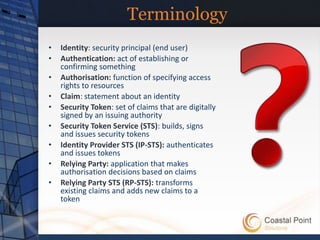
•   Identity: security principal (end user)
•   Authentication: act of establishing or
    confirming something
•   Authorisation: function of specifying access
    rights to resources
•   Claim: statement about an identity
•   Security Token: set of claims that are digitally
    signed by an issuing authority
•   Security Token Service (STS): builds, signs
    and issues security tokens
•   Identity Provider STS (IP-STS): authenticates
    and issues tokens
•   Relying Party: application that makes
    authorisation decisions based on claims
•   Relying Party STS (RP-STS): transforms
    existing claims and adds new claims to a
    token
Claims at an Airport


                                Boarding Gate


Identity: security principal (end user)
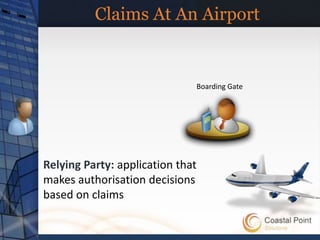
Claims At An Airport


                                  Boarding Gate


Relying Party: application that
makes authorisation decisions
based on claims
Claims At An Airport


                             Boarding Gate


Claim: statement about an identity
   “I am Thuan Le Cong”
   “My seat is 1c” 
Claims At An Airport


      Check In Counter       Boarding Gate


Identity Provider STS (IP-STS):
authenticates and issues tokens
Claims At An Airport
                                                       Name
                                                Seat Number
                                               Frequent Flyer


      Check In Counter         Boarding Gate


Security Token: set of claims that
are digitally signed by an issuing
authority
Claims at An Airport


Check In Counter   Boarding Gate
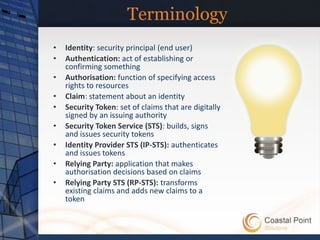
Terminology
•   Identity: security principal (end user)
•   Authentication: act of establishing or
    confirming something
•   Authorisation: function of specifying access
    rights to resources
•   Claim: statement about an identity
•   Security Token: set of claims that are digitally
    signed by an issuing authority
•   Security Token Service (STS): builds, signs
    and issues security tokens
•   Identity Provider STS (IP-STS): authenticates
    and issues tokens
•   Relying Party: application that makes
    authorisation decisions based on claims
•   Relying Party STS (RP-STS): transforms
    existing claims and adds new claims to a
    token
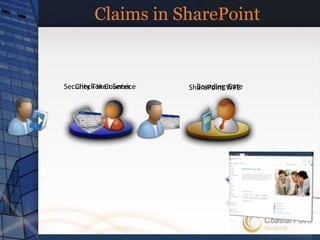
Claims in SharePoint


Security Token Service
   Check In Counter        Boarding Gate
                         SharePoint WFE
Why Claims?

• Decouples SharePoint from
  Authentication
• Support for multiple authentication
  providers on one URL
• Enables federation
Zones

Web Application – Classic                 Web Application – Claims   Windows
• Zone: Default
                            Windows
                                          • Zone: Default
                                                                     FBA
                                                                     SAML
• Zone: Intranet            FBA           • Zone: Intranet
                                                                     FBA

                                                                     Windows
• Zone: Internet            …             • Zone: Internet


• Zone: Extranet            …             • Zone: Extranet
                                                                     …


                                                                     …
• Zone: Custom               …            • Zone: Custom
Authentication Model

• Two Authentication Modes
  – Classic (“Legacy”)
  – Claims
Authentication methods
• Windows Authentication: Uses the Windows
  infrastructure, providing support for NTML,
  Kerberos, Anonymous, Basic, and Digest
  authentication.
• Forms-Based Authentication (FBA) Utilizes a
  username and password HTML form that
  queries a membership provider in the back-
  end.
• SAML token-based Authentication Uses an
  external identity provider that supports SAML
  1.1 and WS-Federation Passive profile.
Externalized Authentication
Claims-based Authentication
Browser Based Sign-IN
Identity Mapping
   CLASSIC                                         CLAIMS


                                                      FBA
   NT Token           NT Token                                      SAML1.1+
                                               SQL, LDAP, Custom,
Windows Identity   Windows Identity                                  ADFS, …
                                                       …


                                 SAML Token
                              Claims Based Identity


                                      SPUser
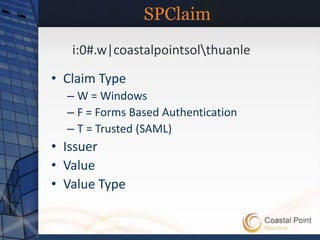
SPClaim
   i:0#.w|coastalpointsolthuanle

• Claim Type
  – W = Windows
  – F = Forms Based Authentication
  – T = Trusted (SAML)
• Issuer
• Value
• Value Type
Forms Based Authentication

• Exposed through Claims
  – Claims Identity instead of Generic Identity
• Implemented as a Claims Provider
  – Implement ValidateUser()
• STS talks to membership provider to
  validate user and issues a claims token
• Roles are converted to claims
Configure FBA


Create Authentication Provider


    Configure Web Application to use
    Authentication Provider


         Add Membership/Role Provider
         web.config entries (CA, STS, FBA Web App)
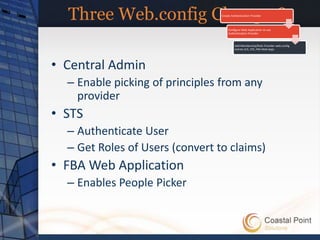
Three Web.config Changes?      Create Authentication Provider


                                     Configure Web Application to use
                                     Authentication Provider


                                          Add Membership/Role Provider web.config
                                          entries (CA, STS, FBA Web App)


• Central Admin
  – Enable picking of principles from any
    provider
• STS
  – Authenticate User
  – Get Roles of Users (convert to claims)
• FBA Web Application
  – Enables People Picker
DEMO
Claims Authentication
Summary

• What is Claims?
• How claims work in SharePoint
• How to configure FBA
hopefully
Questions and Answers
           ^

Claims Based Authentication A Beginners Guide

  • 1.
    Claims Authentication Claims Authentication
  • 2.
    AGENDA • What isClaims? • Claims in SharePoint • Configuring and Using Claims in SharePoint
  • 3.
    My Trip Check InCounter Boarding Gate
  • 4.
    Terminology • Identity: security principal (end user) • Authentication: act of establishing or confirming something • Authorisation: function of specifying access rights to resources • Claim: statement about an identity • Security Token: set of claims that are digitally signed by an issuing authority • Security Token Service (STS): builds, signs and issues security tokens • Identity Provider STS (IP-STS): authenticates and issues tokens • Relying Party: application that makes authorisation decisions based on claims • Relying Party STS (RP-STS): transforms existing claims and adds new claims to a token
  • 5.
    Claims at anAirport Boarding Gate Identity: security principal (end user)
  • 6.
    Claims At AnAirport Boarding Gate Relying Party: application that makes authorisation decisions based on claims
  • 7.
    Claims At AnAirport Boarding Gate Claim: statement about an identity “I am Thuan Le Cong” “My seat is 1c” 
  • 8.
    Claims At AnAirport Check In Counter Boarding Gate Identity Provider STS (IP-STS): authenticates and issues tokens
  • 9.
    Claims At AnAirport Name Seat Number Frequent Flyer Check In Counter Boarding Gate Security Token: set of claims that are digitally signed by an issuing authority
  • 10.
    Claims at AnAirport Check In Counter Boarding Gate
  • 11.
    Terminology • Identity: security principal (end user) • Authentication: act of establishing or confirming something • Authorisation: function of specifying access rights to resources • Claim: statement about an identity • Security Token: set of claims that are digitally signed by an issuing authority • Security Token Service (STS): builds, signs and issues security tokens • Identity Provider STS (IP-STS): authenticates and issues tokens • Relying Party: application that makes authorisation decisions based on claims • Relying Party STS (RP-STS): transforms existing claims and adds new claims to a token
  • 12.
    Claims in SharePoint SecurityToken Service Check In Counter Boarding Gate SharePoint WFE
  • 13.
    Why Claims? • DecouplesSharePoint from Authentication • Support for multiple authentication providers on one URL • Enables federation
  • 14.
    Zones Web Application –Classic Web Application – Claims Windows • Zone: Default Windows • Zone: Default FBA SAML • Zone: Intranet FBA • Zone: Intranet FBA Windows • Zone: Internet … • Zone: Internet • Zone: Extranet … • Zone: Extranet … … • Zone: Custom … • Zone: Custom
  • 15.
    Authentication Model • TwoAuthentication Modes – Classic (“Legacy”) – Claims
  • 16.
    Authentication methods • WindowsAuthentication: Uses the Windows infrastructure, providing support for NTML, Kerberos, Anonymous, Basic, and Digest authentication. • Forms-Based Authentication (FBA) Utilizes a username and password HTML form that queries a membership provider in the back- end. • SAML token-based Authentication Uses an external identity provider that supports SAML 1.1 and WS-Federation Passive profile.
  • 17.
  • 18.
  • 19.
  • 20.
    Identity Mapping CLASSIC CLAIMS FBA NT Token NT Token SAML1.1+ SQL, LDAP, Custom, Windows Identity Windows Identity ADFS, … … SAML Token Claims Based Identity SPUser
  • 21.
    SPClaim i:0#.w|coastalpointsolthuanle • Claim Type – W = Windows – F = Forms Based Authentication – T = Trusted (SAML) • Issuer • Value • Value Type
  • 22.
    Forms Based Authentication •Exposed through Claims – Claims Identity instead of Generic Identity • Implemented as a Claims Provider – Implement ValidateUser() • STS talks to membership provider to validate user and issues a claims token • Roles are converted to claims
  • 23.
    Configure FBA Create AuthenticationProvider Configure Web Application to use Authentication Provider Add Membership/Role Provider web.config entries (CA, STS, FBA Web App)
  • 24.
    Three Web.config Changes? Create Authentication Provider Configure Web Application to use Authentication Provider Add Membership/Role Provider web.config entries (CA, STS, FBA Web App) • Central Admin – Enable picking of principles from any provider • STS – Authenticate User – Get Roles of Users (convert to claims) • FBA Web Application – Enables People Picker
  • 25.
  • 26.
    Summary • What isClaims? • How claims work in SharePoint • How to configure FBA
  • 27.