hpt vietnam corporationWORKFLOW
WorkflowSharepoint  DesignerWindow Workflow Foundation K2 blackpoint
SharepointDesigner
Sharepoint Designer - AdvantagesNo code interactive solutionsProfessional design can be developed and tested rapidly.Workflows can be created by users with less developer experience, such as Web designers or knowledge workers.Collaborate more efficiently with the built-in Workflow DesignerAutomatically generates ASP.NET forms, which you can then customize
Sharepoint Designer - DisadvantagesYou cannot deploy a workflow authored in Office SharePoint Designer 2007 to multiple lists. You cannot modify workflows authored in Office SharePoint Designer 2007InfoPath forms integration not availableCan author only sequential workflowsMust use activities provided.
Sharepoint Designer - Demo
Window Workflow Foundation
Window Workflow Foundation - AdvantagesCode-behind to write custom workflow by Visual C# or Visual Basic .NET.Visual Studio debugging available.Can use any forms technology.Can author custom activities for inclusion in workflowsCan author both sequential and state workflows.
Window Workflow Foundation - DisadvantagesMore experience .Net framework 3.0 or higher.Good  Visual Studio 2005 or higher.Strong asp.net, Infopath form.More time to design and develop workflow. High cost to maintain workflow.
K2 blackpoint - AdvantagesNo codeDesign K2 Studio and a Silverlight-based K2 Web Designer Non- developer and business users can use K2 blackpoint to create workflow.Manage list items, documents, libraries, Web content, sites and workspaces, and records.SharePoint forms are automatically created, based on process design.Integrate with infopath form.Support activity escalations.Integrate with line-of-business systems through Web services
K2 blackpoint - DisadvantagesCost buy license.Can’t Extensibility via K2 API
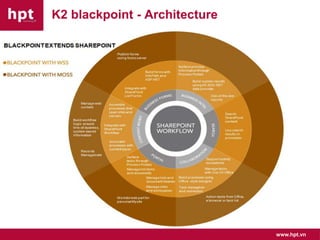
K2 blackpoint - Architecture
K2 blackpoint – K2 Studio
K2 blackpoint – K2 Web Designer
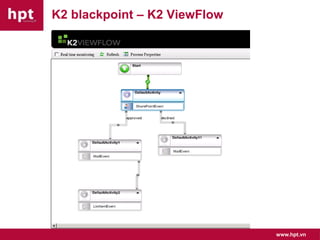
K2 blackpoint – K2 ViewFlow
K2 blackpoint – Permission
K2 blackpoint – K2 Process Portal
K2 blackpoint – Report
K2 blackpoint – Compare Edition
Demo
Compare tool to develop Workflow
Reference links and related informationOverview of MOSS Workflow Developmenthttp://msdn.microsoft.com/en-us/office/bb421687.aspxK2 blackpointhttp://www.k2.com/blackpointSharepoint team bloghttp://blogs.msdn.com/sharepoint
Q & Awww.hpt.vn
Thankswww.hpt.vn

Workflow

Editor's Notes

  • #4 No-code interactive solutionsWith Office SharePoint Designer 2007, you can build sophisticated no-code solutions such as Data Views, reports, and workflow tracking quickly and easily by using menus, task panes, and templates.Professional design can be developed and tested rapidly.Office SharePoint Designer 2007 provides the professional design tools that you need to create compelling SharePoint sites that are customized to your needs.Workflows can be created by users with less developer experience, such as Web designers or knowledge workersCollaborate more efficiently with the built-in Workflow DesignerYou can associate conditions and actions with tasks, lists, and document libraries to automate communications that are specific to your needs. For example, you can create a workflow to automatically route documents that are posted to the site for approval. With the Workflow Designer, you can refine the approval routing to actions that are based on the document being approved or rejected, or in case recipients are out of the office and have delegated their responsibilities to a colleague.Automatically generates ASP.NET forms, which you can then customizeYou can create ASP.NET pages and insert custom ASP.NET controls by using the same powerful on-control activity menus and control property grid found in development tools such as Microsoft Visual Studio 2005.
  • #5 No-code interactive solutionsWith Office SharePoint Designer 2007, you can build sophisticated no-code solutions such as Data Views, reports, and workflow tracking quickly and easily by using menus, task panes, and templates.Professional design can be developed and tested rapidly.Office SharePoint Designer 2007 provides the professional design tools that you need to create compelling SharePoint sites that are customized to your needs.Workflows can be created by users with less developer experience, such as Web designers or knowledge workersCollaborate more efficiently with the built-in Workflow DesignerYou can associate conditions and actions with tasks, lists, and document libraries to automate communications that are specific to your needs. For example, you can create a workflow to automatically route documents that are posted to the site for approval. With the Workflow Designer, you can refine the approval routing to actions that are based on the document being approved or rejected, or in case recipients are out of the office and have delegated their responsibilities to a colleague.Automatically generates ASP.NET forms, which you can then customizeYou can create ASP.NET pages and insert custom ASP.NET controls by using the same powerful on-control activity menus and control property grid found in development tools such as Microsoft Visual Studio 2005.
  • #6 You cannot deploy a workflow authored in Office SharePoint Designer 2007 to multiple lists. It is only valid for the list for which you created it.Because you are authoring the workflow directly against a list, the workflow is associated with the list at design time. Therefore, there is no association stage with workflows authored in Office SharePoint Designer 2007.
  • #8 Code-behind to write custom workflow by Visual C# or Visual Basic .NETCode-behind file enables developer to write custom Visual C# or Visual Basic .NET code to express business logicYou can use the Visual Studio 2005 Designer for Windows Workflow Foundation to create workflow templates and custom workflow activities. You can include custom code in your workflow, as well as design forms, such as ASP.NET forms, to be used by the workflow to communicate with the workflow users during association and run time. You can even create custom activities to be used in other workflows.Can use any forms technology.Can use any forms technology. For example, ASP forms for Windows SharePoint Services workflows, or InfoPath forms for SharePoint Server workflows
  • #9 Code-behind to write custom workflow by Visual C# or Visual Basic .NETCode-behind file enables developer to write custom Visual C# or Visual Basic .NET code to express business logicYou can use the Visual Studio 2005 Designer for Windows Workflow Foundation to create workflow templates and custom workflow activities. You can include custom code in your workflow, as well as design forms, such as ASP.NET forms, to be used by the workflow to communicate with the workflow users during association and run time. You can even create custom activities to be used in other workflows.Can use any forms technology.Can use any forms technology. For example, ASP forms for Windows SharePoint Services workflows, or InfoPath forms for SharePoint Server workflows
  • #11 K2 blackpoint has a powerful Office-style designer (K2 Studio) and a Silverlight-based K2 Web Designer that provides profound simplicity. Non-developers and business users can use K2 blackpoint to create new SharePoint workflows that span libraries, sites, InfoPath forms, server farms and organizations; manage approvals; and route documents and list items. With K2 blackpoint, everything is visual and wizard-driven, everything can be built without code, and users can assemble new applications from information that already exists.