Active Directory Federation Services – Part 2
Thomas Stensitzki
AD FS | Deep Dive
Page  2
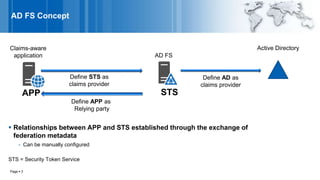
AD FS Concept
Page  3
 Relationships between APP and STS established through the exchange of
federation metadata
- Can be manually configured
STS = Security Token Service
Claims-aware
application AD FS
Active Directory
Define AD as
claims provider
APP
Define STS as
claims provider
STS
Define APP as
Relying party
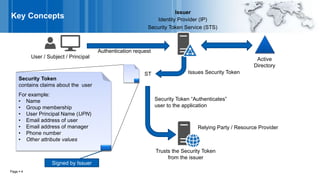
Key Concepts
Page  4
Active
Directory
User / Subject / Principal
Authentication request
Issues Security Token
Relying Party / Resource Provider
Identity Provider (IP)
Security Token Service (STS)
Issuer
Trusts the Security Token
from the issuer
Security Token
contains claims about the user
For example:
• Name
• Group membership
• User Principal Name (UPN)
• Email address of user
• Email address of manager
• Phone number
• Other attribute values
Security Token “Authenticates”
user to the application
ST
Signed by Issuer
Claims-Aware Application
 The application makes authorization decisions based on the claims contained in the
security token
- No longer required to make authentication decisions
 Same authorization logic for Application
- Deployed on the Intranet or as a Cloud service
- Receiving claims from its own organization’s users or users from trusted partners
Page  5
Passive Client
Page  6
ADFS STSClaims-aware App Active Directory
Browse app
Not authenticated
Redirected to STS
Authenticate
User
Query for user attributes
Return Security Token
Return page and cookie
Send Token
ST
ST
App trusts STS
X.509 Certificates
Page  7
 Trust is managed through certificates
 Certificates for
- HTTPS Communication
- Security token signing and encryption
 Require PKI for A & B certificates, C & D can be self-signed by AD FS server
CommunicationA
Signing
Relying party Issuer
ST
Encryption ST
B
Public key of C C
Public key of DD
Root for ARoot for B
Private Key
Federation Metadata
 During the establishment of the issuer / relying party trust, both parties will require
configuration which includes
- End-points for communication
- Claims offered by issuer
- Claims accepted by replying party
- Public keys for signing and encryption
 This information can be manually configured or automatically via the exchange of federation
metadata
- Federation metadata can be automatically updated
Page  8
Offered Claims Types
Extract from federationmetadata.xml
<fed:UriNamedClaimTypesOffered>
<fed:ClaimType Uri="http://schemas.xmlsoap.org/claims/EmailAddress">
<fed:DisplayName>Email Address</fed:DisplayName>
</fed:ClaimType>
<fed:ClaimType Uri="http://schemas.xmlsoap.org/claims/UPN">
<fed:DisplayName>User Principal Name</fed:DisplayName>
</fed:ClaimType>
<fed:ClaimType Uri="http://schemas.xmlsoap.org/claims/CommonName">
<fed:DisplayName>Common Name</fed:DisplayName>
</fed:ClaimType>
<fed:ClaimType Uri="http://schemas.xmlsoap.org/claims/Group">
<fed:DisplayName>Group</fed:DisplayName>
</fed:ClaimType>
</fed:UriNamedClaimTypesOffered>
Page  9
Claims Pipeline – How a Security Token is build
Page  10
Issuance
Authorization Rules
Claims
Provider
Specify incoming claims that will be accepted from the
claims provider and the outgoing claims that will be sent
to the relying party trust
Specifies claims that will be
sent to the relying party
Acceptance
Transform Rules
Input
Issuance
Transform Rules
Output
Specify the users that are permitted to access the
relying party
ST
Resulting claims added to security token (ST)
Permits/denies rule processing and
claims issuance
Input
Input
Claim Rules
 Rule templates simplify the creation of rules
 Examples of rules are:
- Permit / deny user based on incoming claim value
- Transform the incoming claim value
- Pass through / filter an incoming claim
 Multiple claim rules can be specified and are processed in top to bottom order
- Results from previously processed claims can be used as the input for subsequent rules
Link: An ADFS Claims Rules Adventure
Page  11
Creating Claim Rules
Page  12
A claim rule consists of two parts, condition and issuance statement
Condition
Issuance Statement
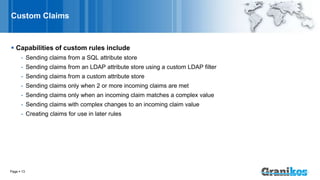
Custom Claims
 Capabilities of custom rules include
- Sending claims from a SQL attribute store
- Sending claims from an LDAP attribute store using a custom LDAP filter
- Sending claims from a custom attribute store
- Sending claims only when 2 or more incoming claims are met
- Sending claims only when an incoming claim matches a complex value
- Sending claims with complex changes to an incoming claim value
- Creating claims for use in later rules
Page  13
Claim Rule Language
The claim rule language consists of Condition => Issuance Statement
Pass through all role Claims
c:[Type == “http://schema.microsoft.com/ws/2008/06/identity/claims/role”]
 issue(claim = c);
Change the value of the Role Claim SalesStaff to Purchasers
c:[Type == “http://schema.microsoft.com/ws/2008/06/identity/claims/role”, Value =~ “^(?i)SalesStaff$”]
=> issue(“http://schema.microsoft.com/ws/2008/06/identity/claims/role”, Issuer = c.Issuer,
OriginalIssuer = c.OriginalIssuer, Value = “Purchasers”, ValueType = c.ValueType)
After a claim is issued it is added to both the input and output claims set allowing the transformed
claim to be processed by subsequent rules
To make a processed claim available just for reprocessing replace the “issue” statement with “add”
Link: AD FS 2.0 Claims Rule Language Primer
Link: Understanding Claim Rule Language In AD FS 2.0 And Higher
Page  14
How do to allow access for Partners?
 Supporting claims aware applications within your organization
- Creating an identity (includes authentication) framework that can be consumed by all applications
regardless of their location  internal or external
- Allowing the identity token to carry more information than just the user and group memberships
 To allow partners to access your systems you must trust them to authenticate your partners
users
Page  15
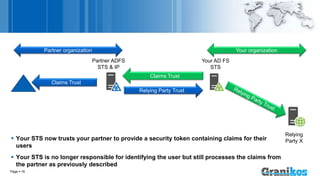
 Your STS now trusts your partner to provide a security token containing claims for their
users
 Your STS is no longer responsible for identifying the user but still processes the claims from
the partner as previously described
Page  16
Claims Trust
Relying
Party X
Relying Party Trust
Claims Trust
Your AD FS
STS
Partner ADFS
STS & IP
Partner organization Your organization
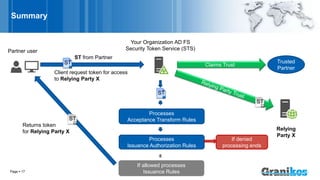
Summary
Page  17
Partner user
Client request token for access
to Relying Party X
Your Organization AD FS
Security Token Service (STS)
Claims Trust
Relying
Party X
Processes
Acceptance Transform Rules
Processes
Issuance Authorization Rules
If allowed processes
Issuance Rules
ST
Returns token
for Relying Party X
If denied
processing ends
ST from Partner
ST Trusted
Partner
ST
ST
Passive Client
Process token
Home realm discovery
ST
ST
Redirected to partner STS requesting ST for partner user
Return ST for consumption by your STS
Return new ST
ST
Your ADFS STSYour Claims-aware App Active DirectoryPartner user Partner ADFS STS & IP
Redirected to your STS
ST
Authenticate
Send Token
Return page and cookie
Browse app
Not authenticated
Redirect to your STS
Resources
 ADFS – How to enable Trace Debugging and advanced access logging
 Troubleshooting ADFS: Enabling additional logging
 Under the hood tour of Azure AD Connect Health: AD FS Diagnostics Module
 AD FS Diagnostics Module
 AD FS for Windows Server 2016 Best Practices
 Backup and Recovery with the AD FS Rapid Restore Tool
Page  19
Page  20
Questions
Thomas Stensitzki
Expert
Granikos GmbH & Co. KG
MCSM Messaging, MCM: Exchange 2010
MCT, MCSE, MCITP, MCTS, MCSA, MCSA:M
E-Mail: thomas.stensitzki@granikos.eu
Web: http://www.Granikos.eu
Blog: http://blog.Granikos.eu
Blog: http://JustCantGetEnough.Granikos.eu

AD FS Workshop | Part 2 | Deep Dive

  • 1.
    Active Directory FederationServices – Part 2 Thomas Stensitzki
  • 2.
    AD FS |Deep Dive Page  2
  • 3.
    AD FS Concept Page 3  Relationships between APP and STS established through the exchange of federation metadata - Can be manually configured STS = Security Token Service Claims-aware application AD FS Active Directory Define AD as claims provider APP Define STS as claims provider STS Define APP as Relying party
  • 4.
    Key Concepts Page 4 Active Directory User / Subject / Principal Authentication request Issues Security Token Relying Party / Resource Provider Identity Provider (IP) Security Token Service (STS) Issuer Trusts the Security Token from the issuer Security Token contains claims about the user For example: • Name • Group membership • User Principal Name (UPN) • Email address of user • Email address of manager • Phone number • Other attribute values Security Token “Authenticates” user to the application ST Signed by Issuer
  • 5.
    Claims-Aware Application  Theapplication makes authorization decisions based on the claims contained in the security token - No longer required to make authentication decisions  Same authorization logic for Application - Deployed on the Intranet or as a Cloud service - Receiving claims from its own organization’s users or users from trusted partners Page  5
  • 6.
    Passive Client Page 6 ADFS STSClaims-aware App Active Directory Browse app Not authenticated Redirected to STS Authenticate User Query for user attributes Return Security Token Return page and cookie Send Token ST ST App trusts STS
  • 7.
    X.509 Certificates Page 7  Trust is managed through certificates  Certificates for - HTTPS Communication - Security token signing and encryption  Require PKI for A & B certificates, C & D can be self-signed by AD FS server CommunicationA Signing Relying party Issuer ST Encryption ST B Public key of C C Public key of DD Root for ARoot for B Private Key
  • 8.
    Federation Metadata  Duringthe establishment of the issuer / relying party trust, both parties will require configuration which includes - End-points for communication - Claims offered by issuer - Claims accepted by replying party - Public keys for signing and encryption  This information can be manually configured or automatically via the exchange of federation metadata - Federation metadata can be automatically updated Page  8
  • 9.
    Offered Claims Types Extractfrom federationmetadata.xml <fed:UriNamedClaimTypesOffered> <fed:ClaimType Uri="http://schemas.xmlsoap.org/claims/EmailAddress"> <fed:DisplayName>Email Address</fed:DisplayName> </fed:ClaimType> <fed:ClaimType Uri="http://schemas.xmlsoap.org/claims/UPN"> <fed:DisplayName>User Principal Name</fed:DisplayName> </fed:ClaimType> <fed:ClaimType Uri="http://schemas.xmlsoap.org/claims/CommonName"> <fed:DisplayName>Common Name</fed:DisplayName> </fed:ClaimType> <fed:ClaimType Uri="http://schemas.xmlsoap.org/claims/Group"> <fed:DisplayName>Group</fed:DisplayName> </fed:ClaimType> </fed:UriNamedClaimTypesOffered> Page  9
  • 10.
    Claims Pipeline –How a Security Token is build Page  10 Issuance Authorization Rules Claims Provider Specify incoming claims that will be accepted from the claims provider and the outgoing claims that will be sent to the relying party trust Specifies claims that will be sent to the relying party Acceptance Transform Rules Input Issuance Transform Rules Output Specify the users that are permitted to access the relying party ST Resulting claims added to security token (ST) Permits/denies rule processing and claims issuance Input Input
  • 11.
    Claim Rules  Ruletemplates simplify the creation of rules  Examples of rules are: - Permit / deny user based on incoming claim value - Transform the incoming claim value - Pass through / filter an incoming claim  Multiple claim rules can be specified and are processed in top to bottom order - Results from previously processed claims can be used as the input for subsequent rules Link: An ADFS Claims Rules Adventure Page  11
  • 12.
    Creating Claim Rules Page 12 A claim rule consists of two parts, condition and issuance statement Condition Issuance Statement
  • 13.
    Custom Claims  Capabilitiesof custom rules include - Sending claims from a SQL attribute store - Sending claims from an LDAP attribute store using a custom LDAP filter - Sending claims from a custom attribute store - Sending claims only when 2 or more incoming claims are met - Sending claims only when an incoming claim matches a complex value - Sending claims with complex changes to an incoming claim value - Creating claims for use in later rules Page  13
  • 14.
    Claim Rule Language Theclaim rule language consists of Condition => Issuance Statement Pass through all role Claims c:[Type == “http://schema.microsoft.com/ws/2008/06/identity/claims/role”]  issue(claim = c); Change the value of the Role Claim SalesStaff to Purchasers c:[Type == “http://schema.microsoft.com/ws/2008/06/identity/claims/role”, Value =~ “^(?i)SalesStaff$”] => issue(“http://schema.microsoft.com/ws/2008/06/identity/claims/role”, Issuer = c.Issuer, OriginalIssuer = c.OriginalIssuer, Value = “Purchasers”, ValueType = c.ValueType) After a claim is issued it is added to both the input and output claims set allowing the transformed claim to be processed by subsequent rules To make a processed claim available just for reprocessing replace the “issue” statement with “add” Link: AD FS 2.0 Claims Rule Language Primer Link: Understanding Claim Rule Language In AD FS 2.0 And Higher Page  14
  • 15.
    How do toallow access for Partners?  Supporting claims aware applications within your organization - Creating an identity (includes authentication) framework that can be consumed by all applications regardless of their location  internal or external - Allowing the identity token to carry more information than just the user and group memberships  To allow partners to access your systems you must trust them to authenticate your partners users Page  15
  • 16.
     Your STSnow trusts your partner to provide a security token containing claims for their users  Your STS is no longer responsible for identifying the user but still processes the claims from the partner as previously described Page  16 Claims Trust Relying Party X Relying Party Trust Claims Trust Your AD FS STS Partner ADFS STS & IP Partner organization Your organization
  • 17.
    Summary Page  17 Partneruser Client request token for access to Relying Party X Your Organization AD FS Security Token Service (STS) Claims Trust Relying Party X Processes Acceptance Transform Rules Processes Issuance Authorization Rules If allowed processes Issuance Rules ST Returns token for Relying Party X If denied processing ends ST from Partner ST Trusted Partner ST ST
  • 18.
    Passive Client Process token Homerealm discovery ST ST Redirected to partner STS requesting ST for partner user Return ST for consumption by your STS Return new ST ST Your ADFS STSYour Claims-aware App Active DirectoryPartner user Partner ADFS STS & IP Redirected to your STS ST Authenticate Send Token Return page and cookie Browse app Not authenticated Redirect to your STS
  • 19.
    Resources  ADFS –How to enable Trace Debugging and advanced access logging  Troubleshooting ADFS: Enabling additional logging  Under the hood tour of Azure AD Connect Health: AD FS Diagnostics Module  AD FS Diagnostics Module  AD FS for Windows Server 2016 Best Practices  Backup and Recovery with the AD FS Rapid Restore Tool Page  19
  • 20.
    Page  20 Questions ThomasStensitzki Expert Granikos GmbH & Co. KG MCSM Messaging, MCM: Exchange 2010 MCT, MCSE, MCITP, MCTS, MCSA, MCSA:M E-Mail: thomas.stensitzki@granikos.eu Web: http://www.Granikos.eu Blog: http://blog.Granikos.eu Blog: http://JustCantGetEnough.Granikos.eu