Complete Study Guide
Recently
Announced…
Identity
Integration
Options
2 3
Identity
Management
Overview
1
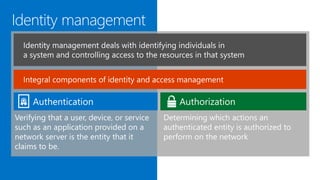
Verifying that a user, device, or service
such as an application provided on a
network server is the entity that it
claims to be.
Determining which actions an
authenticated entity is authorized to
perform on the network
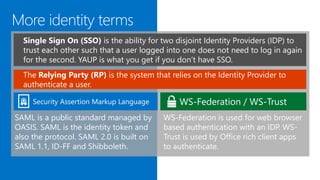
the ability for two disjoint Identity Providers (IDP) to
trust each other such that a user logged into one does not need to log in again
for the second. YAUP is what you get if you don’t have SSO.
SAML is a public standard managed by
OASIS. SAML is the identity token and
also the protocol. SAML 2.0 is built on
SAML 1.1, ID-FF and Shibboleth.
The Relying Party (RP) is the system that relies on the Identity Provider to
authenticate a user.
WS-Federation is used for web browser
based authentication with an IDP. WS-
Trust is used by Office rich client apps
to authenticate.
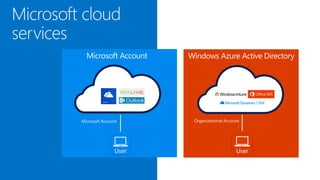
User
Microsoft Account
User
Organizational Account
:
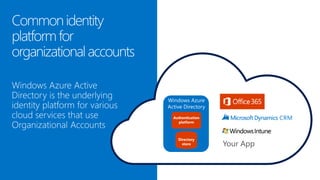
Microsoft Account Windows Azure Active Directory
Directory
store
Authentication
platform
Windows Azure
Active Directory
Your App
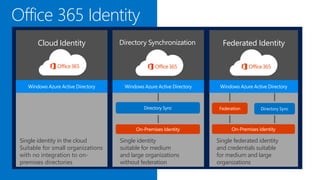
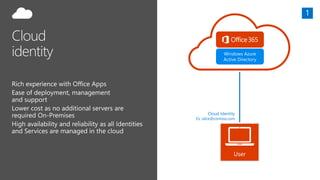
Cloud Identity
Single identity in the cloud
Suitable for small organizations
with no integration to on-
premises directories
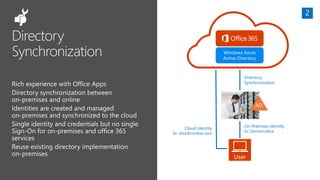
Directory Synchronization
Single identity
suitable for medium
and large organizations
without federation
Federated Identity
Single federated identity
and credentials suitable
for medium and large
organizations
SAML2
Identity Provider
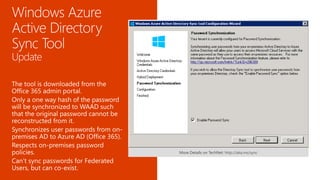
More Details on TechNet: http://aka.ms/sync
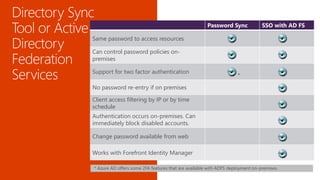
* Azure AD offers some 2FA features that are available with ADFS deployment on-premises.
Password Sync SSO with AD FS
Same password to access resources
Can control password policies on-
premises
Support for two factor authentication
*
No password re-entry if on premises
Client access filtering by IP or by time
schedule
Authentication occurs on-premises. Can
immediately block disabled accounts.
Change password available from web
Works with Forefront Identity Manager
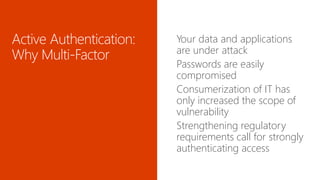
Your data and applications
are under attack
Passwords are easily
compromised
Consumerization of IT has
only increased the scope of
vulnerability
Strengthening regulatory
requirements call for strongly
authenticating access

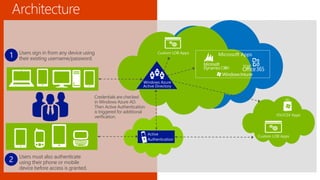
Users sign in from any device using
their existing username/password.
Users must also authenticate
using their phone or mobile
device before access is granted.
Credentials are checked
in Windows Azure AD.
Then Active Authentication
is triggered for additional
verification.
1
2
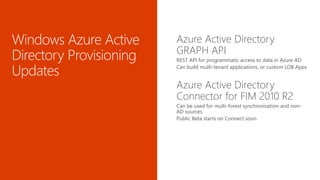
Azure Active Directory
GRAPH API
REST API for programmatic access to data in Azure AD
Can build multi-tenant applications, or custom LOB Apps
Azure Active Directory
Connector for FIM 2010 R2
Can be used for multi-forest synchronization and non-
AD sources
Public Beta starts on Connect soon
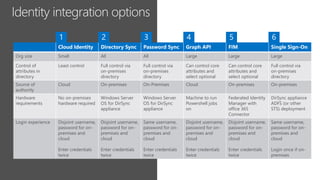
Cloud Identity Directory Sync Password Sync Graph API FIM Single Sign-On
Org size Small All All Large Large Large
Control of
attributes in
directory
Least control Full control via
on-premises
directory
Full control via
on-premises
directory
Can control core
attributes and
select optional
Can control core
attributes and
select optional
Full control via
on-premises
directory
Source of
authority
Cloud On-premises On-Premises Cloud On-premises On-premises
Hardware
requirements
No on-premises
hardware required
Windows Server
OS for DirSync
appliance
Windows Server
OS for DirSync
appliance
Machine to run
Powershell jobs
on
Federated Identity
Manager with
office 365
Connector
DirSync appliance
ADFS (or other
STS) deployment
Login experience Disjoint username,
password for on-
premises and
cloud
Enter credentials
twice
Disjoint username,
password for on-
premises and
cloud
Enter credentials
twice
Same username,
password for on-
premises and
cloud
Enter credentials
twice
Disjoint username,
password for on-
premises and
cloud
Enter credentials
twice
Disjoint username,
password for on-
premises and
cloud
Enter credentials
twice
Same username,
password for on-
premises and
cloud
Login once if on-
premises
Windows Azure
Active Directory
User
Cloud Identity
Ex: alice@contoso.com
Windows Azure
Active Directory
User
On-Premises Identity
Ex: DomainAlice
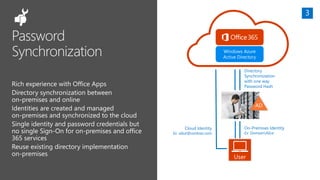
Directory
Synchronization
Cloud Identity
Ex: alice@contoso.com
AD
On-Premises Identity
Ex: DomainAlice
Directory
Synchronization
with one way
Password Hash
Cloud Identity
Ex: alice@contoso.com
AD
Windows Azure
Active Directory
User
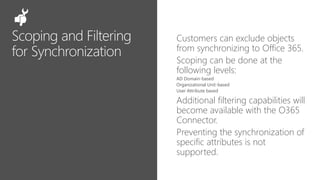
Customers can exclude objects
from synchronizing to Office 365.
Scoping can be done at the
following levels:
AD Domain-based
Organizational Unit-based
User Attribute based
Additional filtering capabilities will
become available with the O365
Connector.
Preventing the synchronization of
specific attributes is not
supported.
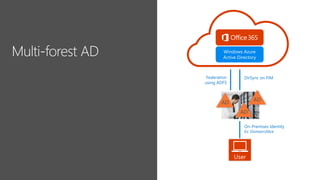
On-Premises Identity
Ex: DomainAlice
Federation
using ADFS
AD
DirSync on FIM
AD
AD
Windows Azure
Active Directory
User
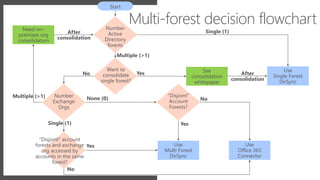
Number
Active
Directory
forests
See
consolidation
whitepaper
Use
Single Forest
DirSync
Use
Office 365
Connector
Use
Multi Forest
DirSync
Need on-
premises org
consolidation
Number
Exchange
Orgs
“Disjoint”
Account
Forests?
“Disjoint” account
forests and exchange
org accessed by
accounts in the same
forest?
Want to
consolidate
single forest?
After
consolidation
Single (1)
Multiple (>1)
Yes
None (0)Multiple (>1)
Start
After
consolidation
No
Single (1) Yes
Yes
No
No
Multi-forest decision flowchart
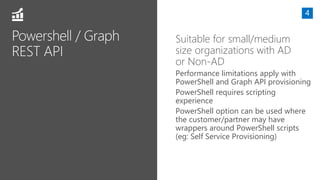
Suitable for small/medium
size organizations with AD
or Non-AD
Performance limitations apply with
PowerShell and Graph API provisioning
PowerShell requires scripting
experience
PowerShell option can be used where
the customer/partner may have
wrappers around PowerShell scripts
(eg: Self Service Provisioning)
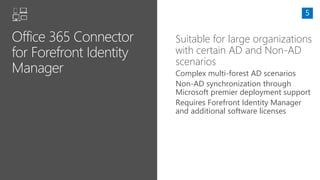
Suitable for large organizations
with certain AD and Non-AD
scenarios
Complex multi-forest AD scenarios
Non-AD synchronization through
Microsoft premier deployment support
Requires Forefront Identity Manager
and additional software licenses
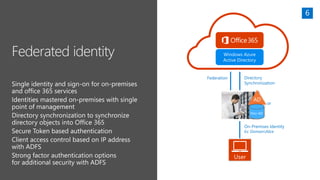
Windows Azure
Active Directory
User
On-Premises Identity
Ex: DomainAlice
Federation
AD
Non-AD
Directory
Synchronization
or
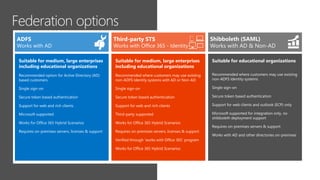
Suitable for educational organizations
Recommended where customers may use existing
non-ADFS Identity systems
Single sign-on
Secure token based authentication
Support for web clients and outlook (ECP) only
Microsoft supported for integration only, no
shibboleth deployment support
Requires on-premises servers & support
Works with AD and other directories on-premises
Shibboleth (SAML)
Works with AD & Non-AD
Suitable for medium, large enterprises
including educational organizations
Recommended option for Active Directory (AD)
based customers
Single sign-on
Secure token based authentication
Support for web and rich clients
Microsoft supported
Works for Office 365 Hybrid Scenarios
Requires on-premises servers, licenses & support
Works with AD
Suitable for medium, large enterprises
including educational organizations
Recommended where customers may use existing
non-ADFS Identity systems with AD or Non-AD
Single sign-on
Secure token based authentication
Support for web and rich clients
Third-party supported
Works for Office 365 Hybrid Scenarios
Requires on-premises servers, licenses & support
Verified through ‘works with Office 365’ program
Works for Office 365 Hybrid Scenarios
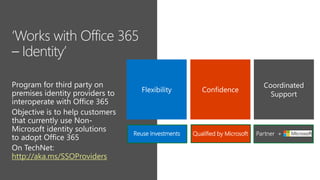
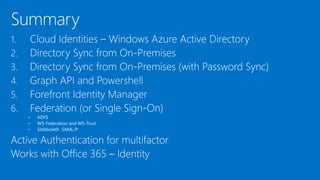
Works with Office 365 - Identity
http://aka.ms/SSOProviders
Qualified by MicrosoftReuse Investments
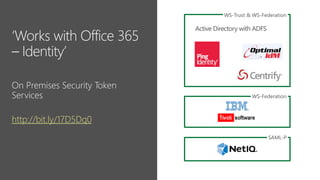
http://bit.ly/17D5Dq0
WS-Trust & WS-Federation
WS-Federation
SAML-P
Active Directory with ADFS
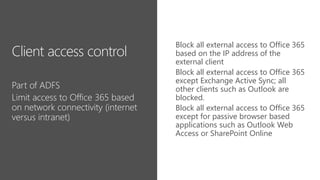
Block all external access to Office 365
based on the IP address of the
external client
Block all external access to Office 365
except Exchange Active Sync; all
other clients such as Outlook are
blocked.
Block all external access to Office 365
except for passive browser based
applications such as Outlook Web
Access or SharePoint Online
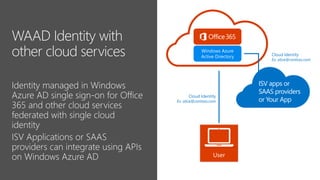
Windows Azure
Active Directory
User
Cloud Identity
Ex: alice@contoso.com
ISV apps or
SAAS providers
or Your App
Cloud Identity
Ex: alice@contoso.com
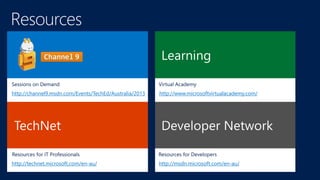
http://msdn.microsoft.com/en-au/
http://www.microsoftvirtualacademy.com/http://channel9.msdn.com/Events/TechEd/Australia/2013
http://technet.microsoft.com/en-au/
1. Keep up to date with all the latest Office 365 information at
http://ignite.office.com
http://fastTrack.office.com
http://office.microsoft.com
70 346 Managing office 365 identities

70 346 Managing office 365 identities

  • 1.
  • 2.
  • 4.
    Verifying that auser, device, or service such as an application provided on a network server is the entity that it claims to be. Determining which actions an authenticated entity is authorized to perform on the network
  • 5.
    the ability fortwo disjoint Identity Providers (IDP) to trust each other such that a user logged into one does not need to log in again for the second. YAUP is what you get if you don’t have SSO. SAML is a public standard managed by OASIS. SAML is the identity token and also the protocol. SAML 2.0 is built on SAML 1.1, ID-FF and Shibboleth. The Relying Party (RP) is the system that relies on the Identity Provider to authenticate a user. WS-Federation is used for web browser based authentication with an IDP. WS- Trust is used by Office rich client apps to authenticate.
  • 6.
  • 7.
  • 8.
    Cloud Identity Single identityin the cloud Suitable for small organizations with no integration to on- premises directories Directory Synchronization Single identity suitable for medium and large organizations without federation Federated Identity Single federated identity and credentials suitable for medium and large organizations
  • 10.
    SAML2 Identity Provider More Detailson TechNet: http://aka.ms/sync
  • 11.
    * Azure ADoffers some 2FA features that are available with ADFS deployment on-premises. Password Sync SSO with AD FS Same password to access resources Can control password policies on- premises Support for two factor authentication * No password re-entry if on premises Client access filtering by IP or by time schedule Authentication occurs on-premises. Can immediately block disabled accounts. Change password available from web Works with Forefront Identity Manager
  • 12.
    Your data andapplications are under attack Passwords are easily compromised Consumerization of IT has only increased the scope of vulnerability Strengthening regulatory requirements call for strongly authenticating access
  • 13.
  • 14.
    Users sign infrom any device using their existing username/password. Users must also authenticate using their phone or mobile device before access is granted. Credentials are checked in Windows Azure AD. Then Active Authentication is triggered for additional verification. 1 2
  • 16.
    Azure Active Directory GRAPHAPI REST API for programmatic access to data in Azure AD Can build multi-tenant applications, or custom LOB Apps Azure Active Directory Connector for FIM 2010 R2 Can be used for multi-forest synchronization and non- AD sources Public Beta starts on Connect soon
  • 18.
    Cloud Identity DirectorySync Password Sync Graph API FIM Single Sign-On Org size Small All All Large Large Large Control of attributes in directory Least control Full control via on-premises directory Full control via on-premises directory Can control core attributes and select optional Can control core attributes and select optional Full control via on-premises directory Source of authority Cloud On-premises On-Premises Cloud On-premises On-premises Hardware requirements No on-premises hardware required Windows Server OS for DirSync appliance Windows Server OS for DirSync appliance Machine to run Powershell jobs on Federated Identity Manager with office 365 Connector DirSync appliance ADFS (or other STS) deployment Login experience Disjoint username, password for on- premises and cloud Enter credentials twice Disjoint username, password for on- premises and cloud Enter credentials twice Same username, password for on- premises and cloud Enter credentials twice Disjoint username, password for on- premises and cloud Enter credentials twice Disjoint username, password for on- premises and cloud Enter credentials twice Same username, password for on- premises and cloud Login once if on- premises
  • 19.
    Windows Azure Active Directory User CloudIdentity Ex: alice@contoso.com
  • 20.
    Windows Azure Active Directory User On-PremisesIdentity Ex: DomainAlice Directory Synchronization Cloud Identity Ex: alice@contoso.com AD
  • 21.
    On-Premises Identity Ex: DomainAlice Directory Synchronization withone way Password Hash Cloud Identity Ex: alice@contoso.com AD Windows Azure Active Directory User
  • 22.
    Customers can excludeobjects from synchronizing to Office 365. Scoping can be done at the following levels: AD Domain-based Organizational Unit-based User Attribute based Additional filtering capabilities will become available with the O365 Connector. Preventing the synchronization of specific attributes is not supported.
  • 23.
    On-Premises Identity Ex: DomainAlice Federation usingADFS AD DirSync on FIM AD AD Windows Azure Active Directory User
  • 24.
    Number Active Directory forests See consolidation whitepaper Use Single Forest DirSync Use Office 365 Connector Use MultiForest DirSync Need on- premises org consolidation Number Exchange Orgs “Disjoint” Account Forests? “Disjoint” account forests and exchange org accessed by accounts in the same forest? Want to consolidate single forest? After consolidation Single (1) Multiple (>1) Yes None (0)Multiple (>1) Start After consolidation No Single (1) Yes Yes No No Multi-forest decision flowchart
  • 25.
    Suitable for small/medium sizeorganizations with AD or Non-AD Performance limitations apply with PowerShell and Graph API provisioning PowerShell requires scripting experience PowerShell option can be used where the customer/partner may have wrappers around PowerShell scripts (eg: Self Service Provisioning)
  • 26.
    Suitable for largeorganizations with certain AD and Non-AD scenarios Complex multi-forest AD scenarios Non-AD synchronization through Microsoft premier deployment support Requires Forefront Identity Manager and additional software licenses
  • 27.
    Windows Azure Active Directory User On-PremisesIdentity Ex: DomainAlice Federation AD Non-AD Directory Synchronization or
  • 28.
    Suitable for educationalorganizations Recommended where customers may use existing non-ADFS Identity systems Single sign-on Secure token based authentication Support for web clients and outlook (ECP) only Microsoft supported for integration only, no shibboleth deployment support Requires on-premises servers & support Works with AD and other directories on-premises Shibboleth (SAML) Works with AD & Non-AD Suitable for medium, large enterprises including educational organizations Recommended option for Active Directory (AD) based customers Single sign-on Secure token based authentication Support for web and rich clients Microsoft supported Works for Office 365 Hybrid Scenarios Requires on-premises servers, licenses & support Works with AD Suitable for medium, large enterprises including educational organizations Recommended where customers may use existing non-ADFS Identity systems with AD or Non-AD Single sign-on Secure token based authentication Support for web and rich clients Third-party supported Works for Office 365 Hybrid Scenarios Requires on-premises servers, licenses & support Verified through ‘works with Office 365’ program Works for Office 365 Hybrid Scenarios Works with Office 365 - Identity
  • 29.
  • 30.
  • 31.
    Block all externalaccess to Office 365 based on the IP address of the external client Block all external access to Office 365 except Exchange Active Sync; all other clients such as Outlook are blocked. Block all external access to Office 365 except for passive browser based applications such as Outlook Web Access or SharePoint Online
  • 32.
    Windows Azure Active Directory User CloudIdentity Ex: alice@contoso.com ISV apps or SAAS providers or Your App Cloud Identity Ex: alice@contoso.com
  • 34.
  • 35.
    1. Keep upto date with all the latest Office 365 information at http://ignite.office.com http://fastTrack.office.com http://office.microsoft.com