New features in Power Pivot 2010
Microsoft PowerPivot for Excel 2010 is a new technology aimed at providing self-service Business
Intelligence (BI).

PowerPivot is a real revolution inside the world of data analysis because it gives you all the power you
need to perform complex analysis of data without requiring the intervention of BI technicians.

This tool, an Excel add-in, is a simple replacement for the PivotTable and implements a powerful in-
memory database that can organize data, detect interesting relationships, and give you a swift way to
browse information.


Standard Excel Pivot and PowerPivot
PivotTables and PivotCharts are the primary ways to analyze and present the large volumes of IB data in
Excel. With self-service BI using PowerPivot, this is still true. PowerPivot includes its own PivotTable field
list that is customized to effectively work with the new PowerPivot data model, which is built around
tables, relationships, rather than dimensions and cubes, as is found in traditional corporate BI.

    1. The ability to organize tables for the PivotTable tool in a relational way, freeing
       the analyst from the need to import data as Excel worksheets before analyzing
       the data.
        Standard Excel pivot tables can work on a single table; PowerPivot on the other hand, lets you
        work on many tables, tied together through relationships.
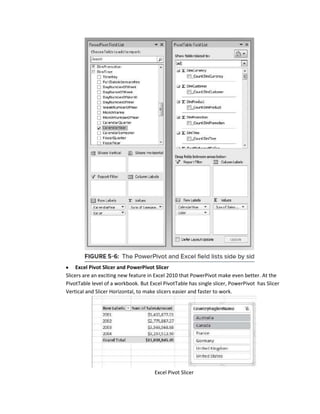
                Excel Pivot Field list and PowerPivot Field list
            The PowerPivot field list doesn't have a drop-down menu that enables you to pick how and
            what the field list will display.
            The PowerPivot filed list doesn't have a drop-down list for filtering based on measure
            groups.
            The PowerPivot field list does have a search box that allows you to search based on table
            and column names.
            The list of available fields differs between the two field lists. Excel's PivotTable field list
            shows fields based on the traditional OLAP model of measures, dimensions, and key
            performance indicators (KPIs), whereas the PowerPivot field list shows fields as tables and
            columns.
            The PowerPivot field list has two additional drop zones, Slicers Vertical and Slicers
            Horizontal.
            The PowerPivot field list doesn't have support for deferring layout updates.
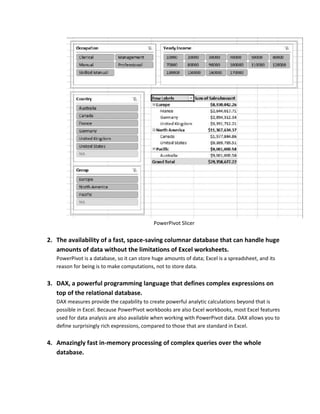
Excel Pivot Slicer and PowerPivot Slicer
Slicers are an exciting new feature in Excel 2010 that PowerPivot make even better. At the
PivotTable level of a workbook. But Excel PivotTable has single slicer, PowerPivot has Slicer
Vertical and Slicer Horizontal, to make slicers easier and faster to work.


                                      Excel Pivot Slicer
PowerPivot Slicer

2. The availability of a fast, space-saving columnar database that can handle huge
   amounts of data without the limitations of Excel worksheets.
   PowerPivot is a database, so it can store huge amounts of data; Excel is a spreadsheet, and its
   reason for being is to make computations, not to store data.

3. DAX, a powerful programming language that defines complex expressions on
   top of the relational database.
   DAX measures provide the capability to create powerful analytic calculations beyond that is
   possible in Excel. Because PowerPivot workbooks are also Excel workbooks, most Excel features
   used for data analysis are also available when working with PowerPivot data. DAX allows you to
   define surprisingly rich expressions, compared to those that are standard in Excel.

4. Amazingly fast in-memory processing of complex queries over the whole
   database.
5. The ability to integrate different sources and almost any kind of data, such as
     information from databases, Excel worksheets, and sources available on the
     Internet.
     There are some benefits of PowerPivot in SharePoint:

            It gives our customers the quickest possible lead times – no installation requirements
            It gives us a means to keep everything up to date, nightly
            It eliminates user data download requirements – a web app is a lot better than
            downloading a 2 GB workbook every day.
            It allows us to protect our core IP – some of our measures and views are truly firsts in
            the target industries, and the ways in which we implement those, from the backend up
            through pixels, are something we can lock down via in-browser delivery.


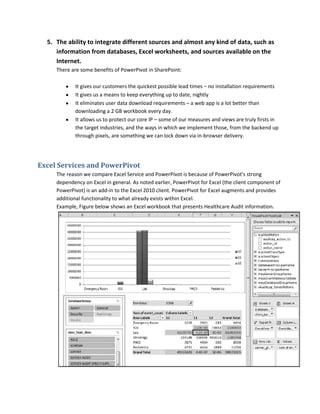
Excel Services and PowerPivot
     The reason we compare Excel Service and PowerPivot is because of PowerPivot's strong
     dependency on Excel in general. As noted earlier, PowerPivot for Excel (the client component of
     PowerPivot) is an add-in to the Excel 2010 client. PowerPivot for Excel augments and provides
     additional functionality to what already exists within Excel.
     Example, Figure below shows an Excel workbook that presents Healthcare Audit information.
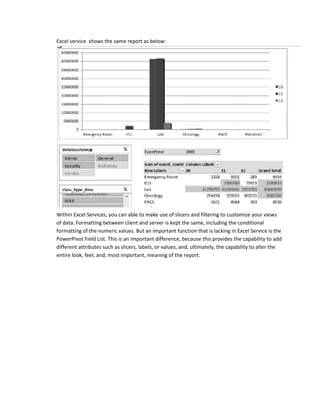
Excel service shows the same report as below:


Within Excel Services, you can able to make use of slicers and filtering to customize your views
of data. Formatting between client and server is kept the same, including the conditional
formatting of the numeric values. But an important function that is lacking in Excel Service is the
PowerPivot Field List. This is an important difference, because this provides the capability to add
different attributes such as slicers, labels, or values, and, ultimately, the capability to alter the
entire look, feel, and, most important, meaning of the report.

New Features In Power Pivot 2010

  • 1.
    New features inPower Pivot 2010 Microsoft PowerPivot for Excel 2010 is a new technology aimed at providing self-service Business Intelligence (BI). PowerPivot is a real revolution inside the world of data analysis because it gives you all the power you need to perform complex analysis of data without requiring the intervention of BI technicians. This tool, an Excel add-in, is a simple replacement for the PivotTable and implements a powerful in- memory database that can organize data, detect interesting relationships, and give you a swift way to browse information. Standard Excel Pivot and PowerPivot PivotTables and PivotCharts are the primary ways to analyze and present the large volumes of IB data in Excel. With self-service BI using PowerPivot, this is still true. PowerPivot includes its own PivotTable field list that is customized to effectively work with the new PowerPivot data model, which is built around tables, relationships, rather than dimensions and cubes, as is found in traditional corporate BI. 1. The ability to organize tables for the PivotTable tool in a relational way, freeing the analyst from the need to import data as Excel worksheets before analyzing the data. Standard Excel pivot tables can work on a single table; PowerPivot on the other hand, lets you work on many tables, tied together through relationships. Excel Pivot Field list and PowerPivot Field list The PowerPivot field list doesn't have a drop-down menu that enables you to pick how and what the field list will display. The PowerPivot filed list doesn't have a drop-down list for filtering based on measure groups. The PowerPivot field list does have a search box that allows you to search based on table and column names. The list of available fields differs between the two field lists. Excel's PivotTable field list shows fields based on the traditional OLAP model of measures, dimensions, and key performance indicators (KPIs), whereas the PowerPivot field list shows fields as tables and columns. The PowerPivot field list has two additional drop zones, Slicers Vertical and Slicers Horizontal. The PowerPivot field list doesn't have support for deferring layout updates.
  • 2.
    Excel Pivot Slicerand PowerPivot Slicer Slicers are an exciting new feature in Excel 2010 that PowerPivot make even better. At the PivotTable level of a workbook. But Excel PivotTable has single slicer, PowerPivot has Slicer Vertical and Slicer Horizontal, to make slicers easier and faster to work. Excel Pivot Slicer
  • 3.
    PowerPivot Slicer 2. Theavailability of a fast, space-saving columnar database that can handle huge amounts of data without the limitations of Excel worksheets. PowerPivot is a database, so it can store huge amounts of data; Excel is a spreadsheet, and its reason for being is to make computations, not to store data. 3. DAX, a powerful programming language that defines complex expressions on top of the relational database. DAX measures provide the capability to create powerful analytic calculations beyond that is possible in Excel. Because PowerPivot workbooks are also Excel workbooks, most Excel features used for data analysis are also available when working with PowerPivot data. DAX allows you to define surprisingly rich expressions, compared to those that are standard in Excel. 4. Amazingly fast in-memory processing of complex queries over the whole database.
  • 4.
    5. The abilityto integrate different sources and almost any kind of data, such as information from databases, Excel worksheets, and sources available on the Internet. There are some benefits of PowerPivot in SharePoint: It gives our customers the quickest possible lead times – no installation requirements It gives us a means to keep everything up to date, nightly It eliminates user data download requirements – a web app is a lot better than downloading a 2 GB workbook every day. It allows us to protect our core IP – some of our measures and views are truly firsts in the target industries, and the ways in which we implement those, from the backend up through pixels, are something we can lock down via in-browser delivery. Excel Services and PowerPivot The reason we compare Excel Service and PowerPivot is because of PowerPivot's strong dependency on Excel in general. As noted earlier, PowerPivot for Excel (the client component of PowerPivot) is an add-in to the Excel 2010 client. PowerPivot for Excel augments and provides additional functionality to what already exists within Excel. Example, Figure below shows an Excel workbook that presents Healthcare Audit information.
  • 5.
    Excel service showsthe same report as below: Within Excel Services, you can able to make use of slicers and filtering to customize your views of data. Formatting between client and server is kept the same, including the conditional formatting of the numeric values. But an important function that is lacking in Excel Service is the PowerPivot Field List. This is an important difference, because this provides the capability to add different attributes such as slicers, labels, or values, and, ultimately, the capability to alter the entire look, feel, and, most important, meaning of the report.