SharePoint 2010 Extranets &
      Authentication
Welcome to SharePoint Saturday—The Conference
      Thank you for being a part of the first
        SharePoint Saturday conference
  • Please turn off all electronic devices or set them to vibrate.
  • If you must take a phone call, please do so in the hall so as not
    to disturb others.
  • Open wireless access is available at SSID: SPSTC2011
  • Feel free to “tweet and blog” during the session
  • Thanks to our Diamond and Platinum Sponsors:
About Brian Culver
– SharePoint Solutions Architect for Expert Point Solutions
– Based in Houston, TX
– Author
   • SharePoint 2010 Unleashed
   • Various White Papers
– Speaker and Blogger
Session Agenda
• Extranet Definition
• Common Extranet Scenarios
• Extranet Design Considerations & Challenges
• Claims Based Authentication and other
  Authentication Scenarios
• Mixed Mode vs. Multi-Authentication
Extranet - Definition
• A web application that is shared with external
  users, such as partners, vendors, and
  customers
• Common attributes for an extranet:
  • Sharing a private network or secured network
  • Requires authenticated access, but the identity of
    the consumer is not always known
  • Has better security controls than an Internet Web
    application but usually less secure than the Intranet
  • Web application
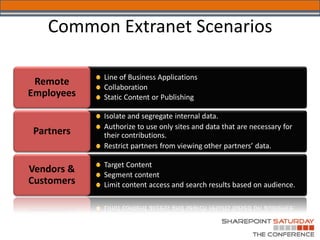
Common Extranet Scenarios

            Line of Business Applications
 Remote     Collaboration
Employees   Static Content or Publishing

            Isolate and segregate internal data.
            Authorize to use only sites and data that are necessary for
Partners    their contributions.
            Restrict partners from viewing other partners’ data.

            Target Content
Vendors &   Segment content
Customers   Limit content access and search results based on audience.
Extranet Design Considerations &
               Challenges
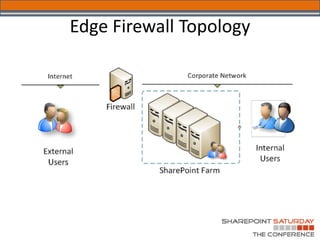
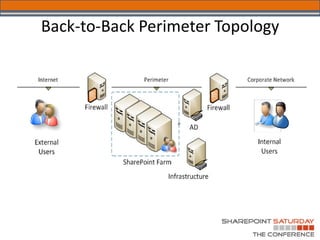
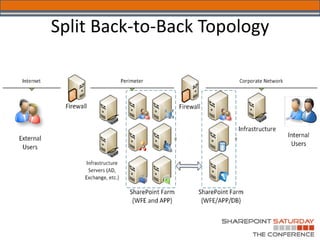
• Network Topology and Access
• Identity Management
   – Seamless Single Sign-on Experience
• Content Security and Access
• Antivirus
   – Client
   – Server
• Rich Client Experience (Office Integration)
Edge Firewall Topology
Back-to-Back Perimeter Topology
Split Back-to-Back Topology
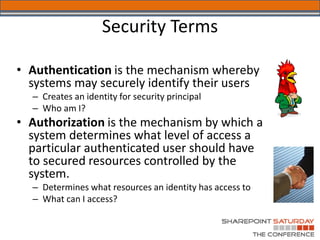
Security Terms

• Authentication is the mechanism whereby
  systems may securely identify their users
  – Creates an identity for security principal
  – Who am I?
• Authorization is the mechanism by which a
  system determines what level of access a
  particular authenticated user should have
  to secured resources controlled by the
  system.
  – Determines what resources an identity has access to
  – What can I access?
SharePoint Authentication

• SharePoint does not authenticate
  – Windows authentication via Windows server and IIS
    (Kerberos/NTLM)
  – FBA via ASP. NET and authentication providers (SQL, LDAP, etc.)
  – Web SSO via Active Directory Federation Services (ADFS) and
    other Identity Management Systems
• SharePoint creates user profiles
  – SPUser object represents security principal
  – User Profile List in Site Collections track user profiles
SharePoint 2010 Security

• SharePoint 2010 changes authentication
  – Uses classic mode and claims based authentication
  – Classic mode is SharePoint 2007 style legacy mode
  – Claims-based authentication is the new security model


• What are the benefits?
  –   Claims decouples SharePoint from the authentication provider
  –   Allows SharePoint to support multiple authentication providers per URL
  –   Identities can be passed without Kerberos delegation
  –   Allows federation between organizations
  –   ACLs can be configured with
  –   DLs, Audiences and OUs
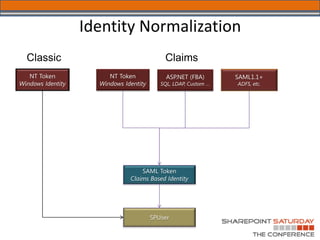
Identity Normalization
Claims-Based Terminology

• Identity: security principal used to
  configure the security policy
• Claim (Assertion): attribute of an identity
  (such as Login Name, AD Group, etc.)
• Security Token: serialized set of claims
  (assertions) about an authenticated user.
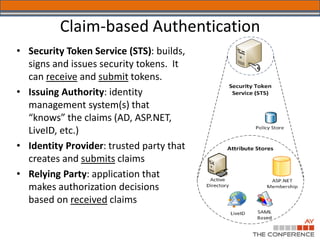
Claim-based Authentication
• Security Token Service (STS): builds,
  signs and issues security tokens. It
  can receive and submit tokens.
• Issuing Authority: identity
  management system(s) that
  “knows” the claims (AD, ASP.NET,
  LiveID, etc.)
• Identity Provider: trusted party that
  creates and submits claims
• Relying Party: application that
  makes authorization decisions
  based on received claims
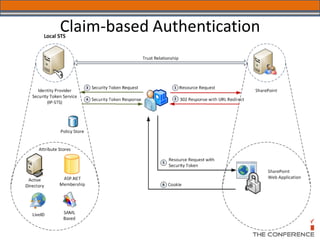
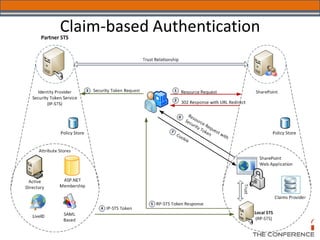
Claim-based Authentication
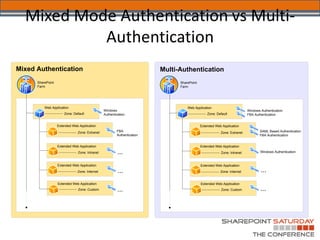
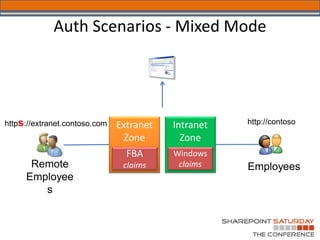
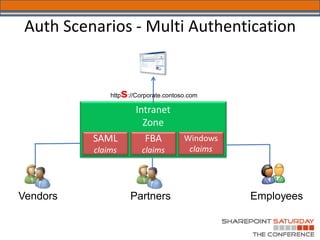
Mixed Mode Authentication vs Multi-
           Authentication
Mixed Authentication                                                     Multi-Authentication
      SharePoint                                                               SharePoint
      Farm                                                                     Farm


          Web Application                                                          Web Application
                                                Windows                                                                  Windows Authentication
                       Zone: Default            Authentication                                  Zone: Default
                                                                                Regular label-callout text               FBA Authentication


                   Extended Web Application                                                 Extended Web Application
                               Zone: Extranet           FBA                                             Zone: Extranet          SAML Based Authentication
                                                        Authentication                                                          FBA Authentication


                   Extended Web Application                                                 Extended Web Application
                               Zone: Intranet            ...                                            Zone: Intranet           Windows Authentication


                   Extended Web Application                                                 Extended Web Application
                               Zone: Internet            ...                                            Zone: Internet           ...
                   Extended Web Application                                                 Extended Web Application
                                Zone: Custom             ...                                             Zone: Custom            ...
Auth Scenarios - Mixed Mode


s
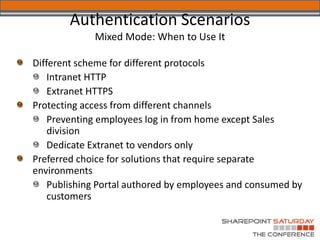
Authentication Scenarios
   Mixed Mode: When to Use It
Auth Scenarios - Multi Authentication


             s
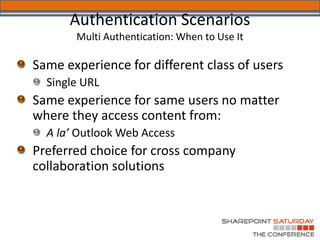
Authentication Scenarios
Multi Authentication: When to Use It
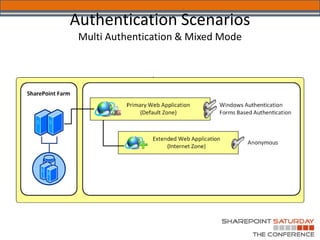
Authentication Scenarios
 Multi Authentication & Mixed Mode
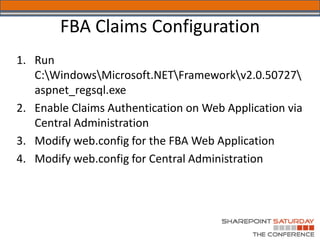
FBA Claims Configuration
1. Run
   C:WindowsMicrosoft.NETFrameworkv2.0.50727
   aspnet_regsql.exe
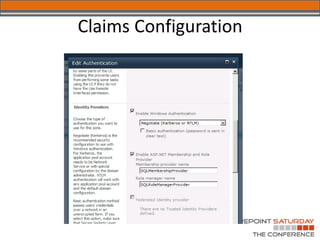
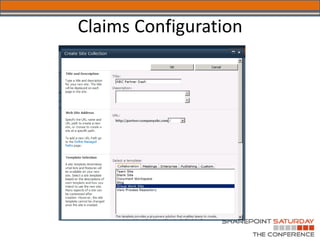
2. Enable Claims Authentication on Web Application via
   Central Administration
3. Modify web.config for the FBA Web Application
4. Modify web.config for Central Administration
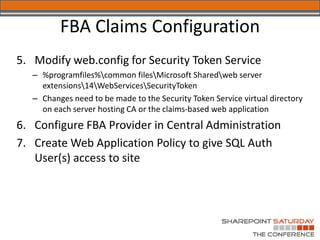
FBA Claims Configuration
5. Modify web.config for Security Token Service
   – %programfiles%common filesMicrosoft Sharedweb server
     extensions14WebServicesSecurityToken
   – Changes need to be made to the Security Token Service virtual directory
     on each server hosting CA or the claims-based web application
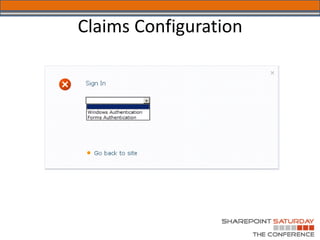
6. Configure FBA Provider in Central Administration
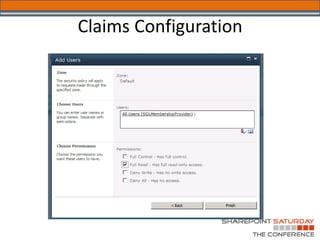
7. Create Web Application Policy to give SQL Auth
   User(s) access to site
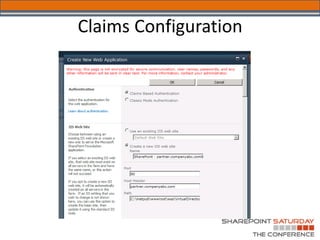
Claims Configuration
FBA Claims Configuration
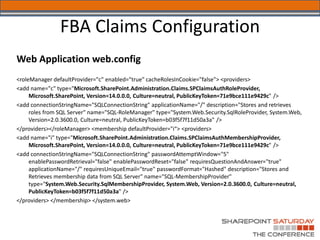
Web Application web.config
<roleManager defaultProvider="c" enabled="true" cacheRolesInCookie="false"> <providers>
<add name="c" type="Microsoft.SharePoint.Administration.Claims.SPClaimsAuthRoleProvider,
     Microsoft.SharePoint, Version=14.0.0.0, Culture=neutral, PublicKeyToken=71e9bce111e9429c" />
<add connectionStringName="SQLConnectionString" applicationName="/" description="Stores and retrieves
     roles from SQL Server" name="SQL-RoleManager" type="System.Web.Security.SqlRoleProvider, System.Web,
     Version=2.0.3600.0, Culture=neutral, PublicKeyToken=b03f5f7f11d50a3a" />
</providers></roleManager> <membership defaultProvider="i“> <providers>
<add name="i" type="Microsoft.SharePoint.Administration.Claims.SPClaimsAuthMembershipProvider,
     Microsoft.SharePoint, Version=14.0.0.0, Culture=neutral, PublicKeyToken=71e9bce111e9429c" />
<add connectionStringName="SQLConnectionString" passwordAttemptWindow="5"
     enablePasswordRetrieval="false" enablePasswordReset="false" requiresQuestionAndAnswer="true"
     applicationName="/" requiresUniqueEmail="true" passwordFormat="Hashed" description="Stores and
     Retrieves membership data from SQL Server" name="SQL-MembershipProvider"
     type="System.Web.Security.SqlMembershipProvider, System.Web, Version=2.0.3600.0, Culture=neutral,
     PublicKeyToken=b03f5f7f11d50a3a" />
</providers> </membership> </system.web>
FBA Claims Configuration
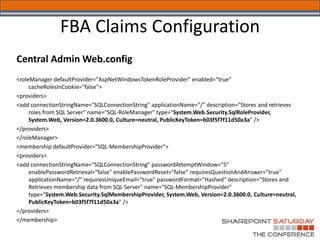
Central Admin Web.config
<roleManager defaultProvider="AspNetWindowsTokenRoleProvider" enabled="true"
     cacheRolesInCookie="false">
<providers>
<add connectionStringName="SQLConnectionString" applicationName="/" description="Stores and retrieves
     roles from SQL Server" name="SQL-RoleManager" type="System.Web.Security.SqlRoleProvider,
     System.Web, Version=2.0.3600.0, Culture=neutral, PublicKeyToken=b03f5f7f11d50a3a" />
</providers>
</roleManager>
<membership defaultProvider="SQL-MembershipProvider">
<providers>
<add connectionStringName="SQLConnectionString" passwordAttemptWindow="5"
     enablePasswordRetrieval="false" enablePasswordReset="false" requiresQuestionAndAnswer="true"
     applicationName="/" requiresUniqueEmail="true" passwordFormat="Hashed" description="Stores and
     Retrieves membership data from SQL Server" name="SQL-MembershipProvider"
     type="System.Web.Security.SqlMembershipProvider, System.Web, Version=2.0.3600.0, Culture=neutral,
     PublicKeyToken=b03f5f7f11d50a3a" />
</providers>
</membership>
FBA Claims Configuration
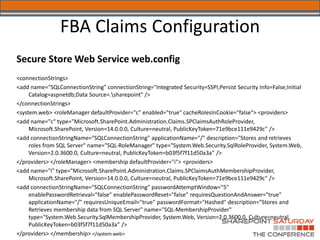
Secure Store Web Service web.config
<connectionStrings>
<add name="SQLConnectionString" connectionString="Integrated Security=SSPI;Persist Security Info=False;Initial
     Catalog=aspnetdb;Data Source=.sharepoint" />
</connectionStrings>
<system.web> <roleManager defaultProvider="c" enabled="true" cacheRolesInCookie="false“> <providers>
<add name="c" type="Microsoft.SharePoint.Administration.Claims.SPClaimsAuthRoleProvider,
     Microsoft.SharePoint, Version=14.0.0.0, Culture=neutral, PublicKeyToken=71e9bce111e9429c" />
<add connectionStringName="SQLConnectionString" applicationName="/" description="Stores and retrieves
     roles from SQL Server" name="SQL-RoleManager" type="System.Web.Security.SqlRoleProvider, System.Web,
     Version=2.0.3600.0, Culture=neutral, PublicKeyToken=b03f5f7f11d50a3a" />
</providers> </roleManager> <membership defaultProvider="i"> <providers>
<add name="i" type="Microsoft.SharePoint.Administration.Claims.SPClaimsAuthMembershipProvider,
     Microsoft.SharePoint, Version=14.0.0.0, Culture=neutral, PublicKeyToken=71e9bce111e9429c" />
<add connectionStringName="SQLConnectionString" passwordAttemptWindow="5"
     enablePasswordRetrieval="false" enablePasswordReset="false" requiresQuestionAndAnswer="true"
     applicationName="/" requiresUniqueEmail="true" passwordFormat="Hashed" description="Stores and
     Retrieves membership data from SQL Server" name="SQL-MembershipProvider"
     type="System.Web.Security.SqlMembershipProvider, System.Web, Version=2.0.3600.0, Culture=neutral,
     PublicKeyToken=b03f5f7f11d50a3a" />
</providers> </membership> </system.web>
Claims Configuration
Issues using Claims Authentication
• "Search Alerts only work with Windows Classic
  Authentication“
   – http://technet.microsoft.com/en-us/library/cc288475.aspx
• Performance Point Dashboard Designer doesn't work
  directly against a web application with multiple
  authentication providers
   – http://technet.microsoft.com/en-us/library/ee748637.aspx
Issues using Claims Authentication
• Some issues have been reported with Infopath Forms
  Services, PowerPivot and Performance Point Services
• Project Server won't create new sites on a claims-
  based authentication web app but don't see a
  reference for it
Welcome to SharePoint Saturday—The Conference
        Thanks to our Sponsors
Thanks to Our Other Sponsors!
Questions
Brian Culver, MCM

Twitter:
@spbrianculver
E-mail:
brian.culver@expertpointsolutions.com
Blog:
spbrian.blogspot.com
Welcome to SharePoint Saturday—The Conference

        Session Evaluation
  Please complete and turn in your Session Evaluation
  Form so we can improve future events. Survey can
                   be filled out at:

    http://app.fluidsurveys.com/surveys/spstc2011-
        and add the Session number to the URL
  Presenter:         Brian Culver
  Session Name:      SharePoint 2010 Extranets and
  Authentication: How will SharePoint Connect you to
  your Partners?
  Session No.:       Sat-S5A-101
Useful Links
•   SharePoint 2010 FBA User Management
•   SharePoint 2010 Forms Based Authentication Configuration Manager
    http://blogs.technet.com/b/speschka/archive/2010/07/28/sharepoint-2010-
    forms-based-authentication-configuration-manager.aspx
    SharePoint 2010: transparent login with mixed authentication
    http://www.orbitone.com/en/blog/archive/2010/06/23/sharepoint-2010-mixed-
    authentication-automatic-login.aspx
    Steve Peschka article’s on Forms Authentication
    » Forms Authentication in SharePoint Products and Technologies (Part 1): Introduction
    » Forms Authentication in SharePoint Products and Technologies (Part 2): Membership and
    Role Provider Samples
    » Forms Authentication in SharePoint Products and Technologies (Part 3): Forms Authentication
    vs. Windows Authentication

SharePoint Saturday The Conference 2011 - Extranets & Claims Authentication

  • 1.
    SharePoint 2010 Extranets& Authentication
  • 2.
    Welcome to SharePointSaturday—The Conference Thank you for being a part of the first SharePoint Saturday conference • Please turn off all electronic devices or set them to vibrate. • If you must take a phone call, please do so in the hall so as not to disturb others. • Open wireless access is available at SSID: SPSTC2011 • Feel free to “tweet and blog” during the session • Thanks to our Diamond and Platinum Sponsors:
  • 3.
    About Brian Culver –SharePoint Solutions Architect for Expert Point Solutions – Based in Houston, TX – Author • SharePoint 2010 Unleashed • Various White Papers – Speaker and Blogger
  • 4.
    Session Agenda • ExtranetDefinition • Common Extranet Scenarios • Extranet Design Considerations & Challenges • Claims Based Authentication and other Authentication Scenarios • Mixed Mode vs. Multi-Authentication
  • 5.
    Extranet - Definition •A web application that is shared with external users, such as partners, vendors, and customers • Common attributes for an extranet: • Sharing a private network or secured network • Requires authenticated access, but the identity of the consumer is not always known • Has better security controls than an Internet Web application but usually less secure than the Intranet • Web application
  • 6.
    Common Extranet Scenarios Line of Business Applications Remote Collaboration Employees Static Content or Publishing Isolate and segregate internal data. Authorize to use only sites and data that are necessary for Partners their contributions. Restrict partners from viewing other partners’ data. Target Content Vendors & Segment content Customers Limit content access and search results based on audience.
  • 7.
    Extranet Design Considerations& Challenges • Network Topology and Access • Identity Management – Seamless Single Sign-on Experience • Content Security and Access • Antivirus – Client – Server • Rich Client Experience (Office Integration)
  • 8.
  • 9.
  • 10.
  • 11.
    Security Terms • Authenticationis the mechanism whereby systems may securely identify their users – Creates an identity for security principal – Who am I? • Authorization is the mechanism by which a system determines what level of access a particular authenticated user should have to secured resources controlled by the system. – Determines what resources an identity has access to – What can I access?
  • 12.
    SharePoint Authentication • SharePointdoes not authenticate – Windows authentication via Windows server and IIS (Kerberos/NTLM) – FBA via ASP. NET and authentication providers (SQL, LDAP, etc.) – Web SSO via Active Directory Federation Services (ADFS) and other Identity Management Systems • SharePoint creates user profiles – SPUser object represents security principal – User Profile List in Site Collections track user profiles
  • 13.
    SharePoint 2010 Security •SharePoint 2010 changes authentication – Uses classic mode and claims based authentication – Classic mode is SharePoint 2007 style legacy mode – Claims-based authentication is the new security model • What are the benefits? – Claims decouples SharePoint from the authentication provider – Allows SharePoint to support multiple authentication providers per URL – Identities can be passed without Kerberos delegation – Allows federation between organizations – ACLs can be configured with – DLs, Audiences and OUs
  • 14.
  • 15.
    Claims-Based Terminology • Identity:security principal used to configure the security policy • Claim (Assertion): attribute of an identity (such as Login Name, AD Group, etc.) • Security Token: serialized set of claims (assertions) about an authenticated user.
  • 16.
    Claim-based Authentication • SecurityToken Service (STS): builds, signs and issues security tokens. It can receive and submit tokens. • Issuing Authority: identity management system(s) that “knows” the claims (AD, ASP.NET, LiveID, etc.) • Identity Provider: trusted party that creates and submits claims • Relying Party: application that makes authorization decisions based on received claims
  • 17.
  • 18.
  • 19.
    Mixed Mode Authenticationvs Multi- Authentication Mixed Authentication Multi-Authentication SharePoint SharePoint Farm Farm Web Application Web Application Windows Windows Authentication Zone: Default Authentication Zone: Default Regular label-callout text FBA Authentication Extended Web Application Extended Web Application Zone: Extranet FBA Zone: Extranet SAML Based Authentication Authentication FBA Authentication Extended Web Application Extended Web Application Zone: Intranet ... Zone: Intranet Windows Authentication Extended Web Application Extended Web Application Zone: Internet ... Zone: Internet ... Extended Web Application Extended Web Application Zone: Custom ... Zone: Custom ...
  • 20.
    Auth Scenarios -Mixed Mode s
  • 21.
    Authentication Scenarios Mixed Mode: When to Use It
  • 22.
    Auth Scenarios -Multi Authentication s
  • 23.
  • 24.
    Authentication Scenarios MultiAuthentication & Mixed Mode
  • 25.
    FBA Claims Configuration 1.Run C:WindowsMicrosoft.NETFrameworkv2.0.50727 aspnet_regsql.exe 2. Enable Claims Authentication on Web Application via Central Administration 3. Modify web.config for the FBA Web Application 4. Modify web.config for Central Administration
  • 26.
    FBA Claims Configuration 5.Modify web.config for Security Token Service – %programfiles%common filesMicrosoft Sharedweb server extensions14WebServicesSecurityToken – Changes need to be made to the Security Token Service virtual directory on each server hosting CA or the claims-based web application 6. Configure FBA Provider in Central Administration 7. Create Web Application Policy to give SQL Auth User(s) access to site
  • 27.
  • 28.
    FBA Claims Configuration WebApplication web.config <roleManager defaultProvider="c" enabled="true" cacheRolesInCookie="false"> <providers> <add name="c" type="Microsoft.SharePoint.Administration.Claims.SPClaimsAuthRoleProvider, Microsoft.SharePoint, Version=14.0.0.0, Culture=neutral, PublicKeyToken=71e9bce111e9429c" /> <add connectionStringName="SQLConnectionString" applicationName="/" description="Stores and retrieves roles from SQL Server" name="SQL-RoleManager" type="System.Web.Security.SqlRoleProvider, System.Web, Version=2.0.3600.0, Culture=neutral, PublicKeyToken=b03f5f7f11d50a3a" /> </providers></roleManager> <membership defaultProvider="i“> <providers> <add name="i" type="Microsoft.SharePoint.Administration.Claims.SPClaimsAuthMembershipProvider, Microsoft.SharePoint, Version=14.0.0.0, Culture=neutral, PublicKeyToken=71e9bce111e9429c" /> <add connectionStringName="SQLConnectionString" passwordAttemptWindow="5" enablePasswordRetrieval="false" enablePasswordReset="false" requiresQuestionAndAnswer="true" applicationName="/" requiresUniqueEmail="true" passwordFormat="Hashed" description="Stores and Retrieves membership data from SQL Server" name="SQL-MembershipProvider" type="System.Web.Security.SqlMembershipProvider, System.Web, Version=2.0.3600.0, Culture=neutral, PublicKeyToken=b03f5f7f11d50a3a" /> </providers> </membership> </system.web>
  • 29.
    FBA Claims Configuration CentralAdmin Web.config <roleManager defaultProvider="AspNetWindowsTokenRoleProvider" enabled="true" cacheRolesInCookie="false"> <providers> <add connectionStringName="SQLConnectionString" applicationName="/" description="Stores and retrieves roles from SQL Server" name="SQL-RoleManager" type="System.Web.Security.SqlRoleProvider, System.Web, Version=2.0.3600.0, Culture=neutral, PublicKeyToken=b03f5f7f11d50a3a" /> </providers> </roleManager> <membership defaultProvider="SQL-MembershipProvider"> <providers> <add connectionStringName="SQLConnectionString" passwordAttemptWindow="5" enablePasswordRetrieval="false" enablePasswordReset="false" requiresQuestionAndAnswer="true" applicationName="/" requiresUniqueEmail="true" passwordFormat="Hashed" description="Stores and Retrieves membership data from SQL Server" name="SQL-MembershipProvider" type="System.Web.Security.SqlMembershipProvider, System.Web, Version=2.0.3600.0, Culture=neutral, PublicKeyToken=b03f5f7f11d50a3a" /> </providers> </membership>
  • 30.
    FBA Claims Configuration SecureStore Web Service web.config <connectionStrings> <add name="SQLConnectionString" connectionString="Integrated Security=SSPI;Persist Security Info=False;Initial Catalog=aspnetdb;Data Source=.sharepoint" /> </connectionStrings> <system.web> <roleManager defaultProvider="c" enabled="true" cacheRolesInCookie="false“> <providers> <add name="c" type="Microsoft.SharePoint.Administration.Claims.SPClaimsAuthRoleProvider, Microsoft.SharePoint, Version=14.0.0.0, Culture=neutral, PublicKeyToken=71e9bce111e9429c" /> <add connectionStringName="SQLConnectionString" applicationName="/" description="Stores and retrieves roles from SQL Server" name="SQL-RoleManager" type="System.Web.Security.SqlRoleProvider, System.Web, Version=2.0.3600.0, Culture=neutral, PublicKeyToken=b03f5f7f11d50a3a" /> </providers> </roleManager> <membership defaultProvider="i"> <providers> <add name="i" type="Microsoft.SharePoint.Administration.Claims.SPClaimsAuthMembershipProvider, Microsoft.SharePoint, Version=14.0.0.0, Culture=neutral, PublicKeyToken=71e9bce111e9429c" /> <add connectionStringName="SQLConnectionString" passwordAttemptWindow="5" enablePasswordRetrieval="false" enablePasswordReset="false" requiresQuestionAndAnswer="true" applicationName="/" requiresUniqueEmail="true" passwordFormat="Hashed" description="Stores and Retrieves membership data from SQL Server" name="SQL-MembershipProvider" type="System.Web.Security.SqlMembershipProvider, System.Web, Version=2.0.3600.0, Culture=neutral, PublicKeyToken=b03f5f7f11d50a3a" /> </providers> </membership> </system.web>
  • 31.
  • 32.
  • 33.
  • 34.
  • 35.
  • 36.
    Issues using ClaimsAuthentication • "Search Alerts only work with Windows Classic Authentication“ – http://technet.microsoft.com/en-us/library/cc288475.aspx • Performance Point Dashboard Designer doesn't work directly against a web application with multiple authentication providers – http://technet.microsoft.com/en-us/library/ee748637.aspx
  • 37.
    Issues using ClaimsAuthentication • Some issues have been reported with Infopath Forms Services, PowerPivot and Performance Point Services • Project Server won't create new sites on a claims- based authentication web app but don't see a reference for it
  • 38.
    Welcome to SharePointSaturday—The Conference Thanks to our Sponsors Thanks to Our Other Sponsors!
  • 39.
  • 40.
  • 41.
    Welcome to SharePointSaturday—The Conference Session Evaluation Please complete and turn in your Session Evaluation Form so we can improve future events. Survey can be filled out at: http://app.fluidsurveys.com/surveys/spstc2011- and add the Session number to the URL Presenter: Brian Culver Session Name: SharePoint 2010 Extranets and Authentication: How will SharePoint Connect you to your Partners? Session No.: Sat-S5A-101
  • 42.
    Useful Links • SharePoint 2010 FBA User Management • SharePoint 2010 Forms Based Authentication Configuration Manager http://blogs.technet.com/b/speschka/archive/2010/07/28/sharepoint-2010- forms-based-authentication-configuration-manager.aspx SharePoint 2010: transparent login with mixed authentication http://www.orbitone.com/en/blog/archive/2010/06/23/sharepoint-2010-mixed- authentication-automatic-login.aspx Steve Peschka article’s on Forms Authentication » Forms Authentication in SharePoint Products and Technologies (Part 1): Introduction » Forms Authentication in SharePoint Products and Technologies (Part 2): Membership and Role Provider Samples » Forms Authentication in SharePoint Products and Technologies (Part 3): Forms Authentication vs. Windows Authentication