
ECM and Enterprise
      Metadata


Enterprise Content Management and Enterprise
                   Metadata
AGENDA

Introduce ECM
ECM and Enterprise Metadata
   Document Management
   Record Management
   Web Content Management
Enterprise Metadata
What is ECM?

Enterprise Content Management (ECM) is the
strategies, methods, and tools used to capture,
manage, store, preserve, and deliver content
and documents related to organizational
processes. ECM tools and strategies allow the
management of an organization's unstructured
information, wherever that information exists.
Why ECM?
Helps bring structure out of chaos
Helps maintain order when the structure
becomes too big.
Cover both unstructured and structured
data for an organization
Avoid the chaos of unmanaged and
unchecked content development that
leads to duplication, rework, and wasted
time and money.
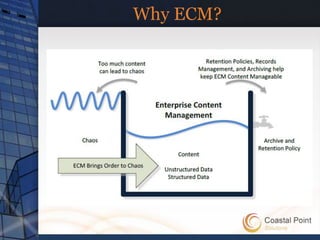
Why ECM?
What is ECM in SharePoint?
Provides an expanded subset of options,
an expanded scope, and is more
extensible than in previous versions.
ECM features are available to everyone in
the enterprise, are easy to use, and
support a broad range of content from the
formal and structured to the informal and
unstructured.
ECM features and functionality are also
highly extensible and scalable.
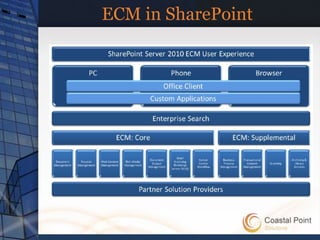
ECM in SharePoint

Document Management
Record Management
Web Content Management
Digital Assets Management
Enterprise Metadata Management
ECM in SharePoint
Digital Assets Management
Supports the ingestion, annotation, storage,
retrieval, and rendering of digital content, including
audio, video, and images.
Document Management
Create, store, and track documents, document sets,
and other types of content.
Includes technology that can use to navigate through
collections of documents and filter based on
metadata, and a way to locate documents based on
metadata defaults.
ECM in SharePoint
Record Management
Identifying documents as records, and ways to
manage those records throughout their life
cycle—identifying and creating records,
eDiscovery or hold, auditing, expiration, and
disposal. Supports managing records in an
archive or repository, and supports in-place
records management.
ECM in SharePoint
Web Content Management
Enables the configuration, deployment,
customization, and optimization of sites, site
collections, pages, Web Parts, and documents.
Enterprise Metadata
A hierarchical collection of centrally managed
terms that you can define and then use as
metadata throughout SharePoint Server 2010
and other Microsoft Office 2010 applications.
ECM in SharePoint
“Featurization” of    ECM

 MOSS 2007
    Document Center
    Record Center
 SharePoint Server 2010
Refactored into SharePoint Features
“Featurization” of ECM

Content Organizer
Document ID Service
Document Sets
Holds and eDiscovery
In-Place Records Management
Metadata Navigation and Filtering
Ratings
Document Management
Document Sets
  Enables users to create a single work product that
  contains multiple work items
  Base on specific content type called Document
  Sets:
       Allow Content Types
       Shared Fields
       Welcome Page
       Default Content
Document Management

Create Content Types that will be
allowed in the Document Sets
Create new Content Type that derives
from the Document Set content type
Add Document Set to document library
Document IDs
All documents and document sets within
that site collection are automatically
assigned a site collection scope unique ID
Users will always be able to find it using
the unique document ID.
Document IDs are generated by a
document ID provider.
Records Management
Custom document provider can be
implemented to replace the oob
funcitonality
  Inherit your provider from the
  Microsoft.Office.DocumentManagement.DocumentIdP
  rovider
  Replace provider using
  Microsoft.Office.DocumentManagement.
  DocumentId.SetProvider()
Applies change in Site Collection level
Records Management
Converting many of the records
management–specific capabilities into
SharePoint features
Some of the records management
features
  Content Organizer
  Holds and eDiscovery
  In-Place Records Management
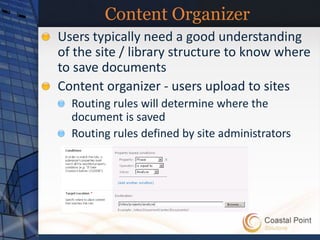
Content Organizer
Users typically need a good understanding
of the site / library structure to know where
to save documents
Content organizer - users upload to sites
  Routing rules will determine where the
  document is saved
  Routing rules defined by site administrators
Web Content Management
Enable you to configure, customize, develop,
optimize, and publish sites, site collections, pages,
Web Parts, and documents
     Controlled consistency
     Rich customization features and extensibility
     through the user interface (UI) and the object
     model.
     Extensive integration with Microsoft Office
     2010 that
     Functionality in one integrated set of
     capabilities that you can use to create
     dynamic, customized Web sites.
Web Content Management
Content Query WebPart
  Context filters introduced
     Filter query results based on query string or
     current page content values
     MOSS 2007 only allowed static filters OOTB
  SharePoint Server 2010 adds capability for
  page authors / designers to select content
  fields to display via customization UI
     In MOSS 2007, developers had to manually
     specify these fields in the CQWP’s
     CommonViewFields property & in the XSLT
Enterprise Metadata
Huge investments in metadata across
the platform
Metadata based navigation
  Easier for users as content is more discoverable
  Content stewards help in creating indices on
  metadata fields for enhanced nav. performance
Users can now filter search results using
metadata of result set
Location based metadata
  Content stewards create helpers for libraries &
  content types
Enterprise Metadata
Service Application (Term Store) » Groups »
   Term Sets » Terms
  Locations » Cities » Redmond
Administrators & users create term stores &
terms
  Flat list or hierarchical list
  Disambiguating, reusing, merging & deprecating
  terms
  Custom properties available from OM
Term store facilitates the management &
retrieval of metadata & relationships
Terms can belong to one or more term sets
  Translations & synonyms
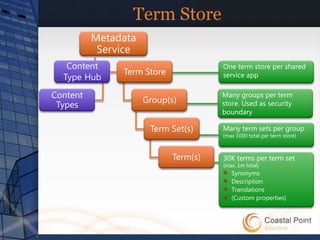
Term Store

             One term store per shared
             service app

             Many groups per term
             store. Used as security
             boundary

             Many term sets per group
             (max 1000 total per term store)


             30K terms per term set
             (max. 1m total)
                Synonyms
                Description
                Translations
                (Custom properties)
Enterprise Metadata
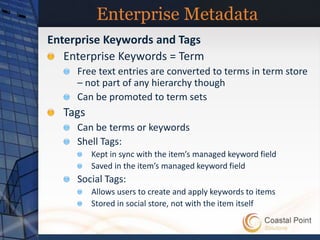
Enterprise Keywords and Tags
   Enterprise Keywords = Term
     Free text entries are converted to terms in term store
     – not part of any hierarchy though
     Can be promoted to term sets
  Tags
     Can be terms or keywords
     Shell Tags:
         Kept in sync with the item’s managed keyword field
         Saved in the item’s managed keyword field
     Social Tags:
         Allows users to create and apply keywords to items
         Stored in social store, not with the item itself
Enterprise Metadata
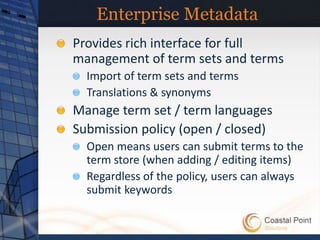
Provides rich interface for full
management of term sets and terms
  Import of term sets and terms
  Translations & synonyms
Manage term set / term languages
Submission policy (open / closed)
  Open means users can submit terms to the
  term store (when adding / editing items)
  Regardless of the policy, users can always
  submit keywords
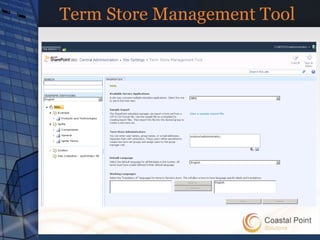
Term Store Management Tool
Rich object model for developers
Thank for listening!

    Q&A

ECM And Enterprise Metadata in SharePoint 2010

  • 1.
    ECM and Enterprise Metadata Enterprise Content Management and Enterprise Metadata
  • 2.
    AGENDA Introduce ECM ECM andEnterprise Metadata Document Management Record Management Web Content Management Enterprise Metadata
  • 3.
    What is ECM? EnterpriseContent Management (ECM) is the strategies, methods, and tools used to capture, manage, store, preserve, and deliver content and documents related to organizational processes. ECM tools and strategies allow the management of an organization's unstructured information, wherever that information exists.
  • 4.
    Why ECM? Helps bringstructure out of chaos Helps maintain order when the structure becomes too big. Cover both unstructured and structured data for an organization Avoid the chaos of unmanaged and unchecked content development that leads to duplication, rework, and wasted time and money.
  • 5.
  • 6.
    What is ECMin SharePoint? Provides an expanded subset of options, an expanded scope, and is more extensible than in previous versions. ECM features are available to everyone in the enterprise, are easy to use, and support a broad range of content from the formal and structured to the informal and unstructured. ECM features and functionality are also highly extensible and scalable.
  • 7.
    ECM in SharePoint DocumentManagement Record Management Web Content Management Digital Assets Management Enterprise Metadata Management
  • 8.
    ECM in SharePoint DigitalAssets Management Supports the ingestion, annotation, storage, retrieval, and rendering of digital content, including audio, video, and images. Document Management Create, store, and track documents, document sets, and other types of content. Includes technology that can use to navigate through collections of documents and filter based on metadata, and a way to locate documents based on metadata defaults.
  • 9.
    ECM in SharePoint RecordManagement Identifying documents as records, and ways to manage those records throughout their life cycle—identifying and creating records, eDiscovery or hold, auditing, expiration, and disposal. Supports managing records in an archive or repository, and supports in-place records management.
  • 10.
    ECM in SharePoint WebContent Management Enables the configuration, deployment, customization, and optimization of sites, site collections, pages, Web Parts, and documents. Enterprise Metadata A hierarchical collection of centrally managed terms that you can define and then use as metadata throughout SharePoint Server 2010 and other Microsoft Office 2010 applications.
  • 11.
  • 12.
    “Featurization” of ECM MOSS 2007 Document Center Record Center SharePoint Server 2010 Refactored into SharePoint Features
  • 13.
    “Featurization” of ECM ContentOrganizer Document ID Service Document Sets Holds and eDiscovery In-Place Records Management Metadata Navigation and Filtering Ratings
  • 14.
    Document Management Document Sets Enables users to create a single work product that contains multiple work items Base on specific content type called Document Sets: Allow Content Types Shared Fields Welcome Page Default Content
  • 15.
    Document Management Create ContentTypes that will be allowed in the Document Sets Create new Content Type that derives from the Document Set content type Add Document Set to document library
  • 16.
    Document IDs All documentsand document sets within that site collection are automatically assigned a site collection scope unique ID Users will always be able to find it using the unique document ID. Document IDs are generated by a document ID provider.
  • 17.
    Records Management Custom documentprovider can be implemented to replace the oob funcitonality Inherit your provider from the Microsoft.Office.DocumentManagement.DocumentIdP rovider Replace provider using Microsoft.Office.DocumentManagement. DocumentId.SetProvider() Applies change in Site Collection level
  • 18.
    Records Management Converting manyof the records management–specific capabilities into SharePoint features Some of the records management features Content Organizer Holds and eDiscovery In-Place Records Management
  • 19.
    Content Organizer Users typicallyneed a good understanding of the site / library structure to know where to save documents Content organizer - users upload to sites Routing rules will determine where the document is saved Routing rules defined by site administrators
  • 20.
    Web Content Management Enableyou to configure, customize, develop, optimize, and publish sites, site collections, pages, Web Parts, and documents Controlled consistency Rich customization features and extensibility through the user interface (UI) and the object model. Extensive integration with Microsoft Office 2010 that Functionality in one integrated set of capabilities that you can use to create dynamic, customized Web sites.
  • 21.
    Web Content Management ContentQuery WebPart Context filters introduced Filter query results based on query string or current page content values MOSS 2007 only allowed static filters OOTB SharePoint Server 2010 adds capability for page authors / designers to select content fields to display via customization UI In MOSS 2007, developers had to manually specify these fields in the CQWP’s CommonViewFields property & in the XSLT
  • 22.
    Enterprise Metadata Huge investmentsin metadata across the platform Metadata based navigation Easier for users as content is more discoverable Content stewards help in creating indices on metadata fields for enhanced nav. performance Users can now filter search results using metadata of result set Location based metadata Content stewards create helpers for libraries & content types
  • 23.
    Enterprise Metadata Service Application(Term Store) » Groups » Term Sets » Terms Locations » Cities » Redmond Administrators & users create term stores & terms Flat list or hierarchical list Disambiguating, reusing, merging & deprecating terms Custom properties available from OM Term store facilitates the management & retrieval of metadata & relationships Terms can belong to one or more term sets Translations & synonyms
  • 24.
    Term Store One term store per shared service app Many groups per term store. Used as security boundary Many term sets per group (max 1000 total per term store) 30K terms per term set (max. 1m total) Synonyms Description Translations (Custom properties)
  • 25.
    Enterprise Metadata Enterprise Keywordsand Tags Enterprise Keywords = Term Free text entries are converted to terms in term store – not part of any hierarchy though Can be promoted to term sets Tags Can be terms or keywords Shell Tags: Kept in sync with the item’s managed keyword field Saved in the item’s managed keyword field Social Tags: Allows users to create and apply keywords to items Stored in social store, not with the item itself
  • 26.
    Enterprise Metadata Provides richinterface for full management of term sets and terms Import of term sets and terms Translations & synonyms Manage term set / term languages Submission policy (open / closed) Open means users can submit terms to the term store (when adding / editing items) Regardless of the policy, users can always submit keywords
  • 27.
  • 28.
    Rich object modelfor developers
  • 29.