SharePoint Security 101
December       1st,   2012

Antonio Maio
Microsoft SharePoint Server MVP
Senior Product Manager, TITUS


       Email: Antonio.maio@titus.com
       Blog: www.trustsharepoint.com
                www.titus.com/blog
       Twitter: @AntonioMaio2
TITUS Introduction
                Data Security & Classification
                Market Leader
                • Over 500 Enterprise Customers
                • Over 2 Million Users Deployed

                • SharePoint Security
                • Email and Document Marking
                • Data Loss Prevention


2
Introduction
Goal - Inform and educate on key SharePoint
security features
     Focus on SharePoint 2010 and SharePoint 2013

• Security is built into many aspects of SharePoint
• Sometimes an after thought for deployments… Requires good planning

• Critical consideration in government and military deployments
• Driven by Regulations & Compliance, Reporting Obligations, Secure
  Information Sharing…
Topics
• Deployment planning & managed accounts
• Authentication
• Web Application Policies
• Anonymous Access & Public Facing Sites
• Data Governance
• Permissions
• Other…
    Information Rights Management
    User License Enforcement
    Privileged Users
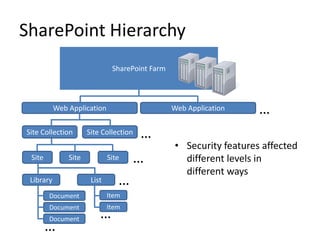
SharePoint Hierarchy
                               SharePoint Farm


           Web Application                       Web Application    …
Site Collection       Site Collection   …
                                                 • Security features affected
 Site          Site           Site   …             different levels in
                                                   different ways
 Library               List      …
        Document              Item
        Document              Item
        Document          …
        …
Deployment Planning/Managed Accounts
• SharePoint is a web application built on top of SQL Server
• Best Practice: specific managed accounts for specific
  purposes with least privileges… Planning required

• Benefits: Separation of Concerns
      Separation of data
      Multiple points of redundancy
      Targeted auditing of account usage
      Minimize risk of compromised accounts
      Minimize risk of information leaks

• Review SharePoint deployment guide before you install (at
  least this section)
Examples of Managed Accounts
1. SQL Server Service Account
    Purpose: Assign to MSSQLSERVER and SQLSERVERAGENT services when you install SQL
     Server (ex: domainSQL_service)
    No special domain permissions - given required rights on the SQL Server during setup
2. Setup User Account
    Purpose: Used to install SharePoint, run Product Config Wizard, install patches/updates
    login with this account when running setup (ex: domainsp_setup_user)
    Must be local admin on each server in SharePoint farm (except SQL Server if different box)
3. SharePoint Farm Account (Database Access Account)
    Purpose: the service account used to run the SharePoint farm; not just for database access
     (ex. domainsp_farm_user)
    After Product Config Wizard is run, prompted to provide the Database Access Account –
     misnamed in UI, this is really the farm service account


• Should all be AD domain accounts
• Do not use personal admin account , especially for Farm Account
• Configure central email account for all managed accounts
Authentication
• Determine that users are who they say they are (login)
    Configured on each web app
    Multiple authentication methods per web app

• SharePoint 2010 Options
    Classic Mode Authentication (Integrated Auth, NTLM, Kerberos)
    Claims Based Authentication
       • Forms Based Authentication available- done through Claims Based Auth.
       • UI configuration only available in UI upon web app creation
       • To convert non-claims based web app to claims will require PowerShell

• SharePoint 2013 Options
    Claims Based Authentication - default
    Classic Mode Configuration UI has been removed – only configurable
     through PowerShell
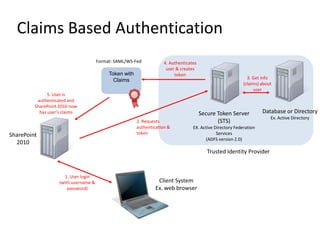
Claims Based Authentication
                                       Format: SAML/WS-Fed            4. Authenticates
                                                                       user & creates
                                            Token with                     token
                                              Claims                                                           3. Get info
                                                                                                             (claims) about
                                                                                                                  user
               5. User is
          authenticated and
         SharePoint 2010 now
           has user’s claims                                                             Secure Token Server          Database or Directory
                                                                                                                          Ex. Active Directory
                                                         2. Requests                            (STS)
                                                         authentication &           EX. Active Directory Federation
SharePoint                                               token                                  Services
                                                                                          (ADFS version 2.0)
  2010
                                                                                            Trusted Identity Provider


                      1. User login
                    (with username &                               Client System
                        password)                                 Ex. web browser
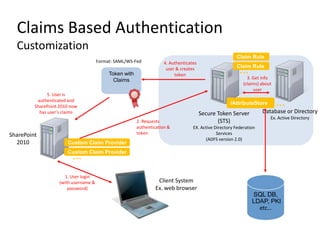
Claims Based Authentication
  Customization
                                                                                                         Claim Rule
                                       Format: SAML/WS-Fed            4. Authenticates
                                                                                                         Claim Rule
                                            Token with
                                                                       user & creates
                                                                           token
                                                                                                           …
                                              Claims                                                           3. Get info
                                                                                                             (claims) about
                                                                                                                  user
               5. User is
          authenticated and
         SharePoint 2010 now
                                                                                                      iAttributeStore         …
           has user’s claims                                                             Secure Token Server          Database or Directory
                                                                                                                          Ex. Active Directory
                                                         2. Requests                            (STS)
                                                         authentication &           EX. Active Directory Federation
SharePoint                                               token                                  Services
                                                                                          (ADFS version 2.0)
  2010                 Custom Claim Provider
                       Custom Claim Provider
                         …

                      1. User login
                    (with username &                               Client System
                        password)                                 Ex. web browser
                                                                                                                 SQL DB,
                                                                                                                 LDAP, PKI
                                                                                                                   etc…
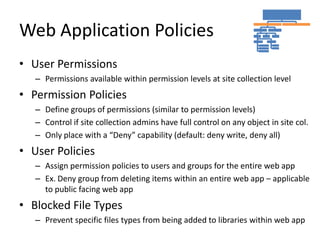
Web Application Policies
• User Permissions
   – Permissions available within permission levels at site collection level
• Permission Policies
   – Define groups of permissions (similar to permission levels)
   – Control if site collection admins have full control on any object in site col.
   – Only place with a “Deny” capability (default: deny write, deny all)
• User Policies
   – Assign permission policies to users and groups for the entire web app
   – Ex. Deny group from deleting items within an entire web app – applicable
     to public facing web app
• Blocked File Types
   – Prevent specific files types from being added to libraries within web app
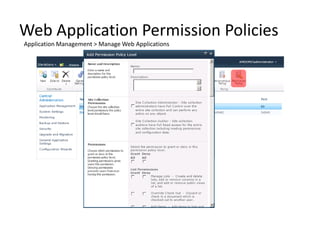
Web Application Permission Policies
Application Management > Manage Web Applications
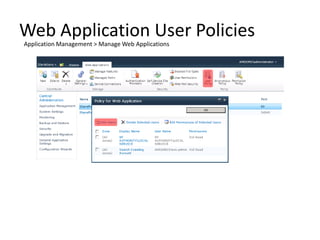
Web Application User Policies
Application Management > Manage Web Applications
Anonymous Access
Public Facing Sites

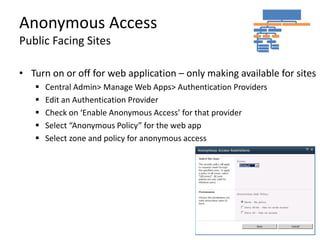
• Turn on or off for web application – only making available for sites
      Central Admin> Manage Web Apps> Authentication Providers
      Edit an Authentication Provider
      Check on ‘Enable Anonymous Access’ for that provider
      Select “Anonymous Policy” for the web app
      Select zone and policy for anonymous access
Anonymous Access
Public Facing Sites

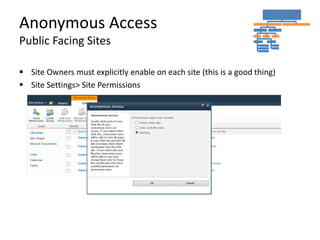
 Site Owners must explicitly enable on each site (this is a good thing)
 Site Settings> Site Permissions
Anonymous Access
Risks of Incorrect Configuration
• Risk: Inadvertent exposure of internal data on a public web site
• All form pages and _vti_bin web services are accessible - PUBLICLY
• Modify the URL of a public facing SharePoint site:
        http://www.mypublicsite.com/SitePages/Home.aspx to
        http://www.mypublicsite.com/_layouts/viewlsts.aspx

• View All Site Content page is now exposed, typically in SharePoint branding,
  with all site content visible
• Desired behavior: user is presented with a login page, or an HTTP error
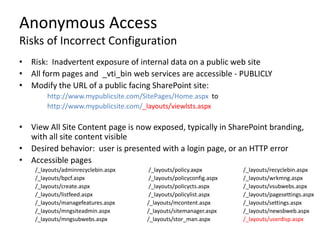
• Accessible pages
    /_layouts/adminrecyclebin.aspx    /_layouts/policy.axpx         /_layouts/recyclebin.aspx
    /_layouts/bpcf.aspx               /_layouts/policyconfig.aspx   /_layouts/wrkmng.aspx
    /_layouts/create.aspx             /_layouts/policycts.aspx      /_layouts/vsubwebs.aspx
    /_layouts/listfeed.aspx           /_layouts/policylist.aspx     /_layouts/pagesettings.aspx
    /_layouts/managefeatures.aspx    /_layouts/mcontent.aspx        /_layouts/settings.aspx
    /_layouts/mngsiteadmin.aspx      /_layouts/sitemanager.aspx     /_layouts/newsbweb.aspx
    /_layouts/mngsubwebs.aspx        /_layouts/stor_man.aspx        /_layouts/userdisp.aspx
Anonymous Access
Lockdown Feature & Web.Config
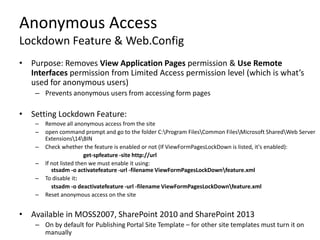
• Purpose: Removes View Application Pages permission & Use Remote
  Interfaces permission from Limited Access permission level (which is what’s
  used for anonymous users)
    – Prevents anonymous users from accessing form pages

• Setting Lockdown Feature:
    –   Remove all anonymous access from the site
    –   open command prompt and go to the folder C:Program FilesCommon FilesMicrosoft SharedWeb Server
        Extensions14BIN
    –   Check whether the feature is enabled or not (If ViewFormPagesLockDown is listed, it's enabled):
                         get-spfeature -site http://url
    –   If not listed then we must enable it using:
           stsadm -o activatefeature -url -filename ViewFormPagesLockDownfeature.xml
    –   To disable it:
           stsadm -o deactivatefeature -url -filename ViewFormPagesLockDownfeature.xml
    –   Reset anonymous access on the site


• Available in MOSS2007, SharePoint 2010 and SharePoint 2013
    – On by default for Publishing Portal Site Template – for other site templates must turn it on
      manually
Anonymous Access
Lockdown Feature & Web.Config
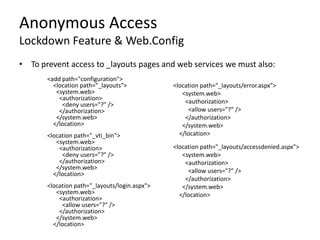
• To prevent access to _layouts pages and web services we must also:
       <add path="configuration">
         <location path="_layouts">            <location path="_layouts/error.aspx">
          <system.web>                            <system.web>
           <authorization>                         <authorization>
            <deny users="?" />
           </authorization>                         <allow users="?" />
          </system.web>                            </authorization>
         </location>                              </system.web>
       <location path="_vti_bin">                </location>
          <system.web>
           <authorization>                     <location path="_layouts/accessdenied.aspx">
            <deny users="?" />                    <system.web>
           </authorization>                        <authorization>
          </system.web>                             <allow users="?" />
         </location>
                                                   </authorization>
       <location path="_layouts/login.aspx">      </system.web>
          <system.web>                           </location>
           <authorization>
            <allow users="?" />
           </authorization>
          </system.web>
         </location>
Permissions
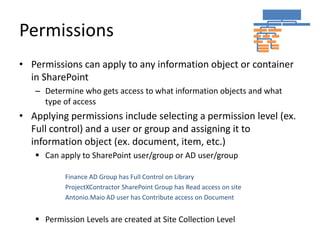
• Permissions can apply to any information object or container
  in SharePoint
   – Determine who gets access to what information objects and what
     type of access
• Applying permissions include selecting a permission level (ex.
  Full control) and a user or group and assigning it to
  information object (ex. document, item, etc.)
    Can apply to SharePoint user/group or AD user/group

           Finance AD Group has Full Control on Library
           ProjectXContractor SharePoint Group has Read access on site
           Antonio.Maio AD user has Contribute access on Document


    Permission Levels are created at Site Collection Level
Permissions and Security Scopes
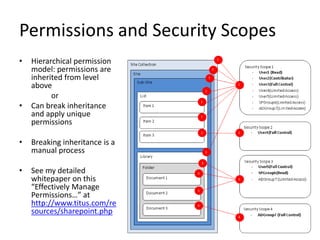
•   Hierarchical permission
    model: permissions are
    inherited from level
    above
          or
•   Can break inheritance
    and apply unique
    permissions

•   Breaking inheritance is a
    manual process

•   See my detailed
    whitepaper on this
    “Effectively Manage
    Permissions…” at
    http://www.titus.com/re
    sources/sharepoint.php
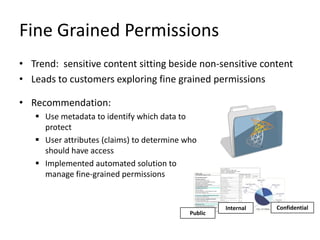
Fine Grained Permissions
• Trend: sensitive content sitting beside non-sensitive content
• Leads to customers exploring fine grained permissions

• Recommendation:
    Use metadata to identify which data to
     protect
    User attributes (claims) to determine who
     should have access
    Implemented automated solution to
     manage fine-grained permissions


                                                     Internal   Confidential
                                            Public
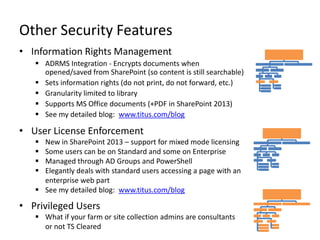
Other Security Features
• Information Rights Management
    ADRMS Integration - Encrypts documents when
     opened/saved from SharePoint (so content is still searchable)
    Sets information rights (do not print, do not forward, etc.)
    Granularity limited to library
    Supports MS Office documents (+PDF in SharePoint 2013)
    See my detailed blog: www.titus.com/blog

• User License Enforcement
    New in SharePoint 2013 – support for mixed mode licensing
    Some users can be on Standard and some on Enterprise
    Managed through AD Groups and PowerShell
    Elegantly deals with standard users accessing a page with an
     enterprise web part
    See my detailed blog: www.titus.com/blog

• Privileged Users
    What if your farm or site collection admins are consultants
     or not TS Cleared
TITUS Prize Giveaway
• See us at TITUS booth today
• Come to TITUS Vendor session this
  afternoon (Rm. 123 @ 4pm)
  •   TITUS SharePoint Security Suite

  •   More SharePoint Security, Less Effort

  •   Ensure the right people are accessing the Right Information

  •   Raise Awareness about Sensitive Data

  •   Promote End User Accountability for Sensitive Data
Thank you to all of our Sponsors!!
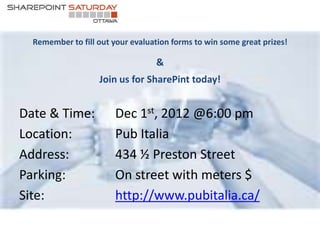
Remember to fill out your evaluation forms to win some great prizes!

                                  &
                   Join us for SharePint today!


Date & Time:            Dec 1st, 2012 @6:00 pm
Location:               Pub Italia
Address:                434 ½ Preston Street
Parking:                On street with meters $
Site:                   http://www.pubitalia.ca/

Share point security 101 sps-ottawa 2012 - antonio maio

  • 1.
    SharePoint Security 101 December 1st, 2012 Antonio Maio Microsoft SharePoint Server MVP Senior Product Manager, TITUS Email: Antonio.maio@titus.com Blog: www.trustsharepoint.com www.titus.com/blog Twitter: @AntonioMaio2
  • 2.
    TITUS Introduction Data Security & Classification Market Leader • Over 500 Enterprise Customers • Over 2 Million Users Deployed • SharePoint Security • Email and Document Marking • Data Loss Prevention 2
  • 3.
    Introduction Goal - Informand educate on key SharePoint security features  Focus on SharePoint 2010 and SharePoint 2013 • Security is built into many aspects of SharePoint • Sometimes an after thought for deployments… Requires good planning • Critical consideration in government and military deployments • Driven by Regulations & Compliance, Reporting Obligations, Secure Information Sharing…
  • 4.
    Topics • Deployment planning& managed accounts • Authentication • Web Application Policies • Anonymous Access & Public Facing Sites • Data Governance • Permissions • Other…  Information Rights Management  User License Enforcement  Privileged Users
  • 5.
    SharePoint Hierarchy SharePoint Farm Web Application Web Application … Site Collection Site Collection … • Security features affected Site Site Site … different levels in different ways Library List … Document Item Document Item Document … …
  • 6.
    Deployment Planning/Managed Accounts •SharePoint is a web application built on top of SQL Server • Best Practice: specific managed accounts for specific purposes with least privileges… Planning required • Benefits: Separation of Concerns  Separation of data  Multiple points of redundancy  Targeted auditing of account usage  Minimize risk of compromised accounts  Minimize risk of information leaks • Review SharePoint deployment guide before you install (at least this section)
  • 7.
    Examples of ManagedAccounts 1. SQL Server Service Account  Purpose: Assign to MSSQLSERVER and SQLSERVERAGENT services when you install SQL Server (ex: domainSQL_service)  No special domain permissions - given required rights on the SQL Server during setup 2. Setup User Account  Purpose: Used to install SharePoint, run Product Config Wizard, install patches/updates  login with this account when running setup (ex: domainsp_setup_user)  Must be local admin on each server in SharePoint farm (except SQL Server if different box) 3. SharePoint Farm Account (Database Access Account)  Purpose: the service account used to run the SharePoint farm; not just for database access (ex. domainsp_farm_user)  After Product Config Wizard is run, prompted to provide the Database Access Account – misnamed in UI, this is really the farm service account • Should all be AD domain accounts • Do not use personal admin account , especially for Farm Account • Configure central email account for all managed accounts
  • 8.
    Authentication • Determine thatusers are who they say they are (login)  Configured on each web app  Multiple authentication methods per web app • SharePoint 2010 Options  Classic Mode Authentication (Integrated Auth, NTLM, Kerberos)  Claims Based Authentication • Forms Based Authentication available- done through Claims Based Auth. • UI configuration only available in UI upon web app creation • To convert non-claims based web app to claims will require PowerShell • SharePoint 2013 Options  Claims Based Authentication - default  Classic Mode Configuration UI has been removed – only configurable through PowerShell
  • 9.
    Claims Based Authentication Format: SAML/WS-Fed 4. Authenticates user & creates Token with token Claims 3. Get info (claims) about user 5. User is authenticated and SharePoint 2010 now has user’s claims Secure Token Server Database or Directory Ex. Active Directory 2. Requests (STS) authentication & EX. Active Directory Federation SharePoint token Services (ADFS version 2.0) 2010 Trusted Identity Provider 1. User login (with username & Client System password) Ex. web browser
  • 10.
    Claims Based Authentication Customization Claim Rule Format: SAML/WS-Fed 4. Authenticates Claim Rule Token with user & creates token … Claims 3. Get info (claims) about user 5. User is authenticated and SharePoint 2010 now iAttributeStore … has user’s claims Secure Token Server Database or Directory Ex. Active Directory 2. Requests (STS) authentication & EX. Active Directory Federation SharePoint token Services (ADFS version 2.0) 2010 Custom Claim Provider Custom Claim Provider … 1. User login (with username & Client System password) Ex. web browser SQL DB, LDAP, PKI etc…
  • 11.
    Web Application Policies •User Permissions – Permissions available within permission levels at site collection level • Permission Policies – Define groups of permissions (similar to permission levels) – Control if site collection admins have full control on any object in site col. – Only place with a “Deny” capability (default: deny write, deny all) • User Policies – Assign permission policies to users and groups for the entire web app – Ex. Deny group from deleting items within an entire web app – applicable to public facing web app • Blocked File Types – Prevent specific files types from being added to libraries within web app
  • 12.
    Web Application PermissionPolicies Application Management > Manage Web Applications
  • 13.
    Web Application UserPolicies Application Management > Manage Web Applications
  • 14.
    Anonymous Access Public FacingSites • Turn on or off for web application – only making available for sites  Central Admin> Manage Web Apps> Authentication Providers  Edit an Authentication Provider  Check on ‘Enable Anonymous Access’ for that provider  Select “Anonymous Policy” for the web app  Select zone and policy for anonymous access
  • 15.
    Anonymous Access Public FacingSites  Site Owners must explicitly enable on each site (this is a good thing)  Site Settings> Site Permissions
  • 16.
    Anonymous Access Risks ofIncorrect Configuration • Risk: Inadvertent exposure of internal data on a public web site • All form pages and _vti_bin web services are accessible - PUBLICLY • Modify the URL of a public facing SharePoint site: http://www.mypublicsite.com/SitePages/Home.aspx to http://www.mypublicsite.com/_layouts/viewlsts.aspx • View All Site Content page is now exposed, typically in SharePoint branding, with all site content visible • Desired behavior: user is presented with a login page, or an HTTP error • Accessible pages /_layouts/adminrecyclebin.aspx /_layouts/policy.axpx /_layouts/recyclebin.aspx /_layouts/bpcf.aspx /_layouts/policyconfig.aspx /_layouts/wrkmng.aspx /_layouts/create.aspx /_layouts/policycts.aspx /_layouts/vsubwebs.aspx /_layouts/listfeed.aspx /_layouts/policylist.aspx /_layouts/pagesettings.aspx /_layouts/managefeatures.aspx /_layouts/mcontent.aspx /_layouts/settings.aspx /_layouts/mngsiteadmin.aspx /_layouts/sitemanager.aspx /_layouts/newsbweb.aspx /_layouts/mngsubwebs.aspx /_layouts/stor_man.aspx /_layouts/userdisp.aspx
  • 17.
    Anonymous Access Lockdown Feature& Web.Config • Purpose: Removes View Application Pages permission & Use Remote Interfaces permission from Limited Access permission level (which is what’s used for anonymous users) – Prevents anonymous users from accessing form pages • Setting Lockdown Feature: – Remove all anonymous access from the site – open command prompt and go to the folder C:Program FilesCommon FilesMicrosoft SharedWeb Server Extensions14BIN – Check whether the feature is enabled or not (If ViewFormPagesLockDown is listed, it's enabled): get-spfeature -site http://url – If not listed then we must enable it using: stsadm -o activatefeature -url -filename ViewFormPagesLockDownfeature.xml – To disable it: stsadm -o deactivatefeature -url -filename ViewFormPagesLockDownfeature.xml – Reset anonymous access on the site • Available in MOSS2007, SharePoint 2010 and SharePoint 2013 – On by default for Publishing Portal Site Template – for other site templates must turn it on manually
  • 18.
    Anonymous Access Lockdown Feature& Web.Config • To prevent access to _layouts pages and web services we must also: <add path="configuration"> <location path="_layouts"> <location path="_layouts/error.aspx"> <system.web> <system.web> <authorization> <authorization> <deny users="?" /> </authorization> <allow users="?" /> </system.web> </authorization> </location> </system.web> <location path="_vti_bin"> </location> <system.web> <authorization> <location path="_layouts/accessdenied.aspx"> <deny users="?" /> <system.web> </authorization> <authorization> </system.web> <allow users="?" /> </location> </authorization> <location path="_layouts/login.aspx"> </system.web> <system.web> </location> <authorization> <allow users="?" /> </authorization> </system.web> </location>
  • 19.
    Permissions • Permissions canapply to any information object or container in SharePoint – Determine who gets access to what information objects and what type of access • Applying permissions include selecting a permission level (ex. Full control) and a user or group and assigning it to information object (ex. document, item, etc.)  Can apply to SharePoint user/group or AD user/group Finance AD Group has Full Control on Library ProjectXContractor SharePoint Group has Read access on site Antonio.Maio AD user has Contribute access on Document  Permission Levels are created at Site Collection Level
  • 20.
    Permissions and SecurityScopes • Hierarchical permission model: permissions are inherited from level above or • Can break inheritance and apply unique permissions • Breaking inheritance is a manual process • See my detailed whitepaper on this “Effectively Manage Permissions…” at http://www.titus.com/re sources/sharepoint.php
  • 21.
    Fine Grained Permissions •Trend: sensitive content sitting beside non-sensitive content • Leads to customers exploring fine grained permissions • Recommendation:  Use metadata to identify which data to protect  User attributes (claims) to determine who should have access  Implemented automated solution to manage fine-grained permissions Internal Confidential Public
  • 22.
    Other Security Features •Information Rights Management  ADRMS Integration - Encrypts documents when opened/saved from SharePoint (so content is still searchable)  Sets information rights (do not print, do not forward, etc.)  Granularity limited to library  Supports MS Office documents (+PDF in SharePoint 2013)  See my detailed blog: www.titus.com/blog • User License Enforcement  New in SharePoint 2013 – support for mixed mode licensing  Some users can be on Standard and some on Enterprise  Managed through AD Groups and PowerShell  Elegantly deals with standard users accessing a page with an enterprise web part  See my detailed blog: www.titus.com/blog • Privileged Users  What if your farm or site collection admins are consultants or not TS Cleared
  • 23.
    TITUS Prize Giveaway •See us at TITUS booth today • Come to TITUS Vendor session this afternoon (Rm. 123 @ 4pm) • TITUS SharePoint Security Suite • More SharePoint Security, Less Effort • Ensure the right people are accessing the Right Information • Raise Awareness about Sensitive Data • Promote End User Accountability for Sensitive Data
  • 24.
    Thank you toall of our Sponsors!!
  • 25.
    Remember to fillout your evaluation forms to win some great prizes! & Join us for SharePint today! Date & Time: Dec 1st, 2012 @6:00 pm Location: Pub Italia Address: 434 ½ Preston Street Parking: On street with meters $ Site: http://www.pubitalia.ca/