
HAD05
Collaborating with Extranet
Partners on SharePoint 2010
        Michael Noel
           CCO
       @MichaelTNoel
Michael Noel
•   Author of SAMS Publishing titles “SharePoint 2010 Unleashed,” “SharePoint
    2007 Unleashed,” “SharePoint 2003 Unleashed”, “Teach Yourself SharePoint
    2003 in 10 Minutes,” “Windows Server 2008 R2 Unleashed,” “Exchange Server
    2010 Unleashed”, “ISA Server 2006 Unleashed”, and many other titles .
•   Partner at Convergent Computing (www.cco.com / +1(510)444-5700) – San
    Francisco Bay Area based Infrastructure/Security specialists for SharePoint,
    AD, Exchange, Security
What we’ll cover
• Why an Extranet?
• SharePoint 2010 Extranets
• Extranet Architecture Options
• Claims-based Authentication
• Forefront Unified Access Gateway (UAG)
  for extranets
• Forefront Identity Manager for Identity
  Management in an Extranet
Why an Extranet?
Why an Extranet?

• Security Isolation
  ●   Isolation of Data
  ●   Less Exposure, Perimeter Network Scenarios
• Partner Collaboration
  ●   Share SP Content with External Partners
  ●   Control Partner Accounts

  Anonymous Customer Scenarios are not
  Extranets
SharePoint 2010 Extranets

• Claims-based Authentication Support
• Multiple Authentication Providers
• Better Scalability (Services Architecture)
  ●   Goodbye SSP!
  ●   Server Groups
  ●   Services Applications
• Multiple Authentication Types per Web
  Application
Sample Extranet
  Architecture
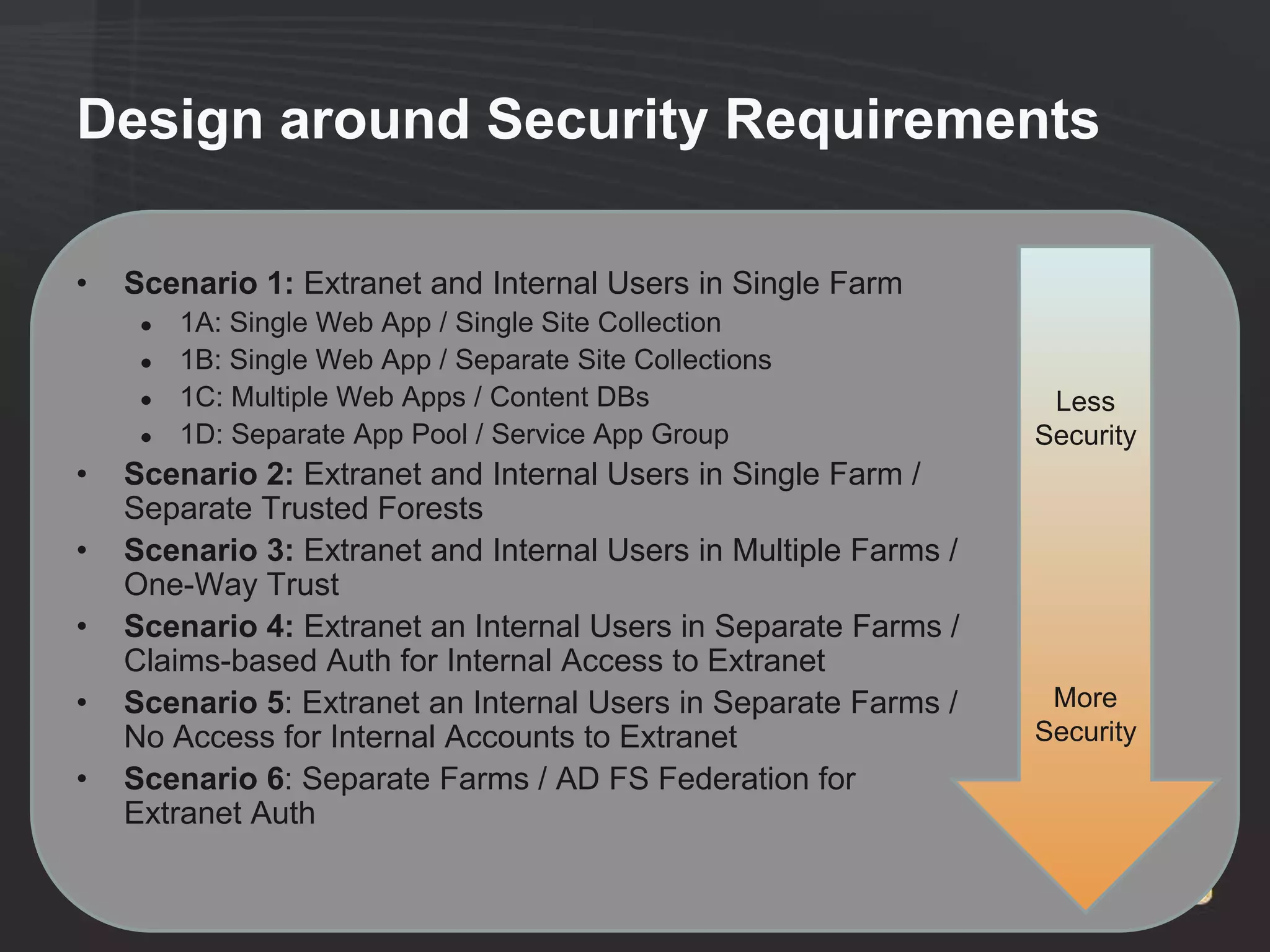
Design around Security Requirements

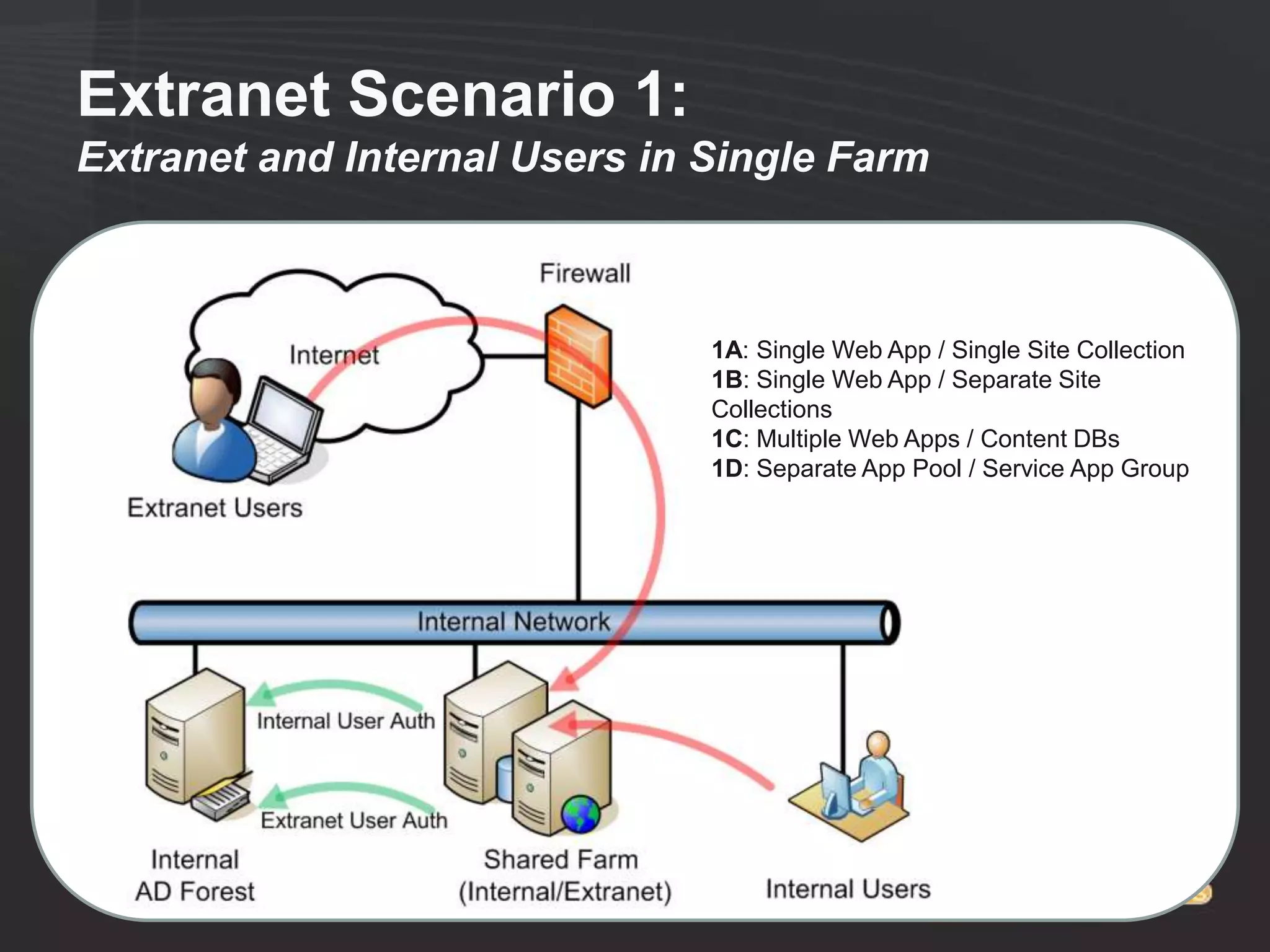
•   Scenario 1: Extranet and Internal Users in Single Farm
     ●   1A: Single Web App / Single Site Collection
     ●   1B: Single Web App / Separate Site Collections
     ●   1C: Multiple Web Apps / Content DBs                       Less
     ●   1D: Separate App Pool / Service App Group                Security
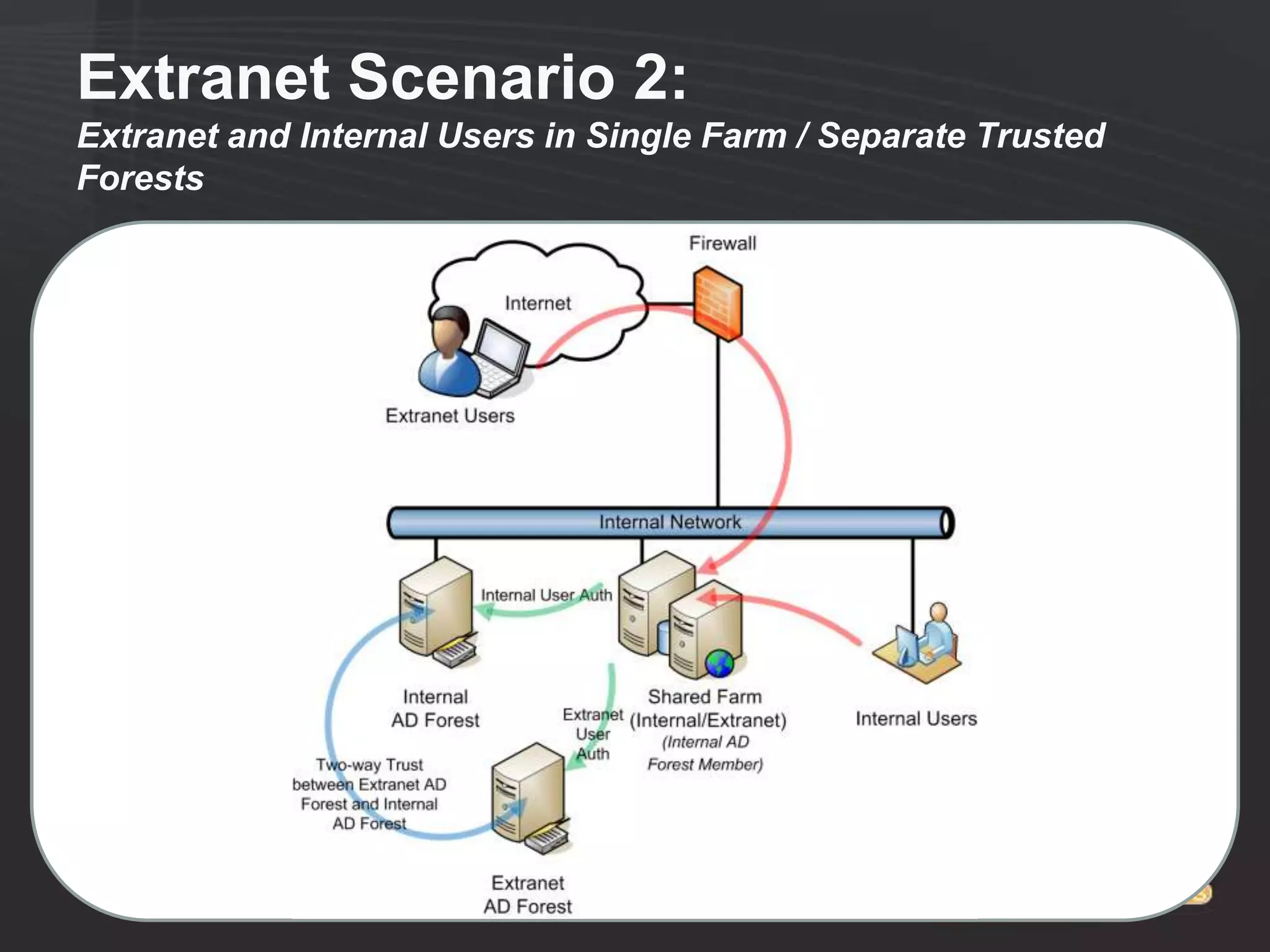
•   Scenario 2: Extranet and Internal Users in Single Farm /
    Separate Trusted Forests
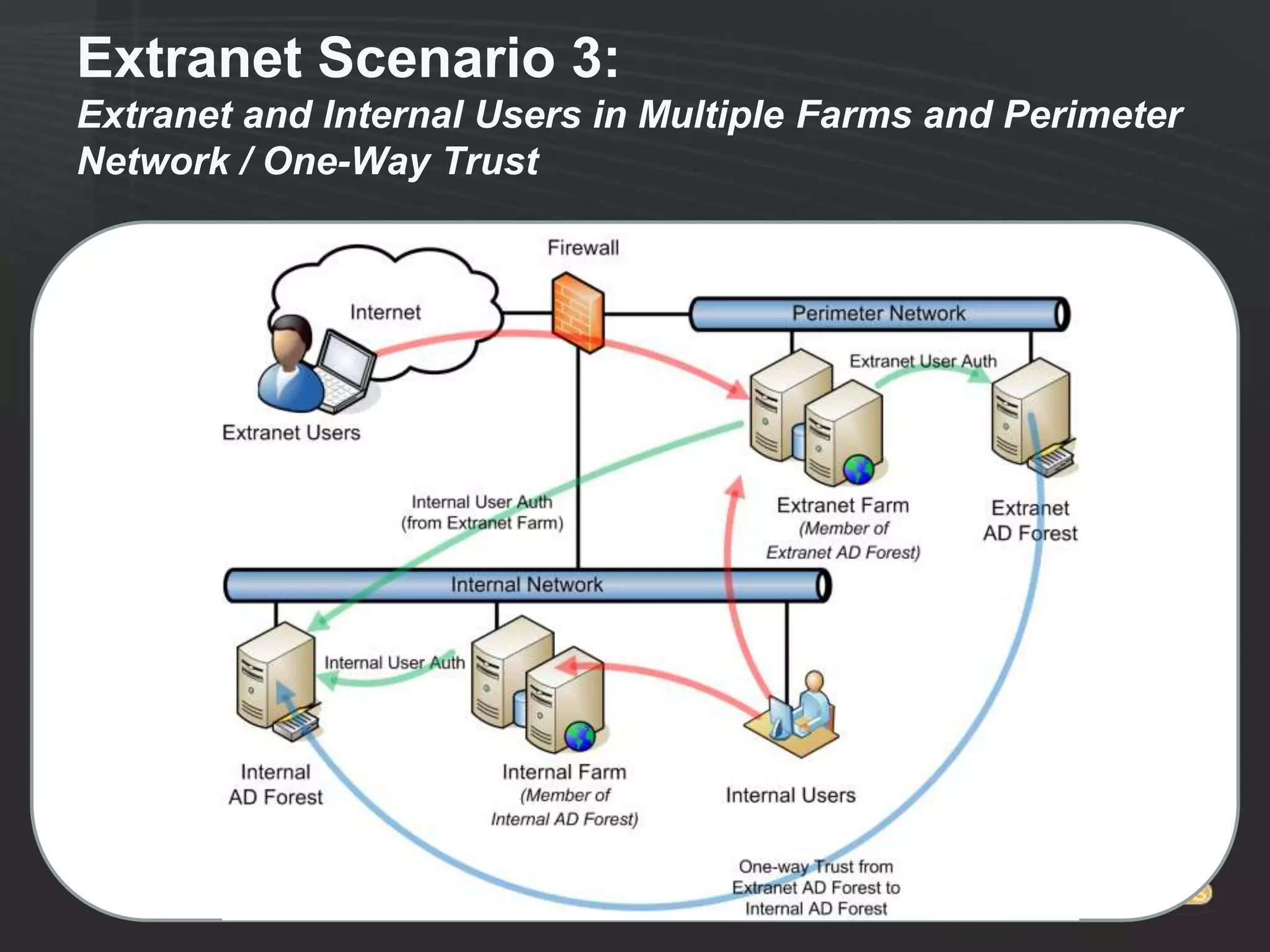
•   Scenario 3: Extranet and Internal Users in Multiple Farms /
    One-Way Trust
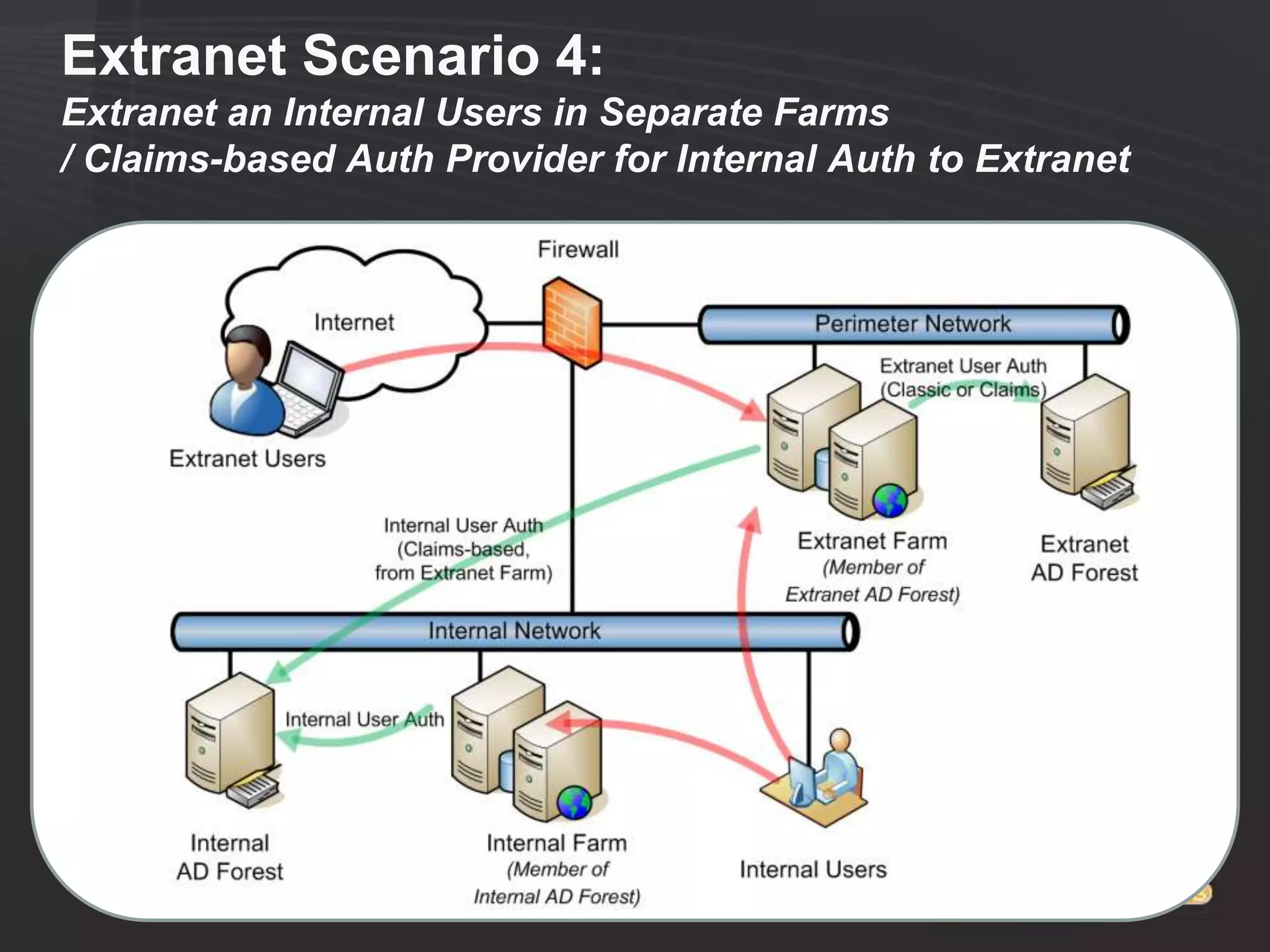
•   Scenario 4: Extranet an Internal Users in Separate Farms /
    Claims-based Auth for Internal Access to Extranet
•   Scenario 5: Extranet an Internal Users in Separate Farms /     More
    No Access for Internal Accounts to Extranet                   Security
•   Scenario 6: Separate Farms / AD FS Federation for
    Extranet Auth
Extranet Scenario 1:
Extranet and Internal Users in Single Farm


                               1A: Single Web App / Single Site Collection
                               1B: Single Web App / Separate Site
                               Collections
                               1C: Multiple Web Apps / Content DBs
                               1D: Separate App Pool / Service App Group
Extranet Scenario 2:
Extranet and Internal Users in Single Farm / Separate Trusted
Forests
Extranet Scenario 3:
Extranet and Internal Users in Multiple Farms and Perimeter
Network / One-Way Trust
Extranet Scenario 4:
Extranet an Internal Users in Separate Farms
/ Claims-based Auth Provider for Internal Auth to Extranet
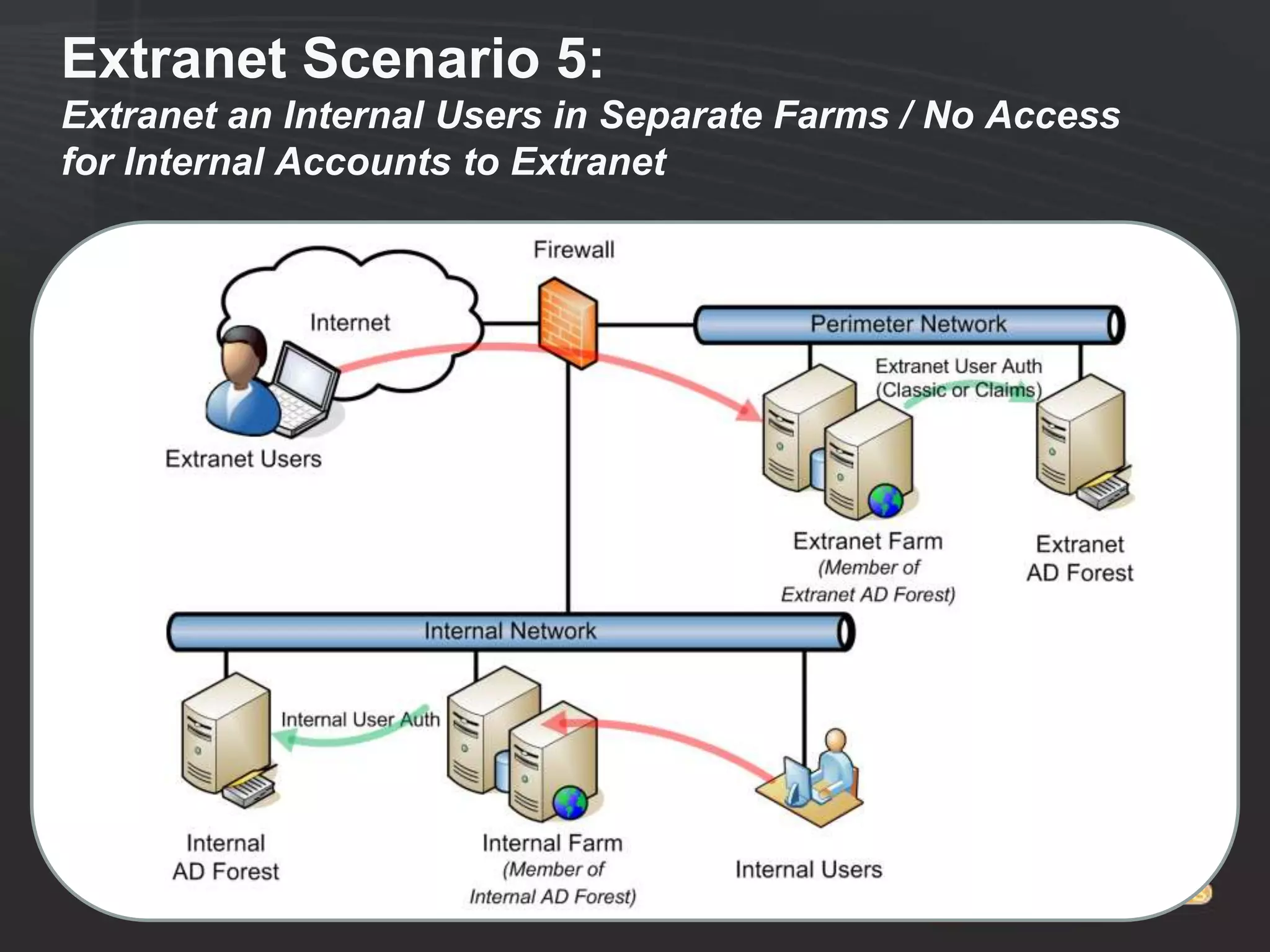
Extranet Scenario 5:
Extranet an Internal Users in Separate Farms / No Access
for Internal Accounts to Extranet
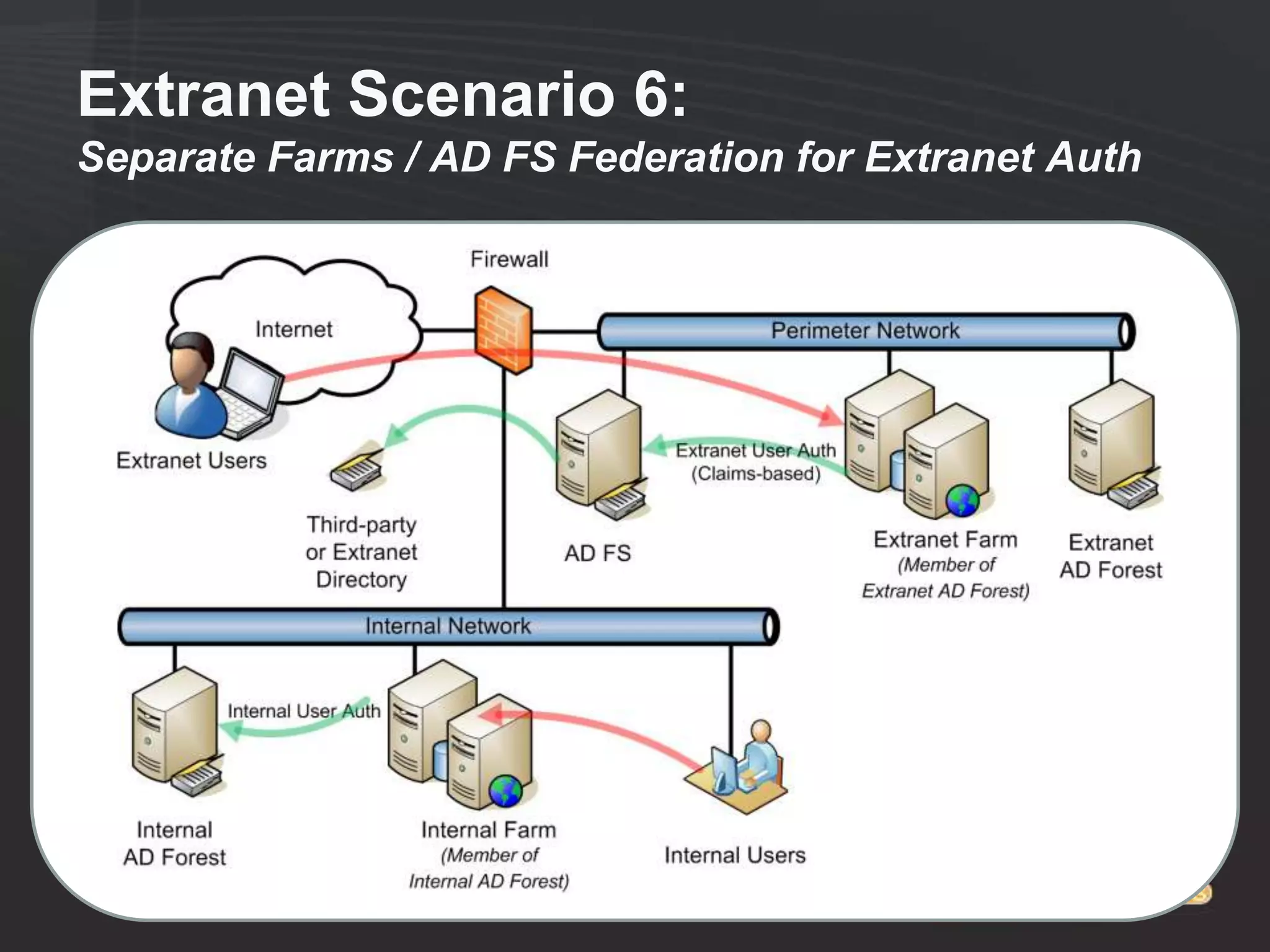
Extranet Scenario 6:
Separate Farms / AD FS Federation for Extranet Auth
Extranet Notes
One-Way Trust Scenarios
• People Picker needs to be configured to crawl domain if it doesn‟t
  trust the domain where the SharePoint farm is installed.
• Only with STSADM (Rare exception when you can‟t use
  PowerShell)
• Example Syntax:
    ●   stsadm.exe -o setapppassword -password AnyPassw0rd
    ●   stsadm.exe -o setproperty -pn peoplepicker-searchadforests -pv
        "domain:companyabc.com,COMPANYABCsvc_sppplpick,Password1;d
        omain:extranetabc.com" -url https://extranet.companyabc.com
    ●   stsadm.exe -o setproperty -pn peoplepicker-searchadforests -pv
        "domain:companyabc.com,COMPANYABCsvc_sppplpick,Password1;d
        omain:extranetabc.com" -url https://spcaext.companyabc.com
• Syntax is critical
• Run against all web apps
Design for Clientless Access to
SharePoint
• Services Applications for Extranet Clients:
  ●   Word Services
  ●   Excel Services
  ●   Visio Services
  ●   Access Services
  ●   InfoPath Forms Services
• Allows „Clientless‟ access to SharePoint
  content, for Extranet partners without
  Office
Standard Requirements Apply to Extranets as
well

• SharePoint-aware Antivirus
  ●   i.e. Forefront Protection for SharePoint
• SharePoint-aware Backup and Restore
  ●   i.e. System Center Data Protection Manager
      (DPM) 2010
• Rights Management?
  ●   Active Directory Rights Management Services
      (AD RMS)
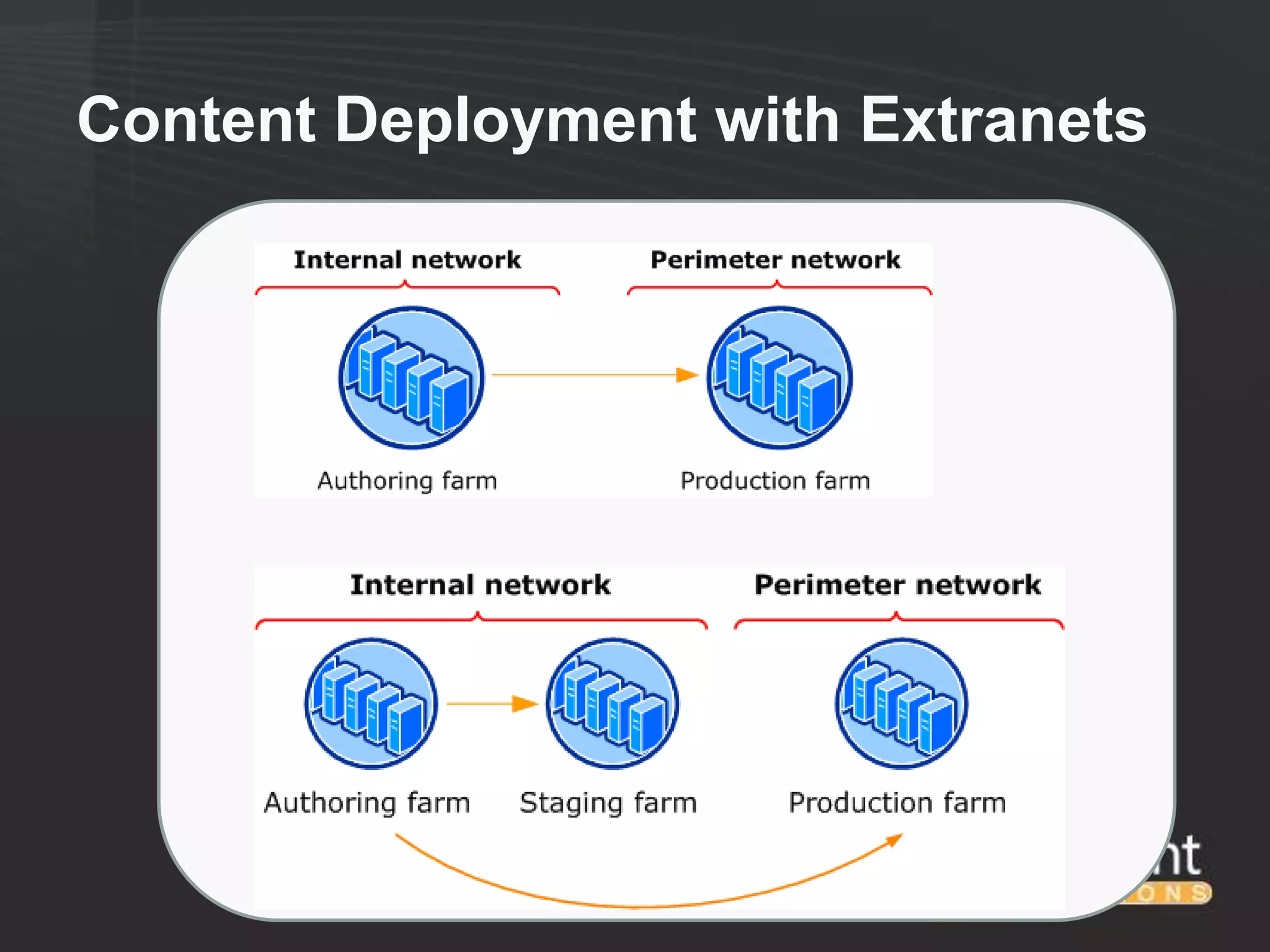
Content Deployment with Extranets
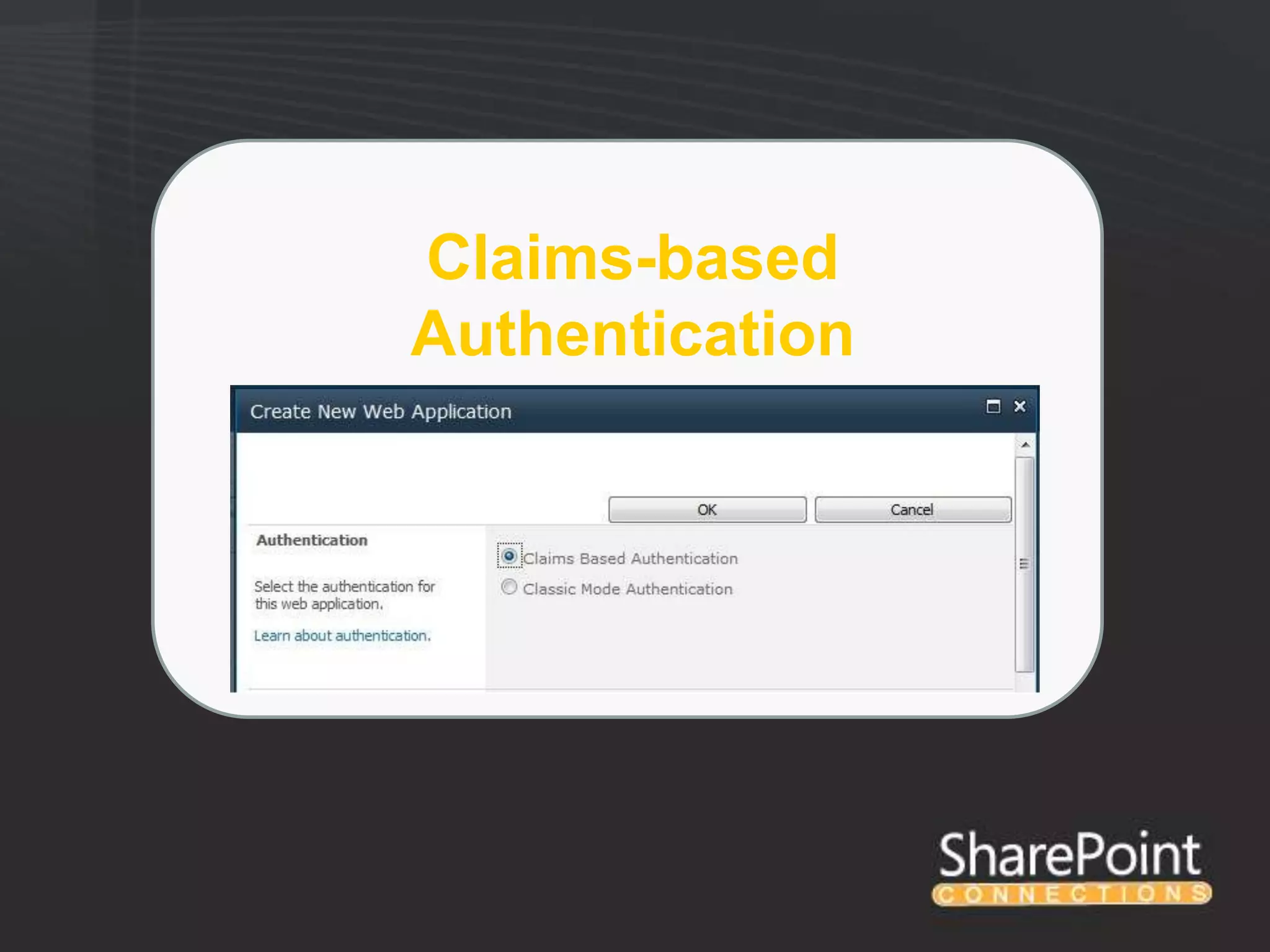
Claims-based
Authentication
Claims-Based Auth
• SharePoint doesn‟t actually Authenticate Users, it relies on IIS or
  other providers
• SharePoint 2010 Allows for Classic and Claims-based Auth
  Scenarios
• Classic Authentication is similar to SharePoint 2007
• Claims based Auth adds the following key benefits:
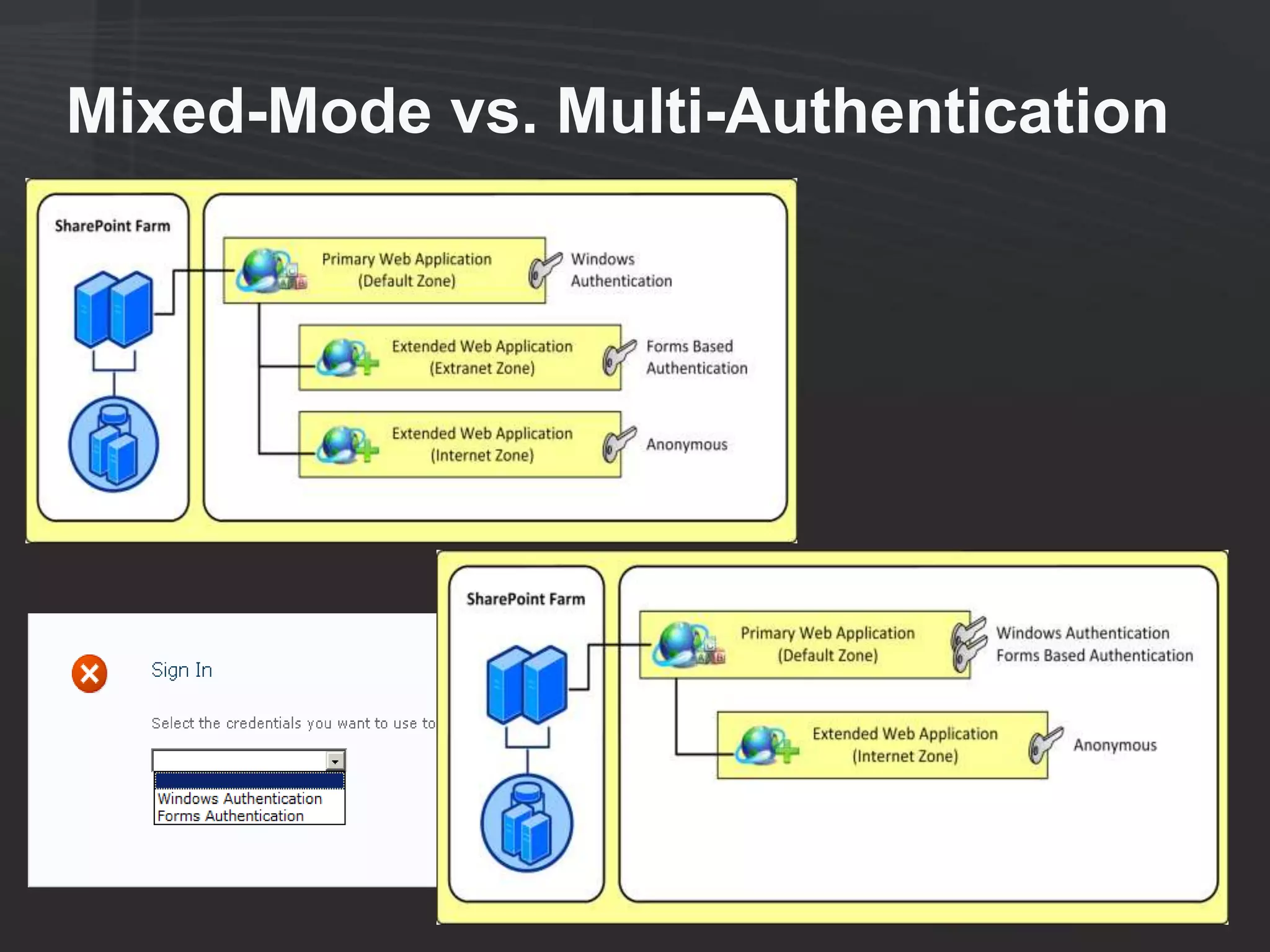
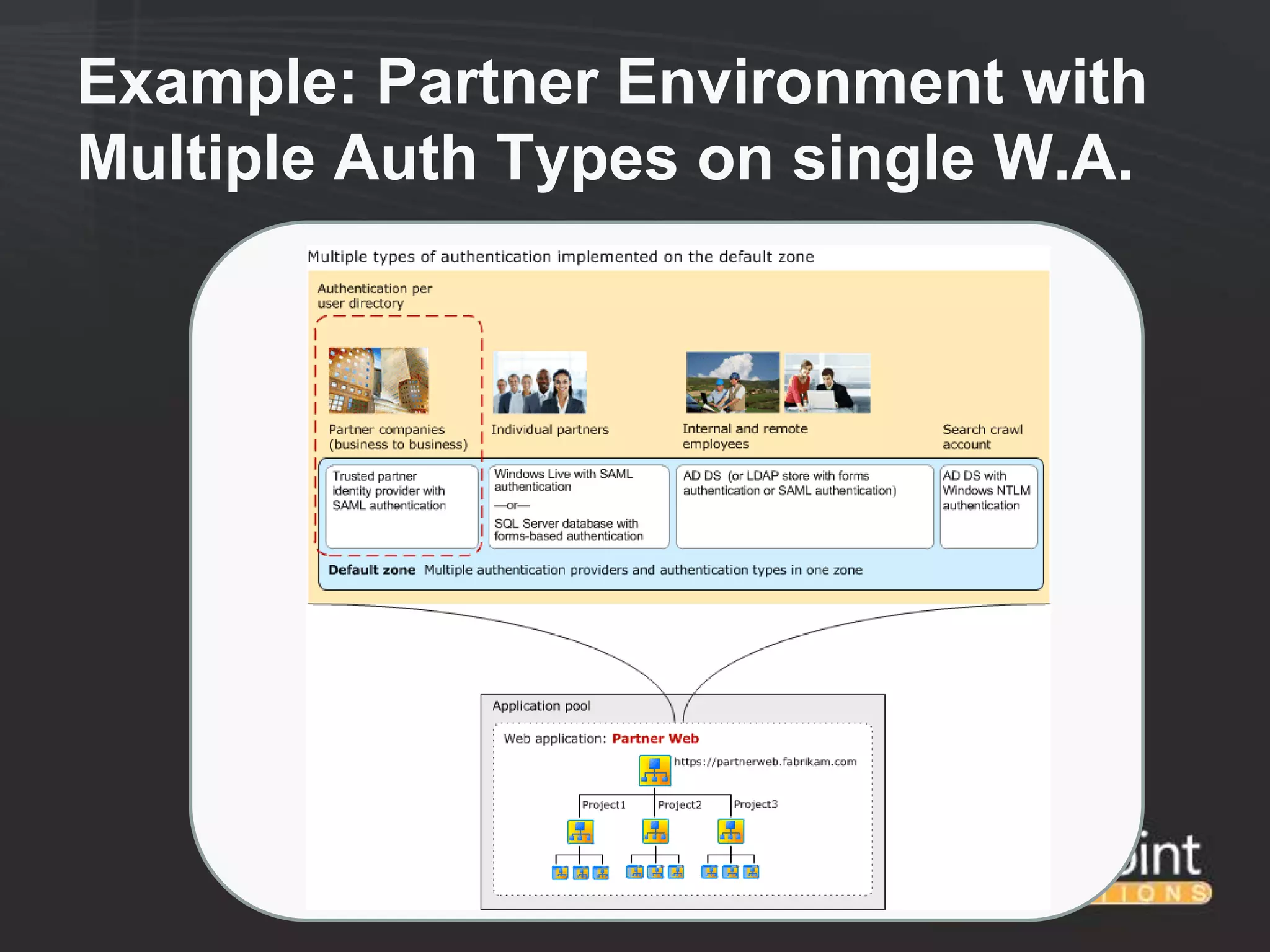
    ●   Allows for Multiple Authentication Types per Web Application Zone
    ●   Removes SharePoint from the Authentication Provider
    ●   Allows for federation between organizations (AD FS, etc.) scenarios
    ●   Does not require Kerberos Delegation
• Current limitations with Claims-based auth involve SQL Reporting
  Services, PowerPivot, PerformancePoint, and other SQL tools that
  require delegation. These appear to be fixed in SQL 2012.
• Remember the difference between Authentication and
  Authorization…
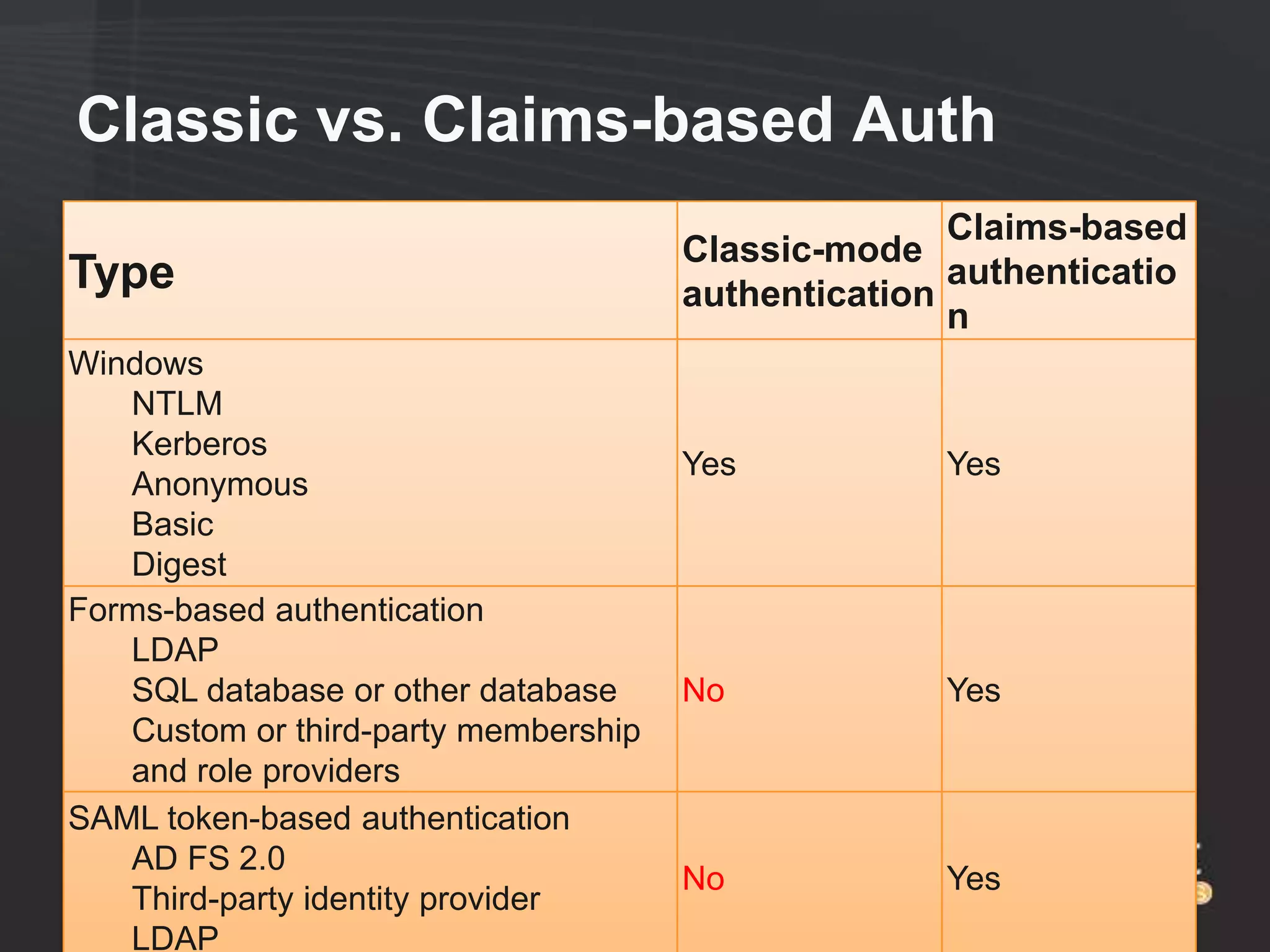
Classic vs. Claims-based Auth
                                                     Claims-based
                                      Classic-mode
Type                                  authentication
                                                     authenticatio
                                                     n
Windows
   NTLM
   Kerberos
                                      Yes           Yes
   Anonymous
   Basic
   Digest
Forms-based authentication
   LDAP
   SQL database or other database     No            Yes
   Custom or third-party membership
   and role providers
SAML token-based authentication
   AD FS 2.0
                                      No            Yes
   Third-party identity provider
   LDAP
Mixed-Mode vs. Multi-Authentication
Example: Partner Environment with
Multiple Auth Types on single W.A.
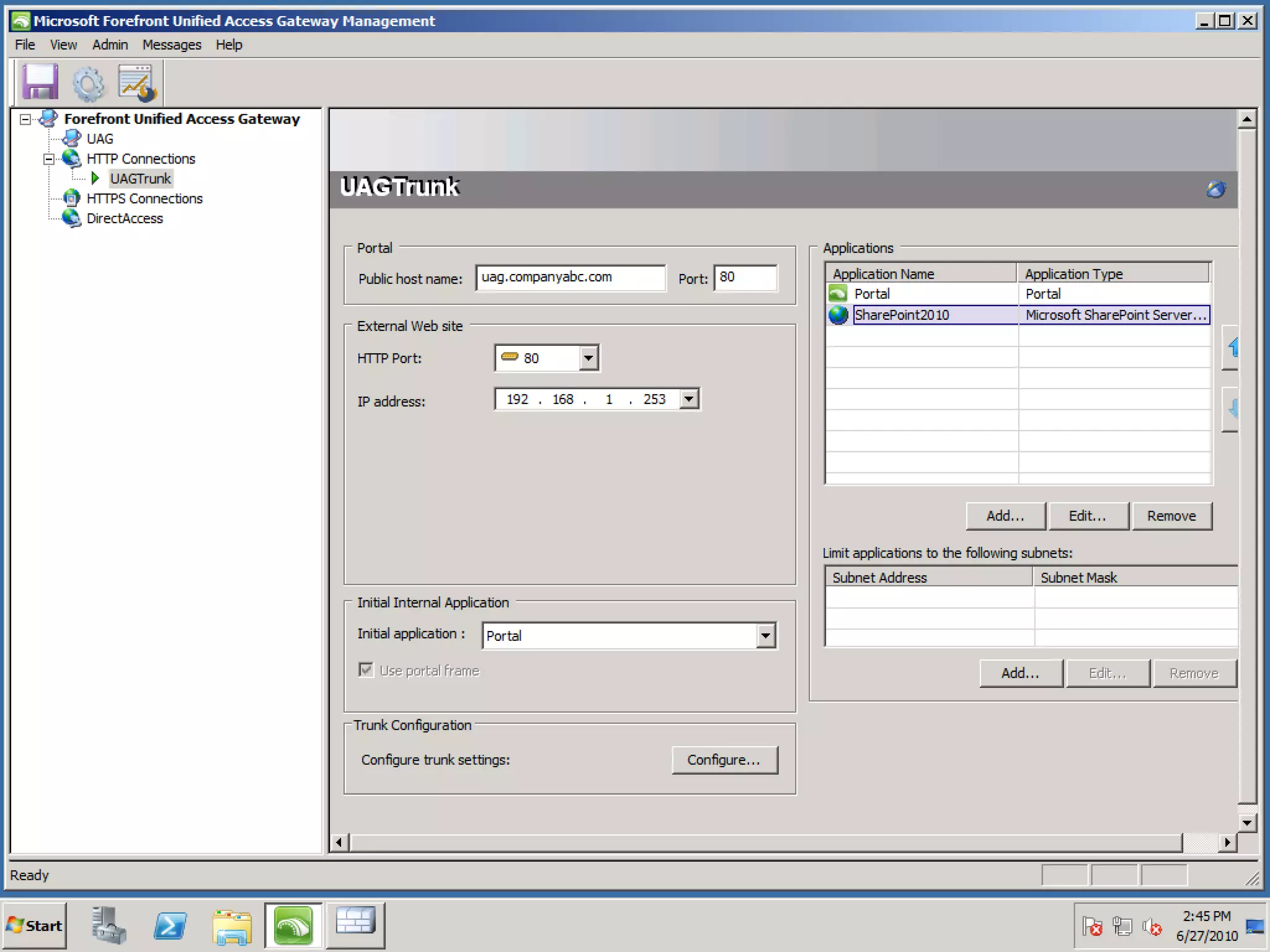
Forefront Unified Access
        Gateway
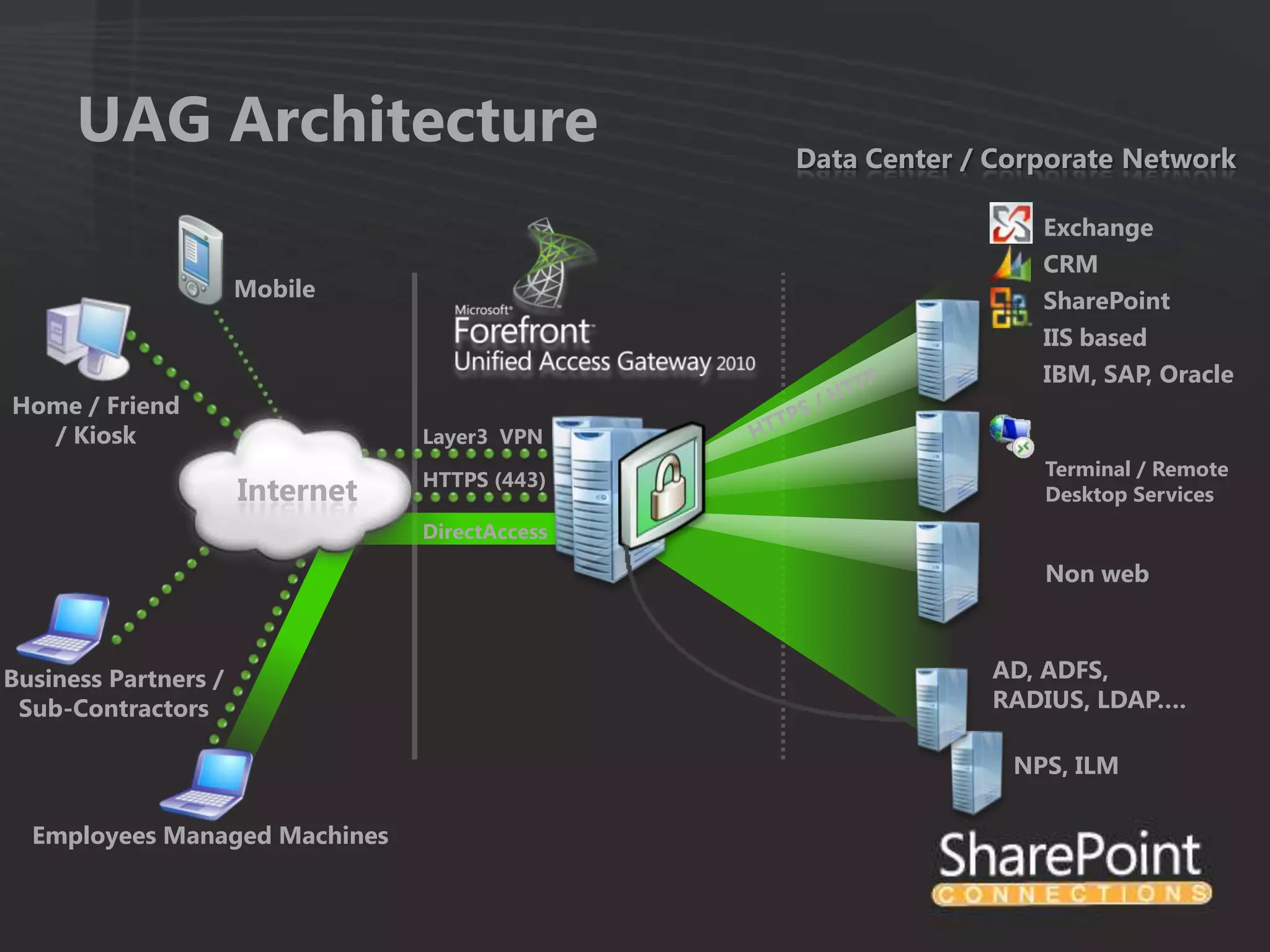
UAG Architecture                          Data Center / Corporate Network

                                                                 Exchange
                                                                 CRM
                      Mobile                                     SharePoint
                                                                 IIS based
                                                                 IBM, SAP, Oracle
Home / Friend
  / Kiosk                        Layer3 VPN
                                                                 Terminal / Remote
                                 HTTPS (443)
                      Internet                                   Desktop Services
                                 DirectAccess

                                                                 Non web


Business Partners /                                          AD, ADFS,
 Sub-Contractors                                             RADIUS, LDAP….

                                                               NPS, ILM

  Employees Managed Machines
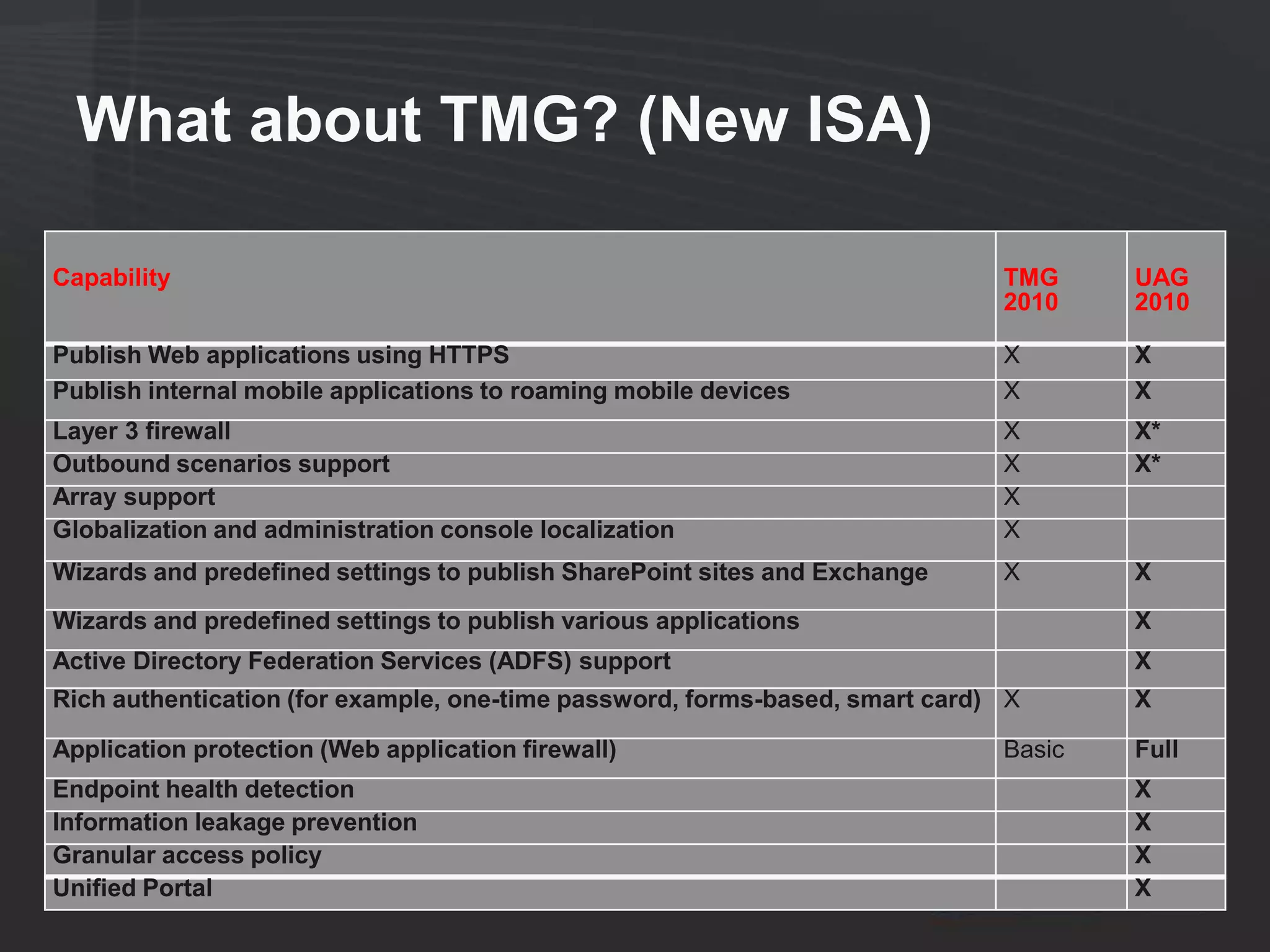
What about TMG? (New ISA)

Capability                                                                   TMG     UAG
                                                                             2010    2010

Publish Web applications using HTTPS                                         X       X
Publish internal mobile applications to roaming mobile devices               X       X
Layer 3 firewall                                                             X       X*
Outbound scenarios support                                                   X       X*
Array support                                                                X
Globalization and administration console localization                        X
Wizards and predefined settings to publish SharePoint sites and Exchange     X       X
Wizards and predefined settings to publish various applications                      X
Active Directory Federation Services (ADFS) support                                  X
Rich authentication (for example, one-time password, forms-based, smart card) X      X

Application protection (Web application firewall)                            Basic   Full
Endpoint health detection                                                            X
Information leakage prevention                                                       X
Granular access policy                                                               X
Unified Portal                                                                       X
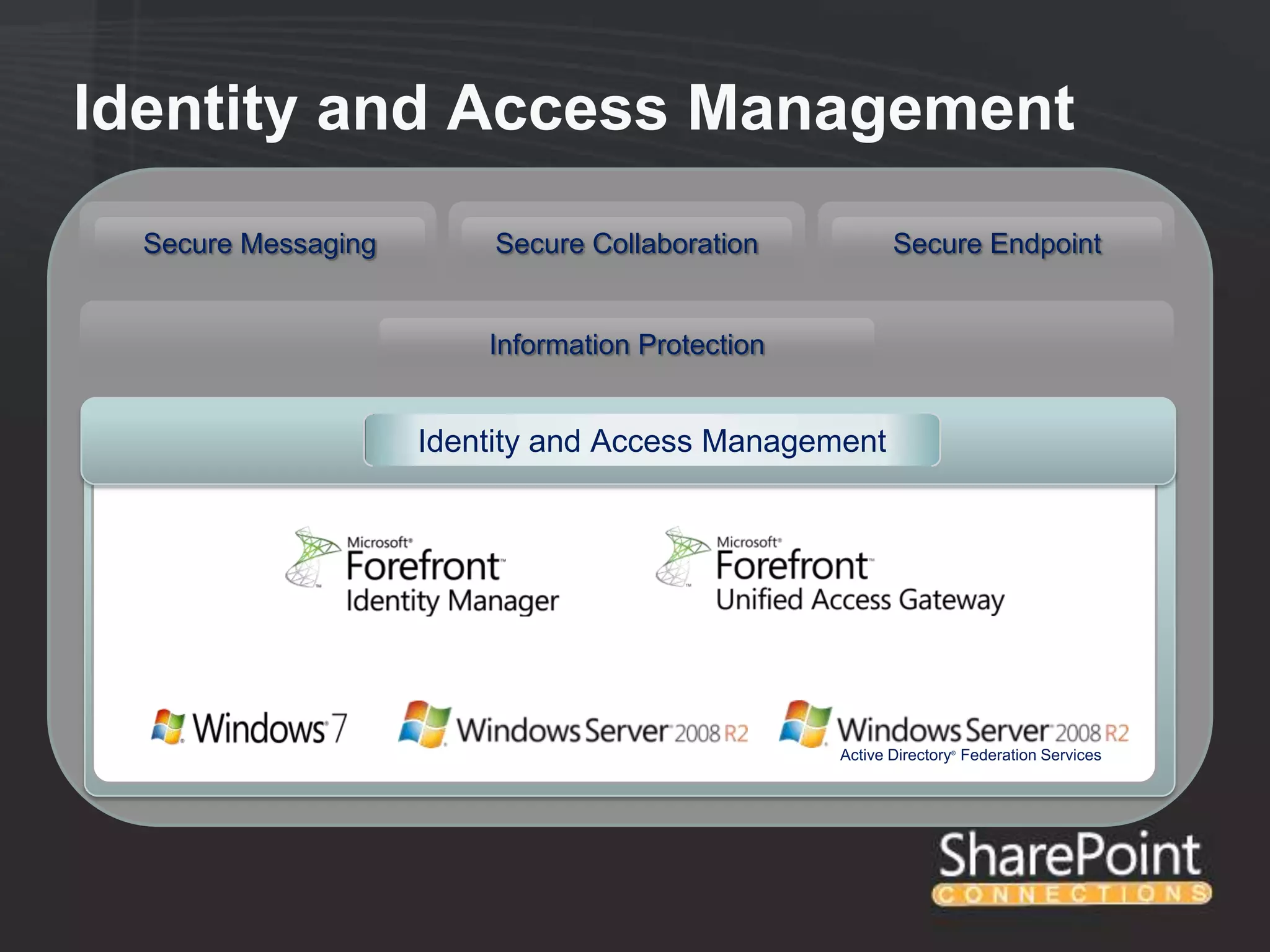
Forefront Identity Manager
Identity and Access Management
  Secure Messaging       Secure Collaboration            Secure Endpoint


                         Information Protection


                     Identity and Access Management


                                                  Active Directory Federation Services
                                                                 ®
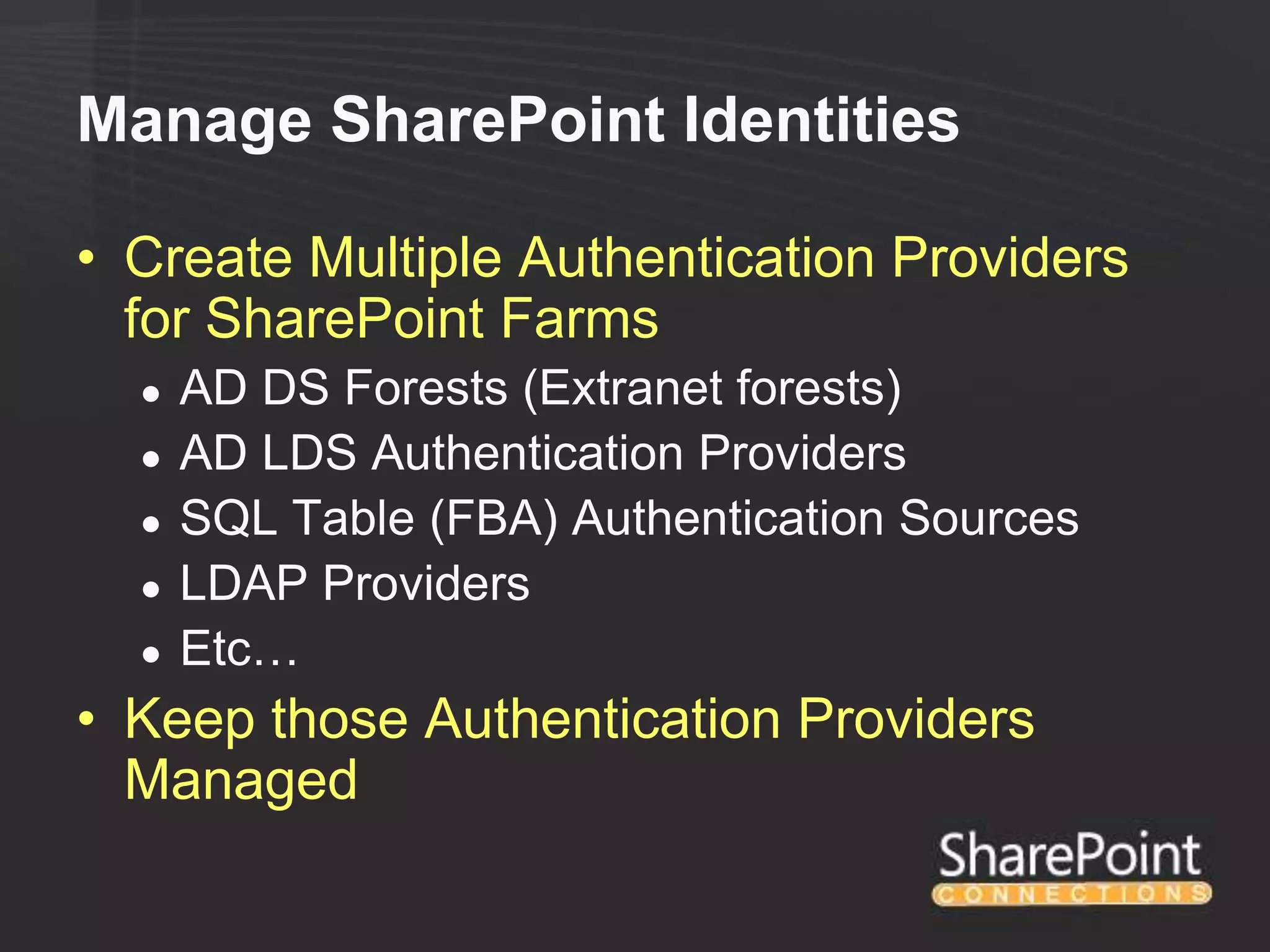
Manage SharePoint Identities

• Create Multiple Authentication Providers
  for SharePoint Farms
  ●   AD DS Forests (Extranet forests)
  ●   AD LDS Authentication Providers
  ●   SQL Table (FBA) Authentication Sources
  ●   LDAP Providers
  ●   Etc…
• Keep those Authentication Providers
  Managed
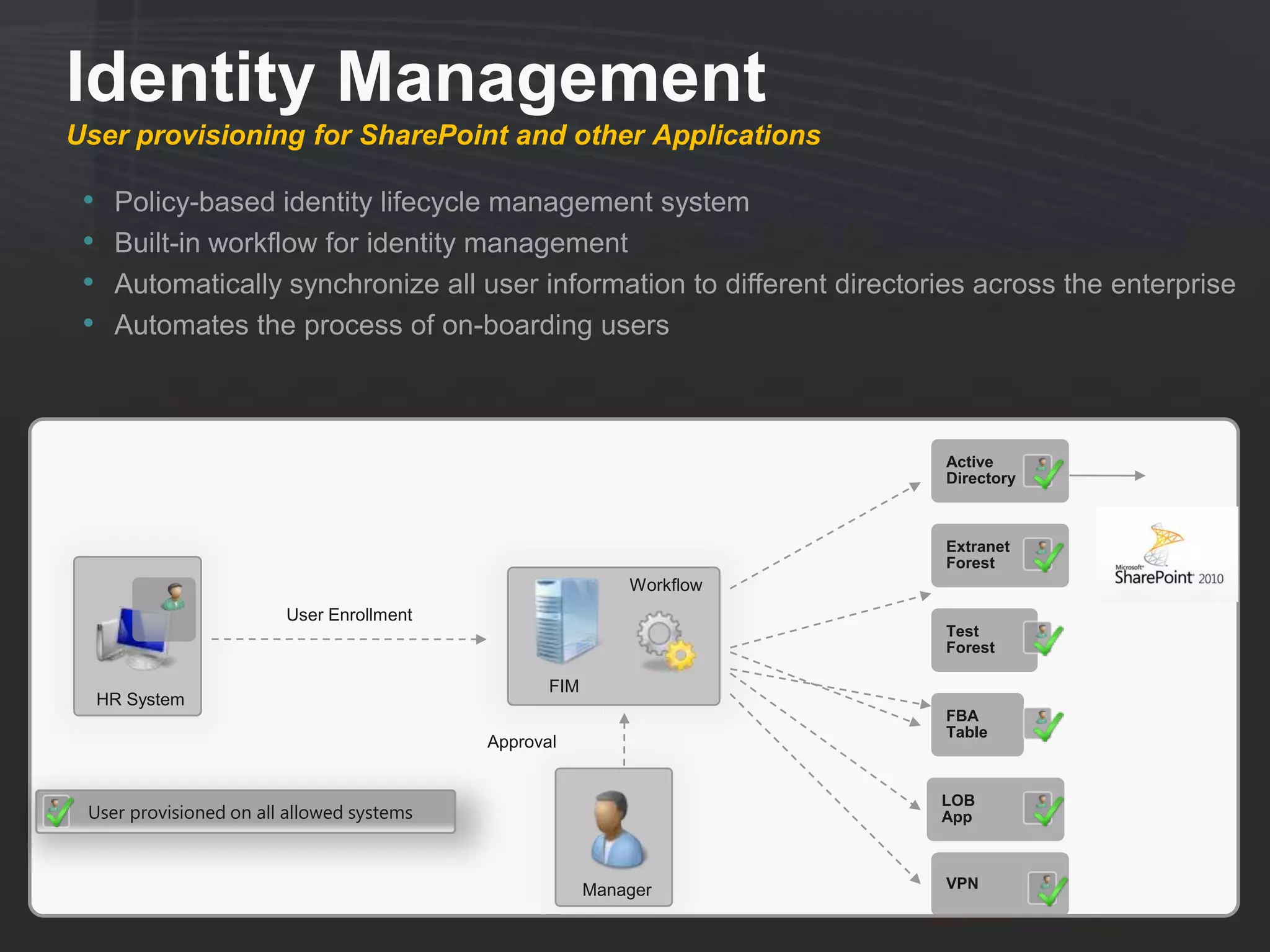
Identity Management
User provisioning for SharePoint and other Applications

 •    Policy-based identity lifecycle management system
 •    Built-in workflow for identity management
 •    Automatically synchronize all user information to different directories across the enterprise
 •    Automates the process of on-boarding users


                                                                          Active
                                                                          Directory


                                                                          Extranet
                                                                          Forest
                                                            Workflow
                        User Enrollment
                                                                          Test
                                                                          Forest

                                                  FIM
     HR System
                                                                          FBA
                                                                          Table
                                           Approval


                                                                          LOB
 User provisioned on all allowed systems                                  App


                                                        Manager           VPN
Identity Management
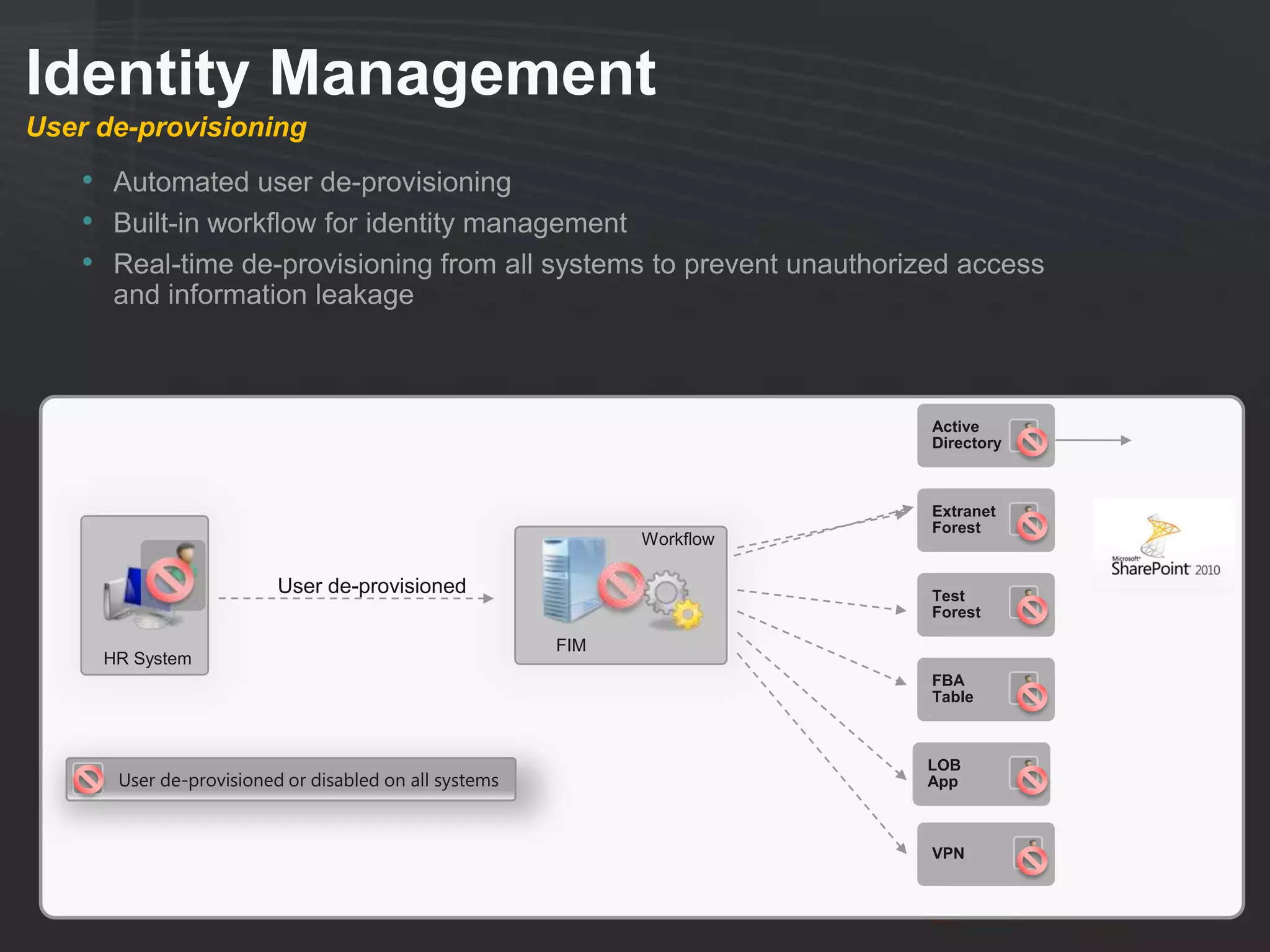
User de-provisioning
    • Automated user de-provisioning
    • Built-in workflow for identity management
    • Real-time de-provisioning from all systems to prevent unauthorized access
      and information leakage


                                                                        Active
                                                                        Directory


                                                                        Extranet
                                                                        Forest
                                                             Workflow

                         User de-provisioned                            Test
                                                                        Forest

                                                       FIM
     HR System
                                                                        FBA
                                                                        Table


                                                                        LOB
      User de-provisioned or disabled on all systems                    App


                                                                        VPN
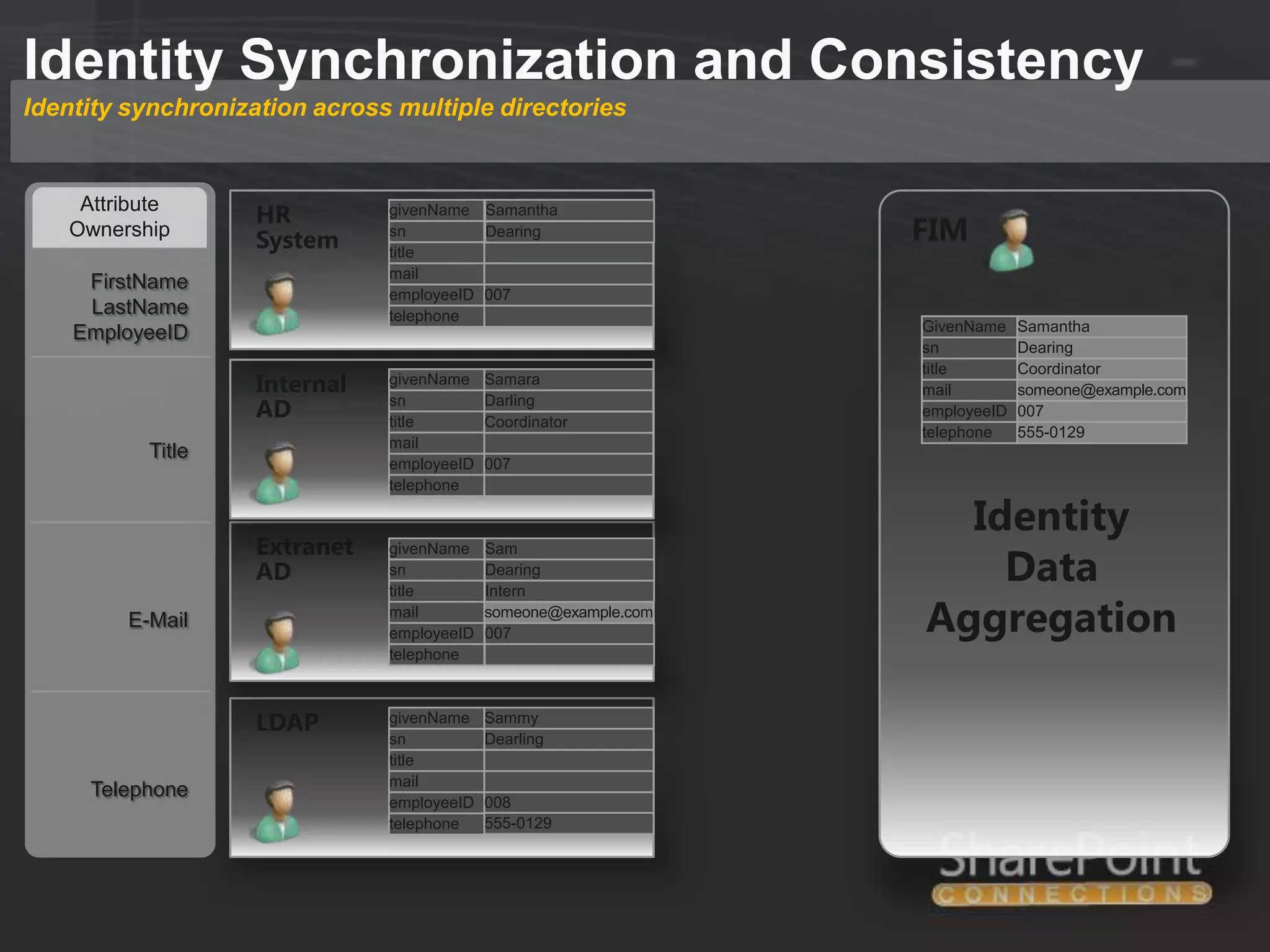
Identity Synchronization and Consistency
Identity synchronization across multiple directories


    Attribute
                    HR         givenName Samantha
   Ownership
                    System     sn         Dearing                 FIM
                               title
                               mail
     FirstName
                               employeeID 007
     LastName                  telephone
    EmployeeID                                                    GivenName
                                                                  givenName    Samantha
                                                                  sn           Dearing
                                                                  title        Coordinator
                    Internal   givenName    Samara
                                                                  mail         someone@example.com
                    AD         sn
                               title
                                            Darling
                                            Coordinator
                                                                  employeeID   007
                                                                  telephone    555-0129
                               mail
           Title
                               employeeID   007
                               telephone

                                                                    Identity
                    Extranet
                                                                      Data
                               givenName    Sam
                    AD         sn           Dearing
                               title        Intern
         E-Mail                mail
                               employeeID
                                            someone@example.com
                                            007                   Aggregation
                               telephone


                    LDAP       givenName    Sammy
                               sn           Dearling
                               title
                               mail
     Telephone
                               employeeID   008
                               telephone    555-0129
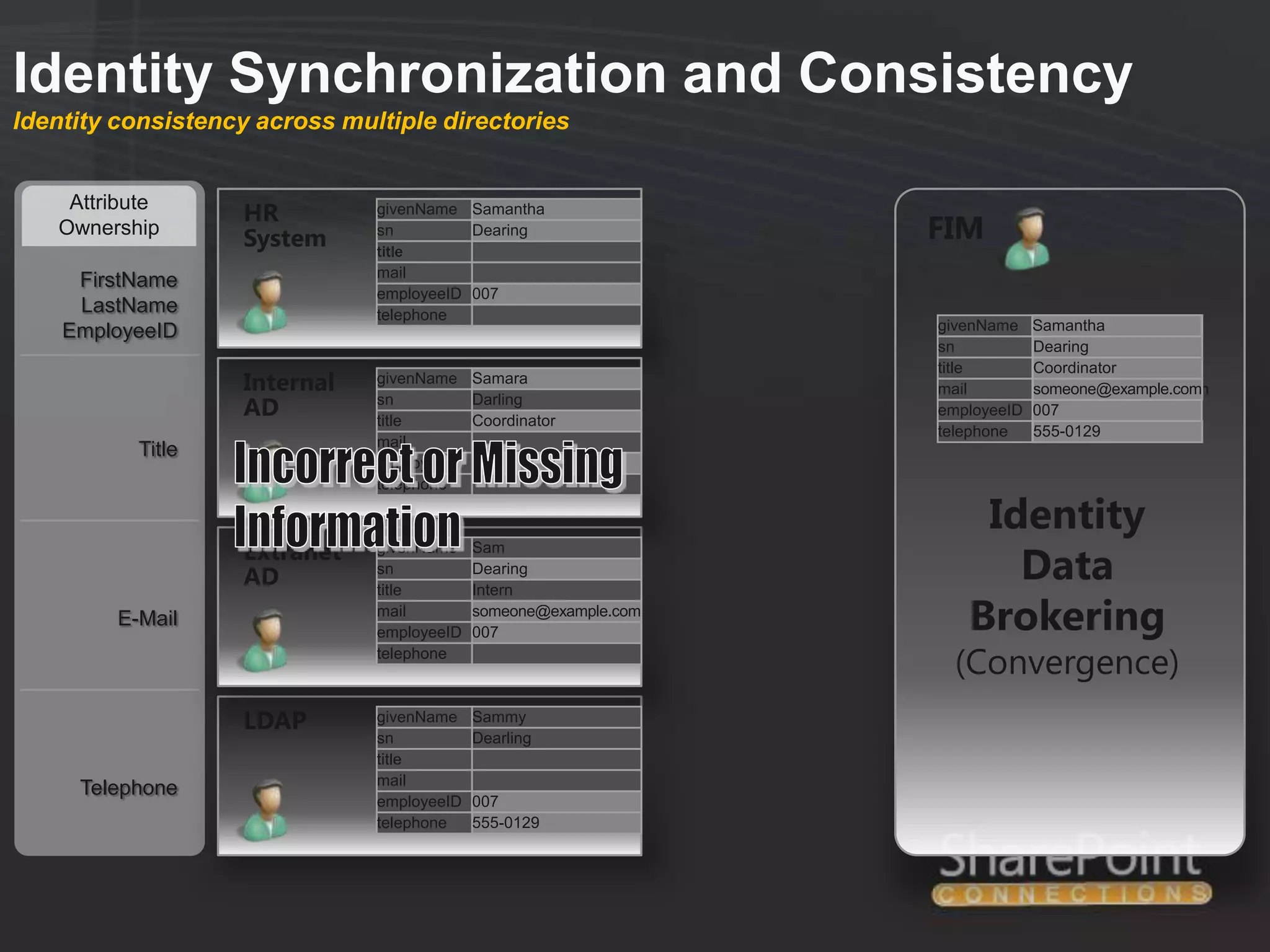
Identity Synchronization and Consistency
Identity consistency across multiple directories


    Attribute
                   HR          givenName Samantha
   Ownership
                   System      sn         Dearing                 FIM
                               title
                               mail
     FirstName
                               employeeID 007
     LastName                  telephone
    EmployeeID                                                    givenName    Samantha
                                                                               Bob
                                                                  sn           Dearing
                                                                  title        Coordinator
                   Internal    givenName    Samara
                                                                  mail         someone@example.com
                                                                               someone@example.com
                   AD          sn
                               title
                                            Darling
                                            Coordinator
                                                                  employeeID   007
                                                                  telephone    555-0129
                               mail
           Title
                               employeeID   007
                               telephone

                                                                      Identity
                   Extranet
                                                                        Data
                               givenName    Sam

                   AD          sn
                               title
                                            Dearing
                                            Intern
         E-Mail                mail
                               employeeID
                                            someone@example.com
                                            007                      Brokering
                               telephone
                                                                    (Convergence)
                   LDAP        givenName    Sammy
                               sn           Dearling
                               title
                               mail
     Telephone
                               employeeID   007
                               telephone    555-0129
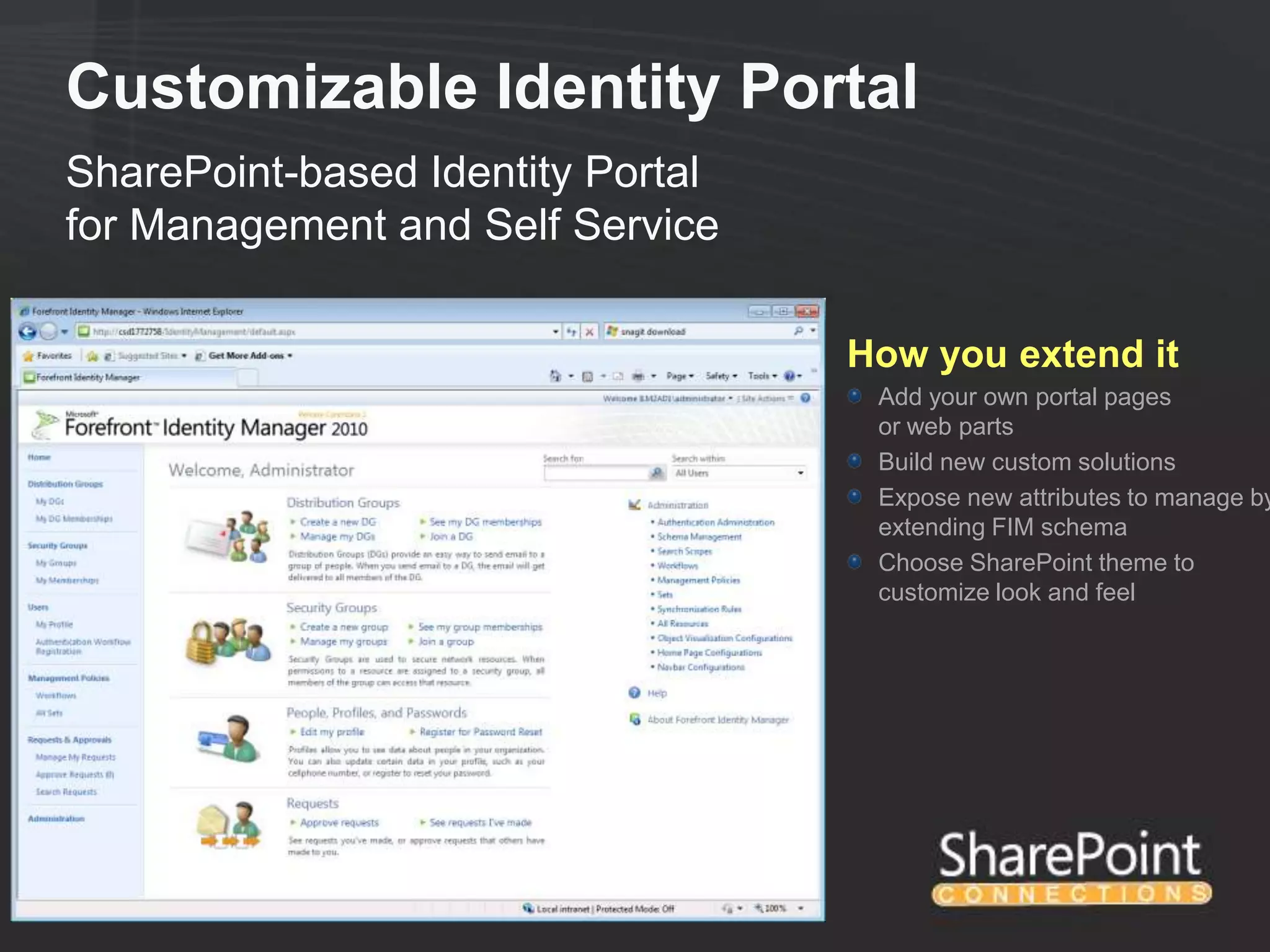
Customizable Identity Portal
SharePoint-based Identity Portal
for Management and Self Service

                                   How you extend it
                                    Add your own portal pages
                                    or web parts
                                    Build new custom solutions
                                    Expose new attributes to manage by
                                    extending FIM schema
                                    Choose SharePoint theme to
                                    customize look and feel
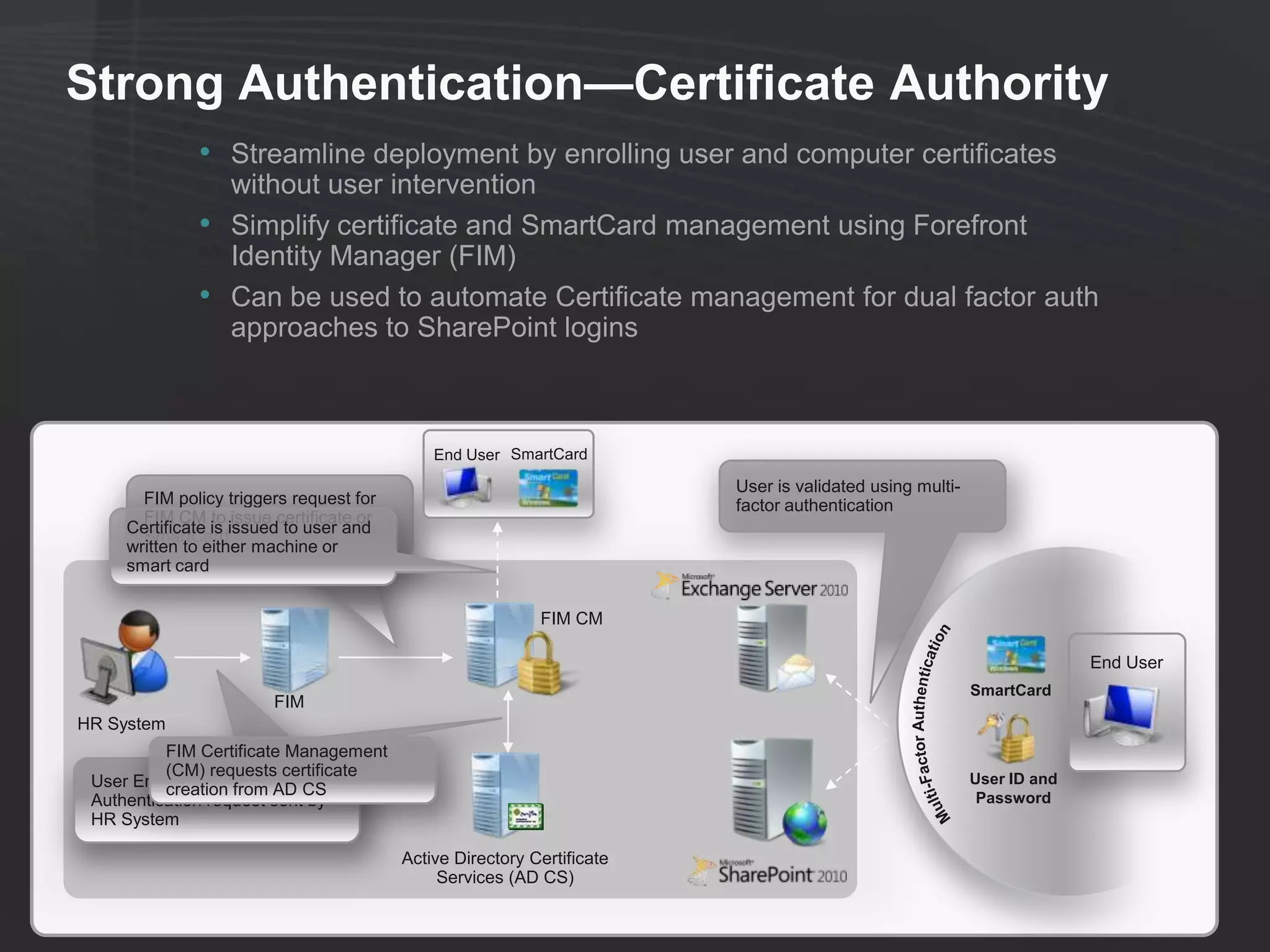
Strong Authentication—Certificate Authority
              • Streamline deployment by enrolling user and computer certificates
                  without user intervention
              •   Simplify certificate and SmartCard management using Forefront
                  Identity Manager (FIM)
              •   Can be used to automate Certificate management for dual factor auth
                  approaches to SharePoint logins


                                             End User SmartCard

                                                                        User is validated using multi-
       FIM policy triggers request for                                  factor authentication
       FIM CM to issue certificate or
     Certificate is issued to user and
       SmartCard
     written to either machine or
     smart card


                                                           FIM CM

                                                                                                                       End User
                                                                                                         SmartCard
                        FIM
HR System
          FIM Certificate Management
          (CM) requests certificate                                                                      User ID and
 User Enrollment and AD CS
          creation from
 Authentication request sent by                                                                           Password
 HR System

                                         Active Directory Certificate
                                              Services (AD CS)
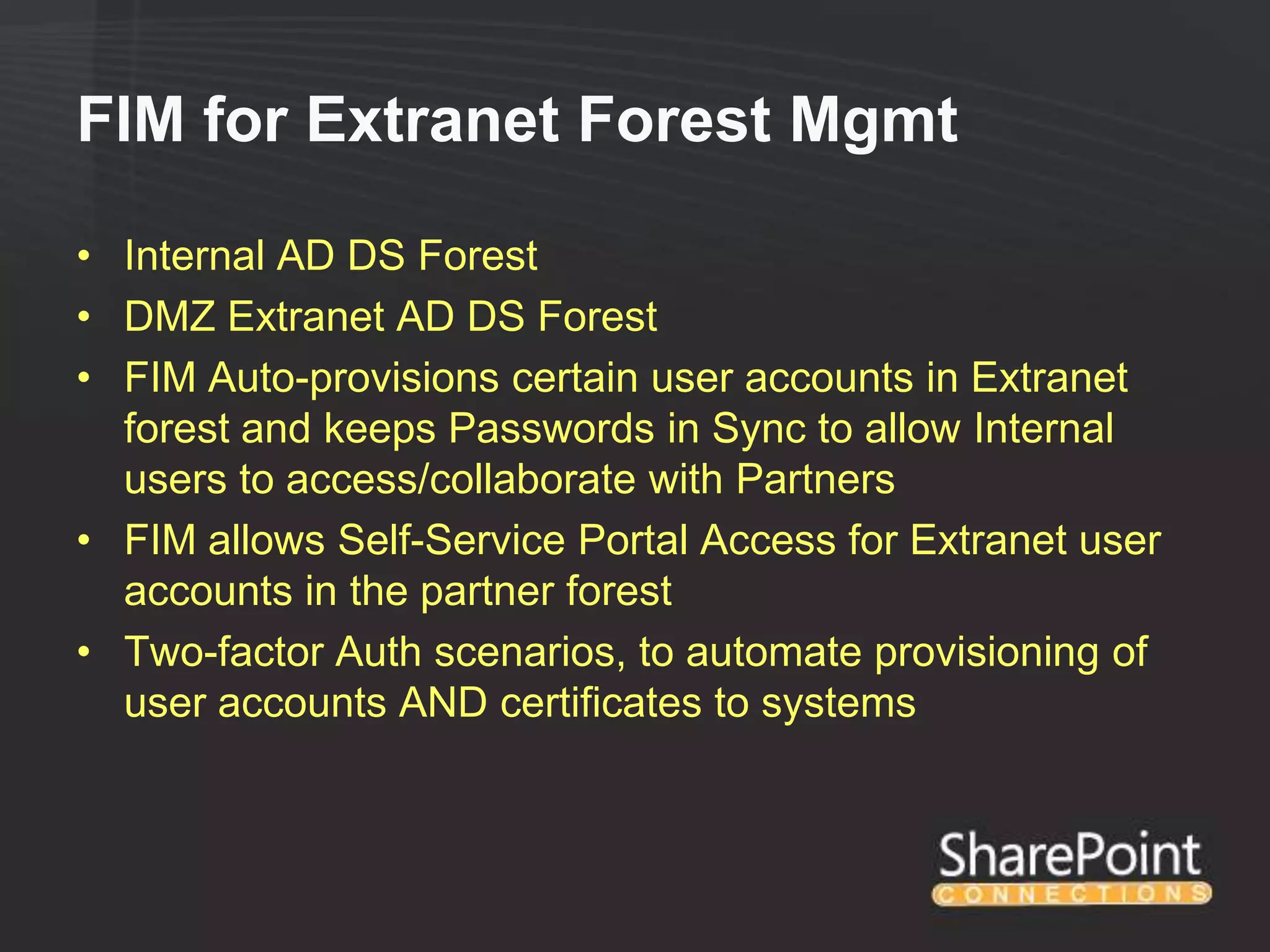
FIM for Extranet Forest Mgmt

• Internal AD DS Forest
• DMZ Extranet AD DS Forest
• FIM Auto-provisions certain user accounts in Extranet
  forest and keeps Passwords in Sync to allow Internal
  users to access/collaborate with Partners
• FIM allows Self-Service Portal Access for Extranet user
  accounts in the partner forest
• Two-factor Auth scenarios, to automate provisioning of
  user accounts AND certificates to systems
FIM for Role Based Access Control

•   FIM is central to RBAC Strategy
•   Can auto-add users to Groups based on RBAC Criteria
•   HR Defines a user‟s access based on their role
•   FIM auto-adds that user to specific Role Groups in AD
    DS, which are tied to SharePoint Groups that have the
    rights that that role group requires.

           User1

                      Role                     SharePoint
                      Group                      Group

           User2
Session Summary

• Understand the Extranet Design Options for
  2010
• Keep Extranet Accounts out of local AD
• Determine how Identities will be Managed
• Use FIM for Identity Management, Self-Service,
  and Provisioning/Deprovisioning of Extranet
  Accounts
• Use UAG to secure inbound access to
  extranets/intranets
Your Feedback is Important

 Please fill out a session evaluation form
  drop it off at the conference registration
                      desk.

                Thank you!
Michael Noel
     Twitter: @MichaelTNoel
            www.cco.com
Slides: slideshare.net/michaeltnoel

HAD05: Collaborating with Extranet Partners on SharePoint 2010

  • 1.
    HAD05 Collaborating with Extranet Partnerson SharePoint 2010 Michael Noel CCO @MichaelTNoel
  • 2.
    Michael Noel • Author of SAMS Publishing titles “SharePoint 2010 Unleashed,” “SharePoint 2007 Unleashed,” “SharePoint 2003 Unleashed”, “Teach Yourself SharePoint 2003 in 10 Minutes,” “Windows Server 2008 R2 Unleashed,” “Exchange Server 2010 Unleashed”, “ISA Server 2006 Unleashed”, and many other titles . • Partner at Convergent Computing (www.cco.com / +1(510)444-5700) – San Francisco Bay Area based Infrastructure/Security specialists for SharePoint, AD, Exchange, Security
  • 3.
    What we’ll cover •Why an Extranet? • SharePoint 2010 Extranets • Extranet Architecture Options • Claims-based Authentication • Forefront Unified Access Gateway (UAG) for extranets • Forefront Identity Manager for Identity Management in an Extranet
  • 4.
  • 5.
    Why an Extranet? •Security Isolation ● Isolation of Data ● Less Exposure, Perimeter Network Scenarios • Partner Collaboration ● Share SP Content with External Partners ● Control Partner Accounts Anonymous Customer Scenarios are not Extranets
  • 6.
    SharePoint 2010 Extranets •Claims-based Authentication Support • Multiple Authentication Providers • Better Scalability (Services Architecture) ● Goodbye SSP! ● Server Groups ● Services Applications • Multiple Authentication Types per Web Application
  • 7.
    Sample Extranet Architecture
  • 8.
    Design around SecurityRequirements • Scenario 1: Extranet and Internal Users in Single Farm ● 1A: Single Web App / Single Site Collection ● 1B: Single Web App / Separate Site Collections ● 1C: Multiple Web Apps / Content DBs Less ● 1D: Separate App Pool / Service App Group Security • Scenario 2: Extranet and Internal Users in Single Farm / Separate Trusted Forests • Scenario 3: Extranet and Internal Users in Multiple Farms / One-Way Trust • Scenario 4: Extranet an Internal Users in Separate Farms / Claims-based Auth for Internal Access to Extranet • Scenario 5: Extranet an Internal Users in Separate Farms / More No Access for Internal Accounts to Extranet Security • Scenario 6: Separate Farms / AD FS Federation for Extranet Auth
  • 9.
    Extranet Scenario 1: Extranetand Internal Users in Single Farm 1A: Single Web App / Single Site Collection 1B: Single Web App / Separate Site Collections 1C: Multiple Web Apps / Content DBs 1D: Separate App Pool / Service App Group
  • 10.
    Extranet Scenario 2: Extranetand Internal Users in Single Farm / Separate Trusted Forests
  • 11.
    Extranet Scenario 3: Extranetand Internal Users in Multiple Farms and Perimeter Network / One-Way Trust
  • 12.
    Extranet Scenario 4: Extranetan Internal Users in Separate Farms / Claims-based Auth Provider for Internal Auth to Extranet
  • 13.
    Extranet Scenario 5: Extranetan Internal Users in Separate Farms / No Access for Internal Accounts to Extranet
  • 14.
    Extranet Scenario 6: SeparateFarms / AD FS Federation for Extranet Auth
  • 15.
  • 16.
    One-Way Trust Scenarios •People Picker needs to be configured to crawl domain if it doesn‟t trust the domain where the SharePoint farm is installed. • Only with STSADM (Rare exception when you can‟t use PowerShell) • Example Syntax: ● stsadm.exe -o setapppassword -password AnyPassw0rd ● stsadm.exe -o setproperty -pn peoplepicker-searchadforests -pv "domain:companyabc.com,COMPANYABCsvc_sppplpick,Password1;d omain:extranetabc.com" -url https://extranet.companyabc.com ● stsadm.exe -o setproperty -pn peoplepicker-searchadforests -pv "domain:companyabc.com,COMPANYABCsvc_sppplpick,Password1;d omain:extranetabc.com" -url https://spcaext.companyabc.com • Syntax is critical • Run against all web apps
  • 17.
    Design for ClientlessAccess to SharePoint • Services Applications for Extranet Clients: ● Word Services ● Excel Services ● Visio Services ● Access Services ● InfoPath Forms Services • Allows „Clientless‟ access to SharePoint content, for Extranet partners without Office
  • 18.
    Standard Requirements Applyto Extranets as well • SharePoint-aware Antivirus ● i.e. Forefront Protection for SharePoint • SharePoint-aware Backup and Restore ● i.e. System Center Data Protection Manager (DPM) 2010 • Rights Management? ● Active Directory Rights Management Services (AD RMS)
  • 19.
  • 20.
  • 21.
    Claims-Based Auth • SharePointdoesn‟t actually Authenticate Users, it relies on IIS or other providers • SharePoint 2010 Allows for Classic and Claims-based Auth Scenarios • Classic Authentication is similar to SharePoint 2007 • Claims based Auth adds the following key benefits: ● Allows for Multiple Authentication Types per Web Application Zone ● Removes SharePoint from the Authentication Provider ● Allows for federation between organizations (AD FS, etc.) scenarios ● Does not require Kerberos Delegation • Current limitations with Claims-based auth involve SQL Reporting Services, PowerPivot, PerformancePoint, and other SQL tools that require delegation. These appear to be fixed in SQL 2012. • Remember the difference between Authentication and Authorization…
  • 22.
    Classic vs. Claims-basedAuth Claims-based Classic-mode Type authentication authenticatio n Windows NTLM Kerberos Yes Yes Anonymous Basic Digest Forms-based authentication LDAP SQL database or other database No Yes Custom or third-party membership and role providers SAML token-based authentication AD FS 2.0 No Yes Third-party identity provider LDAP
  • 23.
  • 24.
    Example: Partner Environmentwith Multiple Auth Types on single W.A.
  • 25.
  • 26.
    UAG Architecture Data Center / Corporate Network Exchange CRM Mobile SharePoint IIS based IBM, SAP, Oracle Home / Friend / Kiosk Layer3 VPN Terminal / Remote HTTPS (443) Internet Desktop Services DirectAccess Non web Business Partners / AD, ADFS, Sub-Contractors RADIUS, LDAP…. NPS, ILM Employees Managed Machines
  • 28.
    What about TMG?(New ISA) Capability TMG UAG 2010 2010 Publish Web applications using HTTPS X X Publish internal mobile applications to roaming mobile devices X X Layer 3 firewall X X* Outbound scenarios support X X* Array support X Globalization and administration console localization X Wizards and predefined settings to publish SharePoint sites and Exchange X X Wizards and predefined settings to publish various applications X Active Directory Federation Services (ADFS) support X Rich authentication (for example, one-time password, forms-based, smart card) X X Application protection (Web application firewall) Basic Full Endpoint health detection X Information leakage prevention X Granular access policy X Unified Portal X
  • 29.
  • 30.
    Identity and AccessManagement Secure Messaging Secure Collaboration Secure Endpoint Information Protection Identity and Access Management Active Directory Federation Services ®
  • 31.
    Manage SharePoint Identities •Create Multiple Authentication Providers for SharePoint Farms ● AD DS Forests (Extranet forests) ● AD LDS Authentication Providers ● SQL Table (FBA) Authentication Sources ● LDAP Providers ● Etc… • Keep those Authentication Providers Managed
  • 32.
    Identity Management User provisioningfor SharePoint and other Applications • Policy-based identity lifecycle management system • Built-in workflow for identity management • Automatically synchronize all user information to different directories across the enterprise • Automates the process of on-boarding users Active Directory Extranet Forest Workflow User Enrollment Test Forest FIM HR System FBA Table Approval LOB User provisioned on all allowed systems App Manager VPN
  • 33.
    Identity Management User de-provisioning • Automated user de-provisioning • Built-in workflow for identity management • Real-time de-provisioning from all systems to prevent unauthorized access and information leakage Active Directory Extranet Forest Workflow User de-provisioned Test Forest FIM HR System FBA Table LOB User de-provisioned or disabled on all systems App VPN
  • 34.
    Identity Synchronization andConsistency Identity synchronization across multiple directories Attribute HR givenName Samantha Ownership System sn Dearing FIM title mail FirstName employeeID 007 LastName telephone EmployeeID GivenName givenName Samantha sn Dearing title Coordinator Internal givenName Samara mail someone@example.com AD sn title Darling Coordinator employeeID 007 telephone 555-0129 mail Title employeeID 007 telephone Identity Extranet Data givenName Sam AD sn Dearing title Intern E-Mail mail employeeID someone@example.com 007 Aggregation telephone LDAP givenName Sammy sn Dearling title mail Telephone employeeID 008 telephone 555-0129
  • 35.
    Identity Synchronization andConsistency Identity consistency across multiple directories Attribute HR givenName Samantha Ownership System sn Dearing FIM title mail FirstName employeeID 007 LastName telephone EmployeeID givenName Samantha Bob sn Dearing title Coordinator Internal givenName Samara mail someone@example.com someone@example.com AD sn title Darling Coordinator employeeID 007 telephone 555-0129 mail Title employeeID 007 telephone Identity Extranet Data givenName Sam AD sn title Dearing Intern E-Mail mail employeeID someone@example.com 007 Brokering telephone (Convergence) LDAP givenName Sammy sn Dearling title mail Telephone employeeID 007 telephone 555-0129
  • 36.
    Customizable Identity Portal SharePoint-basedIdentity Portal for Management and Self Service How you extend it Add your own portal pages or web parts Build new custom solutions Expose new attributes to manage by extending FIM schema Choose SharePoint theme to customize look and feel
  • 37.
    Strong Authentication—Certificate Authority • Streamline deployment by enrolling user and computer certificates without user intervention • Simplify certificate and SmartCard management using Forefront Identity Manager (FIM) • Can be used to automate Certificate management for dual factor auth approaches to SharePoint logins End User SmartCard User is validated using multi- FIM policy triggers request for factor authentication FIM CM to issue certificate or Certificate is issued to user and SmartCard written to either machine or smart card FIM CM End User SmartCard FIM HR System FIM Certificate Management (CM) requests certificate User ID and User Enrollment and AD CS creation from Authentication request sent by Password HR System Active Directory Certificate Services (AD CS)
  • 38.
    FIM for ExtranetForest Mgmt • Internal AD DS Forest • DMZ Extranet AD DS Forest • FIM Auto-provisions certain user accounts in Extranet forest and keeps Passwords in Sync to allow Internal users to access/collaborate with Partners • FIM allows Self-Service Portal Access for Extranet user accounts in the partner forest • Two-factor Auth scenarios, to automate provisioning of user accounts AND certificates to systems
  • 39.
    FIM for RoleBased Access Control • FIM is central to RBAC Strategy • Can auto-add users to Groups based on RBAC Criteria • HR Defines a user‟s access based on their role • FIM auto-adds that user to specific Role Groups in AD DS, which are tied to SharePoint Groups that have the rights that that role group requires. User1 Role SharePoint Group Group User2
  • 40.
    Session Summary • Understandthe Extranet Design Options for 2010 • Keep Extranet Accounts out of local AD • Determine how Identities will be Managed • Use FIM for Identity Management, Self-Service, and Provisioning/Deprovisioning of Extranet Accounts • Use UAG to secure inbound access to extranets/intranets
  • 41.
    Your Feedback isImportant Please fill out a session evaluation form drop it off at the conference registration desk. Thank you!
  • 42.
    Michael Noel Twitter: @MichaelTNoel www.cco.com Slides: slideshare.net/michaeltnoel