Domain 3: Information Security Governance
&
Risk Management
July 27, 2013
Tim Jensen
StaridLabs
●Risk Analysis
●Data Classification
●Risk Assessment
●Security Awareness
Information Security Governance includes:
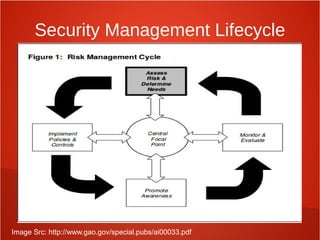
Risk Management
Minnimize loss of information assets through:
● Identification
● Measurement
● control
Security Management Lifecycle
Image Src: http://www.gao.gov/special.pubs/ai00033.pdf
IT Governance
● Governance must be informed about information
security
● Set direction to drive policy and strategy
● Provide resources to security efforts
● Assign management responsibilities
● Set priorities
● Support Changes required
● Insist that security investments are made
measurable and reported on for program
effectiveness
Impact from organizational changes
● Acquisitions and mergers
● Divestitures
● Spin-offs
● Governance Committees
Acquisitions and Mergers
● Friendly VS Hostile
● New staff and roles require new security
awareness and training
● Threats from former employees or threats that
the new company will face due to the merger
● Vulnerabilities when systems are merged
● New regulations/compliance
● External business partner review and
assessment
Divestitures and Spin-offs
● Data Loss/data leak due to employees
leaving
● System ports/protocols/connections left open
after systems were removed
● Loss of visibility into systems if both
organizations didn't keep security monitoring
tools
● New threats from laidoff employees
● Revision of policies, procedures, and
standards for new governance/compliance
Governance Committee Changes
● Ensure the committee understands at a
high level the importance of information
security and risk management
● Ensure someone on the committee has
security and risk aptitude
● Maintain working relationship with
committee and be aproachable
Security Roles & Responsibilities
End User
● End user is responsible for protecting
information assets on a daily bases through
adherence to the security policies
● End user compliance failures include:
● Downloading unauthorized software
● Opening attachments from unknown senders
● Visiting malicious websites
● End user can be turned into human security
sensors with proper training
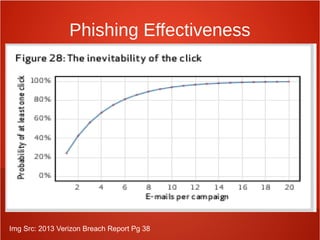
Phishing Effectiveness
Img Src: 2013 Verizon Breach Report Pg 38
Executive Management
● EM maintains the overall responsibility for
protection of the information assets.
● EM must be aware of the risks they are
accepting on behalf of the organization
● Risk must be identified through risk
assessment so management can make
informed decisions
Security Officer
● Directs, coordinates, plans, and organizes
information security activities throughout the
organization
● Responsible for the design, implementation,
management, and review of the
organization's security policies, standards,
procedures, baselines, and guidelines
Information Systems Security
Professional
● Drafting of security policies, standards, and
supporting guidelines and procedures
● Baselines
● Guidance on technical security issues and
emerging threats
● Interpretation of regulations
● Analysis of vendor solutions
Data/Information/Business Owners
● Classify information assets
● Ensure business information is protected
● Review access rights
● Approve access to information
● Determine criticality, backups, and
safeguards for data
Data/Information
Custodian/Steward
● Individual or function who takes care of
information on behalf of the owner
● Makes sure information is available, backed
up, and consistent
Information Systems Auditor
● Verifies compliance with security policies,
procedures, standards, baselines, designs,
architectures, management direction, and
other requirements
● Provide independent assurance to
management on appropriateness of security
controls
Business Continuity Planner
● Develop contingency plans to prepare for
disasters
● Ensures business processes can continue
during and after:
● Earthquakes, tornadoes, hurricanes, blackouts,
political change, terrorist activities, fires, floods,
etc
IS/IT professionals
● Convert security controls into actionable
security on IT systems
● Test controls
Security Administrator
● Manages user access requests and
ensures privileges are provided to
authorized users
● Manages privileges needs over time
● Removes access upon user termination
Network/Systems Administrator
● Configures network and server
hardware/operating system to insure
information is available and accessible
● Manages patching and vulnerability
management
Physical Security
● Monitors physical locations with cameras,
alarms, card readers, etc.
● Verifies physical breaches do not occur and
mitigates damage if breach does occur
Administrative Assistant/Secretaries
● First line of defense at most companies:
● Greets visitors
● Signs for packages
● Screens phone calls for executives
● Very prone to social engineering attacks
● Friendly for a living
Help Desk Administrator
● Fields technical questions from users
● Likely going to hear about security issues before
anyone else
● Viruses
● Systems freezing
● Wierd popups**
● Help desk usually responsible for identifying threats
and notifying the incident response (CIRT) team
Purposes for roles
● Increased efficiency by reducing confusion on who does
what
● Lowers risk to company reputation/brand
● Personal accountability
● Support of disciplinary actions for security violations
● Demonstratable compliance with applicable laws and
regulations
● Shielding of management from liability and negligence
● Roadmap for auditors
● Segregation by role is useful for determining the level of
security training required
Legal Negligence
● A failure to behave with the level of care
that someone of ordinary prudence would
have exercised under the same
circumstances. The behavior usually
consists of actions, but can also consist of
omissions when there is some duty to act
Gross Negligence
● carelessness which is in reckless disregard for
the safety or lives of others, and is so great it
appears to be a conscious violation of other
people's rights to safety. It is more than simple
inadvertence, but it is just shy of being
intentionally evil. If one has borrowed or
contracted to take care of another's property,
then gross negligence is the failure to actively
take the care one would of his/her own property.
If gross negligence is found by the trier of fact
(judge or jury), it can result in the award of
punitive damages on top of general and special
damages.
Legislative and Regulatory
Compliance
● As a general rule, laws and regulations represent a “moral
minimum” which must be adhered to and should never be
considered wholly adequate.
● Regulations often offer specific actions which must be met
for compliance.
● Some have a “Safe Harbor” provision which is a set of
“good faith” conditions which if met may temporarily or
indefinitely protect the organization from penalties of a new
law or regulation.
Compliance Examples
● FISMA
● PCI
● DISA STIGS
● NIST 800-53
● ISO 27001
Privacy Requirements
● Personally identifiable information (PII) is a
valuable commodity for marketers and
attackers
● Storing the data can become a liability.
Certain data falls under privacy regulations
which if not followed come with steep fines or
jail time.
● International exposure increases the risk. US
privacy laws are much less strict compared to
European laws (See the EDPD regulations)
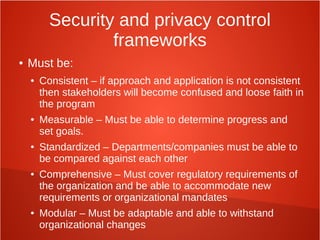
Security and privacy control
frameworks
● Must be:
● Consistent – if approach and application is not consistent
then stakeholders will become confused and loose faith in
the program
● Measurable – Must be able to determine progress and
set goals.
● Standardized – Departments/companies must be able to
be compared against each other
● Comprehensive – Must cover regulatory requirements of
the organization and be able to accommodate new
requirements or organizational mandates
● Modular – Must be adaptable and able to withstand
organizational changes
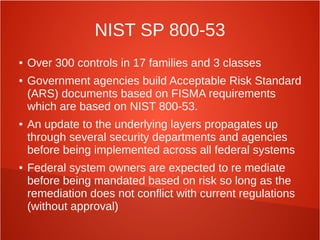
NIST SP 800-53
● Over 300 controls in 17 families and 3 classes
● Government agencies build Acceptable Risk Standard
(ARS) documents based on FISMA requirements
which are based on NIST 800-53.
● An update to the underlying layers propagates up
through several security departments and agencies
before being implemented across all federal systems
● Federal system owners are expected to re mediate
before being mandated based on risk so long as the
remediation does not conflict with current regulations
(without approval)
ISO 27001
● Designed to work with organizations of all
sizes and types (vs just federal systems)
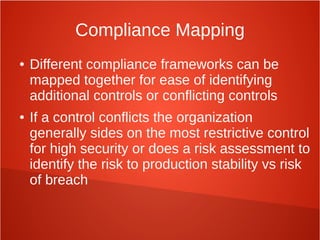
Compliance Mapping
● Different compliance frameworks can be
mapped together for ease of identifying
additional controls or conflicting controls
● If a control conflicts the organization
generally sides on the most restrictive control
for high security or does a risk assessment to
identify the risk to production stability vs risk
of breach
Information Security Governance
&
Risk Management Part 2
July 27, 2013
Jem Jensen
StaridLabs
Due Care
● Legal Definition
● The conduct that a reasonable man or woman will
exercise in a particular situation, in looking out for
the safety of others
● What is your legal obligation in a situation?
● Depends on laws
● Depends on who is defining “reasonable”
● Check the laws and precedence to measure your legal
exposure
Due Diligence
● Pre-emptive cousin of Due Care
● Attempts to avoid situations which can lead to
harm/require due care to be exercised
● Examples:
● Background checks
● Credit checks
● Pen tests
Confidentiality
● Definitions reminders
● Least Privilege: The level of access an
individual has is just what's necessary to do
their job
● Need-To-Know
● Data classification
Integrity
● Definitions reminders
● Info is protected from unauthorized or
accidental changes
● Segregation of duties
● Approval checkpoints
● Testing
Availability
● Definitions reminders
● Info is available and accessible to users when
needed
● Denial of Service
● Loss of Service (due to disaster, etc)
●
Security Policy Introduction
● Life without policy
● Employees has no guidance so they act based
on their view of what is right or wrong for the
company
● Might use past decisions and try to stick to the
status quo
● Many small companies operate this way
because it's cheap and easy. But it's dangerous
Security Policy Introduction
● Procedures
● Step-By-Step instructions
● Standards
● Specific Hardware and Software
● Baselines
● Consistent Level of Security
● Guidelines
● Recommendations
Security Policy Introduction
● Security policy is implemented with
Standards, Procedures, Baselines, and
Guidelines
● Without this implementation, the policy can't
be enforced
● Both policy and the implementation are
usually crafted by Security Officers
Security Policy Introduction
● The policy crafting process should be collaborative
and include
● HR
● Legal
● Compliance
● Various IT areas
● Business representatives
● When everyone is involved, it's easier to catch
everything and get buy-in from everyone
Security Policy Introduction
● Once policy is documented, it's important to
make it readily available to everyone
● Share documents, either on paper or in shared
folders
● Make and distribute forms & checklists
● Training
Security Policy Defined
● In essence, a security policy formalizes
what a company expects from employees
● Defines roles and responsibilities
● Assigns authority for security/compliance
● Policy-making is old. Therefore, the path to
making them is well-traveled. Lots of
guidelines!!!
Security Policy Guidelines
● Guidelines
● Formally define a process for making and
maintaining new policy
● Policies should survive for 2-3 years
– Should be reviewed annually, eventually rewritten
● Policies shouldn't be too specific
– Technology, personnel, and markets change
● Use forceful, directive wording
Security Policy Guidelines
● Guidelines
● Leave out technical implementation details
– Policy must be independent of tech
● Keep as short as possible (2-3 pages)
● Provide references to supporting documents
● Thoroughly review before publishing
● Management review/sign-off
● Employee acknowledgement
Security Policy Guidelines
● Guidelines
● Do not use tech jargon
– Nontechnical people won't understand if you do
● Adjust policy based on incidents
– Regular reviews of incidents
● Review policy periodically
● Define exemption rules
● Develop sanctions for noncompliance
– Disciplinary actions/punishment/termination
Security Policy Types
● Organizational or Program Policy
● Issued by senior management
● Scoped to entire org or division
● High-level authority to define sanctions
● Example:
● “If a computer is unplugged, leave it alone”
Security Policy Types
● Functional or Issue-Specific Policy
● Scoped to particular technology or domain
● Example:
● Acceptable Use Policy for company internet
Security Policy Types
● System-specific Policy
● Targeted for specific application/platform
● Greater control for specific area
● Example:
● “Only Accounting and HR can input information
into the check-writing application”
Standards
● Policy defines what an org needs
● Standards define the requirements
● Lay out the hardware & software mechanisms
● Provide consistency of implementation
● Permit interoperability
● Can save money and time
● Standard is to use Windows desktops – don't have to
support and train for OSX or Linux
● May be external – NIST, ANSI, IEEE, ISO, NSA
Baselines
● Baselines describe how to best implement
standards, especially in software
● More technical and specific
● Example:
● “Disable the Telnet service on all servers”
● Also can be external – DISA STIGS, CIS
Procedures
● Step-by-step instructions
● By documenting procedures, a company can more easily
assure that they are implementing policy consistently
● Ensures nothing gets left out
● Minimizes liability
● Documenting procedures can help break down
interdepartmental walls and assumptions
● Easier to see duplicate work or missing work
Guidelines
● Optional recommendations to help
employees make judgment calls
● Suggested steps for doing work
● How to best implement a baseline
Documentation
● Do not combine policies with other
documentation!
● Documentation can be edited by employees
whereas only management should change
policies
● Also a good idea to keep standards separate
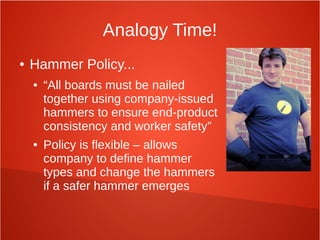
Analogy Time!
● Hammer Policy...
● “All boards must be nailed
together using company-issued
hammers to ensure end-product
consistency and worker safety”
● Policy is flexible – allows
company to define hammer
types and change the hammers
if a safer hammer emerges
Analogy Time!
● Hammer Standard
● “Eleven-inch fiberglass hammers will be used.
Only hardened-steel nails will be used with the
hammers. Automatic hammers are to be used
for repetitive jobs only that are > 1 hour.”
● Clearer, more specific
Analogy Time!
● Hammer Guidelines
● “To avoid splitting the wood, a pilot hole may be
drilled first.”
● Optional suggestion. May not apply in all cases,
depending on the wood being hammered
Analogy Time!
● Hammer Procedure
● “Position nail in upright position on board. Strike
nail with full swing of hammer. Repeat until nail
is flush with board.”
● Process for using the hammer and nail to get
the best results
Manage the Information Life Cycle
● When information is created, someone must
be responsible for it
● Determine impact
● Understand info replacement costs
● Determine who in and outside of the org needs
the info/when it should be released
● Know when the info is inaccurate/unneeded
and should be destroyed
Manage the Information Life Cycle
● Data classification can make the job easier
● Everyone knows how to treat it
● Data categorization too
● Helps define impact of loss and exposure
● A data retention schedule can help
● Mandate destruction of info after a certain date,
period, or period of inactivity
Third-Party Governance
● Types of third-parties
● IaaS – Infrastructure as a Service
– Provides “bare metal” hardware resources
– Example: Co-Lo servers
● PaaS – Platform as a Service
– Provides OS or DB
– Example: Amazon EC2
● SaaS – Software as a Service
– Provides full tool, company just provides the data
Third-Party Governance
● SLA – Service Level Agreement
● Defines levels of performance and
compensation/penalties between providers and customers
● Due Diligence
● On-site inspections
● Third-party policy reviews
● Document exchanges
● Independent inspections
● Legal review – legal exposure, international concerns
To Be Continued, next week...
Check the Syllabus! It's been updated!

CISSP Week 9

  • 1.
    Domain 3: InformationSecurity Governance & Risk Management July 27, 2013 Tim Jensen StaridLabs
  • 2.
    ●Risk Analysis ●Data Classification ●RiskAssessment ●Security Awareness Information Security Governance includes:
  • 3.
    Risk Management Minnimize lossof information assets through: ● Identification ● Measurement ● control
  • 4.
    Security Management Lifecycle ImageSrc: http://www.gao.gov/special.pubs/ai00033.pdf
  • 5.
    IT Governance ● Governancemust be informed about information security ● Set direction to drive policy and strategy ● Provide resources to security efforts ● Assign management responsibilities ● Set priorities ● Support Changes required ● Insist that security investments are made measurable and reported on for program effectiveness
  • 6.
    Impact from organizationalchanges ● Acquisitions and mergers ● Divestitures ● Spin-offs ● Governance Committees
  • 7.
    Acquisitions and Mergers ●Friendly VS Hostile ● New staff and roles require new security awareness and training ● Threats from former employees or threats that the new company will face due to the merger ● Vulnerabilities when systems are merged ● New regulations/compliance ● External business partner review and assessment
  • 8.
    Divestitures and Spin-offs ●Data Loss/data leak due to employees leaving ● System ports/protocols/connections left open after systems were removed ● Loss of visibility into systems if both organizations didn't keep security monitoring tools ● New threats from laidoff employees ● Revision of policies, procedures, and standards for new governance/compliance
  • 9.
    Governance Committee Changes ●Ensure the committee understands at a high level the importance of information security and risk management ● Ensure someone on the committee has security and risk aptitude ● Maintain working relationship with committee and be aproachable
  • 10.
    Security Roles &Responsibilities
  • 11.
    End User ● Enduser is responsible for protecting information assets on a daily bases through adherence to the security policies ● End user compliance failures include: ● Downloading unauthorized software ● Opening attachments from unknown senders ● Visiting malicious websites ● End user can be turned into human security sensors with proper training
  • 12.
    Phishing Effectiveness Img Src:2013 Verizon Breach Report Pg 38
  • 13.
    Executive Management ● EMmaintains the overall responsibility for protection of the information assets. ● EM must be aware of the risks they are accepting on behalf of the organization ● Risk must be identified through risk assessment so management can make informed decisions
  • 14.
    Security Officer ● Directs,coordinates, plans, and organizes information security activities throughout the organization ● Responsible for the design, implementation, management, and review of the organization's security policies, standards, procedures, baselines, and guidelines
  • 15.
    Information Systems Security Professional ●Drafting of security policies, standards, and supporting guidelines and procedures ● Baselines ● Guidance on technical security issues and emerging threats ● Interpretation of regulations ● Analysis of vendor solutions
  • 16.
    Data/Information/Business Owners ● Classifyinformation assets ● Ensure business information is protected ● Review access rights ● Approve access to information ● Determine criticality, backups, and safeguards for data
  • 17.
    Data/Information Custodian/Steward ● Individual orfunction who takes care of information on behalf of the owner ● Makes sure information is available, backed up, and consistent
  • 18.
    Information Systems Auditor ●Verifies compliance with security policies, procedures, standards, baselines, designs, architectures, management direction, and other requirements ● Provide independent assurance to management on appropriateness of security controls
  • 19.
    Business Continuity Planner ●Develop contingency plans to prepare for disasters ● Ensures business processes can continue during and after: ● Earthquakes, tornadoes, hurricanes, blackouts, political change, terrorist activities, fires, floods, etc
  • 20.
    IS/IT professionals ● Convertsecurity controls into actionable security on IT systems ● Test controls
  • 21.
    Security Administrator ● Managesuser access requests and ensures privileges are provided to authorized users ● Manages privileges needs over time ● Removes access upon user termination
  • 22.
    Network/Systems Administrator ● Configuresnetwork and server hardware/operating system to insure information is available and accessible ● Manages patching and vulnerability management
  • 23.
    Physical Security ● Monitorsphysical locations with cameras, alarms, card readers, etc. ● Verifies physical breaches do not occur and mitigates damage if breach does occur
  • 24.
    Administrative Assistant/Secretaries ● Firstline of defense at most companies: ● Greets visitors ● Signs for packages ● Screens phone calls for executives ● Very prone to social engineering attacks ● Friendly for a living
  • 25.
    Help Desk Administrator ●Fields technical questions from users ● Likely going to hear about security issues before anyone else ● Viruses ● Systems freezing ● Wierd popups** ● Help desk usually responsible for identifying threats and notifying the incident response (CIRT) team
  • 26.
    Purposes for roles ●Increased efficiency by reducing confusion on who does what ● Lowers risk to company reputation/brand ● Personal accountability ● Support of disciplinary actions for security violations ● Demonstratable compliance with applicable laws and regulations ● Shielding of management from liability and negligence ● Roadmap for auditors ● Segregation by role is useful for determining the level of security training required
  • 27.
    Legal Negligence ● Afailure to behave with the level of care that someone of ordinary prudence would have exercised under the same circumstances. The behavior usually consists of actions, but can also consist of omissions when there is some duty to act
  • 28.
    Gross Negligence ● carelessnesswhich is in reckless disregard for the safety or lives of others, and is so great it appears to be a conscious violation of other people's rights to safety. It is more than simple inadvertence, but it is just shy of being intentionally evil. If one has borrowed or contracted to take care of another's property, then gross negligence is the failure to actively take the care one would of his/her own property. If gross negligence is found by the trier of fact (judge or jury), it can result in the award of punitive damages on top of general and special damages.
  • 29.
    Legislative and Regulatory Compliance ●As a general rule, laws and regulations represent a “moral minimum” which must be adhered to and should never be considered wholly adequate. ● Regulations often offer specific actions which must be met for compliance. ● Some have a “Safe Harbor” provision which is a set of “good faith” conditions which if met may temporarily or indefinitely protect the organization from penalties of a new law or regulation.
  • 30.
    Compliance Examples ● FISMA ●PCI ● DISA STIGS ● NIST 800-53 ● ISO 27001
  • 31.
    Privacy Requirements ● Personallyidentifiable information (PII) is a valuable commodity for marketers and attackers ● Storing the data can become a liability. Certain data falls under privacy regulations which if not followed come with steep fines or jail time. ● International exposure increases the risk. US privacy laws are much less strict compared to European laws (See the EDPD regulations)
  • 32.
    Security and privacycontrol frameworks ● Must be: ● Consistent – if approach and application is not consistent then stakeholders will become confused and loose faith in the program ● Measurable – Must be able to determine progress and set goals. ● Standardized – Departments/companies must be able to be compared against each other ● Comprehensive – Must cover regulatory requirements of the organization and be able to accommodate new requirements or organizational mandates ● Modular – Must be adaptable and able to withstand organizational changes
  • 33.
    NIST SP 800-53 ●Over 300 controls in 17 families and 3 classes ● Government agencies build Acceptable Risk Standard (ARS) documents based on FISMA requirements which are based on NIST 800-53. ● An update to the underlying layers propagates up through several security departments and agencies before being implemented across all federal systems ● Federal system owners are expected to re mediate before being mandated based on risk so long as the remediation does not conflict with current regulations (without approval)
  • 34.
    ISO 27001 ● Designedto work with organizations of all sizes and types (vs just federal systems)
  • 35.
    Compliance Mapping ● Differentcompliance frameworks can be mapped together for ease of identifying additional controls or conflicting controls ● If a control conflicts the organization generally sides on the most restrictive control for high security or does a risk assessment to identify the risk to production stability vs risk of breach
  • 36.
    Information Security Governance & RiskManagement Part 2 July 27, 2013 Jem Jensen StaridLabs
  • 37.
    Due Care ● LegalDefinition ● The conduct that a reasonable man or woman will exercise in a particular situation, in looking out for the safety of others ● What is your legal obligation in a situation? ● Depends on laws ● Depends on who is defining “reasonable” ● Check the laws and precedence to measure your legal exposure
  • 38.
    Due Diligence ● Pre-emptivecousin of Due Care ● Attempts to avoid situations which can lead to harm/require due care to be exercised ● Examples: ● Background checks ● Credit checks ● Pen tests
  • 39.
    Confidentiality ● Definitions reminders ●Least Privilege: The level of access an individual has is just what's necessary to do their job ● Need-To-Know ● Data classification
  • 40.
    Integrity ● Definitions reminders ●Info is protected from unauthorized or accidental changes ● Segregation of duties ● Approval checkpoints ● Testing
  • 41.
    Availability ● Definitions reminders ●Info is available and accessible to users when needed ● Denial of Service ● Loss of Service (due to disaster, etc) ●
  • 42.
    Security Policy Introduction ●Life without policy ● Employees has no guidance so they act based on their view of what is right or wrong for the company ● Might use past decisions and try to stick to the status quo ● Many small companies operate this way because it's cheap and easy. But it's dangerous
  • 43.
    Security Policy Introduction ●Procedures ● Step-By-Step instructions ● Standards ● Specific Hardware and Software ● Baselines ● Consistent Level of Security ● Guidelines ● Recommendations
  • 44.
    Security Policy Introduction ●Security policy is implemented with Standards, Procedures, Baselines, and Guidelines ● Without this implementation, the policy can't be enforced ● Both policy and the implementation are usually crafted by Security Officers
  • 45.
    Security Policy Introduction ●The policy crafting process should be collaborative and include ● HR ● Legal ● Compliance ● Various IT areas ● Business representatives ● When everyone is involved, it's easier to catch everything and get buy-in from everyone
  • 46.
    Security Policy Introduction ●Once policy is documented, it's important to make it readily available to everyone ● Share documents, either on paper or in shared folders ● Make and distribute forms & checklists ● Training
  • 47.
    Security Policy Defined ●In essence, a security policy formalizes what a company expects from employees ● Defines roles and responsibilities ● Assigns authority for security/compliance ● Policy-making is old. Therefore, the path to making them is well-traveled. Lots of guidelines!!!
  • 48.
    Security Policy Guidelines ●Guidelines ● Formally define a process for making and maintaining new policy ● Policies should survive for 2-3 years – Should be reviewed annually, eventually rewritten ● Policies shouldn't be too specific – Technology, personnel, and markets change ● Use forceful, directive wording
  • 49.
    Security Policy Guidelines ●Guidelines ● Leave out technical implementation details – Policy must be independent of tech ● Keep as short as possible (2-3 pages) ● Provide references to supporting documents ● Thoroughly review before publishing ● Management review/sign-off ● Employee acknowledgement
  • 50.
    Security Policy Guidelines ●Guidelines ● Do not use tech jargon – Nontechnical people won't understand if you do ● Adjust policy based on incidents – Regular reviews of incidents ● Review policy periodically ● Define exemption rules ● Develop sanctions for noncompliance – Disciplinary actions/punishment/termination
  • 51.
    Security Policy Types ●Organizational or Program Policy ● Issued by senior management ● Scoped to entire org or division ● High-level authority to define sanctions ● Example: ● “If a computer is unplugged, leave it alone”
  • 52.
    Security Policy Types ●Functional or Issue-Specific Policy ● Scoped to particular technology or domain ● Example: ● Acceptable Use Policy for company internet
  • 53.
    Security Policy Types ●System-specific Policy ● Targeted for specific application/platform ● Greater control for specific area ● Example: ● “Only Accounting and HR can input information into the check-writing application”
  • 54.
    Standards ● Policy defineswhat an org needs ● Standards define the requirements ● Lay out the hardware & software mechanisms ● Provide consistency of implementation ● Permit interoperability ● Can save money and time ● Standard is to use Windows desktops – don't have to support and train for OSX or Linux ● May be external – NIST, ANSI, IEEE, ISO, NSA
  • 55.
    Baselines ● Baselines describehow to best implement standards, especially in software ● More technical and specific ● Example: ● “Disable the Telnet service on all servers” ● Also can be external – DISA STIGS, CIS
  • 56.
    Procedures ● Step-by-step instructions ●By documenting procedures, a company can more easily assure that they are implementing policy consistently ● Ensures nothing gets left out ● Minimizes liability ● Documenting procedures can help break down interdepartmental walls and assumptions ● Easier to see duplicate work or missing work
  • 57.
    Guidelines ● Optional recommendationsto help employees make judgment calls ● Suggested steps for doing work ● How to best implement a baseline
  • 58.
    Documentation ● Do notcombine policies with other documentation! ● Documentation can be edited by employees whereas only management should change policies ● Also a good idea to keep standards separate
  • 59.
    Analogy Time! ● HammerPolicy... ● “All boards must be nailed together using company-issued hammers to ensure end-product consistency and worker safety” ● Policy is flexible – allows company to define hammer types and change the hammers if a safer hammer emerges
  • 60.
    Analogy Time! ● HammerStandard ● “Eleven-inch fiberglass hammers will be used. Only hardened-steel nails will be used with the hammers. Automatic hammers are to be used for repetitive jobs only that are > 1 hour.” ● Clearer, more specific
  • 61.
    Analogy Time! ● HammerGuidelines ● “To avoid splitting the wood, a pilot hole may be drilled first.” ● Optional suggestion. May not apply in all cases, depending on the wood being hammered
  • 62.
    Analogy Time! ● HammerProcedure ● “Position nail in upright position on board. Strike nail with full swing of hammer. Repeat until nail is flush with board.” ● Process for using the hammer and nail to get the best results
  • 63.
    Manage the InformationLife Cycle ● When information is created, someone must be responsible for it ● Determine impact ● Understand info replacement costs ● Determine who in and outside of the org needs the info/when it should be released ● Know when the info is inaccurate/unneeded and should be destroyed
  • 64.
    Manage the InformationLife Cycle ● Data classification can make the job easier ● Everyone knows how to treat it ● Data categorization too ● Helps define impact of loss and exposure ● A data retention schedule can help ● Mandate destruction of info after a certain date, period, or period of inactivity
  • 65.
    Third-Party Governance ● Typesof third-parties ● IaaS – Infrastructure as a Service – Provides “bare metal” hardware resources – Example: Co-Lo servers ● PaaS – Platform as a Service – Provides OS or DB – Example: Amazon EC2 ● SaaS – Software as a Service – Provides full tool, company just provides the data
  • 66.
    Third-Party Governance ● SLA– Service Level Agreement ● Defines levels of performance and compensation/penalties between providers and customers ● Due Diligence ● On-site inspections ● Third-party policy reviews ● Document exchanges ● Independent inspections ● Legal review – legal exposure, international concerns
  • 67.
    To Be Continued,next week... Check the Syllabus! It's been updated!