Security Architecture & Design
Domain 6
Pages 902-1003
Official CISSP CBK Third Edition

Jem Jensen & Tim Jensen
StaridLabs
What is it?
●

●

Lots of overlap with other domains (thankfully)
Translate business requirements into solutions that
provide security

●

Unique – depends on business approach and assets

●

Involves hardware, firmware, and software
Common System Components
●

Processor: performs data processing, converts
input to output
–

Central Processing Unit (CPU): Main processor.
Performs system/OS/application processing

–

Graphics Processing Unit (GPU): Video processor

–

Controller: controls operation of an external device
(Example: SCSI/IDE/SATA Controller)
Processor
●

Traditionally one CPU which controls everything,
including graphics and IO
–

●

Multitasking: CPU stops execution of one program, saves
it, loads another, runs it for a while, then repeats for the
other program

Currently could have multiple processors treated as
one CPU and additional processors on each IO
device (GPU, Controllers)
–

Multiprocessing: Different processors run different tasks.
Program 1 runs on procA, program 2 runs on procB

–

Multithreading: Execution is split up into time slices.
Program 1 runs for 10ms, Program 2 runs for the next
10ms. Repeat for each program
Processor
●

●

Register: memory located closer to the
processor. Faster but more expensive
Fetch, decode, execute, store (FDX)
–

Load instructions from memory into registers

–

Decode the instructions, fetch operands

–

Perform whatever operation was decoded and
write the results to another register

–

Send the results from the register to memory
Processor
●

●

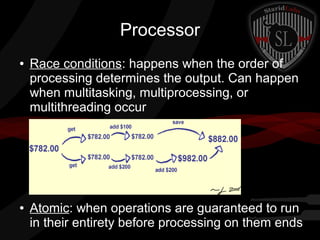
Race conditions: happens when the order of
processing determines the output. Can happen
when multitasking, multiprocessing, or
multithreading occur

Atomic: when operations are guaranteed to run
in their entirety before processing on them ends
Memory
●

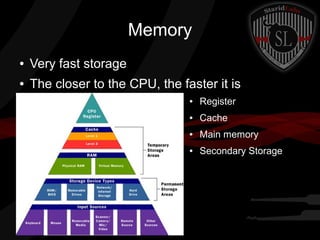
Very fast storage

●

The closer to the CPU, the faster it is
●

Register

●

Cache

●

Main memory

●

Secondary Storage
Memory
●

RAM – Random access memory (read/write)

●

ROM – Read only memory (read)

●

Virtual memory: simulate more “main memory”
by storing part of it on disk. Allows the
perception of “unlimited RAM”
–

●

Secondary storage is slow so relying too heavily on
virtual memory causes poor system performance

Firmware: instructions embedded into hardware
–

Usually ROM
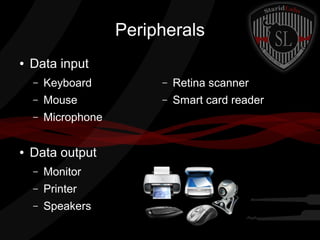
Peripherals
●

Data input
–

–

Retina scanner

–

Mouse

–

Smart card reader

–

●

Keyboard
Microphone

Data output
–

Monitor

–

Printer

–

Speakers
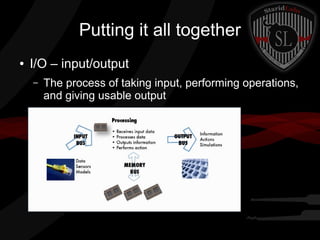
Putting it all together
●

I/O – input/output
–

The process of taking input, performing operations,
and giving usable output
Operating Systems
●

Software that controls:
–
–

Provides file/data abstraction

–

Manages user access/processing

–

●

Program operation

–

●

I/O

Manages scheduling

Ex: Windows, Mac OSX, Linux, DOS, IOS
Kernel: core of an OS. Provides vital operations
and access to resources
Enterprise Security Architect
●

Key goals:
–

Strategic design to address security requirements

–

A simple, long-term view of control: avoid
unnecessary complexities & redundancies

–

Provides unified vision for common security controls

–

Leverages existing technology investments

–

Flexible to cover current and future
threats/functions
Common Security Services
●

●

●

●

●

Boundary Control: Whether and how information is
allowed to flow between
systems/companies/states/countries
Access Control: Focus on identification,
authentication, and authorization
Integrity: Detect and correct corruption of data.
Antivirus, content filtering, file integrity
Cryptographic: Common services for
encryption/decryption and key management. PKI
Audit and Monitoring: Secure collection, storage, and
analysis of audited events. Logging, SIEM
Common Architecture Frameworks
●

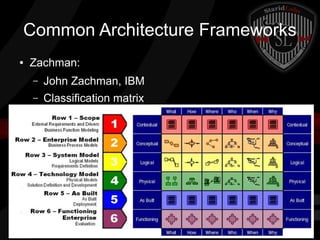
Zachman:
–

John Zachman, IBM

–

Classification matrix
Common Architecture Frameworks
●

Sherwood Applied Business Security Arch (SABSA)
–

Similar to Zachman

–

Assets (WHAT), Motivation (WHY), Process (HOW),
People (WHO), Location (WHERE), Time (WHEN)

–

Chain of Tracability
Common Architecture Frameworks
●

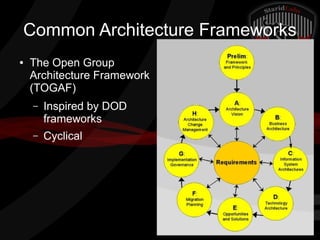
The Open Group
Architecture Framework
(TOGAF)
–

Inspired by DOD
frameworks

–

Cyclical
Common Architecture Frameworks
●

IT Infrastructure Library (ITIL)
–

CCTA (British)

–

Strongly focused on service delivery/management

–

Service Strategy: Services that are to be provided

–

Service Design: Creating the services design

–

Service Transition: Translating designs into
operational services

–

Continual Service Improvement: Measure services,
validate against service level. Improve as needed
Types of Security Models
●

State Machine Model
–
–

●

Describes a system as it moves from state to state
Define what actions are permitted at what point in
time to still guarantee a secure state

Multilevel Lattice Model
–

Layers of subjects and objects with clear rules
defining which interactions are allowed

–

Clearance levels, security labels
Types of Security Models
●

Noninterference Model
–
–

●

Label everything as high or low security inputs
Restrict flows between high and low level users

Matrix-based Model
–
–

●

One-to-one relationships between subjects/objects
Example: Access Control Matrix

Information Flow Model
–

Object-to-object

–

Determine if information is being protected
throughout a process (can find covert channels)
Examples of Security Models
●

Bell–LaPadula Confidentiality Model (BLP)
–

State machine model

–

Only concerned with confidentiality

–

Subject can access data at same and lower levels

–

“* property” - can write at or above their level

–

“Strong * property” – can only write at their level
Examples of Security Models
●

Biba Integrity Model
–

Similar enough to Bell-LaPadula to be confusing

–

Inversed flows – beware on test!
Focused on integrity
●

–

Subject can access data at same and higher
integrity levels (can't access inaccurate)

–

“* property” - can write at or below their level
Examples of Security Models
●

Clark-Wilson Integrity Model
–
–

Evaluation/approval step for separation of duties

–

●

Improves on Biba model
Transactions – steps must be followed for changes
to be made. Ensures certain quality

Lipner Model
–

Combines BLP and Biba with job roles

–

Provides confidentiality and integrity

–

BLP first – classification levels of manager, low

–

Bipa as necessary – integrity levels of system
program, other program, low
Examples of Security Models
●

Brewer-Nash Model (Chinese Wall)
–
–

●

Focuses on preventing conflict of interest
Once you access data from one side of the wall,
you can't get back to data on the other

Graham-Denning Model
–

Focuses on object creation, user privileges

–

Set of objects, set of subjects, set of rights

–

Create objects, create subjects, delete objects,
delete subjects, read access rights, grant access
rights, delete access rights, transfer access rights
Examples of Security Models
●

Harrison-Ruzzo-Ullman Model
–

Extension to Graham-Denning Model

–

Protection system – subjects are prevented from
access programs which can execute certain
commands
Defining an Architecture
●

Capturing and analyzing requirements
–
–

Refine into detailed functional/nonfunctional reqs

–
●

Work with stakeholders to define requirements
Vulnerability/risk assessments, threat modeling

Creating and documenting security architecture
–

Provide designs that appeal to stakeholders

–

May use reference models as starting points

–

Use international standards, best practices

–

Check legislation and regulations
Infosec Evaluation Models
●

Evaluate the architecture to ensure it addresses
the requirements
–

Peer review

–

Formal verification
●

–

Third party evaluation

Certification/accreditation
●
●
●
●

Choose evaluation criteria
Run evaluation, storing results as a baseline
Compare baseline against security requirements
Evaluate the system as to whether it meets the needs of
the organization and for how long (accreditation expires
each year? Each product release?)
EVERYBODY CHANGE PLACES!!!

Switch to Tim
Product Evaluation Models
●

Several security architecture models have been
created:
–

Trusted Computer System Evaluation Criteria
(TCSEC)
●

–

For classified systems

Common Criteria
●

Generic security and applicable internationally
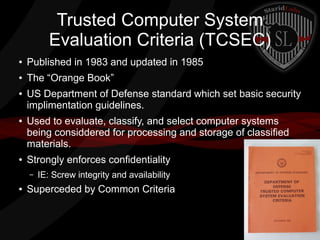
Trusted Computer System
Evaluation Criteria (TCSEC)
●

Published in 1983 and updated in 1985

●

The “Orange Book”

●

●

●

US Department of Defense standard which set basic security
implimentation guidelines.
Used to evaluate, classify, and select computer systems
being considdered for processing and storage of classified
materials.
Strongly enforces confidentiality
–

●

IE: Screw integrity and availability

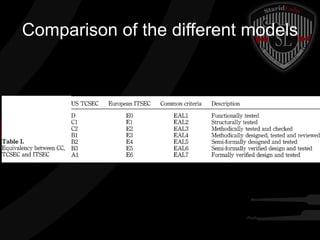
Superceded by Common Criteria
TSEC Continued
●

Primarily uses the idea of Trusted Computing Base
(TCB) to evaluate products.
–

●

●

Certain functions must exist and work properly for security
to be possible. Must be able to be validated.

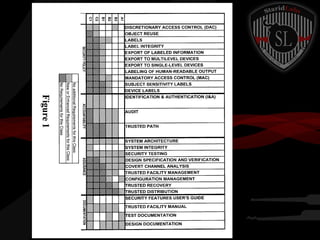
Primarily identified systems with discretionary vs
mandatory access controls (DAC, MAC)
Most commercial systems did not implement MAC
and as such could only receive a C2 rating at best.
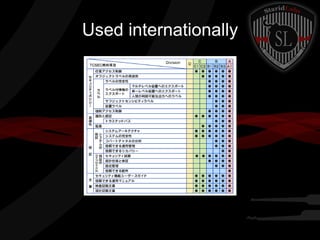
Used internationally
Information Technology Security
Evaluation Criteria (ITSEC)
●

●

●

●

●

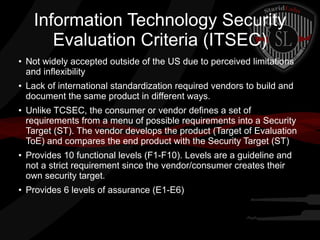
Not widely accepted outside of the US due to perceived limitations
and inflexibility
Lack of international standardization required vendors to build and
document the same product in different ways.
Unlike TCSEC, the consumer or vendor defines a set of
requirements from a menu of possible requirements into a Security
Target (ST). The vendor develops the product (Target of Evaluation
ToE) and compares the end product with the Security Target (ST)
Provides 10 functional levels (F1-F10). Levels are a guideline and
not a strict requirement since the vendor/consumer creates their
own security target.
Provides 6 levels of assurance (E1-E6)
Common Criteria
●

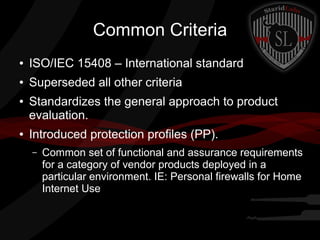
ISO/IEC 15408 – International standard

●

Superseded all other criteria

●

●

Standardizes the general approach to product
evaluation.
Introduced protection profiles (PP).
–

Common set of functional and assurance requirements
for a category of vendor products deployed in a
particular environment. IE: Personal firewalls for Home
Internet Use
Comparison of the different models
Industry/International Security Implementation
Guides
ISO 27001
●

Standardization and certification of an organization's
information security management system (ISMS)

●

Focuses on security governance

●

5 key areas:
–

General requirements of the ISMS

–

Management Responsibility

–

Internal ISMS Audits

–

Management review of the ISMS

–

ISMS improvement
ISO 27002
●

●
●

●

“Code of Practice for Information Security
Management”
Lists security control objectives
Recommends a range of specific security
controls according to industry best practice
ISO 27002 is a guideline, and not a rigid
standard. The business can implement controls
based on risk analysis
ISO 27002 Part 2
●

Contains 11 focus areas:
–

Security Policy

–

Organization and Information Security

–

Asset Management

–

Human Resources Security

–

Physical and Environmental Security

–

Communications and Operations Management

–

Access Control

–

Information Systems Acquisitions, Development, and Maintenance

–

Information Security Incident Management

–

Business Continuity Management

–

Compliance
ISO
●

●

Organizations are only able to become certified
with ISO27001. This is because the ISMS can
be compared with other
organizations/customers.
ISO27002 is very specific to the organization
and wouldn't be shared, and as such isn't
certifiable.
Control Objects for Information and
Related Technology (COBIT)
●

Created by ISACA and ITGI in the early 90's

●

Provides a set of generally accepted processes

●

Describes “base minimum” security controls

●

5 key principals
–

Meeting Stakeholder Needs

–

Covering the Enterprise End-to-End

–

Applying a single integrated framework

–

Enabling a holistic approach

–

Separating Governance from Management

●

Auditors love COBIT

●

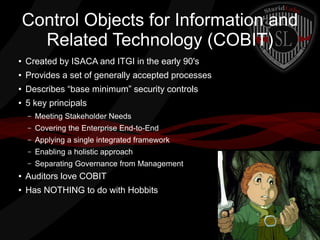
Has NOTHING to do with Hobbits
Payment Card Industry Data
Security Standard (PCI-DSS)
●

Ensures the safe processing, storing, and transmission of
cardholder information

●

Includes prevention, detection, and reaction to security incidents

●

Six goals
–

Build and Maintain a Secure Network

–

Protect Cardholder Data

–

Maintain a Vulnerability Management Program

–

Implement Strong Access Control Measures

–

Regularly Monitor and Test Networks

–

Maintain an Information Security Policy
PCI Part 2
●

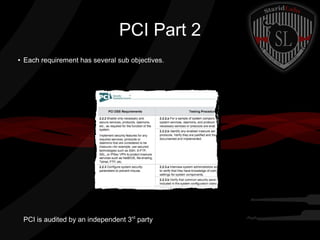
Each requirement has several sub objectives.

PCI is audited by an independent 3rd party
Security capabilities of Information
Systems
●

Primary challenge is to provide security without
compromising the primary function of the
system(s)
Access Control Mechanisms
●

●
●

●

●

●

All systems need to be able to distinguish between individual subjects and
objects managed by the system and determine how they will be allowed to
interact with each other.
Authentication must occur before access is allowed to system resources
This is one of the most fundamental security controls and should be thoroughly
vetted and validated.
When no subject can gain access to an object without authorization, this is
referred to as complete mediation.
A Reference Monitor will examine all attempts by subjects to access objects and
will determine if it should be allowed.
The reference monitor checks the Security Kernel Database which stores
access control lists and logs its decisions into the secure audit log.
Secure Memory Management
●

●

●

●

Ideally we could easily separate memory used by
subjects (running processes and threads) from objects
(data in storage)
Modern computer systems used a shared memory
location which is not ideal. As such the system has to
manage the separation.
This allows for buffer overflows and other vulnerabilities
Technologies such as Address Space Layout
Randomization (ASLR) combat this weakness.
Processor States
●

●

●

●

Processors and their supporting chipsets provide one of the
first layers of defense in a computing system.
Provide specialized security functions (cryptographic
coprocessors)
Processors ahve states that can be used to distinguish
between privileged/unprivileged instructions
Most processors support at least two states: a supervisor
state (kernel mode) and a problem state (user mode)
Processor Layers
●

●

Operating systems have been developed to
control access to kernel mode and require
access to pass through security layers.
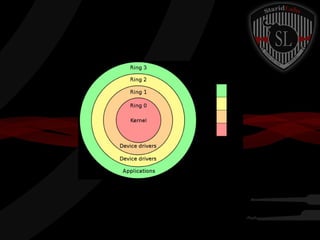
An example of this is ring protection. Ring 0 is
core system functions where Ring 3 is end user
application functions. Privileges get higher the
closer you get to 0.
Process Isolation
●

●

●

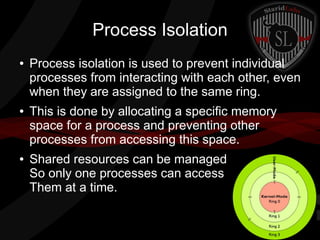
Process isolation is used to prevent individual
processes from interacting with each other, even
when they are assigned to the same ring.
This is done by allocating a specific memory
space for a process and preventing other
processes from accessing this space.
Shared resources can be managed
So only one processes can access
Them at a time.
Data Hiding
●

Data hiding maintains activities at different
security levels to separate these levels from
each other. This assists in preventing data at
one security level from being seen by
processes operating at other security levels.
Abstraction
●

●

Abstraction involves the removal of
characteristics from an entity in order to easily
represent it's essential properties.
Example: Provide permissions to a group
container “Admins” and then place users in the
group, instead of individually assigning
permissions.
Cryptographic Protections
●

Sensitive data can be encrypted and the keys
can be protected, hiding data from less
privileged parts of the system.
Host Firewalls and Intrusion
Prevention
●

●

Host based firewalls and host based Intrusion
Prevention systems can be used to protect a
host in the event of network security failure.
Often done in software but hardware hostbased
firewalls exist (Approximately $100 built into
network card) but can also buy wireless router
and configure to be only a firewall.
(Approximately $20 dollars)
Audit and Monitoring Controls
●

●

Secure systems must have the ability to provide
administrators with evidence of their correct
operation through logging and application
messages.
Host/network intrusion detection systems may
also be considered types of auditing and
monitoring controls.
Virtualization
●

●

●

●

●

●

Virtualization offers numerous security advantages
Virtual machines are isolated in a sandbox environment and if infected can
quickly be removed or shutdown and replaced.
Virtual machines have limited access to hardware resources
VM's require strong configuration management control and versioning to
ensure good copies are available for restoration.
VM's still require anti-malware, encryption, HIDS, firewalls and patching
Viruses are becoming more Virtual Machine aware and can break out. (Tim
Note: Some viruses can detect running in a VM and refuse to run, since they
don't want malware researchers to reverse engineer them)
Vulnerabilities in Security
Architectures
●

●

Security architects must familiarize themselves
with well known attacks and vulnerabilities in
their industry (and keep up with them).
Some of the most challenging attacks to
security architecture are emanations, state
attacks, and cover channels
Emanations
●

●

●

System emanations are unintentional electrical,
mechanical, optical, or acoustical energy signals that
contain information or metadata about information
being processed, stored, or transmitted in a system
If intercepted and recorded, it is possible to analyze
and recover the intelligence that was being
processed.
The problem of compromising radiation has been
given the name TEMPEST
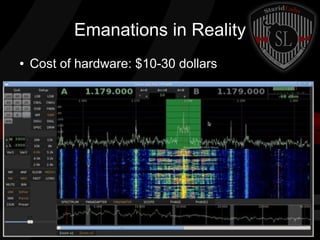
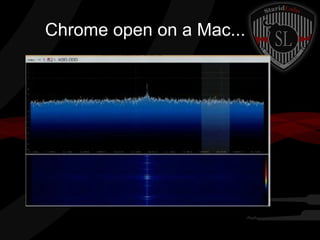
Emanations in Reality
●

Cost of hardware: $10-30 dollars
Chrome open on a Mac...
Tempest
●

●

●

The best protection against emanation in high security
environments is to use the red/black separation
Shielding is put in place between unclassified circuits/equipment
and classified equipment. Once implemented the configuration is
validated. Nothing can be moved, at all, or the validation is void.
Known attacks include ATM attacks where keypress noises were
different, and sensitive microphones could listen accurately at 15
meters and capture PINS.
State Attacks AKA Race Conditions
●

●

●

Race conditions are caused by poorly written code.
Race conditions occur when it's possible to execute
instructions out of order.
Example: A user logs into a system. The login system is
kernel mode. Before the system can complete login, the
user is able to open a command window. The login
process then completes and puts the user in user mode.
The command window could still have kernel mode
permissions.
Covert Channels
●

●

a covert channel is a type of computer security
attack that creates a capability to transfer
information objects between processes that are not
supposed to be allowed to communicate by the
computer security policy
Types of channels:
–

Storage Channel – two processes can communicate with
a stored object

–

Timing Channel – Modify the timing of events relative to
each other
Technology and Process Integration
Mainframes
●

●

●

Mainframes used to be large centralized
distributed computing platforms.
Current mainframes are mostly virtual hosts,
hosting multiple virtual machines. Often
Linux/Unix based.
Other uses are data warehouses, web apps,
financial apps, and middleware
Thinclients
●

Thinclients use a central server for processing,
and have diskless workstations as user
terminals.
Middleware
●

●
●

●

Middleware is a connectivity software that enables
multiple processes running on one or more
machines to interact.
Solves interoperability and connectivity issues
Middleware systems are common in Service
Oriented Architectures (SOA).
Unfortunately many SOA implementations were
not developed with end-to-end security as a
requirement.
Embedded Systems
●

●

●

Embedded systems are small form factor, limited
processing power, machines. They offer a limited
range of computing serves usually around a single
application.
They usually feature a limited OS with minimal
functionality.
Have disadvantages
–

Patching is difficult

–

Processing power makes security functions limited
Pervasive Computing and Mobile
Devices
●

●

●

Mobile phones, ultrabooks, tablets, Google
Goggles,ipods, god knows what, are being
carried by EVERYONE nowadays.
Security has often been sacrificed due to limited
computing power.
Mobility is a prime factor for data loss since they
can be used to transmit and store information in
ways that may be difficult to control.
Software and System Vulnerabilities and Threats
Web Based
●

Web applications are subject to all threats and protection mechanisms discussed
elsewhere. The disadvantage to web based systems is that they are more accessible.

●

Harden the OS

●

Remove unnecessary applications

●

Change default accounts/configurations

●

Configure permissions properly

●

Keep up to date on patching

●

Run web/network vulnerability scans prior to deployment (baseline)

●

Implement IDS/IPS

●

Use application proxy firewalls

●

Disable unnecessary documentation

●

Remove Administrative Interfaces

●

Limit who can access the hosts/networks

●

Use Strong Authentication & Account lockout

●

Use strong input validation
XML
●

●

XML is a formatting standard. It formats and
tags data to allow for easy information
exchange between systems.
XML is vulnerable to injection attacks (So use
data validation, dummy!)
SAML
●

●

●

Security Assertion Markup Language (SAML)
XML based standard used to exchange authentication and
authorization information.
Advantages:
–
–

Loose coupling of directories

–

Improved online experience for end users

–

Reduced administrative costs for service providers

–

●

Platform neutral

Risk transference (Use a 3rd party identity provider and make them responsible
for proper management of identities)

SAML is only as strong as the implementation Poor coding can cause
severe authentication vulnerabilities.
OWASP
●

●

Open Web Application Security Project (OWASP) is a nonprofit
focused on improving security in software.
Has created:
–

OWASP Top 10 security flaws and how to mitigate them (yearly)

–

OWASP Guide Project (Architects manual for designing secure web
applications and services)

–

OWASP Software Assurance Maturity Model (SAMM) – Framework
used to design software

–

OWASP Mobility Project – Provides resources for developers and
architects to develop and maintain secure mobile applications
Client Based Vulnerabilities
●

●

●

The client is often a foothold into an organization
who uses the client to attack other servers and
services.
Security cannot force customers/employees to
use virus/malware free workstations. We must
assume that the client is infected.
One time pad tokens can be used to ensure that
loss and exposure is limited for both the
customer and the organization.
Organization's client system security
●

Systems should include:
–

A supported and licensed operating system

–

Updated, verified, and supported anti-malware and anti-virus capabilities

–

Host based intrusion detection system

–

Whole drive encryption or sensitive information on the drive be encrypted with
strong encryption

–

Whenever possible the client operates in limited user mode (Not as Admin)

–

Client is part of a continuous monitoring program which monitors for vulnerabilities
and patches when needed without interaction of the end user.

–

Changes to the OS or new software are validated through an assessment process
to determine any security impacts.
Mobile Devices
●

●
●

Many organizations are allowing tablets and
smartphones on their networks.
Bring your own Device (BYOD) is also growing.
Most mobile devices are not designed with
enterprise security in mind.
Mobile Device Security
●

Enterprise should be capable of performing:
–
–

Account Management

–

GPS location of device

–

Patching/updating

–

App management

–

Device authentication/enrollment

–
●

Whole drive wipe

Information Archive for legal situations

System should have:
–

Secure web browser

–

VPN capabilities

–

Organization Application repository

●

Device should have whole drive encryption

●

Should not be rooted/jailbroken (the state should be verifiable)
EVERYBODY CHANGE PLACES!!!

Switch to Jem
Server-based Vulnerabilities
●

Determine how remote access will be achieved
–
–

Multifactor authentication? One-time passwords?

–
●

Out of band communication? Separate VLANs?
Disable built-in remote access in new software?

Determine how configuration management will
be performed
–
–

●

Who will be responsible? Are they capable?
Vulnerability scanning/management

Determine business continuity requirements
Server-based Vulnerabilities
●

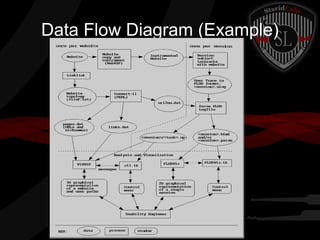
Data Flow Control
–

Data flow diagram (DFD) – how data flows in/out

–

Break down into data, processes, and windows a
user might see

–

Implement least privilege

–

Review technologies in use to ensure they are or
can be supported under the security architecture
Data Flow Diagram (Example)
Database Security
●

Warehousing
–

Repository for information gathered from a number
of data sources

–

Used for analytical purposes

–

Data marts: smaller warehouse containing data
about a specific function or division

–

Confidentiality is critical – prone to leaks/breaches

–

Integrity is critical – loss of compiled data
Database Security
●

Inference
–

●

Aggregation
–

●

Ability to deduce confidential information from
observing available information
Combining nonsensitive data from separate
sources into sensitive information

Data Mining
–

Querying data in a data warehouse to find hidden
relationships, patterns and trends
Distributed Systems
●

Need to share common protocols/interfaces

●

Coordinate resources
–

UUID: universally unique identifiers
17014a58-bd1a-4b6b-8757-adecee9cc99d

●

Authorization is a challenge
Distributed Systems
●

Grid Computing
–

–
●

Sharing system resources like CPU across a
network so that the machines all act together as
one large machine
Heterogeneous – can be different OS, software

Cluster Computing
–

Similar to grid computing

–

Homogeneous – must be identical and devoted to a
single task
Distributed Systems
●

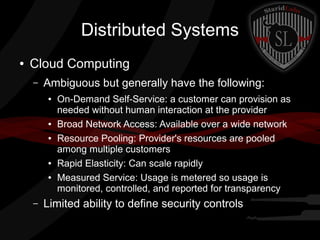
Cloud Computing
–

Ambiguous but generally have the following:
●

●
●

●
●

–

On-Demand Self-Service: a customer can provision as
needed without human interaction at the provider
Broad Network Access: Available over a wide network
Resource Pooling: Provider's resources are pooled
among multiple customers
Rapid Elasticity: Can scale rapidly
Measured Service: Usage is metered so usage is
monitored, controlled, and reported for transparency

Limited ability to define security controls
Distributed Systems
●

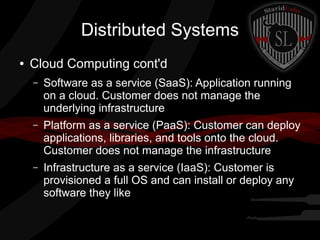
Cloud Computing cont'd
–

Software as a service (SaaS): Application running
on a cloud. Customer does not manage the
underlying infrastructure

–

Platform as a service (PaaS): Customer can deploy
applications, libraries, and tools onto the cloud.
Customer does not manage the infrastructure

–

Infrastructure as a service (IaaS): Customer is
provisioned a full OS and can install or deploy any
software they like
Countermeasure Principles
●

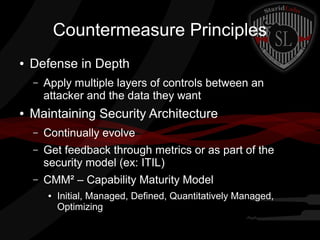
Defense in Depth
–

●

Apply multiple layers of controls between an
attacker and the data they want

Maintaining Security Architecture
–

Continually evolve

–

Get feedback through metrics or as part of the
security model (ex: ITIL)

–

CMM² – Capability Maturity Model
●

Initial, Managed, Defined, Quantitatively Managed,
Optimizing
Countermeasure Principles
●

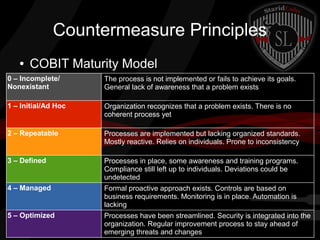
COBIT Maturity Model

0 – Incomplete/
Nonexistant

The process is not implemented or fails to achieve its goals.
General lack of awareness that a problem exists

1 – Initial/Ad Hoc

Organization recognizes that a problem exists. There is no
coherent process yet

2 – Repeatable

Processes are implemented but lacking organized standards.
Mostly reactive. Relies on individuals. Prone to inconsistency

3 – Defined

Processes in place, some awareness and training programs.
Compliance still left up to individuals. Deviations could be
undetected

4 – Managed

Formal proactive approach exists. Controls are based on
business requirements. Monitoring is in place. Automation is
lacking

5 – Optimized

Processes have been streamlined. Security is integrated into the
organization. Regular improvement process to stay ahead of
emerging threats and changes
Next week: Security Operations
New offices in the Black Building
(118 N Broadway #615, Fargo, ND)
Meet in King House at 3pm?
We'll head upstairs as a group
and break in the new conference room!

CISSP Week 22

  • 1.
    Security Architecture &Design Domain 6 Pages 902-1003 Official CISSP CBK Third Edition Jem Jensen & Tim Jensen StaridLabs
  • 2.
    What is it? ● ● Lotsof overlap with other domains (thankfully) Translate business requirements into solutions that provide security ● Unique – depends on business approach and assets ● Involves hardware, firmware, and software
  • 3.
    Common System Components ● Processor:performs data processing, converts input to output – Central Processing Unit (CPU): Main processor. Performs system/OS/application processing – Graphics Processing Unit (GPU): Video processor – Controller: controls operation of an external device (Example: SCSI/IDE/SATA Controller)
  • 4.
    Processor ● Traditionally one CPUwhich controls everything, including graphics and IO – ● Multitasking: CPU stops execution of one program, saves it, loads another, runs it for a while, then repeats for the other program Currently could have multiple processors treated as one CPU and additional processors on each IO device (GPU, Controllers) – Multiprocessing: Different processors run different tasks. Program 1 runs on procA, program 2 runs on procB – Multithreading: Execution is split up into time slices. Program 1 runs for 10ms, Program 2 runs for the next 10ms. Repeat for each program
  • 5.
    Processor ● ● Register: memory locatedcloser to the processor. Faster but more expensive Fetch, decode, execute, store (FDX) – Load instructions from memory into registers – Decode the instructions, fetch operands – Perform whatever operation was decoded and write the results to another register – Send the results from the register to memory
  • 6.
    Processor ● ● Race conditions: happenswhen the order of processing determines the output. Can happen when multitasking, multiprocessing, or multithreading occur Atomic: when operations are guaranteed to run in their entirety before processing on them ends
  • 7.
    Memory ● Very fast storage ● Thecloser to the CPU, the faster it is ● Register ● Cache ● Main memory ● Secondary Storage
  • 8.
    Memory ● RAM – Randomaccess memory (read/write) ● ROM – Read only memory (read) ● Virtual memory: simulate more “main memory” by storing part of it on disk. Allows the perception of “unlimited RAM” – ● Secondary storage is slow so relying too heavily on virtual memory causes poor system performance Firmware: instructions embedded into hardware – Usually ROM
  • 9.
    Peripherals ● Data input – – Retina scanner – Mouse – Smartcard reader – ● Keyboard Microphone Data output – Monitor – Printer – Speakers
  • 10.
    Putting it alltogether ● I/O – input/output – The process of taking input, performing operations, and giving usable output
  • 11.
    Operating Systems ● Software thatcontrols: – – Provides file/data abstraction – Manages user access/processing – ● Program operation – ● I/O Manages scheduling Ex: Windows, Mac OSX, Linux, DOS, IOS Kernel: core of an OS. Provides vital operations and access to resources
  • 12.
    Enterprise Security Architect ● Keygoals: – Strategic design to address security requirements – A simple, long-term view of control: avoid unnecessary complexities & redundancies – Provides unified vision for common security controls – Leverages existing technology investments – Flexible to cover current and future threats/functions
  • 13.
    Common Security Services ● ● ● ● ● BoundaryControl: Whether and how information is allowed to flow between systems/companies/states/countries Access Control: Focus on identification, authentication, and authorization Integrity: Detect and correct corruption of data. Antivirus, content filtering, file integrity Cryptographic: Common services for encryption/decryption and key management. PKI Audit and Monitoring: Secure collection, storage, and analysis of audited events. Logging, SIEM
  • 14.
    Common Architecture Frameworks ● Zachman: – JohnZachman, IBM – Classification matrix
  • 15.
    Common Architecture Frameworks ● SherwoodApplied Business Security Arch (SABSA) – Similar to Zachman – Assets (WHAT), Motivation (WHY), Process (HOW), People (WHO), Location (WHERE), Time (WHEN) – Chain of Tracability
  • 16.
    Common Architecture Frameworks ● TheOpen Group Architecture Framework (TOGAF) – Inspired by DOD frameworks – Cyclical
  • 17.
    Common Architecture Frameworks ● ITInfrastructure Library (ITIL) – CCTA (British) – Strongly focused on service delivery/management – Service Strategy: Services that are to be provided – Service Design: Creating the services design – Service Transition: Translating designs into operational services – Continual Service Improvement: Measure services, validate against service level. Improve as needed
  • 18.
    Types of SecurityModels ● State Machine Model – – ● Describes a system as it moves from state to state Define what actions are permitted at what point in time to still guarantee a secure state Multilevel Lattice Model – Layers of subjects and objects with clear rules defining which interactions are allowed – Clearance levels, security labels
  • 19.
    Types of SecurityModels ● Noninterference Model – – ● Label everything as high or low security inputs Restrict flows between high and low level users Matrix-based Model – – ● One-to-one relationships between subjects/objects Example: Access Control Matrix Information Flow Model – Object-to-object – Determine if information is being protected throughout a process (can find covert channels)
  • 20.
    Examples of SecurityModels ● Bell–LaPadula Confidentiality Model (BLP) – State machine model – Only concerned with confidentiality – Subject can access data at same and lower levels – “* property” - can write at or above their level – “Strong * property” – can only write at their level
  • 21.
    Examples of SecurityModels ● Biba Integrity Model – Similar enough to Bell-LaPadula to be confusing – Inversed flows – beware on test! Focused on integrity ● – Subject can access data at same and higher integrity levels (can't access inaccurate) – “* property” - can write at or below their level
  • 22.
    Examples of SecurityModels ● Clark-Wilson Integrity Model – – Evaluation/approval step for separation of duties – ● Improves on Biba model Transactions – steps must be followed for changes to be made. Ensures certain quality Lipner Model – Combines BLP and Biba with job roles – Provides confidentiality and integrity – BLP first – classification levels of manager, low – Bipa as necessary – integrity levels of system program, other program, low
  • 23.
    Examples of SecurityModels ● Brewer-Nash Model (Chinese Wall) – – ● Focuses on preventing conflict of interest Once you access data from one side of the wall, you can't get back to data on the other Graham-Denning Model – Focuses on object creation, user privileges – Set of objects, set of subjects, set of rights – Create objects, create subjects, delete objects, delete subjects, read access rights, grant access rights, delete access rights, transfer access rights
  • 24.
    Examples of SecurityModels ● Harrison-Ruzzo-Ullman Model – Extension to Graham-Denning Model – Protection system – subjects are prevented from access programs which can execute certain commands
  • 25.
    Defining an Architecture ● Capturingand analyzing requirements – – Refine into detailed functional/nonfunctional reqs – ● Work with stakeholders to define requirements Vulnerability/risk assessments, threat modeling Creating and documenting security architecture – Provide designs that appeal to stakeholders – May use reference models as starting points – Use international standards, best practices – Check legislation and regulations
  • 26.
    Infosec Evaluation Models ● Evaluatethe architecture to ensure it addresses the requirements – Peer review – Formal verification ● – Third party evaluation Certification/accreditation ● ● ● ● Choose evaluation criteria Run evaluation, storing results as a baseline Compare baseline against security requirements Evaluate the system as to whether it meets the needs of the organization and for how long (accreditation expires each year? Each product release?)
  • 27.
  • 28.
    Product Evaluation Models ● Severalsecurity architecture models have been created: – Trusted Computer System Evaluation Criteria (TCSEC) ● – For classified systems Common Criteria ● Generic security and applicable internationally
  • 29.
    Trusted Computer System EvaluationCriteria (TCSEC) ● Published in 1983 and updated in 1985 ● The “Orange Book” ● ● ● US Department of Defense standard which set basic security implimentation guidelines. Used to evaluate, classify, and select computer systems being considdered for processing and storage of classified materials. Strongly enforces confidentiality – ● IE: Screw integrity and availability Superceded by Common Criteria
  • 30.
    TSEC Continued ● Primarily usesthe idea of Trusted Computing Base (TCB) to evaluate products. – ● ● Certain functions must exist and work properly for security to be possible. Must be able to be validated. Primarily identified systems with discretionary vs mandatory access controls (DAC, MAC) Most commercial systems did not implement MAC and as such could only receive a C2 rating at best.
  • 32.
  • 33.
    Information Technology Security EvaluationCriteria (ITSEC) ● ● ● ● ● Not widely accepted outside of the US due to perceived limitations and inflexibility Lack of international standardization required vendors to build and document the same product in different ways. Unlike TCSEC, the consumer or vendor defines a set of requirements from a menu of possible requirements into a Security Target (ST). The vendor develops the product (Target of Evaluation ToE) and compares the end product with the Security Target (ST) Provides 10 functional levels (F1-F10). Levels are a guideline and not a strict requirement since the vendor/consumer creates their own security target. Provides 6 levels of assurance (E1-E6)
  • 34.
    Common Criteria ● ISO/IEC 15408– International standard ● Superseded all other criteria ● ● Standardizes the general approach to product evaluation. Introduced protection profiles (PP). – Common set of functional and assurance requirements for a category of vendor products deployed in a particular environment. IE: Personal firewalls for Home Internet Use
  • 35.
    Comparison of thedifferent models
  • 36.
  • 37.
    ISO 27001 ● Standardization andcertification of an organization's information security management system (ISMS) ● Focuses on security governance ● 5 key areas: – General requirements of the ISMS – Management Responsibility – Internal ISMS Audits – Management review of the ISMS – ISMS improvement
  • 38.
    ISO 27002 ● ● ● ● “Code ofPractice for Information Security Management” Lists security control objectives Recommends a range of specific security controls according to industry best practice ISO 27002 is a guideline, and not a rigid standard. The business can implement controls based on risk analysis
  • 39.
    ISO 27002 Part2 ● Contains 11 focus areas: – Security Policy – Organization and Information Security – Asset Management – Human Resources Security – Physical and Environmental Security – Communications and Operations Management – Access Control – Information Systems Acquisitions, Development, and Maintenance – Information Security Incident Management – Business Continuity Management – Compliance
  • 40.
    ISO ● ● Organizations are onlyable to become certified with ISO27001. This is because the ISMS can be compared with other organizations/customers. ISO27002 is very specific to the organization and wouldn't be shared, and as such isn't certifiable.
  • 41.
    Control Objects forInformation and Related Technology (COBIT) ● Created by ISACA and ITGI in the early 90's ● Provides a set of generally accepted processes ● Describes “base minimum” security controls ● 5 key principals – Meeting Stakeholder Needs – Covering the Enterprise End-to-End – Applying a single integrated framework – Enabling a holistic approach – Separating Governance from Management ● Auditors love COBIT ● Has NOTHING to do with Hobbits
  • 42.
    Payment Card IndustryData Security Standard (PCI-DSS) ● Ensures the safe processing, storing, and transmission of cardholder information ● Includes prevention, detection, and reaction to security incidents ● Six goals – Build and Maintain a Secure Network – Protect Cardholder Data – Maintain a Vulnerability Management Program – Implement Strong Access Control Measures – Regularly Monitor and Test Networks – Maintain an Information Security Policy
  • 43.
    PCI Part 2 ● Eachrequirement has several sub objectives. PCI is audited by an independent 3rd party
  • 44.
    Security capabilities ofInformation Systems ● Primary challenge is to provide security without compromising the primary function of the system(s)
  • 45.
    Access Control Mechanisms ● ● ● ● ● ● Allsystems need to be able to distinguish between individual subjects and objects managed by the system and determine how they will be allowed to interact with each other. Authentication must occur before access is allowed to system resources This is one of the most fundamental security controls and should be thoroughly vetted and validated. When no subject can gain access to an object without authorization, this is referred to as complete mediation. A Reference Monitor will examine all attempts by subjects to access objects and will determine if it should be allowed. The reference monitor checks the Security Kernel Database which stores access control lists and logs its decisions into the secure audit log.
  • 46.
    Secure Memory Management ● ● ● ● Ideallywe could easily separate memory used by subjects (running processes and threads) from objects (data in storage) Modern computer systems used a shared memory location which is not ideal. As such the system has to manage the separation. This allows for buffer overflows and other vulnerabilities Technologies such as Address Space Layout Randomization (ASLR) combat this weakness.
  • 47.
    Processor States ● ● ● ● Processors andtheir supporting chipsets provide one of the first layers of defense in a computing system. Provide specialized security functions (cryptographic coprocessors) Processors ahve states that can be used to distinguish between privileged/unprivileged instructions Most processors support at least two states: a supervisor state (kernel mode) and a problem state (user mode)
  • 48.
    Processor Layers ● ● Operating systemshave been developed to control access to kernel mode and require access to pass through security layers. An example of this is ring protection. Ring 0 is core system functions where Ring 3 is end user application functions. Privileges get higher the closer you get to 0.
  • 50.
    Process Isolation ● ● ● Process isolationis used to prevent individual processes from interacting with each other, even when they are assigned to the same ring. This is done by allocating a specific memory space for a process and preventing other processes from accessing this space. Shared resources can be managed So only one processes can access Them at a time.
  • 51.
    Data Hiding ● Data hidingmaintains activities at different security levels to separate these levels from each other. This assists in preventing data at one security level from being seen by processes operating at other security levels.
  • 52.
    Abstraction ● ● Abstraction involves theremoval of characteristics from an entity in order to easily represent it's essential properties. Example: Provide permissions to a group container “Admins” and then place users in the group, instead of individually assigning permissions.
  • 53.
    Cryptographic Protections ● Sensitive datacan be encrypted and the keys can be protected, hiding data from less privileged parts of the system.
  • 54.
    Host Firewalls andIntrusion Prevention ● ● Host based firewalls and host based Intrusion Prevention systems can be used to protect a host in the event of network security failure. Often done in software but hardware hostbased firewalls exist (Approximately $100 built into network card) but can also buy wireless router and configure to be only a firewall. (Approximately $20 dollars)
  • 55.
    Audit and MonitoringControls ● ● Secure systems must have the ability to provide administrators with evidence of their correct operation through logging and application messages. Host/network intrusion detection systems may also be considered types of auditing and monitoring controls.
  • 56.
    Virtualization ● ● ● ● ● ● Virtualization offers numeroussecurity advantages Virtual machines are isolated in a sandbox environment and if infected can quickly be removed or shutdown and replaced. Virtual machines have limited access to hardware resources VM's require strong configuration management control and versioning to ensure good copies are available for restoration. VM's still require anti-malware, encryption, HIDS, firewalls and patching Viruses are becoming more Virtual Machine aware and can break out. (Tim Note: Some viruses can detect running in a VM and refuse to run, since they don't want malware researchers to reverse engineer them)
  • 57.
    Vulnerabilities in Security Architectures ● ● Securityarchitects must familiarize themselves with well known attacks and vulnerabilities in their industry (and keep up with them). Some of the most challenging attacks to security architecture are emanations, state attacks, and cover channels
  • 58.
    Emanations ● ● ● System emanations areunintentional electrical, mechanical, optical, or acoustical energy signals that contain information or metadata about information being processed, stored, or transmitted in a system If intercepted and recorded, it is possible to analyze and recover the intelligence that was being processed. The problem of compromising radiation has been given the name TEMPEST
  • 59.
    Emanations in Reality ● Costof hardware: $10-30 dollars
  • 60.
  • 61.
    Tempest ● ● ● The best protectionagainst emanation in high security environments is to use the red/black separation Shielding is put in place between unclassified circuits/equipment and classified equipment. Once implemented the configuration is validated. Nothing can be moved, at all, or the validation is void. Known attacks include ATM attacks where keypress noises were different, and sensitive microphones could listen accurately at 15 meters and capture PINS.
  • 62.
    State Attacks AKARace Conditions ● ● ● Race conditions are caused by poorly written code. Race conditions occur when it's possible to execute instructions out of order. Example: A user logs into a system. The login system is kernel mode. Before the system can complete login, the user is able to open a command window. The login process then completes and puts the user in user mode. The command window could still have kernel mode permissions.
  • 63.
    Covert Channels ● ● a covertchannel is a type of computer security attack that creates a capability to transfer information objects between processes that are not supposed to be allowed to communicate by the computer security policy Types of channels: – Storage Channel – two processes can communicate with a stored object – Timing Channel – Modify the timing of events relative to each other
  • 64.
  • 65.
    Mainframes ● ● ● Mainframes used tobe large centralized distributed computing platforms. Current mainframes are mostly virtual hosts, hosting multiple virtual machines. Often Linux/Unix based. Other uses are data warehouses, web apps, financial apps, and middleware
  • 66.
    Thinclients ● Thinclients use acentral server for processing, and have diskless workstations as user terminals.
  • 67.
    Middleware ● ● ● ● Middleware is aconnectivity software that enables multiple processes running on one or more machines to interact. Solves interoperability and connectivity issues Middleware systems are common in Service Oriented Architectures (SOA). Unfortunately many SOA implementations were not developed with end-to-end security as a requirement.
  • 68.
    Embedded Systems ● ● ● Embedded systemsare small form factor, limited processing power, machines. They offer a limited range of computing serves usually around a single application. They usually feature a limited OS with minimal functionality. Have disadvantages – Patching is difficult – Processing power makes security functions limited
  • 70.
    Pervasive Computing andMobile Devices ● ● ● Mobile phones, ultrabooks, tablets, Google Goggles,ipods, god knows what, are being carried by EVERYONE nowadays. Security has often been sacrificed due to limited computing power. Mobility is a prime factor for data loss since they can be used to transmit and store information in ways that may be difficult to control.
  • 71.
    Software and SystemVulnerabilities and Threats
  • 72.
    Web Based ● Web applicationsare subject to all threats and protection mechanisms discussed elsewhere. The disadvantage to web based systems is that they are more accessible. ● Harden the OS ● Remove unnecessary applications ● Change default accounts/configurations ● Configure permissions properly ● Keep up to date on patching ● Run web/network vulnerability scans prior to deployment (baseline) ● Implement IDS/IPS ● Use application proxy firewalls ● Disable unnecessary documentation ● Remove Administrative Interfaces ● Limit who can access the hosts/networks ● Use Strong Authentication & Account lockout ● Use strong input validation
  • 73.
    XML ● ● XML is aformatting standard. It formats and tags data to allow for easy information exchange between systems. XML is vulnerable to injection attacks (So use data validation, dummy!)
  • 74.
    SAML ● ● ● Security Assertion MarkupLanguage (SAML) XML based standard used to exchange authentication and authorization information. Advantages: – – Loose coupling of directories – Improved online experience for end users – Reduced administrative costs for service providers – ● Platform neutral Risk transference (Use a 3rd party identity provider and make them responsible for proper management of identities) SAML is only as strong as the implementation Poor coding can cause severe authentication vulnerabilities.
  • 75.
    OWASP ● ● Open Web ApplicationSecurity Project (OWASP) is a nonprofit focused on improving security in software. Has created: – OWASP Top 10 security flaws and how to mitigate them (yearly) – OWASP Guide Project (Architects manual for designing secure web applications and services) – OWASP Software Assurance Maturity Model (SAMM) – Framework used to design software – OWASP Mobility Project – Provides resources for developers and architects to develop and maintain secure mobile applications
  • 76.
    Client Based Vulnerabilities ● ● ● Theclient is often a foothold into an organization who uses the client to attack other servers and services. Security cannot force customers/employees to use virus/malware free workstations. We must assume that the client is infected. One time pad tokens can be used to ensure that loss and exposure is limited for both the customer and the organization.
  • 77.
    Organization's client systemsecurity ● Systems should include: – A supported and licensed operating system – Updated, verified, and supported anti-malware and anti-virus capabilities – Host based intrusion detection system – Whole drive encryption or sensitive information on the drive be encrypted with strong encryption – Whenever possible the client operates in limited user mode (Not as Admin) – Client is part of a continuous monitoring program which monitors for vulnerabilities and patches when needed without interaction of the end user. – Changes to the OS or new software are validated through an assessment process to determine any security impacts.
  • 78.
    Mobile Devices ● ● ● Many organizationsare allowing tablets and smartphones on their networks. Bring your own Device (BYOD) is also growing. Most mobile devices are not designed with enterprise security in mind.
  • 79.
    Mobile Device Security ● Enterpriseshould be capable of performing: – – Account Management – GPS location of device – Patching/updating – App management – Device authentication/enrollment – ● Whole drive wipe Information Archive for legal situations System should have: – Secure web browser – VPN capabilities – Organization Application repository ● Device should have whole drive encryption ● Should not be rooted/jailbroken (the state should be verifiable)
  • 80.
  • 81.
    Server-based Vulnerabilities ● Determine howremote access will be achieved – – Multifactor authentication? One-time passwords? – ● Out of band communication? Separate VLANs? Disable built-in remote access in new software? Determine how configuration management will be performed – – ● Who will be responsible? Are they capable? Vulnerability scanning/management Determine business continuity requirements
  • 82.
    Server-based Vulnerabilities ● Data FlowControl – Data flow diagram (DFD) – how data flows in/out – Break down into data, processes, and windows a user might see – Implement least privilege – Review technologies in use to ensure they are or can be supported under the security architecture
  • 83.
  • 84.
    Database Security ● Warehousing – Repository forinformation gathered from a number of data sources – Used for analytical purposes – Data marts: smaller warehouse containing data about a specific function or division – Confidentiality is critical – prone to leaks/breaches – Integrity is critical – loss of compiled data
  • 85.
    Database Security ● Inference – ● Aggregation – ● Ability todeduce confidential information from observing available information Combining nonsensitive data from separate sources into sensitive information Data Mining – Querying data in a data warehouse to find hidden relationships, patterns and trends
  • 86.
    Distributed Systems ● Need toshare common protocols/interfaces ● Coordinate resources – UUID: universally unique identifiers 17014a58-bd1a-4b6b-8757-adecee9cc99d ● Authorization is a challenge
  • 87.
    Distributed Systems ● Grid Computing – – ● Sharingsystem resources like CPU across a network so that the machines all act together as one large machine Heterogeneous – can be different OS, software Cluster Computing – Similar to grid computing – Homogeneous – must be identical and devoted to a single task
  • 88.
    Distributed Systems ● Cloud Computing – Ambiguousbut generally have the following: ● ● ● ● ● – On-Demand Self-Service: a customer can provision as needed without human interaction at the provider Broad Network Access: Available over a wide network Resource Pooling: Provider's resources are pooled among multiple customers Rapid Elasticity: Can scale rapidly Measured Service: Usage is metered so usage is monitored, controlled, and reported for transparency Limited ability to define security controls
  • 89.
    Distributed Systems ● Cloud Computingcont'd – Software as a service (SaaS): Application running on a cloud. Customer does not manage the underlying infrastructure – Platform as a service (PaaS): Customer can deploy applications, libraries, and tools onto the cloud. Customer does not manage the infrastructure – Infrastructure as a service (IaaS): Customer is provisioned a full OS and can install or deploy any software they like
  • 90.
    Countermeasure Principles ● Defense inDepth – ● Apply multiple layers of controls between an attacker and the data they want Maintaining Security Architecture – Continually evolve – Get feedback through metrics or as part of the security model (ex: ITIL) – CMM² – Capability Maturity Model ● Initial, Managed, Defined, Quantitatively Managed, Optimizing
  • 91.
    Countermeasure Principles ● COBIT MaturityModel 0 – Incomplete/ Nonexistant The process is not implemented or fails to achieve its goals. General lack of awareness that a problem exists 1 – Initial/Ad Hoc Organization recognizes that a problem exists. There is no coherent process yet 2 – Repeatable Processes are implemented but lacking organized standards. Mostly reactive. Relies on individuals. Prone to inconsistency 3 – Defined Processes in place, some awareness and training programs. Compliance still left up to individuals. Deviations could be undetected 4 – Managed Formal proactive approach exists. Controls are based on business requirements. Monitoring is in place. Automation is lacking 5 – Optimized Processes have been streamlined. Security is integrated into the organization. Regular improvement process to stay ahead of emerging threats and changes
  • 92.
    Next week: SecurityOperations New offices in the Black Building (118 N Broadway #615, Fargo, ND) Meet in King House at 3pm? We'll head upstairs as a group and break in the new conference room!