Chapter 5 Input
Chapter 5 Objectives Define input List the characteristics of a keyboard Describe different mouse types and how they work Summarize how various pointing  devices and controllers for gaming and media players work Explain how voice recognition works Describe various input devices for smart phones, PDAs, and Tablet PCs Explain how a digital camera works Describe uses of Web cams  and video conferencing Discuss various scanners and reading devices and how they work Explain the types of terminals Summarize the various biometric devices Identify alternative input devices for physically challenged users Next
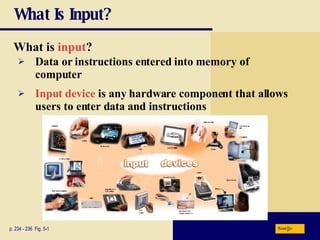
What Is Input? What is   input ? p. 234 - 236  Fig. 5-1 Input device  is any hardware component that allows users to enter data and instructions Data or instructions entered into memory of computer Next
What Is Input? What are the two types of input? p. 234 Unprocessed text,  numbers, images,  audio, and video Instructions Programs Commands User responses Data Next
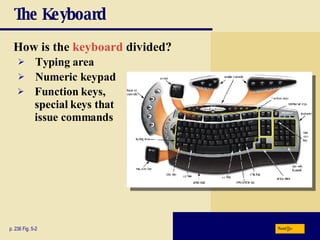
The Keyboard How is the  keyboard  divided? p. 236 Fig. 5-2 Typing area Numeric keypad Function keys,  special keys that  issue commands Next
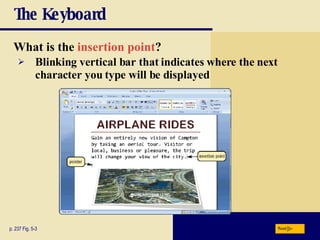
The Keyboard What is the   insertion point ? p. 237 Fig. 5-3 Blinking vertical bar that indicates where the next character you type will be displayed Next
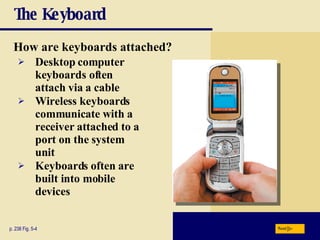
The Keyboard How are keyboards attached? p. 238 Fig. 5-4 Desktop computer keyboards often attach via a cable Wireless keyboards communicate with a receiver attached to a port on the system unit Keyboards often are built into mobile devices Next
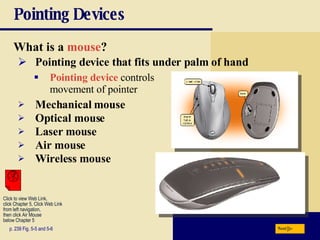
Pointing Devices What is a   mouse ? p. 239 Fig. 5-5 and 5-6 Pointing device that fits under palm of hand Pointing device  controls movement of pointer Mechanical mouse Optical mouse Laser mouse Air mouse Wireless mouse Next Click to view Web Link, click Chapter 5, Click Web Link from left navigation,  then click Air Mouse  below Chapter 5
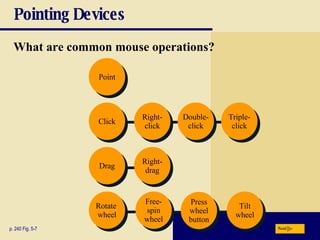
Pointing Devices What are common mouse operations? p. 240 Fig. 5-7 Point Click Drag Rotate  wheel Tilt wheel Press wheel button Free- spin wheel Right- drag Triple- click Double- click Right- click Next
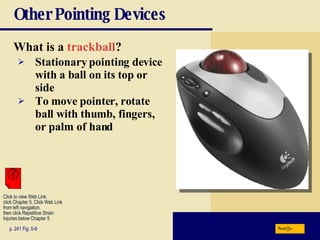
Other Pointing Devices What is a   trackball ? p. 241 Fig. 5-8 Stationary pointing device with a ball on its top or side To move pointer, rotate ball with thumb, fingers, or palm of hand Next Click to view Web Link, click Chapter 5, Click Web Link from left navigation,  then click Repetitive Strain Injuries below Chapter 5
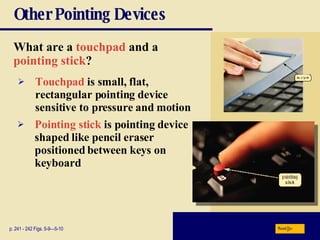
Other Pointing Devices What are a   touchpad   and a   pointing stick ?   p. 241 - 242 Figs. 5-9—5-10 Touchpad   is small, flat, rectangular pointing device sensitive to pressure and motion Pointing stick   is pointing device shaped like pencil eraser positioned between keys on keyboard Next
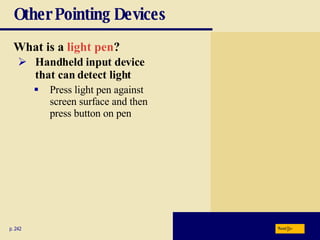
Other Pointing Devices What is a   light pen ? p. 242 Handheld input device that can detect light Press light pen against screen surface and then press button on pen Next
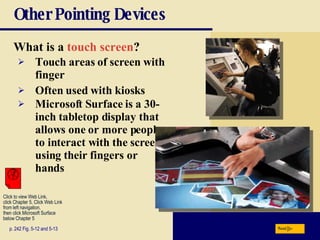
Other Pointing Devices What is a   touch screen ? p. 242 Fig. 5-12 and 5-13 Touch areas of screen with finger Often used with kiosks Microsoft Surface is a 30-inch tabletop display that allows one or more people to interact with the screen using their fingers or hands Next Click to view Web Link, click Chapter 5, Click Web Link from left navigation,  then click Microsoft Surface below Chapter 5
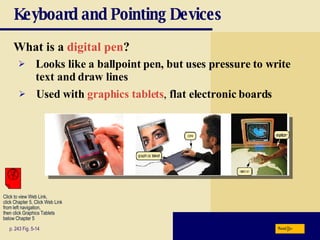
Keyboard and Pointing Devices What is a   digital pen ? p. 243 Fig. 5-14 Looks like a ballpoint pen, but uses pressure to write text and draw lines Used with   graphics tablets ,  flat electronic boards Next Click to view Web Link, click Chapter 5, Click Web Link from left navigation,  then click Graphics Tablets below Chapter 5
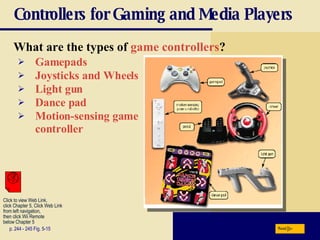
Controllers for Gaming and Media Players What are the types of  game controllers ? p. 244 - 245 Fig. 5-15 Gamepads Joysticks and Wheels Light gun Dance pad Motion-sensing game controller Next Click to view Web Link, click Chapter 5, Click Web Link from left navigation,  then click Wii Remote below Chapter 5
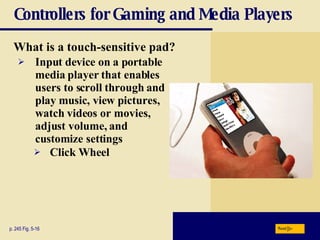
Controllers for Gaming and Media Players What is a   touch-sensitive pad? p. 245 Fig. 5-16 Input device on a portable media player that enables users to scroll through and play music, view pictures, watch videos or movies, adjust volume, and customize settings Click Wheel Next
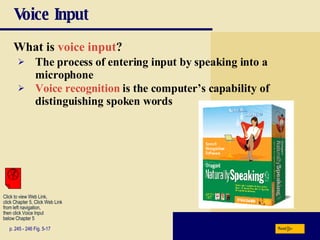
Voice Input What is  voice input ? p. 245 - 246 Fig. 5-17 The process of entering input by speaking into a microphone Voice recognition  is the computer’s capability of distinguishing spoken words Next Click to view Web Link, click Chapter 5, Click Web Link from left navigation,  then click Voice Input  below Chapter 5
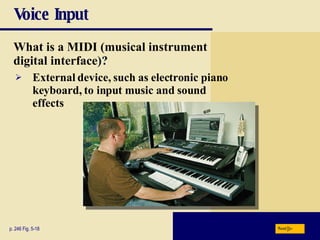
Voice Input What is a   MIDI (musical instrument  digital interface )? p. 246 Fig. 5-18 External device, such as electronic piano keyboard, to input music and sound effects Next
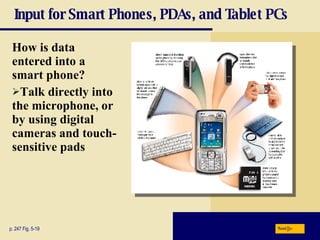
Input for Smart Phones, PDAs, and Tablet PCs How is data entered into a smart phone? Talk directly into the microphone, or by using digital cameras and touch-sensitive pads p. 247 Fig. 5-19 Next
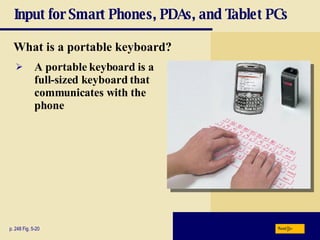
Input for Smart Phones, PDAs, and Tablet PCs What is a   portable keyboard? p. 248 Fig. 5-20 A portable keyboard is a full-sized keyboard that communicates with the phone Next
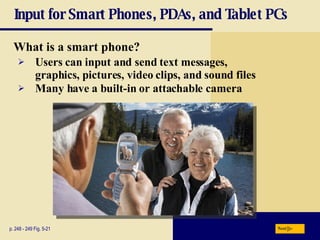
Input for Smart Phones, PDAs, and Tablet PCs What is a   smart phone? p. 248 - 249 Fig. 5-21 Users can input and send text messages, graphics, pictures, video clips, and sound files Many have a built-in or attachable camera Next
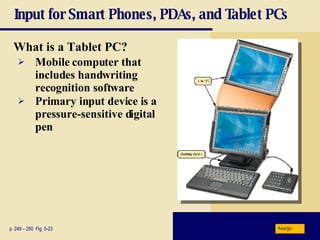
Input for Smart Phones, PDAs, and Tablet PCs What is a   Tablet PC? p. 249 – 250  Fig. 5-23 Mobile computer that includes handwriting recognition software Primary input device is a pressure-sensitive digital pen Next
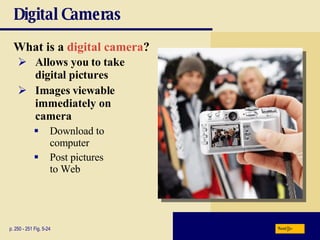
Digital Cameras What is a   digital camera ? p. 250 - 251 Fig. 5-24 Allows you to take  digital pictures Images viewable immediately on  camera Download to  computer Post pictures  to Web Next
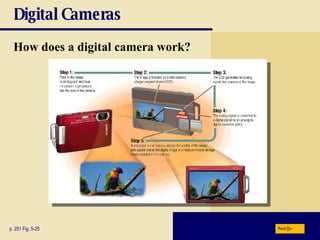
Digital Cameras How does a digital camera work?   p. 251 Fig. 5-25 Next
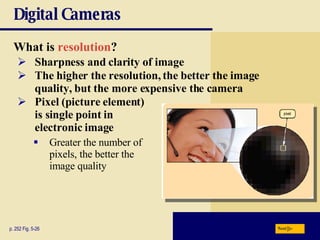
Digital Cameras What is   resolution ?  p. 252 Fig. 5-26 Sharpness and clarity of image The higher the resolution, the better the image quality, but the more expensive the camera Pixel   (picture   element)  is single point in  electronic image Greater the number of  pixels, the better the  image quality Next
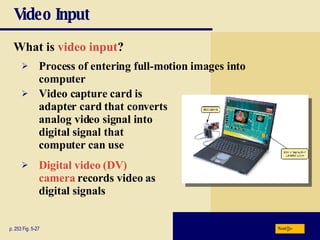
Video Input What is   video input ? p. 253 Fig. 5-27 Process of entering full-motion images into computer Video capture card   is adapter card that converts analog video signal into digital signal that computer can use Digital video (DV) camera   records video as digital signals Next
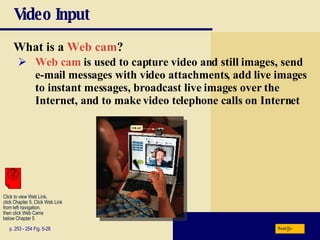
Video Input What is a   Web cam ? p. 253 - 254 Fig. 5-28 Web cam  is used to capture video and still images, send e-mail messages with video attachments, add live images to instant messages, broadcast live images over the Internet, and to make video telephone calls on Internet Next Click to view Web Link, click Chapter 5, Click Web Link from left navigation,  then click Web Cams below Chapter 5
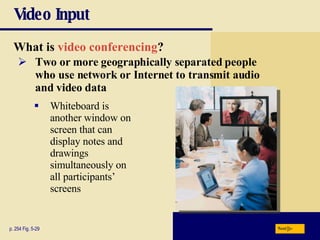
Video Input What is   video conferencing ? p. 254 Fig. 5-29 Whiteboard is another window on screen that can display notes and drawings  simultaneously on  all participants’ screens Two or more geographically separated people who use network or Internet to transmit audio and video data Next
Video Input Video: Video Editing on Your Computer Next CLICK TO START
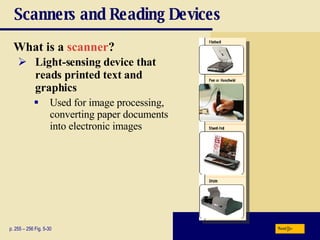
Scanners and Reading Devices What is a   scanner ? p. 255 – 256 Fig. 5-30 Light-sensing device that reads printed text and graphics Used for image processing, converting paper documents into electronic images Next
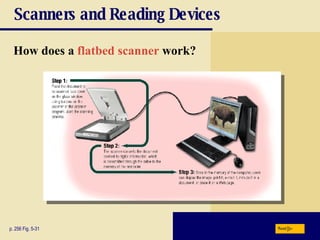
Scanners and Reading Devices How does a   flatbed scanner   work? p. 256 Fig. 5-31 Next
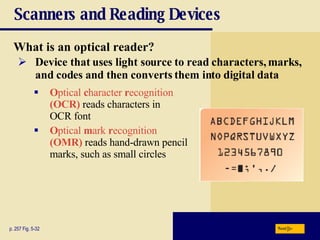
Scanners and Reading Devices What is an   optical reader? p. 257 Fig. 5-32 O ptical  c haracter  r ecognition   (OCR)   reads characters in  OCR font O ptical  m ark  r ecognition   (OMR)  reads hand-drawn pencil marks, such as small circles Device that uses light source to read characters, marks, and codes and then converts them into digital data Next
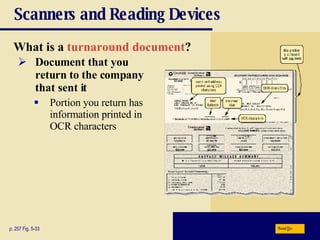
Scanners and Reading Devices What is a   turnaround document ?   p. 257 Fig. 5-33 Document that you return to the company that sent it Portion you return has information printed in OCR characters Next
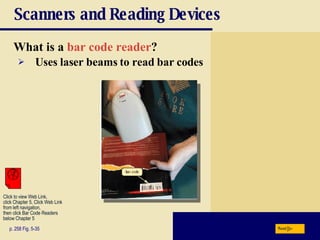
Scanners and Reading Devices What is a   bar code reader ? p. 258 Fig. 5-35 Uses laser beams to read bar codes Next Click to view Web Link, click Chapter 5, Click Web Link from left navigation,  then click Bar Code Readers  below Chapter 5
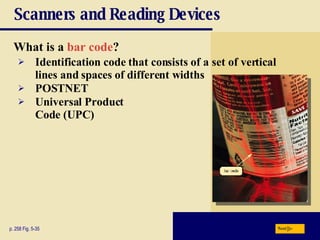
Scanners and Reading Devices What is a   bar code ? p. 258 Fig. 5-35 Identification code that consists of a set of vertical lines and spaces of different widths POSTNET Universal   Product   Code   (UPC) Next
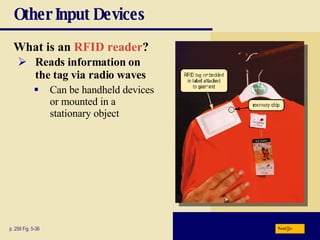
Other Input Devices What is an   RFID reader ?   p. 259 Fig. 5-36 Reads information on the tag via radio waves Can be handheld devices or mounted in a stationary object Next
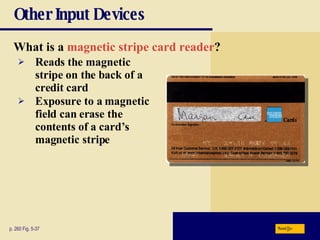
Other Input Devices What is a   magnetic stripe card reader ?   p. 260 Fig. 5-37 Reads the magnetic stripe on the back of a credit card Exposure to a magnetic field can erase the contents of a card’s magnetic stripe Next
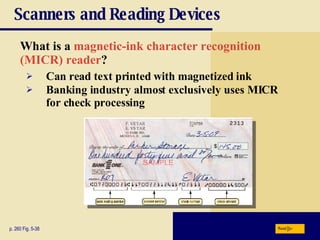
Scanners and Reading Devices What is a   magnetic-ink character recognition  (MICR) reader ? p. 260 Fig. 5-38 Can read text printed with magnetized ink Banking industry almost exclusively uses MICR for check processing Next
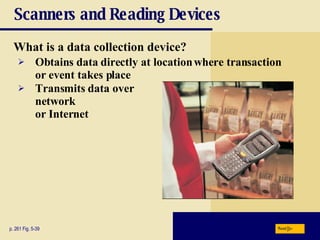
Scanners and Reading Devices What is a   data collection device? p. 261 Fig. 5-39 Obtains data directly at location where transaction or event takes place Transmits data over  network  or Internet Next
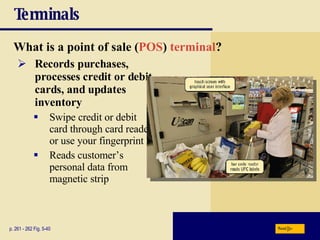
Terminals What is a   point of sale   ( POS )  terminal ? p. 261 - 262 Fig. 5-40 Records purchases, processes credit or debit cards, and updates inventory Swipe credit or debit card through card reader or use your fingerprint Reads customer’s personal data from magnetic strip Next
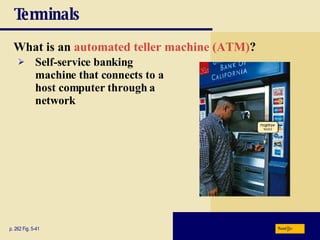
Terminals What is an   automated teller machine (ATM) ? p. 262 Fig. 5-41 Self-service banking machine that connects to a host computer through a network Next
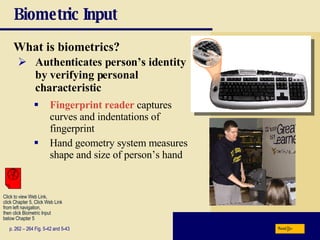
Biometric Input What is   biometrics? p. 262 – 264 Fig. 5-42 and 5-43 Authenticates person’s identity by verifying personal characteristic Fingerprint reader  captures curves and indentations of fingerprint Hand geometry system measures shape and size of person’s hand Next Click to view Web Link, click Chapter 5, Click Web Link from left navigation,  then click Biometric Input  below Chapter 5
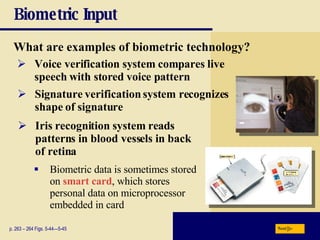
Biometric Input What are examples of biometric technology? p. 263 – 264 Figs. 5-44—5-45 Voice verification system compares live speech with stored voice pattern Signature verification system recognizes  shape of signature Iris recognition system   reads patterns in blood vessels in back of retina Biometric data is sometimes stored on  smart card , which stores personal data on microprocessor embedded in card Next
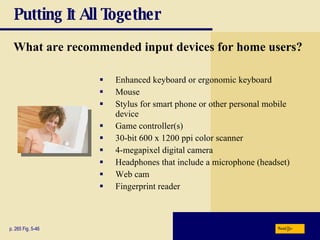
Putting It All Together What are recommended input devices for home users? Enhanced keyboard or ergonomic keyboard Mouse Stylus for smart phone or other personal mobile device Game controller(s) 30-bit 600 x 1200 ppi color scanner 4-megapixel digital camera Headphones that include a microphone (headset) Web cam Fingerprint reader p. 265 Fig. 5-46 Next
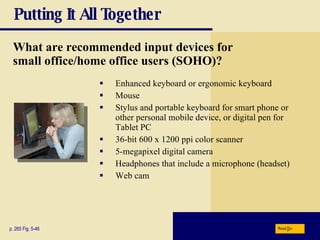
Putting It All Together Enhanced keyboard or ergonomic keyboard Mouse Stylus and portable keyboard for smart phone or other personal mobile device, or digital pen for Tablet PC 36-bit 600 x 1200 ppi color scanner 5-megapixel digital camera Headphones that include a microphone (headset) Web cam p. 265 Fig. 5-46 What are recommended input devices for  small office/home office users (SOHO)? Next
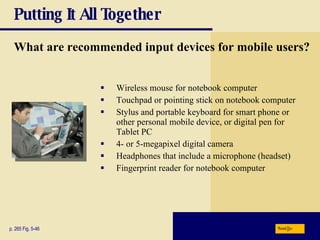
Putting It All Together What are recommended input devices for mobile users? Wireless mouse for notebook computer Touchpad or pointing stick on notebook computer Stylus and portable keyboard for smart phone or other personal mobile device, or digital pen for Tablet PC 4- or 5-megapixel digital camera Headphones that include a microphone (headset) Fingerprint reader for notebook computer p. 265 Fig. 5-46 Next
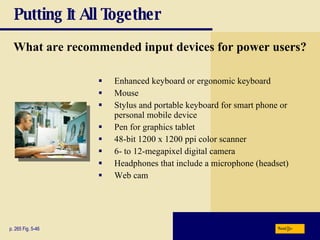
Putting It All Together What are recommended input devices for power users? Enhanced keyboard or ergonomic keyboard Mouse Stylus and portable keyboard for smart phone or personal mobile device Pen for graphics tablet 48-bit 1200 x 1200 ppi color scanner 6- to 12-megapixel digital camera Headphones that include a microphone (headset) Web cam p. 265 Fig. 5-46 Next
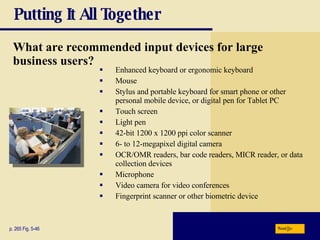
Putting It All Together Enhanced keyboard or ergonomic keyboard Mouse Stylus and portable keyboard for smart phone or other personal mobile device, or digital pen for Tablet PC Touch screen Light pen 42-bit 1200 x 1200 ppi color scanner 6- to 12-megapixel digital camera OCR/OMR readers, bar code readers, MICR reader, or data collection devices Microphone Video camera for video conferences Fingerprint scanner or other biometric device p. 265 Fig. 5-46 What are recommended input devices for large business users? Next
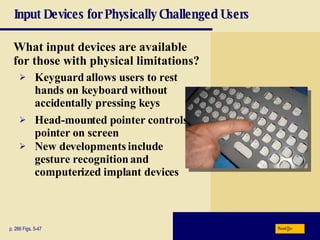
Input Devices for Physically Challenged Users What input devices are available for those with physical limitations? p. 266 Figs. 5-47 Keyguard   allows users to rest hands on keyboard without accidentally pressing keys Head-mounted pointer controls pointer on screen New developments include   gesture recognition and computerized implant devices Next
Summary of Input Keyboard, mouse, and other pointing devices; controllers for gaming and media players Voice input Input devices for smart phones, PDAs, and Tablet PCs Digital cameras Video Input Scanners and reading devices Terminals Biometric input Input devices for physically challenged users Chapter 5 Complete

Chapter05

  • 1.
  • 2.
    Chapter 5 ObjectivesDefine input List the characteristics of a keyboard Describe different mouse types and how they work Summarize how various pointing devices and controllers for gaming and media players work Explain how voice recognition works Describe various input devices for smart phones, PDAs, and Tablet PCs Explain how a digital camera works Describe uses of Web cams and video conferencing Discuss various scanners and reading devices and how they work Explain the types of terminals Summarize the various biometric devices Identify alternative input devices for physically challenged users Next
  • 3.
    What Is Input?What is input ? p. 234 - 236 Fig. 5-1 Input device is any hardware component that allows users to enter data and instructions Data or instructions entered into memory of computer Next
  • 4.
    What Is Input?What are the two types of input? p. 234 Unprocessed text, numbers, images, audio, and video Instructions Programs Commands User responses Data Next
  • 5.
    The Keyboard Howis the keyboard divided? p. 236 Fig. 5-2 Typing area Numeric keypad Function keys, special keys that issue commands Next
  • 6.
    The Keyboard Whatis the insertion point ? p. 237 Fig. 5-3 Blinking vertical bar that indicates where the next character you type will be displayed Next
  • 7.
    The Keyboard Howare keyboards attached? p. 238 Fig. 5-4 Desktop computer keyboards often attach via a cable Wireless keyboards communicate with a receiver attached to a port on the system unit Keyboards often are built into mobile devices Next
  • 8.
    Pointing Devices Whatis a mouse ? p. 239 Fig. 5-5 and 5-6 Pointing device that fits under palm of hand Pointing device controls movement of pointer Mechanical mouse Optical mouse Laser mouse Air mouse Wireless mouse Next Click to view Web Link, click Chapter 5, Click Web Link from left navigation, then click Air Mouse below Chapter 5
  • 9.
    Pointing Devices Whatare common mouse operations? p. 240 Fig. 5-7 Point Click Drag Rotate wheel Tilt wheel Press wheel button Free- spin wheel Right- drag Triple- click Double- click Right- click Next
  • 10.
    Other Pointing DevicesWhat is a trackball ? p. 241 Fig. 5-8 Stationary pointing device with a ball on its top or side To move pointer, rotate ball with thumb, fingers, or palm of hand Next Click to view Web Link, click Chapter 5, Click Web Link from left navigation, then click Repetitive Strain Injuries below Chapter 5
  • 11.
    Other Pointing DevicesWhat are a touchpad and a pointing stick ? p. 241 - 242 Figs. 5-9—5-10 Touchpad is small, flat, rectangular pointing device sensitive to pressure and motion Pointing stick is pointing device shaped like pencil eraser positioned between keys on keyboard Next
  • 12.
    Other Pointing DevicesWhat is a light pen ? p. 242 Handheld input device that can detect light Press light pen against screen surface and then press button on pen Next
  • 13.
    Other Pointing DevicesWhat is a touch screen ? p. 242 Fig. 5-12 and 5-13 Touch areas of screen with finger Often used with kiosks Microsoft Surface is a 30-inch tabletop display that allows one or more people to interact with the screen using their fingers or hands Next Click to view Web Link, click Chapter 5, Click Web Link from left navigation, then click Microsoft Surface below Chapter 5
  • 14.
    Keyboard and PointingDevices What is a digital pen ? p. 243 Fig. 5-14 Looks like a ballpoint pen, but uses pressure to write text and draw lines Used with graphics tablets , flat electronic boards Next Click to view Web Link, click Chapter 5, Click Web Link from left navigation, then click Graphics Tablets below Chapter 5
  • 15.
    Controllers for Gamingand Media Players What are the types of game controllers ? p. 244 - 245 Fig. 5-15 Gamepads Joysticks and Wheels Light gun Dance pad Motion-sensing game controller Next Click to view Web Link, click Chapter 5, Click Web Link from left navigation, then click Wii Remote below Chapter 5
  • 16.
    Controllers for Gamingand Media Players What is a touch-sensitive pad? p. 245 Fig. 5-16 Input device on a portable media player that enables users to scroll through and play music, view pictures, watch videos or movies, adjust volume, and customize settings Click Wheel Next
  • 17.
    Voice Input Whatis voice input ? p. 245 - 246 Fig. 5-17 The process of entering input by speaking into a microphone Voice recognition is the computer’s capability of distinguishing spoken words Next Click to view Web Link, click Chapter 5, Click Web Link from left navigation, then click Voice Input below Chapter 5
  • 18.
    Voice Input Whatis a MIDI (musical instrument digital interface )? p. 246 Fig. 5-18 External device, such as electronic piano keyboard, to input music and sound effects Next
  • 19.
    Input for SmartPhones, PDAs, and Tablet PCs How is data entered into a smart phone? Talk directly into the microphone, or by using digital cameras and touch-sensitive pads p. 247 Fig. 5-19 Next
  • 20.
    Input for SmartPhones, PDAs, and Tablet PCs What is a portable keyboard? p. 248 Fig. 5-20 A portable keyboard is a full-sized keyboard that communicates with the phone Next
  • 21.
    Input for SmartPhones, PDAs, and Tablet PCs What is a smart phone? p. 248 - 249 Fig. 5-21 Users can input and send text messages, graphics, pictures, video clips, and sound files Many have a built-in or attachable camera Next
  • 22.
    Input for SmartPhones, PDAs, and Tablet PCs What is a Tablet PC? p. 249 – 250 Fig. 5-23 Mobile computer that includes handwriting recognition software Primary input device is a pressure-sensitive digital pen Next
  • 23.
    Digital Cameras Whatis a digital camera ? p. 250 - 251 Fig. 5-24 Allows you to take digital pictures Images viewable immediately on camera Download to computer Post pictures to Web Next
  • 24.
    Digital Cameras Howdoes a digital camera work? p. 251 Fig. 5-25 Next
  • 25.
    Digital Cameras Whatis resolution ? p. 252 Fig. 5-26 Sharpness and clarity of image The higher the resolution, the better the image quality, but the more expensive the camera Pixel (picture element) is single point in electronic image Greater the number of pixels, the better the image quality Next
  • 26.
    Video Input Whatis video input ? p. 253 Fig. 5-27 Process of entering full-motion images into computer Video capture card is adapter card that converts analog video signal into digital signal that computer can use Digital video (DV) camera records video as digital signals Next
  • 27.
    Video Input Whatis a Web cam ? p. 253 - 254 Fig. 5-28 Web cam is used to capture video and still images, send e-mail messages with video attachments, add live images to instant messages, broadcast live images over the Internet, and to make video telephone calls on Internet Next Click to view Web Link, click Chapter 5, Click Web Link from left navigation, then click Web Cams below Chapter 5
  • 28.
    Video Input Whatis video conferencing ? p. 254 Fig. 5-29 Whiteboard is another window on screen that can display notes and drawings simultaneously on all participants’ screens Two or more geographically separated people who use network or Internet to transmit audio and video data Next
  • 29.
    Video Input Video:Video Editing on Your Computer Next CLICK TO START
  • 30.
    Scanners and ReadingDevices What is a scanner ? p. 255 – 256 Fig. 5-30 Light-sensing device that reads printed text and graphics Used for image processing, converting paper documents into electronic images Next
  • 31.
    Scanners and ReadingDevices How does a flatbed scanner work? p. 256 Fig. 5-31 Next
  • 32.
    Scanners and ReadingDevices What is an optical reader? p. 257 Fig. 5-32 O ptical c haracter r ecognition (OCR) reads characters in OCR font O ptical m ark r ecognition (OMR) reads hand-drawn pencil marks, such as small circles Device that uses light source to read characters, marks, and codes and then converts them into digital data Next
  • 33.
    Scanners and ReadingDevices What is a turnaround document ? p. 257 Fig. 5-33 Document that you return to the company that sent it Portion you return has information printed in OCR characters Next
  • 34.
    Scanners and ReadingDevices What is a bar code reader ? p. 258 Fig. 5-35 Uses laser beams to read bar codes Next Click to view Web Link, click Chapter 5, Click Web Link from left navigation, then click Bar Code Readers below Chapter 5
  • 35.
    Scanners and ReadingDevices What is a bar code ? p. 258 Fig. 5-35 Identification code that consists of a set of vertical lines and spaces of different widths POSTNET Universal Product Code (UPC) Next
  • 36.
    Other Input DevicesWhat is an RFID reader ? p. 259 Fig. 5-36 Reads information on the tag via radio waves Can be handheld devices or mounted in a stationary object Next
  • 37.
    Other Input DevicesWhat is a magnetic stripe card reader ? p. 260 Fig. 5-37 Reads the magnetic stripe on the back of a credit card Exposure to a magnetic field can erase the contents of a card’s magnetic stripe Next
  • 38.
    Scanners and ReadingDevices What is a magnetic-ink character recognition (MICR) reader ? p. 260 Fig. 5-38 Can read text printed with magnetized ink Banking industry almost exclusively uses MICR for check processing Next
  • 39.
    Scanners and ReadingDevices What is a data collection device? p. 261 Fig. 5-39 Obtains data directly at location where transaction or event takes place Transmits data over network or Internet Next
  • 40.
    Terminals What isa point of sale ( POS ) terminal ? p. 261 - 262 Fig. 5-40 Records purchases, processes credit or debit cards, and updates inventory Swipe credit or debit card through card reader or use your fingerprint Reads customer’s personal data from magnetic strip Next
  • 41.
    Terminals What isan automated teller machine (ATM) ? p. 262 Fig. 5-41 Self-service banking machine that connects to a host computer through a network Next
  • 42.
    Biometric Input Whatis biometrics? p. 262 – 264 Fig. 5-42 and 5-43 Authenticates person’s identity by verifying personal characteristic Fingerprint reader captures curves and indentations of fingerprint Hand geometry system measures shape and size of person’s hand Next Click to view Web Link, click Chapter 5, Click Web Link from left navigation, then click Biometric Input below Chapter 5
  • 43.
    Biometric Input Whatare examples of biometric technology? p. 263 – 264 Figs. 5-44—5-45 Voice verification system compares live speech with stored voice pattern Signature verification system recognizes shape of signature Iris recognition system reads patterns in blood vessels in back of retina Biometric data is sometimes stored on smart card , which stores personal data on microprocessor embedded in card Next
  • 44.
    Putting It AllTogether What are recommended input devices for home users? Enhanced keyboard or ergonomic keyboard Mouse Stylus for smart phone or other personal mobile device Game controller(s) 30-bit 600 x 1200 ppi color scanner 4-megapixel digital camera Headphones that include a microphone (headset) Web cam Fingerprint reader p. 265 Fig. 5-46 Next
  • 45.
    Putting It AllTogether Enhanced keyboard or ergonomic keyboard Mouse Stylus and portable keyboard for smart phone or other personal mobile device, or digital pen for Tablet PC 36-bit 600 x 1200 ppi color scanner 5-megapixel digital camera Headphones that include a microphone (headset) Web cam p. 265 Fig. 5-46 What are recommended input devices for small office/home office users (SOHO)? Next
  • 46.
    Putting It AllTogether What are recommended input devices for mobile users? Wireless mouse for notebook computer Touchpad or pointing stick on notebook computer Stylus and portable keyboard for smart phone or other personal mobile device, or digital pen for Tablet PC 4- or 5-megapixel digital camera Headphones that include a microphone (headset) Fingerprint reader for notebook computer p. 265 Fig. 5-46 Next
  • 47.
    Putting It AllTogether What are recommended input devices for power users? Enhanced keyboard or ergonomic keyboard Mouse Stylus and portable keyboard for smart phone or personal mobile device Pen for graphics tablet 48-bit 1200 x 1200 ppi color scanner 6- to 12-megapixel digital camera Headphones that include a microphone (headset) Web cam p. 265 Fig. 5-46 Next
  • 48.
    Putting It AllTogether Enhanced keyboard or ergonomic keyboard Mouse Stylus and portable keyboard for smart phone or other personal mobile device, or digital pen for Tablet PC Touch screen Light pen 42-bit 1200 x 1200 ppi color scanner 6- to 12-megapixel digital camera OCR/OMR readers, bar code readers, MICR reader, or data collection devices Microphone Video camera for video conferences Fingerprint scanner or other biometric device p. 265 Fig. 5-46 What are recommended input devices for large business users? Next
  • 49.
    Input Devices forPhysically Challenged Users What input devices are available for those with physical limitations? p. 266 Figs. 5-47 Keyguard allows users to rest hands on keyboard without accidentally pressing keys Head-mounted pointer controls pointer on screen New developments include gesture recognition and computerized implant devices Next
  • 50.
    Summary of InputKeyboard, mouse, and other pointing devices; controllers for gaming and media players Voice input Input devices for smart phones, PDAs, and Tablet PCs Digital cameras Video Input Scanners and reading devices Terminals Biometric input Input devices for physically challenged users Chapter 5 Complete