GRAPHICAL INPUT
DEVICES
Prepared by
Rajanivetha G (121cs216)
WHAT IS AN INPUT DEVICE?
• When we work with computer we need to enter data and
instructions to the computer using some devices
• These devices are called input devices
• These devices convert data and instructions to a form that can be
recognized by the computer
•Computer cannot understanding our language because it
understands only machine language and it can be possible using
some devices are called input devices
•When we work with computer we need to enter data and
instructions to the computer using these devices
LIST OF SOME INPUT
DEVICES:
• Mouse
• Keyboard
• Trackball
• Space ball
• Joystick
• Digitizer
• Dials
• Button boxes
• Data gloves
• Touch panels
• Image scanners
• Voice systems
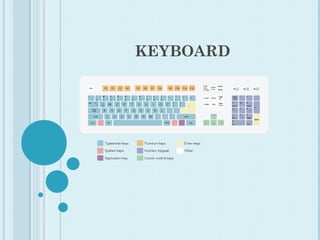
KEYBOARD
KEYBOARD
• Keyboard is the most commonly used input devices.
• They allow data entry into a computer system by pressing a set
of keys neatly mounted on a keyboard
• Contains some extra command keys and function keys that affect
the operation of computer or keyboard itself
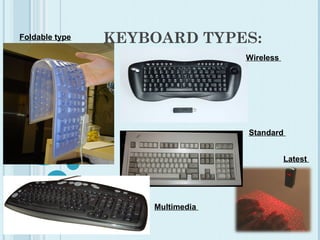
• Types of keyboard :
• (1). Standard keyboard
• (2). Multimedia keyboard
• (3).Wireless keyboard
 In Graphics:
 Used to provide screen coordinates
 Menu selection
 Gaming controls
 And FOR entering many graphics function
KEYBOARD TYPES:Foldable type
Wireless
Standard
Multimedia
Latest
MOUSE
MOUSE
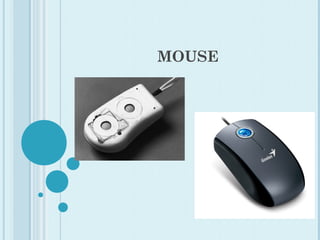
 Hand-held BOX used to position the screen cursor
Mouse is the most popular point-and-draw device
 Wheels or Rollers (now-a-days Laser lights) on the bottom are
used to record the position of the screen
 Generally there are two or three buttons, used for operations
like recording of the cursor positions or invoking of a function
 In order to increase the number of INPUT parameters,
additional devices can be included
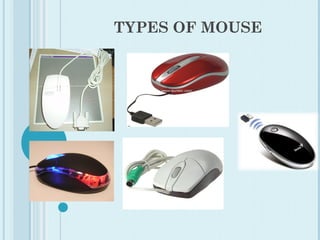
Types of mouse:
(1). Serial mouse
(2).PS/2 mouse
(3).Optical mouse
(4).Wireless mouse
(5).USB mouse
TYPES OF MOUSE
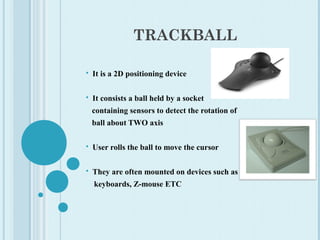
TRACKBALL
 It is a 2D positioning device
 It consists a ball held by a socket
containing sensors to detect the rotation of
ball about TWO axis
 User rolls the ball to move the cursor
 They are often mounted on devices such as
keyboards, Z-mouse ETC
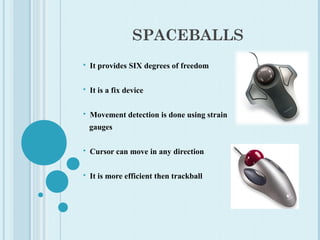
SPACEBALLS
 It provides SIX degrees of freedom
 It is a fix device
 Movement detection is done using strain
gauges
 Cursor can move in any direction
 It is more efficient then trackball
APPLICATIONS:
 Used in CAD workstations
 In animation
 Sometimes on special Workstations such as
the radar consoles in air-traffic control
room
 In Gaming consoles
 People with a mobility impairment use
trackballs as an assistive technology input
device
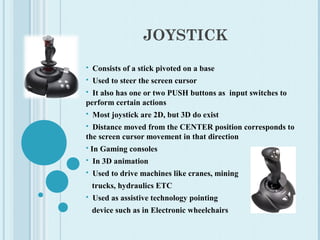
JOYSTICK
 Consists of a stick pivoted on a base
 Used to steer the screen cursor
 It also has one or two PUSH buttons as input switches to
perform certain actions
 Most joystick are 2D, but 3D do exist
 Distance moved from the CENTER position corresponds to
the screen cursor movement in that direction
 In Gaming consoles
 In 3D animation
 Used to drive machines like cranes, mining
trucks, hydraulics ETC
 Used as assistive technology pointing
device such as in Electronic wheelchairs
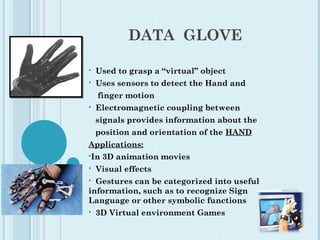
DATA GLOVE
 Used to grasp a “virtual” object
 Uses sensors to detect the Hand and
finger motion
 Electromagnetic coupling between
signals provides information about the
position and orientation of the HAND
Applications:
In 3D animation movies
 Visual effects
 Gestures can be categorized into useful
information, such as to recognize Sign
Language or other symbolic functions
 3D Virtual environment Games
DIGITIZERS
 Common device for drawing, painting,
or interactively selecting coordinate
positions on an object
 Typically, it is used to scan an Object and
to input discrete coordinate positions
ONE TYPE of Digitizer is the Graphics Tablet
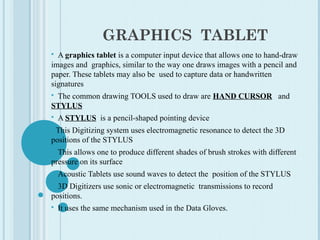
GRAPHICS TABLET
 A graphics tablet is a computer input device that allows one to hand-draw
images and graphics, similar to the way one draws images with a pencil and
paper. These tablets may also be used to capture data or handwritten
signatures
 The common drawing TOOLS used to draw are HAND CURSOR and
STYLUS
 A STYLUS is a pencil-shaped pointing device
 This Digitizing system uses electromagnetic resonance to detect the 3D
positions of the STYLUS
 This allows one to produce different shades of brush strokes with different
pressure on its surface
 Acoustic Tablets use sound waves to detect the position of the STYLUS
 3D Digitizers use sonic or electromagnetic transmissions to record
positions.
 It uses the same mechanism used in the Data Gloves.
APPLICATIONS:
 Used in generating Computer generated
graphic images
 Used in creating characters for Animation
 In Technical drawings and CAD
 Used for Handwriting recognition
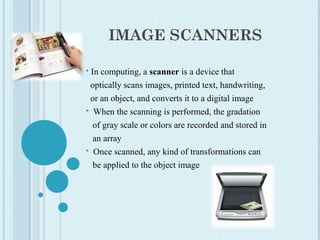
IMAGE SCANNERS
 In computing, a scanner is a device that
optically scans images, printed text, handwriting,
or an object, and converts it to a digital image
 When the scanning is performed, the gradation
of gray scale or colors are recorded and stored in
an array
 Once scanned, any kind of transformations can
be applied to the object image
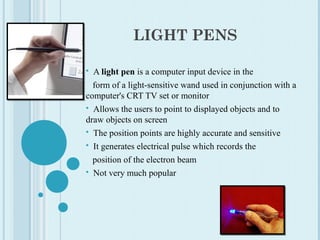
LIGHT PENS
 A light pen is a computer input device in the
   form of a light-sensitive wand used in conjunction with a 
computer's CRT TV set or monitor
  Allows the users to point to displayed objects and to 
draw objects on screen
  The position points are highly accurate and sensitive
  It generates electrical pulse which records the
   position of the electron beam
  Not very much popular
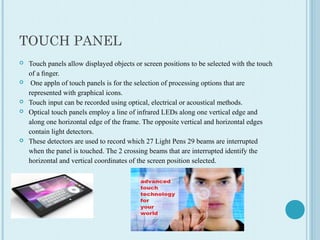
TOUCH PANEL
 Touch panels allow displayed objects or screen positions to be selected with the touch 
of a finger.
  One appln of touch panels is for the selection of processing options that are 
represented with graphical icons.
 Touch input can be recorded using optical, electrical or acoustical methods.
 Optical touch panels employ a line of infrared LEDs along one vertical edge and 
along one horizontal edge of the frame. The opposite vertical and horizontal edges 
contain light detectors. 
 These detectors are used to record which 27 Light Pens 29 beams are interrupted 
when the panel is touched. The 2 crossing beams that are interrupted identify the 
horizontal and vertical coordinates of the screen position selected.
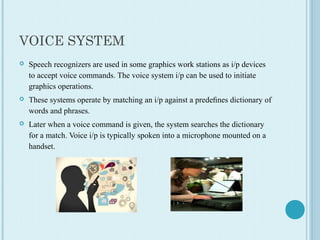
VOICE SYSTEM
 Speech recognizers are used in some graphics work stations as i/p devices 
to accept voice commands. The voice system i/p can be used to initiate 
graphics operations. 
 These systems operate by matching an i/p against a predefines dictionary of 
words and phrases.
 Later when a voice command is given, the system searches the dictionary 
for a match. Voice i/p is typically spoken into a microphone mounted on a 
handset.
THANK YOU

Input devices

  • 1.
  • 2.
    WHAT IS ANINPUT DEVICE? • When we work with computer we need to enter data and instructions to the computer using some devices • These devices are called input devices • These devices convert data and instructions to a form that can be recognized by the computer •Computer cannot understanding our language because it understands only machine language and it can be possible using some devices are called input devices •When we work with computer we need to enter data and instructions to the computer using these devices
  • 3.
    LIST OF SOMEINPUT DEVICES: • Mouse • Keyboard • Trackball • Space ball • Joystick • Digitizer • Dials • Button boxes • Data gloves • Touch panels • Image scanners • Voice systems
  • 4.
  • 5.
    KEYBOARD • Keyboard isthe most commonly used input devices. • They allow data entry into a computer system by pressing a set of keys neatly mounted on a keyboard • Contains some extra command keys and function keys that affect the operation of computer or keyboard itself • Types of keyboard : • (1). Standard keyboard • (2). Multimedia keyboard • (3).Wireless keyboard  In Graphics:  Used to provide screen coordinates  Menu selection  Gaming controls  And FOR entering many graphics function
  • 6.
  • 7.
  • 8.
    MOUSE  Hand-held BOXused to position the screen cursor Mouse is the most popular point-and-draw device  Wheels or Rollers (now-a-days Laser lights) on the bottom are used to record the position of the screen  Generally there are two or three buttons, used for operations like recording of the cursor positions or invoking of a function  In order to increase the number of INPUT parameters, additional devices can be included Types of mouse: (1). Serial mouse (2).PS/2 mouse (3).Optical mouse (4).Wireless mouse (5).USB mouse
  • 9.
  • 10.
    TRACKBALL  It isa 2D positioning device  It consists a ball held by a socket containing sensors to detect the rotation of ball about TWO axis  User rolls the ball to move the cursor  They are often mounted on devices such as keyboards, Z-mouse ETC
  • 11.
    SPACEBALLS  It providesSIX degrees of freedom  It is a fix device  Movement detection is done using strain gauges  Cursor can move in any direction  It is more efficient then trackball
  • 12.
    APPLICATIONS:  Used inCAD workstations  In animation  Sometimes on special Workstations such as the radar consoles in air-traffic control room  In Gaming consoles  People with a mobility impairment use trackballs as an assistive technology input device
  • 13.
    JOYSTICK  Consists ofa stick pivoted on a base  Used to steer the screen cursor  It also has one or two PUSH buttons as input switches to perform certain actions  Most joystick are 2D, but 3D do exist  Distance moved from the CENTER position corresponds to the screen cursor movement in that direction  In Gaming consoles  In 3D animation  Used to drive machines like cranes, mining trucks, hydraulics ETC  Used as assistive technology pointing device such as in Electronic wheelchairs
  • 14.
    DATA GLOVE  Usedto grasp a “virtual” object  Uses sensors to detect the Hand and finger motion  Electromagnetic coupling between signals provides information about the position and orientation of the HAND Applications: In 3D animation movies  Visual effects  Gestures can be categorized into useful information, such as to recognize Sign Language or other symbolic functions  3D Virtual environment Games
  • 15.
    DIGITIZERS  Common devicefor drawing, painting, or interactively selecting coordinate positions on an object  Typically, it is used to scan an Object and to input discrete coordinate positions ONE TYPE of Digitizer is the Graphics Tablet
  • 16.
    GRAPHICS TABLET  Agraphics tablet is a computer input device that allows one to hand-draw images and graphics, similar to the way one draws images with a pencil and paper. These tablets may also be used to capture data or handwritten signatures  The common drawing TOOLS used to draw are HAND CURSOR and STYLUS  A STYLUS is a pencil-shaped pointing device  This Digitizing system uses electromagnetic resonance to detect the 3D positions of the STYLUS  This allows one to produce different shades of brush strokes with different pressure on its surface  Acoustic Tablets use sound waves to detect the position of the STYLUS  3D Digitizers use sonic or electromagnetic transmissions to record positions.  It uses the same mechanism used in the Data Gloves.
  • 17.
    APPLICATIONS:  Used ingenerating Computer generated graphic images  Used in creating characters for Animation  In Technical drawings and CAD  Used for Handwriting recognition
  • 18.
    IMAGE SCANNERS  Incomputing, a scanner is a device that optically scans images, printed text, handwriting, or an object, and converts it to a digital image  When the scanning is performed, the gradation of gray scale or colors are recorded and stored in an array  Once scanned, any kind of transformations can be applied to the object image
  • 19.
    LIGHT PENS  A lightpen is a computer input device in the    form of a light-sensitive wand used in conjunction with a  computer's CRT TV set or monitor   Allows the users to point to displayed objects and to  draw objects on screen   The position points are highly accurate and sensitive   It generates electrical pulse which records the    position of the electron beam   Not very much popular
  • 20.
    TOUCH PANEL  Touch panels allow displayed objects or screen positions to be selected with the touch  of a finger.  One appln of touch panels is for the selection of processing options that are  represented with graphical icons.  Touch input can be recorded using optical, electrical or acoustical methods.  Optical touch panels employ a line of infrared LEDs along one vertical edge and  along one horizontal edge of the frame. The opposite vertical and horizontal edges  contain light detectors.   These detectors are used to record which 27 Light Pens 29 beams are interrupted  when the panel is touched. The 2 crossing beams that are interrupted identify the  horizontal and vertical coordinates of the screen position selected.
  • 21.
    VOICE SYSTEM  Speech recognizers are used in some graphics work stations as i/p devices  to accept voice commands. The voice system i/p can be used to initiate  graphics operations.  These systems operate by matching an i/p against a predefines dictionary of  words and phrases.  Later when a voice command is given, the system searches the dictionary  for a match. Voice i/p is typically spoken into a microphone mounted on a  handset.
  • 22.