1
T S L 6 4 1 : C O M P U T E R A S S I S T E D L A N G U A G E L E A R N I N G
FA C U LT Y O F E D U C AT I O N , U I T M
DEVELOPMENT OF CALL:
THE 3 PHASES
2
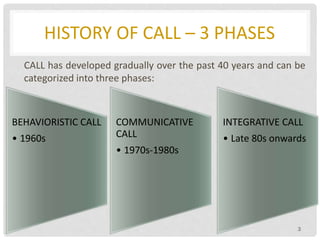
HISTORY OF CALL – 3 PHASES
CALL has developed gradually over the past 40 years and can be
categorized into three phases:
3
BEHAVIORISTIC CALL
• 1960s
COMMUNICATIVE
CALL
• 1970s-1980s
INTEGRATIVE CALL
• Late 80s onwards
4
BEHAVIORISTIC CALL
BEHAVIORISTIC CALL
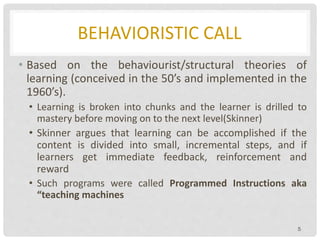
• Based on the behaviourist/structural theories of
learning (conceived in the 50’s and implemented in the
1960’s).
• Learning is broken into chunks and the learner is drilled to
mastery before moving on to the next level(Skinner)
• Skinner argues that learning can be accomplished if the
content is divided into small, incremental steps, and if
learners get immediate feedback, reinforcement and
reward
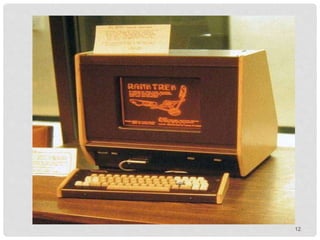
• Such programs were called Programmed Instructions aka
“teaching machines
5
BEHAVIORISTIC CALL
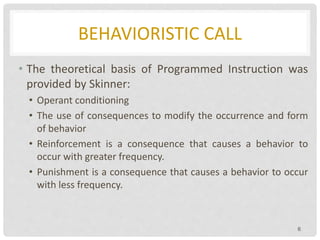
• The theoretical basis of Programmed Instruction was
provided by Skinner:
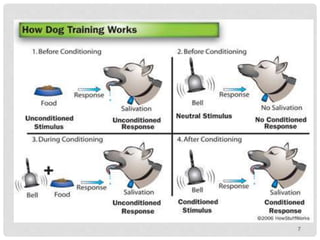
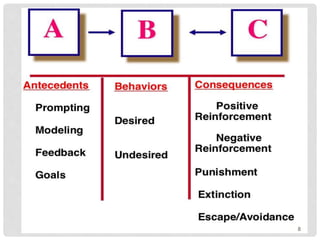
• Operant conditioning
• The use of consequences to modify the occurrence and form
of behavior
• Reinforcement is a consequence that causes a behavior to
occur with greater frequency.
• Punishment is a consequence that causes a behavior to occur
with less frequency.
6
7
8
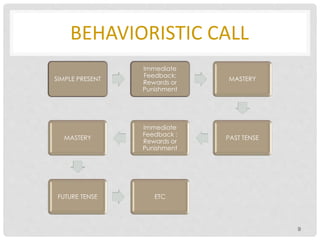
BEHAVIORISTIC CALL
9
SIMPLE PRESENT
Immediate
Feedback:
Rewards or
Punishment
MASTERY
PAST TENSE
Immediate
Feedback :
Rewards or
Punishment
MASTERY
FUTURE TENSE ETC
BEHAVIORISTIC CALL
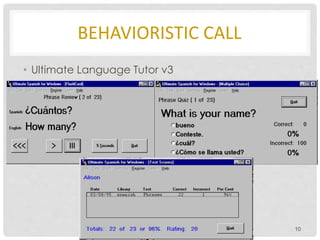
• Ultimate Language Tutor v3
10
BEHAVIORISTIC CALL
• CALL programs entailed repetitive (mindless) drills - drill
and practice (drill and kill)
• The continued drilling would often kill any enthusiasm for
learning
11
12
BEHAVIORISTIC CALL
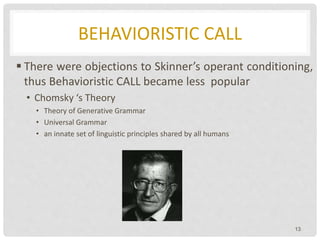
 There were objections to Skinner’s operant conditioning,
thus Behavioristic CALL became less popular
• Chomsky ‘s Theory
• Theory of Generative Grammar
• Universal Grammar
• an innate set of linguistic principles shared by all humans
13
BEHAVIORISTIC CALL
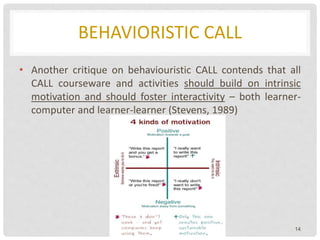
• Another critique on behaviouristic CALL contends that all
CALL courseware and activities should build on intrinsic
motivation and should foster interactivity – both learner-
computer and learner-learner (Stevens, 1989)
14
BEHAVIORISTIC CALL
But the rationale behind these programs has been not rejected
completely due to a number of advantages
1. Repetition is beneficial and even essential to learning (computer
is an ideal tool).
2. Immediate non-judgmental feedback.
3. Students can work at their own pace and acquire these skills
outside class to free up class time for communicative activities.
4. Efficient record keeping.
5. Motivation.
15
BEHAVIORISTIC CALL
• Example of Behavioristic CALL:
• Plato : http://www.plato.com/aboutus/company_history.asp
• Randal’s Listening Lab
• Late 70’s and early 80s behavioristic CALL was undermined by:
• Behavioristic approaches has been rejected theoretically and
pedagogically
• Introduction of microcomputers accorded more possibilities
16
17
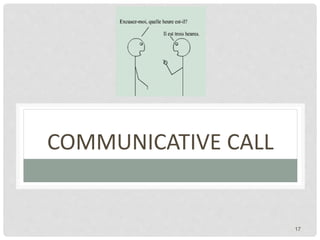
COMMUNICATIVE CALL
COMMUNICATIVE CALL
• Communicative CALL is based on the communicative approach (CLT)
to teaching which became prominent in the 1970’s and 1980’s.
• An approach to the teaching of second and foreign languages that
emphasizes interaction as both the means and the ultimate goal of
learning a language
• Places great emphasis on helping students use the target language
in a variety of contexts and places great emphasis on learning
language functions
18
COMMUNICATIVE CALL
• It focuses more on using forms (content) rather than on
the forms themselves.
• It teaches grammar implicitly rather than explicitly.
• It allows and encourages students to generate utterances
rather than just manipulate prefabricated language.
• It does not judge and evaluate everything nor reward
them with congratulatory messages, lights, or bells.
• It is flexible to a variety of student responses.
• It will never try to do anything that a book can do just as
well. 19
COMMUNICATIVE CALL
20
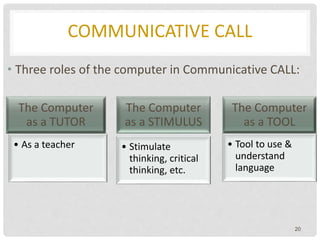
• Three roles of the computer in Communicative CALL:
The Computer
as a TUTOR
• As a teacher
The Computer
as a STIMULUS
• Stimulate
thinking, critical
thinking, etc.
The Computer
as a TOOL
• Tool to use &
understand
language
COMMUNICATIVE CALL
• The computer as a TUTOR
• Skill practice, but also in non-drill format
• Examples of programs:
• paced reading,
• text reconstruction
• language games
• The computer is the “knower-of-the-right” answer
• As opposed to drill and practice, the right answer involves
a fair amount of student choice, control, and interaction
21
COMMUNICATIVE CALL
The computer as a TUTOR – Examples
• Grammar
• ESL Page
• Listening and Speaking
• Listening multimedia programs (Rosetta Stone, etc.)
• Pronunciation Tutor,
• VisiPitch
• Programs which generally allow students to record and playback
their own voice and compare it to a model
• Linguistics applications, for example, teaching the IPA, sound
analysis 22
COMMUNICATIVE CALL
• Reading or Text Reconstruction
• These programs allow students to manipulate
letters, words, sentences, or paragraphs in order to
put texts together (Spanish Now, Storyboard, etc.)
• Vocabulary
• Includes drill and practice programs, multimedia
tutorials, and games (La Casa, Treefrog, etc.)
• http://eslbears.homestead.com/Contact_Info.html
23
COMMUNICATIVE CALL
• The computer as STIMULUS
• The purpose of the computer is not so much to have students
discover the right answer, but rather to stimulate students’
discussion, writing, or critical thinking
• A simulation is a representation or model of an event, an
object, or a phenomenon
• Where the World is Carmen Sandiego, A La Rencontre de
Philippe, etc.
• Generally a simplified model that contains the essential
elements of the thing simulated
• Example : Sim City, Sleuth
24
COMMUNICATIVE CALL
• Problem solving software
• Similar to simulation software in that students are placed in
situations where they can manipulate variables and then receive
feedback on the results of these manipulations
• Simulations, however, are attempts to model real-life situations
and objects, whereas problem-solving is a more general
category that includes all software designed for teaching
problem-solving skills (i.e. adventure games: Myst, etc.)
• http://www.theproblemsite.com/treasure_hunt/
25
COMMUNICATIVE CALL
• Shannon’s Game
• C: Alec Guiness is a famous film star.
• C: Clue: pronoun
• S: He
• C: Right. Alec Guiness is a famous film star. He
• C: Clue: auxiliary
• S: can
• C: Wrong. Two guesses left.
• S: is
• C: Right. Alec Guiness is a famous film star. He is
• C: Clue: content word.
• S: young
• C: Wrong. Two guesses left.
• S: American
• C: Wrong. One guess left.
26
COMMUNICATIVE CALL
• Escape from Utopia
• Student: Turn left.
• Computer: OK. [The students' symbol moves one space leftward, the police agent moves one space
nearer.]
• S: Go east.
• C: Impossible. [There is a building in the way. The students' symbol doesn't move, but the police agent
comes one space nearer.]
• S: Right.
• C: No verb. [The police agent moves one space nearer.]
• And so on, until the students reach the destination or are caught by the police.
• When the students arrive, they engage in dialogues appropriate to the situation; if they are at the
restaurant, the following dialogue could ensue:
• C: You go into an expensive restaurant. You sit down at a table and a man comes up to you and says:
• C: Can I help you?
• S: I'd like something to drink, please.
• C: What would you like?
• S: Some beer.
• C: I'm sorry. We are not allowed to serve alcoholic drinks before six. Can I get you something else?
• S: Yes. Could I have a cup of coffee?
• C: Certainly. Black or white?
• S: White, please.
• C: You sit waiting. The waiter comes with your drink.
• C: Here is your coffee.
• S: Thank you very much. '
• C: You sit drinking your coffee. Press C when you have finished. 27
COMMUNICATIVE CALL
• Station
• C: Hello. British Rail, Colchester.
• S: Could you be telling me the train to Harwich?
• C: Sorry—I don't understand.
• S: When is the next train to Harwich?
• C: It leaves at three o'clock.
• S: What platform is it?
• C: It leaves from platform 4.
• S: When does he arrive?
• C: When does what?
• S: When does it arrive?
• C: It arrives at half past three.
• S: How much is it?
• C: It costs two pounds.
• S: Thank you. Goodbye.
• C: Goodbye. 28
COMMUNICATIVE CALL
• Spelling games
29
COMMUNICATIVE CALL
The computer as STIMULUS – Advantages
• Simulations give students an opportunity to apply their learning to
a “real-life” situation, these programs tend to address higher-order
educational objectives.
• Students become an active part of the educational environment
(decision makers) and can usually see the immediate results of the
decisions they make in the environment.
• Usually, a simulation will require the students to perform
application-, analysis-, and synthesis-level activities.
30
COMMUNICATIVE CALL
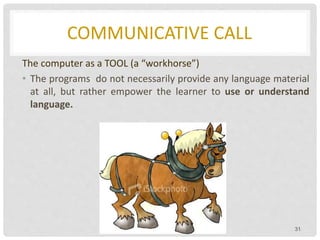
The computer as a TOOL (a “workhorse”)
• The programs do not necessarily provide any language material
at all, but rather empower the learner to use or understand
language.
31
COMMUNICATIVE CALL
• Word Processors, Spreadsheets, Graphic Programs
• WordPerfect, Microsoft Word, Simple Text, BBedit, Excel, Corel Draw, etc.
• Spelling and Grammar Checkers
• Hugo, Bilingual Writing Centre, etc.
• Desktop Publishing Program
• PageMaker, etc.
• Reference
• Dictionaries and encyclopedias i.e. Le Petit Robert, Encarta.
32
COMMUNICATIVE CALL
• Electronic Grade Books
• Concordancers
• They search through large files of texts -corpora- in order to find all the uses of a
particular word or collocation i.e. Oxford’s MicroConcord with a total 1,000,000
words
• Example
• Collaborative Writing
• A number of tools assist students to work on their writing collaboratively on
computers linked in a local area network (LAN) i.e. Aspects, Daedalus,
MacCollaborator
• Authoring
• Allows teachers to tailor software programs either by inserting new text or by
modifying the activities. Authoring runs on a spectrum from set programs which
allow slight modification to programs where the designer has more control with
respect to GUI, exercise types, etc.
• Dasher, HyperCard, SuperCard, Toolbook, Micromedia Director
33
COMMUNICATIVE CALL
The Computer as a TOOL - ADVANTAGES
• Teaches students to manage information
• Tool software is cost-effective
• Wide application of a word processing program
• Students learn how to use tool software
• Emphasises active student involvement (user manipulate
information and are controlling the computers as opposed to just
being put through their paces)
34
COMMUNICATIVE CALL
Criticism of Communicative CALL
1. The computer was being used in an ad hoc and disconnected
fashion.
2. Scholars were no longer satisfied with teaching compartmentalised
skills or structures (even if taught in communicative manner)
3. Educators were seeking ways to teach in a more integrative manner.
35
36
INTEGRATIVE CALL
STEPS TOWARD INTEGRATIVE CALL
Integrative approaches to CALL are based on two important
technological developments of the last decade.
• Multimedia
• Electronic communication
37
INTEGRATIVE CALL
• Multimedia
• CD-ROM which allows a variety of media (text,
graphics, sound, animation, and video) to be accessed
on a single machine.
• Multimedia entails hypermedia.
• Multimedia resources are linked together and learners can
navigate their own paths simply by pointing and clicking a
mouse.
38
INTEGRATIVE CALL
Multimedia and Hypermedia in Language Learning –
Advantages
• More authentic learning environments – listening is combined
with seeing.
• Students have great control over learning – not only at their
own pace, but also on their own individual path.
• Skills are integrated.
• Reading + Writing + Speaking + Listening
• It facilitates a principle focus on the content, without
sacrificing a secondary focus on language form or learning
strategies.
39
INTEGRATIVE CALL
Multimedia and Hypermedia in Language Learning -
DISADVANTAGES
• Quality of available programs
• The field is predominantly left to commercial developers who
often fail to base their programs on sound pedagogical
principles.
• Computer programs are not yet intelligent enough to be truly
interactive
• They cannot understand a user’s spoken input nor evaluate the
appropriateness of an utterance (even the mere correctness
presents problems at a more advanced level).
40
INTEGRATIVE CALL
• It seldom involves a more important type of integration
• Integrating meaningful and authentic communication
into all aspects of the language learning curriculum.
• While Intelligent CALL (Underwood, 1989) may be the
next and ultimate usage of computers for language
learning, that phase is clearly a long way down the
road.
41
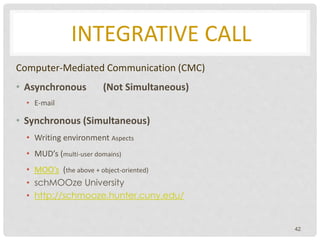
INTEGRATIVE CALL
Computer-Mediated Communication (CMC)
• Asynchronous (Not Simultaneous)
• E-mail
• Synchronous (Simultaneous)
• Writing environment Aspects
• MUD’s (multi-user domains)
• MOO’s (the above + object-oriented)
• schMOOze University
• http://schmooze.hunter.cuny.edu/
42
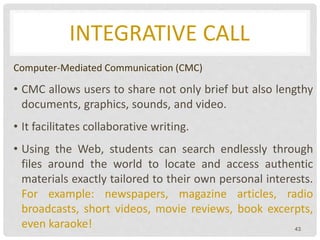
INTEGRATIVE CALL
Computer-Mediated Communication (CMC)
• CMC allows users to share not only brief but also lengthy
documents, graphics, sounds, and video.
• It facilitates collaborative writing.
• Using the Web, students can search endlessly through
files around the world to locate and access authentic
materials exactly tailored to their own personal interests.
For example: newspapers, magazine articles, radio
broadcasts, short videos, movie reviews, book excerpts,
even karaoke! 43
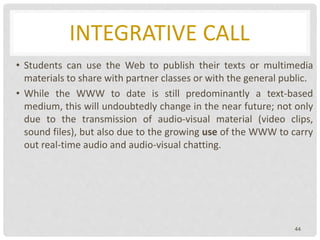
INTEGRATIVE CALL
• Students can use the Web to publish their texts or multimedia
materials to share with partner classes or with the general public.
• While the WWW to date is still predominantly a text-based
medium, this will undoubtedly change in the near future; not only
due to the transmission of audio-visual material (video clips,
sound files), but also due to the growing use of the WWW to carry
out real-time audio and audio-visual chatting.
44
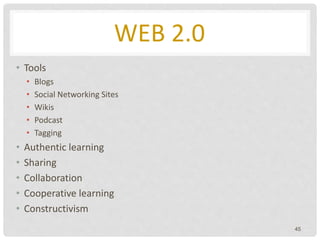
WEB 2.0
• Tools
• Blogs
• Social Networking Sites
• Wikis
• Podcast
• Tagging
• Authentic learning
• Sharing
• Collaboration
• Cooperative learning
• Constructivism
45
46
THE END

Development of call simplified 2015

  • 1.
    1 T S L6 4 1 : C O M P U T E R A S S I S T E D L A N G U A G E L E A R N I N G FA C U LT Y O F E D U C AT I O N , U I T M DEVELOPMENT OF CALL: THE 3 PHASES
  • 2.
  • 3.
    HISTORY OF CALL– 3 PHASES CALL has developed gradually over the past 40 years and can be categorized into three phases: 3 BEHAVIORISTIC CALL • 1960s COMMUNICATIVE CALL • 1970s-1980s INTEGRATIVE CALL • Late 80s onwards
  • 4.
  • 5.
    BEHAVIORISTIC CALL • Basedon the behaviourist/structural theories of learning (conceived in the 50’s and implemented in the 1960’s). • Learning is broken into chunks and the learner is drilled to mastery before moving on to the next level(Skinner) • Skinner argues that learning can be accomplished if the content is divided into small, incremental steps, and if learners get immediate feedback, reinforcement and reward • Such programs were called Programmed Instructions aka “teaching machines 5
  • 6.
    BEHAVIORISTIC CALL • Thetheoretical basis of Programmed Instruction was provided by Skinner: • Operant conditioning • The use of consequences to modify the occurrence and form of behavior • Reinforcement is a consequence that causes a behavior to occur with greater frequency. • Punishment is a consequence that causes a behavior to occur with less frequency. 6
  • 7.
  • 8.
  • 9.
    BEHAVIORISTIC CALL 9 SIMPLE PRESENT Immediate Feedback: Rewardsor Punishment MASTERY PAST TENSE Immediate Feedback : Rewards or Punishment MASTERY FUTURE TENSE ETC
  • 10.
    BEHAVIORISTIC CALL • UltimateLanguage Tutor v3 10
  • 11.
    BEHAVIORISTIC CALL • CALLprograms entailed repetitive (mindless) drills - drill and practice (drill and kill) • The continued drilling would often kill any enthusiasm for learning 11
  • 12.
  • 13.
    BEHAVIORISTIC CALL  Therewere objections to Skinner’s operant conditioning, thus Behavioristic CALL became less popular • Chomsky ‘s Theory • Theory of Generative Grammar • Universal Grammar • an innate set of linguistic principles shared by all humans 13
  • 14.
    BEHAVIORISTIC CALL • Anothercritique on behaviouristic CALL contends that all CALL courseware and activities should build on intrinsic motivation and should foster interactivity – both learner- computer and learner-learner (Stevens, 1989) 14
  • 15.
    BEHAVIORISTIC CALL But therationale behind these programs has been not rejected completely due to a number of advantages 1. Repetition is beneficial and even essential to learning (computer is an ideal tool). 2. Immediate non-judgmental feedback. 3. Students can work at their own pace and acquire these skills outside class to free up class time for communicative activities. 4. Efficient record keeping. 5. Motivation. 15
  • 16.
    BEHAVIORISTIC CALL • Exampleof Behavioristic CALL: • Plato : http://www.plato.com/aboutus/company_history.asp • Randal’s Listening Lab • Late 70’s and early 80s behavioristic CALL was undermined by: • Behavioristic approaches has been rejected theoretically and pedagogically • Introduction of microcomputers accorded more possibilities 16
  • 17.
  • 18.
    COMMUNICATIVE CALL • CommunicativeCALL is based on the communicative approach (CLT) to teaching which became prominent in the 1970’s and 1980’s. • An approach to the teaching of second and foreign languages that emphasizes interaction as both the means and the ultimate goal of learning a language • Places great emphasis on helping students use the target language in a variety of contexts and places great emphasis on learning language functions 18
  • 19.
    COMMUNICATIVE CALL • Itfocuses more on using forms (content) rather than on the forms themselves. • It teaches grammar implicitly rather than explicitly. • It allows and encourages students to generate utterances rather than just manipulate prefabricated language. • It does not judge and evaluate everything nor reward them with congratulatory messages, lights, or bells. • It is flexible to a variety of student responses. • It will never try to do anything that a book can do just as well. 19
  • 20.
    COMMUNICATIVE CALL 20 • Threeroles of the computer in Communicative CALL: The Computer as a TUTOR • As a teacher The Computer as a STIMULUS • Stimulate thinking, critical thinking, etc. The Computer as a TOOL • Tool to use & understand language
  • 21.
    COMMUNICATIVE CALL • Thecomputer as a TUTOR • Skill practice, but also in non-drill format • Examples of programs: • paced reading, • text reconstruction • language games • The computer is the “knower-of-the-right” answer • As opposed to drill and practice, the right answer involves a fair amount of student choice, control, and interaction 21
  • 22.
    COMMUNICATIVE CALL The computeras a TUTOR – Examples • Grammar • ESL Page • Listening and Speaking • Listening multimedia programs (Rosetta Stone, etc.) • Pronunciation Tutor, • VisiPitch • Programs which generally allow students to record and playback their own voice and compare it to a model • Linguistics applications, for example, teaching the IPA, sound analysis 22
  • 23.
    COMMUNICATIVE CALL • Readingor Text Reconstruction • These programs allow students to manipulate letters, words, sentences, or paragraphs in order to put texts together (Spanish Now, Storyboard, etc.) • Vocabulary • Includes drill and practice programs, multimedia tutorials, and games (La Casa, Treefrog, etc.) • http://eslbears.homestead.com/Contact_Info.html 23
  • 24.
    COMMUNICATIVE CALL • Thecomputer as STIMULUS • The purpose of the computer is not so much to have students discover the right answer, but rather to stimulate students’ discussion, writing, or critical thinking • A simulation is a representation or model of an event, an object, or a phenomenon • Where the World is Carmen Sandiego, A La Rencontre de Philippe, etc. • Generally a simplified model that contains the essential elements of the thing simulated • Example : Sim City, Sleuth 24
  • 25.
    COMMUNICATIVE CALL • Problemsolving software • Similar to simulation software in that students are placed in situations where they can manipulate variables and then receive feedback on the results of these manipulations • Simulations, however, are attempts to model real-life situations and objects, whereas problem-solving is a more general category that includes all software designed for teaching problem-solving skills (i.e. adventure games: Myst, etc.) • http://www.theproblemsite.com/treasure_hunt/ 25
  • 26.
    COMMUNICATIVE CALL • Shannon’sGame • C: Alec Guiness is a famous film star. • C: Clue: pronoun • S: He • C: Right. Alec Guiness is a famous film star. He • C: Clue: auxiliary • S: can • C: Wrong. Two guesses left. • S: is • C: Right. Alec Guiness is a famous film star. He is • C: Clue: content word. • S: young • C: Wrong. Two guesses left. • S: American • C: Wrong. One guess left. 26
  • 27.
    COMMUNICATIVE CALL • Escapefrom Utopia • Student: Turn left. • Computer: OK. [The students' symbol moves one space leftward, the police agent moves one space nearer.] • S: Go east. • C: Impossible. [There is a building in the way. The students' symbol doesn't move, but the police agent comes one space nearer.] • S: Right. • C: No verb. [The police agent moves one space nearer.] • And so on, until the students reach the destination or are caught by the police. • When the students arrive, they engage in dialogues appropriate to the situation; if they are at the restaurant, the following dialogue could ensue: • C: You go into an expensive restaurant. You sit down at a table and a man comes up to you and says: • C: Can I help you? • S: I'd like something to drink, please. • C: What would you like? • S: Some beer. • C: I'm sorry. We are not allowed to serve alcoholic drinks before six. Can I get you something else? • S: Yes. Could I have a cup of coffee? • C: Certainly. Black or white? • S: White, please. • C: You sit waiting. The waiter comes with your drink. • C: Here is your coffee. • S: Thank you very much. ' • C: You sit drinking your coffee. Press C when you have finished. 27
  • 28.
    COMMUNICATIVE CALL • Station •C: Hello. British Rail, Colchester. • S: Could you be telling me the train to Harwich? • C: Sorry—I don't understand. • S: When is the next train to Harwich? • C: It leaves at three o'clock. • S: What platform is it? • C: It leaves from platform 4. • S: When does he arrive? • C: When does what? • S: When does it arrive? • C: It arrives at half past three. • S: How much is it? • C: It costs two pounds. • S: Thank you. Goodbye. • C: Goodbye. 28
  • 29.
  • 30.
    COMMUNICATIVE CALL The computeras STIMULUS – Advantages • Simulations give students an opportunity to apply their learning to a “real-life” situation, these programs tend to address higher-order educational objectives. • Students become an active part of the educational environment (decision makers) and can usually see the immediate results of the decisions they make in the environment. • Usually, a simulation will require the students to perform application-, analysis-, and synthesis-level activities. 30
  • 31.
    COMMUNICATIVE CALL The computeras a TOOL (a “workhorse”) • The programs do not necessarily provide any language material at all, but rather empower the learner to use or understand language. 31
  • 32.
    COMMUNICATIVE CALL • WordProcessors, Spreadsheets, Graphic Programs • WordPerfect, Microsoft Word, Simple Text, BBedit, Excel, Corel Draw, etc. • Spelling and Grammar Checkers • Hugo, Bilingual Writing Centre, etc. • Desktop Publishing Program • PageMaker, etc. • Reference • Dictionaries and encyclopedias i.e. Le Petit Robert, Encarta. 32
  • 33.
    COMMUNICATIVE CALL • ElectronicGrade Books • Concordancers • They search through large files of texts -corpora- in order to find all the uses of a particular word or collocation i.e. Oxford’s MicroConcord with a total 1,000,000 words • Example • Collaborative Writing • A number of tools assist students to work on their writing collaboratively on computers linked in a local area network (LAN) i.e. Aspects, Daedalus, MacCollaborator • Authoring • Allows teachers to tailor software programs either by inserting new text or by modifying the activities. Authoring runs on a spectrum from set programs which allow slight modification to programs where the designer has more control with respect to GUI, exercise types, etc. • Dasher, HyperCard, SuperCard, Toolbook, Micromedia Director 33
  • 34.
    COMMUNICATIVE CALL The Computeras a TOOL - ADVANTAGES • Teaches students to manage information • Tool software is cost-effective • Wide application of a word processing program • Students learn how to use tool software • Emphasises active student involvement (user manipulate information and are controlling the computers as opposed to just being put through their paces) 34
  • 35.
    COMMUNICATIVE CALL Criticism ofCommunicative CALL 1. The computer was being used in an ad hoc and disconnected fashion. 2. Scholars were no longer satisfied with teaching compartmentalised skills or structures (even if taught in communicative manner) 3. Educators were seeking ways to teach in a more integrative manner. 35
  • 36.
  • 37.
    STEPS TOWARD INTEGRATIVECALL Integrative approaches to CALL are based on two important technological developments of the last decade. • Multimedia • Electronic communication 37
  • 38.
    INTEGRATIVE CALL • Multimedia •CD-ROM which allows a variety of media (text, graphics, sound, animation, and video) to be accessed on a single machine. • Multimedia entails hypermedia. • Multimedia resources are linked together and learners can navigate their own paths simply by pointing and clicking a mouse. 38
  • 39.
    INTEGRATIVE CALL Multimedia andHypermedia in Language Learning – Advantages • More authentic learning environments – listening is combined with seeing. • Students have great control over learning – not only at their own pace, but also on their own individual path. • Skills are integrated. • Reading + Writing + Speaking + Listening • It facilitates a principle focus on the content, without sacrificing a secondary focus on language form or learning strategies. 39
  • 40.
    INTEGRATIVE CALL Multimedia andHypermedia in Language Learning - DISADVANTAGES • Quality of available programs • The field is predominantly left to commercial developers who often fail to base their programs on sound pedagogical principles. • Computer programs are not yet intelligent enough to be truly interactive • They cannot understand a user’s spoken input nor evaluate the appropriateness of an utterance (even the mere correctness presents problems at a more advanced level). 40
  • 41.
    INTEGRATIVE CALL • Itseldom involves a more important type of integration • Integrating meaningful and authentic communication into all aspects of the language learning curriculum. • While Intelligent CALL (Underwood, 1989) may be the next and ultimate usage of computers for language learning, that phase is clearly a long way down the road. 41
  • 42.
    INTEGRATIVE CALL Computer-Mediated Communication(CMC) • Asynchronous (Not Simultaneous) • E-mail • Synchronous (Simultaneous) • Writing environment Aspects • MUD’s (multi-user domains) • MOO’s (the above + object-oriented) • schMOOze University • http://schmooze.hunter.cuny.edu/ 42
  • 43.
    INTEGRATIVE CALL Computer-Mediated Communication(CMC) • CMC allows users to share not only brief but also lengthy documents, graphics, sounds, and video. • It facilitates collaborative writing. • Using the Web, students can search endlessly through files around the world to locate and access authentic materials exactly tailored to their own personal interests. For example: newspapers, magazine articles, radio broadcasts, short videos, movie reviews, book excerpts, even karaoke! 43
  • 44.
    INTEGRATIVE CALL • Studentscan use the Web to publish their texts or multimedia materials to share with partner classes or with the general public. • While the WWW to date is still predominantly a text-based medium, this will undoubtedly change in the near future; not only due to the transmission of audio-visual material (video clips, sound files), but also due to the growing use of the WWW to carry out real-time audio and audio-visual chatting. 44
  • 45.
    WEB 2.0 • Tools •Blogs • Social Networking Sites • Wikis • Podcast • Tagging • Authentic learning • Sharing • Collaboration • Cooperative learning • Constructivism 45
  • 46.