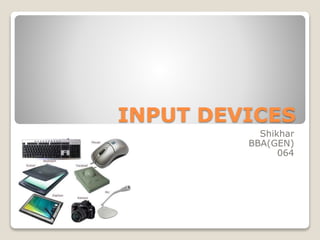
INPUT DEVICES
Shikhar
BBA(GEN)
064
Various Input Devices
 Keyboard
 Mouse
 Joystick
 Scanner
 MICR
 OCR
 OMR
KEYBOARD
 A computer keyboard is one of the
primary input devices used with a
computer that looks similar to those found
on electric typewriters, but with some
additional keys. Keyboards allow you to
input letters, numbers, and
other symbols.
 The keyboard has five sections 1) Typing
keys 2) Numeric Keys 3)Functional keys
4)Control Keys 5) Special purpose keys
Five sections of keyboard
 Typing keys (1,2,3……, A,B,C…)
 Numeric Keys (Numeric keys on right
side)
 Functional keys (F1,F2…. On top side)
 Control Keys (Cursor keys,ctrl,alt…)
 Special purpose keys(Enter ,Space ,Shift
,Spacebar …)
Advantages of keyboards
Disadvantages of
keyboards
Most computers come with a
keyboard supplied
It is easy to make mistakes
when typing in data
People are used to using
keyboards to enter data,
they need very little training
If you can't touch type, it
can be time consuming to
enter data
A skilled typist can enter
data very quickly
Keyboards are not suitable
for creating diagrams
Specialist keyboards are
available e.g. ergonomic,
gaming keyboards
Disabled people often find
keyboards difficult to use
MOUSE
 A mouse is a hardware input device that
was invented by Douglas
Engelbart in1963 .Mouse is a small
handed device having two or three
buttons on its upper side.
 A mouse is classified as physical mouse
and optical mouse.
Classifications of mouse
 Physical mouse:- It has a rubber on the
bottom side that protrudes when the
mouse is moved . It requires a smooth ,
dust free , such as a mouse pad on which
it is rolled
 Optical Mouse:- It uses Light Emitting
Diode(LED) and a sensor to detect the
movement of mouse. Optical mouse was
introduced by Microsoft in 1999.
Advantages of mouse Disadvantages of mouse
Ideal for use with desktop
computers
They need a flat space close
to the computer
Usually supplied as part of a
new computer system
Older style mouse which
have roller balls can become
clogged with grease and
grime and lose their
accuracy until cleaned.
Most computer users are
familiar with them and
require little training
Excessive use can lead to
health problems such as
repetitive strain injury
(R.S.I.)
Works well in conjunction
with a keyboard for data
entry
If the battery wears out in a
wireless mouse, it cannot be
used until it has been
replaced
JOYSTICK
 A joystick is an input device that allows
the user to control a character or machine
in a computer program, such as a plane in
a flight simulator. They look similar to the
control device you would find on an
arcade game, but nearly always include
extra buttons for additional
functionality. Today, most computer
joysticks connect to the computer using a
USB port
Advantages of
joysticks
Disadvantages of
joysticks
They give a better
gaming experience for
racing or flying styles of
computer games
Some people find
joysticks more difficult to
control than a traditional
mouse.
Joysticks are not
particularly robust and
can break easily if too
much force is used on
them.
Scanner
 With hardware, a scanner or optical
scanner is a hardware input device for a
computer. Scanners allow a user to take a
printed picture, drawing, or document and
convert it into a digital file (either
an image or a text file) so that it can
stored, viewed, and edited on a computer.
A scanner can be connected to a
computer using many different interfaces
although today is most commonly
connected to a computer using USB.
 Two types of scanner are :- 1) Hand Held
Scanner 2) Flat bed Scanner
Types of Scanner
 Hand held Scanner:-Handheld scanners
are usually only a few inches wide and are
held in the hand whilst they are rolled
across the document to be scanned. The
images produced are generally not as
large or as high quality as those captured
with a flatbed scanner.
 Flat-bed Scanner:- The most popular
type is the flatbed scanner. This is
probably the one that we use at school.
They can scan larger images and are
more accurate than handheld scanners.
Advantages of scanners
Disadvantages of
scanners
Flatbed scanners are very
accurate and can produce
reasonably high quality
images.
Images produced by the
scanner can take up a lot of
memory space.
Any image which is digitised
by the scanner can then be
included on electronic
documents.
Images lose some quality in
the scanning and digitising
process.
Images once digitised can be
enhanced with a graphics
application.
The quality of the final image
is dependent on the quality
of the original image .
Can accurately capture an
image, but the original
source may be more
important than the scanned
image.
Magnetic-Ink Character
Recognition
 Magnetic-Ink Character Recognition,
MICR is a font capable of recognition
using magnetically charged ink.
Computers equipped with the right
hardware and software can print or read
the character printed in such ink. MICR
font is commonly used to print checks,
deposit slips, mortgage coupons, etc.
Advantages of MICR
Disadvantages of
MICR
MICR is difficult to forge. MICR readers and encoders are
very expensive.
Documents can still be
read when folded or
written on.
The system can only
accept a few different
character sets.
Optical Character Reader
 Optical Character Recognition or
Optical Character Reader, OCR is the
process of taking an image of letters or
typed text and converting it into data the
computer understands. A good example is
companies and libraries taking physical
copies of books, magazines, or other old
printed material and using OCR to put
them onto computers.
Advantages of OCR Disadvantages of OCR
Cheaper than paying
someone to manually
enter large amounts of
text
Not 100% accurate,
there are likely to be
some mistakes made
during the process
Much faster than
someone manually
entering large amounts
of text
All documents need to be
checked over carefully
and then manually
corrected
The latest software can
recreate tables and the
original layout
If the original document
is of poor quality or the
handwriting difficult to
read, more mistakes will
occur
Not worth doing for small
amounts of text
Optical Mark Recognition
 Optical Mark Recognition, OMR is the
process of gathering information from
human beings by recognizing marks on a
document. OMR is accomplished by using
a hardware device (scanner) that detects
a reflection or limited light transmittance
on or through piece of paper. OMR allows
for the processing of hundreds or
thousands of physical documents per
hour.
Advantages of OMR Disadvantages of OMR
A fast method of inputting
large amounts of data - up to
10,000 forms can be read per
hour depending on the
quality of the machine used.
If the marks don't fill the
space completely, or aren't in
a dark enough pencil, they
may not be read correctly
Only one computer needed to
collect and process the data
Only suitable for recording
one out of a selection of
answers, not suitable for text
input
.
OMR is much more accurate
than data being keyed in by a
person
The OMR reader needs the
answers to be on the
prepared forms which will all
be identical to one another.
You can't just pick up a blank
sheet of paper and mark
your answers on it.
Input devices

Input devices

  • 1.
  • 2.
    Various Input Devices Keyboard  Mouse  Joystick  Scanner  MICR  OCR  OMR
  • 4.
    KEYBOARD  A computerkeyboard is one of the primary input devices used with a computer that looks similar to those found on electric typewriters, but with some additional keys. Keyboards allow you to input letters, numbers, and other symbols.  The keyboard has five sections 1) Typing keys 2) Numeric Keys 3)Functional keys 4)Control Keys 5) Special purpose keys
  • 5.
    Five sections ofkeyboard  Typing keys (1,2,3……, A,B,C…)  Numeric Keys (Numeric keys on right side)  Functional keys (F1,F2…. On top side)  Control Keys (Cursor keys,ctrl,alt…)  Special purpose keys(Enter ,Space ,Shift ,Spacebar …)
  • 6.
    Advantages of keyboards Disadvantagesof keyboards Most computers come with a keyboard supplied It is easy to make mistakes when typing in data People are used to using keyboards to enter data, they need very little training If you can't touch type, it can be time consuming to enter data A skilled typist can enter data very quickly Keyboards are not suitable for creating diagrams Specialist keyboards are available e.g. ergonomic, gaming keyboards Disabled people often find keyboards difficult to use
  • 8.
    MOUSE  A mouseis a hardware input device that was invented by Douglas Engelbart in1963 .Mouse is a small handed device having two or three buttons on its upper side.  A mouse is classified as physical mouse and optical mouse.
  • 9.
    Classifications of mouse Physical mouse:- It has a rubber on the bottom side that protrudes when the mouse is moved . It requires a smooth , dust free , such as a mouse pad on which it is rolled  Optical Mouse:- It uses Light Emitting Diode(LED) and a sensor to detect the movement of mouse. Optical mouse was introduced by Microsoft in 1999.
  • 10.
    Advantages of mouseDisadvantages of mouse Ideal for use with desktop computers They need a flat space close to the computer Usually supplied as part of a new computer system Older style mouse which have roller balls can become clogged with grease and grime and lose their accuracy until cleaned. Most computer users are familiar with them and require little training Excessive use can lead to health problems such as repetitive strain injury (R.S.I.) Works well in conjunction with a keyboard for data entry If the battery wears out in a wireless mouse, it cannot be used until it has been replaced
  • 12.
    JOYSTICK  A joystickis an input device that allows the user to control a character or machine in a computer program, such as a plane in a flight simulator. They look similar to the control device you would find on an arcade game, but nearly always include extra buttons for additional functionality. Today, most computer joysticks connect to the computer using a USB port
  • 13.
    Advantages of joysticks Disadvantages of joysticks Theygive a better gaming experience for racing or flying styles of computer games Some people find joysticks more difficult to control than a traditional mouse. Joysticks are not particularly robust and can break easily if too much force is used on them.
  • 15.
    Scanner  With hardware,a scanner or optical scanner is a hardware input device for a computer. Scanners allow a user to take a printed picture, drawing, or document and convert it into a digital file (either an image or a text file) so that it can stored, viewed, and edited on a computer. A scanner can be connected to a computer using many different interfaces although today is most commonly connected to a computer using USB.  Two types of scanner are :- 1) Hand Held Scanner 2) Flat bed Scanner
  • 16.
    Types of Scanner Hand held Scanner:-Handheld scanners are usually only a few inches wide and are held in the hand whilst they are rolled across the document to be scanned. The images produced are generally not as large or as high quality as those captured with a flatbed scanner.  Flat-bed Scanner:- The most popular type is the flatbed scanner. This is probably the one that we use at school. They can scan larger images and are more accurate than handheld scanners.
  • 17.
    Advantages of scanners Disadvantagesof scanners Flatbed scanners are very accurate and can produce reasonably high quality images. Images produced by the scanner can take up a lot of memory space. Any image which is digitised by the scanner can then be included on electronic documents. Images lose some quality in the scanning and digitising process. Images once digitised can be enhanced with a graphics application. The quality of the final image is dependent on the quality of the original image . Can accurately capture an image, but the original source may be more important than the scanned image.
  • 19.
    Magnetic-Ink Character Recognition  Magnetic-InkCharacter Recognition, MICR is a font capable of recognition using magnetically charged ink. Computers equipped with the right hardware and software can print or read the character printed in such ink. MICR font is commonly used to print checks, deposit slips, mortgage coupons, etc.
  • 20.
    Advantages of MICR Disadvantagesof MICR MICR is difficult to forge. MICR readers and encoders are very expensive. Documents can still be read when folded or written on. The system can only accept a few different character sets.
  • 22.
    Optical Character Reader Optical Character Recognition or Optical Character Reader, OCR is the process of taking an image of letters or typed text and converting it into data the computer understands. A good example is companies and libraries taking physical copies of books, magazines, or other old printed material and using OCR to put them onto computers.
  • 23.
    Advantages of OCRDisadvantages of OCR Cheaper than paying someone to manually enter large amounts of text Not 100% accurate, there are likely to be some mistakes made during the process Much faster than someone manually entering large amounts of text All documents need to be checked over carefully and then manually corrected The latest software can recreate tables and the original layout If the original document is of poor quality or the handwriting difficult to read, more mistakes will occur Not worth doing for small amounts of text
  • 24.
  • 25.
    Optical Mark Recognition Optical Mark Recognition, OMR is the process of gathering information from human beings by recognizing marks on a document. OMR is accomplished by using a hardware device (scanner) that detects a reflection or limited light transmittance on or through piece of paper. OMR allows for the processing of hundreds or thousands of physical documents per hour.
  • 26.
    Advantages of OMRDisadvantages of OMR A fast method of inputting large amounts of data - up to 10,000 forms can be read per hour depending on the quality of the machine used. If the marks don't fill the space completely, or aren't in a dark enough pencil, they may not be read correctly Only one computer needed to collect and process the data Only suitable for recording one out of a selection of answers, not suitable for text input . OMR is much more accurate than data being keyed in by a person The OMR reader needs the answers to be on the prepared forms which will all be identical to one another. You can't just pick up a blank sheet of paper and mark your answers on it.