Working with Files
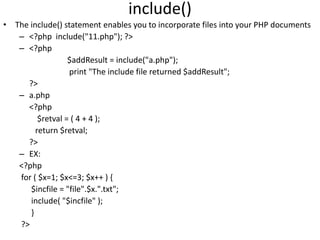
include()
• The include() statement enables you to incorporate files into your PHP documents
– <?php include("11.php"); ?>
– <?php
$addResult = include("a.php");
print "The include file returned $addResult";
?>
– a.php
<?php
$retval = ( 4 + 4 );
return $retval;
?>
– EX:
<?php
for ( $x=1; $x<=3; $x++ ) {
$incfile = "file".$x.".txt";
include( "$incfile" );
}
?>
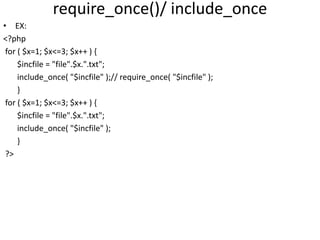
require_once()/ include_once
• EX:
<?php
for ( $x=1; $x<=3; $x++ ) {
$incfile = "file".$x.".txt";
include_once( "$incfile" );// require_once( "$incfile" );
}
for ( $x=1; $x<=3; $x++ ) {
$incfile = "file".$x.".txt";
include_once( "$incfile" );
}
?>
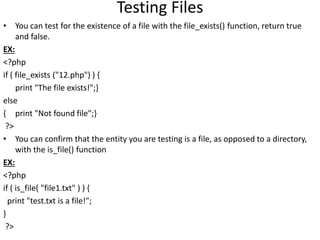
Testing Files
• You can test for the existence of a file with the file_exists() function, return true
and false.
EX:
<?php
if ( file_exists ("12.php") ) {
print "The file exists!";}
else
{ print "Not found file";}
?>
• You can confirm that the entity you are testing is a file, as opposed to a directory,
with the is_file() function
EX:
<?php
if ( is_file( "file1.txt" ) ) {
print "test.txt is a file!";
}
?>
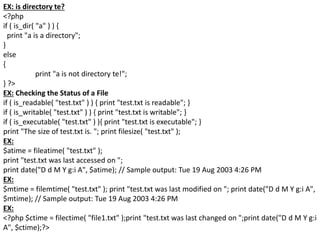
EX: is directory te?
<?php
if ( is_dir( "a" ) ) {
print "a is a directory";
}
else
{
print "a is not directory te!";
} ?>
EX: Checking the Status of a File
if ( is_readable( "test.txt" ) ) { print "test.txt is readable"; }
if ( is_writable( "test.txt" ) ) { print "test.txt is writable"; }
if ( is_executable( "test.txt" ) ){ print "test.txt is executable"; }
print "The size of test.txt is. "; print filesize( "test.txt" );
EX:
$atime = fileatime( "test.txt" );
print "test.txt was last accessed on ";
print date("D d M Y g:i A", $atime); // Sample output: Tue 19 Aug 2003 4:26 PM
EX:
$mtime = filemtime( "test.txt" ); print "test.txt was last modified on "; print date("D d M Y g:i A",
$mtime); // Sample output: Tue 19 Aug 2003 4:26 PM
EX:
<?php $ctime = filectime( "file1.txt" );print "test.txt was last changed on ";print date("D d M Y g:i
A", $ctime);?>
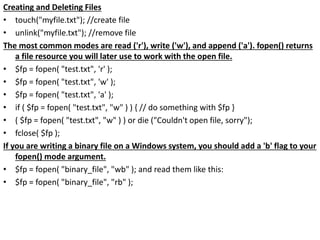
Creating and Deleting Files
• touch("myfile.txt"); //create file
• unlink("myfile.txt"); //remove file
The most common modes are read ('r'), write ('w'), and append ('a'). fopen() returns
a file resource you will later use to work with the open file.
• $fp = fopen( "test.txt", 'r' );
• $fp = fopen( "test.txt", 'w' );
• $fp = fopen( "test.txt", 'a' );
• if ( $fp = fopen( "test.txt", "w" ) ) { // do something with $fp }
• ( $fp = fopen( "test.txt", "w" ) ) or die ("Couldn't open file, sorry");
• fclose( $fp );
If you are writing a binary file on a Windows system, you should add a 'b' flag to your
fopen() mode argument.
• $fp = fopen( "binary_file", "wb" ); and read them like this:
• $fp = fopen( "binary_file", "rb" );
Reading from Files
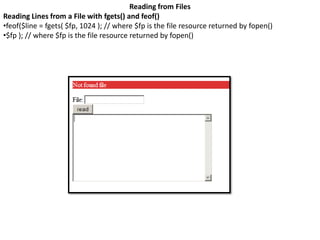
Reading Lines from a File with fgets() and feof()
•feof($line = fgets( $fp, 1024 ); // where $fp is the file resource returned by fopen()
•$fp ); // where $fp is the file resource returned by fopen()
Reading Arbitrary Amounts of Data from a File with fread()
•Rather than reading text by the line, you can choose to read a file in arbitrarily defined chunks.
•EX:
<!DOCTYPE html PUBLIC "-//W3C//DTD XHTML 1.0 Strict//EN"
"http://www.w3.org/TR/xhtml1/DTD/xhtml1-strict.dtd">
<html>
<head>
<title>Listing 11.10 Reading a File with fread()</title>
</head>
<body>
<div>
<?php
$filename = "test.txt";
$fp = fopen( $filename, "r" ) or die("Couldn't open $filename");
while ( ! feof( $fp ) ) {
$chunk = fread( $fp,1 );
print "$chunk<br/>";
}
?>
</div>
</body>
</html>
Moving Around a File with fseek()
•EX:
<!DOCTYPE html PUBLIC "-//W3C//DTD XHTML 1.0 Strict//EN"
"http://www.w3.org/TR/xhtml1/DTD/xhtml1-strict.dtd">
<html>
<head>
<title> Listing 11.11 Moving Around a File with fseek()</title>
</head>
<body>
<div>
<?php
$filename = "test.txt";
$fp = fopen( $filename, "r" ) or die("Couldn't open $filename");
$fsize = filesize($filename);
$halfway = (int)( $fsize / 2 );
print "Halfway point: $halfway <br/>n";
fseek( $fp, $halfway );
$chunk = fread( $fp, ($fsize - $halfway) );
print $chunk;
?>
</div>
</body>
</html>
Reading Characters with fgetc()
•fgetc() is similar to fgets() except that it returns only a single character from a file every time it
is called.
•fgetc() doesn't require a length argument.
•$char = fgetc( $fp );
•EX:
<!DOCTYPE html PUBLIC "-//W3C//DTD XHTML 1.0 Strict//EN"
"http://www.w3.org/TR/xhtml1/DTD/xhtml1-strict.dtd">
<html>
<head>
<title>Listing 11.12 Reading Characters with fgetc()</title>
</head>
<body>
<div>
<?php
$filename = "test.txt";
$fp = fopen( $filename, "r" ) or die("Couldn't open $filename");
while ( ! feof( $fp ) ) {
$char = fgetc( $fp );
print "$char<br/>";
}
?>
</div>
</body></html>
Reading the Contents of a File with file_get_contents()
•EX:
<?php
$contents = file_get_contents( "test.txt" );
print $contents;
?>
•EX:
<?php
$file_array = file( "test.txt" );
$contents = implode( $file_array );
print $contents;
?>
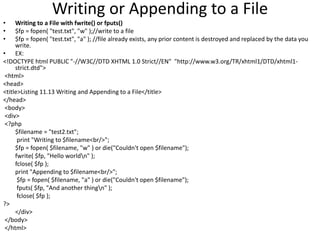
Writing or Appending to a File
• Writing to a File with fwrite() or fputs()
• $fp = fopen( "test.txt", "w" );//write to a file
• $fp = fopen( "test.txt", "a" ); //file already exists, any prior content is destroyed and replaced by the data you
write.
• EX:
<!DOCTYPE html PUBLIC "-//W3C//DTD XHTML 1.0 Strict//EN" "http://www.w3.org/TR/xhtml1/DTD/xhtml1-
strict.dtd">
<html>
<head>
<title>Listing 11.13 Writing and Appending to a File</title>
</head>
<body>
<div>
<?php
$filename = "test2.txt";
print "Writing to $filename<br/>";
$fp = fopen( $filename, "w" ) or die("Couldn't open $filename");
fwrite( $fp, "Hello worldn" );
fclose( $fp );
print "Appending to $filename<br/>";
$fp = fopen( $filename, "a" ) or die("Couldn't open $filename");
fputs( $fp, "And another thingn" );
fclose( $fp );
?>
</div>
</body>
</html>
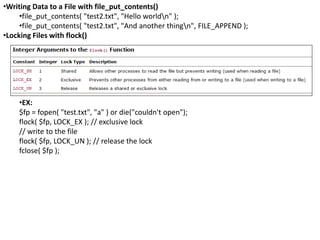
•Writing Data to a File with file_put_contents()
•file_put_contents( "test2.txt", "Hello worldn" );
•file_put_contents( "test2.txt", "And another thingn", FILE_APPEND );
•Locking Files with flock()
•EX:
$fp = fopen( "test.txt", "a" ) or die("couldn't open");
flock( $fp, LOCK_EX ); // exclusive lock
// write to the file
flock( $fp, LOCK_UN ); // release the lock
fclose( $fp );

Ch3(working with file)

  • 1.
  • 2.
    include() • The include()statement enables you to incorporate files into your PHP documents – <?php include("11.php"); ?> – <?php $addResult = include("a.php"); print "The include file returned $addResult"; ?> – a.php <?php $retval = ( 4 + 4 ); return $retval; ?> – EX: <?php for ( $x=1; $x<=3; $x++ ) { $incfile = "file".$x.".txt"; include( "$incfile" ); } ?>
  • 3.
    require_once()/ include_once • EX: <?php for( $x=1; $x<=3; $x++ ) { $incfile = "file".$x.".txt"; include_once( "$incfile" );// require_once( "$incfile" ); } for ( $x=1; $x<=3; $x++ ) { $incfile = "file".$x.".txt"; include_once( "$incfile" ); } ?>
  • 4.
    Testing Files • Youcan test for the existence of a file with the file_exists() function, return true and false. EX: <?php if ( file_exists ("12.php") ) { print "The file exists!";} else { print "Not found file";} ?> • You can confirm that the entity you are testing is a file, as opposed to a directory, with the is_file() function EX: <?php if ( is_file( "file1.txt" ) ) { print "test.txt is a file!"; } ?>
  • 5.
    EX: is directoryte? <?php if ( is_dir( "a" ) ) { print "a is a directory"; } else { print "a is not directory te!"; } ?> EX: Checking the Status of a File if ( is_readable( "test.txt" ) ) { print "test.txt is readable"; } if ( is_writable( "test.txt" ) ) { print "test.txt is writable"; } if ( is_executable( "test.txt" ) ){ print "test.txt is executable"; } print "The size of test.txt is. "; print filesize( "test.txt" ); EX: $atime = fileatime( "test.txt" ); print "test.txt was last accessed on "; print date("D d M Y g:i A", $atime); // Sample output: Tue 19 Aug 2003 4:26 PM EX: $mtime = filemtime( "test.txt" ); print "test.txt was last modified on "; print date("D d M Y g:i A", $mtime); // Sample output: Tue 19 Aug 2003 4:26 PM EX: <?php $ctime = filectime( "file1.txt" );print "test.txt was last changed on ";print date("D d M Y g:i A", $ctime);?>
  • 7.
    Creating and DeletingFiles • touch("myfile.txt"); //create file • unlink("myfile.txt"); //remove file The most common modes are read ('r'), write ('w'), and append ('a'). fopen() returns a file resource you will later use to work with the open file. • $fp = fopen( "test.txt", 'r' ); • $fp = fopen( "test.txt", 'w' ); • $fp = fopen( "test.txt", 'a' ); • if ( $fp = fopen( "test.txt", "w" ) ) { // do something with $fp } • ( $fp = fopen( "test.txt", "w" ) ) or die ("Couldn't open file, sorry"); • fclose( $fp ); If you are writing a binary file on a Windows system, you should add a 'b' flag to your fopen() mode argument. • $fp = fopen( "binary_file", "wb" ); and read them like this: • $fp = fopen( "binary_file", "rb" );
  • 8.
    Reading from Files ReadingLines from a File with fgets() and feof() •feof($line = fgets( $fp, 1024 ); // where $fp is the file resource returned by fopen() •$fp ); // where $fp is the file resource returned by fopen()
  • 9.
    Reading Arbitrary Amountsof Data from a File with fread() •Rather than reading text by the line, you can choose to read a file in arbitrarily defined chunks. •EX: <!DOCTYPE html PUBLIC "-//W3C//DTD XHTML 1.0 Strict//EN" "http://www.w3.org/TR/xhtml1/DTD/xhtml1-strict.dtd"> <html> <head> <title>Listing 11.10 Reading a File with fread()</title> </head> <body> <div> <?php $filename = "test.txt"; $fp = fopen( $filename, "r" ) or die("Couldn't open $filename"); while ( ! feof( $fp ) ) { $chunk = fread( $fp,1 ); print "$chunk<br/>"; } ?> </div> </body> </html>
  • 10.
    Moving Around aFile with fseek() •EX: <!DOCTYPE html PUBLIC "-//W3C//DTD XHTML 1.0 Strict//EN" "http://www.w3.org/TR/xhtml1/DTD/xhtml1-strict.dtd"> <html> <head> <title> Listing 11.11 Moving Around a File with fseek()</title> </head> <body> <div> <?php $filename = "test.txt"; $fp = fopen( $filename, "r" ) or die("Couldn't open $filename"); $fsize = filesize($filename); $halfway = (int)( $fsize / 2 ); print "Halfway point: $halfway <br/>n"; fseek( $fp, $halfway ); $chunk = fread( $fp, ($fsize - $halfway) ); print $chunk; ?> </div> </body> </html>
  • 11.
    Reading Characters withfgetc() •fgetc() is similar to fgets() except that it returns only a single character from a file every time it is called. •fgetc() doesn't require a length argument. •$char = fgetc( $fp ); •EX: <!DOCTYPE html PUBLIC "-//W3C//DTD XHTML 1.0 Strict//EN" "http://www.w3.org/TR/xhtml1/DTD/xhtml1-strict.dtd"> <html> <head> <title>Listing 11.12 Reading Characters with fgetc()</title> </head> <body> <div> <?php $filename = "test.txt"; $fp = fopen( $filename, "r" ) or die("Couldn't open $filename"); while ( ! feof( $fp ) ) { $char = fgetc( $fp ); print "$char<br/>"; } ?> </div> </body></html>
  • 12.
    Reading the Contentsof a File with file_get_contents() •EX: <?php $contents = file_get_contents( "test.txt" ); print $contents; ?> •EX: <?php $file_array = file( "test.txt" ); $contents = implode( $file_array ); print $contents; ?>
  • 13.
    Writing or Appendingto a File • Writing to a File with fwrite() or fputs() • $fp = fopen( "test.txt", "w" );//write to a file • $fp = fopen( "test.txt", "a" ); //file already exists, any prior content is destroyed and replaced by the data you write. • EX: <!DOCTYPE html PUBLIC "-//W3C//DTD XHTML 1.0 Strict//EN" "http://www.w3.org/TR/xhtml1/DTD/xhtml1- strict.dtd"> <html> <head> <title>Listing 11.13 Writing and Appending to a File</title> </head> <body> <div> <?php $filename = "test2.txt"; print "Writing to $filename<br/>"; $fp = fopen( $filename, "w" ) or die("Couldn't open $filename"); fwrite( $fp, "Hello worldn" ); fclose( $fp ); print "Appending to $filename<br/>"; $fp = fopen( $filename, "a" ) or die("Couldn't open $filename"); fputs( $fp, "And another thingn" ); fclose( $fp ); ?> </div> </body> </html>
  • 14.
    •Writing Data toa File with file_put_contents() •file_put_contents( "test2.txt", "Hello worldn" ); •file_put_contents( "test2.txt", "And another thingn", FILE_APPEND ); •Locking Files with flock() •EX: $fp = fopen( "test.txt", "a" ) or die("couldn't open"); flock( $fp, LOCK_EX ); // exclusive lock // write to the file flock( $fp, LOCK_UN ); // release the lock fclose( $fp );

Editor's Notes

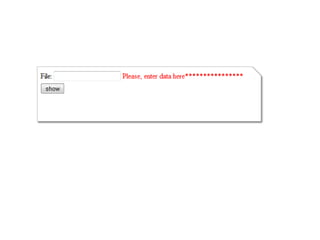
  • #7  <!DOCTYPE html PUBLIC "-//W3C//DTD XHTML 1.0 Strict//EN" "http://www.w3.org/TR/xhtml1/DTD/xhtml1-strict.dtd"> <html> <head> <title></title> <?php $file=""; $fileNote=""; ?> <?php if(isset($_POST['btShow'])) { if(!empty($_POST['txtFile'])) { $file=$_POST['txtFile']; outputFileTestInfo($file); } else { $fileNote="Please, enter data here****************"; } } ?> </head> <body> <form method="post" action="<?php print $_SERVER['PHP_SELF']; ?>"> <table> <tr><td>File:</td><td><input type="text" name="txtFile" value="<?php print $file; ?>"></input></td><td><font color="red"><?php print $fileNote; ?></font></td></tr> <tr><td colspan=3><input type="submit" name="btShow" value="show"></td></tr> </table> </form> <?php function outputFileTestInfo( $file ) { if ( ! file_exists( $file ) ) { print "$file does not exist<br/>"; return; } print "$file is ".( is_file( $file )?"":"not ")."a file<br/>"; print "$file is ".( is_dir( $file )?"":"not ")."a directory<br/>"; print "$file is ".( is_readable( $file )?"":"not ")."readable<br/>"; print "$file is ".( is_writable( $file )?"":"not ")."writable<br/>"; print "$file is ".( is_executable( $file )?"":"not")."executable<br/>"; print "$file is ".( filesize($file))." bytes<br/>"; print "$file was accessed on " . date( "D d M Y g:i A", fileatime( $file ) )."<br/>"; print "$file was modified on ".date( "D d M Y g:i A", filemtime( $file ) )."<br/>"; print "$file was changed on ".date( "D d M Y g:i A", filectime( $file ) )."<br/>"; } ?> </body> </html>
  • #9 <!DOCTYPE html PUBLIC "-//W3C//DTD XHTML 1.0 Strict//EN" "http://www.w3.org/TR/xhtml1/DTD/xhtml1-strict.dtd"> <html> <head> <title></title> <?php if(isset($_POST['btRead'])) { $st=""; $filename = $_POST['txtFile']; if ( file_exists ($filename) ) { $fp = fopen( $filename, "r" ) or die("Couldn't open $filename"); while ( ! feof( $fp ) ) { $line = fgets( $fp, 1024 ); $st = $st . $line ; } } else { print "<p style='background: #d33; color: white;'>Not found file</p>"; } } else { $st=""; $filename=""; } ?> <html><head></head> <form method="post" action="1.php"> <div><label for="txtFile">File: </label><input type="text" name="txtFile" value="<?php echo $filename; ?>"></input></div> <input type="submit" value="read" name="btRead"> <div><textarea name="txtA" rows=10 cols=40 ><?php echo $st; ?></textarea></div> </form> </html>