1
PREPARDED BY :ENAAM ABDELGADER
Computer skills 1
2
Internet and E-mail
What is the Internet?
The internet is the largest computer network in the world,
connecting millions of computers.
Note:
A network is a group of two or more computer systems linked
together.
3
Internet and E-mail
What is the Internet?
• Contains an amazing variety of information, but also provides
new ways of accessing, interacting and connecting with
people and content.
4
Internet and E-mail
Servers and Clients
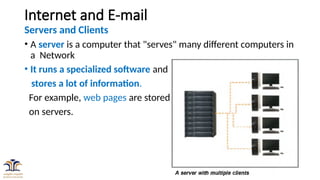
• A server is a computer that "serves" many different computers in
a Network
• It runs a specialized software and
stores a lot of information.
For example, web pages are stored
on servers.
5
Internet and E-mail
• When you access a web page, your computer is acting as a
client.
• A client runs familiar software such as web browsers or
email software, and it communicates with the server to get
the information it requires.
• In order for your browser to display a web page, it requests
the data from the server where the page is stored.
• The server processes the request, then sends the data to
your browser, where it is displayed.
6
Internet and E-mail
Servers and Clients
• In peer-to-peer (P2P) networks, each computer acts as
both a server and a client. Examples of P2P software include
Skype or zoom.
• The Internet connects different services by using
client-server model.
7
Internet and E-mail
What is the internet used for?
The internet is used for a lot of different things, People use the internet to:-
• Apply for jobs
• Play games
• Do research
• Watch movies
• Listen to music
• Go to school
• Stay in contact with friends, family and co-workers
• Run a small business
• Buy or sell products
• Search directions (Google Maps)
8
Internet and E-mail
The World Wide Web (WWW)
• When most people think of the Internet, they think about is
the World Wide Web.
• The internet and the web are two separate but related
things.
• The internet is the physical network of computers all over
the world.
9
Internet and E-mail
The World Wide Web (WWW)
• The World Wide Web is a virtual network of web sites
connected by hyperlinks (or "links").
• A website is a collection of webpages/webfiles that contain
various information.
• Web sites are stored on servers on the internet, so the
World Wide Web is a part of the internet.
10
Internet and E-mail
HTML
• The backbone of the World Wide Web is made of HTML files, which
are specially-formatted documents that can contain links, as well as
images and other media.
• All web browsers can read HTML files.
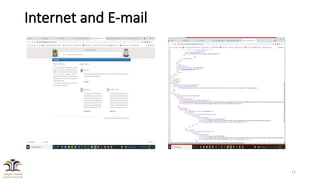
• To View the HTML file of a webpage, Right click on an empty space
On the browser and select “View page source”
11
Internet and E-mail
12
Internet and E-mail
HTML
• What is HTML?
• HTML stands for HyperText Mark-up Language
• It is the code that is used to structure a web page and all its contents.
• It is used to display web content.
• It is not a programming language.
13
Internet and E-mail
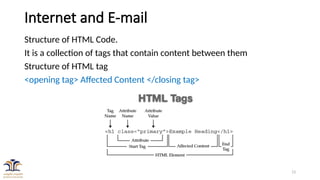
Structure of HTML Code.
It is a collection of tags that contain content between them
Structure of HTML tag
<opening tag> Affected Content </closing tag>
14
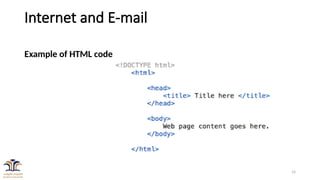
Internet and E-mail
Example of HTML code
15
Internet and E-mail
HTTP
• Stands for HyperText Transfer Protocol
• Which is only one of many languages used on the internet to transmit
data, Email, instant messaging, uploading and downloading files.
• The web uses special software called browsers to access web
documents
• Web pages are linked to each other via hyperlinks.
• Web pages contain some or all of the following: text, images, audio,
and video.
16
Internet and E-mail
URL
• To get to a web page, you can type the URL (Uniform Resource Locator)
in a browser.
• The URL, also known as the web address, tells the browser exactly
where to find the page.
• people get to a web page by following a link from a different page or by
searching for the page with a search engine.
17
Internet and E-mail
How do you connect to the internet?
There are many different ways to connect to the internet from your
personal computer:
1. Dial-up
2. Broadband
3. Wi-Fi
4. Mobile
18
Internet and E-mail
How do you connect to the internet?
Dial-up:
• With a dial-up connection you can connect to the Internet via a
telephone line and an internet service provider (ISP).
• It offers the slowest overall connection speeds.
• Broadband:
• Cable, DSL, and fiber optics are in this category.
• Speeds up to 70 times faster than dial-up.
19
Internet and E-mail
How do you connect to the internet?
Wi-Fi
• Wireless technology allows users to have mobile connections,
accessing the web where and when they need to.
• Wi-Fi networks can be found at many businesses, restaurants,
and other public areas (parks, schools, libraries)
• Home connection can be set up through your ISP.
20
Internet and E-mail
Getting Online
There are two most common ways of accessing the internet
• Using a web browser
• Using Web Applications (Apps)
Using a web browser
It is the most common way of accessing the internet
A web browser is a special computer software/program use to search,
retrieve and view webpages.
21
Internet and E-mail
Web browser
The most popular web browsers are
• Internet Explorer (IE)
• Mozilla Firefox
• Google Chrome
• Safari
• Opera
22
Internet and E-mail
Parts of a Web Address
There are typically four main parts of a web address.
23
Internet and E-mail
Parts of a Web Address
• http://
• Stands for hypertext transfer protocol.
• Helps your web browser locate the webpage or website, and to
display it for you to see.
• Most browsers will automatically add this prefix, no need to type.
www.
stands for World Wide Web
Means the page you are looking for is somewhere in the world wide
web
For most websites its not necessary to type the www. part
24
Internet and E-mail
Parts of a Web Address
“Cincinnatilibrary”
• Is the unique name of the webpage or the website
.org
• Is the top level domain name.
• Tells you where the webpage is registered, and kind of website
.com usually means that you're looking at a commercial site) .edu
(educational institutions) .org (organizations) .gov (governments).
25
Internet and E-mail
Using Search Engines
A search engine is a tool for searching for information on the
internet.
• The most popular search engines are Google
(www.google.com), Yahoo (www.yahoo.com), and Bing
(www.bing.com),
26
Internet and E-mail
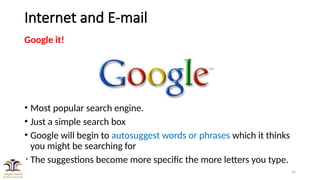
Google it!
• Most popular search engine.
• Just a simple search box
• Google will begin to autosuggest words or phrases which it thinks
you might be searching for
• The suggestions become more specific the more letters you type.
27
E-mail
Email (electronic mail)
• It is a way to send and receive messages across the Internet.
• It's similar to traditional mail, but it also has some key differences.
Email advantages
• Productivity tools: has a calendar, address book, instant messaging
etc..
• Access to web services: sign up for an account like Facebook or
order products, so you can be safely identified and contacted.
• Easy mail management: Email service providers have tools that
find, group, and filter your emails for easy management
28
E-mail
Email advantages (Continued …)
• Privacy: Your email is delivered to your own personal and
private account with a password required to access and view
emails.
• Communication with multiple people
• Accessible anywhere at any time
29
E-mail
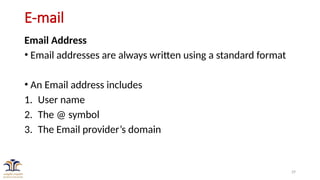
Email Address
• Email addresses are always written using a standard format
• An Email address includes
1. User name
2. The @ symbol
3. The Email provider’s domain
30
E-mail
Email Address
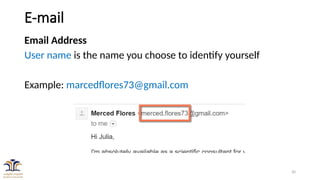
User name is the name you choose to identify yourself
Example: marcedflores73@gmail.com
31
E-mail
Email Address
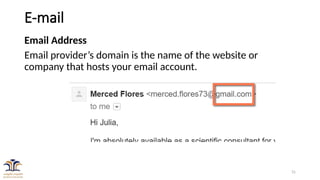
Email provider’s domain is the name of the website or
company that hosts your email account.
32
E-mail
Email Address
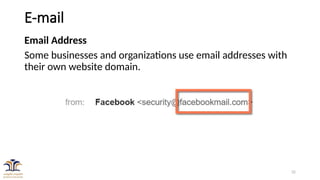
Some businesses and organizations use email addresses with
their own website domain.
33
E-mail
Web mail providers
• The top three webmail providers are
1. Yahoo!,
2. Microsoft's Outlook.com (previously Hotmail)
3. Google's Gmail.
34
E-mail
Other email providers
• Many hosted web domains end with a suffix other than .com
• Depending on the organization, your provider's domain
might end with a suffix like .gov (for government
websites), .edu (for schools), .mil (for military branches),
or .org (for nonprofit organizations).
35
E-mail
Getting started with email
We are going to learn how to :-
• Sign up for an email account
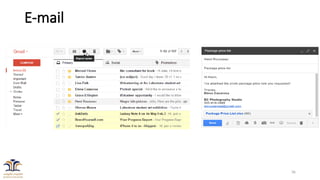
• Navigate and get to know the email interface
• Compose, manage, and respond to email
• Set up email on a mobile device
36
E-mail
37
E-mail
Assignment 1
•Create a new Gmail account
•On email subject write your name and registration
number
•Write anything on the message body (not more than 3
lines)
•Attach a file (document file, picture)
•Send it to itonycpe@gmail.com

lecture-3-Internet and Email---part1.pptx

  • 1.
    1 PREPARDED BY :ENAAMABDELGADER Computer skills 1
  • 2.
    2 Internet and E-mail Whatis the Internet? The internet is the largest computer network in the world, connecting millions of computers. Note: A network is a group of two or more computer systems linked together.
  • 3.
    3 Internet and E-mail Whatis the Internet? • Contains an amazing variety of information, but also provides new ways of accessing, interacting and connecting with people and content.
  • 4.
    4 Internet and E-mail Serversand Clients • A server is a computer that "serves" many different computers in a Network • It runs a specialized software and stores a lot of information. For example, web pages are stored on servers.
  • 5.
    5 Internet and E-mail •When you access a web page, your computer is acting as a client. • A client runs familiar software such as web browsers or email software, and it communicates with the server to get the information it requires. • In order for your browser to display a web page, it requests the data from the server where the page is stored. • The server processes the request, then sends the data to your browser, where it is displayed.
  • 6.
    6 Internet and E-mail Serversand Clients • In peer-to-peer (P2P) networks, each computer acts as both a server and a client. Examples of P2P software include Skype or zoom. • The Internet connects different services by using client-server model.
  • 7.
    7 Internet and E-mail Whatis the internet used for? The internet is used for a lot of different things, People use the internet to:- • Apply for jobs • Play games • Do research • Watch movies • Listen to music • Go to school • Stay in contact with friends, family and co-workers • Run a small business • Buy or sell products • Search directions (Google Maps)
  • 8.
    8 Internet and E-mail TheWorld Wide Web (WWW) • When most people think of the Internet, they think about is the World Wide Web. • The internet and the web are two separate but related things. • The internet is the physical network of computers all over the world.
  • 9.
    9 Internet and E-mail TheWorld Wide Web (WWW) • The World Wide Web is a virtual network of web sites connected by hyperlinks (or "links"). • A website is a collection of webpages/webfiles that contain various information. • Web sites are stored on servers on the internet, so the World Wide Web is a part of the internet.
  • 10.
    10 Internet and E-mail HTML •The backbone of the World Wide Web is made of HTML files, which are specially-formatted documents that can contain links, as well as images and other media. • All web browsers can read HTML files. • To View the HTML file of a webpage, Right click on an empty space On the browser and select “View page source”
  • 11.
  • 12.
    12 Internet and E-mail HTML •What is HTML? • HTML stands for HyperText Mark-up Language • It is the code that is used to structure a web page and all its contents. • It is used to display web content. • It is not a programming language.
  • 13.
    13 Internet and E-mail Structureof HTML Code. It is a collection of tags that contain content between them Structure of HTML tag <opening tag> Affected Content </closing tag>
  • 14.
  • 15.
    15 Internet and E-mail HTTP •Stands for HyperText Transfer Protocol • Which is only one of many languages used on the internet to transmit data, Email, instant messaging, uploading and downloading files. • The web uses special software called browsers to access web documents • Web pages are linked to each other via hyperlinks. • Web pages contain some or all of the following: text, images, audio, and video.
  • 16.
    16 Internet and E-mail URL •To get to a web page, you can type the URL (Uniform Resource Locator) in a browser. • The URL, also known as the web address, tells the browser exactly where to find the page. • people get to a web page by following a link from a different page or by searching for the page with a search engine.
  • 17.
    17 Internet and E-mail Howdo you connect to the internet? There are many different ways to connect to the internet from your personal computer: 1. Dial-up 2. Broadband 3. Wi-Fi 4. Mobile
  • 18.
    18 Internet and E-mail Howdo you connect to the internet? Dial-up: • With a dial-up connection you can connect to the Internet via a telephone line and an internet service provider (ISP). • It offers the slowest overall connection speeds. • Broadband: • Cable, DSL, and fiber optics are in this category. • Speeds up to 70 times faster than dial-up.
  • 19.
    19 Internet and E-mail Howdo you connect to the internet? Wi-Fi • Wireless technology allows users to have mobile connections, accessing the web where and when they need to. • Wi-Fi networks can be found at many businesses, restaurants, and other public areas (parks, schools, libraries) • Home connection can be set up through your ISP.
  • 20.
    20 Internet and E-mail GettingOnline There are two most common ways of accessing the internet • Using a web browser • Using Web Applications (Apps) Using a web browser It is the most common way of accessing the internet A web browser is a special computer software/program use to search, retrieve and view webpages.
  • 21.
    21 Internet and E-mail Webbrowser The most popular web browsers are • Internet Explorer (IE) • Mozilla Firefox • Google Chrome • Safari • Opera
  • 22.
    22 Internet and E-mail Partsof a Web Address There are typically four main parts of a web address.
  • 23.
    23 Internet and E-mail Partsof a Web Address • http:// • Stands for hypertext transfer protocol. • Helps your web browser locate the webpage or website, and to display it for you to see. • Most browsers will automatically add this prefix, no need to type. www. stands for World Wide Web Means the page you are looking for is somewhere in the world wide web For most websites its not necessary to type the www. part
  • 24.
    24 Internet and E-mail Partsof a Web Address “Cincinnatilibrary” • Is the unique name of the webpage or the website .org • Is the top level domain name. • Tells you where the webpage is registered, and kind of website .com usually means that you're looking at a commercial site) .edu (educational institutions) .org (organizations) .gov (governments).
  • 25.
    25 Internet and E-mail UsingSearch Engines A search engine is a tool for searching for information on the internet. • The most popular search engines are Google (www.google.com), Yahoo (www.yahoo.com), and Bing (www.bing.com),
  • 26.
    26 Internet and E-mail Googleit! • Most popular search engine. • Just a simple search box • Google will begin to autosuggest words or phrases which it thinks you might be searching for • The suggestions become more specific the more letters you type.
  • 27.
    27 E-mail Email (electronic mail) •It is a way to send and receive messages across the Internet. • It's similar to traditional mail, but it also has some key differences. Email advantages • Productivity tools: has a calendar, address book, instant messaging etc.. • Access to web services: sign up for an account like Facebook or order products, so you can be safely identified and contacted. • Easy mail management: Email service providers have tools that find, group, and filter your emails for easy management
  • 28.
    28 E-mail Email advantages (Continued…) • Privacy: Your email is delivered to your own personal and private account with a password required to access and view emails. • Communication with multiple people • Accessible anywhere at any time
  • 29.
    29 E-mail Email Address • Emailaddresses are always written using a standard format • An Email address includes 1. User name 2. The @ symbol 3. The Email provider’s domain
  • 30.
    30 E-mail Email Address User nameis the name you choose to identify yourself Example: marcedflores73@gmail.com
  • 31.
    31 E-mail Email Address Email provider’sdomain is the name of the website or company that hosts your email account.
  • 32.
    32 E-mail Email Address Some businessesand organizations use email addresses with their own website domain.
  • 33.
    33 E-mail Web mail providers •The top three webmail providers are 1. Yahoo!, 2. Microsoft's Outlook.com (previously Hotmail) 3. Google's Gmail.
  • 34.
    34 E-mail Other email providers •Many hosted web domains end with a suffix other than .com • Depending on the organization, your provider's domain might end with a suffix like .gov (for government websites), .edu (for schools), .mil (for military branches), or .org (for nonprofit organizations).
  • 35.
    35 E-mail Getting started withemail We are going to learn how to :- • Sign up for an email account • Navigate and get to know the email interface • Compose, manage, and respond to email • Set up email on a mobile device
  • 36.
  • 37.
    37 E-mail Assignment 1 •Create anew Gmail account •On email subject write your name and registration number •Write anything on the message body (not more than 3 lines) •Attach a file (document file, picture) •Send it to itonycpe@gmail.com