Publishing MySQL Data on the
Web
Introduction
• have installed and learned the basics of MySQL, a relational database engine, and
PHP, a server-side scripting language. Now you'll see how to use these two new
tools together to create a true database-driven Website!
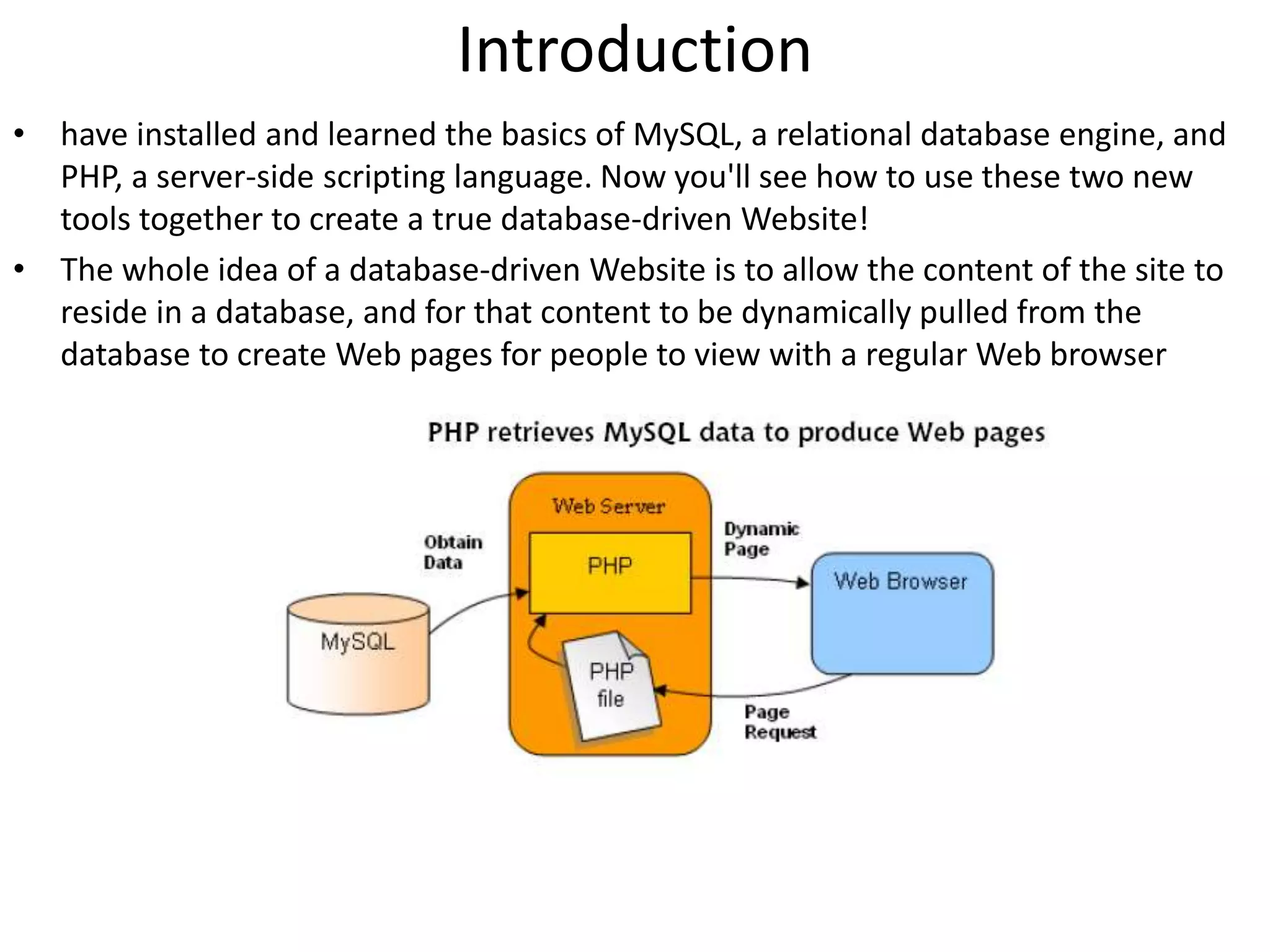
• The whole idea of a database-driven Website is to allow the content of the site to
reside in a database, and for that content to be dynamically pulled from the
database to create Web pages for people to view with a regular Web browser
• ❑ The visitor's Web browser requests the Web page using a standard URL.
• ❑ The Web server software (Apache, IIS, or whatever) recognizes that the
requested file is a PHP script, and so the server interprets the file using its PHP
plug-in, before responding to the page request.
• ❑ Certain PHP commands (which you have yet to learn) connect to the MySQL
database and request the content that belongs in the Web page.
• ❑ The MySQL database responds by sending the requested content to the PHP
script.
• ❑ The PHP script stores the content into one or more PHP variables, and then uses
the now-familiar echo function to output the content as part of the Web page.
• ❑ The PHP plug-in finishes up by handing a copy of the HTML it has created to the
Web server.
• ❑ The Web server sends the HTML to the Web browser as it would a plain HTML
file, except that instead of coming directly from an HTML file, the page is the
output provided by the PHP plug-in.
Connecting to MySQL with PHP
Connect to our MySQL server.
• $dbcnx = mysql_connect('localhost', 'root', 'mypasswd');
– EX:
$dbcnx = @mysql_connect('localhost', 'root', 'mypasswd');
if (!$dbcnx) {
echo( '<p>Unable to connect to the ' .'database server at this time.</p>' );
exit();}
Select your database
– EX:
if (! @mysql_select_db('jokes') ) {
die( '<p>Unable to locate the joke ' .'database at this time.</p>' );
}
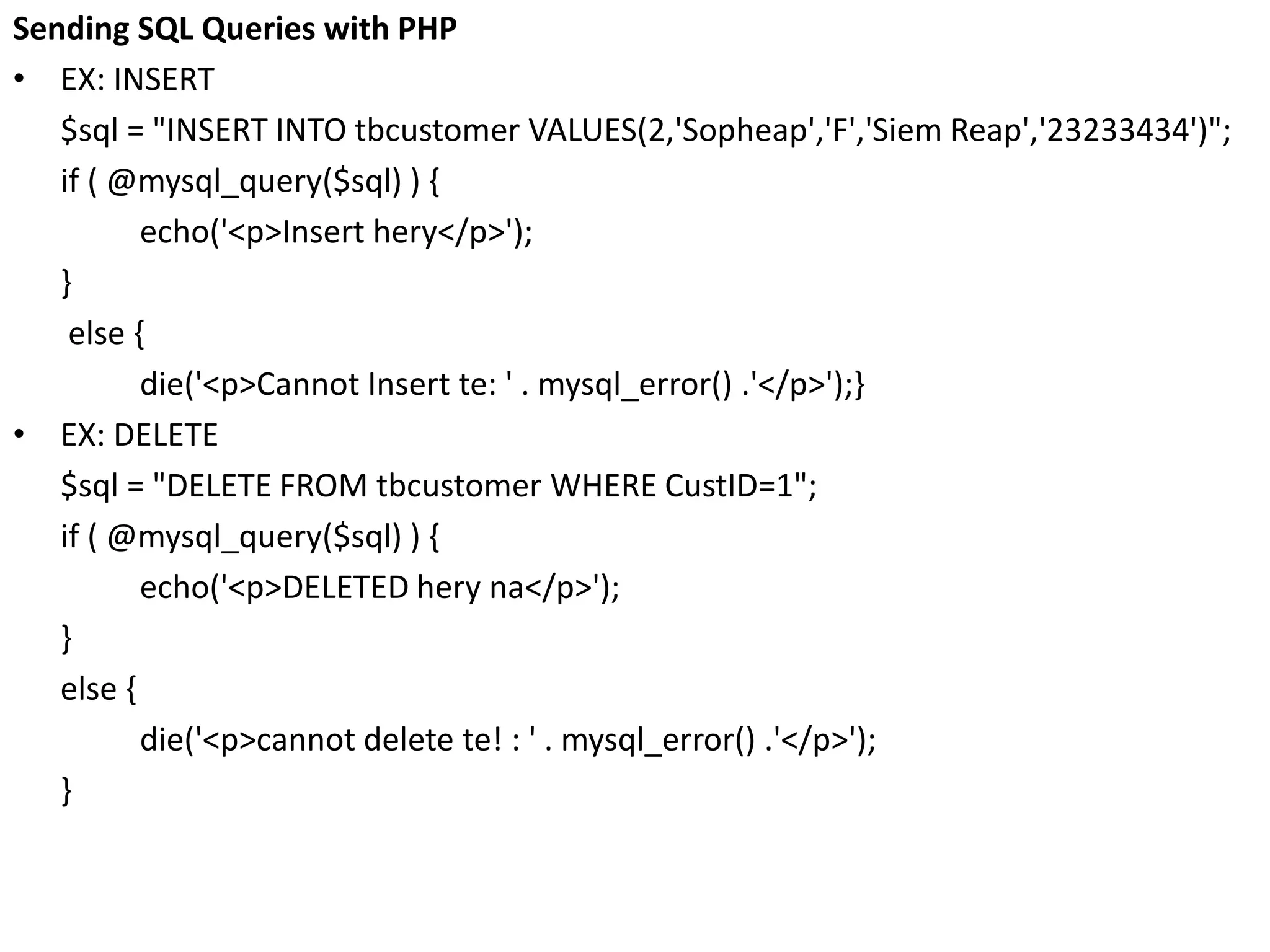
Sending SQL Queries with PHP
• EX: INSERT
$sql = "INSERT INTO tbcustomer VALUES(2,'Sopheap','F','Siem Reap','23233434')";
if ( @mysql_query($sql) ) {
echo('<p>Insert hery</p>');
}
else {
die('<p>Cannot Insert te: ' . mysql_error() .'</p>');}
• EX: DELETE
$sql = "DELETE FROM tbcustomer WHERE CustID=1";
if ( @mysql_query($sql) ) {
echo('<p>DELETED hery na</p>');
}
else {
die('<p>cannot delete te! : ' . mysql_error() .'</p>');
}
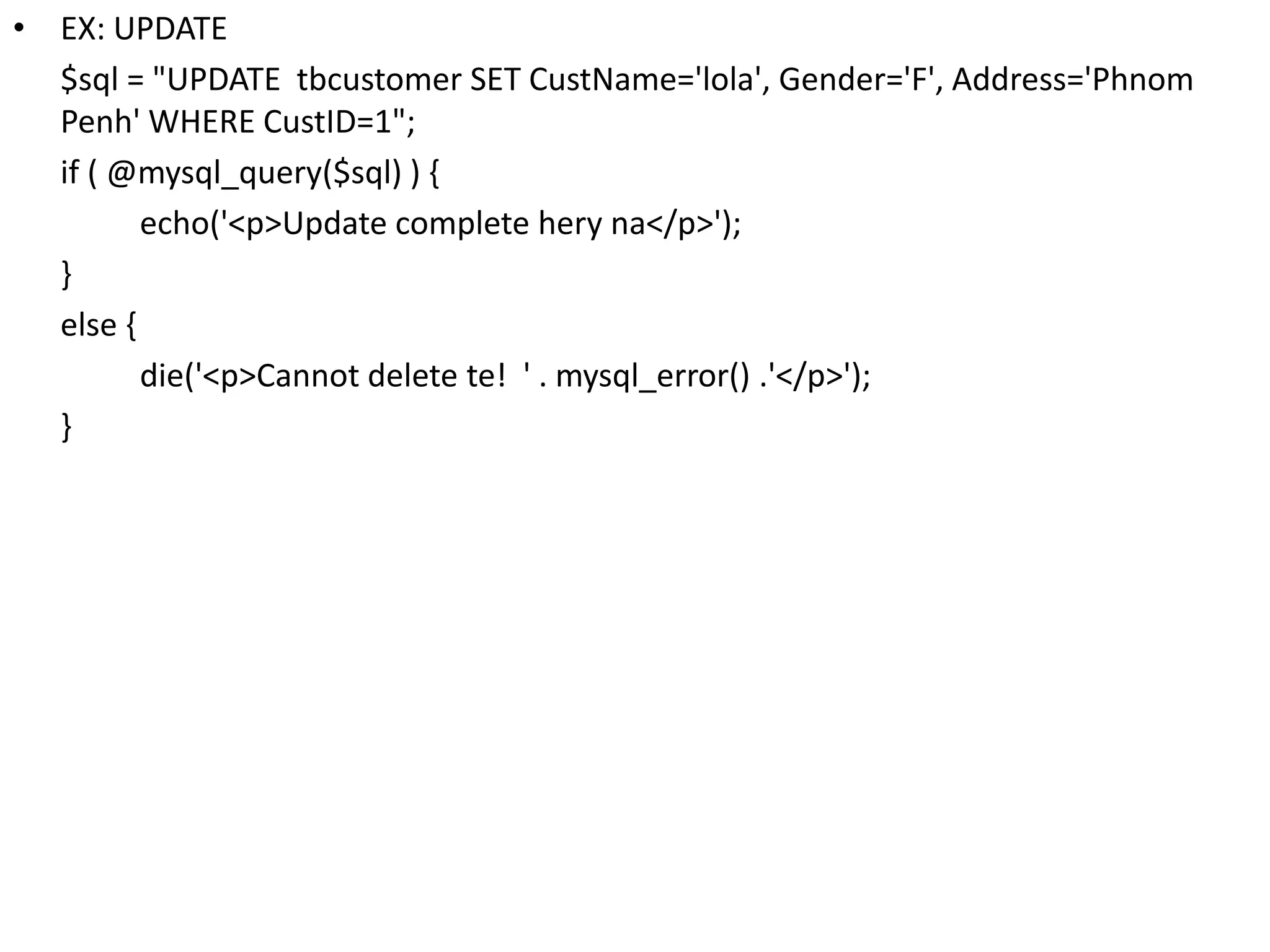
• EX: UPDATE
$sql = "UPDATE tbcustomer SET CustName='lola', Gender='F', Address='Phnom
Penh' WHERE CustID=1";
if ( @mysql_query($sql) ) {
echo('<p>Update complete hery na</p>');
}
else {
die('<p>Cannot delete te! ' . mysql_error() .'</p>');
}
Handling SELECT Result Sets
• For SELECT queries this just isn't enough.
• In addition to indicating whether the query succeeded or failed, PHP must also
receive the results of the query.
– EX:
$result = @mysql_query('SELECT* FROM tbcustomer;');
if (!$result)
{
die('<p>Error performing query: ' . mysql_error() .'</p>');
}
– EX:
$result = @mysql_query('SELECT* FROM tbcustomer;');
if (!$result){
die('<p>Error performing query: ' . mysql_error() .'</p>');}
while ( $row = mysql_fetch_array($result) ) {
echo('<p>' . $row['CustID'] . '|' . $row['CustName'] . '|' . $row['Gender'] . '|' .
$row['Address'] . '|' . $row['Phone'] . '</p>');
}
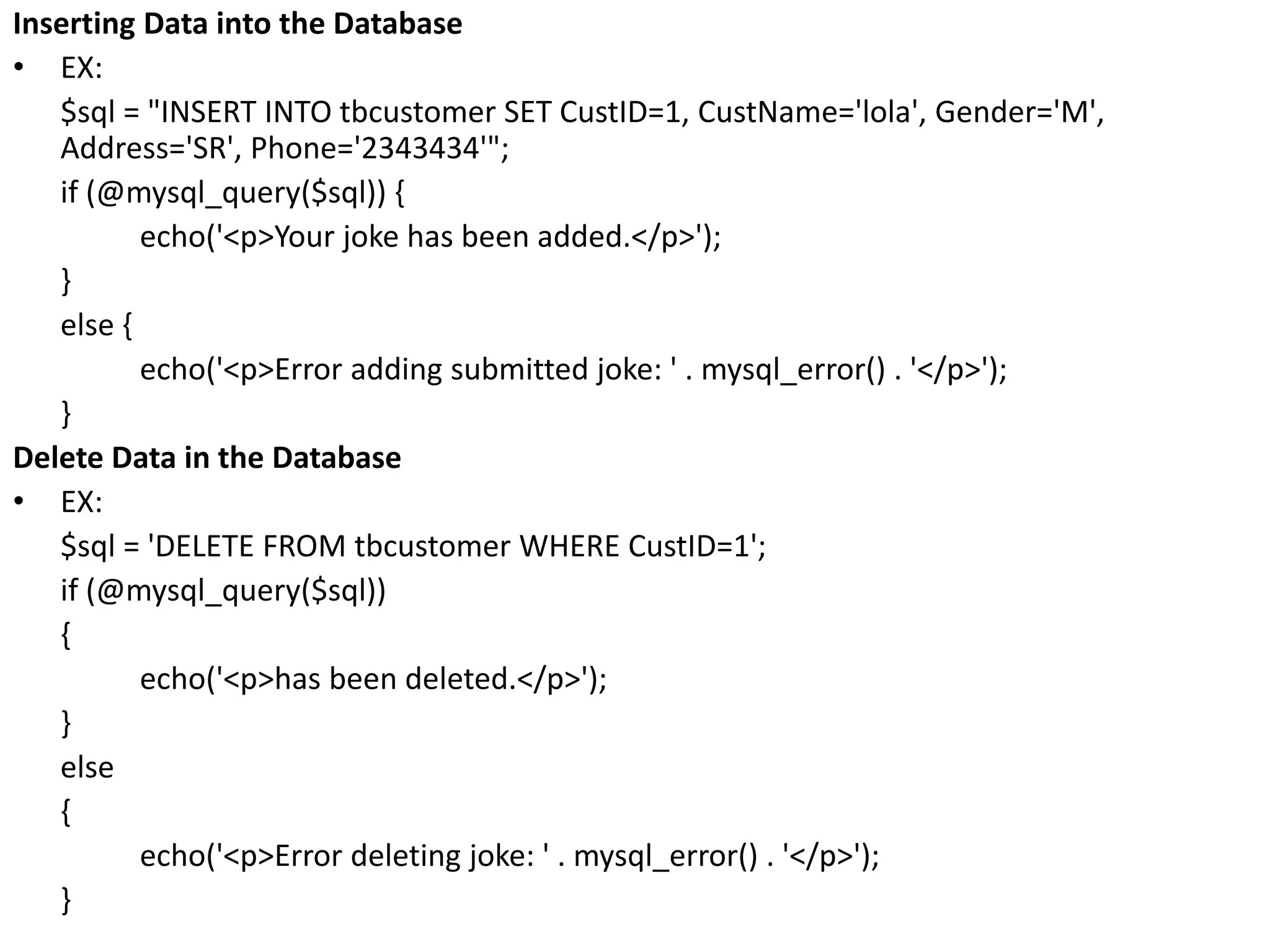
Inserting Data into the Database
• EX:
$sql = "INSERT INTO tbcustomer SET CustID=1, CustName='lola', Gender='M',
Address='SR', Phone='2343434'";
if (@mysql_query($sql)) {
echo('<p>Your joke has been added.</p>');
}
else {
echo('<p>Error adding submitted joke: ' . mysql_error() . '</p>');
}
Delete Data in the Database
• EX:
$sql = 'DELETE FROM tbcustomer WHERE CustID=1';
if (@mysql_query($sql))
{
echo('<p>has been deleted.</p>');
}
else
{
echo('<p>Error deleting joke: ' . mysql_error() . '</p>');
}
Ch7(publishing my sql data on the web)

Ch7(publishing my sql data on the web)

  • 1.
  • 2.
    Introduction • have installedand learned the basics of MySQL, a relational database engine, and PHP, a server-side scripting language. Now you'll see how to use these two new tools together to create a true database-driven Website! • The whole idea of a database-driven Website is to allow the content of the site to reside in a database, and for that content to be dynamically pulled from the database to create Web pages for people to view with a regular Web browser
  • 3.
    • ❑ Thevisitor's Web browser requests the Web page using a standard URL. • ❑ The Web server software (Apache, IIS, or whatever) recognizes that the requested file is a PHP script, and so the server interprets the file using its PHP plug-in, before responding to the page request. • ❑ Certain PHP commands (which you have yet to learn) connect to the MySQL database and request the content that belongs in the Web page. • ❑ The MySQL database responds by sending the requested content to the PHP script. • ❑ The PHP script stores the content into one or more PHP variables, and then uses the now-familiar echo function to output the content as part of the Web page. • ❑ The PHP plug-in finishes up by handing a copy of the HTML it has created to the Web server. • ❑ The Web server sends the HTML to the Web browser as it would a plain HTML file, except that instead of coming directly from an HTML file, the page is the output provided by the PHP plug-in.
  • 4.
    Connecting to MySQLwith PHP Connect to our MySQL server. • $dbcnx = mysql_connect('localhost', 'root', 'mypasswd'); – EX: $dbcnx = @mysql_connect('localhost', 'root', 'mypasswd'); if (!$dbcnx) { echo( '<p>Unable to connect to the ' .'database server at this time.</p>' ); exit();} Select your database – EX: if (! @mysql_select_db('jokes') ) { die( '<p>Unable to locate the joke ' .'database at this time.</p>' ); }
  • 5.
    Sending SQL Querieswith PHP • EX: INSERT $sql = "INSERT INTO tbcustomer VALUES(2,'Sopheap','F','Siem Reap','23233434')"; if ( @mysql_query($sql) ) { echo('<p>Insert hery</p>'); } else { die('<p>Cannot Insert te: ' . mysql_error() .'</p>');} • EX: DELETE $sql = "DELETE FROM tbcustomer WHERE CustID=1"; if ( @mysql_query($sql) ) { echo('<p>DELETED hery na</p>'); } else { die('<p>cannot delete te! : ' . mysql_error() .'</p>'); }
  • 6.
    • EX: UPDATE $sql= "UPDATE tbcustomer SET CustName='lola', Gender='F', Address='Phnom Penh' WHERE CustID=1"; if ( @mysql_query($sql) ) { echo('<p>Update complete hery na</p>'); } else { die('<p>Cannot delete te! ' . mysql_error() .'</p>'); }
  • 7.
    Handling SELECT ResultSets • For SELECT queries this just isn't enough. • In addition to indicating whether the query succeeded or failed, PHP must also receive the results of the query. – EX: $result = @mysql_query('SELECT* FROM tbcustomer;'); if (!$result) { die('<p>Error performing query: ' . mysql_error() .'</p>'); } – EX: $result = @mysql_query('SELECT* FROM tbcustomer;'); if (!$result){ die('<p>Error performing query: ' . mysql_error() .'</p>');} while ( $row = mysql_fetch_array($result) ) { echo('<p>' . $row['CustID'] . '|' . $row['CustName'] . '|' . $row['Gender'] . '|' . $row['Address'] . '|' . $row['Phone'] . '</p>'); }
  • 8.
    Inserting Data intothe Database • EX: $sql = "INSERT INTO tbcustomer SET CustID=1, CustName='lola', Gender='M', Address='SR', Phone='2343434'"; if (@mysql_query($sql)) { echo('<p>Your joke has been added.</p>'); } else { echo('<p>Error adding submitted joke: ' . mysql_error() . '</p>'); } Delete Data in the Database • EX: $sql = 'DELETE FROM tbcustomer WHERE CustID=1'; if (@mysql_query($sql)) { echo('<p>has been deleted.</p>'); } else { echo('<p>Error deleting joke: ' . mysql_error() . '</p>'); }

Editor's Notes

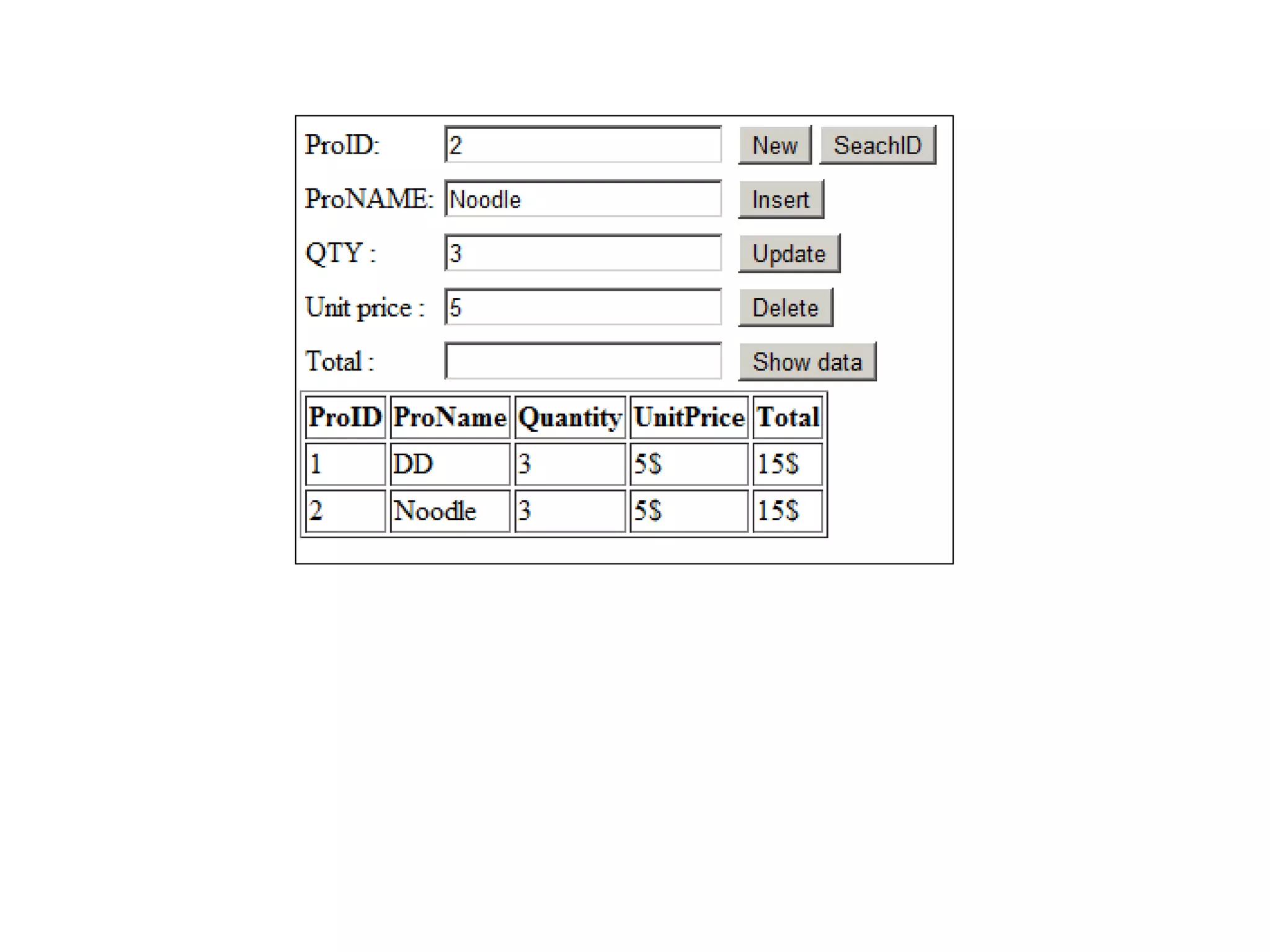
  • #10 <html> <head> <meta http-equiv="Content-Type" content="text/html; charset=windows-1252"> <style type="text/css"> .error{ background: 'red';} </style> <?php $cls1="";$cls2="";$cls3="";$cls4=""; $st=""; function clearForm() { $_POST['txtPID']=""; $_POST['txtProName']=""; $_POST['txtProQty']=""; $_POST['txtUnitPrice']=""; $_POST['txtTotal']=""; } if(isset($_POST['btNew'])) { clearForm(); } else if(isset($_POST['btSearch'])) { $dbcnx = @mysql_connect('localhost', 'root'); if (!$dbcnx) { echo( '<p>Unable to connect to the ' .'database server at this time.</p>' ); exit(); } if (! @mysql_select_db('db2') ) { die( '<p>Unable to locate ' .'database at this time.</p>' ); } $result = @mysql_query('SELECT* FROM tbproduct WHERE ProID=' . $_POST['txtPID']); if (!$result) { die('<p>Error performing query: ' . mysql_error() .'</p>'); } $st="<table border=1><tr><th>ProID</th><th>ProName</th><th>Quantity</th><th>UnitPrice</th><th>Total</th></tr>"; while ( $row = mysql_fetch_array($result) ) { $st.="<tr><td>" . $row['ProID'] . "</td><td>" . $row['ProName'] . "</td><td>" . $row['Qty'] . "</td><td>" . $row['UnitPrice'] . "$</td><td>" . $row['UnitPrice']*$row['Qty'] . "$</td></tr>"; } $st.="</table>"; } else if(isset($_POST['btShow'])) { $dbcnx = @mysql_connect('localhost', 'root'); if (!$dbcnx) { echo( '<p>Unable to connect to the ' .'database server at this time.</p>' ); exit(); } if (! @mysql_select_db('db2') ) { die( '<p>Unable to locate the joke ' .'database at this time.</p>' ); } $result = @mysql_query('SELECT* FROM tbproduct;'); if (!$result) { die('<p>Error performing query: ' . mysql_error() .'</p>'); } $st="<table border=1><tr><th>ProID</th><th>ProName</th><th>Quantity</th><th>UnitPrice</th><th>Total</th></tr>"; while ( $row = mysql_fetch_array($result) ) { $st.="<tr><td>" . $row['ProID'] . "</td><td>" . $row['ProName'] . "</td><td>" . $row['Qty'] . "</td><td>" . $row['UnitPrice'] . "$</td><td>" . $row['UnitPrice']*$row['Qty'] . "$</td></tr>"; } $st.="</table>"; } else if(isset($_POST['btDelete'])) { if(!empty($_POST['txtPID'])) { $dbcnx = @mysql_connect('localhost', 'root'); if (!$dbcnx) { echo( '<p>Unable to connect to the ' .'database server at this time.</p>' ); exit(); } if (! @mysql_select_db('db2') ) { die( '<p>Unable to locate ' .'database at this time.</p>' ); } $pID=$_POST['txtPID']; $sql = 'DELETE FROM tbproduct WHERE ProID=' . $pID ; if (@mysql_query($sql)) { echo('<p>has been deleted.</p>'); } else { echo('<p>Error deleting joke: ' . mysql_error() . '</p>'); } } } else if(isset($_POST['btInsert']) or isset($_POST['btUpdate']) or isset($_POST['btDelete'])) { $proID=$_POST['txtPID']; $proName=$_POST['txtProName']; $qty=$_POST['txtProQty']; $unitprice=$_POST['txtUnitPrice']; if(empty($_POST['txtPID'])) { $cls1="error"; } else if(empty($_POST['txtProName'])) { $cls2="error"; } else if(empty($_POST['txtProQty'])) { $cls3="error"; } else if(empty($_POST['txtUnitPrice'])) { $cls4="error"; } else if(isset($_POST['btInsert'])) { $proID=$_POST['txtPID']; $proName=$_POST['txtProName']; $qty=$_POST['txtProQty']; $unitprice=$_POST['txtUnitPrice']; if(empty($_POST['txtPID'])) { $cls1="error"; } else if(empty($_POST['txtProName'])) { $cls2="error"; } else if(empty($_POST['txtProQty'])) { $cls3="error"; } else if(empty($_POST['txtUnitPrice'])) { $cls4="error"; } else { $dbcnx = @mysql_connect('localhost', 'root'); if (!$dbcnx) { echo( '<p>Unable to connect to the ' .'database server at this time.</p>' ); exit(); } if (! @mysql_select_db('db2') ) { die( '<p>Unable to locate the db2 ' .'database at this time.</p>' ); } $sql = "INSERT INTO tbproduct SET ProID=" . $proID . " , ProName='" . $proName . "', Qty=" . $qty . ", UnitPrice=" . $unitprice; if (@mysql_query($sql)) { echo('<p>You has been added.</p>'); } else { echo('<p>Error adding submitted table: ' . mysql_error() . '</p>'); } } } else if(isset($_POST['btUpdate'])) { $dbcnx = @mysql_connect('localhost', 'root'); if (!$dbcnx) { echo( '<p>Unable to connect to the ' .'database server at this time.</p>' ); exit(); } if (! @mysql_select_db('db2') ) { die( '<p>Unable to locate ' .'database at this time.</p>' ); } $sql = "UPDATE tbproduct SET ProName='" . $_POST['txtProName'] . "', Qty=" . $_POST['txtProQty'] . " , UnitPrice=" . $_POST['txtUnitPrice'] . " WHERE ProID=" . $_POST['txtPID']; @mysql_query($sql) ; } } ?> </head> <body> <form method="post" action=""> <table> <tr><td><label for="txtPID" class="<?php print $cls1; ?>">ProID:</label></td><td><input type="text" name="txtPID" value="<?php print $_POST['txtPID']; ?>"/></td><td><input type="submit" name="btNew" value="New"/><input type="submit" name="btSearch" value="SeachID"/></td></tr> <tr><td><label for="txtProName" class="<?php print $cls2; ?>">ProNAME:</label></td><td><input type="text" name="txtProName" value="<?php print $_POST['txtProName']; ?>"/></td><td><input type="submit" name="btInsert" value="Insert"/></td></tr> <tr><td><label for="txtProQty" class="<?php print $cls3; ?>">QTY :</label></td><td><input type="text" name="txtProQty" value="<?php print $_POST['txtProQty']; ?>"/></td><td><input type="submit" name="btUpdate" value="Update"/></td></tr> <tr><td><label for="txtUnitPrice" class="<?php print $_POST['txtUnitPrice']; ?>">Unit price :</label></td><td><input type="text" name="txtUnitPrice" value="<?php print $_POST['txtUnitPrice']; ?>"/></td><td><input type="submit" name="btDelete" value="Delete"/></td></tr> <tr><td><label for="txtTotal">Total :</label></td><td ><input type="text" name="txtTotal" value="<?php print $total; ?>"/></td><td><input type="submit" name="btShow" value="Show data"/></td></tr> </table> <?php print $st; ?> </form> </body> </html>
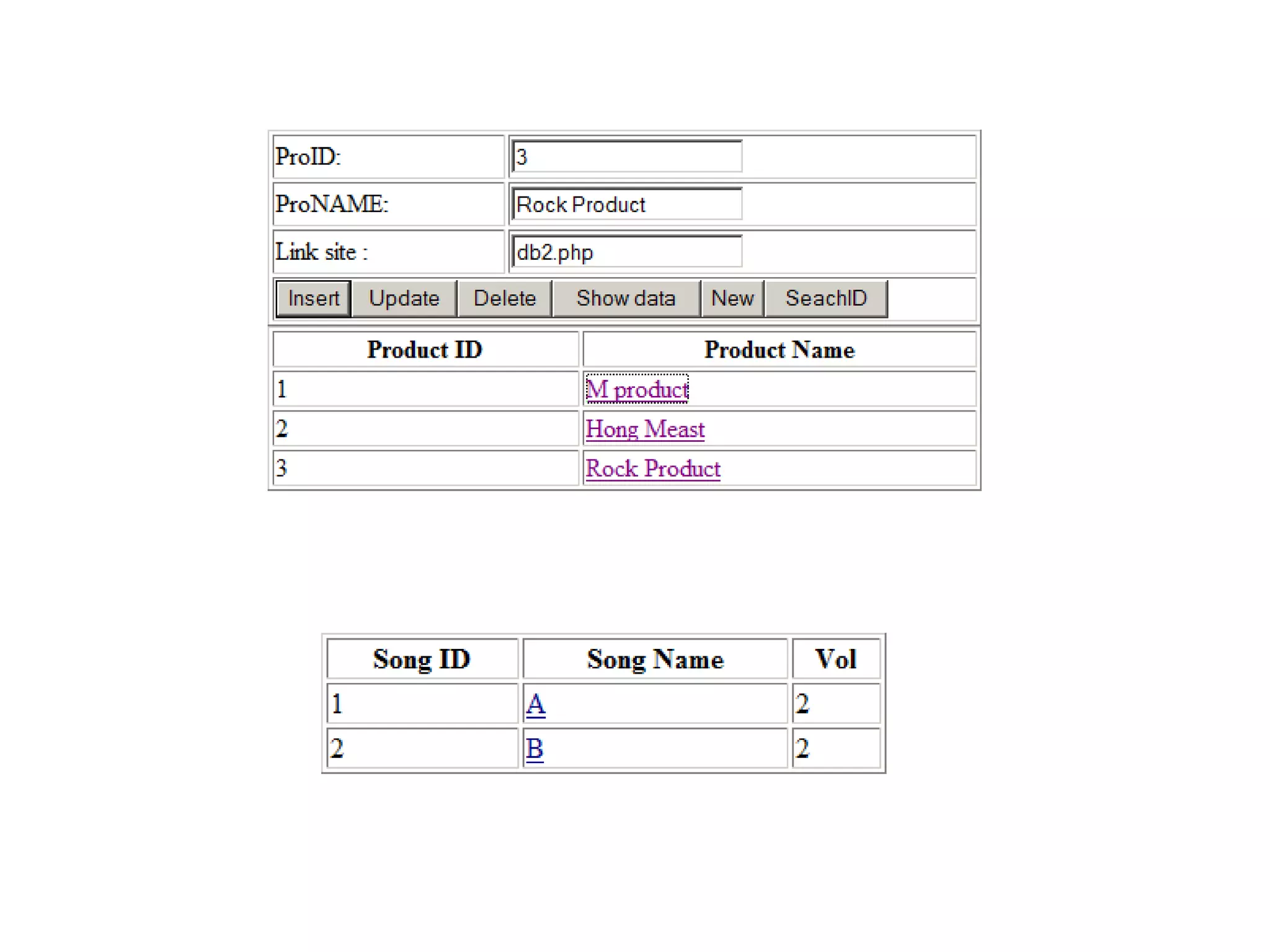
  • #11 <html> <head> <meta http-equiv="Content-Type" content="text/html; charset=windows-1252"> <style type="text/css"> .error{ background: 'red';} </style> <?php $cls1="";$cls2="";$cls3=""; function clearForm() { $_POST['txtPID']=""; $_POST['txtProName']=""; $_POST['txtLink']=""; } if(isset($_POST['btNew'])) { clearForm(); } else if(isset($_POST['btSearch'])) { $dbcnx = @mysql_connect('localhost', 'root'); if (!$dbcnx) { echo( '<p>Unable to connect to the ' .'database server at this time.</p>' ); exit(); } if (! @mysql_select_db('db1') ) { die( '<p>Unable to locate the joke ' .'database at this time.</p>' ); } $result = @mysql_query("SELECT * FROM tbproduct WHERE productName='" . $_POST['txtProName'] . "'" ); if (!$result) { die('<p>Error performing query: ' . mysql_error() .'</p>'); } $st="<table border=1 width='100%'><tr><th>Product ID</th><th>Product Name</th></tr>"; while ( $row = mysql_fetch_array($result) ) { $st.="<tr><td>" . $row['ProductID'] . "</td><td><a href='" . $row['Linksite'] . "'>" . $row['ProductName'] . "</td></tr>"; } $st.="</table>"; } else if(isset($_POST['btShow'])) { $dbcnx = @mysql_connect('localhost', 'root'); if (!$dbcnx) { echo( '<p>Unable to connect to the ' .'database server at this time.</p>' ); exit(); } if (! @mysql_select_db('db1') ) { die( '<p>Unable to locate the joke ' .'database at this time.</p>' ); } $result = @mysql_query('SELECT * FROM tbproduct;'); if (!$result) { die('<p>Error performing query: ' . mysql_error() .'</p>'); } $st="<table border=1 width='100%'><tr><th>Product ID</th><th>Product Name</th></tr>"; while ( $row = mysql_fetch_array($result) ) { $st.="<tr><td>" . $row['ProductID'] . "</td><td><a href='" . $row['Linksite'] . "?v1=" . $row['ProductID'] . "'>" . $row['ProductName'] . "</a></td></tr>"; } $st.="</table>"; } else if(isset($_POST['btDelete'])) { if(!empty($_POST['txtPID'])) { $dbcnx = @mysql_connect('localhost', 'root'); if (!$dbcnx) { echo( '<p>Unable to connect to the ' .'database server at this time.</p>' ); exit(); } if (! @mysql_select_db('db1') ) { die( '<p>Unable to locate ' .'database at this time.</p>' ); } $pID=$_POST['txtPID']; $sql = 'DELETE FROM tbproduct WHERE ProductID=' . $pID ; if (@mysql_query($sql)) { echo('<p>has been deleted.</p>'); } else { echo('<p>Error deleting joke: ' . mysql_error() . '</p>'); } } } else if(isset($_POST['btInsert']) or isset($_POST['btUpdate'])) { $proID=$_POST['txtPID']; $proName=$_POST['txtProName']; $link=$_POST['txtLink']; if(empty($_POST['txtPID'])) { $cls1="error"; } else if(empty($_POST['txtProName'])) { $cls2="error"; } else if(empty($_POST['txtLink'])) { $cls3="error"; } else if(isset($_POST['btInsert'])) { $proID=$_POST['txtPID']; $proName=$_POST['txtProName']; $link=$_POST['txtLink']; $dbcnx = @mysql_connect('localhost', 'root'); if (!$dbcnx) { echo( '<p>Unable to connect to the ' .'database server at this time.</p>' ); exit(); } if (! @mysql_select_db('db1') ) { die( '<p>Unable to locate the db2 ' .'database at this time.</p>' ); } $sql = "INSERT INTO tbproduct SET ProductID=" . $proID . " , ProductName='" . $proName . "', Linksite='" . $link ."'"; if (@mysql_query($sql)) { echo('<p>You has been added.</p>'); } else { echo('<p>Error adding submitted table: ' . mysql_error() . '</p>'); } } else if(isset($_POST['btUpdate'])) { $dbcnx = @mysql_connect('localhost', 'root'); if (!$dbcnx) { echo( '<p>Unable to connect to the ' .'database server at this time.</p>' ); exit(); } if (! @mysql_select_db('db1') ) { die( '<p>Unable to locate ' .'database at this time.</p>' ); } $sql = "UPDATE tbproduct SET ProductName='" . $_POST['txtProName'] . "', Linksite='" . $_POST['txtLink'] . "' WHERE ProductID=" . $_POST['txtPID']; if (@mysql_query($sql)) { echo('<p>You update successfully.</p>'); } else { echo('<p>Error adding submitted table: ' . mysql_error() . '</p>'); } } else { clearForm(); } } ?> </head> <body> <form method="post" action=""> <table border=1 width="100%"> <tr><td><label for="txtPID" class="<?php print $cls1; ?>">ProID:</label></td><td><input type="text" name="txtPID" value="<?php print $_POST['txtPID']; ?>"/></td></tr> <tr><td><label for="txtProName" class="<?php print $cls2; ?>">ProNAME:</label></td><td><input type="text" name="txtProName" value="<?php print $_POST['txtProName']; ?>"/></td></tr> <tr><td><label for="txtLink" class="<?php print $cls3; ?>">Link site :</label></td><td><input type="text" name="txtLink" value="<?php print $_POST['txtLink']; ?>"/></tr> <tr><td colspan="2"><input type="submit" name="btInsert" value="Insert"/><input type="submit" name="btUpdate" value="Update"/><input type="submit" name="btDelete" value="Delete"/><input type="submit" name="btShow" value="Show data"/><input type="submit" name="btNew" value="New"/><input type="submit" name="btSearch" value="SeachID"/></td></tr> </table> <?php print $st; ?> </form> </body> </html> //======================================================= <?php $dbcnx = @mysql_connect('localhost', 'root'); if (!$dbcnx) { echo( '<p>Unable to connect to the ' .'database server at this time.</p>' ); exit(); } if (! @mysql_select_db('db1') ) { die( '<p>Unable to locate the joke ' .'database at this time.</p>' ); } $result = @mysql_query('SELECT * FROM tbsong WHERE ProductID=' . $_GET['v1']); if (!$result) { die('<p>Error performing query: ' . mysql_error() .'</p>'); } $st="<table border=1 width='100%'><tr><th>Song ID</th><th>Song Name</th><th>Vol</td></tr>"; while ( $row = mysql_fetch_array($result) ) { $st.="<tr><td>" . $row['SongID'] . "</td><td><a href='" . $row['Linksite'] . "' >" . $row['SongName'] . "</td><td>" . $row['Vol'] . "</td></tr>"; } $st.="</table>"; print $st; ?>