Release 16/07/2009 Jetking Infotrain Ltd.
Router Fundamentals
Chapter 4
Release 16/07/2009 Jetking Infotrain Ltd.
Chapter Objectives
 Explain router components
 Explain router installation
 Discuss router boot sequence
 Define Internetwork Operating System (IOS)
 Explain Command Line Interface (CLI)
 Perform initial router configuration
 Set hostname, banners and passwords for the
router
 Manage the configuration register
Release 16/07/2009 Jetking Infotrain Ltd.
Recall - I
 Different network devices include:
 Hubs
 Routers
 Switches
 Bridges
 Repeaters
 Different types of hubs include:
 Active
 Passive
 Hybrid
Release 16/07/2009 Jetking Infotrain Ltd.
Recall - II
 Different WAN devices include:
 WAN Switch
 Access Server
 Modem
 Channel Service Unit
 ISDN Terminal Adapter
Release 16/07/2009 Jetking Infotrain Ltd.
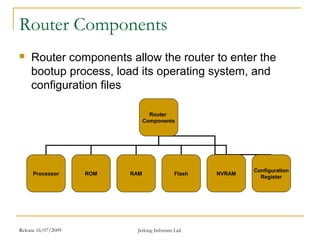
Router Components
 Router components allow the router to enter the
bootup process, load its operating system, and
configuration files
Router
Components
Processor ROM RAM Flash NVRAM
Configuration
Register
Release 16/07/2009 Jetking Infotrain Ltd.
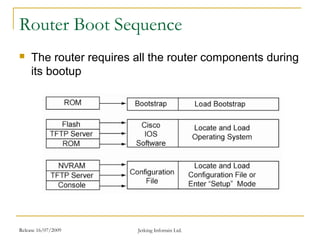
Router Boot Sequence
 The router requires all the router components during
its bootup
Release 16/07/2009 Jetking Infotrain Ltd.
Internetwork Operating System
 IOS acts as an interface between the network
devices and the user
 It is stored in the flash memory of the router
 The Cisco IOS software requires the processor of
the system for configuring and maintaining the
network devices
 Different features of IOS include:
 Support for different technologies
 Scalability
 Security
Release 16/07/2009 Jetking Infotrain Ltd.
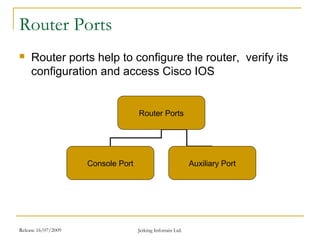
Router Ports
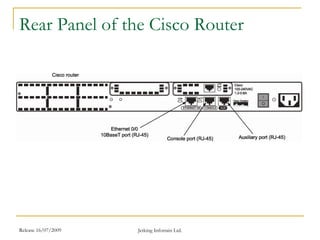
 Router ports help to configure the router, verify its
configuration and access Cisco IOS
Router Ports
Console Port Auxiliary Port
Release 16/07/2009 Jetking Infotrain Ltd.
Rear Panel of the Cisco Router
Release 16/07/2009 Jetking Infotrain Ltd.
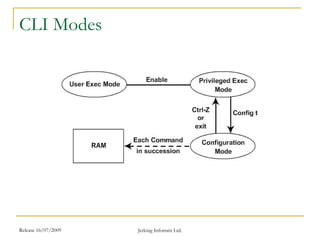
CLI Modes
Release 16/07/2009 Jetking Infotrain Ltd.
CLI Prompts
 CLI prompts allow you to navigate and recognize
the mode that you have entered
 CLI prompts include:
 Interfaces
 Sub-Interfaces
 Line
 Router
Release 16/07/2009 Jetking Infotrain Ltd.
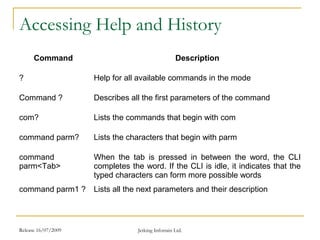
Accessing Help and History
Command Description
? Help for all available commands in the mode
Command ? Describes all the first parameters of the command
com? Lists the commands that begin with com
command parm? Lists the characters that begin with parm
command
parm<Tab>
When the tab is pressed in between the word, the CLI
completes the word. If the CLI is idle, it indicates that the
typed characters can form more possible words
command parm1 ? Lists all the next parameters and their description
Release 16/07/2009 Jetking Infotrain Ltd.
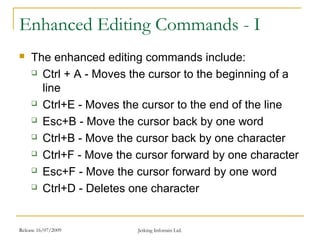
Enhanced Editing Commands - I
 The enhanced editing commands include:
 Ctrl + A - Moves the cursor to the beginning of a
line
 Ctrl+E - Moves the cursor to the end of the line
 Esc+B - Move the cursor back by one word
 Ctrl+B - Move the cursor back by one character
 Ctrl+F - Move the cursor forward by one character
 Esc+F - Move the cursor forward by one word
 Ctrl+D - Deletes one character
Release 16/07/2009 Jetking Infotrain Ltd.
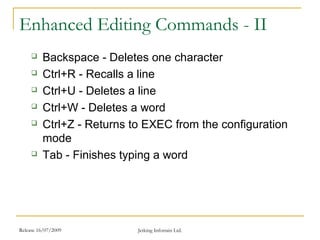
Enhanced Editing Commands - II
 Backspace - Deletes one character
 Ctrl+R - Recalls a line
 Ctrl+U - Deletes a line
 Ctrl+W - Deletes a word
 Ctrl+Z - Returns to EXEC from the configuration
mode
 Tab - Finishes typing a word
Release 16/07/2009 Jetking Infotrain Ltd.
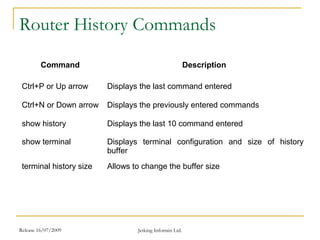
Router History Commands
Command Description
Ctrl+P or Up arrow Displays the last command entered
Ctrl+N or Down arrow Displays the previously entered commands
show history Displays the last 10 command entered
show terminal Displays terminal configuration and size of history
buffer
terminal history size Allows to change the buffer size
Release 16/07/2009 Jetking Infotrain Ltd.
Router Administrative Functions
 Router administrative functions allow easy
troubleshooting and maintenance of routers
 Router administrative function include:
 Assigning hostname
 Assigning banners
 setting password
Release 16/07/2009 Jetking Infotrain Ltd.
Banners
 Banner is a message displayed to all the users when
they access the router through Telnet, console and
auxiliary ports
 It can be used to display information about the router
itself or nay kind of security message
 Four types of banners available for the Cisco routers
are:
 Message of the day banner
 Exec process creation banner
 Incoming terminal line banner
 Login banner
Release 16/07/2009 Jetking Infotrain Ltd.
Summary - I
 The router components enable the router to start the
boot up process, load its operating system, and load
its configuration files
 The Power-On-Self-Test or the POST component
provides a series of diagnostic tests for the router
 The POST is a series of 14 tests that run in the
reverse numerical order
 The bootstrap program or the ROM Monitor
component enables you to initialize the processor
hardware when the router boots
Release 16/07/2009 Jetking Infotrain Ltd.
Summary - II
 The bootstrap program loads the IOS image for the
router
 The different values for the image in the
configuration register are:
 0x0 - Boots the router into ROM monitor mode
 0x1 - Boots the router using the Mini-IOS
 0x2–0xF - Boots the router using the default boot
sequence
Release 16/07/2009 Jetking Infotrain Ltd.
Summary - III
 The boot system commands in the startup-config file
are:
 boot system flash IOS filename - Enables you to
boot from flash memory
 boot system tftp IOS filename tftp server ip
address - Enables you to boot from a TFTP server
 boot system rom - Enables you boot from system
ROM
Release 16/07/2009 Jetking Infotrain Ltd.
Summary - IV
 The bootstrap program offers a console-based
interface or monitor for working with the program
 Mini-IOS component provides an alternate file for
the router boot up, if the existing image file is
unavailable
 ROM monitor is a component stored in the
microcode of RAM
 The flash memory contains IOS using which the
router can boot
Release 16/07/2009 Jetking Infotrain Ltd.
Summary - V
 NVRAM or Non-Volatile RAM is a type of random
access memory that stores the configuration files for
the router
 Configuration register is a component that controls the
booting process of a router
 The router can be connected through console port,
auxillary port or Telnet program
 CLI is a character or text based interface that allows
manual configuration of the router
 User Exec Mode enables you to work with the router
and execute very simple commands

CCNA CHAPTER 4 BY jetarvind kumar madhukar

  • 1.
    Release 16/07/2009 JetkingInfotrain Ltd. Router Fundamentals Chapter 4
  • 2.
    Release 16/07/2009 JetkingInfotrain Ltd. Chapter Objectives  Explain router components  Explain router installation  Discuss router boot sequence  Define Internetwork Operating System (IOS)  Explain Command Line Interface (CLI)  Perform initial router configuration  Set hostname, banners and passwords for the router  Manage the configuration register
  • 3.
    Release 16/07/2009 JetkingInfotrain Ltd. Recall - I  Different network devices include:  Hubs  Routers  Switches  Bridges  Repeaters  Different types of hubs include:  Active  Passive  Hybrid
  • 4.
    Release 16/07/2009 JetkingInfotrain Ltd. Recall - II  Different WAN devices include:  WAN Switch  Access Server  Modem  Channel Service Unit  ISDN Terminal Adapter
  • 5.
    Release 16/07/2009 JetkingInfotrain Ltd. Router Components  Router components allow the router to enter the bootup process, load its operating system, and configuration files Router Components Processor ROM RAM Flash NVRAM Configuration Register
  • 6.
    Release 16/07/2009 JetkingInfotrain Ltd. Router Boot Sequence  The router requires all the router components during its bootup
  • 7.
    Release 16/07/2009 JetkingInfotrain Ltd. Internetwork Operating System  IOS acts as an interface between the network devices and the user  It is stored in the flash memory of the router  The Cisco IOS software requires the processor of the system for configuring and maintaining the network devices  Different features of IOS include:  Support for different technologies  Scalability  Security
  • 8.
    Release 16/07/2009 JetkingInfotrain Ltd. Router Ports  Router ports help to configure the router, verify its configuration and access Cisco IOS Router Ports Console Port Auxiliary Port
  • 9.
    Release 16/07/2009 JetkingInfotrain Ltd. Rear Panel of the Cisco Router
  • 10.
    Release 16/07/2009 JetkingInfotrain Ltd. CLI Modes
  • 11.
    Release 16/07/2009 JetkingInfotrain Ltd. CLI Prompts  CLI prompts allow you to navigate and recognize the mode that you have entered  CLI prompts include:  Interfaces  Sub-Interfaces  Line  Router
  • 12.
    Release 16/07/2009 JetkingInfotrain Ltd. Accessing Help and History Command Description ? Help for all available commands in the mode Command ? Describes all the first parameters of the command com? Lists the commands that begin with com command parm? Lists the characters that begin with parm command parm<Tab> When the tab is pressed in between the word, the CLI completes the word. If the CLI is idle, it indicates that the typed characters can form more possible words command parm1 ? Lists all the next parameters and their description
  • 13.
    Release 16/07/2009 JetkingInfotrain Ltd. Enhanced Editing Commands - I  The enhanced editing commands include:  Ctrl + A - Moves the cursor to the beginning of a line  Ctrl+E - Moves the cursor to the end of the line  Esc+B - Move the cursor back by one word  Ctrl+B - Move the cursor back by one character  Ctrl+F - Move the cursor forward by one character  Esc+F - Move the cursor forward by one word  Ctrl+D - Deletes one character
  • 14.
    Release 16/07/2009 JetkingInfotrain Ltd. Enhanced Editing Commands - II  Backspace - Deletes one character  Ctrl+R - Recalls a line  Ctrl+U - Deletes a line  Ctrl+W - Deletes a word  Ctrl+Z - Returns to EXEC from the configuration mode  Tab - Finishes typing a word
  • 15.
    Release 16/07/2009 JetkingInfotrain Ltd. Router History Commands Command Description Ctrl+P or Up arrow Displays the last command entered Ctrl+N or Down arrow Displays the previously entered commands show history Displays the last 10 command entered show terminal Displays terminal configuration and size of history buffer terminal history size Allows to change the buffer size
  • 16.
    Release 16/07/2009 JetkingInfotrain Ltd. Router Administrative Functions  Router administrative functions allow easy troubleshooting and maintenance of routers  Router administrative function include:  Assigning hostname  Assigning banners  setting password
  • 17.
    Release 16/07/2009 JetkingInfotrain Ltd. Banners  Banner is a message displayed to all the users when they access the router through Telnet, console and auxiliary ports  It can be used to display information about the router itself or nay kind of security message  Four types of banners available for the Cisco routers are:  Message of the day banner  Exec process creation banner  Incoming terminal line banner  Login banner
  • 18.
    Release 16/07/2009 JetkingInfotrain Ltd. Summary - I  The router components enable the router to start the boot up process, load its operating system, and load its configuration files  The Power-On-Self-Test or the POST component provides a series of diagnostic tests for the router  The POST is a series of 14 tests that run in the reverse numerical order  The bootstrap program or the ROM Monitor component enables you to initialize the processor hardware when the router boots
  • 19.
    Release 16/07/2009 JetkingInfotrain Ltd. Summary - II  The bootstrap program loads the IOS image for the router  The different values for the image in the configuration register are:  0x0 - Boots the router into ROM monitor mode  0x1 - Boots the router using the Mini-IOS  0x2–0xF - Boots the router using the default boot sequence
  • 20.
    Release 16/07/2009 JetkingInfotrain Ltd. Summary - III  The boot system commands in the startup-config file are:  boot system flash IOS filename - Enables you to boot from flash memory  boot system tftp IOS filename tftp server ip address - Enables you to boot from a TFTP server  boot system rom - Enables you boot from system ROM
  • 21.
    Release 16/07/2009 JetkingInfotrain Ltd. Summary - IV  The bootstrap program offers a console-based interface or monitor for working with the program  Mini-IOS component provides an alternate file for the router boot up, if the existing image file is unavailable  ROM monitor is a component stored in the microcode of RAM  The flash memory contains IOS using which the router can boot
  • 22.
    Release 16/07/2009 JetkingInfotrain Ltd. Summary - V  NVRAM or Non-Volatile RAM is a type of random access memory that stores the configuration files for the router  Configuration register is a component that controls the booting process of a router  The router can be connected through console port, auxillary port or Telnet program  CLI is a character or text based interface that allows manual configuration of the router  User Exec Mode enables you to work with the router and execute very simple commands