Release 16/07/2009 Jetking Infotrain Ltd.
ISDN Configuration
Chapter 10
Release 16/07/2009Jetking Infotrain Ltd.
Chapter Objectives
 Explain ISDN features
 Explain ISDN devices
 Explain ISDN connections
 Configure BRI
 Configure PRI
 Verify ISDN Connections
Release 16/07/2009Jetking Infotrain Ltd.
Recall
 WAN is a network that spans a large geographical
area
 Data-Link layer protocols are commonly called the
data link protocols, which communicate between
two devices
 PAP is a insecure protocol because the username
and password is sent in plain text
 Use debug ppp authentication to troubleshoot PPP
 Using CHAP protocol the server sends challenge
messages to the node. The node calculates and
sends the results back to the server
Release 16/07/2009Jetking Infotrain Ltd.
ISDN Features
 ISDN provides Wide Area Network (WAN) services
in incremental values of 64 kbps
 The features of ISDN are:
 Speed
 Multiple Device Support
 Inexpensive
Release 16/07/2009Jetking Infotrain Ltd.
ISDN Channels and Services
 ISDN network transmits information through the
three logical digital communication channels such
as Bearer (B) channel, Data (D) channel and Hybrid
(H) channel
 H channel can be implemented as H0, H10, H11,
H12
 ISDN supports two types of connections such as the
Basic Rate Interface (BRI) and Primary Rate
Interface (PRI)
Release 16/07/2009Jetking Infotrain Ltd.
ISDN Devices
 The ISDN devices are given as follows:
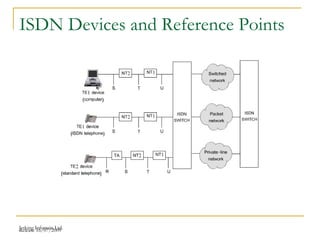
 Network Termination Device 1 (NT1)
 Network Termination Device 2 (NT2)
 ISDN Router
 Terminal Equipment 1 (TE1)
 Terminal Equipment 2 (TE2)
 Terminal Adapter (TA)
Release 16/07/2009Jetking Infotrain Ltd.
ISDN Connections
 ISDN is a channelized service
 A channelized service splits a wire into many logical
channels or time slots
 Some of the common terms that are used in
channelized connections are:
 Digital Signal 0 (DS0)
 Digital Signal 1 (DS1)
 T1
 E1
Release 16/07/2009Jetking Infotrain Ltd.
ISDN Devices and Reference Points
Release 16/07/2009Jetking Infotrain Ltd.
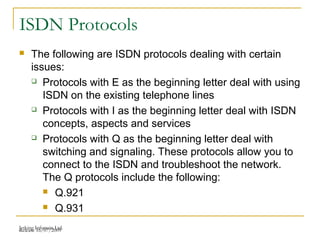
ISDN Protocols
 The following are ISDN protocols dealing with certain
issues:
 Protocols with E as the beginning letter deal with using
ISDN on the existing telephone lines
 Protocols with I as the beginning letter deal with ISDN
concepts, aspects and services
 Protocols with Q as the beginning letter deal with
switching and signaling. These protocols allow you to
connect to the ISDN and troubleshoot the network.
The Q protocols include the following:
 Q.921
 Q.931
Release 16/07/2009Jetking Infotrain Ltd.
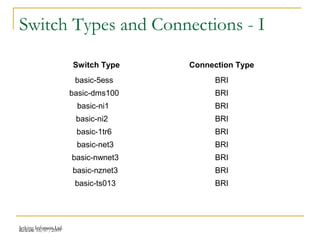
Switch Types and Connections - I
Switch Type Connection Type
basic-5ess BRI
basic-dms100 BRI
basic-ni1 BRI
basic-ni2 BRI
basic-1tr6 BRI
basic-net3 BRI
basic-nwnet3 BRI
basic-nznet3 BRI
basic-ts013 BRI
Release 16/07/2009Jetking Infotrain Ltd.
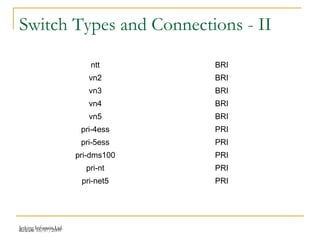
Switch Types and Connections - II
ntt BRI
vn2 BRI
vn3 BRI
vn4 BRI
vn5 BRI
pri-4ess PRI
pri-5ess PRI
pri-dms100 PRI
pri-nt PRI
pri-net5 PRI
Release 16/07/2009Jetking Infotrain Ltd.
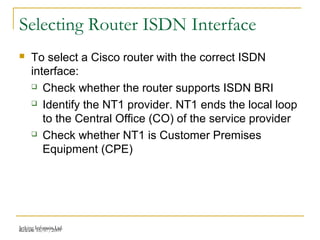
Selecting Router ISDN Interface
 To select a Cisco router with the correct ISDN
interface:
 Check whether the router supports ISDN BRI
 Identify the NT1 provider. NT1 ends the local loop
to the Central Office (CO) of the service provider
 Check whether NT1 is Customer Premises
Equipment (CPE)
Release 16/07/2009Jetking Infotrain Ltd.
ISDN Call Setup Procedure
 To set up an ISDN call between the router and the
ISDN switch, the D channel is used whereas,
between the switches within the service provider’s
network, Signaling System 7 (SS7) is used
 By default, the D channel is always enabled
 During the ISDN call, the calling host sends a call
setup request
 Before the actual connection is established, many
different messages are sent across such as
progress messages and alert messages
Release 16/07/2009Jetking Infotrain Ltd.
Configuring BRI
 You can configure the BRI for the router after
connecting the ISDN equipment
 The generic steps to configure BRI are:
 Setting an user name and password
 Setting the switch type
 Configuring ISDN interface on a router
 Setting the Service Profile Identifier (SPID)
Release 16/07/2009Jetking Infotrain Ltd.
Setting the SPID
 Service Profile IDentifier (SPID) is a set of numbers
for BRI connections that have a National ISDN-1 or
Nortel DMS-100 switch
 The SPID consists of the ten-digit telephone number
for the connection and extra identification digits
 The SPIDs are provided along with the switch carrier
Release 16/07/2009Jetking Infotrain Ltd.
Configuring PRI - I
 You need to configure additional parameters for PRI
on your router
 After setting the switch type, you need to configure
the T1/E1 controller card and the serial interface of
the controller card
 The different configuration settings for the controller
card include:
 Framing
 Line code
 Clock source
 Timeslots
Release 16/07/2009Jetking Infotrain Ltd.
Configuring PRI - II
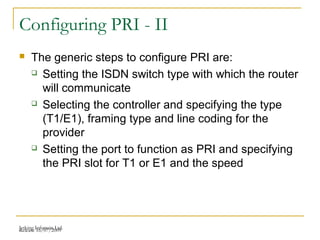
 The generic steps to configure PRI are:
 Setting the ISDN switch type with which the router
will communicate
 Selecting the controller and specifying the type
(T1/E1), framing type and line coding for the
provider
 Setting the port to function as PRI and specifying
the PRI slot for T1 or E1 and the speed
Release 16/07/2009Jetking Infotrain Ltd.
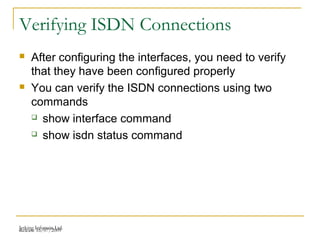
Verifying ISDN Connections
 After configuring the interfaces, you need to verify
that they have been configured properly
 You can verify the ISDN connections using two
commands
 show interface command
 show isdn status command
Release 16/07/2009Jetking Infotrain Ltd.
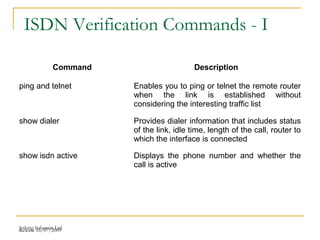
ISDN Verification Commands - I
Command Description
ping and telnet Enables you to ping or telnet the remote router
when the link is established without
considering the interesting traffic list
show dialer Provides dialer information that includes status
of the link, idle time, length of the call, router to
which the interface is connected
show isdn active Displays the phone number and whether the
call is active
Release 16/07/2009Jetking Infotrain Ltd.
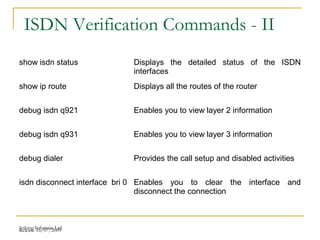
ISDN Verification Commands - II
show isdn status Displays the detailed status of the ISDN
interfaces
show ip route Displays all the routes of the router
debug isdn q921 Enables you to view layer 2 information
debug isdn q931 Enables you to view layer 3 information
debug dialer Provides the call setup and disabled activities
isdn disconnect interface bri 0 Enables you to clear the interface and
disconnect the connection
Release 16/07/2009Jetking Infotrain Ltd.
Dial on Demand Routing
 Cisco provides Dial on Demand Routing (DDR)
feature that allows the Cisco router to dial an ISDN
when it receives an interesting traffic
 The interesting traffic is referred as IP traffic fulfilling
specific criteria such as particular protocol and
highly secured destination address
 If a traffic using particular criterion is set as
interesting traffic, the traffic is given the highest
priority during the transmission
Release 16/07/2009Jetking Infotrain Ltd.
Making a phone connection - I
 To make a phone connection, the DDR goes through the
following process:
 When a packet is received, the router checks the
routing table to locate the destination
 The router determines if the packet is interesting.
 The router establishes DDR connection by dialing the
ISDN. When the received packet is interesting and the
DDR is not active, the router makes a phone call to
establish connection. If the received packet is not
interesting and the DDR is not active, the router drops
the packet. However, the router transmits all the
packets if the DDR already active
Release 16/07/2009Jetking Infotrain Ltd.
Making a phone connection - II
 Once the connection is established, the router
transmits the packets from the DDR interface
 The router terminates the connection if no packets
are to be transmitted or the connection remains
idle for certain period
Release 16/07/2009Jetking Infotrain Ltd.
DDR Configuration - I
 You can allow the Cisco router to perform the DDR
process by configuring it
 DDR can be used in the following situations:
 The telecommuters need to connect to the
company network periodically
 There are offices that need to send transactions
or requests to the main computer at the central
office
 The users need to retrieve the e-mail from the ISP
Release 16/07/2009Jetking Infotrain Ltd.
DDR Configuration - II
 The generic steps to configure legacy DDR are:
 Configuring static routes that are the routes for
remote networks
 Specifying which traffic is interesting
 Activating dialer list that contains the information
about the traffic that can generate calls
 Configuring a dialer map that informs the router to
make a call using legacy DDR
Release 16/07/2009Jetking Infotrain Ltd.
Configuring Static Routes
 The DDR feature of Cisco allows you to prevent
unwanted traffic from making phone calls and
keeping the line busy
 configuring static routes helps in avoiding other
traffic to trigger calls
 The ip route command enables you to define the
static route. The syntax of this command is:
ip route network_IP_address_# subnet_mask
remote_router’s_IP_address|router_interface
[administrative_distance]
Release 16/07/2009Jetking Infotrain Ltd.
Specifying Interesting Traffic
 Access Lists (ACLs) allows you to specify the
interesting traffic on the router
 Using the dialer-list command, you can allow only
the IP traffic to establish connection
 The dialer-list command enables you to specify
which traffic is interesting. The syntax of this
command is:
dialer-list [list_#] protocol [protocol_name] permit|
deny access-list [ACL_#]
Release 16/07/2009Jetking Infotrain Ltd.
Activating Dialer List
 You need to activate the dialer list on the DDR
interface after the list is created
 It is necessary to activate the list because the list is
not an ACL and it only specifies which traffic is
interesting traffic by referring an ACL
 To activate the dialer list, you should use the dialer-
group command. The syntax of this command is
given as follows:
dialer-group dialer_list_#
Release 16/07/2009Jetking Infotrain Ltd.
Configuring Dialer Maps
 Once you finish specifying the interesting traffic and
activating the dialer list on the DDR interface, you
can specify dialer information to the router
 The dialer map command gives dialer information
for the router to make phone calls. The syntax of the
command is:
dialer map protocol_name
destination_router_address name [remote_router]
speed [56|64] [broadcast]
[destination_phone_number]
Release 16/07/2009Jetking Infotrain Ltd.
Dialer Profiles
 With the help of dialer profiles, the following tasks
can be performed:
 Configuring B channels with different IP subnets
 Using encapsulation on the B channel
 Setting DDR parameters for the B channels
 Eliminating the garbage of ISDN B channels by
allowing ISDN BRI interfaces to associate with
multiple dialer pools
Release 16/07/2009Jetking Infotrain Ltd.
Configuring Dialer Profiles
 You can configure many dialer interfaces on the
router wherein each interface will contain complete
information about the possible destinations
 The initial steps in configuring dialer profiles include
configuring static routes and dialer list similar to
legacy DDR
 you need to configure the dialer and the physical
interfaces then
Release 16/07/2009Jetking Infotrain Ltd.
Verifying DDR Configuration
 After configuring the interfaces, you need to verify
that they have been configured properly
 To verify the DDR configuration, there are three
commands:
 show dialer interface
 show isdn active
 show isdn status
Release 16/07/2009Jetking Infotrain Ltd.
Troubleshooting ISDN DDR
 The show and debug commands enable you to
verify and troubleshoot the DDR connections
 show command - You can use the show dialer
command to view the DDR interfaces that made
the phone calls
 debug command - You can use the debug dialer
command to view the DDR process to enable or
disable the connection
Release 16/07/2009Jetking Infotrain Ltd.
Case Study
The Blue Diamond Steel company opened a new
branch at Hyderabad. The organization uses regular
telephone line for data transmission. All the
departments of the Hyderabad branch send the
details of their daily transactions to the Gujarat
branch. The files that contain the transaction details
are very large in size.
Release 16/07/2009Jetking Infotrain Ltd.
Problem
The data transmission is slow which incurs
a lot of expense on each call
Release 16/07/2009Jetking Infotrain Ltd.
Suggested Solution
Implement Cisco routers in the network and configure
ISDN on each router. The Cisco routers provide Dial
on Demand Routing (DDR) feature, which allows the
router to call the ISDN when it receives important
traffic. Setup the PRI service for data transmission,
which provides 23 B channels and 1 D channel
Release 16/07/2009Jetking Infotrain Ltd.
Summary - I
 The Integrated Services Digital Network (ISDN) is a
set of international standards that define data
transmission across digital circuits
 ISDN provides Wide Area Network (WAN) services
in incremental values of 64 kbps
 ISDN requires only 2 seconds to complete a call as
compared to analog signals that require 30 seconds
 Network Termination Device 1 (NT1) provides an
interface between the ISDN BRI line and other
devices
Release 16/07/2009Jetking Infotrain Ltd.
Summary - II
 Network Termination Device 2 (NT2) communicates
with the ISDN protocols
 ISDN Router enables multiple computers on a LAN to
share a single ISDN BRI connection
 Terminal Adapter (TA) converts some other form of
signaling to ISDN to enable non-ISDN devices, such
as the TE2 to work the 2-wire ISDN network
 The U point is a 2-wire interface for connecting to the
(NT1)
 The division of the wire into logical time slots is termed
as Time Division Multiplexing (TDM)
Release 16/07/2009Jetking Infotrain Ltd.
Summary - III
 The S reference point provides a 4-wire interface
between the NT1 and the ISDN networking equipment
such as an ISDN adapter or a router
 Basic Rate Interface (BRI) consists of two B channels
and one D channel
 Primary Rate Interface (PRI) consists of multiple B and
D channels
 The ISDN interfaces can be configured using the
interface command
 The Internet Service Provider (ISP) provides the
switch type for the ISDN connection
Release 16/07/2009Jetking Infotrain Ltd.
Summary - IV
 Service Profile IDentifier (SPID) is a set of numbers
for BRI connections that have a National ISDN-1 or
Nortel DMS-100 switch
 The show interface command enables you to view
the ISDN interface configuration
 The show isdn status command enables you to view
the detailed status of the ISDN interfaces

CCNA CHAPTER 10 BY jetarvind kumar madhukar

  • 1.
    Release 16/07/2009 JetkingInfotrain Ltd. ISDN Configuration Chapter 10
  • 2.
    Release 16/07/2009Jetking InfotrainLtd. Chapter Objectives  Explain ISDN features  Explain ISDN devices  Explain ISDN connections  Configure BRI  Configure PRI  Verify ISDN Connections
  • 3.
    Release 16/07/2009Jetking InfotrainLtd. Recall  WAN is a network that spans a large geographical area  Data-Link layer protocols are commonly called the data link protocols, which communicate between two devices  PAP is a insecure protocol because the username and password is sent in plain text  Use debug ppp authentication to troubleshoot PPP  Using CHAP protocol the server sends challenge messages to the node. The node calculates and sends the results back to the server
  • 4.
    Release 16/07/2009Jetking InfotrainLtd. ISDN Features  ISDN provides Wide Area Network (WAN) services in incremental values of 64 kbps  The features of ISDN are:  Speed  Multiple Device Support  Inexpensive
  • 5.
    Release 16/07/2009Jetking InfotrainLtd. ISDN Channels and Services  ISDN network transmits information through the three logical digital communication channels such as Bearer (B) channel, Data (D) channel and Hybrid (H) channel  H channel can be implemented as H0, H10, H11, H12  ISDN supports two types of connections such as the Basic Rate Interface (BRI) and Primary Rate Interface (PRI)
  • 6.
    Release 16/07/2009Jetking InfotrainLtd. ISDN Devices  The ISDN devices are given as follows:  Network Termination Device 1 (NT1)  Network Termination Device 2 (NT2)  ISDN Router  Terminal Equipment 1 (TE1)  Terminal Equipment 2 (TE2)  Terminal Adapter (TA)
  • 7.
    Release 16/07/2009Jetking InfotrainLtd. ISDN Connections  ISDN is a channelized service  A channelized service splits a wire into many logical channels or time slots  Some of the common terms that are used in channelized connections are:  Digital Signal 0 (DS0)  Digital Signal 1 (DS1)  T1  E1
  • 8.
    Release 16/07/2009Jetking InfotrainLtd. ISDN Devices and Reference Points
  • 9.
    Release 16/07/2009Jetking InfotrainLtd. ISDN Protocols  The following are ISDN protocols dealing with certain issues:  Protocols with E as the beginning letter deal with using ISDN on the existing telephone lines  Protocols with I as the beginning letter deal with ISDN concepts, aspects and services  Protocols with Q as the beginning letter deal with switching and signaling. These protocols allow you to connect to the ISDN and troubleshoot the network. The Q protocols include the following:  Q.921  Q.931
  • 10.
    Release 16/07/2009Jetking InfotrainLtd. Switch Types and Connections - I Switch Type Connection Type basic-5ess BRI basic-dms100 BRI basic-ni1 BRI basic-ni2 BRI basic-1tr6 BRI basic-net3 BRI basic-nwnet3 BRI basic-nznet3 BRI basic-ts013 BRI
  • 11.
    Release 16/07/2009Jetking InfotrainLtd. Switch Types and Connections - II ntt BRI vn2 BRI vn3 BRI vn4 BRI vn5 BRI pri-4ess PRI pri-5ess PRI pri-dms100 PRI pri-nt PRI pri-net5 PRI
  • 12.
    Release 16/07/2009Jetking InfotrainLtd. Selecting Router ISDN Interface  To select a Cisco router with the correct ISDN interface:  Check whether the router supports ISDN BRI  Identify the NT1 provider. NT1 ends the local loop to the Central Office (CO) of the service provider  Check whether NT1 is Customer Premises Equipment (CPE)
  • 13.
    Release 16/07/2009Jetking InfotrainLtd. ISDN Call Setup Procedure  To set up an ISDN call between the router and the ISDN switch, the D channel is used whereas, between the switches within the service provider’s network, Signaling System 7 (SS7) is used  By default, the D channel is always enabled  During the ISDN call, the calling host sends a call setup request  Before the actual connection is established, many different messages are sent across such as progress messages and alert messages
  • 14.
    Release 16/07/2009Jetking InfotrainLtd. Configuring BRI  You can configure the BRI for the router after connecting the ISDN equipment  The generic steps to configure BRI are:  Setting an user name and password  Setting the switch type  Configuring ISDN interface on a router  Setting the Service Profile Identifier (SPID)
  • 15.
    Release 16/07/2009Jetking InfotrainLtd. Setting the SPID  Service Profile IDentifier (SPID) is a set of numbers for BRI connections that have a National ISDN-1 or Nortel DMS-100 switch  The SPID consists of the ten-digit telephone number for the connection and extra identification digits  The SPIDs are provided along with the switch carrier
  • 16.
    Release 16/07/2009Jetking InfotrainLtd. Configuring PRI - I  You need to configure additional parameters for PRI on your router  After setting the switch type, you need to configure the T1/E1 controller card and the serial interface of the controller card  The different configuration settings for the controller card include:  Framing  Line code  Clock source  Timeslots
  • 17.
    Release 16/07/2009Jetking InfotrainLtd. Configuring PRI - II  The generic steps to configure PRI are:  Setting the ISDN switch type with which the router will communicate  Selecting the controller and specifying the type (T1/E1), framing type and line coding for the provider  Setting the port to function as PRI and specifying the PRI slot for T1 or E1 and the speed
  • 18.
    Release 16/07/2009Jetking InfotrainLtd. Verifying ISDN Connections  After configuring the interfaces, you need to verify that they have been configured properly  You can verify the ISDN connections using two commands  show interface command  show isdn status command
  • 19.
    Release 16/07/2009Jetking InfotrainLtd. ISDN Verification Commands - I Command Description ping and telnet Enables you to ping or telnet the remote router when the link is established without considering the interesting traffic list show dialer Provides dialer information that includes status of the link, idle time, length of the call, router to which the interface is connected show isdn active Displays the phone number and whether the call is active
  • 20.
    Release 16/07/2009Jetking InfotrainLtd. ISDN Verification Commands - II show isdn status Displays the detailed status of the ISDN interfaces show ip route Displays all the routes of the router debug isdn q921 Enables you to view layer 2 information debug isdn q931 Enables you to view layer 3 information debug dialer Provides the call setup and disabled activities isdn disconnect interface bri 0 Enables you to clear the interface and disconnect the connection
  • 21.
    Release 16/07/2009Jetking InfotrainLtd. Dial on Demand Routing  Cisco provides Dial on Demand Routing (DDR) feature that allows the Cisco router to dial an ISDN when it receives an interesting traffic  The interesting traffic is referred as IP traffic fulfilling specific criteria such as particular protocol and highly secured destination address  If a traffic using particular criterion is set as interesting traffic, the traffic is given the highest priority during the transmission
  • 22.
    Release 16/07/2009Jetking InfotrainLtd. Making a phone connection - I  To make a phone connection, the DDR goes through the following process:  When a packet is received, the router checks the routing table to locate the destination  The router determines if the packet is interesting.  The router establishes DDR connection by dialing the ISDN. When the received packet is interesting and the DDR is not active, the router makes a phone call to establish connection. If the received packet is not interesting and the DDR is not active, the router drops the packet. However, the router transmits all the packets if the DDR already active
  • 23.
    Release 16/07/2009Jetking InfotrainLtd. Making a phone connection - II  Once the connection is established, the router transmits the packets from the DDR interface  The router terminates the connection if no packets are to be transmitted or the connection remains idle for certain period
  • 24.
    Release 16/07/2009Jetking InfotrainLtd. DDR Configuration - I  You can allow the Cisco router to perform the DDR process by configuring it  DDR can be used in the following situations:  The telecommuters need to connect to the company network periodically  There are offices that need to send transactions or requests to the main computer at the central office  The users need to retrieve the e-mail from the ISP
  • 25.
    Release 16/07/2009Jetking InfotrainLtd. DDR Configuration - II  The generic steps to configure legacy DDR are:  Configuring static routes that are the routes for remote networks  Specifying which traffic is interesting  Activating dialer list that contains the information about the traffic that can generate calls  Configuring a dialer map that informs the router to make a call using legacy DDR
  • 26.
    Release 16/07/2009Jetking InfotrainLtd. Configuring Static Routes  The DDR feature of Cisco allows you to prevent unwanted traffic from making phone calls and keeping the line busy  configuring static routes helps in avoiding other traffic to trigger calls  The ip route command enables you to define the static route. The syntax of this command is: ip route network_IP_address_# subnet_mask remote_router’s_IP_address|router_interface [administrative_distance]
  • 27.
    Release 16/07/2009Jetking InfotrainLtd. Specifying Interesting Traffic  Access Lists (ACLs) allows you to specify the interesting traffic on the router  Using the dialer-list command, you can allow only the IP traffic to establish connection  The dialer-list command enables you to specify which traffic is interesting. The syntax of this command is: dialer-list [list_#] protocol [protocol_name] permit| deny access-list [ACL_#]
  • 28.
    Release 16/07/2009Jetking InfotrainLtd. Activating Dialer List  You need to activate the dialer list on the DDR interface after the list is created  It is necessary to activate the list because the list is not an ACL and it only specifies which traffic is interesting traffic by referring an ACL  To activate the dialer list, you should use the dialer- group command. The syntax of this command is given as follows: dialer-group dialer_list_#
  • 29.
    Release 16/07/2009Jetking InfotrainLtd. Configuring Dialer Maps  Once you finish specifying the interesting traffic and activating the dialer list on the DDR interface, you can specify dialer information to the router  The dialer map command gives dialer information for the router to make phone calls. The syntax of the command is: dialer map protocol_name destination_router_address name [remote_router] speed [56|64] [broadcast] [destination_phone_number]
  • 30.
    Release 16/07/2009Jetking InfotrainLtd. Dialer Profiles  With the help of dialer profiles, the following tasks can be performed:  Configuring B channels with different IP subnets  Using encapsulation on the B channel  Setting DDR parameters for the B channels  Eliminating the garbage of ISDN B channels by allowing ISDN BRI interfaces to associate with multiple dialer pools
  • 31.
    Release 16/07/2009Jetking InfotrainLtd. Configuring Dialer Profiles  You can configure many dialer interfaces on the router wherein each interface will contain complete information about the possible destinations  The initial steps in configuring dialer profiles include configuring static routes and dialer list similar to legacy DDR  you need to configure the dialer and the physical interfaces then
  • 32.
    Release 16/07/2009Jetking InfotrainLtd. Verifying DDR Configuration  After configuring the interfaces, you need to verify that they have been configured properly  To verify the DDR configuration, there are three commands:  show dialer interface  show isdn active  show isdn status
  • 33.
    Release 16/07/2009Jetking InfotrainLtd. Troubleshooting ISDN DDR  The show and debug commands enable you to verify and troubleshoot the DDR connections  show command - You can use the show dialer command to view the DDR interfaces that made the phone calls  debug command - You can use the debug dialer command to view the DDR process to enable or disable the connection
  • 34.
    Release 16/07/2009Jetking InfotrainLtd. Case Study The Blue Diamond Steel company opened a new branch at Hyderabad. The organization uses regular telephone line for data transmission. All the departments of the Hyderabad branch send the details of their daily transactions to the Gujarat branch. The files that contain the transaction details are very large in size.
  • 35.
    Release 16/07/2009Jetking InfotrainLtd. Problem The data transmission is slow which incurs a lot of expense on each call
  • 36.
    Release 16/07/2009Jetking InfotrainLtd. Suggested Solution Implement Cisco routers in the network and configure ISDN on each router. The Cisco routers provide Dial on Demand Routing (DDR) feature, which allows the router to call the ISDN when it receives important traffic. Setup the PRI service for data transmission, which provides 23 B channels and 1 D channel
  • 37.
    Release 16/07/2009Jetking InfotrainLtd. Summary - I  The Integrated Services Digital Network (ISDN) is a set of international standards that define data transmission across digital circuits  ISDN provides Wide Area Network (WAN) services in incremental values of 64 kbps  ISDN requires only 2 seconds to complete a call as compared to analog signals that require 30 seconds  Network Termination Device 1 (NT1) provides an interface between the ISDN BRI line and other devices
  • 38.
    Release 16/07/2009Jetking InfotrainLtd. Summary - II  Network Termination Device 2 (NT2) communicates with the ISDN protocols  ISDN Router enables multiple computers on a LAN to share a single ISDN BRI connection  Terminal Adapter (TA) converts some other form of signaling to ISDN to enable non-ISDN devices, such as the TE2 to work the 2-wire ISDN network  The U point is a 2-wire interface for connecting to the (NT1)  The division of the wire into logical time slots is termed as Time Division Multiplexing (TDM)
  • 39.
    Release 16/07/2009Jetking InfotrainLtd. Summary - III  The S reference point provides a 4-wire interface between the NT1 and the ISDN networking equipment such as an ISDN adapter or a router  Basic Rate Interface (BRI) consists of two B channels and one D channel  Primary Rate Interface (PRI) consists of multiple B and D channels  The ISDN interfaces can be configured using the interface command  The Internet Service Provider (ISP) provides the switch type for the ISDN connection
  • 40.
    Release 16/07/2009Jetking InfotrainLtd. Summary - IV  Service Profile IDentifier (SPID) is a set of numbers for BRI connections that have a National ISDN-1 or Nortel DMS-100 switch  The show interface command enables you to view the ISDN interface configuration  The show isdn status command enables you to view the detailed status of the ISDN interfaces