FILE MANAGEMENT – CHAPTER 11
IT IS IMPORTANT YOU TAKE NOTES DURING
MY CLASSES INTO YOUR ICT NOTEBOOK
YOUR TEXTBOOK IS ALSO VERY IMPORTANT.
Page on the Textbook: 252
ICT IGCSE Theory – Revision Presentation
Chapter
10:
Communication
WWW.YAHMAD.CO.UK
❖11.1 Manage files effectively
❖11.2 Reduce file sizes for storage or transmission
Table of Content
ICT IGCSE Theory – Revision Presentation
Chapter
11:
File
Management
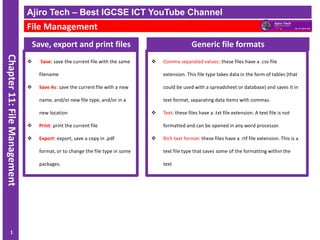
Save, export and print files
❖ Save: save the current file with the same
filename
❖ Save As: save the current file with a new
name, and/or new file type, and/or in a
new location
❖ Print: print the current file
❖ Export: export, save a copy in .pdf
format, or to change the file type in some
packages.
Ajiro Tech – Best IGCSE ICT YouTube Channel
File Management
1
Generic file formats
❖ Comma separated values: these files have a .csv file
extension. This file type takes data in the form of tables (that
could be used with a spreadsheet or database) and saves it in
text format, separating data items with commas.
❖ Text: these files have a .txt file extension. A text file is not
formatted and can be opened in any word processor.
❖ Rich text format: these files have a .rtf file extension. This is a
text file type that saves some of the formatting within the
text
ICT IGCSE Theory – Revision Presentation
Chapter
11:
File
Management
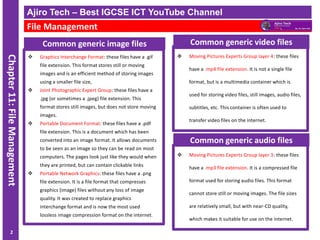
Common generic image files
❖ Graphics Interchange Format: these files have a .gif
file extension. This format stores still or moving
images and is an efficient method of storing images
using a smaller file size,
❖ Joint Photographic Expert Group: these files have a
.jpg (or sometimes a .jpeg) file extension. This
format stores still images, but does not store moving
images.
❖ Portable Document Format: these files have a .pdf
file extension. This is a document which has been
converted into an image format. It allows documents
to be seen as an image so they can be read on most
computers. The pages look just like they would when
they are printed, but can contain clickable links
❖ Portable Network Graphics: these files have a .png
file extension. It is a file format that compresses
graphics (image) files without any loss of image
quality. It was created to replace graphics
interchange format and is now the most used
lossless image compression format on the internet.
Ajiro Tech – Best IGCSE ICT YouTube Channel
File Management
2
❖ Moving Pictures Experts Group layer 4: these files
have a .mp4 file extension. It is not a single file
format, but is a multimedia container which is
used for storing video files, still images, audio files,
subtitles, etc. This container is often used to
transfer video files on the internet.
Common generic video files
❖ Moving Pictures Experts Group layer 3: these files
have a .mp3 file extension. It is a compressed file
format used for storing audio files. This format
cannot store still or moving images. The file sizes
are relatively small, but with near-CD quality,
which makes it suitable for use on the internet.
Common generic audio files
ICT IGCSE Theory – Revision Presentation
Chapter
11:
File
Management
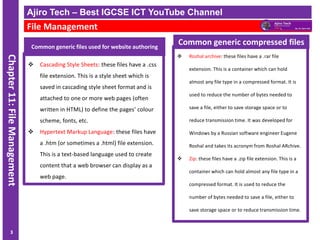
Common generic files used for website authoring
❖ Cascading Style Sheets: these files have a .css
file extension. This is a style sheet which is
saved in cascading style sheet format and is
attached to one or more web pages (often
written in HTML) to define the pages’ colour
scheme, fonts, etc.
❖ Hypertext Markup Language: these files have
a .htm (or sometimes a .html) file extension.
This is a text-based language used to create
content that a web browser can display as a
web page.
Ajiro Tech – Best IGCSE ICT YouTube Channel
File Management
3
❖ Roshal archive: these files have a .rar file
extension. This is a container which can hold
almost any file type in a compressed format. It is
used to reduce the number of bytes needed to
save a file, either to save storage space or to
reduce transmission time. It was developed for
Windows by a Russian software engineer Eugene
Roshal and takes its acronym from Roshal ARchive.
❖ Zip: these files have a .zip file extension. This is a
container which can hold almost any file type in a
compressed format. It is used to reduce the
number of bytes needed to save a file, either to
save storage space or to reduce transmission time.
Common generic compressed files
ICT IGCSE Theory – Revision Presentation
Chapter
11:
File
Management
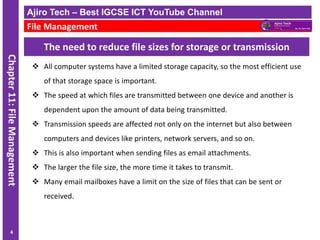
The need to reduce file sizes for storage or transmission
❖ All computer systems have a limited storage capacity, so the most efficient use
of that storage space is important.
❖ The speed at which files are transmitted between one device and another is
dependent upon the amount of data being transmitted.
❖ Transmission speeds are affected not only on the internet but also between
computers and devices like printers, network servers, and so on.
❖ This is also important when sending files as email attachments.
❖ The larger the file size, the more time it takes to transmit.
❖ Many email mailboxes have a limit on the size of files that can be sent or
received.
Ajiro Tech – Best IGCSE ICT YouTube Channel
File Management
4
IGCSE ICT - File Management - Ajiro Tech

IGCSE ICT - File Management - Ajiro Tech

  • 1.
    FILE MANAGEMENT –CHAPTER 11 IT IS IMPORTANT YOU TAKE NOTES DURING MY CLASSES INTO YOUR ICT NOTEBOOK YOUR TEXTBOOK IS ALSO VERY IMPORTANT. Page on the Textbook: 252
  • 2.
    ICT IGCSE Theory– Revision Presentation Chapter 10: Communication WWW.YAHMAD.CO.UK ❖11.1 Manage files effectively ❖11.2 Reduce file sizes for storage or transmission Table of Content
  • 3.
    ICT IGCSE Theory– Revision Presentation Chapter 11: File Management Save, export and print files ❖ Save: save the current file with the same filename ❖ Save As: save the current file with a new name, and/or new file type, and/or in a new location ❖ Print: print the current file ❖ Export: export, save a copy in .pdf format, or to change the file type in some packages. Ajiro Tech – Best IGCSE ICT YouTube Channel File Management 1 Generic file formats ❖ Comma separated values: these files have a .csv file extension. This file type takes data in the form of tables (that could be used with a spreadsheet or database) and saves it in text format, separating data items with commas. ❖ Text: these files have a .txt file extension. A text file is not formatted and can be opened in any word processor. ❖ Rich text format: these files have a .rtf file extension. This is a text file type that saves some of the formatting within the text
  • 4.
    ICT IGCSE Theory– Revision Presentation Chapter 11: File Management Common generic image files ❖ Graphics Interchange Format: these files have a .gif file extension. This format stores still or moving images and is an efficient method of storing images using a smaller file size, ❖ Joint Photographic Expert Group: these files have a .jpg (or sometimes a .jpeg) file extension. This format stores still images, but does not store moving images. ❖ Portable Document Format: these files have a .pdf file extension. This is a document which has been converted into an image format. It allows documents to be seen as an image so they can be read on most computers. The pages look just like they would when they are printed, but can contain clickable links ❖ Portable Network Graphics: these files have a .png file extension. It is a file format that compresses graphics (image) files without any loss of image quality. It was created to replace graphics interchange format and is now the most used lossless image compression format on the internet. Ajiro Tech – Best IGCSE ICT YouTube Channel File Management 2 ❖ Moving Pictures Experts Group layer 4: these files have a .mp4 file extension. It is not a single file format, but is a multimedia container which is used for storing video files, still images, audio files, subtitles, etc. This container is often used to transfer video files on the internet. Common generic video files ❖ Moving Pictures Experts Group layer 3: these files have a .mp3 file extension. It is a compressed file format used for storing audio files. This format cannot store still or moving images. The file sizes are relatively small, but with near-CD quality, which makes it suitable for use on the internet. Common generic audio files
  • 5.
    ICT IGCSE Theory– Revision Presentation Chapter 11: File Management Common generic files used for website authoring ❖ Cascading Style Sheets: these files have a .css file extension. This is a style sheet which is saved in cascading style sheet format and is attached to one or more web pages (often written in HTML) to define the pages’ colour scheme, fonts, etc. ❖ Hypertext Markup Language: these files have a .htm (or sometimes a .html) file extension. This is a text-based language used to create content that a web browser can display as a web page. Ajiro Tech – Best IGCSE ICT YouTube Channel File Management 3 ❖ Roshal archive: these files have a .rar file extension. This is a container which can hold almost any file type in a compressed format. It is used to reduce the number of bytes needed to save a file, either to save storage space or to reduce transmission time. It was developed for Windows by a Russian software engineer Eugene Roshal and takes its acronym from Roshal ARchive. ❖ Zip: these files have a .zip file extension. This is a container which can hold almost any file type in a compressed format. It is used to reduce the number of bytes needed to save a file, either to save storage space or to reduce transmission time. Common generic compressed files
  • 6.
    ICT IGCSE Theory– Revision Presentation Chapter 11: File Management The need to reduce file sizes for storage or transmission ❖ All computer systems have a limited storage capacity, so the most efficient use of that storage space is important. ❖ The speed at which files are transmitted between one device and another is dependent upon the amount of data being transmitted. ❖ Transmission speeds are affected not only on the internet but also between computers and devices like printers, network servers, and so on. ❖ This is also important when sending files as email attachments. ❖ The larger the file size, the more time it takes to transmit. ❖ Many email mailboxes have a limit on the size of files that can be sent or received. Ajiro Tech – Best IGCSE ICT YouTube Channel File Management 4