Multimedia
Text and Graphics
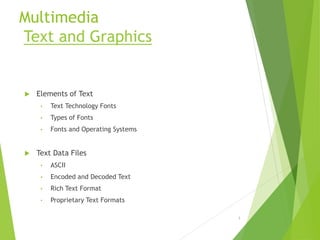
 Elements of Text
• Text Technology Fonts
• Types of Fonts
• Fonts and Operating Systems
 Text Data Files
• ASCII
• Encoded and Decoded Text
• Rich Text Format
• Proprietary Text Formats
1
Text Continues..
 Using Text in Multimedia Applications
• Labels and Captions
• Informational Text
• Navigation and User support
• Applying Text to Multimedia Projects
 Hypertext
• Indexed Retrieval Systems
• Linked or Hyperlinked Systems
2
Graphics
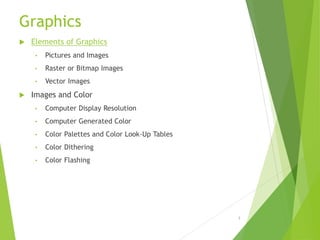
 Elements of Graphics
• Pictures and Images
• Raster or Bitmap Images
• Vector Images
 Images and Color
• Computer Display Resolution
• Computer Generated Color
• Color Palettes and Color Look-Up Tables
• Color Dithering
• Color Flashing
3
Graphics Continues…
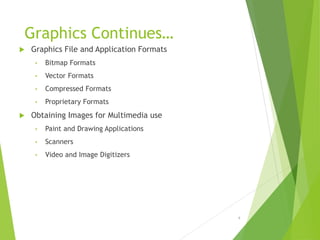
 Graphics File and Application Formats
• Bitmap Formats
• Vector Formats
• Compressed Formats
• Proprietary Formats
 Obtaining Images for Multimedia use
• Paint and Drawing Applications
• Scanners
• Video and Image Digitizers
4
Digital Audio and Video
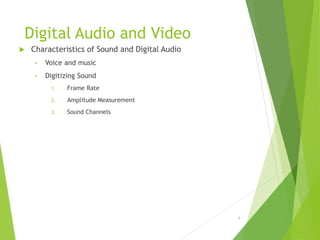
 Characteristics of Sound and Digital Audio
• Voice and music
• Digitizing Sound
1. Frame Rate
2. Amplitude Measurement
3. Sound Channels
5
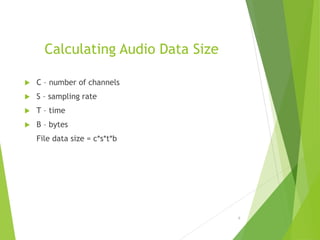
Calculating Audio Data Size
 C – number of channels
 S – sampling rate
 T – time
 B – bytes
File data size = c*s*t*b
6
Digital Audio Systems
 Converting the audio signal from a microphone or from
other audio source
 Transferring the digital data
 Digital Audio Software Support
7
Digital Audio Hardware
Configuration
8
Digital Audio Systems
 Digital Audio Software Support
 Functions are
 Play back
 Record
 Rewind
 Stop
 Fast Forward
 Reverse
9
Digital Audio Systems Editing Digital Audio
 Trimming
 Slicing and Assembly
 Volume Adjustments
 Format Conversions
 Resampling or Downsampling
 Equalization
 Time Stretching
 Digital Signal Processing
 Reversing sounds
10
Digital Audio Systems
 Sound Controls
 Selection of Components
 Volume Level
 Recording Input Level
 Bass and Treble controls
11
 MIDI
• Musical Instrument and Digital Interface – interchanging information between
synthesizers
 Audio File Formats
• Audio Files
• Apple
• Microsoft
• CD-Audio
12
 Using Audio in Multimedia Applications
 Background on Video
• Sources of Digital Video
• Types of Analog Video and standards
• Component video
• Digital video
• Computer-based digital video
 Characteristics of Digital Video
• Frame Rate
• Frame Size
• Color Depth or Resolution
• Balancing Characteristics
13
Interfaced scanning for NTSC
Video Signal
14
Video Capture Technology
15
Characteristics of Digital Video
16
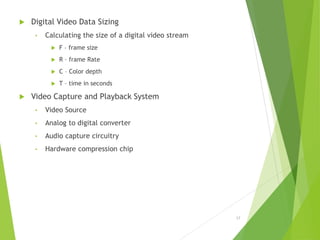
 Digital Video Data Sizing
• Calculating the size of a digital video stream
 F – frame size
 R – frame Rate
 C – Color depth
 T – time in seconds
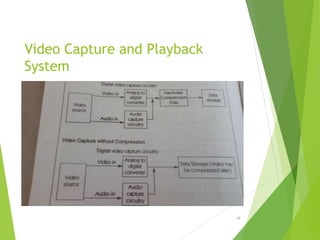
 Video Capture and Playback System
• Video Source
• Analog to digital converter
• Audio capture circuitry
• Hardware compression chip
17
Video Capture and Playback
System
18
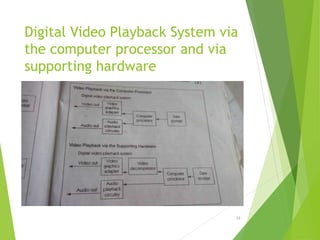
Digital Video Playback System via
the computer processor and via
supporting hardware
19
 Using Graphics in Multimedia Selecting Graphics for multimedia
 Audio Quality
 Audio for Managing software function
 Using audio to enhance other content
 Audio for content delivery
 Backgrounds and Transitions
 Information Delivery
 Navigation
20
Product and Design
Unit IV – Authoring Tools
 Objectives
 Categories of Authoring Tools
 Selecting the Right Authoring Paradigm
21
 Objectives
 Multimedia Tool Selection
 Function
 Content
 Hardware
 Software
 Performance
 User Interface
 Database
 Reliability
 Maintenance and Update
22
Other Elements in Tool
Selection
 Personal Skills
 Cost
 Schedule
23
 Multimedia Tool Features
 Page
 Controls
 Three general categories
 Navigation
 Input
 Media Controls
 Data
 Text
 Graphics
 Audio
 Video
 Live Audio/Video
 Execution
24
Multimedia Tool Features
 Linear Sequenced
 Program Controlled
 Temporal Controlled
 Interactively Controlled
25
Categories of Authoring Tools
 Simple Authoring and Delivery Tool
 Programming Languages for Authoring
 Simple Interactive Authoring Tools
 Complex Interactive Authoring Tools
26
Simple Authoring and Delivery
Tool
 Word processors
 Graphics software
 Presentation packages
27
 Selecting the Right Authoring Paradigm
 Internal Expertise Versus Requirement
 Prototyping with different Tools
 Cross Platform Tools and Products
 One strategy for selecting a tool
28

Multimedia Technology and its Application

  • 1.
    Multimedia Text and Graphics Elements of Text • Text Technology Fonts • Types of Fonts • Fonts and Operating Systems  Text Data Files • ASCII • Encoded and Decoded Text • Rich Text Format • Proprietary Text Formats 1
  • 2.
    Text Continues..  UsingText in Multimedia Applications • Labels and Captions • Informational Text • Navigation and User support • Applying Text to Multimedia Projects  Hypertext • Indexed Retrieval Systems • Linked or Hyperlinked Systems 2
  • 3.
    Graphics  Elements ofGraphics • Pictures and Images • Raster or Bitmap Images • Vector Images  Images and Color • Computer Display Resolution • Computer Generated Color • Color Palettes and Color Look-Up Tables • Color Dithering • Color Flashing 3
  • 4.
    Graphics Continues…  GraphicsFile and Application Formats • Bitmap Formats • Vector Formats • Compressed Formats • Proprietary Formats  Obtaining Images for Multimedia use • Paint and Drawing Applications • Scanners • Video and Image Digitizers 4
  • 5.
    Digital Audio andVideo  Characteristics of Sound and Digital Audio • Voice and music • Digitizing Sound 1. Frame Rate 2. Amplitude Measurement 3. Sound Channels 5
  • 6.
    Calculating Audio DataSize  C – number of channels  S – sampling rate  T – time  B – bytes File data size = c*s*t*b 6
  • 7.
    Digital Audio Systems Converting the audio signal from a microphone or from other audio source  Transferring the digital data  Digital Audio Software Support 7
  • 8.
  • 9.
    Digital Audio Systems Digital Audio Software Support  Functions are  Play back  Record  Rewind  Stop  Fast Forward  Reverse 9
  • 10.
    Digital Audio SystemsEditing Digital Audio  Trimming  Slicing and Assembly  Volume Adjustments  Format Conversions  Resampling or Downsampling  Equalization  Time Stretching  Digital Signal Processing  Reversing sounds 10
  • 11.
    Digital Audio Systems Sound Controls  Selection of Components  Volume Level  Recording Input Level  Bass and Treble controls 11
  • 12.
     MIDI • MusicalInstrument and Digital Interface – interchanging information between synthesizers  Audio File Formats • Audio Files • Apple • Microsoft • CD-Audio 12
  • 13.
     Using Audioin Multimedia Applications  Background on Video • Sources of Digital Video • Types of Analog Video and standards • Component video • Digital video • Computer-based digital video  Characteristics of Digital Video • Frame Rate • Frame Size • Color Depth or Resolution • Balancing Characteristics 13
  • 14.
    Interfaced scanning forNTSC Video Signal 14
  • 15.
  • 16.
  • 17.
     Digital VideoData Sizing • Calculating the size of a digital video stream  F – frame size  R – frame Rate  C – Color depth  T – time in seconds  Video Capture and Playback System • Video Source • Analog to digital converter • Audio capture circuitry • Hardware compression chip 17
  • 18.
    Video Capture andPlayback System 18
  • 19.
    Digital Video PlaybackSystem via the computer processor and via supporting hardware 19
  • 20.
     Using Graphicsin Multimedia Selecting Graphics for multimedia  Audio Quality  Audio for Managing software function  Using audio to enhance other content  Audio for content delivery  Backgrounds and Transitions  Information Delivery  Navigation 20
  • 21.
    Product and Design UnitIV – Authoring Tools  Objectives  Categories of Authoring Tools  Selecting the Right Authoring Paradigm 21
  • 22.
     Objectives  MultimediaTool Selection  Function  Content  Hardware  Software  Performance  User Interface  Database  Reliability  Maintenance and Update 22
  • 23.
    Other Elements inTool Selection  Personal Skills  Cost  Schedule 23
  • 24.
     Multimedia ToolFeatures  Page  Controls  Three general categories  Navigation  Input  Media Controls  Data  Text  Graphics  Audio  Video  Live Audio/Video  Execution 24
  • 25.
    Multimedia Tool Features Linear Sequenced  Program Controlled  Temporal Controlled  Interactively Controlled 25
  • 26.
    Categories of AuthoringTools  Simple Authoring and Delivery Tool  Programming Languages for Authoring  Simple Interactive Authoring Tools  Complex Interactive Authoring Tools 26
  • 27.
    Simple Authoring andDelivery Tool  Word processors  Graphics software  Presentation packages 27
  • 28.
     Selecting theRight Authoring Paradigm  Internal Expertise Versus Requirement  Prototyping with different Tools  Cross Platform Tools and Products  One strategy for selecting a tool 28