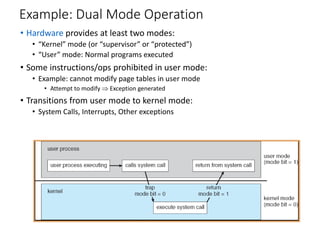
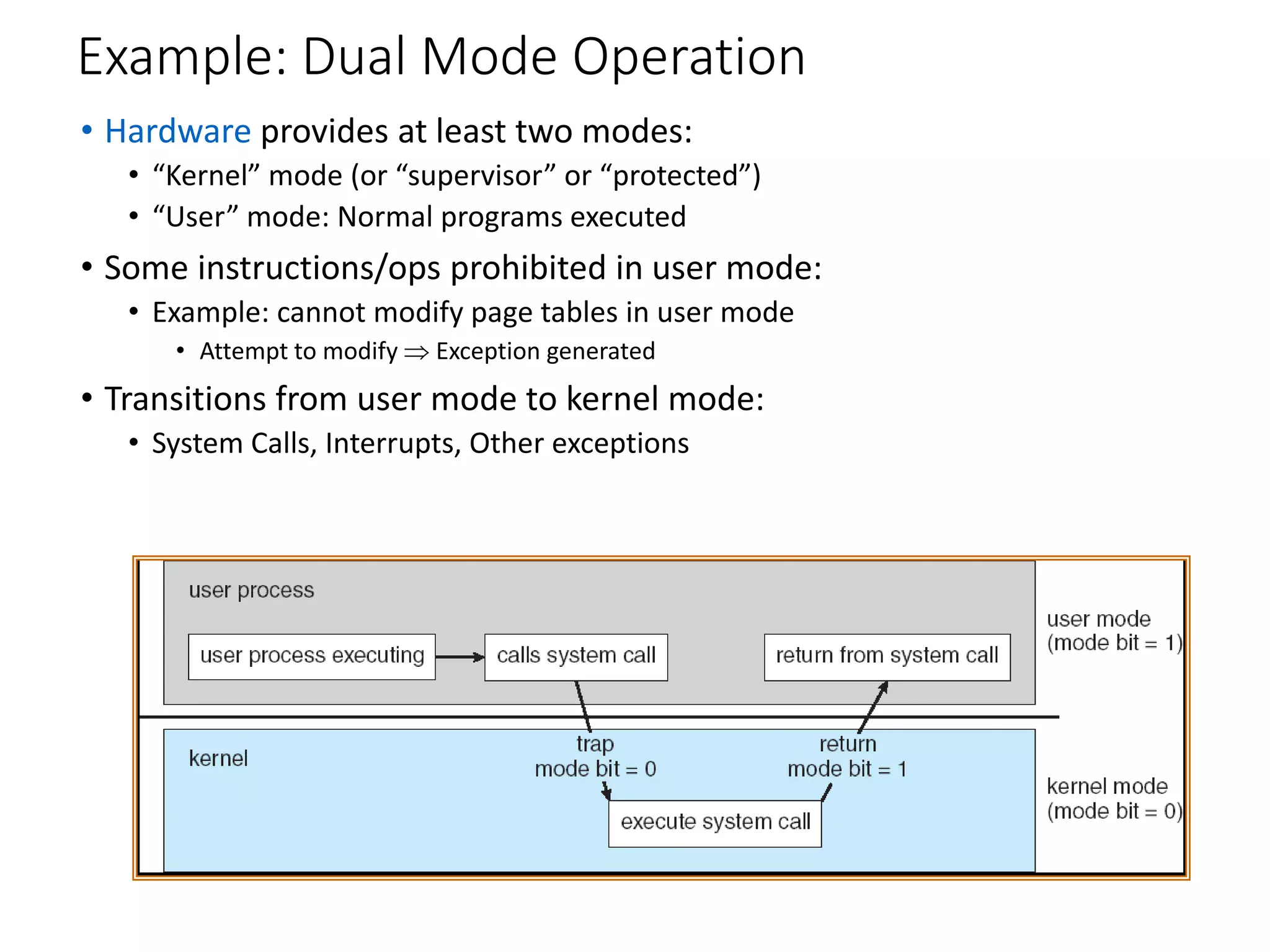
Example: Dual Mode Operation
• Hardware provides at least two modes:
• “Kernel” mode (or “supervisor” or “protected”)
• “User” mode: Normal programs executed
• Some instructions/ops prohibited in user mode:
• Example: cannot modify page tables in user mode
• Attempt to modify  Exception generated
• Transitions from user mode to kernel mode:
• System Calls, Interrupts, Other exceptions
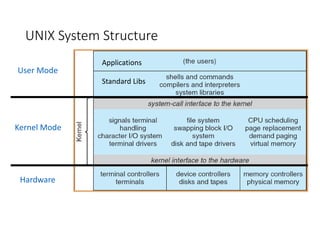
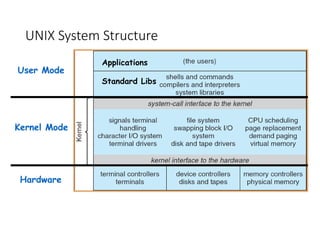
UNIX System Structure
User Mode
Kernel Mode
Hardware
Applications
Standard Libs
Operating Systems Components
(What are the pieces of the OS)
• Process Management
• Main-Memory Management
• I/O System management
• File Management
• Networking
• User Interfaces
Operating System Services
(What things does the OS do?)
• Services that (more-or-less) map onto components
• Program execution
• How do you execute concurrent sequences of instructions?
• I/O operations
• Standardized interfaces to extremely diverse devices
• File system manipulation
• How do you read/write/preserve files?
• Looming concern: How do you even find files???
• Communications
• Networking protocols/Interface with CyberSpace?
• Cross-cutting capabilities
• Error detection & recovery
• Resource allocation
• Accounting
• Protection
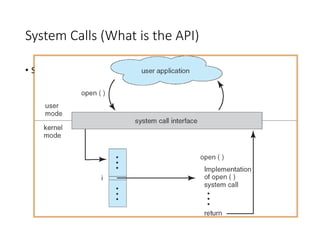
System Calls (What is the API)
• See Chapter 2 of 7th edition or Chapter 3 of 6th
Operating Systems Structure
(What is the organizational Principle?)
• Simple
• Only one or two levels of code
• Layered
• Lower levels independent of upper levels
• Microkernel
• OS built from many user-level processes
• Modular
• Core kernel with Dynamically loadable modules
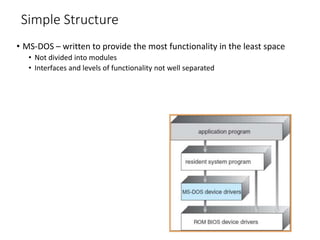
Simple Structure
• MS-DOS – written to provide the most functionality in the least space
• Not divided into modules
• Interfaces and levels of functionality not well separated
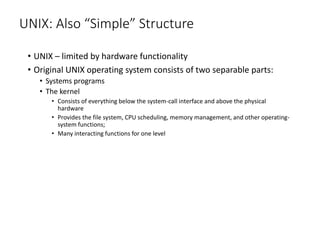
UNIX: Also “Simple” Structure
• UNIX – limited by hardware functionality
• Original UNIX operating system consists of two separable parts:
• Systems programs
• The kernel
• Consists of everything below the system-call interface and above the physical
hardware
• Provides the file system, CPU scheduling, memory management, and other operating-
system functions;
• Many interacting functions for one level
UNIX System Structure
User Mode
Kernel Mode
Hardware
Applications
Standard Libs
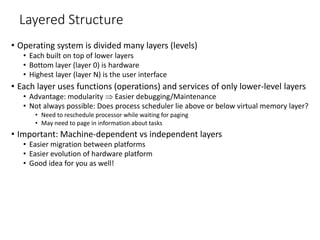
Layered Structure
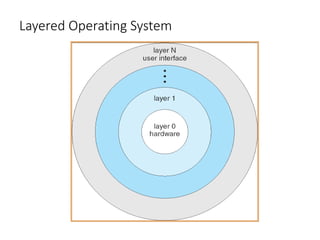
• Operating system is divided many layers (levels)
• Each built on top of lower layers
• Bottom layer (layer 0) is hardware
• Highest layer (layer N) is the user interface
• Each layer uses functions (operations) and services of only lower-level layers
• Advantage: modularity  Easier debugging/Maintenance
• Not always possible: Does process scheduler lie above or below virtual memory layer?
• Need to reschedule processor while waiting for paging
• May need to page in information about tasks
• Important: Machine-dependent vs independent layers
• Easier migration between platforms
• Easier evolution of hardware platform
• Good idea for you as well!
Layered Operating System
Microkernel Structure
• Moves as much from the kernel into “user” space
• Small core OS running at kernel level
• OS Services built from many independent user-level processes
• Communication between modules with message passing
• Benefits:
• Easier to extend a microkernel
• Easier to port OS to new architectures
• More reliable (less code is running in kernel mode)
• Fault Isolation (parts of kernel protected from other parts)
• More secure
• Detriments:
• Performance overhead severe for naïve implementation
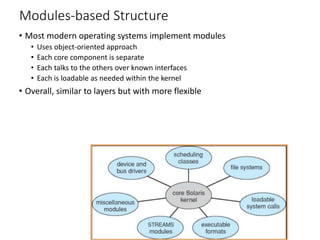
Modules-based Structure
• Most modern operating systems implement modules
• Uses object-oriented approach
• Each core component is separate
• Each talks to the others over known interfaces
• Each is loadable as needed within the kernel
• Overall, similar to layers but with more flexible
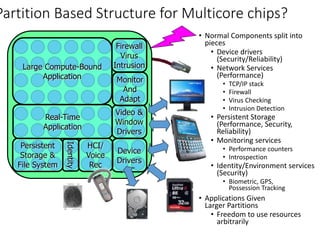
Partition Based Structure for Multicore chips?
• Normal Components split into
pieces
• Device drivers
(Security/Reliability)
• Network Services
(Performance)
• TCP/IP stack
• Firewall
• Virus Checking
• Intrusion Detection
• Persistent Storage
(Performance, Security,
Reliability)
• Monitoring services
• Performance counters
• Introspection
• Identity/Environment services
(Security)
• Biometric, GPS,
Possession Tracking
• Applications Given
Larger Partitions
• Freedom to use resources
arbitrarily
Device
Drivers
Video &
Window
Drivers
Firewall
Virus
Intrusion
Monitor
And
Adapt
Persistent
Storage &
File System
HCI/
Voice
Rec
Large Compute-Bound
Application
Real-Time
Application
Identity
Implementation Issues
(How is the OS implemented?)
• Policy vs. Mechanism
• Policy: What do you want to do?
• Mechanism: How are you going to do it?
• Should be separated, since both change
• Algorithms used
• Linear, Tree-based, Log Structured, etc…
• Event models used
• threads vs event loops
• Backward compatability issues
• Very important for Windows 2000/XP
• System generation/configuration
• How to make generic OS fit on specific hardware

Operating system components

  • 1.
    Example: Dual ModeOperation • Hardware provides at least two modes: • “Kernel” mode (or “supervisor” or “protected”) • “User” mode: Normal programs executed • Some instructions/ops prohibited in user mode: • Example: cannot modify page tables in user mode • Attempt to modify  Exception generated • Transitions from user mode to kernel mode: • System Calls, Interrupts, Other exceptions
  • 2.
    UNIX System Structure UserMode Kernel Mode Hardware Applications Standard Libs
  • 3.
    Operating Systems Components (Whatare the pieces of the OS) • Process Management • Main-Memory Management • I/O System management • File Management • Networking • User Interfaces
  • 4.
    Operating System Services (Whatthings does the OS do?) • Services that (more-or-less) map onto components • Program execution • How do you execute concurrent sequences of instructions? • I/O operations • Standardized interfaces to extremely diverse devices • File system manipulation • How do you read/write/preserve files? • Looming concern: How do you even find files??? • Communications • Networking protocols/Interface with CyberSpace? • Cross-cutting capabilities • Error detection & recovery • Resource allocation • Accounting • Protection
  • 5.
    System Calls (Whatis the API) • See Chapter 2 of 7th edition or Chapter 3 of 6th
  • 6.
    Operating Systems Structure (Whatis the organizational Principle?) • Simple • Only one or two levels of code • Layered • Lower levels independent of upper levels • Microkernel • OS built from many user-level processes • Modular • Core kernel with Dynamically loadable modules
  • 7.
    Simple Structure • MS-DOS– written to provide the most functionality in the least space • Not divided into modules • Interfaces and levels of functionality not well separated
  • 8.
    UNIX: Also “Simple”Structure • UNIX – limited by hardware functionality • Original UNIX operating system consists of two separable parts: • Systems programs • The kernel • Consists of everything below the system-call interface and above the physical hardware • Provides the file system, CPU scheduling, memory management, and other operating- system functions; • Many interacting functions for one level
  • 9.
    UNIX System Structure UserMode Kernel Mode Hardware Applications Standard Libs
  • 10.
    Layered Structure • Operatingsystem is divided many layers (levels) • Each built on top of lower layers • Bottom layer (layer 0) is hardware • Highest layer (layer N) is the user interface • Each layer uses functions (operations) and services of only lower-level layers • Advantage: modularity  Easier debugging/Maintenance • Not always possible: Does process scheduler lie above or below virtual memory layer? • Need to reschedule processor while waiting for paging • May need to page in information about tasks • Important: Machine-dependent vs independent layers • Easier migration between platforms • Easier evolution of hardware platform • Good idea for you as well!
  • 11.
  • 12.
    Microkernel Structure • Movesas much from the kernel into “user” space • Small core OS running at kernel level • OS Services built from many independent user-level processes • Communication between modules with message passing • Benefits: • Easier to extend a microkernel • Easier to port OS to new architectures • More reliable (less code is running in kernel mode) • Fault Isolation (parts of kernel protected from other parts) • More secure • Detriments: • Performance overhead severe for naïve implementation
  • 13.
    Modules-based Structure • Mostmodern operating systems implement modules • Uses object-oriented approach • Each core component is separate • Each talks to the others over known interfaces • Each is loadable as needed within the kernel • Overall, similar to layers but with more flexible
  • 14.
    Partition Based Structurefor Multicore chips? • Normal Components split into pieces • Device drivers (Security/Reliability) • Network Services (Performance) • TCP/IP stack • Firewall • Virus Checking • Intrusion Detection • Persistent Storage (Performance, Security, Reliability) • Monitoring services • Performance counters • Introspection • Identity/Environment services (Security) • Biometric, GPS, Possession Tracking • Applications Given Larger Partitions • Freedom to use resources arbitrarily Device Drivers Video & Window Drivers Firewall Virus Intrusion Monitor And Adapt Persistent Storage & File System HCI/ Voice Rec Large Compute-Bound Application Real-Time Application Identity
  • 15.
    Implementation Issues (How isthe OS implemented?) • Policy vs. Mechanism • Policy: What do you want to do? • Mechanism: How are you going to do it? • Should be separated, since both change • Algorithms used • Linear, Tree-based, Log Structured, etc… • Event models used • threads vs event loops • Backward compatability issues • Very important for Windows 2000/XP • System generation/configuration • How to make generic OS fit on specific hardware

Editor's Notes

  • #2 Like warden in an insane asylum. Put patients in locked padded cell – patient can bang head against wall, but otherwise can’t cause any problems. Pascal – like putting them in a straight jacket. C is like giving them knives to play with.