©2015 Amir Jafari – www.amir-Jafari.com
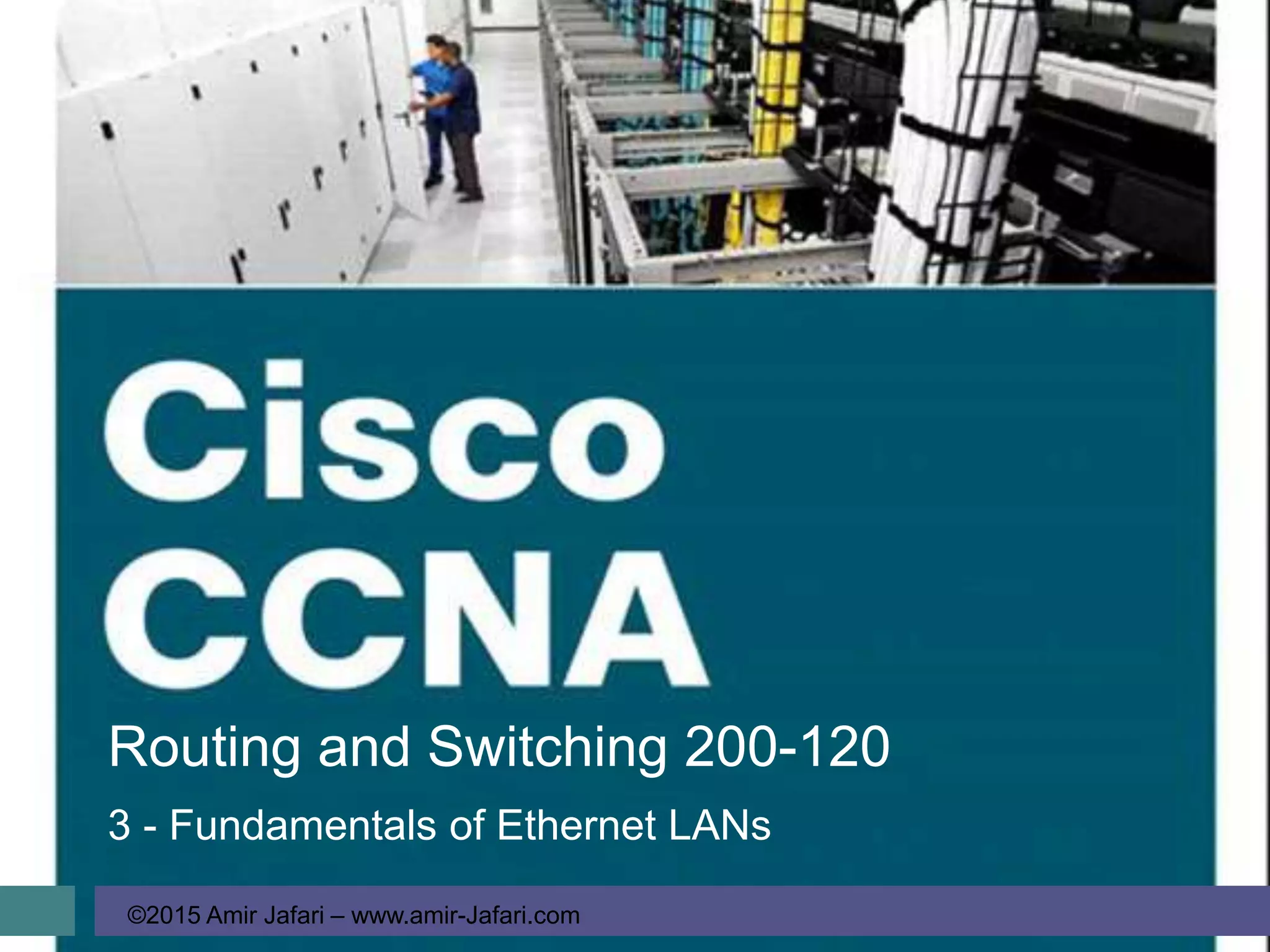
Routing and Switching 200-120
3 - Fundamentals of Ethernet LANs
Fundamentals of Ethernet LANs
©2015 Amir Jafari – www.amir-Jafari.com
Agenda
 An Overview of LANs
 Building Physical Ethernet Networks with UTP
 Sending Data in Ethernet Networks
An Overview of LANs
©2015 Amir Jafari – www.amir-Jafari.com
An Overview of LANs
 Enterprise computer network can be separated into two general types of
technology:
1. local-area networks (LAN)
2. wide-area networks (WAN)
 Together, LANs and WANs create a complete enterprise computer network
 There are two general types of LANs:
1. Ethernet LANs
2. wireless LANs
An Overview of LANs
©2015 Amir Jafari – www.amir-Jafari.com
An Overview of LANs
Ethernet
 The term Ethernet refers to a family of LAN standards that together define the
physical and data link layers of the wired LAN technology
 Defined by the Institute of Electrical and Electronics Engineers (IEEE)
 Defines the cabling, the connectors on the ends of the cables, the protocol
rules, and everything else required to create an Ethernet LAN
 Ethernet Cable, which is a general reference to any cable that conforms to
any of several Ethernet standards
An Overview of LANs
©2015 Amir Jafari – www.amir-Jafari.com
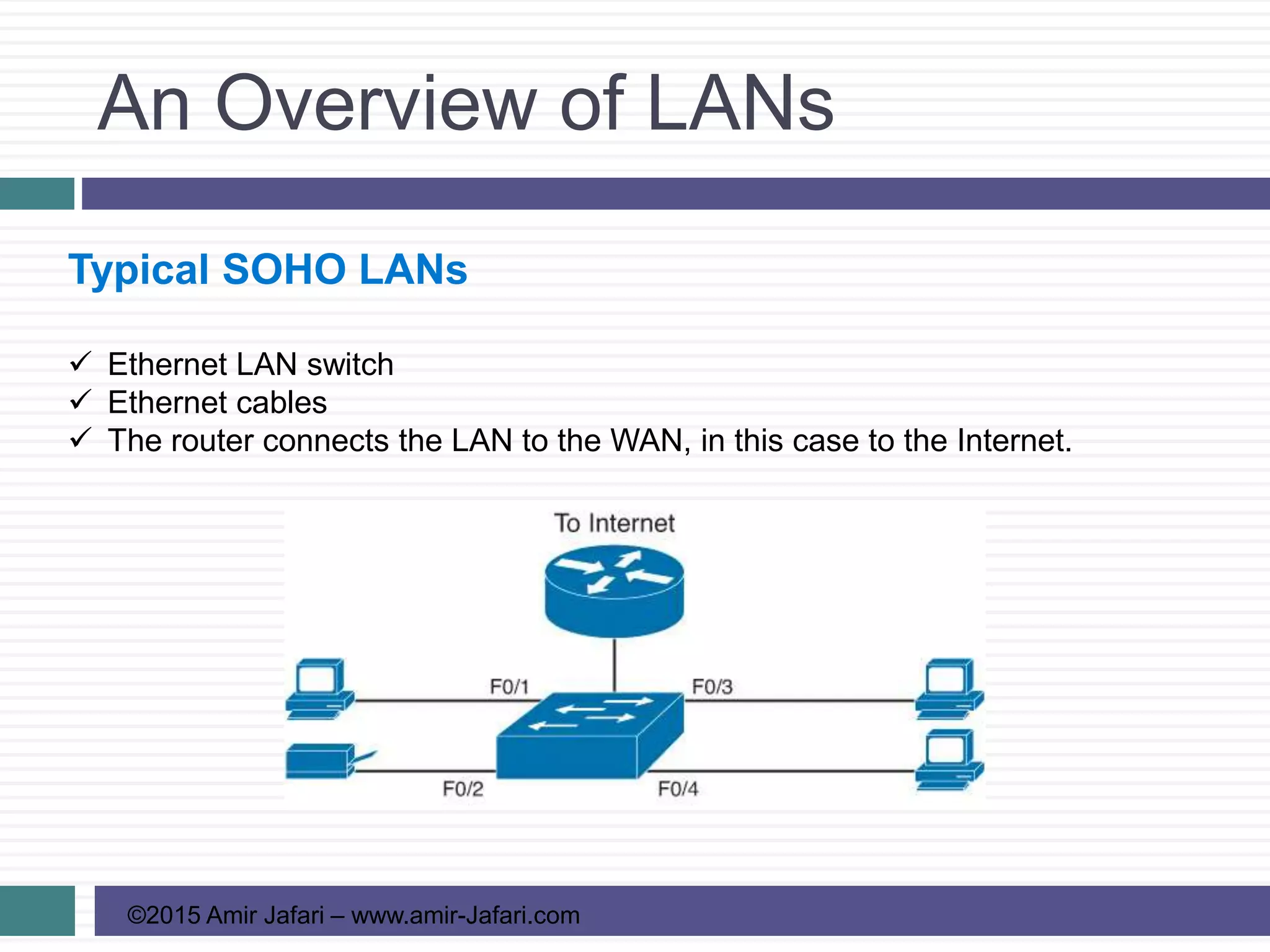
Typical SOHO LANs
 Ethernet LAN switch
 Ethernet cables
 The router connects the LAN to the WAN, in this case to the Internet.
An Overview of LANs
©2015 Amir Jafari – www.amir-Jafari.com
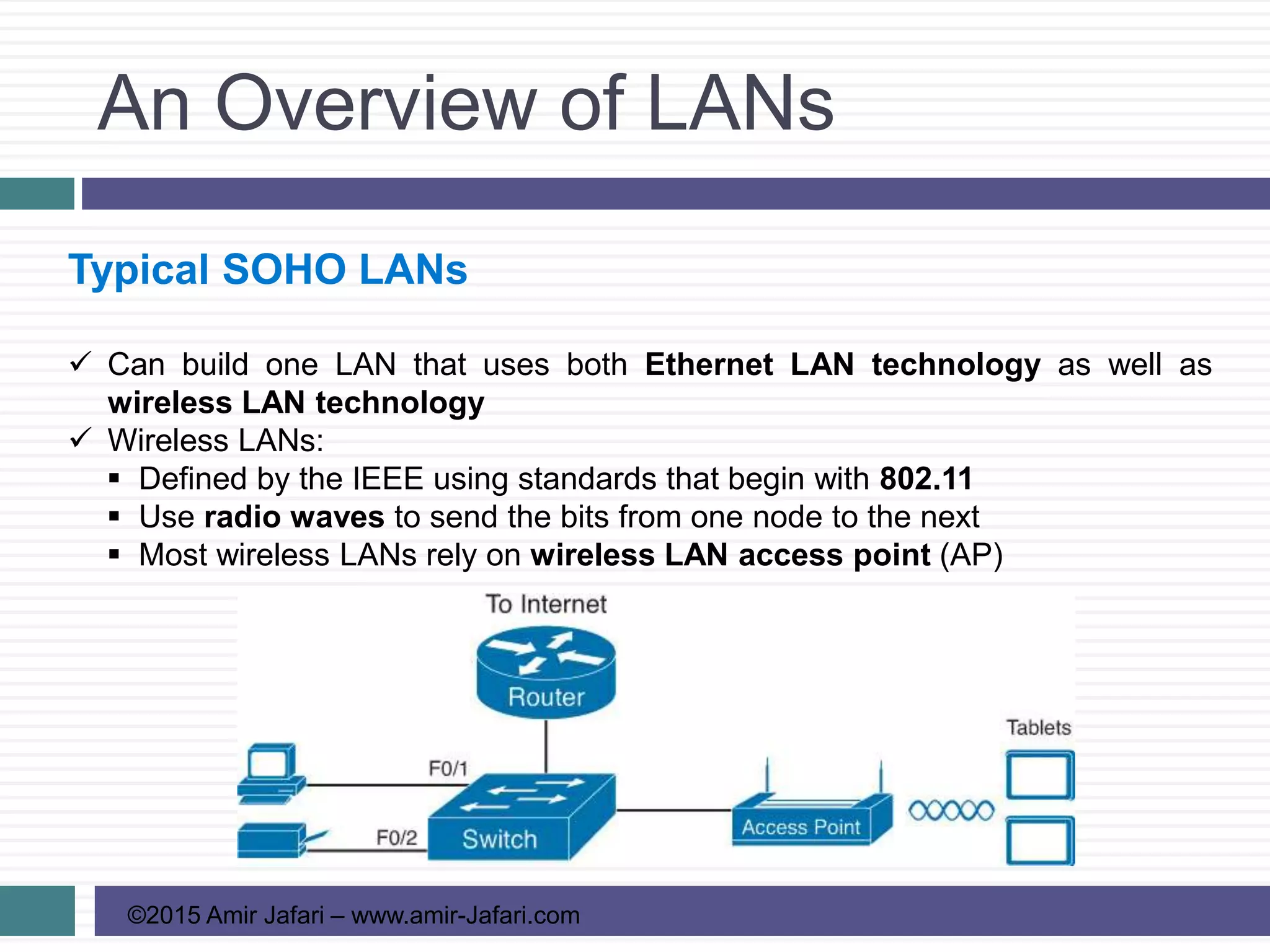
Typical SOHO LANs
 Can build one LAN that uses both Ethernet LAN technology as well as
wireless LAN technology
 Wireless LANs:
 Defined by the IEEE using standards that begin with 802.11
 Use radio waves to send the bits from one node to the next
 Most wireless LANs rely on wireless LAN access point (AP)
An Overview of LANs
©2015 Amir Jafari – www.amir-Jafari.com
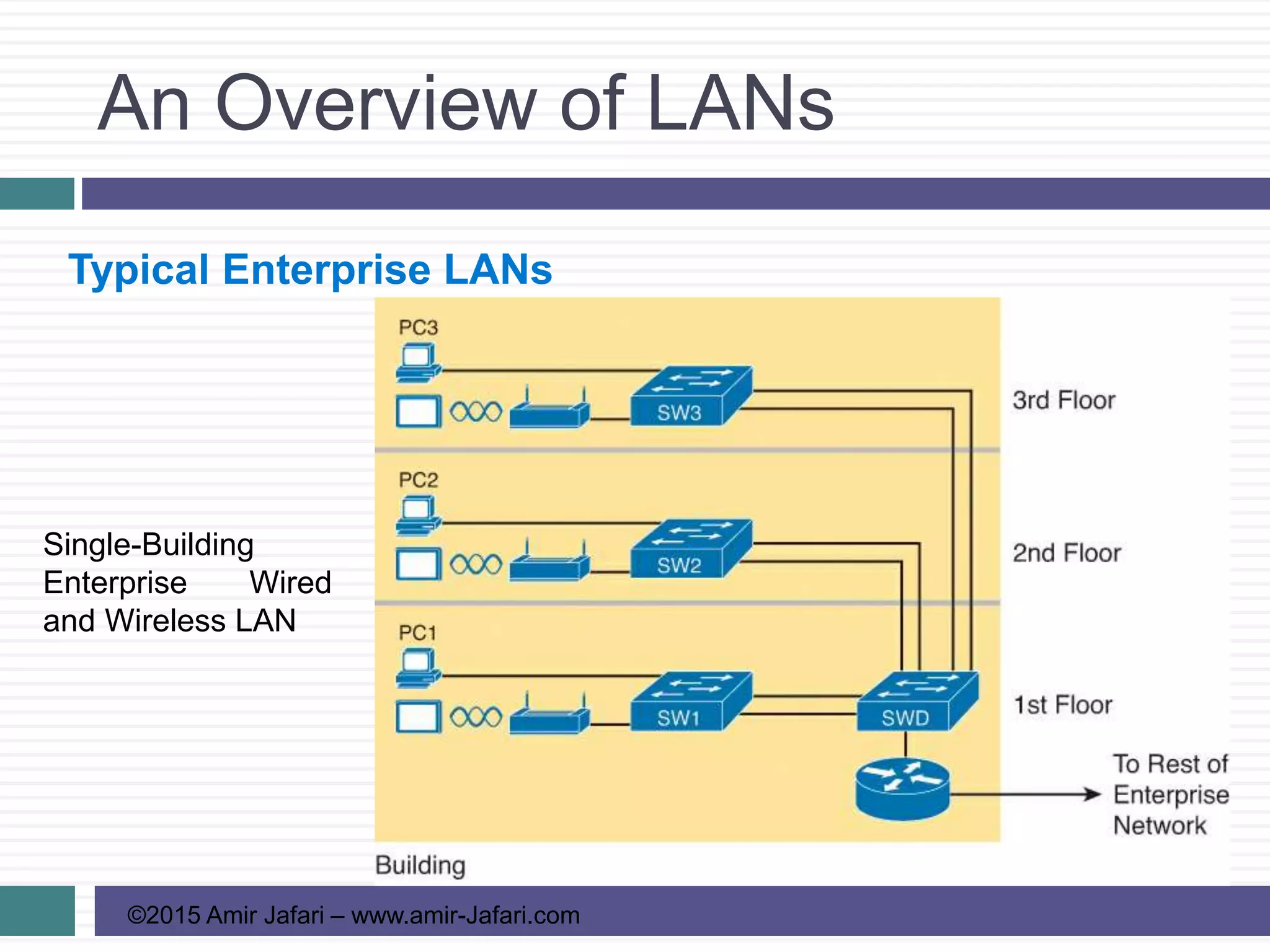
Typical Enterprise LANs
Single-Building
Enterprise Wired
and Wireless LAN
An Overview of LANs
©2015 Amir Jafari – www.amir-Jafari.com
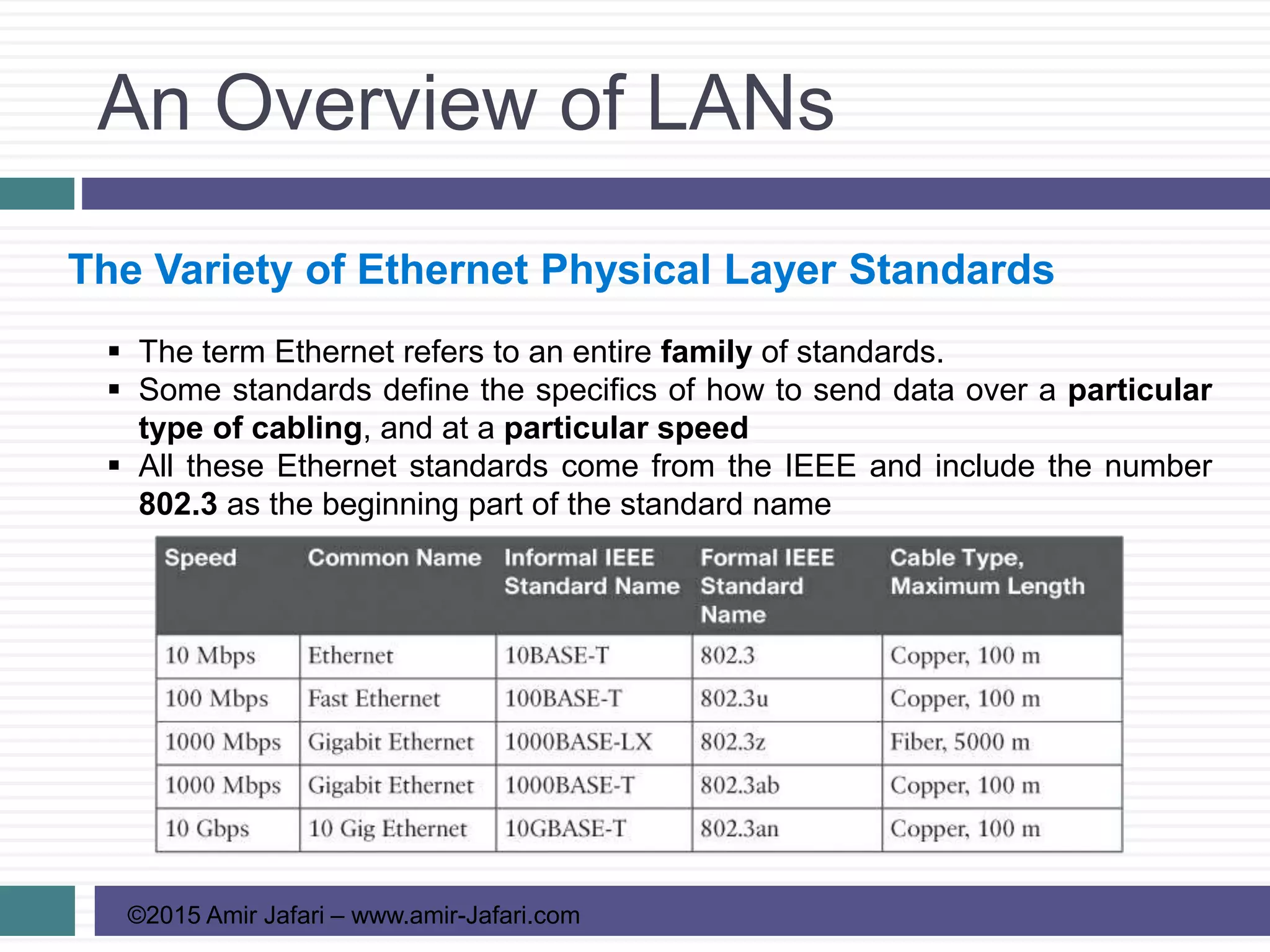
The Variety of Ethernet Physical Layer Standards
 The term Ethernet refers to an entire family of standards.
 Some standards define the specifics of how to send data over a particular
type of cabling, and at a particular speed
 All these Ethernet standards come from the IEEE and include the number
802.3 as the beginning part of the standard name
An Overview of LANs
©2015 Amir Jafari – www.amir-Jafari.com
The Variety of Ethernet Physical Layer Standards
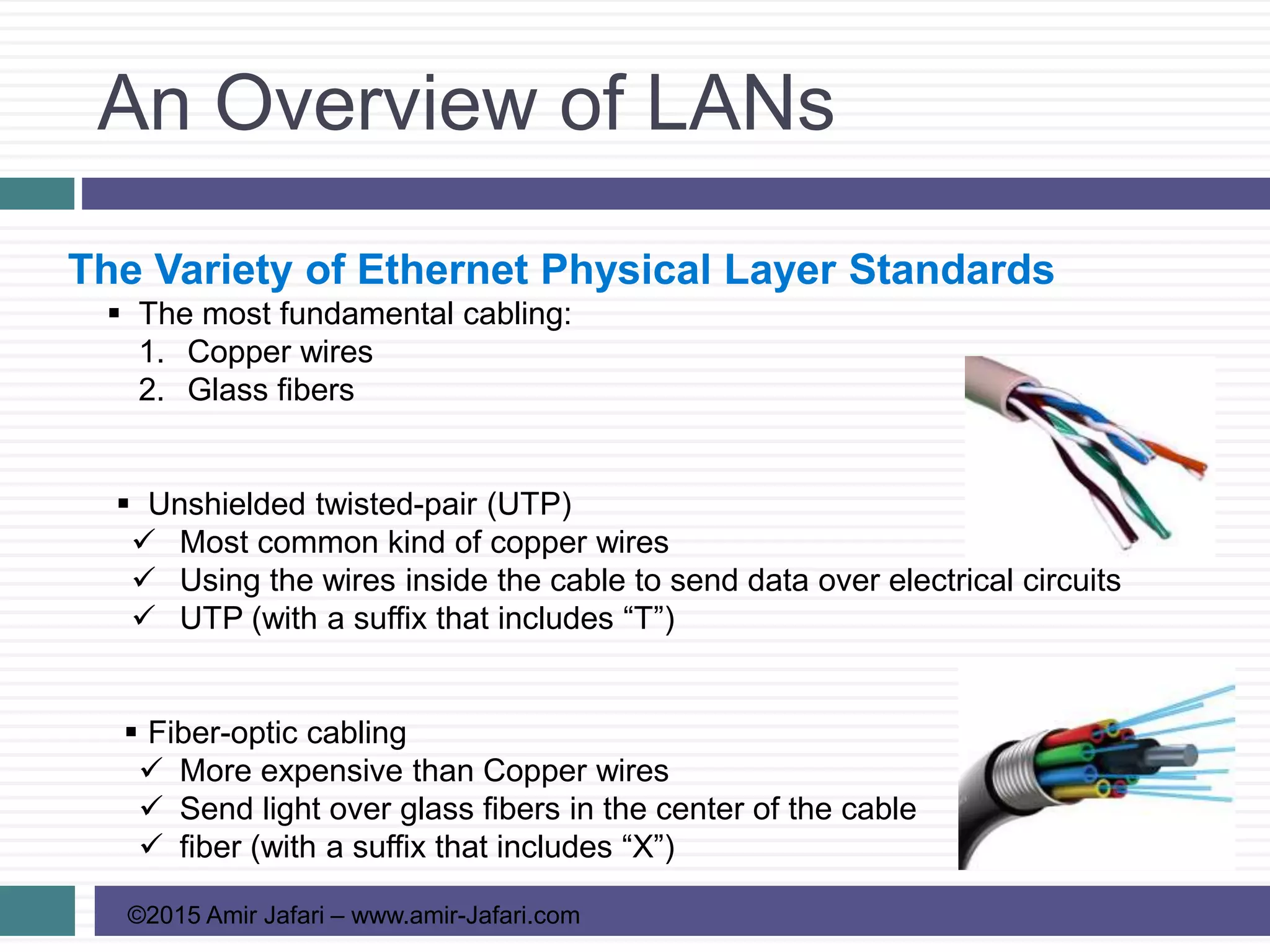
 The most fundamental cabling:
1. Copper wires
2. Glass fibers
 Unshielded twisted-pair (UTP)
 Most common kind of copper wires
 Using the wires inside the cable to send data over electrical circuits
 UTP (with a suffix that includes “T”)
 Fiber-optic cabling
 More expensive than Copper wires
 Send light over glass fibers in the center of the cable
 fiber (with a suffix that includes “X”)
An Overview of LANs
©2015 Amir Jafari – www.amir-Jafari.com
Consistent Behavior over All Links Using the Ethernet
Data Link Layer
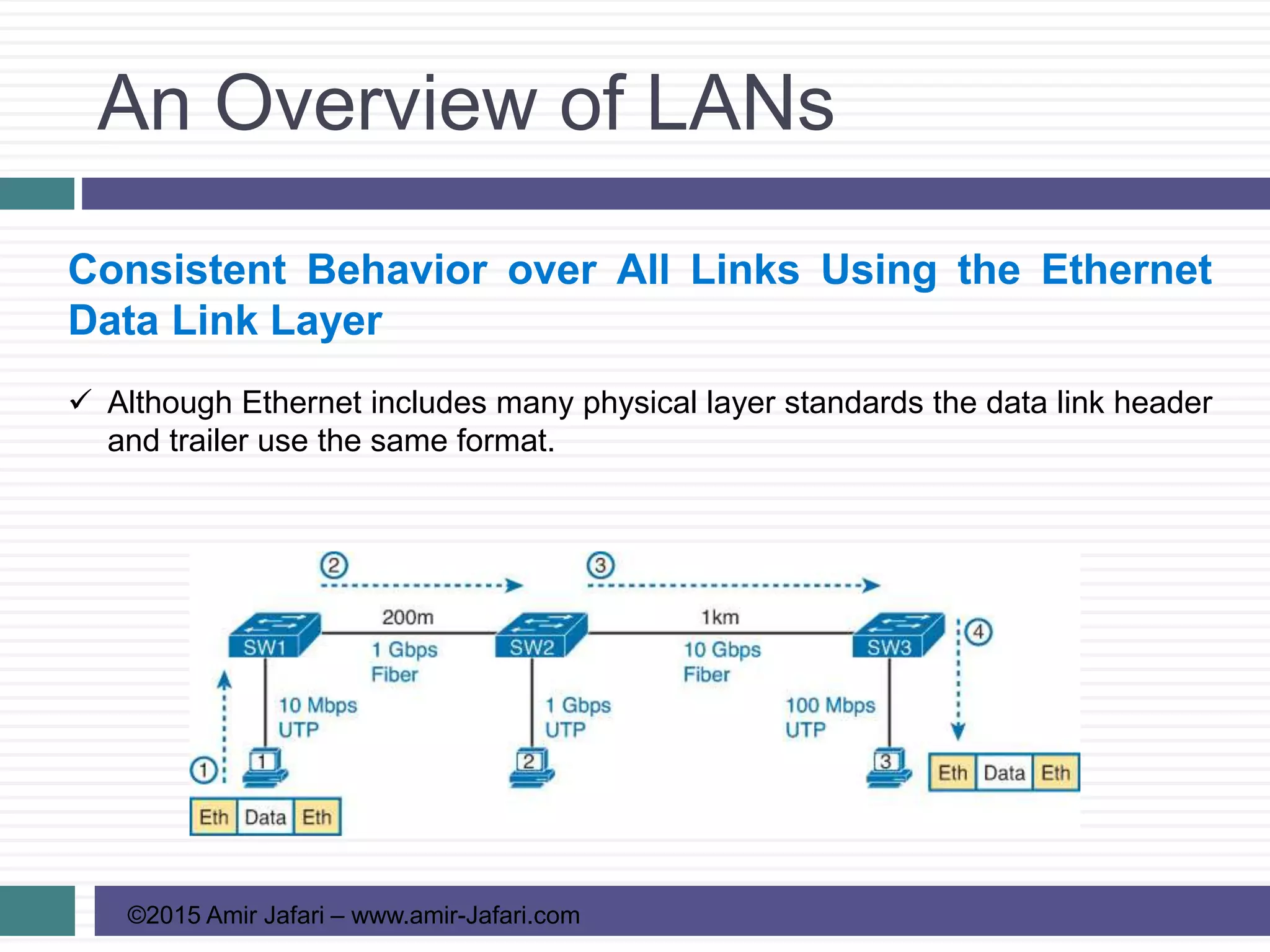
 Although Ethernet includes many physical layer standards the data link header
and trailer use the same format.
Building Physical Ethernet
Networks with UTP
©2015 Amir Jafari – www.amir-Jafari.com
Transmitting Data Using Twisted Pairs
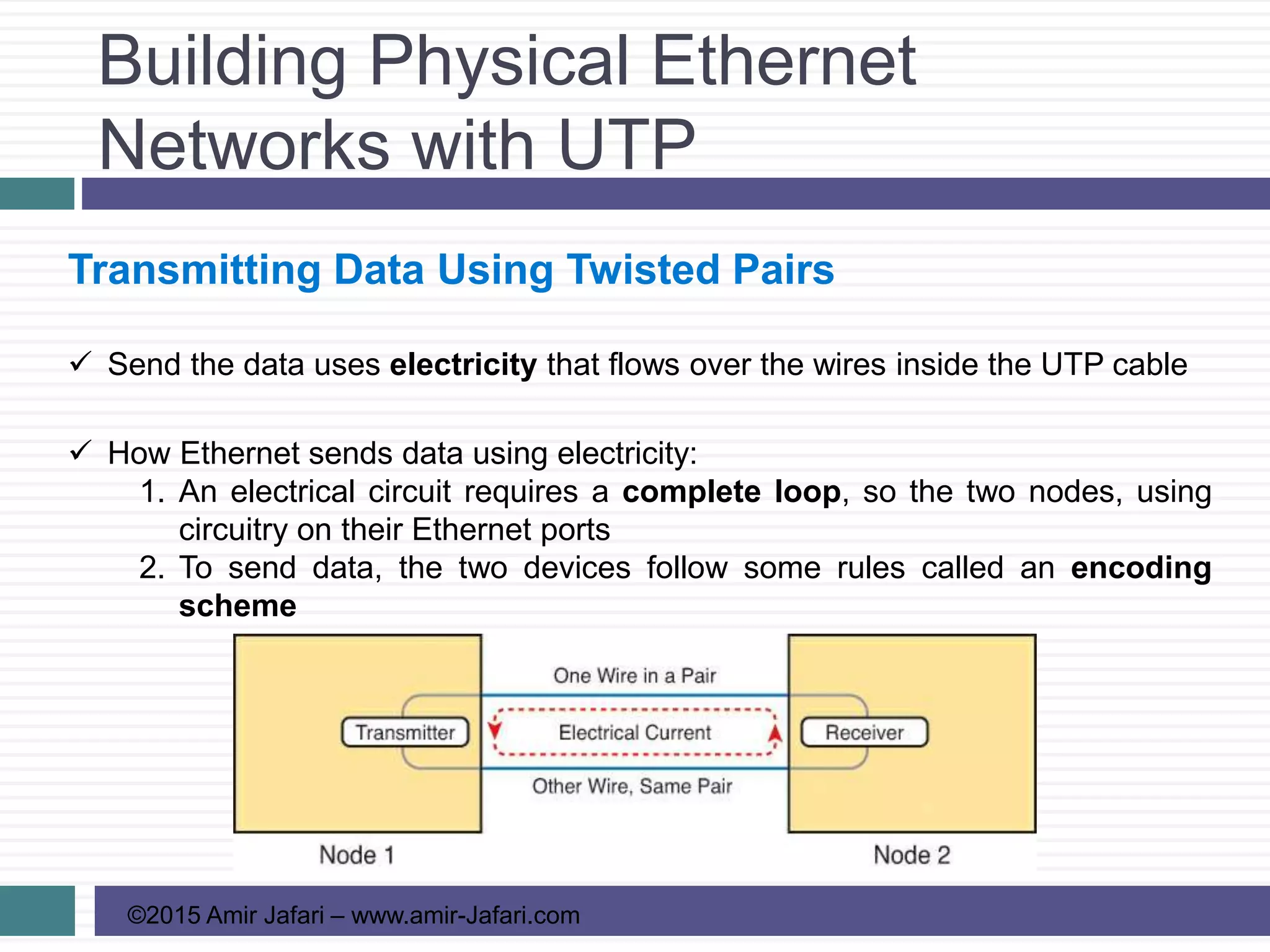
 Send the data uses electricity that flows over the wires inside the UTP cable
 How Ethernet sends data using electricity:
1. An electrical circuit requires a complete loop, so the two nodes, using
circuitry on their Ethernet ports
2. To send data, the two devices follow some rules called an encoding
scheme
Building Physical Ethernet
Networks with UTP
©2015 Amir Jafari – www.amir-Jafari.com
Transmitting Data Using Twisted Pairs
 In an actual UTP cable, the wires will be twisted together and not parallel
which helps solve electromagnetic interference (EMI)
 EMI between wire pairs in the same cable is called crosstalk
 Twisting the wire pairs together helps cancel out most of the EMI
Building Physical Ethernet
Networks with UTP
©2015 Amir Jafari – www.amir-Jafari.com
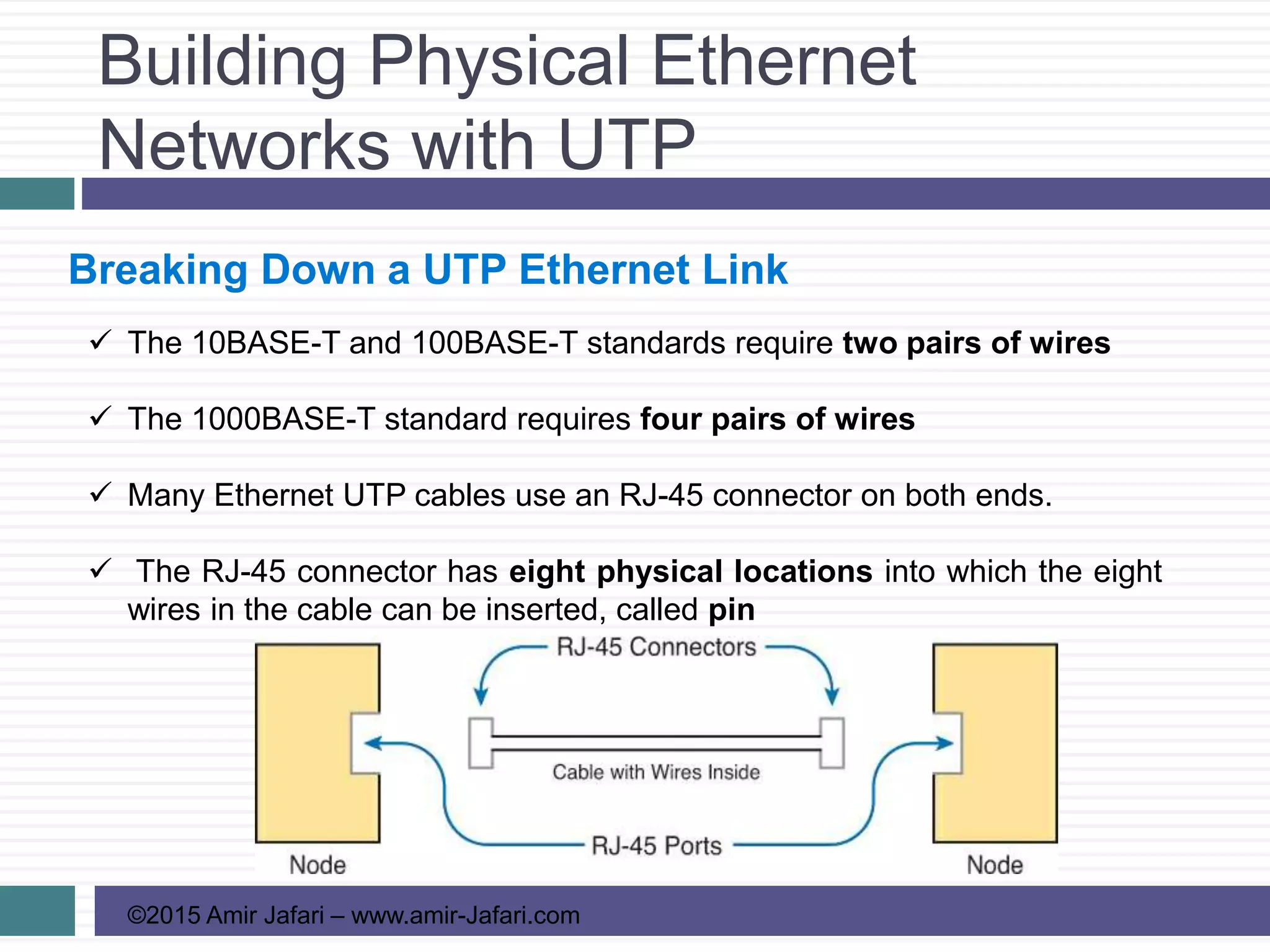
Breaking Down a UTP Ethernet Link
 The 10BASE-T and 100BASE-T standards require two pairs of wires
 The 1000BASE-T standard requires four pairs of wires
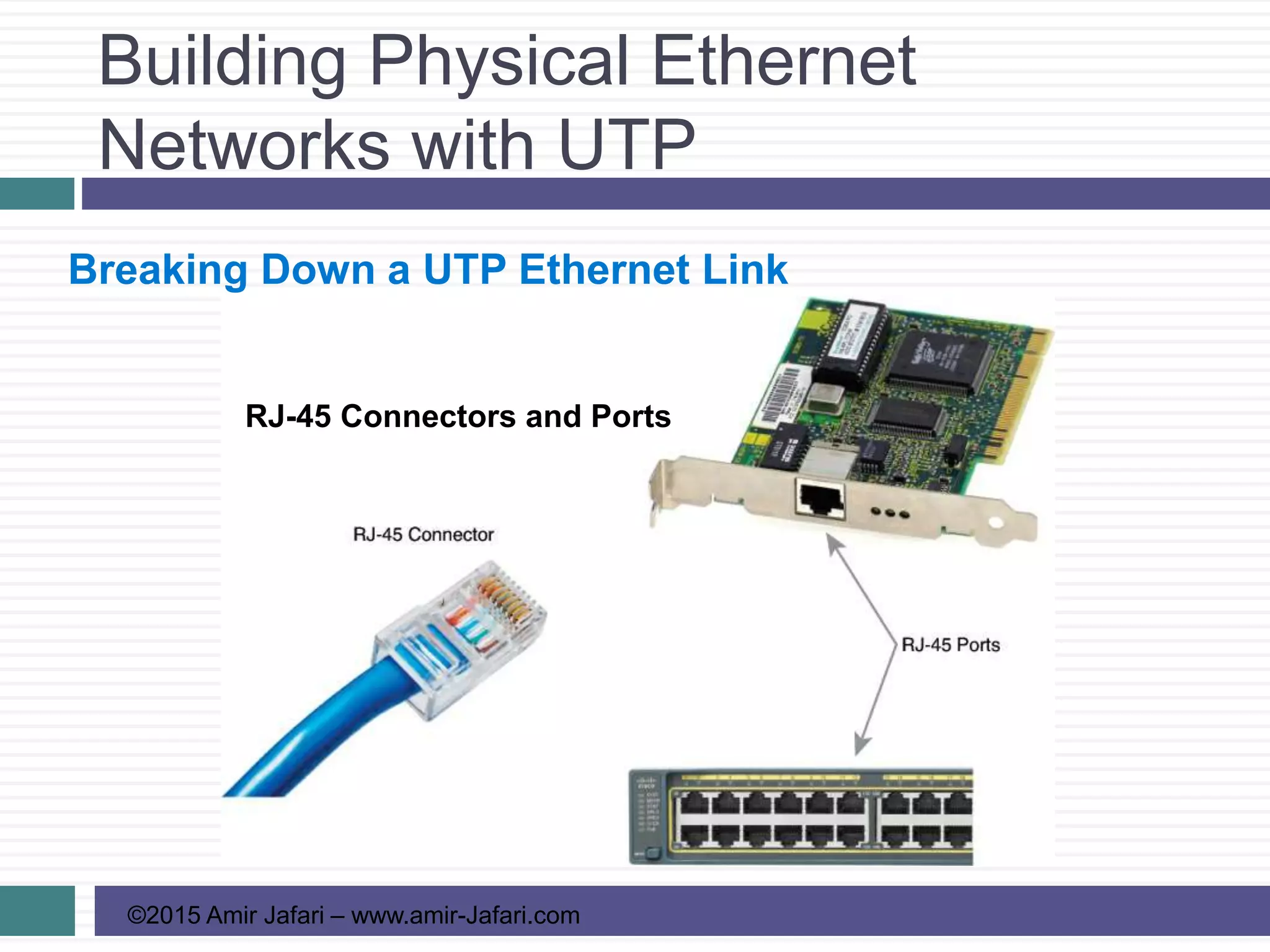
 Many Ethernet UTP cables use an RJ-45 connector on both ends.
 The RJ-45 connector has eight physical locations into which the eight
wires in the cable can be inserted, called pin
Building Physical Ethernet
Networks with UTP
©2015 Amir Jafari – www.amir-Jafari.com
Breaking Down a UTP Ethernet Link
RJ-45 Connectors and Ports
Building Physical Ethernet
Networks with UTP
©2015 Amir Jafari – www.amir-Jafari.com
Breaking Down a UTP Ethernet Link
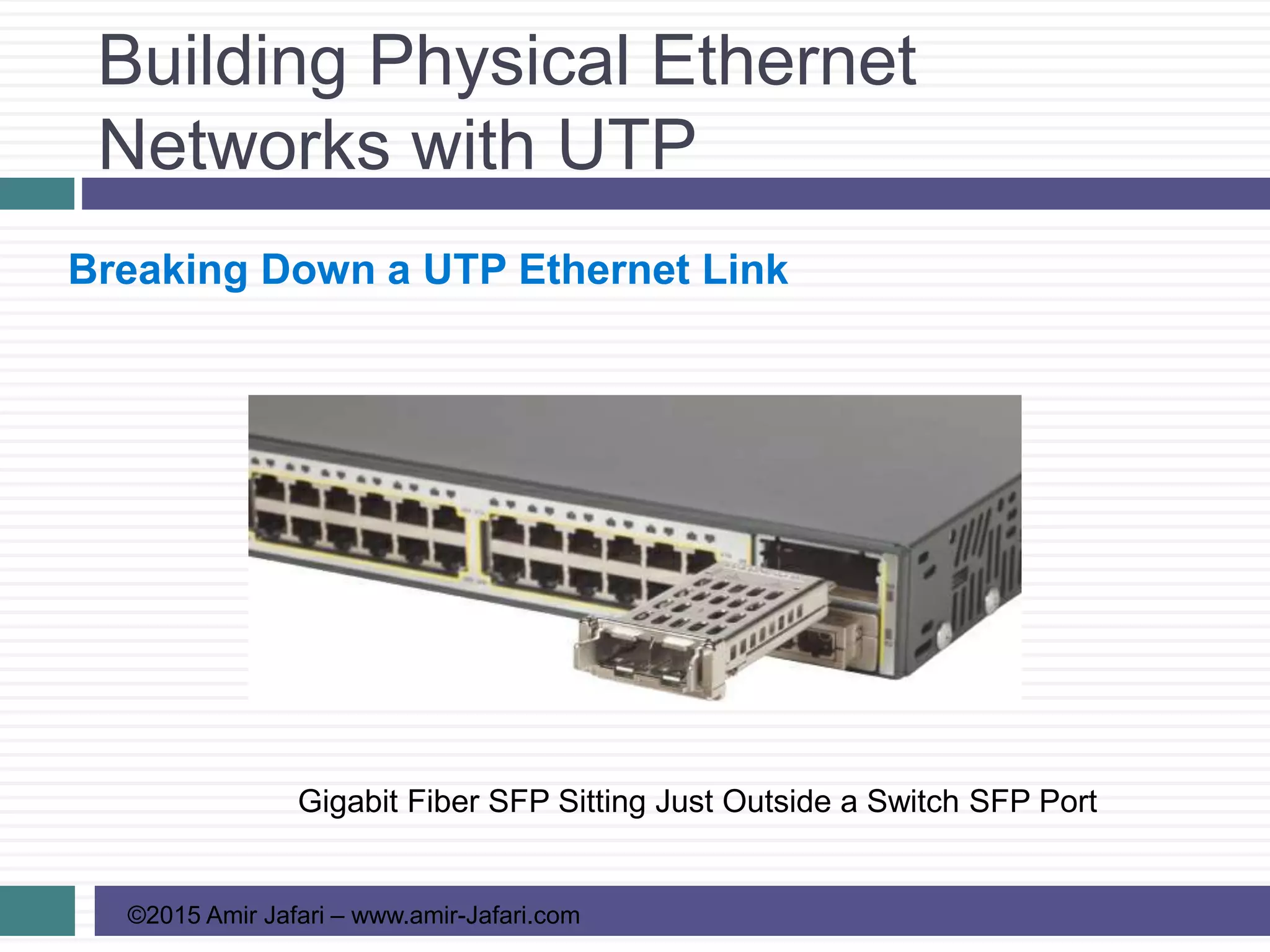
Gigabit Fiber SFP Sitting Just Outside a Switch SFP Port
Building Physical Ethernet
Networks with UTP
©2015 Amir Jafari – www.amir-Jafari.com
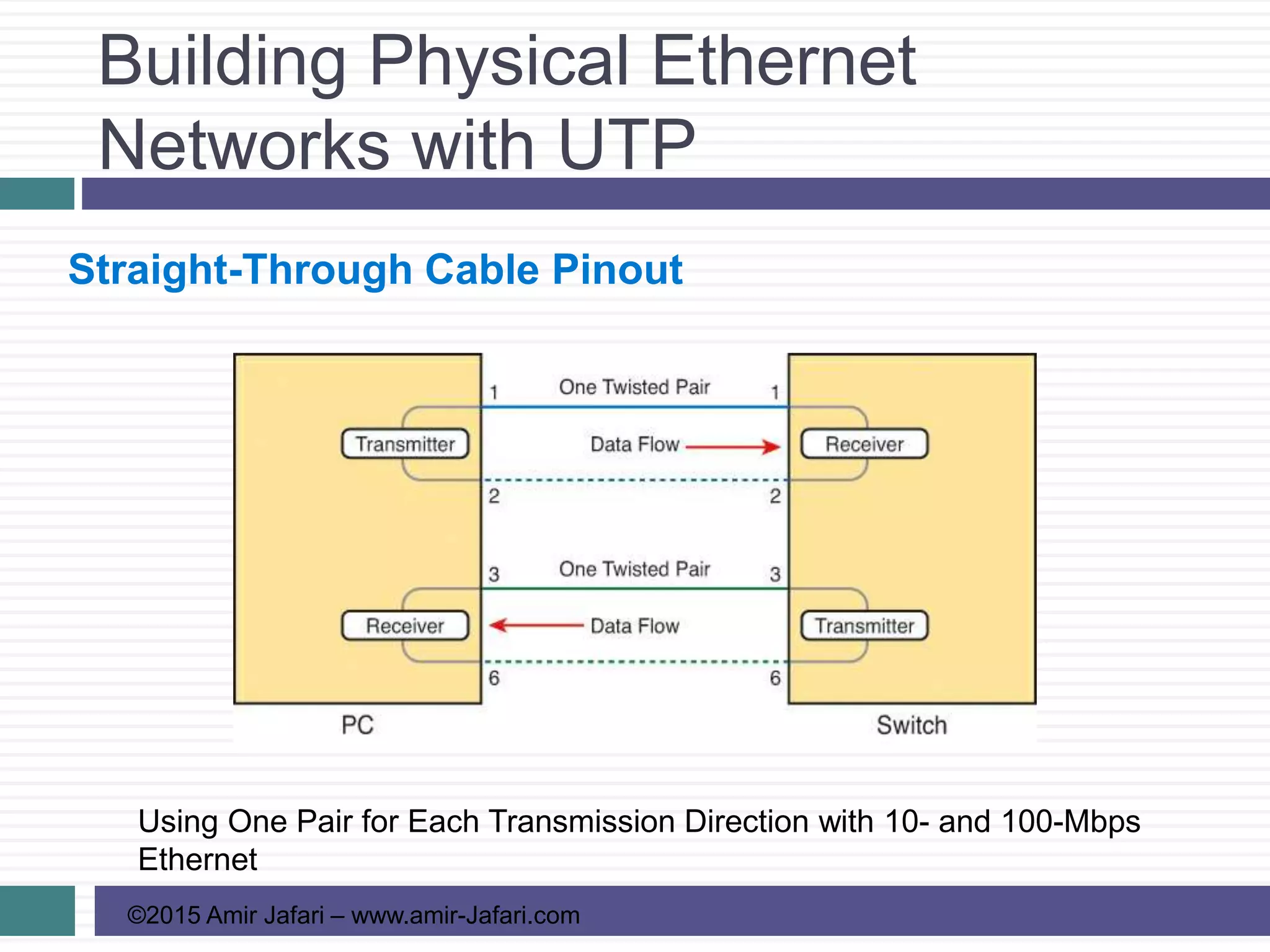
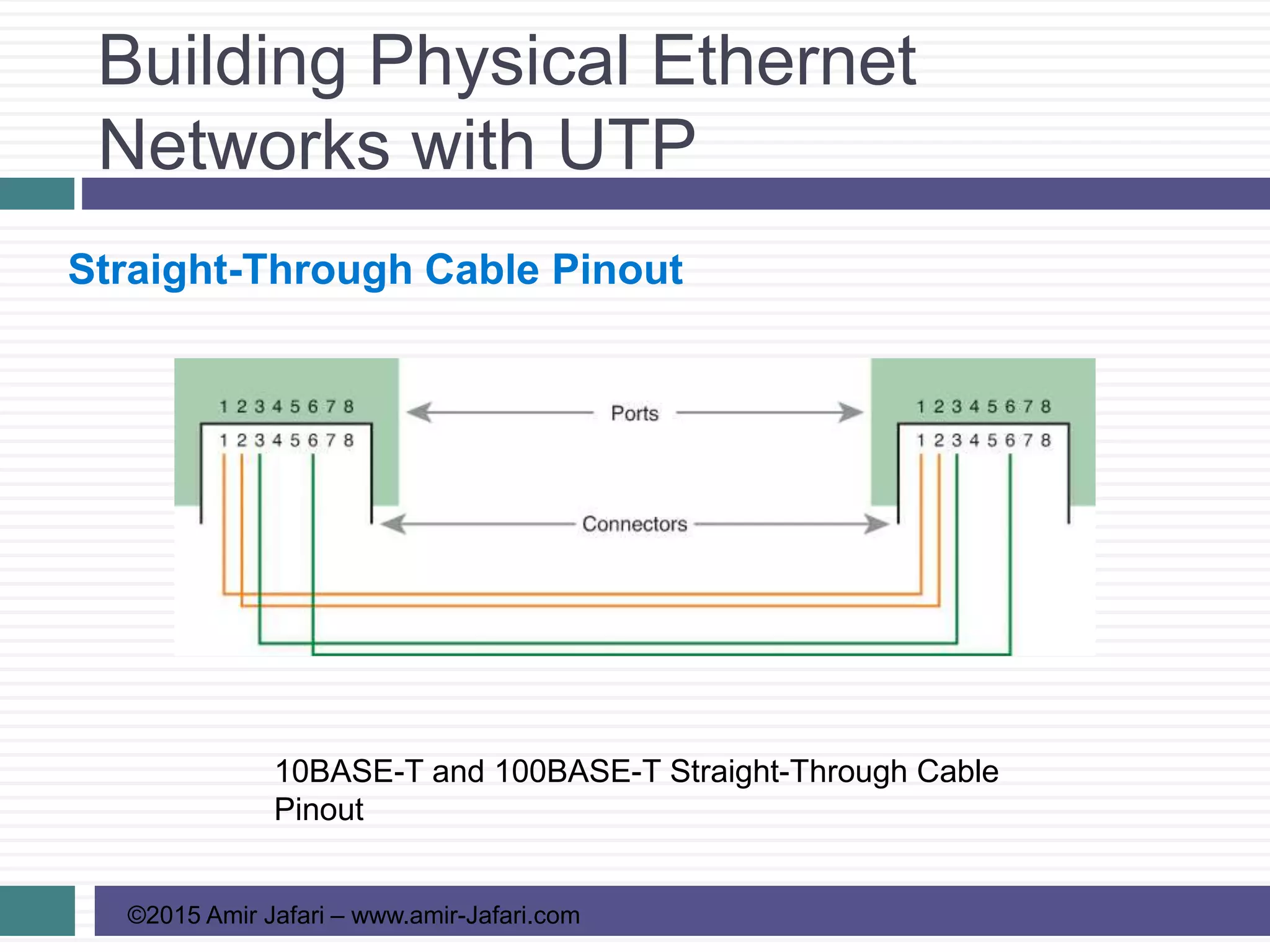
Straight-Through Cable Pinout
Using One Pair for Each Transmission Direction with 10- and 100-Mbps
Ethernet
Building Physical Ethernet
Networks with UTP
©2015 Amir Jafari – www.amir-Jafari.com
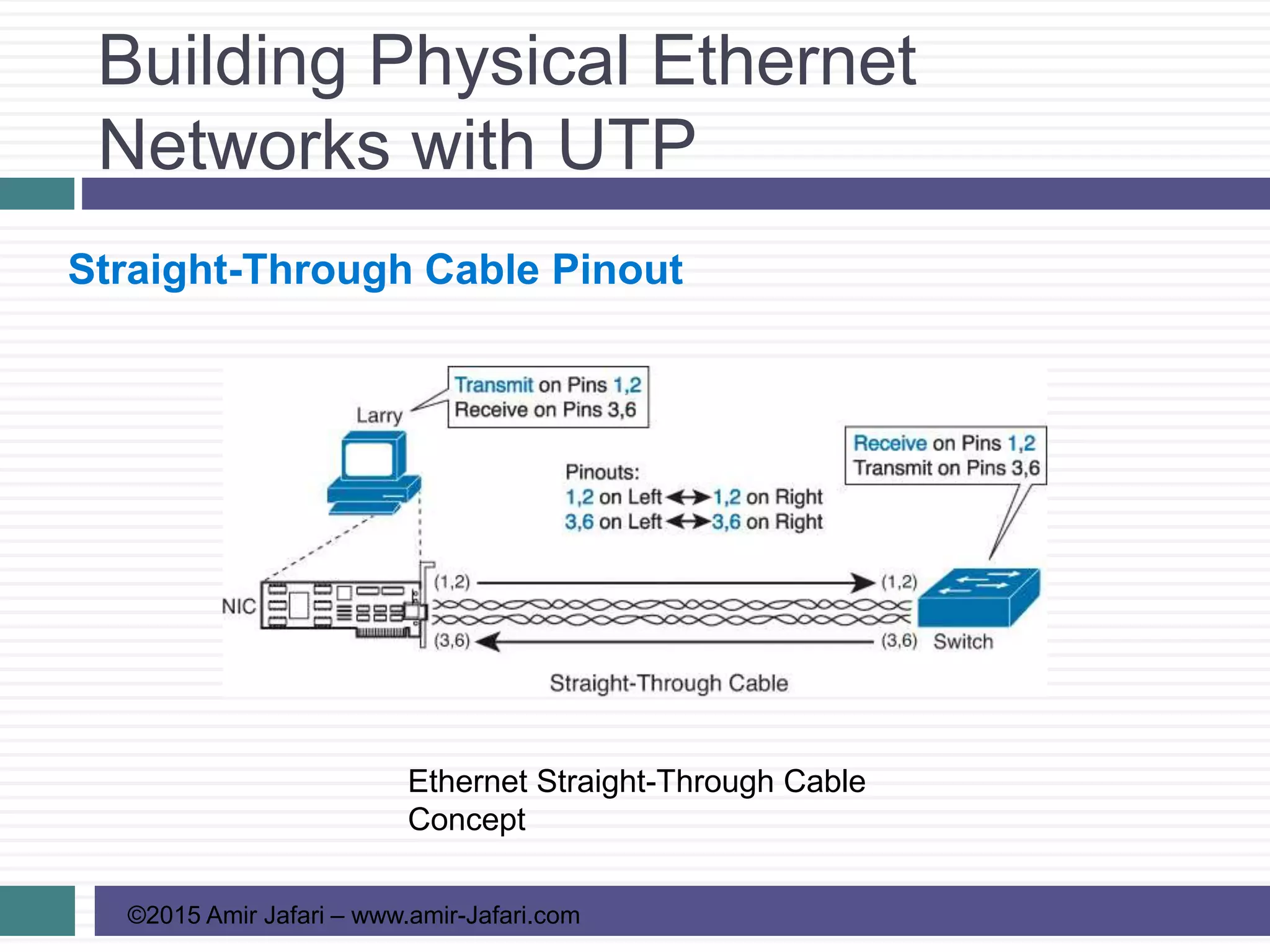
Straight-Through Cable Pinout
10BASE-T and 100BASE-T Straight-Through Cable
Pinout
Building Physical Ethernet
Networks with UTP
©2015 Amir Jafari – www.amir-Jafari.com
Straight-Through Cable Pinout
Ethernet Straight-Through Cable
Concept
Building Physical Ethernet
Networks with UTP
©2015 Amir Jafari – www.amir-Jafari.com
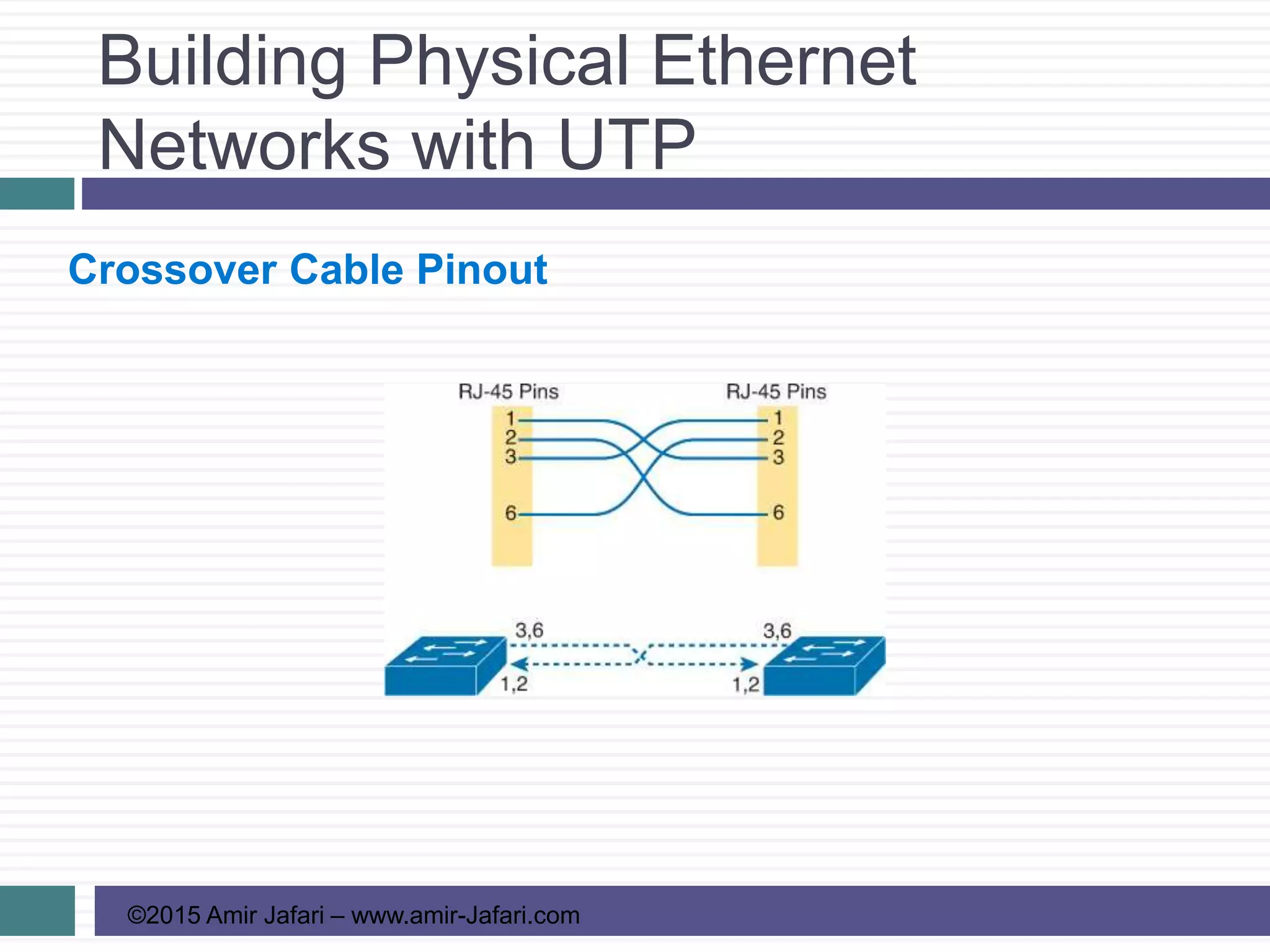
Crossover Cable Pinout
Building Physical Ethernet
Networks with UTP
©2015 Amir Jafari – www.amir-Jafari.com
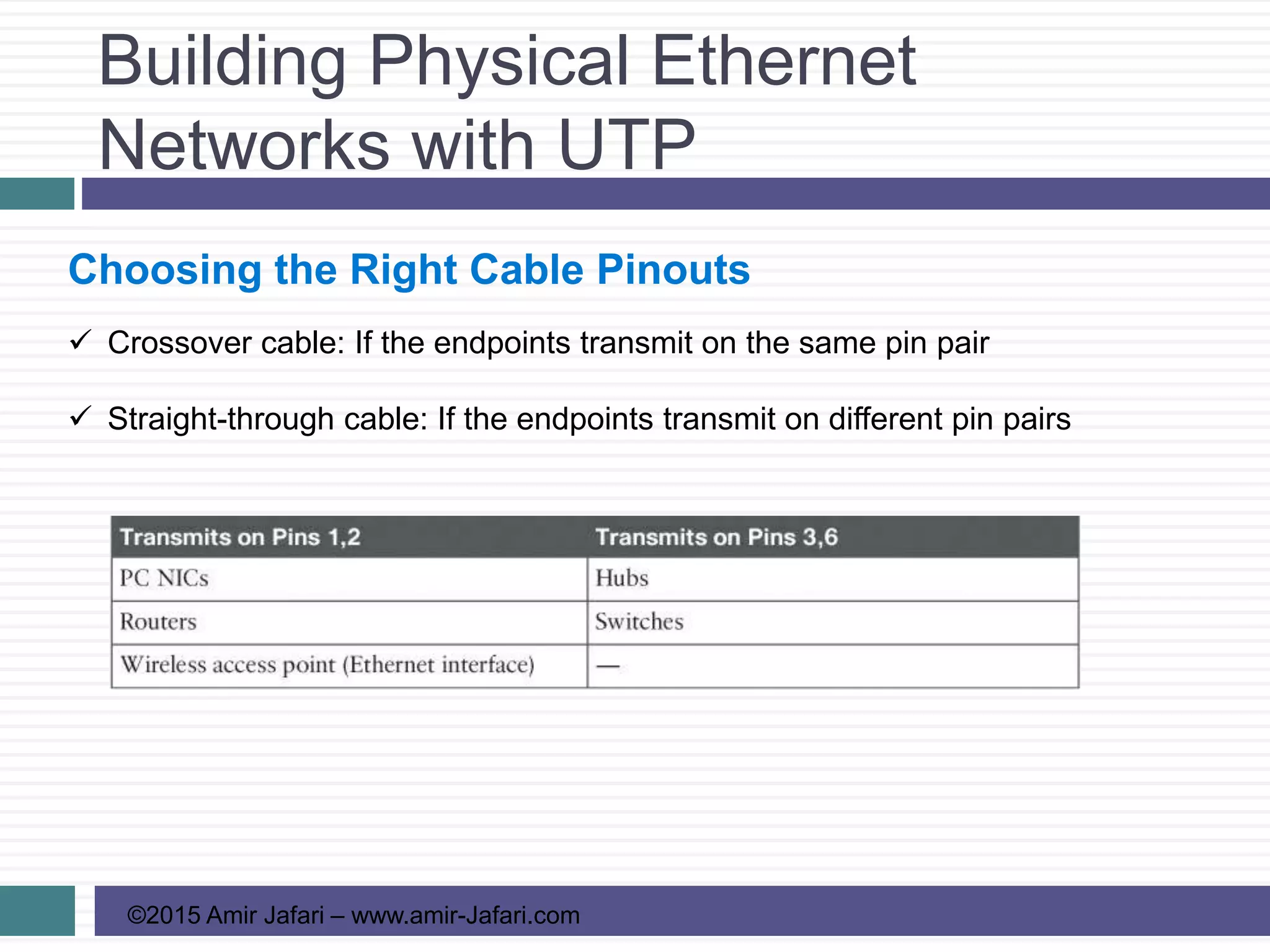
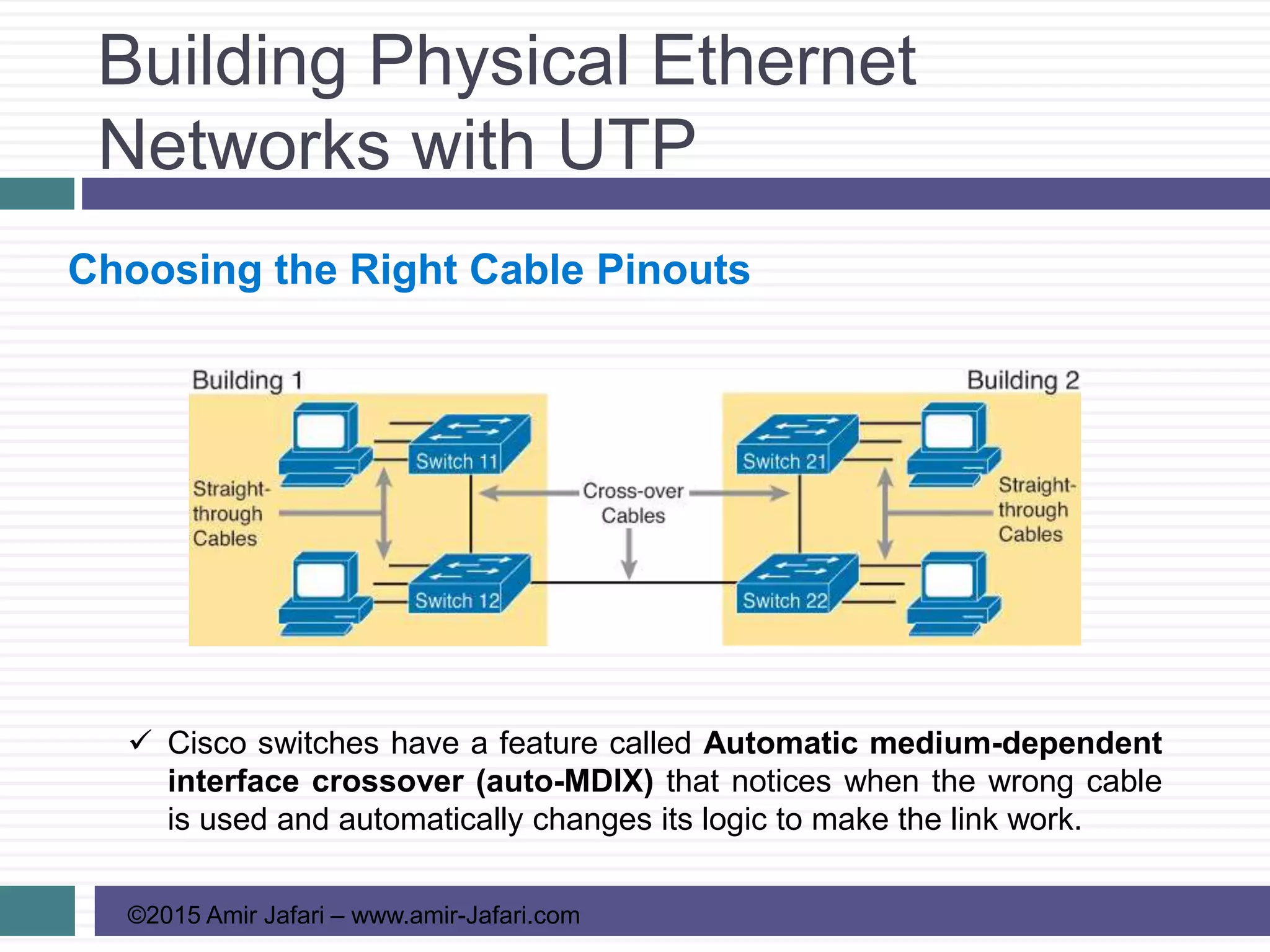
Choosing the Right Cable Pinouts
 Crossover cable: If the endpoints transmit on the same pin pair
 Straight-through cable: If the endpoints transmit on different pin pairs
Building Physical Ethernet
Networks with UTP
©2015 Amir Jafari – www.amir-Jafari.com
Choosing the Right Cable Pinouts
 Cisco switches have a feature called Automatic medium-dependent
interface crossover (auto-MDIX) that notices when the wrong cable
is used and automatically changes its logic to make the link work.
Building Physical Ethernet
Networks with UTP
©2015 Amir Jafari – www.amir-Jafari.com
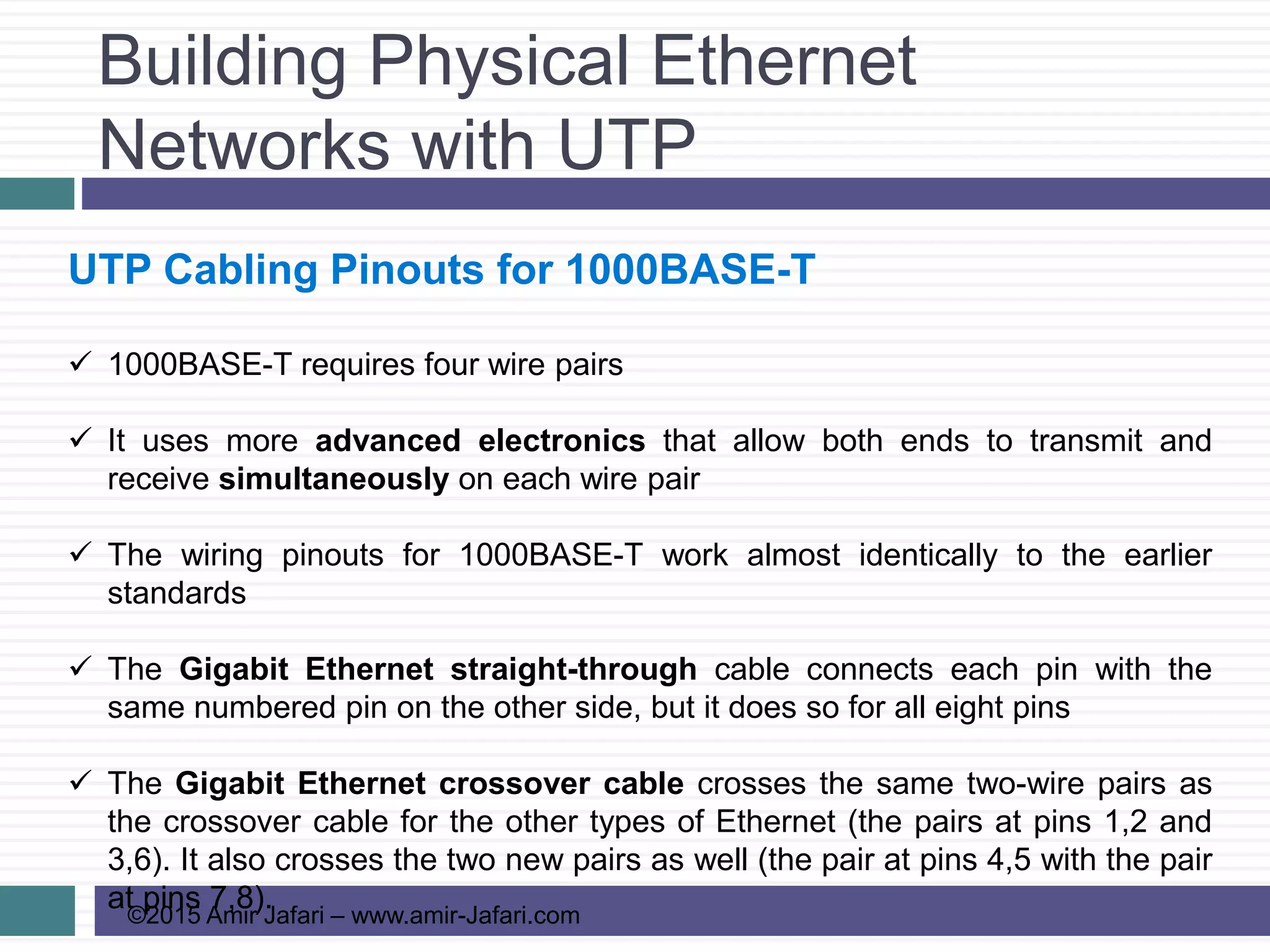
UTP Cabling Pinouts for 1000BASE-T
 1000BASE-T requires four wire pairs
 It uses more advanced electronics that allow both ends to transmit and
receive simultaneously on each wire pair
 The wiring pinouts for 1000BASE-T work almost identically to the earlier
standards
 The Gigabit Ethernet straight-through cable connects each pin with the
same numbered pin on the other side, but it does so for all eight pins
 The Gigabit Ethernet crossover cable crosses the same two-wire pairs as
the crossover cable for the other types of Ethernet (the pairs at pins 1,2 and
3,6). It also crosses the two new pairs as well (the pair at pins 4,5 with the pair
at pins 7,8).
Sending Data in Ethernet
Networks
©2015 Amir Jafari – www.amir-Jafari.com
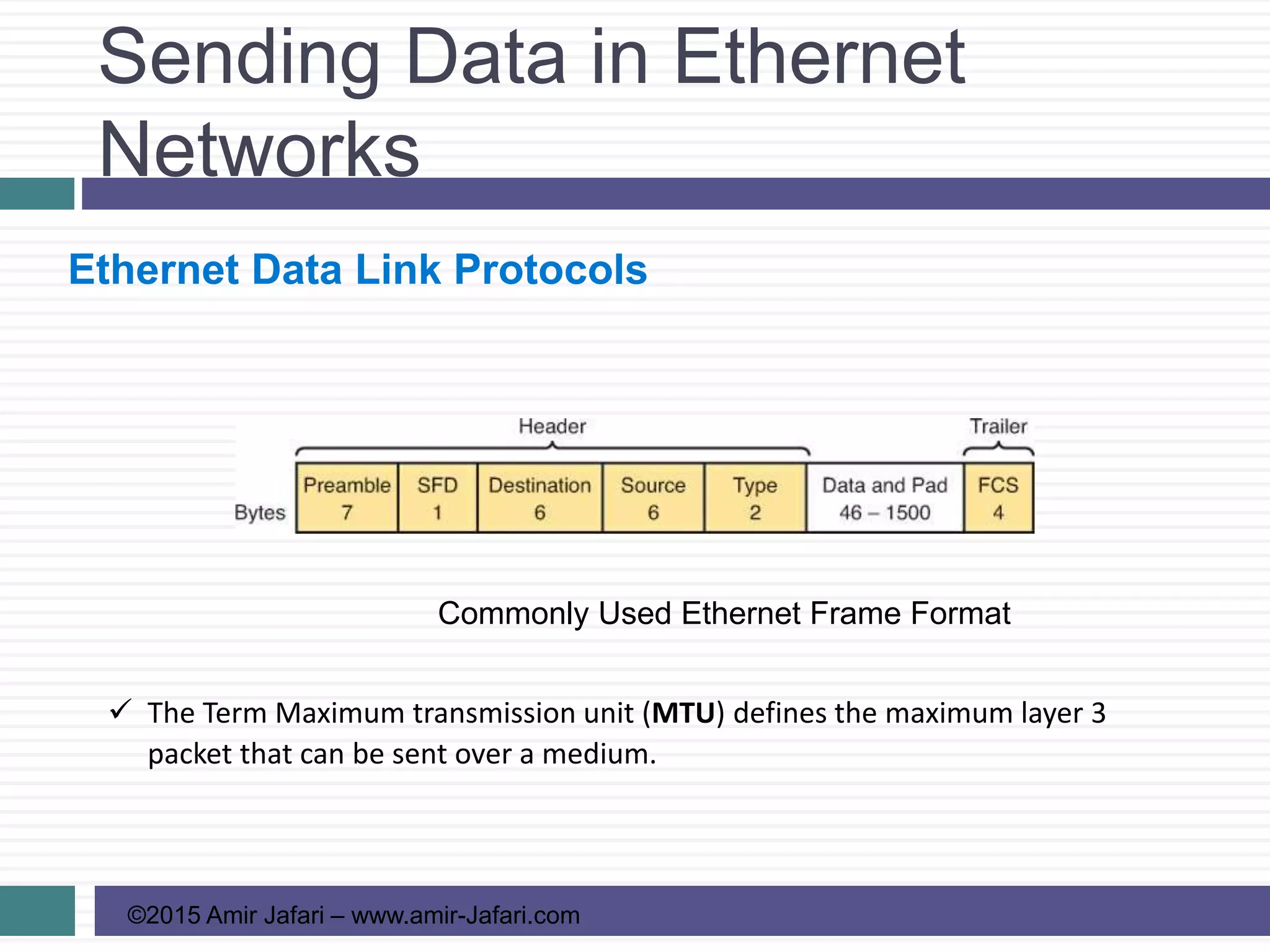
Ethernet Data Link Protocols
Commonly Used Ethernet Frame Format
 The Term Maximum transmission unit (MTU) defines the maximum layer 3
packet that can be sent over a medium.
Sending Data in Ethernet
Networks
©2015 Amir Jafari – www.amir-Jafari.com
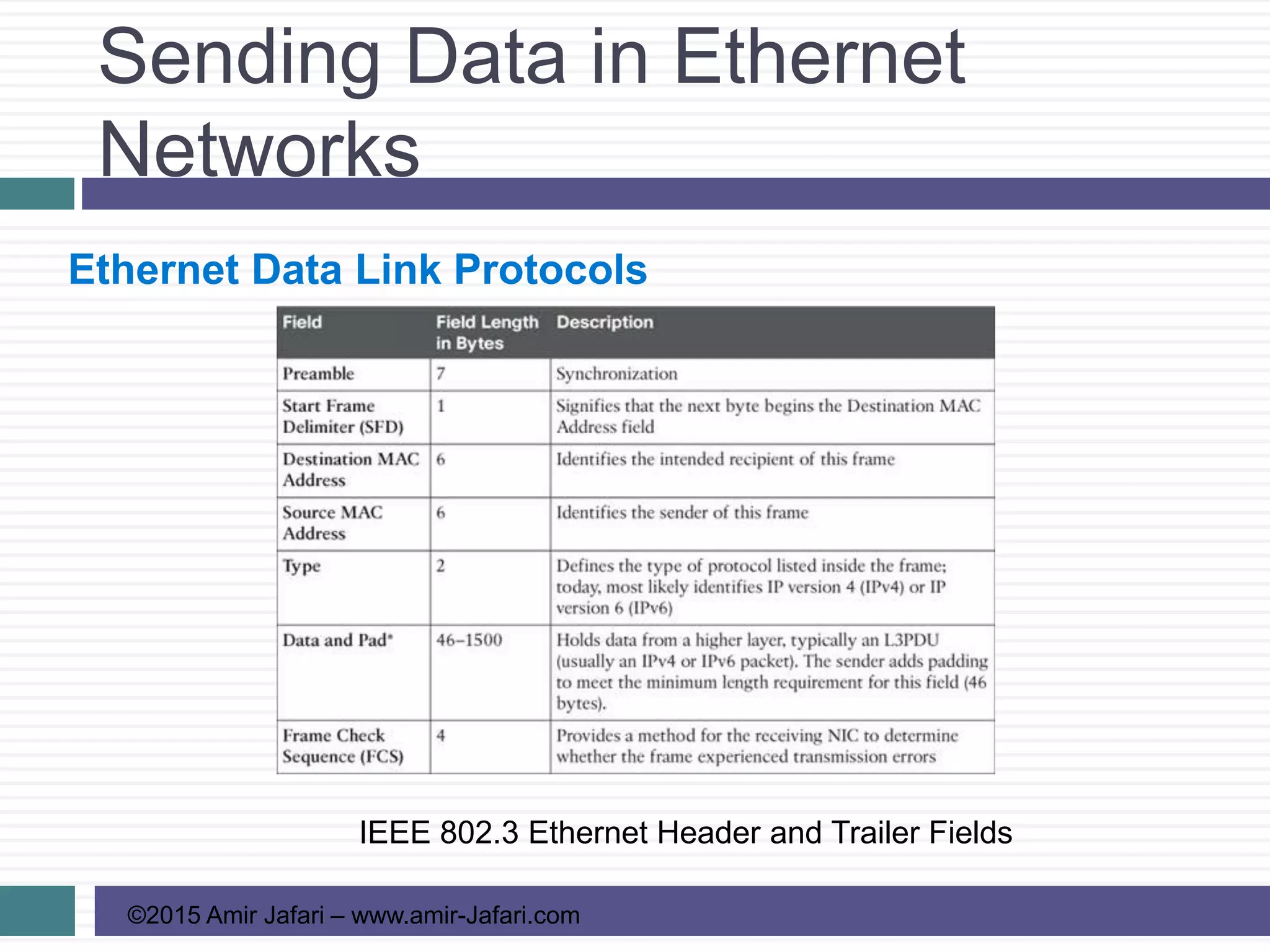
Ethernet Data Link Protocols
IEEE 802.3 Ethernet Header and Trailer Fields
Sending Data in Ethernet
Networks
©2015 Amir Jafari – www.amir-Jafari.com
Ethernet Addressing
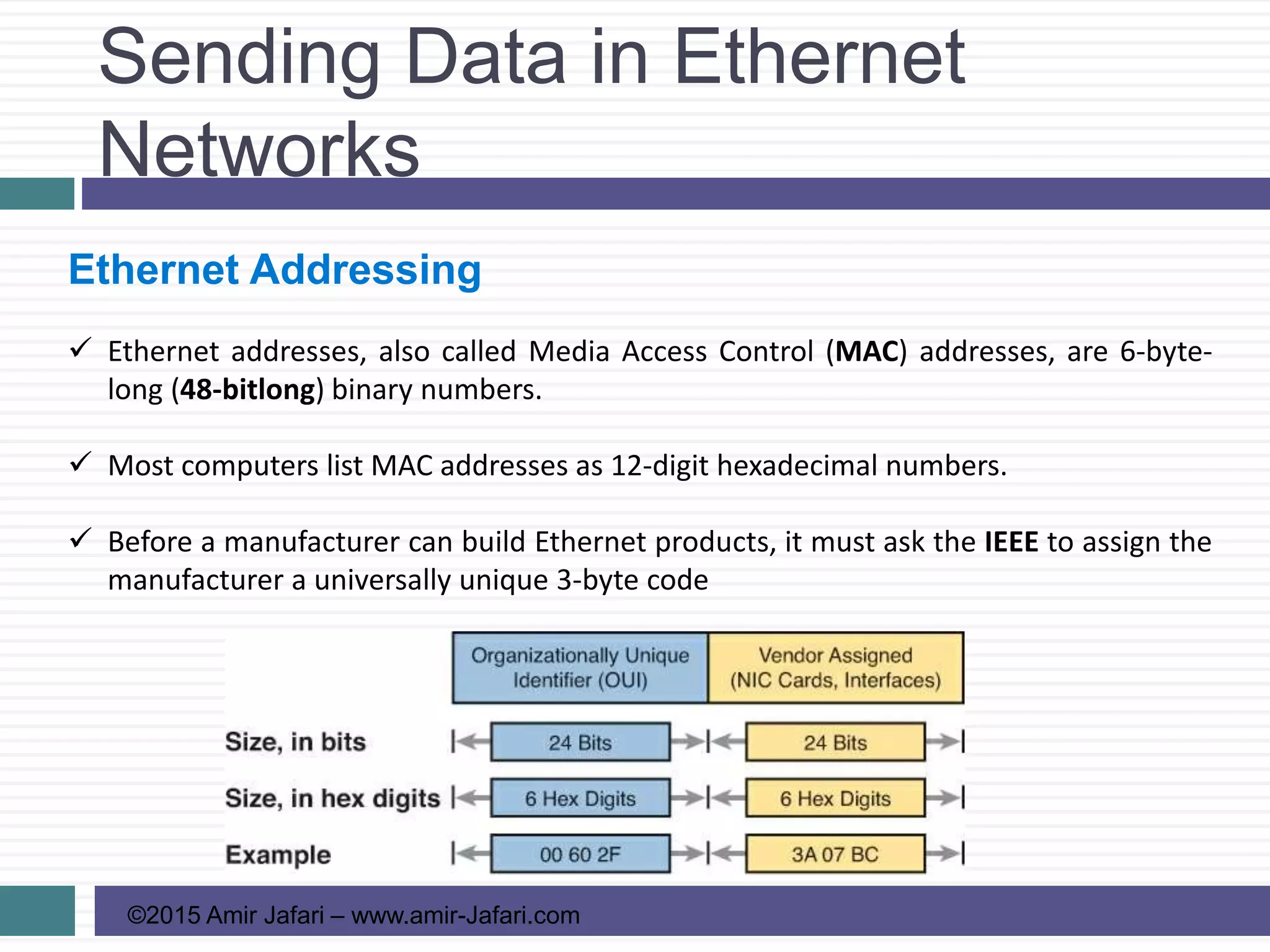
 Ethernet addresses, also called Media Access Control (MAC) addresses, are 6-byte-
long (48-bitlong) binary numbers.
 Most computers list MAC addresses as 12-digit hexadecimal numbers.
 Before a manufacturer can build Ethernet products, it must ask the IEEE to assign the
manufacturer a universally unique 3-byte code
Sending Data in Ethernet
Networks
©2015 Amir Jafari – www.amir-Jafari.com
Ethernet Addressing
 LAN address, Ethernet address, hardware address, burned-in address, physical
address, universal address, or MAC address.
 IEEE defines two general categories of group addresses for Ethernet:
1. Broadcast address: Frames sent to this address should be delivered to all devices
on the Ethernet LAN. It has a value of FFFF.FFFF.FFFF
2. Multicast addresses: Frames sent to a multicast Ethernet address will be copied
and forwarded to a subset of the devices on the LAN
Sending Data in Ethernet
Networks
©2015 Amir Jafari – www.amir-Jafari.com
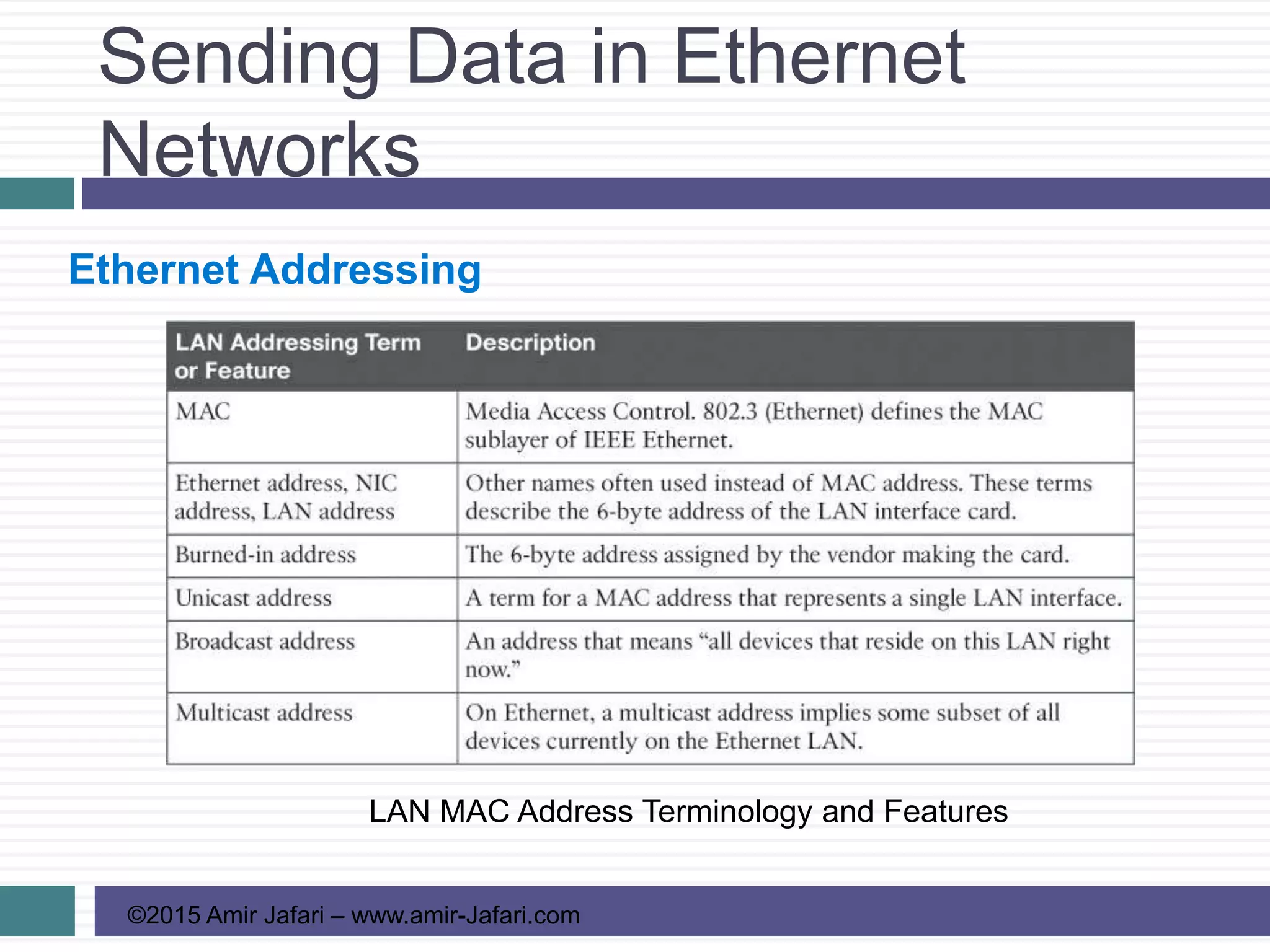
Ethernet Addressing
LAN MAC Address Terminology and Features
Sending Data in Ethernet
Networks
©2015 Amir Jafari – www.amir-Jafari.com
Identifying Network Layer Protocols with the Ethernet
Type Field
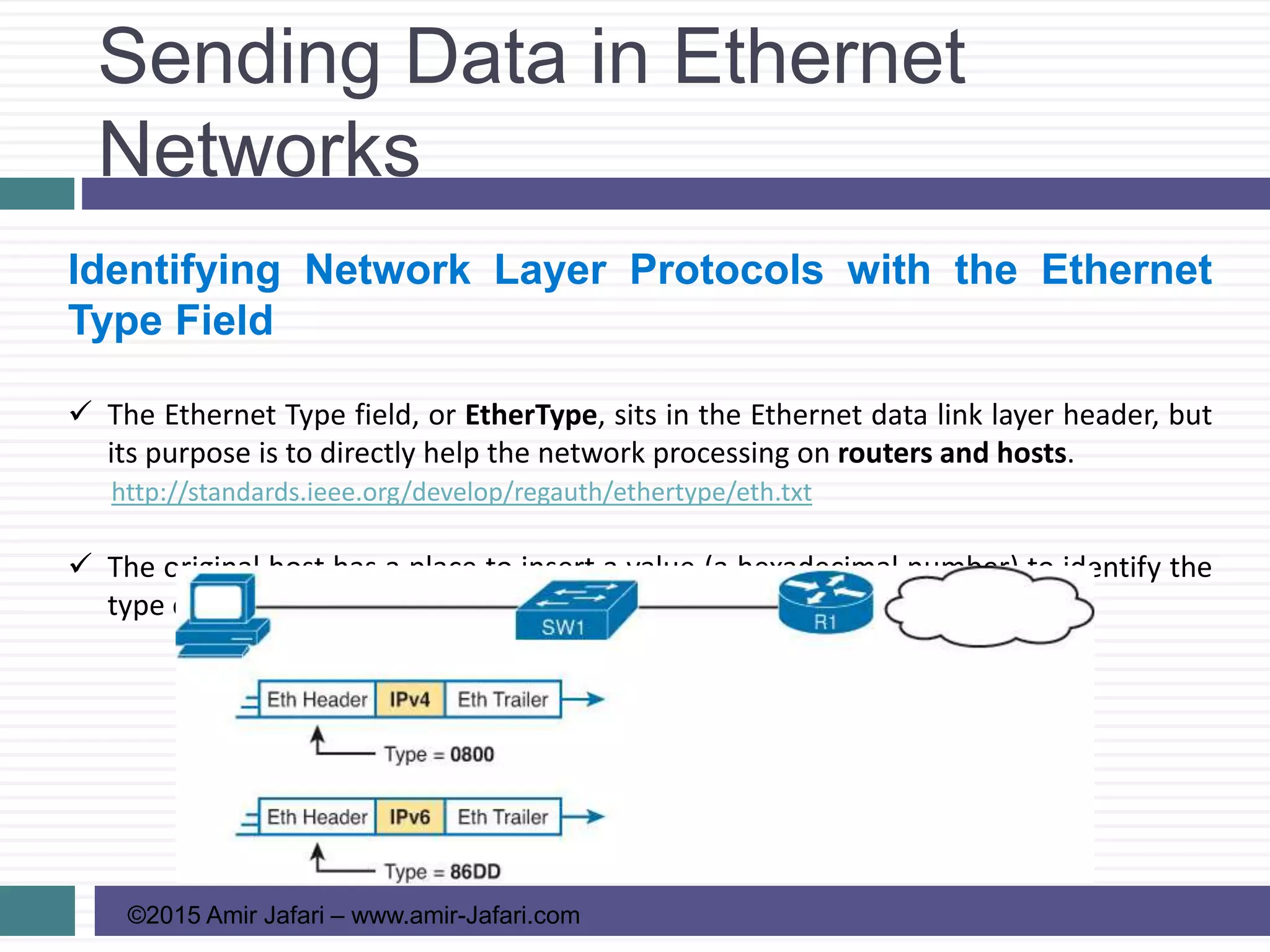
 The Ethernet Type field, or EtherType, sits in the Ethernet data link layer header, but
its purpose is to directly help the network processing on routers and hosts.
http://standards.ieee.org/develop/regauth/ethertype/eth.txt
 The original host has a place to insert a value (a hexadecimal number) to identify the
type of packet encapsulated inside the Ethernet frame.
Sending Data in Ethernet
Networks
©2015 Amir Jafari – www.amir-Jafari.com
Error Detection with FCS
 The Ethernet Frame Check Sequence (FCS) field in the Ethernet gives the receiving
node a way to compare results with the sender, to discover whether errors occurred
in the frame.
 If an error occurred, and the receiver discards the frame.
 Error detection: Ethernet defines that the errored frame should be discarded, but
Ethernet does not attempt to recover the lost frame.
Sending Data in Ethernet
Networks
©2015 Amir Jafari – www.amir-Jafari.com
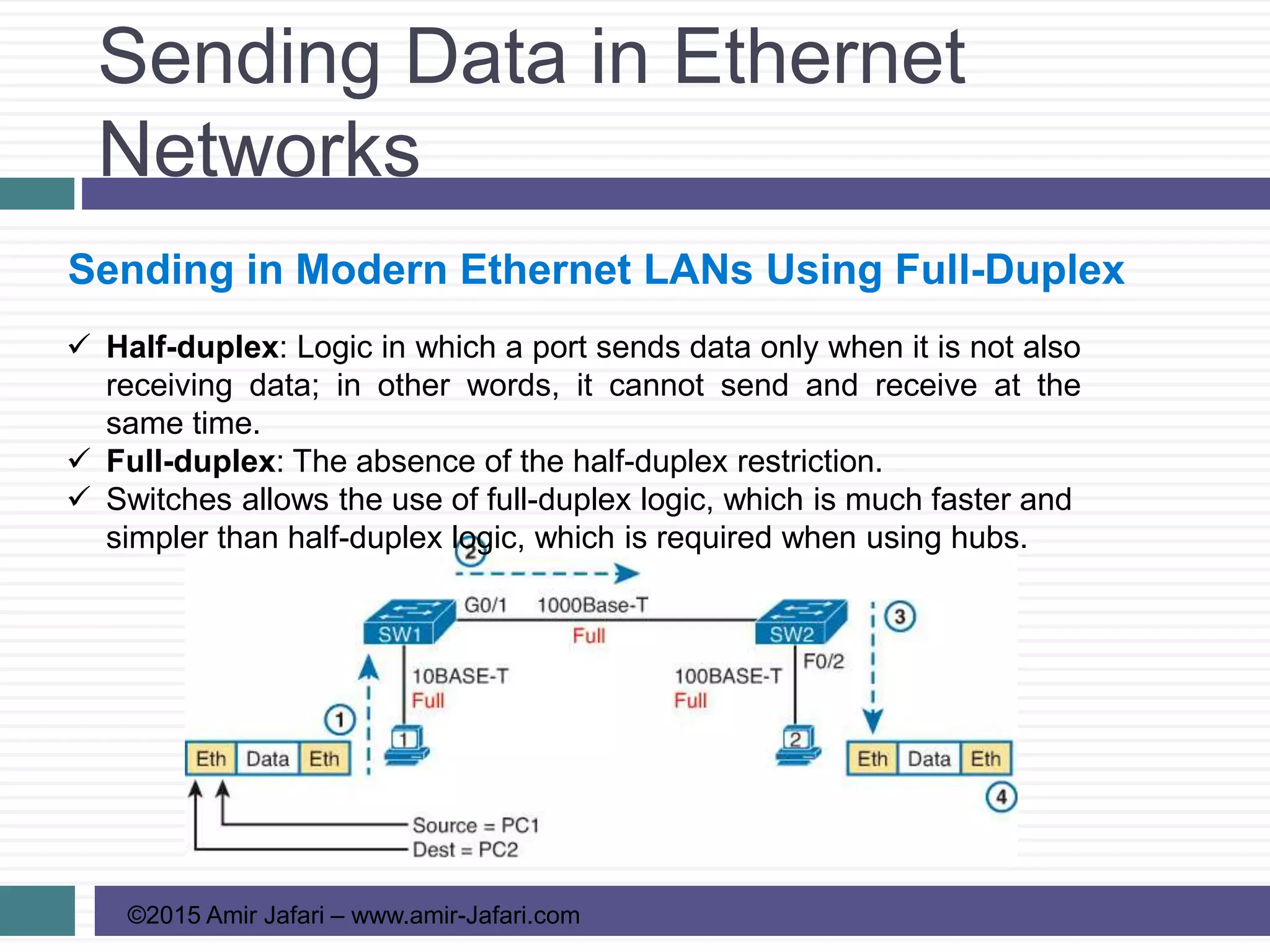
Sending in Modern Ethernet LANs Using Full-Duplex
 Half-duplex: Logic in which a port sends data only when it is not also
receiving data; in other words, it cannot send and receive at the
same time.
 Full-duplex: The absence of the half-duplex restriction.
 Switches allows the use of full-duplex logic, which is much faster and
simpler than half-duplex logic, which is required when using hubs.
Sending Data in Ethernet
Networks
©2015 Amir Jafari – www.amir-Jafari.com
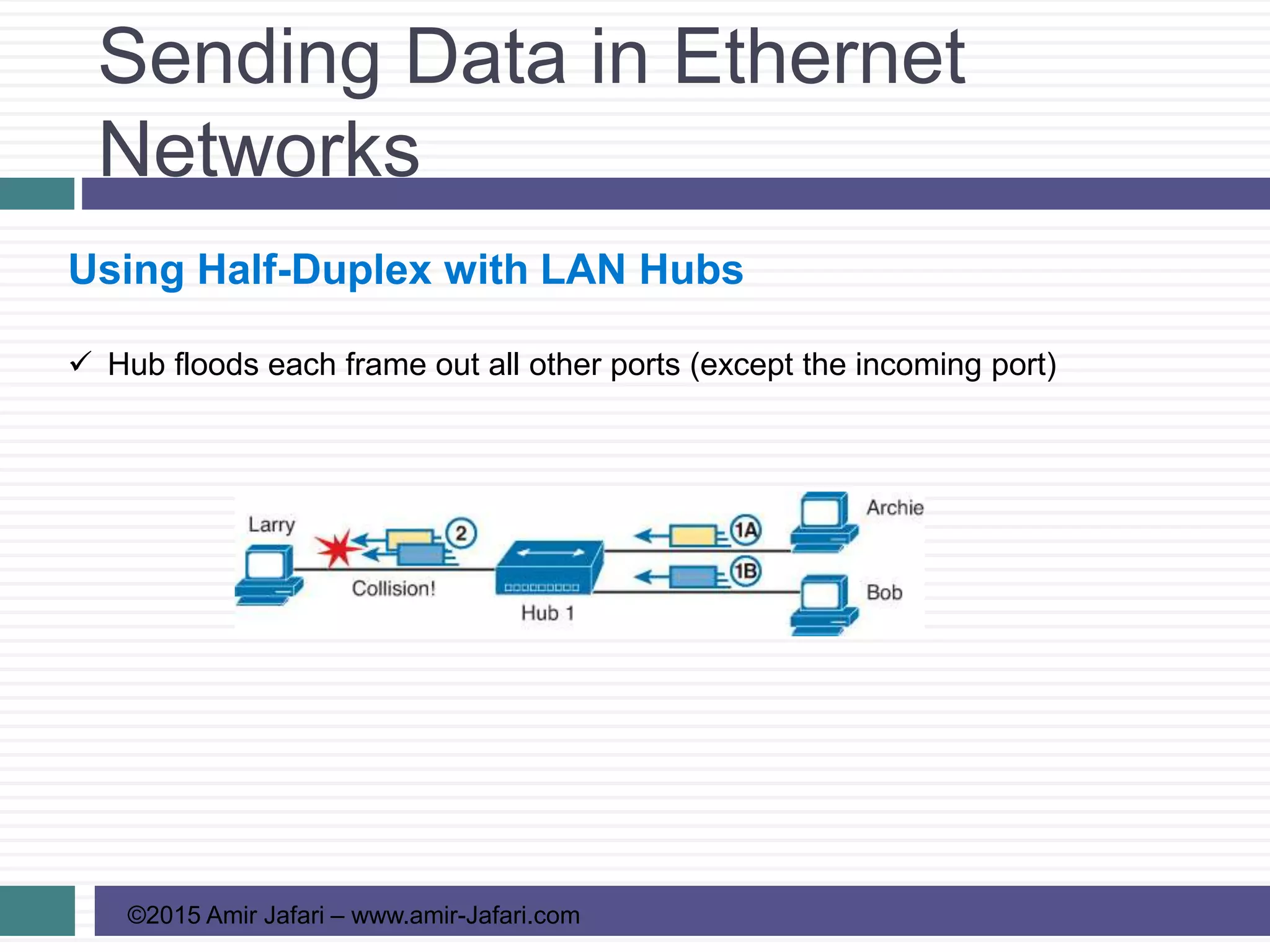
Using Half-Duplex with LAN Hubs
 Hub floods each frame out all other ports (except the incoming port)
Sending Data in Ethernet
Networks
©2015 Amir Jafari – www.amir-Jafari.com
Using Half-Duplex with LAN Hubs
 Use half-duplex logic actually use a relatively well-known algorithm called
CSMA/CD (carrier sense multiple access with collision detection):
Step 1. A device with a frame to send listens until the Ethernet is not busy.
Step 2. When the Ethernet is not busy, the sender begins sending the frame.
Step 3. The sender listens while sending to discover whether a collision
occurs. If a collision occurs, all currently sending nodes do the following:
A. They send a jamming signal that tells all nodes that a collision
happened.
B. They independently choose a random time to wait before trying again, to
avoid unfortunate timing
C. The next attempt starts again at Step 1.
Sending Data in Ethernet
Networks
©2015 Amir Jafari – www.amir-Jafari.com
Using Half-Duplex with LAN Hubs
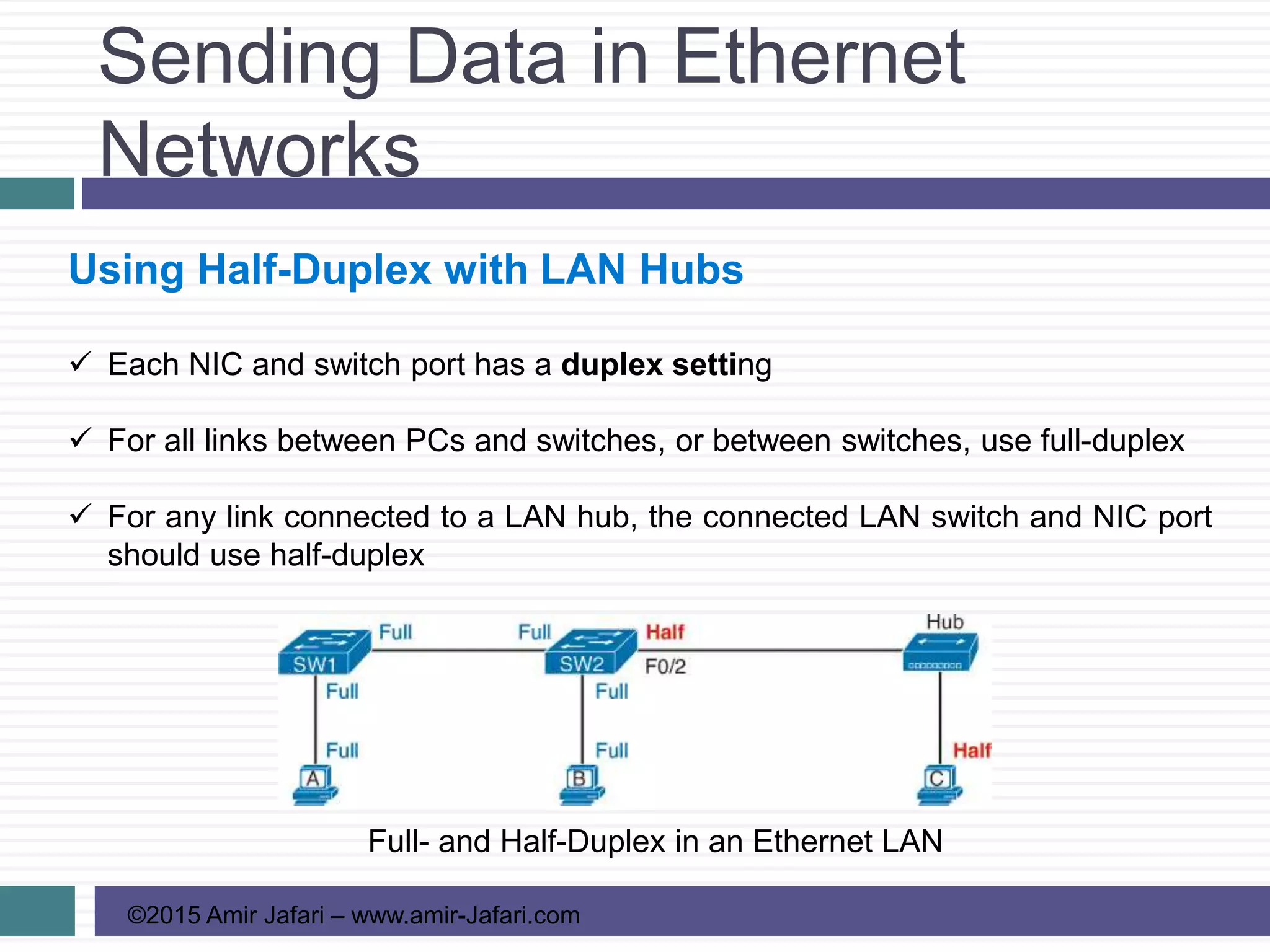
 Each NIC and switch port has a duplex setting
 For all links between PCs and switches, or between switches, use full-duplex
 For any link connected to a LAN hub, the connected LAN switch and NIC port
should use half-duplex
Full- and Half-Duplex in an Ethernet LAN
Fundamentals of Ethernet LANs
©2015 Amir Jafari – www.amir-Jafari.com
References
1) Cisco Systems, Inc, www.cisco.com/
2) Wendell Odom ,”Cisco CCENT/CCNA ICND1 100-101 Official Cert Guide”,
Cisco Press, USA, 2013

CCCNA R&S-03-Fundamentals of Ethernet LANs

  • 1.
    ©2015 Amir Jafari– www.amir-Jafari.com Routing and Switching 200-120 3 - Fundamentals of Ethernet LANs
  • 2.
    Fundamentals of EthernetLANs ©2015 Amir Jafari – www.amir-Jafari.com Agenda  An Overview of LANs  Building Physical Ethernet Networks with UTP  Sending Data in Ethernet Networks
  • 3.
    An Overview ofLANs ©2015 Amir Jafari – www.amir-Jafari.com An Overview of LANs  Enterprise computer network can be separated into two general types of technology: 1. local-area networks (LAN) 2. wide-area networks (WAN)  Together, LANs and WANs create a complete enterprise computer network  There are two general types of LANs: 1. Ethernet LANs 2. wireless LANs
  • 4.
    An Overview ofLANs ©2015 Amir Jafari – www.amir-Jafari.com An Overview of LANs Ethernet  The term Ethernet refers to a family of LAN standards that together define the physical and data link layers of the wired LAN technology  Defined by the Institute of Electrical and Electronics Engineers (IEEE)  Defines the cabling, the connectors on the ends of the cables, the protocol rules, and everything else required to create an Ethernet LAN  Ethernet Cable, which is a general reference to any cable that conforms to any of several Ethernet standards
  • 5.
    An Overview ofLANs ©2015 Amir Jafari – www.amir-Jafari.com Typical SOHO LANs  Ethernet LAN switch  Ethernet cables  The router connects the LAN to the WAN, in this case to the Internet.
  • 6.
    An Overview ofLANs ©2015 Amir Jafari – www.amir-Jafari.com Typical SOHO LANs  Can build one LAN that uses both Ethernet LAN technology as well as wireless LAN technology  Wireless LANs:  Defined by the IEEE using standards that begin with 802.11  Use radio waves to send the bits from one node to the next  Most wireless LANs rely on wireless LAN access point (AP)
  • 7.
    An Overview ofLANs ©2015 Amir Jafari – www.amir-Jafari.com Typical Enterprise LANs Single-Building Enterprise Wired and Wireless LAN
  • 8.
    An Overview ofLANs ©2015 Amir Jafari – www.amir-Jafari.com The Variety of Ethernet Physical Layer Standards  The term Ethernet refers to an entire family of standards.  Some standards define the specifics of how to send data over a particular type of cabling, and at a particular speed  All these Ethernet standards come from the IEEE and include the number 802.3 as the beginning part of the standard name
  • 9.
    An Overview ofLANs ©2015 Amir Jafari – www.amir-Jafari.com The Variety of Ethernet Physical Layer Standards  The most fundamental cabling: 1. Copper wires 2. Glass fibers  Unshielded twisted-pair (UTP)  Most common kind of copper wires  Using the wires inside the cable to send data over electrical circuits  UTP (with a suffix that includes “T”)  Fiber-optic cabling  More expensive than Copper wires  Send light over glass fibers in the center of the cable  fiber (with a suffix that includes “X”)
  • 10.
    An Overview ofLANs ©2015 Amir Jafari – www.amir-Jafari.com Consistent Behavior over All Links Using the Ethernet Data Link Layer  Although Ethernet includes many physical layer standards the data link header and trailer use the same format.
  • 11.
    Building Physical Ethernet Networkswith UTP ©2015 Amir Jafari – www.amir-Jafari.com Transmitting Data Using Twisted Pairs  Send the data uses electricity that flows over the wires inside the UTP cable  How Ethernet sends data using electricity: 1. An electrical circuit requires a complete loop, so the two nodes, using circuitry on their Ethernet ports 2. To send data, the two devices follow some rules called an encoding scheme
  • 12.
    Building Physical Ethernet Networkswith UTP ©2015 Amir Jafari – www.amir-Jafari.com Transmitting Data Using Twisted Pairs  In an actual UTP cable, the wires will be twisted together and not parallel which helps solve electromagnetic interference (EMI)  EMI between wire pairs in the same cable is called crosstalk  Twisting the wire pairs together helps cancel out most of the EMI
  • 13.
    Building Physical Ethernet Networkswith UTP ©2015 Amir Jafari – www.amir-Jafari.com Breaking Down a UTP Ethernet Link  The 10BASE-T and 100BASE-T standards require two pairs of wires  The 1000BASE-T standard requires four pairs of wires  Many Ethernet UTP cables use an RJ-45 connector on both ends.  The RJ-45 connector has eight physical locations into which the eight wires in the cable can be inserted, called pin
  • 14.
    Building Physical Ethernet Networkswith UTP ©2015 Amir Jafari – www.amir-Jafari.com Breaking Down a UTP Ethernet Link RJ-45 Connectors and Ports
  • 15.
    Building Physical Ethernet Networkswith UTP ©2015 Amir Jafari – www.amir-Jafari.com Breaking Down a UTP Ethernet Link Gigabit Fiber SFP Sitting Just Outside a Switch SFP Port
  • 16.
    Building Physical Ethernet Networkswith UTP ©2015 Amir Jafari – www.amir-Jafari.com Straight-Through Cable Pinout Using One Pair for Each Transmission Direction with 10- and 100-Mbps Ethernet
  • 17.
    Building Physical Ethernet Networkswith UTP ©2015 Amir Jafari – www.amir-Jafari.com Straight-Through Cable Pinout 10BASE-T and 100BASE-T Straight-Through Cable Pinout
  • 18.
    Building Physical Ethernet Networkswith UTP ©2015 Amir Jafari – www.amir-Jafari.com Straight-Through Cable Pinout Ethernet Straight-Through Cable Concept
  • 19.
    Building Physical Ethernet Networkswith UTP ©2015 Amir Jafari – www.amir-Jafari.com Crossover Cable Pinout
  • 20.
    Building Physical Ethernet Networkswith UTP ©2015 Amir Jafari – www.amir-Jafari.com Choosing the Right Cable Pinouts  Crossover cable: If the endpoints transmit on the same pin pair  Straight-through cable: If the endpoints transmit on different pin pairs
  • 21.
    Building Physical Ethernet Networkswith UTP ©2015 Amir Jafari – www.amir-Jafari.com Choosing the Right Cable Pinouts  Cisco switches have a feature called Automatic medium-dependent interface crossover (auto-MDIX) that notices when the wrong cable is used and automatically changes its logic to make the link work.
  • 22.
    Building Physical Ethernet Networkswith UTP ©2015 Amir Jafari – www.amir-Jafari.com UTP Cabling Pinouts for 1000BASE-T  1000BASE-T requires four wire pairs  It uses more advanced electronics that allow both ends to transmit and receive simultaneously on each wire pair  The wiring pinouts for 1000BASE-T work almost identically to the earlier standards  The Gigabit Ethernet straight-through cable connects each pin with the same numbered pin on the other side, but it does so for all eight pins  The Gigabit Ethernet crossover cable crosses the same two-wire pairs as the crossover cable for the other types of Ethernet (the pairs at pins 1,2 and 3,6). It also crosses the two new pairs as well (the pair at pins 4,5 with the pair at pins 7,8).
  • 23.
    Sending Data inEthernet Networks ©2015 Amir Jafari – www.amir-Jafari.com Ethernet Data Link Protocols Commonly Used Ethernet Frame Format  The Term Maximum transmission unit (MTU) defines the maximum layer 3 packet that can be sent over a medium.
  • 24.
    Sending Data inEthernet Networks ©2015 Amir Jafari – www.amir-Jafari.com Ethernet Data Link Protocols IEEE 802.3 Ethernet Header and Trailer Fields
  • 25.
    Sending Data inEthernet Networks ©2015 Amir Jafari – www.amir-Jafari.com Ethernet Addressing  Ethernet addresses, also called Media Access Control (MAC) addresses, are 6-byte- long (48-bitlong) binary numbers.  Most computers list MAC addresses as 12-digit hexadecimal numbers.  Before a manufacturer can build Ethernet products, it must ask the IEEE to assign the manufacturer a universally unique 3-byte code
  • 26.
    Sending Data inEthernet Networks ©2015 Amir Jafari – www.amir-Jafari.com Ethernet Addressing  LAN address, Ethernet address, hardware address, burned-in address, physical address, universal address, or MAC address.  IEEE defines two general categories of group addresses for Ethernet: 1. Broadcast address: Frames sent to this address should be delivered to all devices on the Ethernet LAN. It has a value of FFFF.FFFF.FFFF 2. Multicast addresses: Frames sent to a multicast Ethernet address will be copied and forwarded to a subset of the devices on the LAN
  • 27.
    Sending Data inEthernet Networks ©2015 Amir Jafari – www.amir-Jafari.com Ethernet Addressing LAN MAC Address Terminology and Features
  • 28.
    Sending Data inEthernet Networks ©2015 Amir Jafari – www.amir-Jafari.com Identifying Network Layer Protocols with the Ethernet Type Field  The Ethernet Type field, or EtherType, sits in the Ethernet data link layer header, but its purpose is to directly help the network processing on routers and hosts. http://standards.ieee.org/develop/regauth/ethertype/eth.txt  The original host has a place to insert a value (a hexadecimal number) to identify the type of packet encapsulated inside the Ethernet frame.
  • 29.
    Sending Data inEthernet Networks ©2015 Amir Jafari – www.amir-Jafari.com Error Detection with FCS  The Ethernet Frame Check Sequence (FCS) field in the Ethernet gives the receiving node a way to compare results with the sender, to discover whether errors occurred in the frame.  If an error occurred, and the receiver discards the frame.  Error detection: Ethernet defines that the errored frame should be discarded, but Ethernet does not attempt to recover the lost frame.
  • 30.
    Sending Data inEthernet Networks ©2015 Amir Jafari – www.amir-Jafari.com Sending in Modern Ethernet LANs Using Full-Duplex  Half-duplex: Logic in which a port sends data only when it is not also receiving data; in other words, it cannot send and receive at the same time.  Full-duplex: The absence of the half-duplex restriction.  Switches allows the use of full-duplex logic, which is much faster and simpler than half-duplex logic, which is required when using hubs.
  • 31.
    Sending Data inEthernet Networks ©2015 Amir Jafari – www.amir-Jafari.com Using Half-Duplex with LAN Hubs  Hub floods each frame out all other ports (except the incoming port)
  • 32.
    Sending Data inEthernet Networks ©2015 Amir Jafari – www.amir-Jafari.com Using Half-Duplex with LAN Hubs  Use half-duplex logic actually use a relatively well-known algorithm called CSMA/CD (carrier sense multiple access with collision detection): Step 1. A device with a frame to send listens until the Ethernet is not busy. Step 2. When the Ethernet is not busy, the sender begins sending the frame. Step 3. The sender listens while sending to discover whether a collision occurs. If a collision occurs, all currently sending nodes do the following: A. They send a jamming signal that tells all nodes that a collision happened. B. They independently choose a random time to wait before trying again, to avoid unfortunate timing C. The next attempt starts again at Step 1.
  • 33.
    Sending Data inEthernet Networks ©2015 Amir Jafari – www.amir-Jafari.com Using Half-Duplex with LAN Hubs  Each NIC and switch port has a duplex setting  For all links between PCs and switches, or between switches, use full-duplex  For any link connected to a LAN hub, the connected LAN switch and NIC port should use half-duplex Full- and Half-Duplex in an Ethernet LAN
  • 34.
    Fundamentals of EthernetLANs ©2015 Amir Jafari – www.amir-Jafari.com References 1) Cisco Systems, Inc, www.cisco.com/ 2) Wendell Odom ,”Cisco CCENT/CCNA ICND1 100-101 Official Cert Guide”, Cisco Press, USA, 2013

Editor's Notes

  • #3 Beginning course details and/or books/materials needed for a class/project.
  • #4 Beginning course details and/or books/materials needed for a class/project.
  • #5 Beginning course details and/or books/materials needed for a class/project.
  • #6 Beginning course details and/or books/materials needed for a class/project.
  • #7 Beginning course details and/or books/materials needed for a class/project.
  • #8 Beginning course details and/or books/materials needed for a class/project.
  • #9 Beginning course details and/or books/materials needed for a class/project.
  • #10 Beginning course details and/or books/materials needed for a class/project.
  • #11 Beginning course details and/or books/materials needed for a class/project.
  • #12 Beginning course details and/or books/materials needed for a class/project.
  • #13 Beginning course details and/or books/materials needed for a class/project.
  • #14 Beginning course details and/or books/materials needed for a class/project.
  • #15 Beginning course details and/or books/materials needed for a class/project.
  • #16 Beginning course details and/or books/materials needed for a class/project.
  • #17 Beginning course details and/or books/materials needed for a class/project.
  • #18 Beginning course details and/or books/materials needed for a class/project.
  • #19 Beginning course details and/or books/materials needed for a class/project.
  • #20 Beginning course details and/or books/materials needed for a class/project.
  • #21 Beginning course details and/or books/materials needed for a class/project.
  • #22 Beginning course details and/or books/materials needed for a class/project.
  • #23 Beginning course details and/or books/materials needed for a class/project.
  • #24 Beginning course details and/or books/materials needed for a class/project.
  • #25 Beginning course details and/or books/materials needed for a class/project.
  • #26 Beginning course details and/or books/materials needed for a class/project.
  • #27 Beginning course details and/or books/materials needed for a class/project.
  • #28 Beginning course details and/or books/materials needed for a class/project.
  • #29 Beginning course details and/or books/materials needed for a class/project.
  • #30 Beginning course details and/or books/materials needed for a class/project.
  • #31 Beginning course details and/or books/materials needed for a class/project.
  • #32 Beginning course details and/or books/materials needed for a class/project.
  • #33 Beginning course details and/or books/materials needed for a class/project.
  • #34 Beginning course details and/or books/materials needed for a class/project.
  • #35 Beginning course details and/or books/materials needed for a class/project.