©2015 Amir Jafari – www.amir-Jafari.com
Routing and Switching 200-120
13 - Spanning Tree Protocol Implementation
Spanning Tree Protocol Implementation
©2015 Amir Jafari – www.amir-Jafari.com
Agenda
STP Configuration and Verification
STP Troubleshooting
STP Configuration and Verification
©2015 Amir Jafari – www.amir-Jafari.com
STP Configuration and Verification
Cisco switches usually use STP (IEEE 802.1D) by default
You can buy some Cisco switches and connect them with Ethernet cables in a redundant
topology, and STP will ensure that frames do not loop
Network engineers usually want to configure at least some STP settings, so when all
switches and links work, the engineer knows which switch is the root and which ports
block
The configuration can also be set so that when links or switches fail, the engineer can
predict the STP topology in those cases, as well
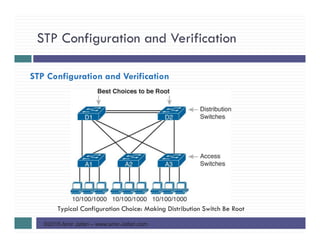
Most network engineers make the distribution layer switches be the root
STP Configuration and Verification
©2015 Amir Jafari – www.amir-Jafari.com
STP Configuration and Verification
Typical Configuration Choice: Making Distribution Switch Be Root
STP Configuration and Verification
©2015 Amir Jafari – www.amir-Jafari.com
Setting the STP Mode
The IEEE first standardized STP as the IEEE 802.1D standard, first published back in
1990.
On that date, Cisco sold no LAN switches at the time, and virtual LANs did not exist
yet.
As a result, the STP protocol has gone through several significant changes with the
introduction of switches, VLANs, and other improvements in LAN technology
Today, Cisco LAN switches allow you to use one of three STP modes:
1. Per-VLAN Spanning Tree Plus (PVST+, or PVSTP)
2. Rapid PVST+, or simply RPVST+
3. Multiple Spanning Tree (MST)
STP Configuration and Verification
©2015 Amir Jafari – www.amir-Jafari.com
Setting the STP Mode
PVST+ is a Cisco-proprietary improvement of 802.1D STP. The per-VLAN part of the
name gives away the main feature: PVST+ creates a different STP topology per
VLAN, whereas 802.1D actually did not. PVST+ also introduced PortFast
Over time, the IEEE improved STP beyond the 802.1D standard with the Rapid STP
(802.1W) protocol. Then Cisco took that standard and made another proprietary
improvement, creating another mode in Cisco switches: Rapid PVST+. It has all the
improvements of the newer IEEE standard per-VLAN
Cisco switches generally default to using PVST+
To set a switch to use these modes:
1. Switch(config)#spanning-tree mode pvst (set a switch to use PVST+ mode)
2. Switch(config)#spanning-tree mode rapid-pvst (set a switch to use RPVST+ mode)
3. Switch(config)#spanning-tree mode mst (set a switch to use MST mode)
STP Configuration and Verification
©2015 Amir Jafari – www.amir-Jafari.com
Per-VLAN Configuration Settings
By default, Cisco switches use IEEE 802.1D, not RSTP (802.1w), with a Cisco-proprietary
feature called Per-VLAN Spanning Tree Plus (PVST+).
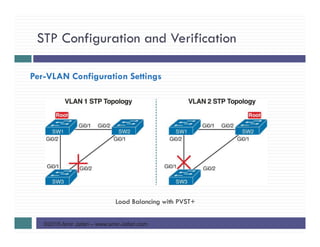
PVST+ creates a different instance of STP for each VLAN
PVST+ gives engineers a load-balancing tool with STP.
By changing some STP configuration parameters differently for different VLANs, the
engineer could cause switches to pick different RPs and DPs in different VLANs
As a result, some traffic in some VLANs can be forwarded over one trunk, and traffic
for other VLANs can be forwarded over a different trunk
STP Configuration and Verification
©2015 Amir Jafari – www.amir-Jafari.com
Per-VLAN Configuration Settings
Load Balancing with PVST+
STP Configuration and Verification
©2015 Amir Jafari – www.amir-Jafari.com
The Bridge ID and System ID Extension
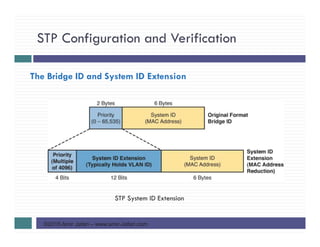
Originally, a switch’s BID was formed by combining the switch’s 2-byte priority and its
6-byte MAC address.
Later, the IEEE changed the rules, splitting the original priority field into two separate
fields, :
1. 4-bit priority field
2. 12-bit subfield called the system ID extension (which represents the VLAN ID)
STP Configuration and Verification
©2015 Amir Jafari – www.amir-Jafari.com
The Bridge ID and System ID Extension
STP System ID Extension
STP Configuration and Verification
©2015 Amir Jafari – www.amir-Jafari.com
The Bridge ID and System ID Extension
Cisco switches let you configure the BID, but only the priority part. The only part
configurable by the network engineer is the 4-bit priority field.
the priority field was originally a 16-bit number, which represented a decimal number
from 0 to 65,535. Because of that history, the current configuration command (spanning-
tree vlan vlan-id priority x) requires a decimal number between 0 and 65,535
And not just any number in that range, either: It must be a multiple of 4096: 0, 4096,
8192, 12288, and so on, up through 61,440
As it turns out, of the 16 allowed multiples of 4096, from 0 through 61,440, each has
a different binary value in their first 4 bits: 0000, 0001, 0010, and so on, up through
1111.
STP Configuration and Verification
©2015 Amir Jafari – www.amir-Jafari.com
The Bridge ID and System ID Extension
VLAN IDs range from 1 to 4094, requiring 12 bits. Cisco switches place the VLAN ID
into the System ID Extension field, so each switch has a unique BID per VLAN
For example, a switch configured with VLANs 1 through 4, with a default base priority
of 32,768, has a default STP priority of 32,769 in VLAN 1, 32,770 in VLAN 2, 32,771
in VLAN 3, and so on
STP Configuration and Verification
©2015 Amir Jafari – www.amir-Jafari.com
Per-VLAN Port Costs
Each switch interface defaults its per-VLAN STP cost based on the IEEE
recommendations.
On interfaces that support multiple speeds, Cisco switches base the cost on the current
actual speed.
Alternatively, you can configure a switch’s STP port cost with the spanning-tree [vlan
vlan-id] cost cost interface subcommand
This command most often on trunks because setting the cost on trunks has an impact on
the switch’s root cost, whereas setting STP costs on access ports does not
STP Configuration and Verification
©2015 Amir Jafari – www.amir-Jafari.com
Per-VLAN Port Costs
For the spanning-tree [vlan vlan-id] cost cost, it can include the VLAN ID, or not.
The command only needs a vlan parameter on trunk ports to set the cost per VLAN.
On a trunk, if the command omits the VLAN parameter, it sets the STP cost for all
VLANs whose cost is not set by a spanning-tree vlan x cost command for that VLAN
STP Configuration and Verification
©2015 Amir Jafari – www.amir-Jafari.com
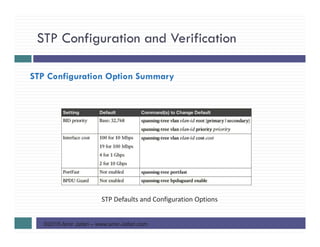
STP Configuration Option Summary
STP Defaults and Configuration Options
STP Configuration and Verification
©2015 Amir Jafari – www.amir-Jafari.com
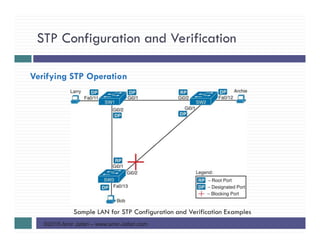
Verifying STP Operation
Sample LAN for STP Configuration and Verification Examples
STP Configuration and Verification
©2015 Amir Jafari – www.amir-Jafari.com
Verifying STP Operation
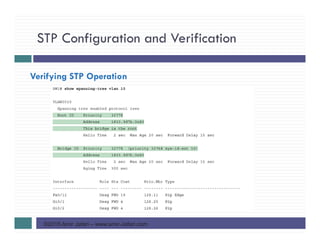
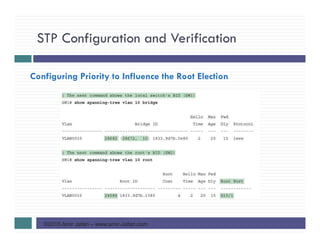
The show spanning-tree vlan vlan command identifies the root switch and lists settings on
the local switch
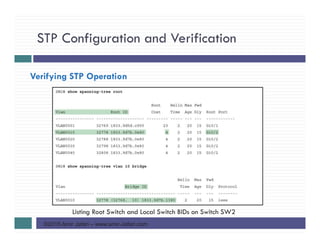
Two other commands : work better for listing BID information in a shorter form:
1. show spanning-tree root, lists the root’s BID for each VLAN. This command also lists
other details, like the local switch’s root cost and root port
2. show spanning-tree vlan 10 bridge, breaks out the BID into its component parts
STP Configuration and Verification
©2015 Amir Jafari – www.amir-Jafari.com
Verifying STP Operation
STP Configuration and Verification
©2015 Amir Jafari – www.amir-Jafari.com
Verifying STP Operation
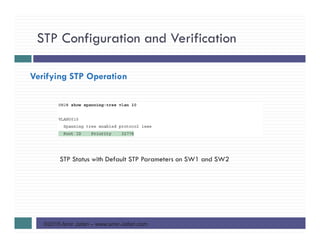
STP Status with Default STP Parameters on SW1 and SW2
STP Configuration and Verification
©2015 Amir Jafari – www.amir-Jafari.com
Verifying STP Operation
Listing Root Switch and Local Switch BIDs on Switch SW2
STP Configuration and Verification
©2015 Amir Jafari – www.amir-Jafari.com
Verifying STP Operation
both the commands have a VLAN option:
1. show spanning-tree [vlan x] root
2. show spanning-tree [vlan x] bridge
Without the VLAN listed, each command lists one line per VLAN
With the VLAN, the output lists the same information, but just for that one VLAN
STP Configuration and Verification
©2015 Amir Jafari – www.amir-Jafari.com
Configuring STP Port Costs
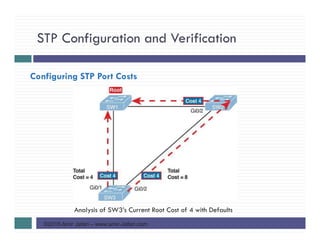
Analysis of SW3’s Current Root Cost of 4 with Defaults
STP Configuration and Verification
©2015 Amir Jafari – www.amir-Jafari.com
Configuring STP Port Costs
Manipulating STP Port Cost and Watching the Transition to Forwarding
State
STP Configuration and Verification
©2015 Amir Jafari – www.amir-Jafari.com
Configuring STP Port Costs
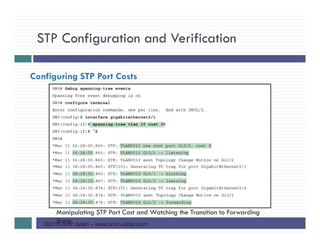
This example starts with the debug spanning-tree events command on SW1. This
command tells the switch to issue debug log messages whenever STP performs
changes to an interface’s role or state
The debug messages tell us what STP on SW3 is thinking behind the scenes, with
timestamps
Five debug messages, displayed immediately after the user exited configuration
mode in this case, all happen at the same time. G0/1, which had been forwarding,
immediately moves to a blocking state.
Interface G0/2, which had been blocking, does not go to a forwarding state, instead
moving to a listening state and then to learning state and reaching forwarding state.
STP Configuration and Verification
©2015 Amir Jafari – www.amir-Jafari.com
Configuring STP Port Costs
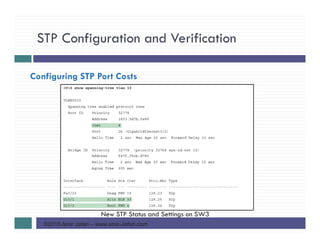
New STP Status and Settings on SW3
STP Configuration and Verification
©2015 Amir Jafari – www.amir-Jafari.com
Configuring Priority to Influence the Root Election
The other big STP configuration option is to influence the root election by changing the
priority of a switch.
The priority can be set explicitly with the spanning-tree vlan vlan-id priority value
global configuration command, which sets the base priority of the switch
In most designs, the network engineers pick two switches to be root:
1. One to be root if all switches are up
2. Another to take over if the first switch fails
Switch IOS supports this idea with the following commands:
1. spanningtree vlan vlan-id root primary
2. spanning-tree vlan vlan-id root secondary
STP Configuration and Verification
©2015 Amir Jafari – www.amir-Jafari.com
Configuring Priority to Influence the Root Election
The spanning-tree vlan vlan-id root primary command tells the switch to set its priority
low enough to become root right now
The switch looks at the current root in that VLAN, and at the root’s priority. Then the
local switch chooses a priority value that causes the local switch to take over as root
This command chooses the base priority as follows
1. If the current root has a base priority higher than 24,576, the local switch uses a
base priority of 24,576.
2. If the current root’s base priority is 24,576 or lower, the local switch sets its base
priority to the highest multiple of 4096 that still results in the local switch becoming
root
STP Configuration and Verification
©2015 Amir Jafari – www.amir-Jafari.com
Configuring Priority to Influence the Root Election
For the switch intended to take over as the root if the first switch fails, use the
spanning-tree vlan vlan-id root secondary command.
This command is much like the spanning-tree vlan vlan-id root primary command, but
with a priority value worse than the primary switch but better than all the other
switches.
This command sets the switch’s base priority to 28,672 regardless of the current root’s
current priority value.
STP Configuration and Verification
©2015 Amir Jafari – www.amir-Jafari.com
Configuring Priority to Influence the Root Election
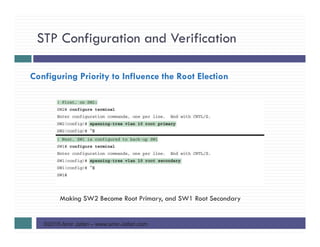
Making SW2 Become Root Primary, and SW1 Root Secondary
STP Configuration and Verification
©2015 Amir Jafari – www.amir-Jafari.com
Configuring Priority to Influence the Root Election
STP Configuration and Verification
©2015 Amir Jafari – www.amir-Jafari.com
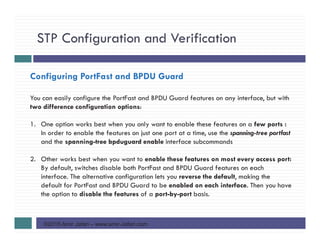
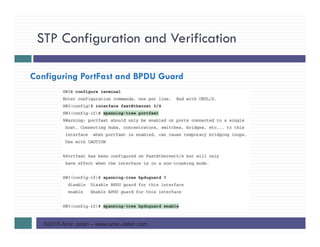
Configuring PortFast and BPDU Guard
You can easily configure the PortFast and BPDU Guard features on any interface, but with
two difference configuration options:
1. One option works best when you only want to enable these features on a few ports :
In order to enable the features on just one port at a time, use the spanning-tree portfast
and the spanning-tree bpduguard enable interface subcommands
2. Other works best when you want to enable these features on most every access port:
By default, switches disable both PortFast and BPDU Guard features on each
interface. The alternative configuration lets you reverse the default, making the
default for PortFast and BPDU Guard to be enabled on each interface. Then you have
the option to disable the features of a port-by-port basis.
STP Configuration and Verification
©2015 Amir Jafari – www.amir-Jafari.com
Configuring PortFast and BPDU Guard
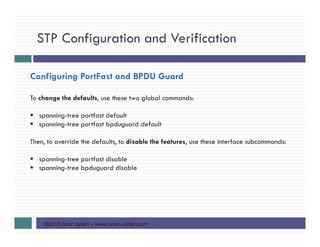
To change the defaults, use these two global commands:
spanning-tree portfast default
spanning-tree portfast bpduguard default
Then, to override the defaults, to disable the features, use these interface subcommands:
spanning-tree portfast disable
spanning-tree bpduguard disable
STP Configuration and Verification
©2015 Amir Jafari – www.amir-Jafari.com
Configuring PortFast and BPDU Guard
STP Configuration and Verification
©2015 Amir Jafari – www.amir-Jafari.com
Configuring PortFast and BPDU Guard
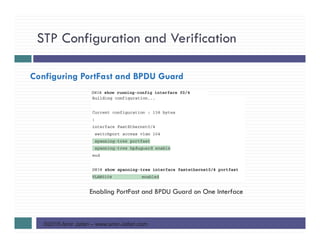
Enabling PortFast and BPDU Guard on One Interface
STP Configuration and Verification
©2015 Amir Jafari – www.amir-Jafari.com
Configuring EtherChannel
STP operates on the EtherChannel, instead of the individual physical links, so that STP
either forwards or blocks on the entire logical EtherChannel for a given VLAN
As a result, a switch in a forwarding state can then load balance traffic over all the
physical links in the EtherChannel
Without EtherChannel, only one of the parallel links between two switches would be
allowed to forward traffic, with the rest of the links blocked by STP
STP Configuration and Verification
©2015 Amir Jafari – www.amir-Jafari.com
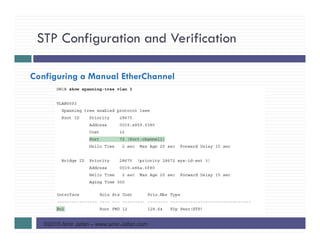
Configuring a Manual EtherChannel
The simplest way to configure an EtherChannel is to add the correct channel-group
configuration command to each physical interface, on each switch, all with the on
keyword
The on keyword tells the switches to place a physical interface into an EtherChannel
IOS using three terms as synonyms:
1. Channel-group: IOS uses the channel-group configuration command
2. EtherChannel: To display its status, IOS uses the show etherchannel command
3. PortChannel: show command refers to neither an “EtherChannel” nor a “Channel-
group,” instead using the term “PortChannel.
STP Configuration and Verification
©2015 Amir Jafari – www.amir-Jafari.com
Configuring a Manual EtherChannel
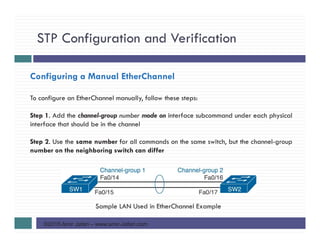
To configure an EtherChannel manually, follow these steps:
Step 1. Add the channel-group number mode on interface subcommand under each physical
interface that should be in the channel
Step 2. Use the same number for all commands on the same switch, but the channel-group
number on the neighboring switch can differ
Sample LAN Used in EtherChannel Example
STP Configuration and Verification
©2015 Amir Jafari – www.amir-Jafari.com
Configuring a Manual EtherChannel
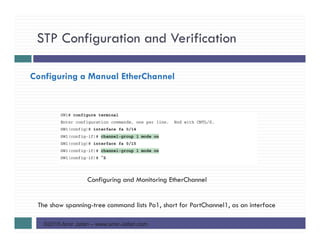
Configuring and Monitoring EtherChannel
The show spanning-tree command lists Po1, short for PortChannel1, as an interface
STP Configuration and Verification
©2015 Amir Jafari – www.amir-Jafari.com
Configuring a Manual EtherChannel
STP Configuration and Verification
©2015 Amir Jafari – www.amir-Jafari.com
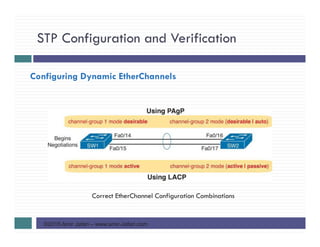
Configuring Dynamic EtherChannels
Cisco switches support two different protocols that allow the switches to negotiate
whether a particular link becomes part of an EtherChannel or not.
Basically, the configuration enables the protocol for a particular channel-group
number.
At that point, the switch can use the protocol to send messages to/from the
neighboring switch and discover whether their configuration settings pass all checks.
If a given physical link passes, the link is added to the EtherChannel and used; if not, it
is placed in a down state, and not used, until the configuration inconsistency can be
resolved
STP Configuration and Verification
©2015 Amir Jafari – www.amir-Jafari.com
Configuring Dynamic EtherChannels
Cisco switches support two different protocols:
1. Cisco proprietary Port Aggregation Protocol (PAgP)
2. IEEE standard Link Aggregation Control Protocol (LACP), based on IEEE 802.3ad
Although differences exist between the two, they both accomplish the same task:
negotiate so that only links that pass the configuration checks are actually used in an
EtherChannel
STP Configuration and Verification
©2015 Amir Jafari – www.amir-Jafari.com
Configuring Dynamic EtherChannels
To configure either protocol, a switch uses the channel-group configuration commands
on each switch, but with a keyword that either means “use this protocol and begin
negotiations” or “use this protocol and wait for the other switch to begin negotiations.”
desirable and auto keywords enable PAgP
active and passive keywords enable LACP
at least one side has to begin the negotiations. In other words, with PAgP, at least one
of the two sides must use desirable, and with LACP, at least one of the two sides must
use active
The on option uses neither PAgP nor LACP, so a configuration that uses on, with PAgP
or LACP options on the other end, would prevent the EtherChannel from working
STP Configuration and Verification
©2015 Amir Jafari – www.amir-Jafari.com
Configuring Dynamic EtherChannels
Correct EtherChannel Configuration Combinations
STP Troubleshooting
©2015 Amir Jafari – www.amir-Jafari.com
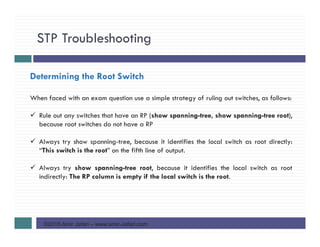
Determining the Root Switch
When faced with an exam question use a simple strategy of ruling out switches, as follows:
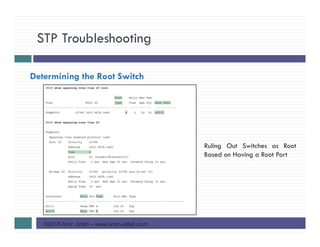
Rule out any switches that have an RP (show spanning-tree, show spanning-tree root),
because root switches do not have a RP
Always try show spanning-tree, because it identifies the local switch as root directly:
“This switch is the root” on the fifth line of output.
Always try show spanning-tree root, because it identifies the local switch as root
indirectly: The RP column is empty if the local switch is the root.
STP Troubleshooting
©2015 Amir Jafari – www.amir-Jafari.com
Determining the Root Switch
Ruling Out Switches as Root
Based on Having a Root Port
STP Troubleshooting
©2015 Amir Jafari – www.amir-Jafari.com
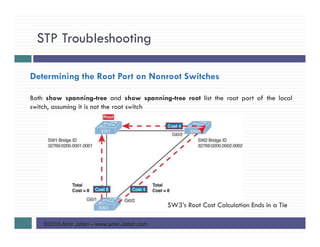
Determining the Root Port on Nonroot Switches
Both show spanning-tree and show spanning-tree root list the root port of the local
switch, assuming it is not the root switch
SW3’s Root Cost Calculation Ends in a Tie
STP Troubleshooting
©2015 Amir Jafari – www.amir-Jafari.com
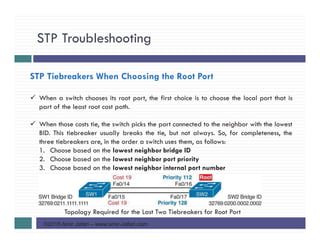
STP Tiebreakers When Choosing the Root Port
When a switch chooses its root port, the first choice is to choose the local port that is
part of the least root cost path.
When those costs tie, the switch picks the port connected to the neighbor with the lowest
BID. This tiebreaker usually breaks the tie, but not always. So, for completeness, the
three tiebreakers are, in the order a switch uses them, as follows:
1. Choose based on the lowest neighbor bridge ID
2. Choose based on the lowest neighbor port priority
3. Choose based on the lowest neighbor internal port number
Topology Required for the Last Two Tiebreakers for Root Port
STP Troubleshooting
©2015 Amir Jafari – www.amir-Jafari.com
STP Tiebreakers When Choosing the Root Port
The next tiebreaker is a configurable option: the neighboring switch’s port priority on
each neighboring switch interface (spanning-tree vlan 10 port-priority priority
interface command)
Cisco switch ports default to a setting of 128, with a range of values from 0 through
255, with lower being better (as usual)
If the port priority ties, which it often does due to the default values, STP relies on an
internal port numbering on the neighbor.
Cisco switches assign an internal integer to identify each interface on the switch. The
nonroot looks for the neighbor’s lowest internal port number (as listed in the hello
messages) and chooses its RP based on the lower number
STP Troubleshooting
©2015 Amir Jafari – www.amir-Jafari.com
Suggestions for Attacking Root Port Problems on the Exam
The following list makes a few suggestions about how to approach STP problems on the
exam:
Look at the show spanning-tree and show spanning-tree root commands. These both
list the root port, and the first of these also lists the root cost
The show spanning-tree command list cost in two places: the root cost at the top, in the
section about the root switch; and the interface cost, at the bottom, in the per-interface
section
Look for any evidence of the spanning-tree cost configuration command on an
interface, because it overrides the default cost. Do not assume default costs are used
When you know a default cost is used, if you can, check the current actual speed as
well. Cisco switches choose STP cost defaults based on the current speed, not the
maximum speed.
STP Troubleshooting
©2015 Amir Jafari – www.amir-Jafari.com
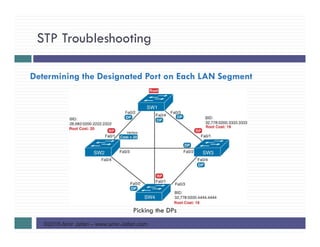
Determining the Designated Port on Each LAN Segment
Picking the DPs
STP Troubleshooting
©2015 Amir Jafari – www.amir-Jafari.com
STP Convergence
But at some point, some switch or link will fail, a link may change speeds (changing
the STP cost), or the STP configuration may change. Any of these events can cause
switches to repeat their STP algorithm, which may in turn change their own RP and any
ports that are DPs.
When a port needs to change state, something has to happen, based on the following
rules:
1. For interfaces that stay in the same STP state, nothing needs to change
2. For interfaces that need to move from a forwarding state to a blocking state, the
switch immediately changes the state to blocking
3. For interfaces that need to move from a blocking state to a forwarding state, the
switch first moves the interface to listening state, then learning state, each for the
time specified by the forward delay timer. Only then is the interface placed into
forwarding state
STP Troubleshooting
©2015 Amir Jafari – www.amir-Jafari.com
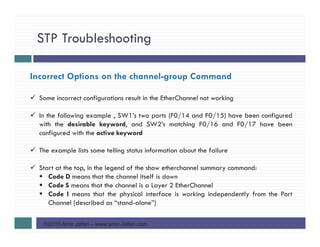
Incorrect Options on the channel-group Command
Some incorrect configurations result in the EtherChannel not working
In the following example , SW1’s two ports (F0/14 and F0/15) have been configured
with the desirable keyword, and SW2’s matching F0/16 and F0/17 have been
configured with the active keyword
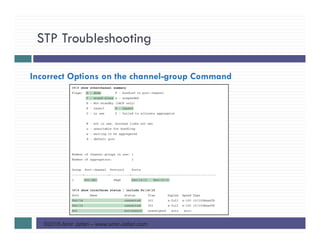
The example lists some telling status information about the failure
Start at the top, in the legend of the show etherchannel summary command:
Code D means that the channel itself is down
Code S means that the channel is a Layer 2 EtherChannel
Code I means that the physical interface is working independently from the Port
Channel (described as “stand-alone”)
STP Troubleshooting
©2015 Amir Jafari – www.amir-Jafari.com
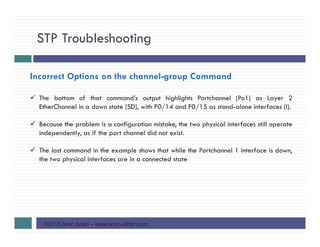
Incorrect Options on the channel-group Command
The bottom of that command’s output highlights Portchannel (Po1) as Layer 2
EtherChannel in a down state (SD), with F0/14 and F0/15 as stand-alone interfaces (I).
Because the problem is a configuration mistake, the two physical interfaces still operate
independently, as if the port channel did not exist.
The last command in the example shows that while the Portchannel 1 interface is down,
the two physical interfaces are in a connected state
STP Troubleshooting
©2015 Amir Jafari – www.amir-Jafari.com
Incorrect Options on the channel-group Command
STP Troubleshooting
©2015 Amir Jafari – www.amir-Jafari.com
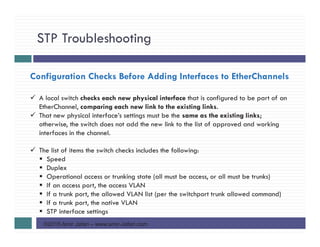
Configuration Checks Before Adding Interfaces to EtherChannels
A local switch checks each new physical interface that is configured to be part of an
EtherChannel, comparing each new link to the existing links.
That new physical interface’s settings must be the same as the existing links;
otherwise, the switch does not add the new link to the list of approved and working
interfaces in the channel.
The list of items the switch checks includes the following:
Speed
Duplex
Operational access or trunking state (all must be access, or all must be trunks)
If an access port, the access VLAN
If a trunk port, the allowed VLAN list (per the switchport trunk allowed command)
If a trunk port, the native VLAN
STP interface settings
STP Troubleshooting
©2015 Amir Jafari – www.amir-Jafari.com
Configuration Checks Before Adding Interfaces to EtherChannels
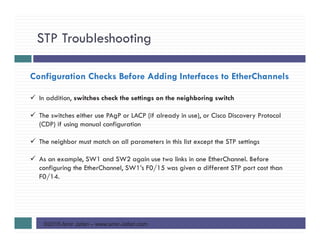
In addition, switches check the settings on the neighboring switch
The switches either use PAgP or LACP (if already in use), or Cisco Discovery Protocol
(CDP) if using manual configuration
The neighbor must match on all parameters in this list except the STP settings
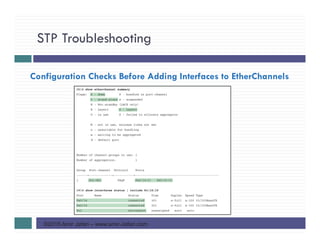
As an example, SW1 and SW2 again use two links in one EtherChannel. Before
configuring the EtherChannel, SW1’s F0/15 was given a different STP port cost than
F0/14.
STP Troubleshooting
©2015 Amir Jafari – www.amir-Jafari.com
Configuration Checks Before Adding Interfaces to EtherChannels
STP Troubleshooting
©2015 Amir Jafari – www.amir-Jafari.com
Configuration Checks Before Adding Interfaces to EtherChannels
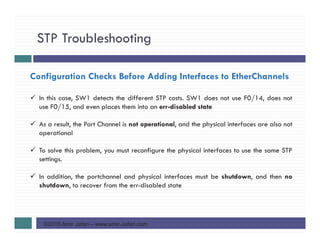
In this case, SW1 detects the different STP costs. SW1 does not use F0/14, does not
use F0/15, and even places them into an err-disabled state
As a result, the Port Channel is not operational, and the physical interfaces are also not
operational
To solve this problem, you must reconfigure the physical interfaces to use the same STP
settings.
In addition, the portchannel and physical interfaces must be shutdown, and then no
shutdown, to recover from the err-disabled state
Spanning Tree Protocol Implementation
©2015 Amir Jafari – www.amir-Jafari.com
References
1) Cisco Systems, Inc, www.cisco.com/
2) Wendell Odom ,”Cisco CCENT/CCNA ICND1 100-101 Official Cert Guide”, Cisco
Press, USA, 2013

CCNA R&S-13-Spanning Tree Protocol Implementation

  • 1.
    ©2015 Amir Jafari– www.amir-Jafari.com Routing and Switching 200-120 13 - Spanning Tree Protocol Implementation
  • 2.
    Spanning Tree ProtocolImplementation ©2015 Amir Jafari – www.amir-Jafari.com Agenda STP Configuration and Verification STP Troubleshooting
  • 3.
    STP Configuration andVerification ©2015 Amir Jafari – www.amir-Jafari.com STP Configuration and Verification Cisco switches usually use STP (IEEE 802.1D) by default You can buy some Cisco switches and connect them with Ethernet cables in a redundant topology, and STP will ensure that frames do not loop Network engineers usually want to configure at least some STP settings, so when all switches and links work, the engineer knows which switch is the root and which ports block The configuration can also be set so that when links or switches fail, the engineer can predict the STP topology in those cases, as well Most network engineers make the distribution layer switches be the root
  • 4.
    STP Configuration andVerification ©2015 Amir Jafari – www.amir-Jafari.com STP Configuration and Verification Typical Configuration Choice: Making Distribution Switch Be Root
  • 5.
    STP Configuration andVerification ©2015 Amir Jafari – www.amir-Jafari.com Setting the STP Mode The IEEE first standardized STP as the IEEE 802.1D standard, first published back in 1990. On that date, Cisco sold no LAN switches at the time, and virtual LANs did not exist yet. As a result, the STP protocol has gone through several significant changes with the introduction of switches, VLANs, and other improvements in LAN technology Today, Cisco LAN switches allow you to use one of three STP modes: 1. Per-VLAN Spanning Tree Plus (PVST+, or PVSTP) 2. Rapid PVST+, or simply RPVST+ 3. Multiple Spanning Tree (MST)
  • 6.
    STP Configuration andVerification ©2015 Amir Jafari – www.amir-Jafari.com Setting the STP Mode PVST+ is a Cisco-proprietary improvement of 802.1D STP. The per-VLAN part of the name gives away the main feature: PVST+ creates a different STP topology per VLAN, whereas 802.1D actually did not. PVST+ also introduced PortFast Over time, the IEEE improved STP beyond the 802.1D standard with the Rapid STP (802.1W) protocol. Then Cisco took that standard and made another proprietary improvement, creating another mode in Cisco switches: Rapid PVST+. It has all the improvements of the newer IEEE standard per-VLAN Cisco switches generally default to using PVST+ To set a switch to use these modes: 1. Switch(config)#spanning-tree mode pvst (set a switch to use PVST+ mode) 2. Switch(config)#spanning-tree mode rapid-pvst (set a switch to use RPVST+ mode) 3. Switch(config)#spanning-tree mode mst (set a switch to use MST mode)
  • 7.
    STP Configuration andVerification ©2015 Amir Jafari – www.amir-Jafari.com Per-VLAN Configuration Settings By default, Cisco switches use IEEE 802.1D, not RSTP (802.1w), with a Cisco-proprietary feature called Per-VLAN Spanning Tree Plus (PVST+). PVST+ creates a different instance of STP for each VLAN PVST+ gives engineers a load-balancing tool with STP. By changing some STP configuration parameters differently for different VLANs, the engineer could cause switches to pick different RPs and DPs in different VLANs As a result, some traffic in some VLANs can be forwarded over one trunk, and traffic for other VLANs can be forwarded over a different trunk
  • 8.
    STP Configuration andVerification ©2015 Amir Jafari – www.amir-Jafari.com Per-VLAN Configuration Settings Load Balancing with PVST+
  • 9.
    STP Configuration andVerification ©2015 Amir Jafari – www.amir-Jafari.com The Bridge ID and System ID Extension Originally, a switch’s BID was formed by combining the switch’s 2-byte priority and its 6-byte MAC address. Later, the IEEE changed the rules, splitting the original priority field into two separate fields, : 1. 4-bit priority field 2. 12-bit subfield called the system ID extension (which represents the VLAN ID)
  • 10.
    STP Configuration andVerification ©2015 Amir Jafari – www.amir-Jafari.com The Bridge ID and System ID Extension STP System ID Extension
  • 11.
    STP Configuration andVerification ©2015 Amir Jafari – www.amir-Jafari.com The Bridge ID and System ID Extension Cisco switches let you configure the BID, but only the priority part. The only part configurable by the network engineer is the 4-bit priority field. the priority field was originally a 16-bit number, which represented a decimal number from 0 to 65,535. Because of that history, the current configuration command (spanning- tree vlan vlan-id priority x) requires a decimal number between 0 and 65,535 And not just any number in that range, either: It must be a multiple of 4096: 0, 4096, 8192, 12288, and so on, up through 61,440 As it turns out, of the 16 allowed multiples of 4096, from 0 through 61,440, each has a different binary value in their first 4 bits: 0000, 0001, 0010, and so on, up through 1111.
  • 12.
    STP Configuration andVerification ©2015 Amir Jafari – www.amir-Jafari.com The Bridge ID and System ID Extension VLAN IDs range from 1 to 4094, requiring 12 bits. Cisco switches place the VLAN ID into the System ID Extension field, so each switch has a unique BID per VLAN For example, a switch configured with VLANs 1 through 4, with a default base priority of 32,768, has a default STP priority of 32,769 in VLAN 1, 32,770 in VLAN 2, 32,771 in VLAN 3, and so on
  • 13.
    STP Configuration andVerification ©2015 Amir Jafari – www.amir-Jafari.com Per-VLAN Port Costs Each switch interface defaults its per-VLAN STP cost based on the IEEE recommendations. On interfaces that support multiple speeds, Cisco switches base the cost on the current actual speed. Alternatively, you can configure a switch’s STP port cost with the spanning-tree [vlan vlan-id] cost cost interface subcommand This command most often on trunks because setting the cost on trunks has an impact on the switch’s root cost, whereas setting STP costs on access ports does not
  • 14.
    STP Configuration andVerification ©2015 Amir Jafari – www.amir-Jafari.com Per-VLAN Port Costs For the spanning-tree [vlan vlan-id] cost cost, it can include the VLAN ID, or not. The command only needs a vlan parameter on trunk ports to set the cost per VLAN. On a trunk, if the command omits the VLAN parameter, it sets the STP cost for all VLANs whose cost is not set by a spanning-tree vlan x cost command for that VLAN
  • 15.
    STP Configuration andVerification ©2015 Amir Jafari – www.amir-Jafari.com STP Configuration Option Summary STP Defaults and Configuration Options
  • 16.
    STP Configuration andVerification ©2015 Amir Jafari – www.amir-Jafari.com Verifying STP Operation Sample LAN for STP Configuration and Verification Examples
  • 17.
    STP Configuration andVerification ©2015 Amir Jafari – www.amir-Jafari.com Verifying STP Operation The show spanning-tree vlan vlan command identifies the root switch and lists settings on the local switch Two other commands : work better for listing BID information in a shorter form: 1. show spanning-tree root, lists the root’s BID for each VLAN. This command also lists other details, like the local switch’s root cost and root port 2. show spanning-tree vlan 10 bridge, breaks out the BID into its component parts
  • 18.
    STP Configuration andVerification ©2015 Amir Jafari – www.amir-Jafari.com Verifying STP Operation
  • 19.
    STP Configuration andVerification ©2015 Amir Jafari – www.amir-Jafari.com Verifying STP Operation STP Status with Default STP Parameters on SW1 and SW2
  • 20.
    STP Configuration andVerification ©2015 Amir Jafari – www.amir-Jafari.com Verifying STP Operation Listing Root Switch and Local Switch BIDs on Switch SW2
  • 21.
    STP Configuration andVerification ©2015 Amir Jafari – www.amir-Jafari.com Verifying STP Operation both the commands have a VLAN option: 1. show spanning-tree [vlan x] root 2. show spanning-tree [vlan x] bridge Without the VLAN listed, each command lists one line per VLAN With the VLAN, the output lists the same information, but just for that one VLAN
  • 22.
    STP Configuration andVerification ©2015 Amir Jafari – www.amir-Jafari.com Configuring STP Port Costs Analysis of SW3’s Current Root Cost of 4 with Defaults
  • 23.
    STP Configuration andVerification ©2015 Amir Jafari – www.amir-Jafari.com Configuring STP Port Costs Manipulating STP Port Cost and Watching the Transition to Forwarding State
  • 24.
    STP Configuration andVerification ©2015 Amir Jafari – www.amir-Jafari.com Configuring STP Port Costs This example starts with the debug spanning-tree events command on SW1. This command tells the switch to issue debug log messages whenever STP performs changes to an interface’s role or state The debug messages tell us what STP on SW3 is thinking behind the scenes, with timestamps Five debug messages, displayed immediately after the user exited configuration mode in this case, all happen at the same time. G0/1, which had been forwarding, immediately moves to a blocking state. Interface G0/2, which had been blocking, does not go to a forwarding state, instead moving to a listening state and then to learning state and reaching forwarding state.
  • 25.
    STP Configuration andVerification ©2015 Amir Jafari – www.amir-Jafari.com Configuring STP Port Costs New STP Status and Settings on SW3
  • 26.
    STP Configuration andVerification ©2015 Amir Jafari – www.amir-Jafari.com Configuring Priority to Influence the Root Election The other big STP configuration option is to influence the root election by changing the priority of a switch. The priority can be set explicitly with the spanning-tree vlan vlan-id priority value global configuration command, which sets the base priority of the switch In most designs, the network engineers pick two switches to be root: 1. One to be root if all switches are up 2. Another to take over if the first switch fails Switch IOS supports this idea with the following commands: 1. spanningtree vlan vlan-id root primary 2. spanning-tree vlan vlan-id root secondary
  • 27.
    STP Configuration andVerification ©2015 Amir Jafari – www.amir-Jafari.com Configuring Priority to Influence the Root Election The spanning-tree vlan vlan-id root primary command tells the switch to set its priority low enough to become root right now The switch looks at the current root in that VLAN, and at the root’s priority. Then the local switch chooses a priority value that causes the local switch to take over as root This command chooses the base priority as follows 1. If the current root has a base priority higher than 24,576, the local switch uses a base priority of 24,576. 2. If the current root’s base priority is 24,576 or lower, the local switch sets its base priority to the highest multiple of 4096 that still results in the local switch becoming root
  • 28.
    STP Configuration andVerification ©2015 Amir Jafari – www.amir-Jafari.com Configuring Priority to Influence the Root Election For the switch intended to take over as the root if the first switch fails, use the spanning-tree vlan vlan-id root secondary command. This command is much like the spanning-tree vlan vlan-id root primary command, but with a priority value worse than the primary switch but better than all the other switches. This command sets the switch’s base priority to 28,672 regardless of the current root’s current priority value.
  • 29.
    STP Configuration andVerification ©2015 Amir Jafari – www.amir-Jafari.com Configuring Priority to Influence the Root Election Making SW2 Become Root Primary, and SW1 Root Secondary
  • 30.
    STP Configuration andVerification ©2015 Amir Jafari – www.amir-Jafari.com Configuring Priority to Influence the Root Election
  • 31.
    STP Configuration andVerification ©2015 Amir Jafari – www.amir-Jafari.com Configuring PortFast and BPDU Guard You can easily configure the PortFast and BPDU Guard features on any interface, but with two difference configuration options: 1. One option works best when you only want to enable these features on a few ports : In order to enable the features on just one port at a time, use the spanning-tree portfast and the spanning-tree bpduguard enable interface subcommands 2. Other works best when you want to enable these features on most every access port: By default, switches disable both PortFast and BPDU Guard features on each interface. The alternative configuration lets you reverse the default, making the default for PortFast and BPDU Guard to be enabled on each interface. Then you have the option to disable the features of a port-by-port basis.
  • 32.
    STP Configuration andVerification ©2015 Amir Jafari – www.amir-Jafari.com Configuring PortFast and BPDU Guard To change the defaults, use these two global commands: spanning-tree portfast default spanning-tree portfast bpduguard default Then, to override the defaults, to disable the features, use these interface subcommands: spanning-tree portfast disable spanning-tree bpduguard disable
  • 33.
    STP Configuration andVerification ©2015 Amir Jafari – www.amir-Jafari.com Configuring PortFast and BPDU Guard
  • 34.
    STP Configuration andVerification ©2015 Amir Jafari – www.amir-Jafari.com Configuring PortFast and BPDU Guard Enabling PortFast and BPDU Guard on One Interface
  • 35.
    STP Configuration andVerification ©2015 Amir Jafari – www.amir-Jafari.com Configuring EtherChannel STP operates on the EtherChannel, instead of the individual physical links, so that STP either forwards or blocks on the entire logical EtherChannel for a given VLAN As a result, a switch in a forwarding state can then load balance traffic over all the physical links in the EtherChannel Without EtherChannel, only one of the parallel links between two switches would be allowed to forward traffic, with the rest of the links blocked by STP
  • 36.
    STP Configuration andVerification ©2015 Amir Jafari – www.amir-Jafari.com Configuring a Manual EtherChannel The simplest way to configure an EtherChannel is to add the correct channel-group configuration command to each physical interface, on each switch, all with the on keyword The on keyword tells the switches to place a physical interface into an EtherChannel IOS using three terms as synonyms: 1. Channel-group: IOS uses the channel-group configuration command 2. EtherChannel: To display its status, IOS uses the show etherchannel command 3. PortChannel: show command refers to neither an “EtherChannel” nor a “Channel- group,” instead using the term “PortChannel.
  • 37.
    STP Configuration andVerification ©2015 Amir Jafari – www.amir-Jafari.com Configuring a Manual EtherChannel To configure an EtherChannel manually, follow these steps: Step 1. Add the channel-group number mode on interface subcommand under each physical interface that should be in the channel Step 2. Use the same number for all commands on the same switch, but the channel-group number on the neighboring switch can differ Sample LAN Used in EtherChannel Example
  • 38.
    STP Configuration andVerification ©2015 Amir Jafari – www.amir-Jafari.com Configuring a Manual EtherChannel Configuring and Monitoring EtherChannel The show spanning-tree command lists Po1, short for PortChannel1, as an interface
  • 39.
    STP Configuration andVerification ©2015 Amir Jafari – www.amir-Jafari.com Configuring a Manual EtherChannel
  • 40.
    STP Configuration andVerification ©2015 Amir Jafari – www.amir-Jafari.com Configuring Dynamic EtherChannels Cisco switches support two different protocols that allow the switches to negotiate whether a particular link becomes part of an EtherChannel or not. Basically, the configuration enables the protocol for a particular channel-group number. At that point, the switch can use the protocol to send messages to/from the neighboring switch and discover whether their configuration settings pass all checks. If a given physical link passes, the link is added to the EtherChannel and used; if not, it is placed in a down state, and not used, until the configuration inconsistency can be resolved
  • 41.
    STP Configuration andVerification ©2015 Amir Jafari – www.amir-Jafari.com Configuring Dynamic EtherChannels Cisco switches support two different protocols: 1. Cisco proprietary Port Aggregation Protocol (PAgP) 2. IEEE standard Link Aggregation Control Protocol (LACP), based on IEEE 802.3ad Although differences exist between the two, they both accomplish the same task: negotiate so that only links that pass the configuration checks are actually used in an EtherChannel
  • 42.
    STP Configuration andVerification ©2015 Amir Jafari – www.amir-Jafari.com Configuring Dynamic EtherChannels To configure either protocol, a switch uses the channel-group configuration commands on each switch, but with a keyword that either means “use this protocol and begin negotiations” or “use this protocol and wait for the other switch to begin negotiations.” desirable and auto keywords enable PAgP active and passive keywords enable LACP at least one side has to begin the negotiations. In other words, with PAgP, at least one of the two sides must use desirable, and with LACP, at least one of the two sides must use active The on option uses neither PAgP nor LACP, so a configuration that uses on, with PAgP or LACP options on the other end, would prevent the EtherChannel from working
  • 43.
    STP Configuration andVerification ©2015 Amir Jafari – www.amir-Jafari.com Configuring Dynamic EtherChannels Correct EtherChannel Configuration Combinations
  • 44.
    STP Troubleshooting ©2015 AmirJafari – www.amir-Jafari.com Determining the Root Switch When faced with an exam question use a simple strategy of ruling out switches, as follows: Rule out any switches that have an RP (show spanning-tree, show spanning-tree root), because root switches do not have a RP Always try show spanning-tree, because it identifies the local switch as root directly: “This switch is the root” on the fifth line of output. Always try show spanning-tree root, because it identifies the local switch as root indirectly: The RP column is empty if the local switch is the root.
  • 45.
    STP Troubleshooting ©2015 AmirJafari – www.amir-Jafari.com Determining the Root Switch Ruling Out Switches as Root Based on Having a Root Port
  • 46.
    STP Troubleshooting ©2015 AmirJafari – www.amir-Jafari.com Determining the Root Port on Nonroot Switches Both show spanning-tree and show spanning-tree root list the root port of the local switch, assuming it is not the root switch SW3’s Root Cost Calculation Ends in a Tie
  • 47.
    STP Troubleshooting ©2015 AmirJafari – www.amir-Jafari.com STP Tiebreakers When Choosing the Root Port When a switch chooses its root port, the first choice is to choose the local port that is part of the least root cost path. When those costs tie, the switch picks the port connected to the neighbor with the lowest BID. This tiebreaker usually breaks the tie, but not always. So, for completeness, the three tiebreakers are, in the order a switch uses them, as follows: 1. Choose based on the lowest neighbor bridge ID 2. Choose based on the lowest neighbor port priority 3. Choose based on the lowest neighbor internal port number Topology Required for the Last Two Tiebreakers for Root Port
  • 48.
    STP Troubleshooting ©2015 AmirJafari – www.amir-Jafari.com STP Tiebreakers When Choosing the Root Port The next tiebreaker is a configurable option: the neighboring switch’s port priority on each neighboring switch interface (spanning-tree vlan 10 port-priority priority interface command) Cisco switch ports default to a setting of 128, with a range of values from 0 through 255, with lower being better (as usual) If the port priority ties, which it often does due to the default values, STP relies on an internal port numbering on the neighbor. Cisco switches assign an internal integer to identify each interface on the switch. The nonroot looks for the neighbor’s lowest internal port number (as listed in the hello messages) and chooses its RP based on the lower number
  • 49.
    STP Troubleshooting ©2015 AmirJafari – www.amir-Jafari.com Suggestions for Attacking Root Port Problems on the Exam The following list makes a few suggestions about how to approach STP problems on the exam: Look at the show spanning-tree and show spanning-tree root commands. These both list the root port, and the first of these also lists the root cost The show spanning-tree command list cost in two places: the root cost at the top, in the section about the root switch; and the interface cost, at the bottom, in the per-interface section Look for any evidence of the spanning-tree cost configuration command on an interface, because it overrides the default cost. Do not assume default costs are used When you know a default cost is used, if you can, check the current actual speed as well. Cisco switches choose STP cost defaults based on the current speed, not the maximum speed.
  • 50.
    STP Troubleshooting ©2015 AmirJafari – www.amir-Jafari.com Determining the Designated Port on Each LAN Segment Picking the DPs
  • 51.
    STP Troubleshooting ©2015 AmirJafari – www.amir-Jafari.com STP Convergence But at some point, some switch or link will fail, a link may change speeds (changing the STP cost), or the STP configuration may change. Any of these events can cause switches to repeat their STP algorithm, which may in turn change their own RP and any ports that are DPs. When a port needs to change state, something has to happen, based on the following rules: 1. For interfaces that stay in the same STP state, nothing needs to change 2. For interfaces that need to move from a forwarding state to a blocking state, the switch immediately changes the state to blocking 3. For interfaces that need to move from a blocking state to a forwarding state, the switch first moves the interface to listening state, then learning state, each for the time specified by the forward delay timer. Only then is the interface placed into forwarding state
  • 52.
    STP Troubleshooting ©2015 AmirJafari – www.amir-Jafari.com Incorrect Options on the channel-group Command Some incorrect configurations result in the EtherChannel not working In the following example , SW1’s two ports (F0/14 and F0/15) have been configured with the desirable keyword, and SW2’s matching F0/16 and F0/17 have been configured with the active keyword The example lists some telling status information about the failure Start at the top, in the legend of the show etherchannel summary command: Code D means that the channel itself is down Code S means that the channel is a Layer 2 EtherChannel Code I means that the physical interface is working independently from the Port Channel (described as “stand-alone”)
  • 53.
    STP Troubleshooting ©2015 AmirJafari – www.amir-Jafari.com Incorrect Options on the channel-group Command The bottom of that command’s output highlights Portchannel (Po1) as Layer 2 EtherChannel in a down state (SD), with F0/14 and F0/15 as stand-alone interfaces (I). Because the problem is a configuration mistake, the two physical interfaces still operate independently, as if the port channel did not exist. The last command in the example shows that while the Portchannel 1 interface is down, the two physical interfaces are in a connected state
  • 54.
    STP Troubleshooting ©2015 AmirJafari – www.amir-Jafari.com Incorrect Options on the channel-group Command
  • 55.
    STP Troubleshooting ©2015 AmirJafari – www.amir-Jafari.com Configuration Checks Before Adding Interfaces to EtherChannels A local switch checks each new physical interface that is configured to be part of an EtherChannel, comparing each new link to the existing links. That new physical interface’s settings must be the same as the existing links; otherwise, the switch does not add the new link to the list of approved and working interfaces in the channel. The list of items the switch checks includes the following: Speed Duplex Operational access or trunking state (all must be access, or all must be trunks) If an access port, the access VLAN If a trunk port, the allowed VLAN list (per the switchport trunk allowed command) If a trunk port, the native VLAN STP interface settings
  • 56.
    STP Troubleshooting ©2015 AmirJafari – www.amir-Jafari.com Configuration Checks Before Adding Interfaces to EtherChannels In addition, switches check the settings on the neighboring switch The switches either use PAgP or LACP (if already in use), or Cisco Discovery Protocol (CDP) if using manual configuration The neighbor must match on all parameters in this list except the STP settings As an example, SW1 and SW2 again use two links in one EtherChannel. Before configuring the EtherChannel, SW1’s F0/15 was given a different STP port cost than F0/14.
  • 57.
    STP Troubleshooting ©2015 AmirJafari – www.amir-Jafari.com Configuration Checks Before Adding Interfaces to EtherChannels
  • 58.
    STP Troubleshooting ©2015 AmirJafari – www.amir-Jafari.com Configuration Checks Before Adding Interfaces to EtherChannels In this case, SW1 detects the different STP costs. SW1 does not use F0/14, does not use F0/15, and even places them into an err-disabled state As a result, the Port Channel is not operational, and the physical interfaces are also not operational To solve this problem, you must reconfigure the physical interfaces to use the same STP settings. In addition, the portchannel and physical interfaces must be shutdown, and then no shutdown, to recover from the err-disabled state
  • 59.
    Spanning Tree ProtocolImplementation ©2015 Amir Jafari – www.amir-Jafari.com References 1) Cisco Systems, Inc, www.cisco.com/ 2) Wendell Odom ,”Cisco CCENT/CCNA ICND1 100-101 Official Cert Guide”, Cisco Press, USA, 2013