Network Wiring & Devices
Geert Jan de Groot
Network Wiring
• Half/full duplex Ethernet
• Network Wiring
• Autonegotiation
• Structured wiring
• Optics
• Your questions please!
Copper Ethernet media
• Coax (10 Mbit/sec)
– now obsolete
• Twisted pair
– Uses pair 1-2, 3-6, 4-5, 7-8
– 10 Mbit/sec (10BASE-T)
– 100 Mbit/sec
– 1000 Mbit/sec (‘gigabit ethernet’)
– (10.000 Mbit/sec)
A few words on 10BASE-T
• Available everywhere today
• Uses pair 1-2, 3-6
– Unshielded twisted pairs
– Often miswired
• Typically half-duplex
– Full duplex possible
• Max length 100 meters!
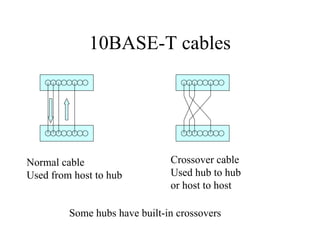
10BASE-T cables
Normal cable
Used from host to hub
Crossover cable
Used hub to hub
or host to host
Some hubs have built-in crossovers
100 Mbit copper networks
• 3 standards:
– 100BASE-TX <<-- Winner
– 100BASE-T4 <<-- Loser
– 100VG-Anylan <<-- Loser
• Don’t buy anything but 100BASE-TX!
100BASE-TX
• Requires Category 5 (‘CAT5’) cabling
– No more, no less
• 100BASE-TX runs on 2 wire pairs
– 1-2, 3-6, like 10BASE-T
• Cheap today
– Built-in in PC chipset
– Has replaced 10BASE-T equipment
Faster: Gigabit Ethernet
• 1000 Mbit/sec, 1000BASE-T
• Still works on CAT5 cabling, tight fit
• Uses all 4 wire pairs
– In both directions
• About to get cheap and common
– $15 network card
– Being integrated in PC chipset (replacing
100BASE-TX)
• Automatic crossover additional new feature
Still faster: 10 Gigabit Ethernet
• 10 Gigabit originally only on fiber
• 10 Gigabit on copper currently being under
development by IEEE 802.3 standards
committee
– Close to Shannon Limit
– Standard is IEEE 802.3an - currently through
IEEE voting process
Half/Full duplex
• Ethernet is CSMA/CD
– Carrier Sense Multiple Access/Collision
Detection
• Without Full Duplex, only one station
transmitting at any time
• With Full Duplex, packets can be sent in
both directions simultaniously
Half duplex
• Listen before you transmit
• Listen while you transmit
• If there is a collision, both transmitters will:
– Jam
– Backoff (exponentially, randomly)
– Re-try sending the packet
– Minimal packet size: 64 bytes
• Collisions are harmless!
– Actually help scale / stabilize an ethernet network
Full duplex
• Allows transmission/reception
simultaneously
– Impossible on older coax media
– Easy to implement on twisted pair/fiber media
• No collisions
• More bandwidth available
Link pulses
• 10BASE-T sends link pulses when idle
– used to test integrity of link (why?)
– link light
• 100BASE-T uses faster link pulses
– Automatic detection between 10 and 100 possible
• Manual setting of half/full duplex
– Settings must match
Autonegotiation
• Method to automatically select ‘best’
transmission method between link partners
• Link pulse now becomes pulse train
• Automatically sets speed, duplex etc
Autonegotiation (2)
• ‘Parallel detection’ for devices w/o
autonegotiation
– 10BASE-T and 100BASE-TX only
– Only HDX
• Autonegotiation mandatory for gigabit
ethernet
• Technology is mature now
– Early chips had serious issues, so be aware
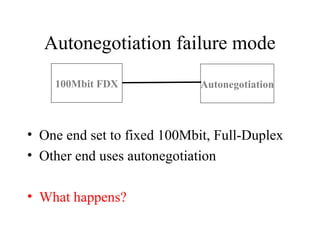
Autonegotiation failure mode
• One end set to fixed 100Mbit, Full-Duplex
• Other end uses autonegotiation
• What happens?
100Mbit FDX Autonegotiation
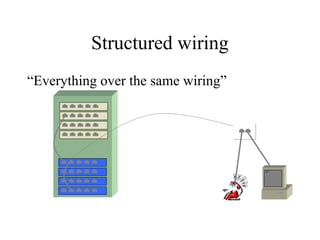
Structured wiring
“Everything over the same wiring”
Wire Types
• Category 3: 10 Mbps
• Category 4: 16 Mbps (for token ring)
• Category 5: 100 Mbps / 1000 Mbps
– Cat5e: tighter tolerances
– Cat6: Allows even higher bandwiths
• Shielded or unshielded
• Advice: use Cat 5, Cat 5e or Cat6 UTP (unshielded
twisted pair)
• Category 7 and higher marketing hype
– Not official IEEE spec
Structured wiring pitfalls
• High installation cost
– so install enough the first time
• Use materials that are qualified for Cat 5 or
higher
• Get guarantee from installer
• (IP Telephony?)
Fiber optics
• Long-haul connections within buildings
– Remember: copper = 100m max!
– Interconnects between structured wiring wiring
cabinets
• Must use fiber between buildings
– Cable length restrictions
– Lightning protection
Fiber optics (2)
• Multi mode: short hauls
• Single mode: long hauls
• Different fiber diameters
• Different connector types
– ST, SC, VF45
– Many others these days
Fiber optics (3)
• 10BaseF for 10Mbps ethernet
• 100BaseFX for 100Mbps fast ethernet
• 1000BaseSX for gigabit ethernet
• Advice: run more fibers than you need, but
don’t terminate them (yet)
Power Over Ethernet
• Allows to power device over ethernet cable
– No power plug or wall wart
– Uses ‘unused’ wire pairs
• Convenient for places where power is
difficult
– Wireless access points
– IP telephones
• IEEE 802.3af standard
– Be aware of pre-standard (incompatible)
equipment
Hubs, Switches and Routers
How do they work?
What are the differences?
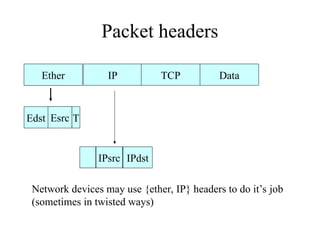
Packet headers
Ether IP Data
TCP
Edst T
IPsrc IPdst
Network devices may use {ether, IP} headers to do it’s job
(sometimes in twisted ways)
Esrc
Types of ethernet addresses
• Typically one interrupt per packet received
– Interrupts cost a lot of CPU performance!
• Use ethernet addresses to be able to filter packets in
ethernet receiver hardware
• First 3 bytes (actually, only 22 bits) assigned by
IEEE
• Organisational Unique Identifier
• 3 types of addresses:
– Unicast, Multicast, Broadcast
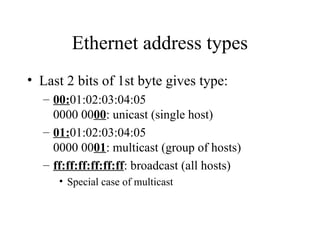
Ethernet address types
• Last 2 bits of 1st byte gives type:
– 00:01:02:03:04:05
0000 0000: unicast (single host)
– 01:01:02:03:04:05
0000 0001: multicast (group of hosts)
– ff:ff:ff:ff:ff:ff: broadcast (all hosts)
• Special case of multicast
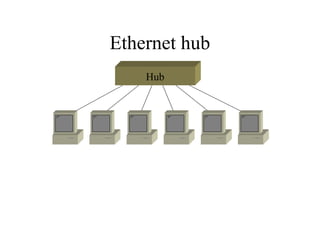
Ethernet hub
Hub
Ethernet hub (2)
• Hub is layer 1 device
• Hub does not filter packets
• Whole hub is one collision domain
– Hence cannot do full duplex
• Daisychaining of hubs limited
• Cheap
• Doesn’t exist for Gigabit Ethernet
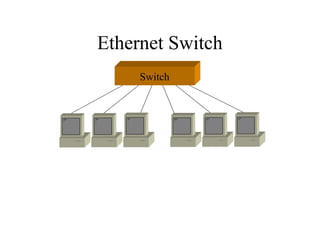
Ethernet Switch
Switch
Ethernet Switch (2)
• Formally, a switch is just a bridge
• Switch looks at ethernet headers (layer 2)
– ethernet to ethernet only
• Learns what addresses are connected to
which ports
• If destination of packet known, the packet is
only sent to the destination port
Ethernet Switch (3)
• Each port is a separate collision domain
– no daisychain limit
• Can do full duplex
• Often one host per port
– high performance
• Security features
• Dualspeed ‘hub’ includes switch
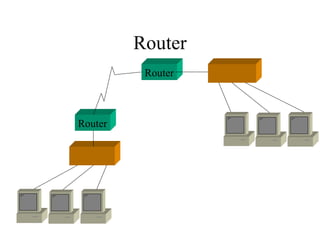
Router
Router
Router
Router (2)
• Router works on IP header (layer 3)
• Can use almost any underlying media
– LAN or WAN
• Can have several ports
• Useful for long distance connections
(backbone)
• Must be configured
– IP addresses etc.
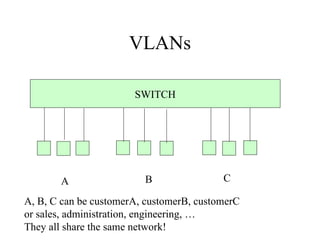
VLANs
SWITCH
A B C
A, B, C can be customerA, customerB, customerC
or sales, administration, engineering, …
They all share the same network!
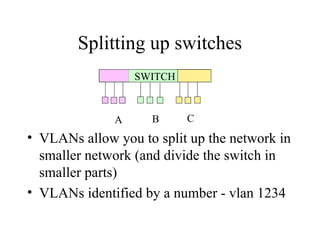
Splitting up switches
SWITCH
A B C
• VLANs allow you to split up the network in
smaller network (and divide the switch in
smaller parts)
• VLANs identified by a number - vlan 1234
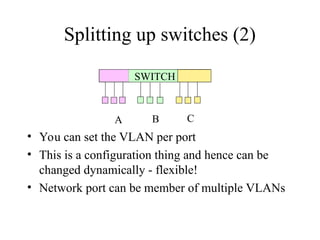
Splitting up switches (2)
SWITCH
A B C
• You can set the VLAN per port
• This is a configuration thing and hence can be
changed dynamically - flexible!
• Network port can be member of multiple VLANs
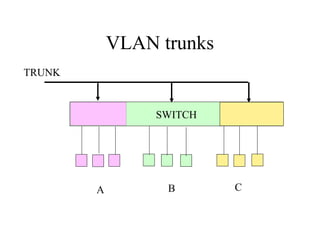
VLAN trunks
SWITCH
A B C
TRUNK
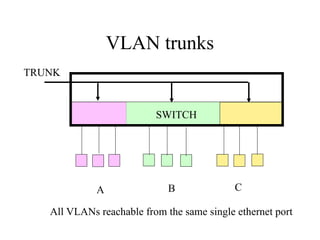
VLAN trunks
SWITCH
A B C
TRUNK
All VLANs reachable from the same single ethernet port
VLAN trunks
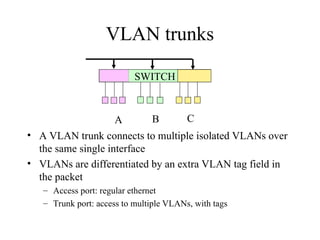
• A VLAN trunk connects to multiple isolated VLANs over
the same single interface
• VLANs are differentiated by an extra VLAN tag field in
the packet
– Access port: regular ethernet
– Trunk port: access to multiple VLANs, with tags
SWITCH
A B C
VLAN trunks
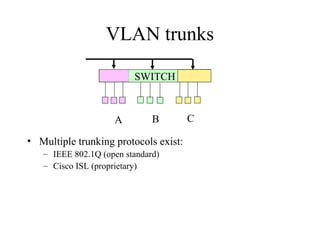
• Multiple trunking protocols exist:
– IEEE 802.1Q (open standard)
– Cisco ISL (proprietary)
SWITCH
A B C
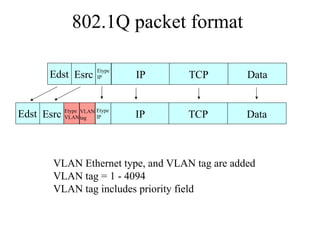
802.1Q packet format
IP Data
TCP
VLAN Ethernet type, and VLAN tag are added
VLAN tag = 1 - 4094
VLAN tag includes priority field
IP Data
TCP
Edst Esrc
Etype
IP
Edst Esrc Etype
VLAN
Etype
IP
VLAN
tag
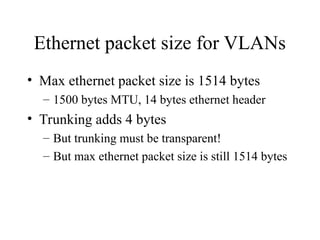
Ethernet packet size for VLANs
• Max ethernet packet size is 1514 bytes
– 1500 bytes MTU, 14 bytes ethernet header
• Trunking adds 4 bytes
– But trunking must be transparent!
– But max ethernet packet size is still 1514 bytes
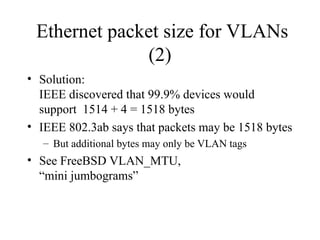
Ethernet packet size for VLANs
(2)
• Solution:
IEEE discovered that 99.9% devices would
support 1514 + 4 = 1518 bytes
• IEEE 802.3ab says that packets may be 1518 bytes
– But additional bytes may only be VLAN tags
• See FreeBSD VLAN_MTU,
“mini jumbograms”

netdev.ppt computer communication and network devices

  • 1.
    Network Wiring &Devices Geert Jan de Groot
  • 2.
    Network Wiring • Half/fullduplex Ethernet • Network Wiring • Autonegotiation • Structured wiring • Optics • Your questions please!
  • 3.
    Copper Ethernet media •Coax (10 Mbit/sec) – now obsolete • Twisted pair – Uses pair 1-2, 3-6, 4-5, 7-8 – 10 Mbit/sec (10BASE-T) – 100 Mbit/sec – 1000 Mbit/sec (‘gigabit ethernet’) – (10.000 Mbit/sec)
  • 4.
    A few wordson 10BASE-T • Available everywhere today • Uses pair 1-2, 3-6 – Unshielded twisted pairs – Often miswired • Typically half-duplex – Full duplex possible • Max length 100 meters!
  • 5.
    10BASE-T cables Normal cable Usedfrom host to hub Crossover cable Used hub to hub or host to host Some hubs have built-in crossovers
  • 6.
    100 Mbit coppernetworks • 3 standards: – 100BASE-TX <<-- Winner – 100BASE-T4 <<-- Loser – 100VG-Anylan <<-- Loser • Don’t buy anything but 100BASE-TX!
  • 7.
    100BASE-TX • Requires Category5 (‘CAT5’) cabling – No more, no less • 100BASE-TX runs on 2 wire pairs – 1-2, 3-6, like 10BASE-T • Cheap today – Built-in in PC chipset – Has replaced 10BASE-T equipment
  • 8.
    Faster: Gigabit Ethernet •1000 Mbit/sec, 1000BASE-T • Still works on CAT5 cabling, tight fit • Uses all 4 wire pairs – In both directions • About to get cheap and common – $15 network card – Being integrated in PC chipset (replacing 100BASE-TX) • Automatic crossover additional new feature
  • 9.
    Still faster: 10Gigabit Ethernet • 10 Gigabit originally only on fiber • 10 Gigabit on copper currently being under development by IEEE 802.3 standards committee – Close to Shannon Limit – Standard is IEEE 802.3an - currently through IEEE voting process
  • 10.
    Half/Full duplex • Ethernetis CSMA/CD – Carrier Sense Multiple Access/Collision Detection • Without Full Duplex, only one station transmitting at any time • With Full Duplex, packets can be sent in both directions simultaniously
  • 11.
    Half duplex • Listenbefore you transmit • Listen while you transmit • If there is a collision, both transmitters will: – Jam – Backoff (exponentially, randomly) – Re-try sending the packet – Minimal packet size: 64 bytes • Collisions are harmless! – Actually help scale / stabilize an ethernet network
  • 12.
    Full duplex • Allowstransmission/reception simultaneously – Impossible on older coax media – Easy to implement on twisted pair/fiber media • No collisions • More bandwidth available
  • 13.
    Link pulses • 10BASE-Tsends link pulses when idle – used to test integrity of link (why?) – link light • 100BASE-T uses faster link pulses – Automatic detection between 10 and 100 possible • Manual setting of half/full duplex – Settings must match
  • 14.
    Autonegotiation • Method toautomatically select ‘best’ transmission method between link partners • Link pulse now becomes pulse train • Automatically sets speed, duplex etc
  • 15.
    Autonegotiation (2) • ‘Paralleldetection’ for devices w/o autonegotiation – 10BASE-T and 100BASE-TX only – Only HDX • Autonegotiation mandatory for gigabit ethernet • Technology is mature now – Early chips had serious issues, so be aware
  • 16.
    Autonegotiation failure mode •One end set to fixed 100Mbit, Full-Duplex • Other end uses autonegotiation • What happens? 100Mbit FDX Autonegotiation
  • 17.
  • 18.
    Wire Types • Category3: 10 Mbps • Category 4: 16 Mbps (for token ring) • Category 5: 100 Mbps / 1000 Mbps – Cat5e: tighter tolerances – Cat6: Allows even higher bandwiths • Shielded or unshielded • Advice: use Cat 5, Cat 5e or Cat6 UTP (unshielded twisted pair) • Category 7 and higher marketing hype – Not official IEEE spec
  • 19.
    Structured wiring pitfalls •High installation cost – so install enough the first time • Use materials that are qualified for Cat 5 or higher • Get guarantee from installer • (IP Telephony?)
  • 20.
    Fiber optics • Long-haulconnections within buildings – Remember: copper = 100m max! – Interconnects between structured wiring wiring cabinets • Must use fiber between buildings – Cable length restrictions – Lightning protection
  • 21.
    Fiber optics (2) •Multi mode: short hauls • Single mode: long hauls • Different fiber diameters • Different connector types – ST, SC, VF45 – Many others these days
  • 22.
    Fiber optics (3) •10BaseF for 10Mbps ethernet • 100BaseFX for 100Mbps fast ethernet • 1000BaseSX for gigabit ethernet • Advice: run more fibers than you need, but don’t terminate them (yet)
  • 23.
    Power Over Ethernet •Allows to power device over ethernet cable – No power plug or wall wart – Uses ‘unused’ wire pairs • Convenient for places where power is difficult – Wireless access points – IP telephones • IEEE 802.3af standard – Be aware of pre-standard (incompatible) equipment
  • 24.
    Hubs, Switches andRouters How do they work? What are the differences?
  • 25.
    Packet headers Ether IPData TCP Edst T IPsrc IPdst Network devices may use {ether, IP} headers to do it’s job (sometimes in twisted ways) Esrc
  • 26.
    Types of ethernetaddresses • Typically one interrupt per packet received – Interrupts cost a lot of CPU performance! • Use ethernet addresses to be able to filter packets in ethernet receiver hardware • First 3 bytes (actually, only 22 bits) assigned by IEEE • Organisational Unique Identifier • 3 types of addresses: – Unicast, Multicast, Broadcast
  • 27.
    Ethernet address types •Last 2 bits of 1st byte gives type: – 00:01:02:03:04:05 0000 0000: unicast (single host) – 01:01:02:03:04:05 0000 0001: multicast (group of hosts) – ff:ff:ff:ff:ff:ff: broadcast (all hosts) • Special case of multicast
  • 28.
  • 29.
    Ethernet hub (2) •Hub is layer 1 device • Hub does not filter packets • Whole hub is one collision domain – Hence cannot do full duplex • Daisychaining of hubs limited • Cheap • Doesn’t exist for Gigabit Ethernet
  • 30.
  • 31.
    Ethernet Switch (2) •Formally, a switch is just a bridge • Switch looks at ethernet headers (layer 2) – ethernet to ethernet only • Learns what addresses are connected to which ports • If destination of packet known, the packet is only sent to the destination port
  • 32.
    Ethernet Switch (3) •Each port is a separate collision domain – no daisychain limit • Can do full duplex • Often one host per port – high performance • Security features • Dualspeed ‘hub’ includes switch
  • 33.
  • 34.
    Router (2) • Routerworks on IP header (layer 3) • Can use almost any underlying media – LAN or WAN • Can have several ports • Useful for long distance connections (backbone) • Must be configured – IP addresses etc.
  • 35.
    VLANs SWITCH A B C A,B, C can be customerA, customerB, customerC or sales, administration, engineering, … They all share the same network!
  • 36.
    Splitting up switches SWITCH AB C • VLANs allow you to split up the network in smaller network (and divide the switch in smaller parts) • VLANs identified by a number - vlan 1234
  • 37.
    Splitting up switches(2) SWITCH A B C • You can set the VLAN per port • This is a configuration thing and hence can be changed dynamically - flexible! • Network port can be member of multiple VLANs
  • 38.
  • 39.
    VLAN trunks SWITCH A BC TRUNK All VLANs reachable from the same single ethernet port
  • 40.
    VLAN trunks • AVLAN trunk connects to multiple isolated VLANs over the same single interface • VLANs are differentiated by an extra VLAN tag field in the packet – Access port: regular ethernet – Trunk port: access to multiple VLANs, with tags SWITCH A B C
  • 41.
    VLAN trunks • Multipletrunking protocols exist: – IEEE 802.1Q (open standard) – Cisco ISL (proprietary) SWITCH A B C
  • 42.
    802.1Q packet format IPData TCP VLAN Ethernet type, and VLAN tag are added VLAN tag = 1 - 4094 VLAN tag includes priority field IP Data TCP Edst Esrc Etype IP Edst Esrc Etype VLAN Etype IP VLAN tag
  • 43.
    Ethernet packet sizefor VLANs • Max ethernet packet size is 1514 bytes – 1500 bytes MTU, 14 bytes ethernet header • Trunking adds 4 bytes – But trunking must be transparent! – But max ethernet packet size is still 1514 bytes
  • 44.
    Ethernet packet sizefor VLANs (2) • Solution: IEEE discovered that 99.9% devices would support 1514 + 4 = 1518 bytes • IEEE 802.3ab says that packets may be 1518 bytes – But additional bytes may only be VLAN tags • See FreeBSD VLAN_MTU, “mini jumbograms”