1 | CC 101 Introduction to Computing
COURSE SYLLABUS in Introduction to Computing
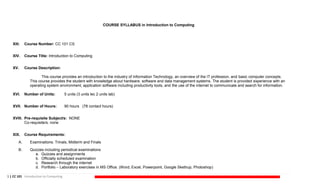
XIII. Course Number: CC 101 CS
XIV. Course Title: Introduction to Computing
XV. Course Description:
This course provides an introduction to the industry of Information Technology, an overview of the IT profession, and basic computer concepts.
This course provides the student with knowledge about hardware, software and data management systems. The student is provided experience with an
operating system environment, application software including productivity tools, and the use of the internet to communicate and search for information.
XVI. Number of Units: 5 units (3 units lec 2 units lab)
XVII. Number of Hours: 90 hours (78 contact hours)
XVIII. Pre-requisite Subject/s: NONE
Co-requisite/s: none
XIX. Course Requirements:
A. Examinations: Trinals, Midterm and Finals
B. Quizzes including periodical examinations
a. Quizzes and assignments
b. Officially scheduled examination
c. Research through the internet
d. Portfolio – Laboratory exercises in MS Office. (Word, Excel, Powerpoint, Google Skethup, Photoshop)
2 | CC 101 Introduction to Computing
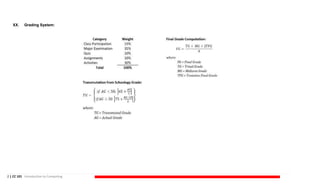
XX. Grading System:
3 | CC 101 Introduction to Computing
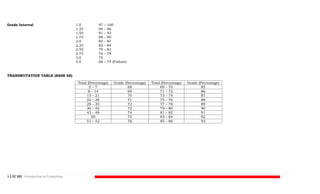
Grade Interval 1.0 97 – 100
1.25 94 – 96
1.50 91 – 93
1.75 88 – 90
2.0 85 – 87
2.25 82 – 84
2.50 79 – 81
2.75 76 – 78
3.0 75
5.0 68 – 74 (Failure)
TRANSMUTATION TABLE (BASE 68)
Total (Percentage) Grade (Percentage) Total (Percentage) Grade (Percentage)
0 – 7 68 69 – 70 85
8 – 14 69 71 – 72 86
15 – 21 70 73 – 74 87
22 – 28 71 75 – 76 88
29 – 35 72 77 – 78 89
36 – 42 73 79 – 80 90
43 – 49 74 81 – 82 91
50 75 83 – 84 92
51 – 52 76 85 – 86 93
4 | CC 101 Introduction to Computing
XXI. Course Outline and Time Frame
Trinal (Weeks 1-6)
Course Content/Topics
Week 1
Week 2
Week 3
Week 4
Week 5
Week 6
Orientation, Basic Computer Concepts
Introduction to Profession
Information Technology, Internet and You
Operating System, Input and Output
Latest trends and issues in Information Technology
Trinal Examination, Lab Exam & Quizzes
Midterm (Weeks 7-
12)
Week 7-8
Week 9-10
Week 11
Week 12
Hardware and Software Installation
Office Productivity Tools (Microsoft Word)
Office Productivity Tools (Microsoft Excel)
Midterm Examination, Lab Exam & Quizzes
Finals (Weeks 13-
18)
Week 13-14
Week 15
Week 16-17
Week 18
Office Productivity Tools (Microsoft Powerpoint)
Office Productivity Tools (Microsoft Access)
Productivity tools (Manipulation software – Adobe Photoshop)
Final Examination, Lab Exam & Quizzes
5 | CC 101 Introduction to Computing
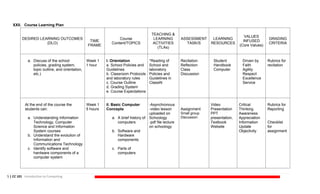
XXII. Course Learning Plan
DESIRED LEARNING OUTCOMES
(DLO)
TIME
FRAME
Course
Content/TOPICS
TEACHING &
LEARNING
ACTIVITIES
(TLAs)
ASSESSMENT
TASK/S
LEARNING
RESOURCES
VALUES
INFUSED
(Core Values)
GRADING
CRITERIA
a. Discuss of the school
policies, grading system,
topic outline, and orientation,
etc.)
Week 1
1 hour
I. Orientation
a. School Policies and
Guidelines
b. Classroom Protocols
and laboratory rules
c. Course Outline
d. Grading System
e. Course Expectations
*Reading of
School and
laboratory
Policies and
Guidelines in
ClassiN
Recitation
Reflection
Class
Discussion
Student
Handbook
Computer
Driven by
Faith
Agility
Respect
Excellence
Service
Rubrics for
recitation
At the end of the course the
students can:
a. Understanding Information
Technology, Computer
Science and Information
System courses
b. Understand the evolution of
Information and
Communications Technology
c. Identify software and
hardware components of a
computer system
Week 1
5 hours
II. Basic Computer
Concepts
a. A brief history of
computers
b. Software and
Hardware
components
c. Parts of
computers
-Asynchronous
-video lesson
uploaded on
Schoology
-pdf file lecture
on schoology
Assignment
Small group
Discussion
Video
Presentation
PPT
presentation,
Textbook
Website
Critical
Thinking
Awareness
Appreciation
Information
Update
Objectivity
Rubrics for
Reporting
Checklist
for
assignment
6 | CC 101 Introduction to Computing
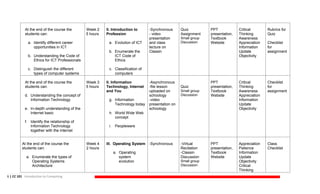
At the end of the course the
students can:
a. Identify different career
opportunities in ICT
b. Understanding the Code of
Ethics for ICT Professionals
c. Distinguish the different
types of computer systems
Week 2
5 hours
II. Introduction to
Profession
a. Evolution of ICT
b. Enumerate the
ICT Code of
Ethics
c. Classification of
computers
-Synchronous
- video
presentation
and class
lecture on
Classin
Quiz
Assignment
Small group
Discussion
PPT
presentation,
Textbook
Website
Critical
Thinking
Awareness
Appreciation
Information
Update
Objectivity
Rubrics for
Quiz
Checklist
for
assignment
At the end of the course the
students can:
d. Understanding the concept of
Information Technology
e. In-depth understanding of the
Internet basic
f. Identify the relationship of
Information Technology
together with the internet
Week 3
5 hours
II. Information
Technology, Internet
and You
g. Information
Technology today
h. World Wide Web
concept
i. Peopleware
-Asynchronous
-file lesson
uploaded on
schoology
-video
presentation on
schoology
Quiz
Small group
Discussion
PPT
presentation,
Textbook
Website
Critical
Thinking
Awareness
Appreciation
Information
Update
Objectivity
Checklist
for
assignment
At the end of the course the
students can:
a. Enumerate the types of
Operating Systems
Architecture
Week 4
2 hours
III. Operating System
a. Operating
system
evolution
-Synchronous -Virtual
Recitation
-Classin
Discussion
Small group
Discussion
PPT
presentation,
Textbook
Website
Appreciation
Patience
Information
Update
Objectivity
Critical
Thinking
Class
Checklist
7 | CC 101 Introduction to Computing
b. Explain how computer works
with Operating systems
c. Understanding the system
software
b. Machine
Language
c. System
Software
(windows-
based)
Cooperation
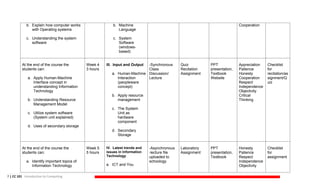
At the end of the course the
students can:
a. Apply Human-Machine
Interface concept in
understanding Information
Technology
b. Understanding Resource
Management Model
c. Utilize system software
(System unit explained)
d. Uses of secondary storage
Week 4
3 hours
III. Input and Output
a. Human-Machine
Interaction
(peopleware
concept)
b. Apply resource
management
c. The System
Unit as
hardware
component
d. Secondary
Storage
-Synchronous
Class
Discussion/
Lecture
Quiz
Recitation
Assignment
PPT
presentation,
Textbook
Website
Appreciation
Patience
Honesty
Cooperation
Respect
Independence
Objectivity
Critical
Thinking
Checklist
for
recitation/as
signment/Q
uiz
At the end of the course the
students can:
a. Identify important topics of
Information Technology
Week 5
5 hours
IV. Latest trends and
issues in Information
Technology
a. ICT and You
-Asynchronous
-lecture file
uploaded to
schoology
Laboratory
Assignment
PPT
presentation,
Textbook
Honesty
Patience
Respect
Independence
Objectivity
Checklist
for
assignment
8 | CC 101 Introduction to Computing
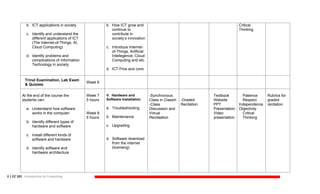
b. ICT applications in society
c. Identify and understand the
different applications of ICT
(The Internet-of-Things, AI,
Cloud Computing)
d. Identify problems and
complications of Information
Technology in society
b. How ICT grow and
continue to
contribute in
society’s innovation
c. Introduce Internet-
of-Things, Artificial
Intellegence, Cloud
Computing and etc.
d. ICT Pros and cons
Critical
Thinking
Trinal Examination, Lab Exam
& Quizzes
Week 6
At the end of the course the
students can:
a. Understand how software
works in the computer
b. Identify different types of
hardware and software
c. Install different kinds of
software and hardware
d. Identify software and
hardware architecture
Week 7
5 hours
Week 8
5 hours
V. Hardware and
Software Installation
a. Troubleshooting
b. Maintenance
c. Upgrading
d. Software download
from the internet
(licensing)
-Synchronous
Class in Classin
-Class
Discussion and
Virtual
Recitaation
-Graded
Recitation
Textbook
Website
PPT
Presentation
Video
presentation
Patience
Respect
Independence
Objectivity
Critical
Thinking
Rubrics for
graded
recitation
9 | CC 101 Introduction to Computing
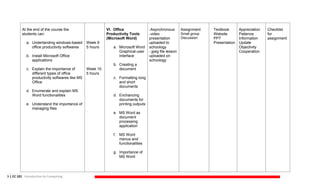
At the end of the course the
students can:
a. Undertanding windows-based
office productivity softwares
b. Install Microsoft Office
applications
c. Explain the importance of
different types of office
productivity softwares like MS
Office
d. Enumerate and explain MS
Word functionalities
e. Understand the importance of
managing files
Week 9
5 hours
Week 10
5 hours
VI. Office
Productivity Tools
(Microsoft Word)
a. Microsoft Word
Graphical-user
Interface
b. Creating a
document
c. Formatting long
and short
documents
d. Enchancing
documents for
printing outputs
e. MS Word as
document
processing
application
f. MS Word
menus and
functionalities
g. Importance of
MS Word
-Asynchronous
-video
presentation
uploaded to
schoology
-.jpeg file lesson
uploaded on
schoology
Assignment
Small group
Discussion
Textbook
Website
PPT
Presentation
Appreciation
Patience
Information
Update
Objectivity
Cooperation
Checklist
for
assignment
10 | CC 101 Introduction to Computing
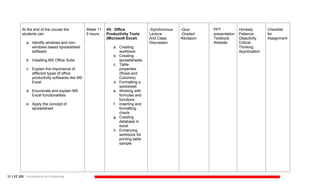
At the end of the course the
students can:
a. Identify windows and non-
windows based spreadsheet
software
b. Installing MS Office Suite
c. Explain the importance of
different types of office
productivity softwares like MS
Excel
d. Enumerate and explain MS
Excel functionalities
e. Apply the concept of
spreadsheet
Week 11
5 hours
VII. Office
Productivity Tools
(Microsoft Excel)
a. Creating
workbook
b. Creating
spreadsheets
c. Table
properties
(Rows and
Columns)
d. Formatting a
worksheet
e. Working with
formulas and
functions
f. Inserting and
formatting
charts
g. Creating
database in
excel
h. Enhancing
workbook for
printing table
sample
-Synchronous
Lecture
And Class
Discussion
-Quiz
-Graded
Recitaion
PPT
presentation
Textbook
Website
Honesty
Patience
Objectivity
Critical
Thinking
Appreciation
Checklist
for
Assignment
11 | CC 101 Introduction to Computing
Midterm Examination, Lab
Exam & Quizzes
Week 12
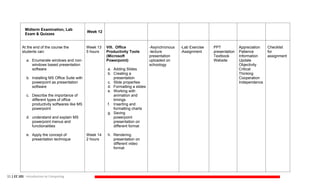
At the end of the course the
students can:
a. Enumerate windows and non-
windows based presentation
software
b. Installing MS Office Suite with
powerpoint as presentation
software
c. Describe the importance of
different types of office
productivity softwares like MS
powerpoint
d. understand and explain MS
powerpoint menus and
functionalities
e. Apply the concept of
presentation technique
Week 13
5 hours
Week 14
2 hours
VIII. Office
Productivity Tools
(Microsoft
Powerpoint)
a. Adding Slides
b. Creating a
presentation
c. Slide properties
d. Formatting a slides
e. Working with
animation and
timings
f. Inserting and
formatting charts
g. Saving
powerpoint
presentation on
different format
h. Rendering
presentation on
different video
format
-Asynchronous
-lecture
presentation
uploaded on
schoology
-Lab Exercise
-Assignment
PPT
presentation
Textbook
Website
Appreciation
Patience
Information
Update
Objectivity
Critical
Thinking
Cooperation
Independence
Checklist
for
assignment
12 | CC 101 Introduction to Computing
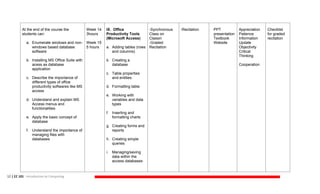
At the end of the course the
students can:
a. Enumerate windows and non-
windows based database
software
b. Installing MS Office Suite with
acess as database
application
c. Describe the importance of
different types of office
productivity softwares like MS
access
d. Understand and explain MS
Access menus and
functionalities
e. Apply the basic concept of
database
f. Understand the importance of
managing files with
databases
Week 14
3hours
Week 15
5 hours
IX. Office
Productivity Tools
(Microsoft Access)
a. Adding tables (rows
and columns)
b. Creating a
database
c. Table properties
and entities
d. Formatting table
e. Working with
variables and data
types
f. Inserting and
formatting charts
g. Creating forms and
reports
h. Creating simple
queries
i. Managing/saving
data within the
access databases
-Synchronous
Class on
Classin
-Graded
Recitation
-Recitation PPT
presentation
Textbook
Website
Appreciation
Patience
Information
Update
Objectivity
Critical
Thinking
Cooperation
Checklist
for graded
recitation
13 | CC 101 Introduction to Computing
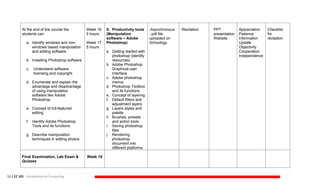
At the end of the course the
students can:
a. Identify windows and non-
windows based manipulation
and editing software
b. Installing Photoshop software
c. Understand software
licensing and copyright
d. Enumerate and explain the
advantage and disadvantage
of using manipulation
software like Adobe
Photoshop
e. Concept of full-featured
editing
f. Identify Adobe Photoshop
Tools and its functions
g. Describe manipulation
techniques in editing photos
Week 16
5 hours
Week 17
5 hours
X. Productivity tools
(Manipulation
software – Adobe
Photoshop)
a. Getting started with
photoshop (identify
resources)
b. Adobe Photoshop
Graphical-user
Interface
c. Adobe photoshop
menus
d. Photoshop Toolbox
and its functions
e. Concept of layering
f. Default filters and
adjustment layers
g. Layers styles and
palette
h. Brushes, presets
and action tools
i. Saving photoshop
files
j. Rendering
photoshop
document into
different platforms
-Asynchronous
-.pdf file
uploaded on
Schoology
-Recitation PPT
presentation
Website
Appreciation
Patience
Information
Update
Objectivity
Cooperation
Independence
Checklist
for
recitation
Final Examination, Lab Exam &
Quizzes
Week 18
14 | CC 101 Introduction to Computing
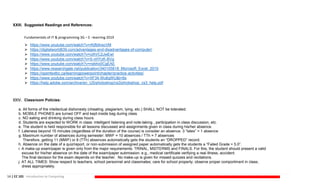
XXIII. Suggested Readings and References:
Fundamentals of IT & programming 3G – E –learning 2019
⮚ https://www.youtube.com/watch?v=rKjfb9vscVM
⮚ https://digitalworld839.com/advantages-and-disadvantages-of-computer/
⮚ https://www.youtube.com/watch?v=ctAVC2JwEwI
⮚ https://www.youtube.com/watch?v=S-nHYzK-BVg
⮚ https://www.youtube.com/watch?v=rwbho0CgEAE
⮚ https://www.researchgate.net/publication/340105818_Microsoft_Excel_2010
⮚ https://opentextbc.ca/learningpowerpoint/chapter/practice-activities/
⮚ https://www.youtube.com/watch?v=XF34-Wu6qWU&t=8s
⮚ https://help.adobe.com/archive/en_US/photoshop/cs3/photoshop_cs3_help.pdf
XXIV. Classroom Policies:
a. All forms of the intellectual dishonesty (cheating, plagiarism, lying, etc.) SHALL NOT be tolerated.
b. MOBILE PHONES are turned OFF and kept inside bag during class.
c. NO eating and drinking during class hours.
d. Students are expected to WORK in class: intelligent listening and note-taking , participation in class discussion, etc.
e. The student is held responsible for all lessons discussed and assignments given in class during his/her absence.
f. Lateness beyond 15 minutes (regardless of the duration of the course) is consider an absence. 3 “lates” = 1 absence
g. Maximum number of absences during semester: MWF = 10 absences / TTh = 7 absences
Therefore, getting 11 (MWF) or 8 (TTh) absences automatically gets the students an “DROPPED” record.
h. Absence on the date of a quiz/report, or non-submission of assigned paper automatically gets the students a “Failed Grade = 5.0”.
i. A make-up exam/paper is given only from the major requirements: TRINAL, MIDTERMS and FINALS. For this, the student should present a valid
excuse for his/her absence on the date of the exam/paper submission: e.g., medical certificate verifying a real illness, accident.
The final decision for the exam depends on the teacher. No make-up is given for missed quizzes and recitations.
j. AT ALL TIMES: Show respect to teachers, school personnel and classmates; care for school property; observe proper comportment in class;
dress appropriately.

CC 101 Introduction to Computing/Intro Comp

  • 1.
    1 | CC101 Introduction to Computing COURSE SYLLABUS in Introduction to Computing XIII. Course Number: CC 101 CS XIV. Course Title: Introduction to Computing XV. Course Description: This course provides an introduction to the industry of Information Technology, an overview of the IT profession, and basic computer concepts. This course provides the student with knowledge about hardware, software and data management systems. The student is provided experience with an operating system environment, application software including productivity tools, and the use of the internet to communicate and search for information. XVI. Number of Units: 5 units (3 units lec 2 units lab) XVII. Number of Hours: 90 hours (78 contact hours) XVIII. Pre-requisite Subject/s: NONE Co-requisite/s: none XIX. Course Requirements: A. Examinations: Trinals, Midterm and Finals B. Quizzes including periodical examinations a. Quizzes and assignments b. Officially scheduled examination c. Research through the internet d. Portfolio – Laboratory exercises in MS Office. (Word, Excel, Powerpoint, Google Skethup, Photoshop)
  • 2.
    2 | CC101 Introduction to Computing XX. Grading System:
  • 3.
    3 | CC101 Introduction to Computing Grade Interval 1.0 97 – 100 1.25 94 – 96 1.50 91 – 93 1.75 88 – 90 2.0 85 – 87 2.25 82 – 84 2.50 79 – 81 2.75 76 – 78 3.0 75 5.0 68 – 74 (Failure) TRANSMUTATION TABLE (BASE 68) Total (Percentage) Grade (Percentage) Total (Percentage) Grade (Percentage) 0 – 7 68 69 – 70 85 8 – 14 69 71 – 72 86 15 – 21 70 73 – 74 87 22 – 28 71 75 – 76 88 29 – 35 72 77 – 78 89 36 – 42 73 79 – 80 90 43 – 49 74 81 – 82 91 50 75 83 – 84 92 51 – 52 76 85 – 86 93
  • 4.
    4 | CC101 Introduction to Computing XXI. Course Outline and Time Frame Trinal (Weeks 1-6) Course Content/Topics Week 1 Week 2 Week 3 Week 4 Week 5 Week 6 Orientation, Basic Computer Concepts Introduction to Profession Information Technology, Internet and You Operating System, Input and Output Latest trends and issues in Information Technology Trinal Examination, Lab Exam & Quizzes Midterm (Weeks 7- 12) Week 7-8 Week 9-10 Week 11 Week 12 Hardware and Software Installation Office Productivity Tools (Microsoft Word) Office Productivity Tools (Microsoft Excel) Midterm Examination, Lab Exam & Quizzes Finals (Weeks 13- 18) Week 13-14 Week 15 Week 16-17 Week 18 Office Productivity Tools (Microsoft Powerpoint) Office Productivity Tools (Microsoft Access) Productivity tools (Manipulation software – Adobe Photoshop) Final Examination, Lab Exam & Quizzes
  • 5.
    5 | CC101 Introduction to Computing XXII. Course Learning Plan DESIRED LEARNING OUTCOMES (DLO) TIME FRAME Course Content/TOPICS TEACHING & LEARNING ACTIVITIES (TLAs) ASSESSMENT TASK/S LEARNING RESOURCES VALUES INFUSED (Core Values) GRADING CRITERIA a. Discuss of the school policies, grading system, topic outline, and orientation, etc.) Week 1 1 hour I. Orientation a. School Policies and Guidelines b. Classroom Protocols and laboratory rules c. Course Outline d. Grading System e. Course Expectations *Reading of School and laboratory Policies and Guidelines in ClassiN Recitation Reflection Class Discussion Student Handbook Computer Driven by Faith Agility Respect Excellence Service Rubrics for recitation At the end of the course the students can: a. Understanding Information Technology, Computer Science and Information System courses b. Understand the evolution of Information and Communications Technology c. Identify software and hardware components of a computer system Week 1 5 hours II. Basic Computer Concepts a. A brief history of computers b. Software and Hardware components c. Parts of computers -Asynchronous -video lesson uploaded on Schoology -pdf file lecture on schoology Assignment Small group Discussion Video Presentation PPT presentation, Textbook Website Critical Thinking Awareness Appreciation Information Update Objectivity Rubrics for Reporting Checklist for assignment
  • 6.
    6 | CC101 Introduction to Computing At the end of the course the students can: a. Identify different career opportunities in ICT b. Understanding the Code of Ethics for ICT Professionals c. Distinguish the different types of computer systems Week 2 5 hours II. Introduction to Profession a. Evolution of ICT b. Enumerate the ICT Code of Ethics c. Classification of computers -Synchronous - video presentation and class lecture on Classin Quiz Assignment Small group Discussion PPT presentation, Textbook Website Critical Thinking Awareness Appreciation Information Update Objectivity Rubrics for Quiz Checklist for assignment At the end of the course the students can: d. Understanding the concept of Information Technology e. In-depth understanding of the Internet basic f. Identify the relationship of Information Technology together with the internet Week 3 5 hours II. Information Technology, Internet and You g. Information Technology today h. World Wide Web concept i. Peopleware -Asynchronous -file lesson uploaded on schoology -video presentation on schoology Quiz Small group Discussion PPT presentation, Textbook Website Critical Thinking Awareness Appreciation Information Update Objectivity Checklist for assignment At the end of the course the students can: a. Enumerate the types of Operating Systems Architecture Week 4 2 hours III. Operating System a. Operating system evolution -Synchronous -Virtual Recitation -Classin Discussion Small group Discussion PPT presentation, Textbook Website Appreciation Patience Information Update Objectivity Critical Thinking Class Checklist
  • 7.
    7 | CC101 Introduction to Computing b. Explain how computer works with Operating systems c. Understanding the system software b. Machine Language c. System Software (windows- based) Cooperation At the end of the course the students can: a. Apply Human-Machine Interface concept in understanding Information Technology b. Understanding Resource Management Model c. Utilize system software (System unit explained) d. Uses of secondary storage Week 4 3 hours III. Input and Output a. Human-Machine Interaction (peopleware concept) b. Apply resource management c. The System Unit as hardware component d. Secondary Storage -Synchronous Class Discussion/ Lecture Quiz Recitation Assignment PPT presentation, Textbook Website Appreciation Patience Honesty Cooperation Respect Independence Objectivity Critical Thinking Checklist for recitation/as signment/Q uiz At the end of the course the students can: a. Identify important topics of Information Technology Week 5 5 hours IV. Latest trends and issues in Information Technology a. ICT and You -Asynchronous -lecture file uploaded to schoology Laboratory Assignment PPT presentation, Textbook Honesty Patience Respect Independence Objectivity Checklist for assignment
  • 8.
    8 | CC101 Introduction to Computing b. ICT applications in society c. Identify and understand the different applications of ICT (The Internet-of-Things, AI, Cloud Computing) d. Identify problems and complications of Information Technology in society b. How ICT grow and continue to contribute in society’s innovation c. Introduce Internet- of-Things, Artificial Intellegence, Cloud Computing and etc. d. ICT Pros and cons Critical Thinking Trinal Examination, Lab Exam & Quizzes Week 6 At the end of the course the students can: a. Understand how software works in the computer b. Identify different types of hardware and software c. Install different kinds of software and hardware d. Identify software and hardware architecture Week 7 5 hours Week 8 5 hours V. Hardware and Software Installation a. Troubleshooting b. Maintenance c. Upgrading d. Software download from the internet (licensing) -Synchronous Class in Classin -Class Discussion and Virtual Recitaation -Graded Recitation Textbook Website PPT Presentation Video presentation Patience Respect Independence Objectivity Critical Thinking Rubrics for graded recitation
  • 9.
    9 | CC101 Introduction to Computing At the end of the course the students can: a. Undertanding windows-based office productivity softwares b. Install Microsoft Office applications c. Explain the importance of different types of office productivity softwares like MS Office d. Enumerate and explain MS Word functionalities e. Understand the importance of managing files Week 9 5 hours Week 10 5 hours VI. Office Productivity Tools (Microsoft Word) a. Microsoft Word Graphical-user Interface b. Creating a document c. Formatting long and short documents d. Enchancing documents for printing outputs e. MS Word as document processing application f. MS Word menus and functionalities g. Importance of MS Word -Asynchronous -video presentation uploaded to schoology -.jpeg file lesson uploaded on schoology Assignment Small group Discussion Textbook Website PPT Presentation Appreciation Patience Information Update Objectivity Cooperation Checklist for assignment
  • 10.
    10 | CC101 Introduction to Computing At the end of the course the students can: a. Identify windows and non- windows based spreadsheet software b. Installing MS Office Suite c. Explain the importance of different types of office productivity softwares like MS Excel d. Enumerate and explain MS Excel functionalities e. Apply the concept of spreadsheet Week 11 5 hours VII. Office Productivity Tools (Microsoft Excel) a. Creating workbook b. Creating spreadsheets c. Table properties (Rows and Columns) d. Formatting a worksheet e. Working with formulas and functions f. Inserting and formatting charts g. Creating database in excel h. Enhancing workbook for printing table sample -Synchronous Lecture And Class Discussion -Quiz -Graded Recitaion PPT presentation Textbook Website Honesty Patience Objectivity Critical Thinking Appreciation Checklist for Assignment
  • 11.
    11 | CC101 Introduction to Computing Midterm Examination, Lab Exam & Quizzes Week 12 At the end of the course the students can: a. Enumerate windows and non- windows based presentation software b. Installing MS Office Suite with powerpoint as presentation software c. Describe the importance of different types of office productivity softwares like MS powerpoint d. understand and explain MS powerpoint menus and functionalities e. Apply the concept of presentation technique Week 13 5 hours Week 14 2 hours VIII. Office Productivity Tools (Microsoft Powerpoint) a. Adding Slides b. Creating a presentation c. Slide properties d. Formatting a slides e. Working with animation and timings f. Inserting and formatting charts g. Saving powerpoint presentation on different format h. Rendering presentation on different video format -Asynchronous -lecture presentation uploaded on schoology -Lab Exercise -Assignment PPT presentation Textbook Website Appreciation Patience Information Update Objectivity Critical Thinking Cooperation Independence Checklist for assignment
  • 12.
    12 | CC101 Introduction to Computing At the end of the course the students can: a. Enumerate windows and non- windows based database software b. Installing MS Office Suite with acess as database application c. Describe the importance of different types of office productivity softwares like MS access d. Understand and explain MS Access menus and functionalities e. Apply the basic concept of database f. Understand the importance of managing files with databases Week 14 3hours Week 15 5 hours IX. Office Productivity Tools (Microsoft Access) a. Adding tables (rows and columns) b. Creating a database c. Table properties and entities d. Formatting table e. Working with variables and data types f. Inserting and formatting charts g. Creating forms and reports h. Creating simple queries i. Managing/saving data within the access databases -Synchronous Class on Classin -Graded Recitation -Recitation PPT presentation Textbook Website Appreciation Patience Information Update Objectivity Critical Thinking Cooperation Checklist for graded recitation
  • 13.
    13 | CC101 Introduction to Computing At the end of the course the students can: a. Identify windows and non- windows based manipulation and editing software b. Installing Photoshop software c. Understand software licensing and copyright d. Enumerate and explain the advantage and disadvantage of using manipulation software like Adobe Photoshop e. Concept of full-featured editing f. Identify Adobe Photoshop Tools and its functions g. Describe manipulation techniques in editing photos Week 16 5 hours Week 17 5 hours X. Productivity tools (Manipulation software – Adobe Photoshop) a. Getting started with photoshop (identify resources) b. Adobe Photoshop Graphical-user Interface c. Adobe photoshop menus d. Photoshop Toolbox and its functions e. Concept of layering f. Default filters and adjustment layers g. Layers styles and palette h. Brushes, presets and action tools i. Saving photoshop files j. Rendering photoshop document into different platforms -Asynchronous -.pdf file uploaded on Schoology -Recitation PPT presentation Website Appreciation Patience Information Update Objectivity Cooperation Independence Checklist for recitation Final Examination, Lab Exam & Quizzes Week 18
  • 14.
    14 | CC101 Introduction to Computing XXIII. Suggested Readings and References: Fundamentals of IT & programming 3G – E –learning 2019 ⮚ https://www.youtube.com/watch?v=rKjfb9vscVM ⮚ https://digitalworld839.com/advantages-and-disadvantages-of-computer/ ⮚ https://www.youtube.com/watch?v=ctAVC2JwEwI ⮚ https://www.youtube.com/watch?v=S-nHYzK-BVg ⮚ https://www.youtube.com/watch?v=rwbho0CgEAE ⮚ https://www.researchgate.net/publication/340105818_Microsoft_Excel_2010 ⮚ https://opentextbc.ca/learningpowerpoint/chapter/practice-activities/ ⮚ https://www.youtube.com/watch?v=XF34-Wu6qWU&t=8s ⮚ https://help.adobe.com/archive/en_US/photoshop/cs3/photoshop_cs3_help.pdf XXIV. Classroom Policies: a. All forms of the intellectual dishonesty (cheating, plagiarism, lying, etc.) SHALL NOT be tolerated. b. MOBILE PHONES are turned OFF and kept inside bag during class. c. NO eating and drinking during class hours. d. Students are expected to WORK in class: intelligent listening and note-taking , participation in class discussion, etc. e. The student is held responsible for all lessons discussed and assignments given in class during his/her absence. f. Lateness beyond 15 minutes (regardless of the duration of the course) is consider an absence. 3 “lates” = 1 absence g. Maximum number of absences during semester: MWF = 10 absences / TTh = 7 absences Therefore, getting 11 (MWF) or 8 (TTh) absences automatically gets the students an “DROPPED” record. h. Absence on the date of a quiz/report, or non-submission of assigned paper automatically gets the students a “Failed Grade = 5.0”. i. A make-up exam/paper is given only from the major requirements: TRINAL, MIDTERMS and FINALS. For this, the student should present a valid excuse for his/her absence on the date of the exam/paper submission: e.g., medical certificate verifying a real illness, accident. The final decision for the exam depends on the teacher. No make-up is given for missed quizzes and recitations. j. AT ALL TIMES: Show respect to teachers, school personnel and classmates; care for school property; observe proper comportment in class; dress appropriately.