Valley City State University
Fall 2015 Face to Face Class
CIS 170 – Introduction to Computer Information Systems Section5
MWF 1:00-1:50pm
Welcome to CIS 170. We will examine the broad topics of basic and responsible use oftechnology,
increased productivity using technology, and uses of technology to solve problems. It is our goalthat
students advance in knowledge and understanding of technology across disciplines and in chosencareer
paths.
Jamie Paurus, Department Chair
Computer Systems and Software Engineering
Office: McFarland Hall 138F
Phone: 701-845-7723
Email: Jamie.paurus@vcsu.edu
Office hours: 10-11 MWF, online office hours can be arranged through outlook calendar or
set up by sending me an email
It is best to contact me via email, once received I will get back to you within two business days
Teaching Assistant: TBD
Course Description: This course provides an introduction to word processing, spreadsheets,
presentation software, and operating system software. Additional topics include: history, ethics,
uses of computers in society, and emerging applications for computers. Prerequisite: Thiscourse
covers a full semester and no prerequisites arenecessary.
Course Overview: As a student in this course, you will learn the important topics of relating toMicrosoft
Office and other computer concepts. No prior computer experience is assumed. You will firstbe
introduced to file management and the students’ current operating system as it relates to file
management. Students will be introduced computer ethics and how it applies to them. Studentswill
be introduced the basic Office programs, including Word, PowerPoint, and Excel. Students willalso
be introduced to the topics of Enterprise Systems and introductory programming. Students willalso
learn how to use online resources of the VCSU library and internet searching.
This course will strive to reach the following specificgoals:
1. Students will have an understanding of file maintenance using the current operatingsystem.
2. Students will have a working vocabulary and knowledge of computers and information
concepts.
3. Students will know and demonstrate the basics of the application software used inclass.
4. Students will use the software to complete required projects, working individually or ingroups.
5. Students will complete projects demonstrating TechnologyLiteracy.
6. Students will know and use online library resources.
Course Materials:
Required for all students regardless of
platform:
1. Intro to Computer Information Systems
Debra Geoghan
Alan Evans, Kendall Martin, Mary Anne
Poatsy Catherine LaBerta
George Beekman, Ben
Beekman Shelly Gaskin,
Melissa Prinzing
ISBN-10: 1-269-77105-1
ISBN-13: 978-1-269-77105-4bb
Publisher:Pearson Learning
Solutions Copyright: 2015
Students using PC laptops are required to purchase the followingtextbook:
2. CIS 170 Excel for PC
Shelley Gaskin, Carolyn E McLellan, Robert Ferrett, Alicia
Vargas ISBN-10: 1-269-77361-5
ISBN-13: 978-1-269-77361-4
Publisher: Pearson Learning
Solutions Copyright: 2015
Students using Mac laptops are required to purchase the followingtextbook:
2. CIS 170 Excel for Mac
Shelley Gaskin, Carolyn E McLellan, Robert Ferrett, Alicia
Vargas ISBN-10: 1-269-77360-7
ISBN-13: 978-1-269-77360-7
Publisher: Pearson Learning
Solutions Copyright: 2015
Textbooks are available through the VCSU bookstore.
Software: Microsoft Office Suite (2013 for PC, 2011 Excel for Mac, 2011 or 2016 for Mac for
Word and PowerPoint), Web Brower, ERP, Alice, MyeFolio
Hardware: PC or Macintosh
If you have questions, please email me at Jamie.paurus@vcsu.edu. I will respond to your email within
two normal weekdays. Sending emails over weekends and holidays may result in a longer response
time.
CLASS ATTENDANCE: Students are expected to attend all class sessions of courses for which they are
registered. You will receive participation points for each class you are in attendance. If I receive
notification prior to class for an absence, you will receive your participation points. These
participation points will be used in your final grade calculation.
NCATE Standards: This course helps fulfill the following North Dakota Business Teacher Education
Standards: Standard 03020.1, 03020.2, and 03020.4. To see the complete standard information visit:
V:institutionAccreditationNCATEND Program Area ReportsBusinessStandardsState Standards.pdf
Instant Messaging/Web Browsing: If I walk by or observe students either Instant Messaging or browsing
the web during discussion of class material, you will be asked to either close your lid or get back on
task.
Cell Phones: I understand that cell phones play a vital part in your life. If you receive a call, please step
out of the class and deal with it. If I observe text messaging, cell phones will be shut off and put
away.
Academic Policies and Resource/Support S3rvice Links: The following links provide information
on VCSU policies and/or resource/support services/ You can either click on the link to access
the information or copy and paste the link into the address bar of your web browser to view
the pertinent information.
Academic Integrity http://www.vcsu.edu/documents/vp.htm?p=2625&cm=1
Final Exam date and policy reference
http://www.vcsu.edu/documents/vp.htm?p=2625&cm=1
VCSU Document Link: http://www.vcsu.edu/documents/vp.htm?p=2625&cm=1
Disability Support Services http://www.vcsu.edu/documents/vp.htm?p=2625&cm=1
Library: http://www.vcsu.edu/documents/vp.htm?p=2625&cm=1
Learning Center: http://www.vcsu.edu/documents/vp.htm?p=2625&cm=1
Evaluation/Assessment: This class will be evaluated through the completion of the individual
assignments and quizzes. The assignments will cover all topics that were assigned in the appropriate
Blackboard unit. Organization and completeness of materials will play a key part in the evaluation of
the project. I also reserve the right to use written assignments, quizzes, and tests as additional
evaluation tools.
Students must upload their final project to eFolio successfully (instructor must be able to view
entire document), failure to do so can result in failing this course.
Late Assignments: Late work will not be accepted unless there is supporting evidence from the
Academic Services office that additional time is needed.
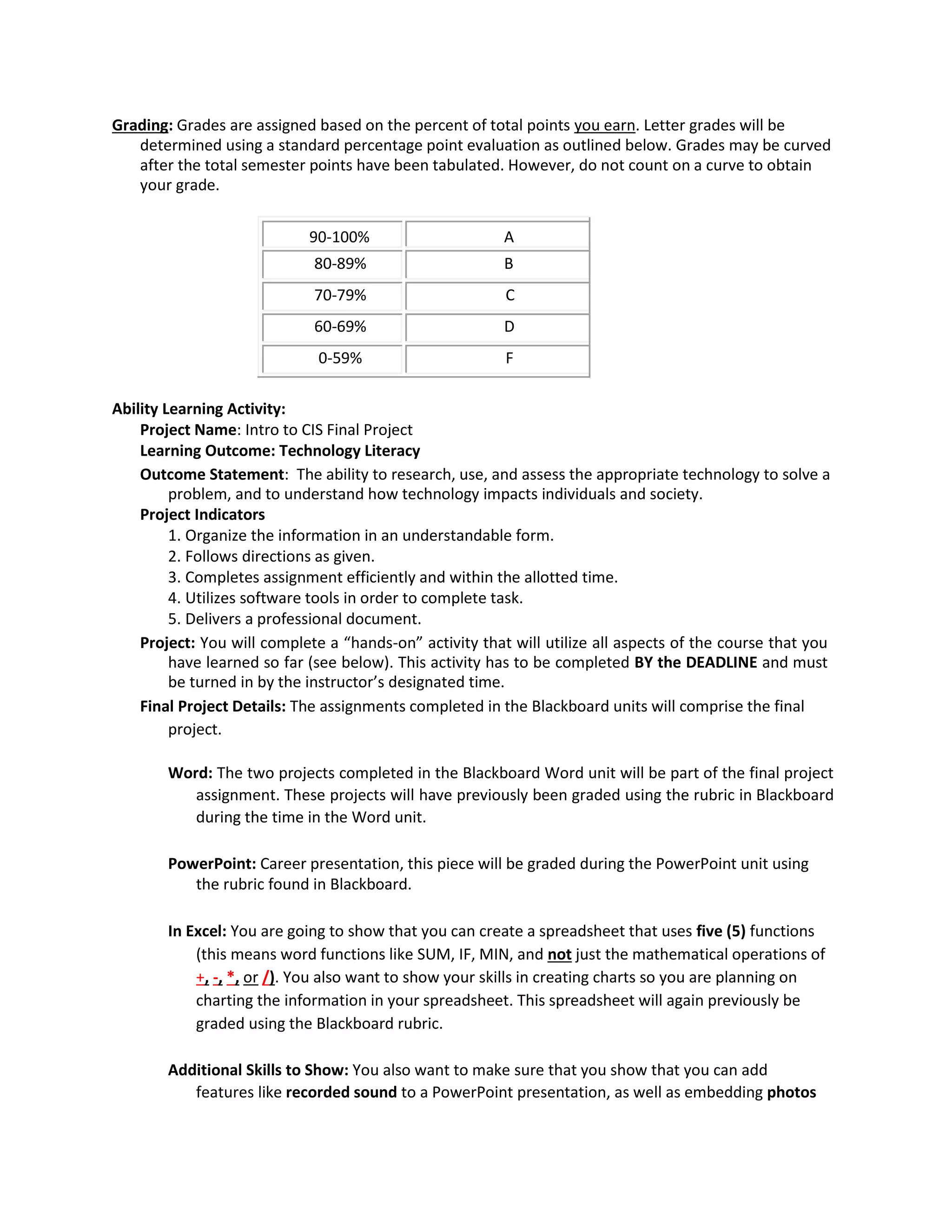
Grading: Grades are assigned based on the percent of total points you earn. Letter grades will be
determined using a standard percentage point evaluation as outlined below. Grades may be curved
after the total semester points have been tabulated. However, do not count on a curve to obtain
your grade.
90-100% A
80-89% B
70-79% C
60-69% D
0-59% F
Ability Learning Activity:
Project Name: Intro to CIS Final Project
Learning Outcome: Technology Literacy
Outcome Statement: The ability to research, use, and assess the appropriate technology to solve a
problem, and to understand how technology impacts individuals and society.
Project Indicators
1. Organize the information in an understandable form.
2. Follows directions as given.
3. Completes assignment efficiently and within the allotted time.
4. Utilizes software tools in order to complete task.
5. Delivers a professional document.
Project: You will complete a “hands-on” activity that will utilize all aspects of the course that you
have learned so far (see below). This activity has to be completed BY the DEADLINE and must
be turned in by the instructor’s designated time.
Final Project Details: The assignments completed in the Blackboard units will comprise the final
project.
Word: The two projects completed in the Blackboard Word unit will be part of the final project
assignment. These projects will have previously been graded using the rubric in Blackboard
during the time in the Word unit.
PowerPoint: Career presentation, this piece will be graded during the PowerPoint unit using
the rubric found in Blackboard.
In Excel: You are going to show that you can create a spreadsheet that uses five (5) functions
(this means word functions like SUM, IF, MIN, and not just the mathematical operations of
+, -, *, or /). You also want to show your skills in creating charts so you are planning on
charting the information in your spreadsheet. This spreadsheet will again previously be
graded using the Blackboard rubric.
Additional Skills to Show: You also want to make sure that you show that you can add
features like recorded sound to a PowerPoint presentation, as well as embedding photos
into the presentation.
Reflection of CIS 170: You will write a reflection about the CIS 170 class. The reflection will
answer three basic questions similar to what you did, what you learned, and how will you
use these things in the future. This is about the class, not the instructor.
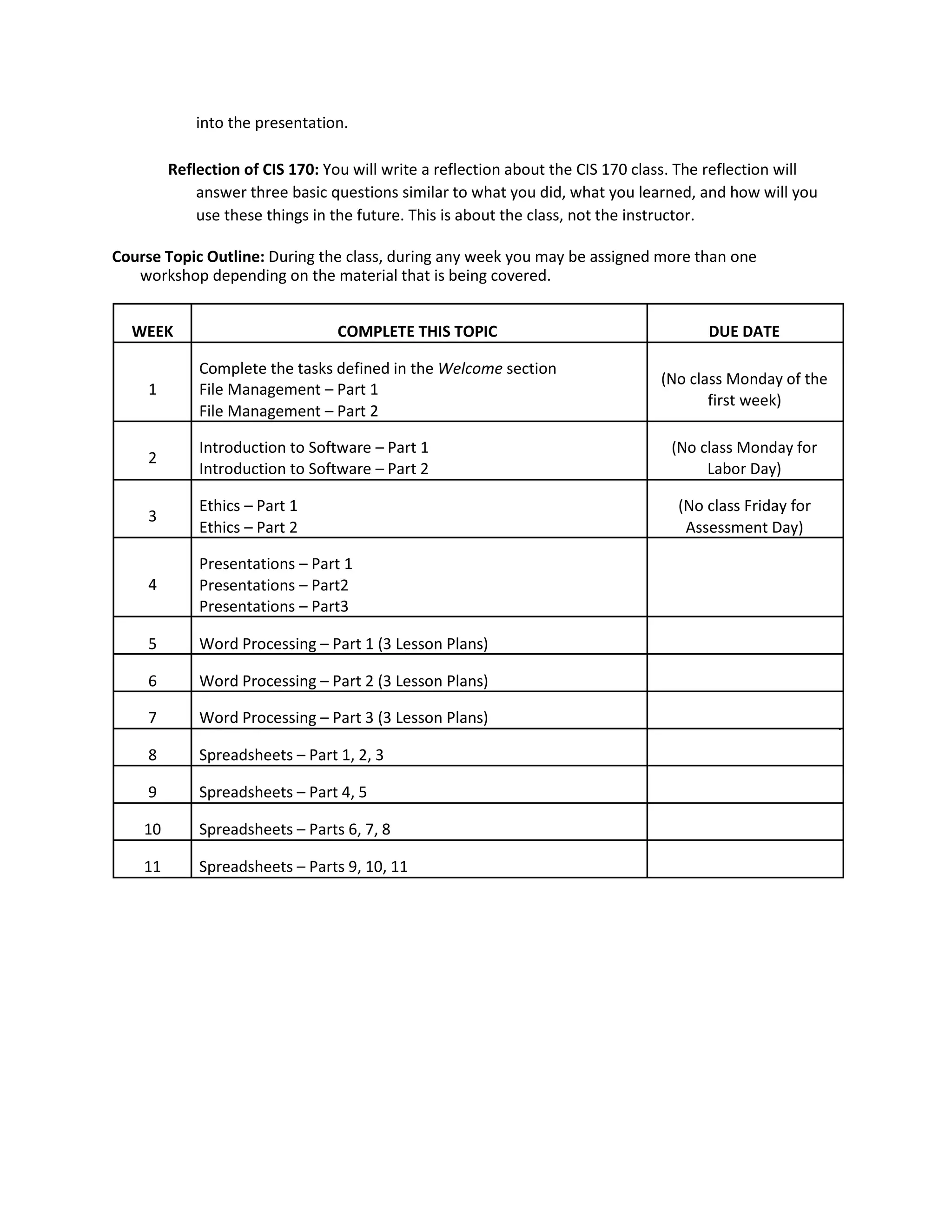
Course Topic Outline: During the class, during any week you may be assigned more than one
workshop depending on the material that is being covered.
WEEK COMPLETE THIS TOPIC DUE DATE
Complete the tasks defined in the Welcome section
(No class Monday of the
1 File Management – Part 1
first week)
File Management – Part 2
2
Introduction to Software – Part 1 (No class Monday for
Introduction to Software – Part 2 Labor Day)
3
Ethics – Part 1 (No class Friday for
Ethics – Part 2 Assessment Day)
Presentations – Part 1
4 Presentations – Part2
Presentations – Part3
5 Word Processing – Part 1 (3 Lesson Plans)
6 Word Processing – Part 2 (3 Lesson Plans)
7 Word Processing – Part 3 (3 Lesson Plans)
8 Spreadsheets – Part 1, 2, 3
9 Spreadsheets – Part 4, 5
10 Spreadsheets – Parts 6, 7, 8
11 Spreadsheets – Parts 9, 10, 11
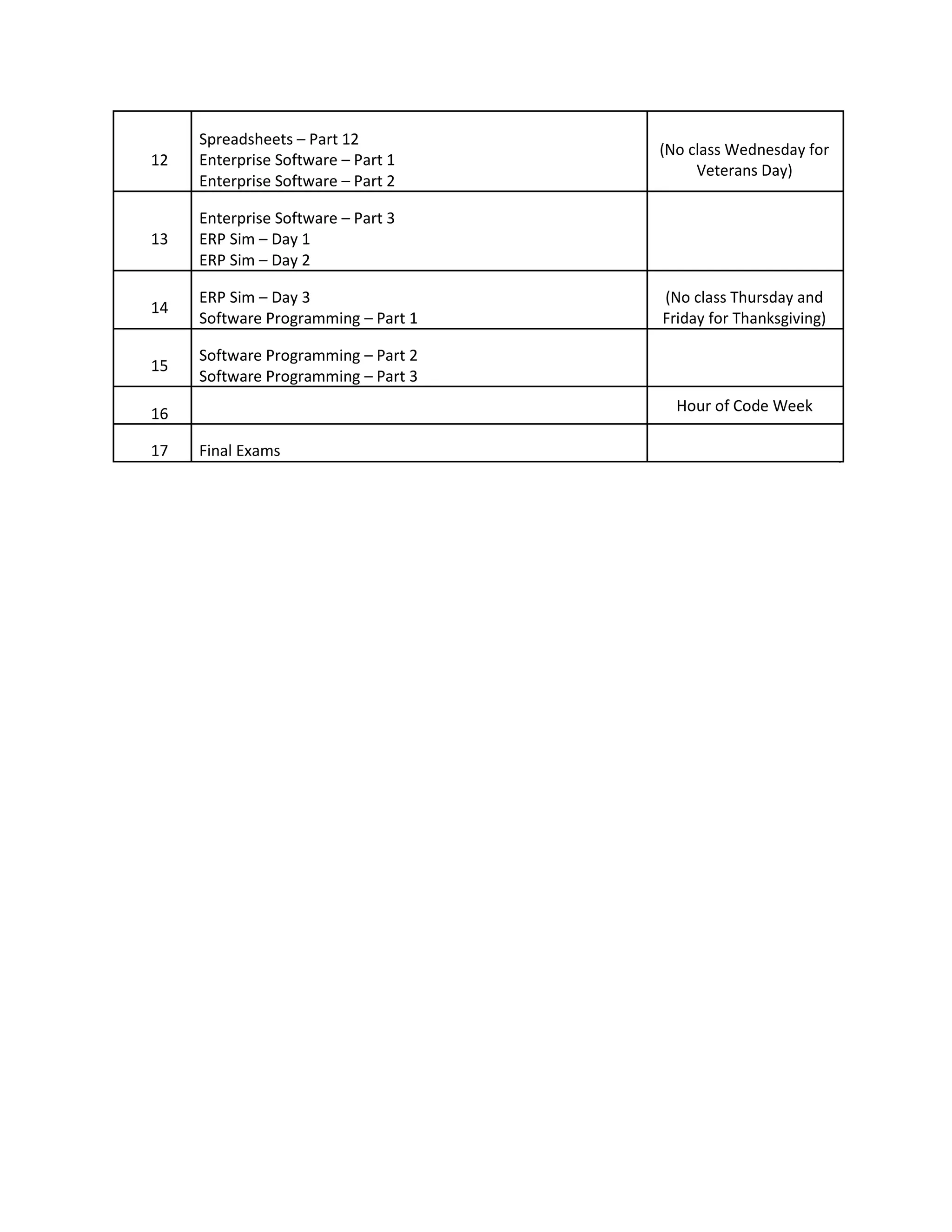
Spreadsheets – Part 12
(No class Wednesday for
12 Enterprise Software – Part 1
Veterans Day)
Enterprise Software – Part 2
Enterprise Software – Part 3
13 ERP Sim – Day 1
ERP Sim – Day 2
14
ERP Sim – Day 3 (No class Thursday and
Software Programming – Part 1 Friday for Thanksgiving)
15
Software Programming – Part 2
Software Programming – Part 3
16 Hour of Code Week
17 Final Exams

CIS_170_05_F15F2F_Paurus

  • 1.
    Valley City StateUniversity Fall 2015 Face to Face Class CIS 170 – Introduction to Computer Information Systems Section5 MWF 1:00-1:50pm Welcome to CIS 170. We will examine the broad topics of basic and responsible use oftechnology, increased productivity using technology, and uses of technology to solve problems. It is our goalthat students advance in knowledge and understanding of technology across disciplines and in chosencareer paths. Jamie Paurus, Department Chair Computer Systems and Software Engineering Office: McFarland Hall 138F Phone: 701-845-7723 Email: Jamie.paurus@vcsu.edu Office hours: 10-11 MWF, online office hours can be arranged through outlook calendar or set up by sending me an email It is best to contact me via email, once received I will get back to you within two business days Teaching Assistant: TBD Course Description: This course provides an introduction to word processing, spreadsheets, presentation software, and operating system software. Additional topics include: history, ethics, uses of computers in society, and emerging applications for computers. Prerequisite: Thiscourse covers a full semester and no prerequisites arenecessary. Course Overview: As a student in this course, you will learn the important topics of relating toMicrosoft Office and other computer concepts. No prior computer experience is assumed. You will firstbe introduced to file management and the students’ current operating system as it relates to file management. Students will be introduced computer ethics and how it applies to them. Studentswill be introduced the basic Office programs, including Word, PowerPoint, and Excel. Students willalso be introduced to the topics of Enterprise Systems and introductory programming. Students willalso learn how to use online resources of the VCSU library and internet searching. This course will strive to reach the following specificgoals: 1. Students will have an understanding of file maintenance using the current operatingsystem. 2. Students will have a working vocabulary and knowledge of computers and information concepts. 3. Students will know and demonstrate the basics of the application software used inclass. 4. Students will use the software to complete required projects, working individually or ingroups. 5. Students will complete projects demonstrating TechnologyLiteracy. 6. Students will know and use online library resources.
  • 2.
    Course Materials: Required forall students regardless of platform: 1. Intro to Computer Information Systems Debra Geoghan Alan Evans, Kendall Martin, Mary Anne Poatsy Catherine LaBerta George Beekman, Ben Beekman Shelly Gaskin, Melissa Prinzing ISBN-10: 1-269-77105-1 ISBN-13: 978-1-269-77105-4bb Publisher:Pearson Learning Solutions Copyright: 2015 Students using PC laptops are required to purchase the followingtextbook: 2. CIS 170 Excel for PC Shelley Gaskin, Carolyn E McLellan, Robert Ferrett, Alicia Vargas ISBN-10: 1-269-77361-5 ISBN-13: 978-1-269-77361-4 Publisher: Pearson Learning Solutions Copyright: 2015 Students using Mac laptops are required to purchase the followingtextbook: 2. CIS 170 Excel for Mac Shelley Gaskin, Carolyn E McLellan, Robert Ferrett, Alicia Vargas ISBN-10: 1-269-77360-7 ISBN-13: 978-1-269-77360-7 Publisher: Pearson Learning Solutions Copyright: 2015 Textbooks are available through the VCSU bookstore. Software: Microsoft Office Suite (2013 for PC, 2011 Excel for Mac, 2011 or 2016 for Mac for Word and PowerPoint), Web Brower, ERP, Alice, MyeFolio Hardware: PC or Macintosh
  • 3.
    If you havequestions, please email me at Jamie.paurus@vcsu.edu. I will respond to your email within two normal weekdays. Sending emails over weekends and holidays may result in a longer response time. CLASS ATTENDANCE: Students are expected to attend all class sessions of courses for which they are registered. You will receive participation points for each class you are in attendance. If I receive notification prior to class for an absence, you will receive your participation points. These participation points will be used in your final grade calculation. NCATE Standards: This course helps fulfill the following North Dakota Business Teacher Education Standards: Standard 03020.1, 03020.2, and 03020.4. To see the complete standard information visit: V:institutionAccreditationNCATEND Program Area ReportsBusinessStandardsState Standards.pdf Instant Messaging/Web Browsing: If I walk by or observe students either Instant Messaging or browsing the web during discussion of class material, you will be asked to either close your lid or get back on task. Cell Phones: I understand that cell phones play a vital part in your life. If you receive a call, please step out of the class and deal with it. If I observe text messaging, cell phones will be shut off and put away. Academic Policies and Resource/Support S3rvice Links: The following links provide information on VCSU policies and/or resource/support services/ You can either click on the link to access the information or copy and paste the link into the address bar of your web browser to view the pertinent information. Academic Integrity http://www.vcsu.edu/documents/vp.htm?p=2625&cm=1 Final Exam date and policy reference http://www.vcsu.edu/documents/vp.htm?p=2625&cm=1 VCSU Document Link: http://www.vcsu.edu/documents/vp.htm?p=2625&cm=1 Disability Support Services http://www.vcsu.edu/documents/vp.htm?p=2625&cm=1 Library: http://www.vcsu.edu/documents/vp.htm?p=2625&cm=1 Learning Center: http://www.vcsu.edu/documents/vp.htm?p=2625&cm=1 Evaluation/Assessment: This class will be evaluated through the completion of the individual assignments and quizzes. The assignments will cover all topics that were assigned in the appropriate Blackboard unit. Organization and completeness of materials will play a key part in the evaluation of the project. I also reserve the right to use written assignments, quizzes, and tests as additional evaluation tools. Students must upload their final project to eFolio successfully (instructor must be able to view entire document), failure to do so can result in failing this course. Late Assignments: Late work will not be accepted unless there is supporting evidence from the Academic Services office that additional time is needed.
  • 4.
    Grading: Grades areassigned based on the percent of total points you earn. Letter grades will be determined using a standard percentage point evaluation as outlined below. Grades may be curved after the total semester points have been tabulated. However, do not count on a curve to obtain your grade. 90-100% A 80-89% B 70-79% C 60-69% D 0-59% F Ability Learning Activity: Project Name: Intro to CIS Final Project Learning Outcome: Technology Literacy Outcome Statement: The ability to research, use, and assess the appropriate technology to solve a problem, and to understand how technology impacts individuals and society. Project Indicators 1. Organize the information in an understandable form. 2. Follows directions as given. 3. Completes assignment efficiently and within the allotted time. 4. Utilizes software tools in order to complete task. 5. Delivers a professional document. Project: You will complete a “hands-on” activity that will utilize all aspects of the course that you have learned so far (see below). This activity has to be completed BY the DEADLINE and must be turned in by the instructor’s designated time. Final Project Details: The assignments completed in the Blackboard units will comprise the final project. Word: The two projects completed in the Blackboard Word unit will be part of the final project assignment. These projects will have previously been graded using the rubric in Blackboard during the time in the Word unit. PowerPoint: Career presentation, this piece will be graded during the PowerPoint unit using the rubric found in Blackboard. In Excel: You are going to show that you can create a spreadsheet that uses five (5) functions (this means word functions like SUM, IF, MIN, and not just the mathematical operations of +, -, *, or /). You also want to show your skills in creating charts so you are planning on charting the information in your spreadsheet. This spreadsheet will again previously be graded using the Blackboard rubric. Additional Skills to Show: You also want to make sure that you show that you can add features like recorded sound to a PowerPoint presentation, as well as embedding photos
  • 5.
    into the presentation. Reflectionof CIS 170: You will write a reflection about the CIS 170 class. The reflection will answer three basic questions similar to what you did, what you learned, and how will you use these things in the future. This is about the class, not the instructor. Course Topic Outline: During the class, during any week you may be assigned more than one workshop depending on the material that is being covered. WEEK COMPLETE THIS TOPIC DUE DATE Complete the tasks defined in the Welcome section (No class Monday of the 1 File Management – Part 1 first week) File Management – Part 2 2 Introduction to Software – Part 1 (No class Monday for Introduction to Software – Part 2 Labor Day) 3 Ethics – Part 1 (No class Friday for Ethics – Part 2 Assessment Day) Presentations – Part 1 4 Presentations – Part2 Presentations – Part3 5 Word Processing – Part 1 (3 Lesson Plans) 6 Word Processing – Part 2 (3 Lesson Plans) 7 Word Processing – Part 3 (3 Lesson Plans) 8 Spreadsheets – Part 1, 2, 3 9 Spreadsheets – Part 4, 5 10 Spreadsheets – Parts 6, 7, 8 11 Spreadsheets – Parts 9, 10, 11
  • 6.
    Spreadsheets – Part12 (No class Wednesday for 12 Enterprise Software – Part 1 Veterans Day) Enterprise Software – Part 2 Enterprise Software – Part 3 13 ERP Sim – Day 1 ERP Sim – Day 2 14 ERP Sim – Day 3 (No class Thursday and Software Programming – Part 1 Friday for Thanksgiving) 15 Software Programming – Part 2 Software Programming – Part 3 16 Hour of Code Week 17 Final Exams