Introduction to computing
Objectives:
Explain fundamental principles, concepts and
evolution of computing systems as they relate to
different fields.
To review basic computer system concepts.
Course Overview
• ​
The Introduction to Computing course is designed
to equip students with fundamental computer skills
and a broad understanding of key concepts in
computing and information technology.
Course Components
• This course provides insights into computer
systems, focusing on hardware, operating systems,
and applications on microcomputers. It also
introduces essential components of computing
infrastructure, which include hardware, software
applications, and data communication systems.
Networking and Information Systems
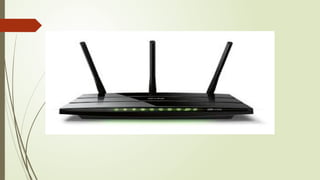
• The curriculum addresses network communication
and information systems, arming students with
essential knowledge pertinent to these areas.
Practical Elements
• The course features a combination of lectures and
hands-on laboratory exercises to facilitate
understanding of basic topics such as hardware,
software, networking, and computer security. This
practical approach enriches learning through direct
experience.
Course Credit
• Generally, this course is designed for a total of
three semester hours, enabling students to earn
academic credit upon successful completion.
Basic Understanding of Computing
 Introduction to computing covers essential concepts
that form the building blocks of technology
beginners need to understand. This includes
understanding the distinction between hardware and
software, as both are crucial components in a
computing system.
Components of a Computer System
• A computer system consists of core components such
as hardware, which refers to the physical parts of a
computer, and software, which is the set of
instructions that directs the hardware. The integration
of these components enables computers to perform a
wide range of tasks efficiently
Navigating Operating Systems
• Familiarity with operating systems, particularly
Windows, is an essential skill for beginners. The
guide emphasizes learning how to navigate the
interface, manage files, and utilize applications
effectively
Basic Software Applications
• Introduction to basic software applications is critical
for practical computing skills. Beginners are taught to
create documents using word processors,
spreadsheets for data handling, and presentation
software for visual communication. Knowledge of
these applications greatly contributes to productivity
and digital literacy
Internet and Connectivity
• Understanding how to access the Internet, use web
browsers, and manage email accounts is essential in
today’s digital age. This knowledge includes
navigating the web safely and responsibly while
considering privacy and security practices
Security and Privacy
• Basic computing instruction also emphasizes the
importance of keeping personal information secure
online1. Beginners learn about potential threats and
methods for safeguarding their data to ensure a safer
computing environment
 Lesson Proper: Basic Understanding of Computing
 1. Introduction to Computing
• Objective: Understand the fundamental components of computing.
• Key Points:
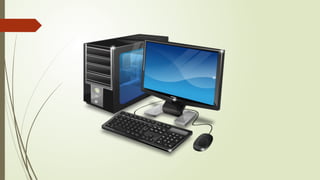
• Hardware: Physical components like the CPU, RAM, hard drive, and peripherals (keyboard, mouse, monitor).
• Software: Programs and applications that instruct the hardware, such as operating systems and applications.
 2. Components of a Computer System
• Objective: Identify and describe the core components of a computer system.
• Key Points:
• Hardware Components:
• Central Processing Unit (CPU): The brain of the computer that performs calculations and executes instructions.
• Memory (RAM): Temporary storage for data currently in use.
• Storage: Hard drives or SSDs for long-term data storage.
• Peripherals: Input devices (keyboard, mouse), output devices (monitor, printer), and external storage devices.
• Software Components:
• Operating System: Manages hardware and software resources (e.g., Windows, macOS, Linux).
• Applications: Programs that perform specific tasks (e.g., word processors, web browsers).
 Navigating Operating Systems
• Objective: Develop basic skills in using operating systems, particularly Windows.
• Key Points:
• Interface Navigation: Learn to use the desktop, taskbar, and start menu.
• File Management: Understand how to create, save, move, and delete files and folders.
• Application Use: Open, close, and switch between applications.
 4. Basic Software Applications
• Objective: Gain proficiency in using essential software applications.
• Key Points:
• Word Processors: Create and edit text documents (e.g., Microsoft Word, Google
Docs).
• Spreadsheets: Handle data and perform calculations (e.g., Microsoft Excel, Google
Sheets).
• Presentation Software: Design and present visual content (e.g., Microsoft PowerPoint,
Google Slides).
 . Internet and Connectivity
• Objective: Understand how to use the internet and manage online communications.
• Key Points:
• Web Browsing: Use web browsers to search for information and navigate websites (e.g., Chrome,
Firefox).
• Email Management: Set up and manage email accounts, send, and receive messages.
• Online Safety: Recognize safe practices for browsing and handling online information.
 6. Security and Privacy
• Objective: Learn basic practices for securing personal information and maintaining online privacy.
• Key Points:
• Data Protection: Use strong passwords, enable two-factor authentication, and regularly update
software.
• Threat Awareness: Recognize common threats like phishing, malware, and scams.
• Privacy Settings: Adjust privacy settings on social media and online accounts to protect personal
information.
Summary
In this lesson, students will gain a foundational
understanding of computing by learning about
hardware and software components, navigating
operating systems, using basic software
applications, managing internet connectivity, and
practicing good security and privacy habits. This
knowledge provides the basis for effective and
responsible use of technology.

Introduction To Computing (1).pptxmoly.pptx

  • 1.
  • 2.
    Objectives: Explain fundamental principles,concepts and evolution of computing systems as they relate to different fields. To review basic computer system concepts.
  • 7.
    Course Overview • ​ TheIntroduction to Computing course is designed to equip students with fundamental computer skills and a broad understanding of key concepts in computing and information technology. Course Components • This course provides insights into computer systems, focusing on hardware, operating systems, and applications on microcomputers. It also introduces essential components of computing infrastructure, which include hardware, software applications, and data communication systems.
  • 8.
    Networking and InformationSystems • The curriculum addresses network communication and information systems, arming students with essential knowledge pertinent to these areas. Practical Elements • The course features a combination of lectures and hands-on laboratory exercises to facilitate understanding of basic topics such as hardware, software, networking, and computer security. This practical approach enriches learning through direct experience.
  • 9.
    Course Credit • Generally,this course is designed for a total of three semester hours, enabling students to earn academic credit upon successful completion.
  • 10.
    Basic Understanding ofComputing  Introduction to computing covers essential concepts that form the building blocks of technology beginners need to understand. This includes understanding the distinction between hardware and software, as both are crucial components in a computing system.
  • 11.
    Components of aComputer System • A computer system consists of core components such as hardware, which refers to the physical parts of a computer, and software, which is the set of instructions that directs the hardware. The integration of these components enables computers to perform a wide range of tasks efficiently
  • 12.
    Navigating Operating Systems •Familiarity with operating systems, particularly Windows, is an essential skill for beginners. The guide emphasizes learning how to navigate the interface, manage files, and utilize applications effectively
  • 13.
    Basic Software Applications •Introduction to basic software applications is critical for practical computing skills. Beginners are taught to create documents using word processors, spreadsheets for data handling, and presentation software for visual communication. Knowledge of these applications greatly contributes to productivity and digital literacy
  • 14.
    Internet and Connectivity •Understanding how to access the Internet, use web browsers, and manage email accounts is essential in today’s digital age. This knowledge includes navigating the web safely and responsibly while considering privacy and security practices
  • 15.
    Security and Privacy •Basic computing instruction also emphasizes the importance of keeping personal information secure online1. Beginners learn about potential threats and methods for safeguarding their data to ensure a safer computing environment
  • 16.
     Lesson Proper:Basic Understanding of Computing  1. Introduction to Computing • Objective: Understand the fundamental components of computing. • Key Points: • Hardware: Physical components like the CPU, RAM, hard drive, and peripherals (keyboard, mouse, monitor). • Software: Programs and applications that instruct the hardware, such as operating systems and applications.  2. Components of a Computer System • Objective: Identify and describe the core components of a computer system. • Key Points: • Hardware Components: • Central Processing Unit (CPU): The brain of the computer that performs calculations and executes instructions. • Memory (RAM): Temporary storage for data currently in use. • Storage: Hard drives or SSDs for long-term data storage. • Peripherals: Input devices (keyboard, mouse), output devices (monitor, printer), and external storage devices. • Software Components: • Operating System: Manages hardware and software resources (e.g., Windows, macOS, Linux). • Applications: Programs that perform specific tasks (e.g., word processors, web browsers).
  • 17.
     Navigating OperatingSystems • Objective: Develop basic skills in using operating systems, particularly Windows. • Key Points: • Interface Navigation: Learn to use the desktop, taskbar, and start menu. • File Management: Understand how to create, save, move, and delete files and folders. • Application Use: Open, close, and switch between applications.  4. Basic Software Applications • Objective: Gain proficiency in using essential software applications. • Key Points: • Word Processors: Create and edit text documents (e.g., Microsoft Word, Google Docs). • Spreadsheets: Handle data and perform calculations (e.g., Microsoft Excel, Google Sheets). • Presentation Software: Design and present visual content (e.g., Microsoft PowerPoint, Google Slides).
  • 18.
     . Internetand Connectivity • Objective: Understand how to use the internet and manage online communications. • Key Points: • Web Browsing: Use web browsers to search for information and navigate websites (e.g., Chrome, Firefox). • Email Management: Set up and manage email accounts, send, and receive messages. • Online Safety: Recognize safe practices for browsing and handling online information.  6. Security and Privacy • Objective: Learn basic practices for securing personal information and maintaining online privacy. • Key Points: • Data Protection: Use strong passwords, enable two-factor authentication, and regularly update software. • Threat Awareness: Recognize common threats like phishing, malware, and scams. • Privacy Settings: Adjust privacy settings on social media and online accounts to protect personal information.
  • 19.
    Summary In this lesson,students will gain a foundational understanding of computing by learning about hardware and software components, navigating operating systems, using basic software applications, managing internet connectivity, and practicing good security and privacy habits. This knowledge provides the basis for effective and responsible use of technology.
Editor's Notes

  • #10 Fundamental of intro to computing