Understanding Subroutines and
Functions in VB
What is/are Subroutines?
A subroutine has a name attributed with it, much
like a variable does. Unlike a variable, a
subroutine doesn't hold data. Instead, it holds
code.
For example, the Form_Load subroutine is
automatically called when a form loads. This is
where you have been inserting your test code
before. What you were actually doing was adding
code to this subroutine.
What is/are Functions?
Functions are basically the exact same as
subroutines, except that they return a value.
That means that the function itself has a
type, and the function will return a value to
the calling subroutine based on the code
that it contains.
A function is declared the exact same way as
a subroutine, except using the "Function"
keyword instead of "Sub".
The difference between a
Subs and a Functions
Sub does not produce a return value (one
that can be assigned directly to a variable)
whereas a
Function does produce a return value.
Both Subroutines and Functions can be
called with or without parameters.
Calling a Sub Without Parameters
To call a Sub, you use the
Call statement. Example,
the statement below calls
a Sub named "AddNum".
Call AddNum
This would cause VB to
execute the statements
in the Sub named
"AddEm" and then
return to the statement
following the Call.
Private Sub AddNum()
[statements]
End Sub
The keyword "Call" is optional, thus a
call can be made simply by coding the
name of the Sub:
AddNum ' same as "Call AddNum"
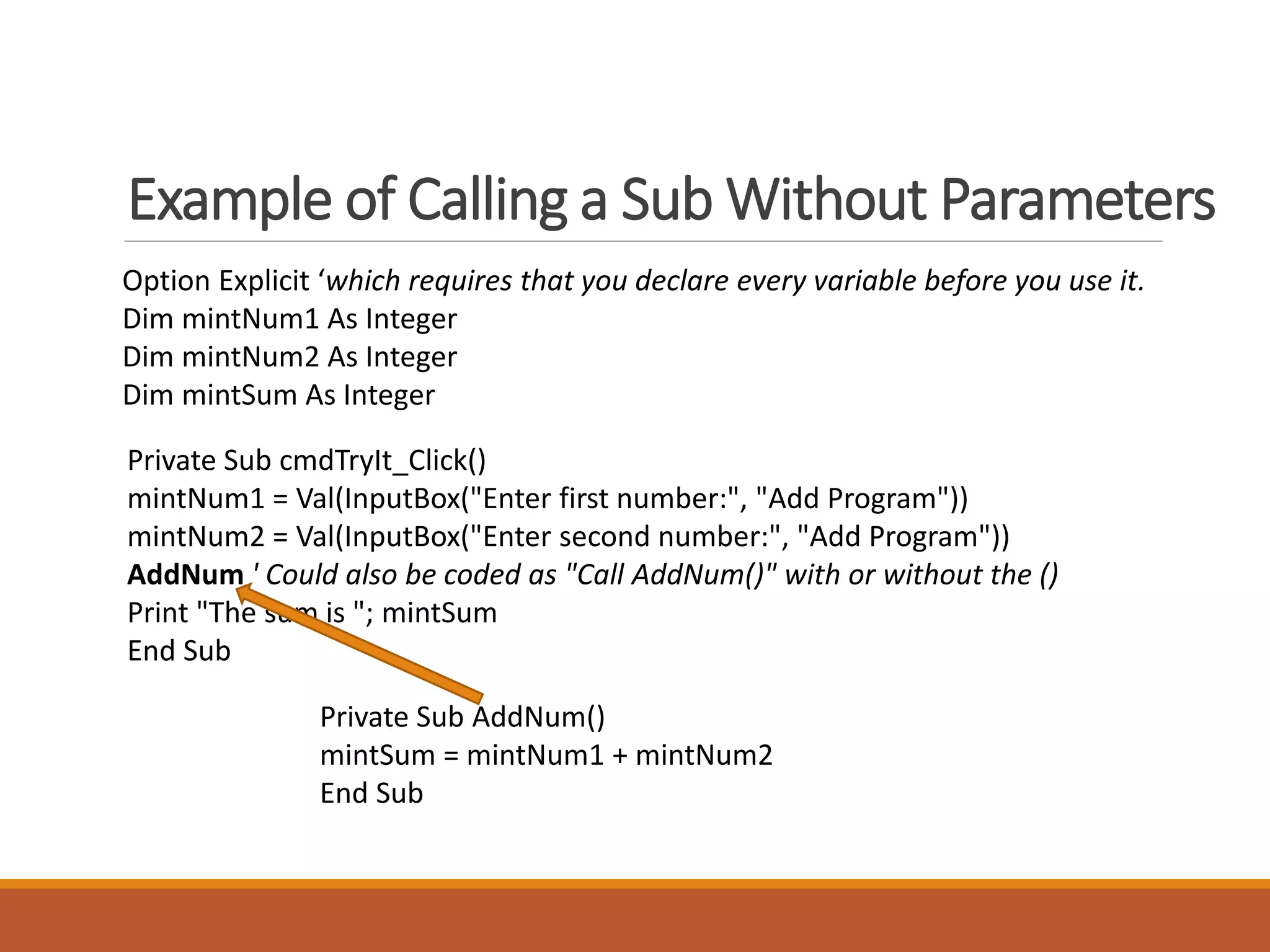
Example of Calling a Sub Without Parameters
Option Explicit ‘which requires that you declare every variable before you use it.
Dim mintNum1 As Integer
Dim mintNum2 As Integer
Dim mintSum As Integer
Private Sub cmdTryIt_Click()
mintNum1 = Val(InputBox("Enter first number:", "Add Program"))
mintNum2 = Val(InputBox("Enter second number:", "Add Program"))
AddNum ' Could also be coded as "Call AddNum()" with or without the ()
Print "The sum is "; mintSum
End Sub
Private Sub AddNum()
mintSum = mintNum1 + mintNum2
End Sub
Calling a Sub With Parameters
A Sub Procedure will be expecting one or more
parameters. This enhances the reusability and
flexibility of the Sub procedure. The full syntax for
a Sub procedure is:
[Private | Public] Sub SubName[(parameter list)]
[statements]
End Sub
where "parameter list" is a comma-separated
list of the parameter variables with their data
types (ex. var1 As datatype, var2 As datatype,
etc.).
Example: Private Sub AddNum(pintNum1 As Integer, pintNum2 As Integer, pintSum As Integer)
The CALL can be coded in one of two ways.
Call AddNum(intNum1, intNum2, intSum)
or
AddEm intNum1, intNum2, intSum
With the naming conventions use to start
the variable names of the parameters in
a Sub or Function header with the letter
"p" for "parameter
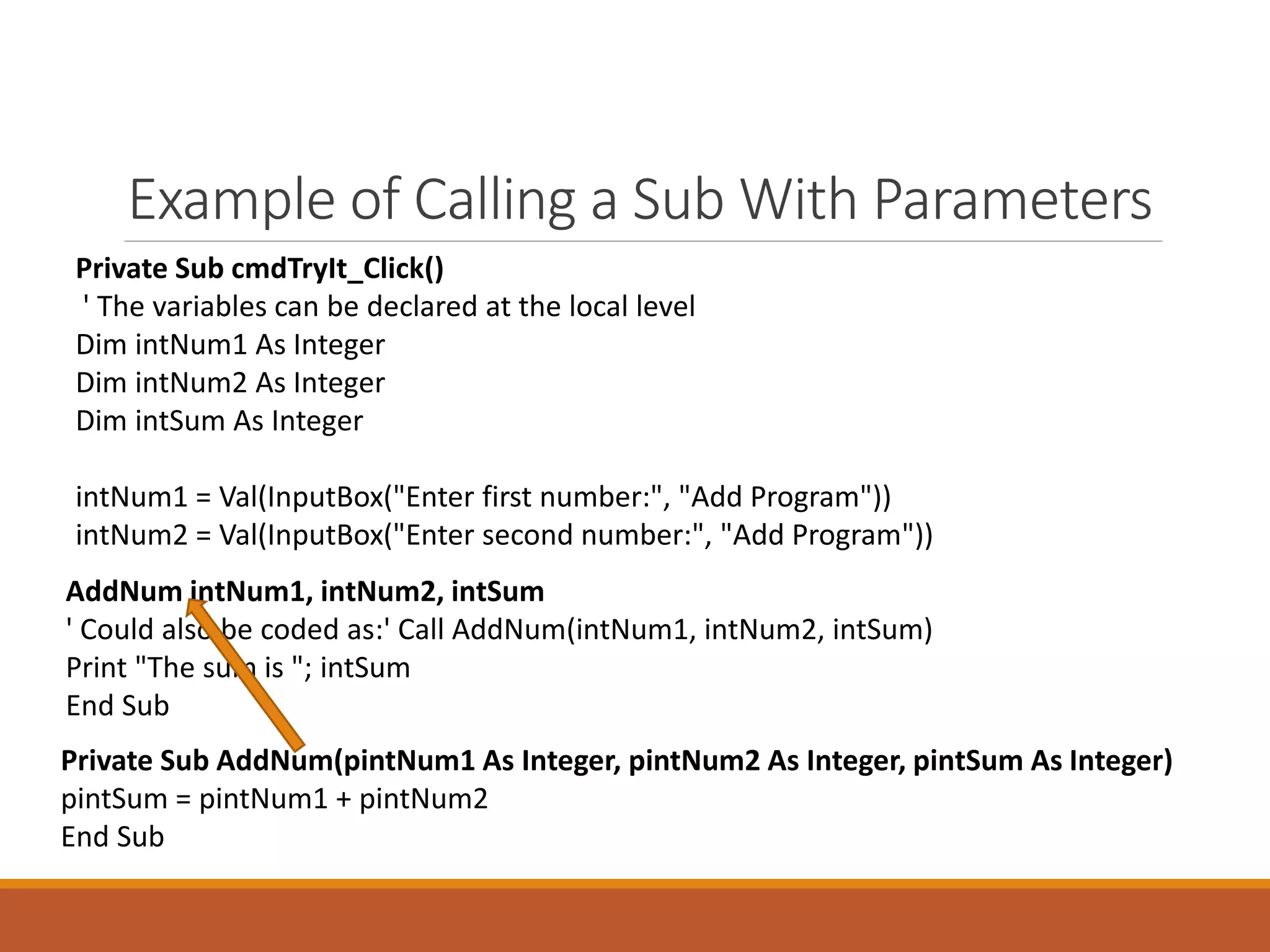
Example of Calling a Sub With Parameters
Private Sub cmdTryIt_Click()
' The variables can be declared at the local level
Dim intNum1 As Integer
Dim intNum2 As Integer
Dim intSum As Integer
intNum1 = Val(InputBox("Enter first number:", "Add Program"))
intNum2 = Val(InputBox("Enter second number:", "Add Program"))
AddNum intNum1, intNum2, intSum
' Could also be coded as:' Call AddNum(intNum1, intNum2, intSum)
Print "The sum is "; intSum
End Sub
Private Sub AddNum(pintNum1 As Integer, pintNum2 As Integer, pintSum As Integer)
pintSum = pintNum1 + pintNum2
End Sub
Calling a Function
To call a Function, the syntax is identical to an assignment statement that uses a
VB built-in function:
VariableName = FunctionName[(argument list)]
For example, if you made a function called "AddNum" that returned a value (like
the sum, for example), you could invoke the function as follows:
intSum = AddEm(intNum1, intNum2)
The above statement would cause the following to happen:
1. The procedure AddNum would be called, passing intNum1 and intNum2
2. The AddNum procedure would add the values of intNum1 and intNum2 to produce its
return value, the sum.
3. When the AddNum procedure exits, its return value would be stored in the variable
intSum
The format of the Function
Procedure
[Private | Public] Function FunctionName
[(parameter list)] [As datatype]
[statements]
FunctionName = value
[statements]
End Function
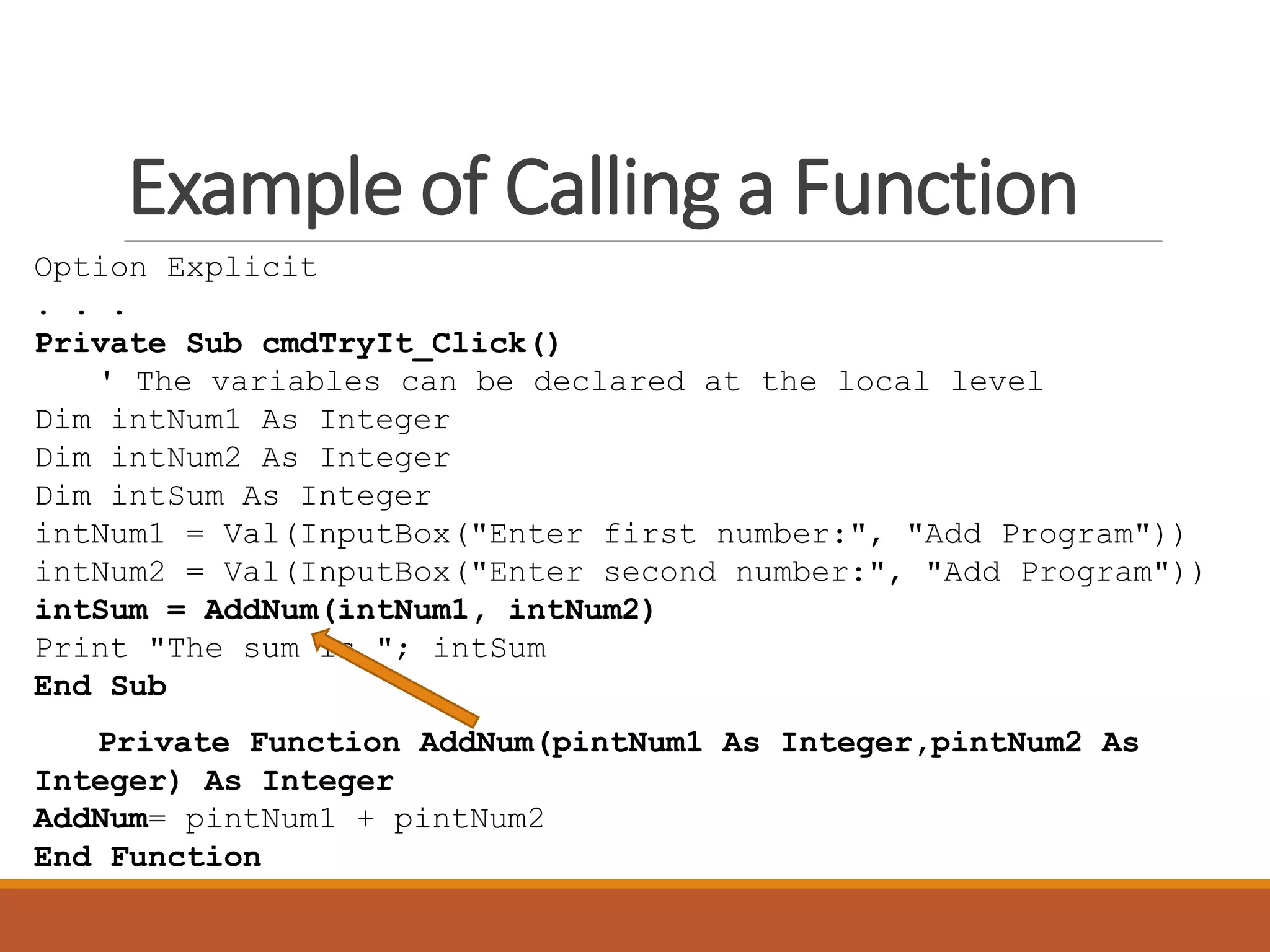
Example of Calling a Function
Option Explicit
. . .
Private Sub cmdTryIt_Click()
' The variables can be declared at the local level
Dim intNum1 As Integer
Dim intNum2 As Integer
Dim intSum As Integer
intNum1 = Val(InputBox("Enter first number:", "Add Program"))
intNum2 = Val(InputBox("Enter second number:", "Add Program"))
intSum = AddNum(intNum1, intNum2)
Print "The sum is "; intSum
End Sub
Private Function AddNum(pintNum1 As Integer,pintNum2 As
Integer) As Integer
AddNum= pintNum1 + pintNum2
End Function
Laboratory Hands-on Exercise:
Apply the Subroutines and Functions in a Simple
Math Operation (that can add, subtract, multiply
and divide)
Filenames: UsingSubs.vbp and UsingFunctions.vbp
In the last line of the program/code answer the
question and put as remarks to avoid errors. What
do you think the best way to determine which is
better?

Understanding Subroutines and Functions in VB6

  • 1.
  • 2.
    What is/are Subroutines? Asubroutine has a name attributed with it, much like a variable does. Unlike a variable, a subroutine doesn't hold data. Instead, it holds code. For example, the Form_Load subroutine is automatically called when a form loads. This is where you have been inserting your test code before. What you were actually doing was adding code to this subroutine.
  • 3.
    What is/are Functions? Functionsare basically the exact same as subroutines, except that they return a value. That means that the function itself has a type, and the function will return a value to the calling subroutine based on the code that it contains. A function is declared the exact same way as a subroutine, except using the "Function" keyword instead of "Sub".
  • 4.
    The difference betweena Subs and a Functions Sub does not produce a return value (one that can be assigned directly to a variable) whereas a Function does produce a return value. Both Subroutines and Functions can be called with or without parameters.
  • 5.
    Calling a SubWithout Parameters To call a Sub, you use the Call statement. Example, the statement below calls a Sub named "AddNum". Call AddNum This would cause VB to execute the statements in the Sub named "AddEm" and then return to the statement following the Call. Private Sub AddNum() [statements] End Sub The keyword "Call" is optional, thus a call can be made simply by coding the name of the Sub: AddNum ' same as "Call AddNum"
  • 6.
    Example of Callinga Sub Without Parameters Option Explicit ‘which requires that you declare every variable before you use it. Dim mintNum1 As Integer Dim mintNum2 As Integer Dim mintSum As Integer Private Sub cmdTryIt_Click() mintNum1 = Val(InputBox("Enter first number:", "Add Program")) mintNum2 = Val(InputBox("Enter second number:", "Add Program")) AddNum ' Could also be coded as "Call AddNum()" with or without the () Print "The sum is "; mintSum End Sub Private Sub AddNum() mintSum = mintNum1 + mintNum2 End Sub
  • 7.
    Calling a SubWith Parameters A Sub Procedure will be expecting one or more parameters. This enhances the reusability and flexibility of the Sub procedure. The full syntax for a Sub procedure is: [Private | Public] Sub SubName[(parameter list)] [statements] End Sub where "parameter list" is a comma-separated list of the parameter variables with their data types (ex. var1 As datatype, var2 As datatype, etc.). Example: Private Sub AddNum(pintNum1 As Integer, pintNum2 As Integer, pintSum As Integer) The CALL can be coded in one of two ways. Call AddNum(intNum1, intNum2, intSum) or AddEm intNum1, intNum2, intSum With the naming conventions use to start the variable names of the parameters in a Sub or Function header with the letter "p" for "parameter
  • 8.
    Example of Callinga Sub With Parameters Private Sub cmdTryIt_Click() ' The variables can be declared at the local level Dim intNum1 As Integer Dim intNum2 As Integer Dim intSum As Integer intNum1 = Val(InputBox("Enter first number:", "Add Program")) intNum2 = Val(InputBox("Enter second number:", "Add Program")) AddNum intNum1, intNum2, intSum ' Could also be coded as:' Call AddNum(intNum1, intNum2, intSum) Print "The sum is "; intSum End Sub Private Sub AddNum(pintNum1 As Integer, pintNum2 As Integer, pintSum As Integer) pintSum = pintNum1 + pintNum2 End Sub
  • 9.
    Calling a Function Tocall a Function, the syntax is identical to an assignment statement that uses a VB built-in function: VariableName = FunctionName[(argument list)] For example, if you made a function called "AddNum" that returned a value (like the sum, for example), you could invoke the function as follows: intSum = AddEm(intNum1, intNum2) The above statement would cause the following to happen: 1. The procedure AddNum would be called, passing intNum1 and intNum2 2. The AddNum procedure would add the values of intNum1 and intNum2 to produce its return value, the sum. 3. When the AddNum procedure exits, its return value would be stored in the variable intSum
  • 10.
    The format ofthe Function Procedure [Private | Public] Function FunctionName [(parameter list)] [As datatype] [statements] FunctionName = value [statements] End Function
  • 11.
    Example of Callinga Function Option Explicit . . . Private Sub cmdTryIt_Click() ' The variables can be declared at the local level Dim intNum1 As Integer Dim intNum2 As Integer Dim intSum As Integer intNum1 = Val(InputBox("Enter first number:", "Add Program")) intNum2 = Val(InputBox("Enter second number:", "Add Program")) intSum = AddNum(intNum1, intNum2) Print "The sum is "; intSum End Sub Private Function AddNum(pintNum1 As Integer,pintNum2 As Integer) As Integer AddNum= pintNum1 + pintNum2 End Function
  • 12.
    Laboratory Hands-on Exercise: Applythe Subroutines and Functions in a Simple Math Operation (that can add, subtract, multiply and divide) Filenames: UsingSubs.vbp and UsingFunctions.vbp In the last line of the program/code answer the question and put as remarks to avoid errors. What do you think the best way to determine which is better?