Demonstration Lesson Plan in ICT
I. Objectives:
Content Standard : The learners demonstrate and understanding of concepts
and underlying principles in installing configuring
computer systems.
Performance Standard : The learners shall be able to install and configure
computer systems based on established procedures and
system requirements
Learning Competency : Install Application Software based on software
installation guides, end-user requirements and software
license agreement.
II. Subject Matter/Lesson
1. Topic: Application Software
2. References: Computer Systems Servicing Grade 11 Learner’s Material
3. Other Learning Resources:
https://www.homeschoolspark.com/articles/free-microsoft-word-alternatives/
https://intl.siyavula.com/read/cat/grade-12-cat/software/03-software
https://www.goodfirms.co/blog/top-10-free-and-open-source-database-
management-software-solutions
https://www.echorivera.com/blog/best-slide-software
https://en.localconcept.com/toolbox/desktop-publishing/
https://blogs.cul.columbia.edu/clio/2014/05/06/software-now-findable-in-clio/
https://www.youtube.com/watch?v=96xnG1rr7Hw
https://allthatsaas.com/roundup/best-video-conferencing-software/
https://www.temok.com/blog/tag/source-code-editor/
https://blurbgeek.com/online-multiplayer-games-for-pc/
4. Materials: powerpointpresentation, images, application installer
5. Values Integration:
a. Diligence in accomplishing assigned tasks.
b. Awareness ofthe functions of different application software.
III. Learning Procedure
Teacher’s Activity Pupil’s Activity
A. Preliminary Activities
a. Motivation
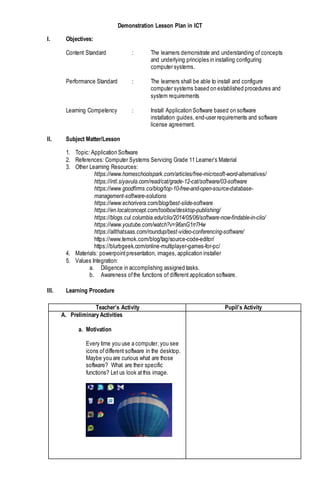
Every time you use a computer, you see
icons ofdifferent software in the desktop.
Maybe you are curious what are those
software? What are their specific
functions? Let us look atthis image.
b. Review
Let us first recall our previous lesson.
Who can give a recap?
Very good!
B. Activity
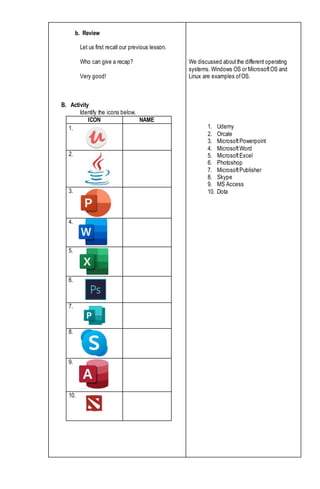
Identify the icons below.
ICON NAME
1.
2.
3.
4.
5.
6.
7.
8.
9.
10.
We discussed aboutthe different operating
systems. Windows OS or MicrosoftOS and
Linux are examples ofOS.
1. Udemy
2. Orcale
3. MicrosoftPowerpoint
4. MicrosoftWord
5. MicrosoftExcel
6. Photoshop
7. MicrosoftPublisher
8. Skype
9. MS Access
10. Dota
C. Analysis
Now, letus examine what are their functions.
1. Udemy
2. Orcale
3. MicrosoftPowerpoint
4. MicrosoftWord
5. MicrosoftExcel
6. Photoshop
7. MicrosoftPublisher
8. Skype
9. MS Access
10. Dota
D. Abstraction
At this pointwe are going to explore more about
software.
Brace yourselfas we discuss aboutapplication
software. Let’s getit on!
Application Software
Application software is a specialized program
that could execute a specific job for the user. It
would only run in its compatible Operating
System.
Examples of Application Software
a. Word processing software - Creates, edits,
saves, and prints documents. This also
serves as an electronic typewriter and even
more. With word processors, the user can
quickly produce quality documents like
memos and reports.
Can you give examples of word processing
software?
https://www.homeschoolspark.com/articles/fr
ee-microsoft-word-alternatives/
b. Spreadsheet software - An electronic
spreadsheetconsisting ofrows and columns
is used to presentand analyze data.
Can you give examples of spreadsheet
software?
1. For education
2. For programming
3. For creating presentation
4. For creating documents
5. For storing and sorting of data
6. For editing pictures
7. For creating booklets, brochures
8. For video call
9. For managing large amount of data
10. For fun and leisure
Examples ofWord processing software:MS
Word, WordPerfect, Ami Pro, MacWrite.
Examples ofspreadsheetsoftware: MS Excel,
Lotus 123, Quattro Pro.
https://intl.siyavula. com/read/cat/grade-12-
cat/software/03-software
c. Database management software - Used to
structure a database, an extensive collection
of computer programs. Data is organized as
fields and records for easy retrieval.
Examples ofdatabase management
software: MS Access, Oracle.
https://www.goodfirms.co/blog/top-10-free-
and-open-source-database-management-
software-solutions
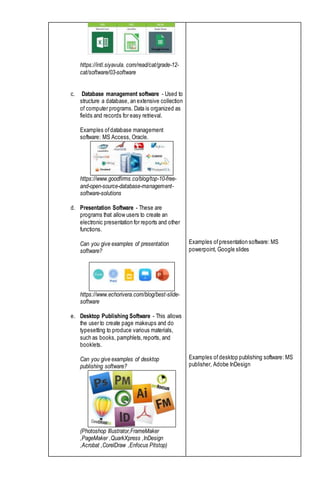
d. Presentation Software - These are
programs that allow users to create an
electronic presentation for reports and other
functions.
Can you give examples of presentation
software?
https://www.echorivera.com/blog/best-slide-
software
e. Desktop Publishing Software - This allows
the user to create page makeups and do
typesetting to produce various materials,
such as books, pamphlets,reports, and
booklets.
Can you give examples of desktop
publishing software?
(Photoshop Illustrator,FrameMaker
,PageMaker ,QuarkXpress ,InDesign
,Acrobat ,CorelDraw ,Enfocus Pitstop)
Examples ofpresentation software: MS
powerpoint, Google slides
Examples ofdesktop publishing software: MS
publisher, Adobe InDesign
https://en.localconcept.com/toolbox/desktop-
publishing/
f. Reference Software - These are electronic
versions ofvarious references such as
encyclopedia, almanacs, atlases,
dictionaries, thesauri, and the like.
g. Graphics Programs - These allow the
creation and manipulation of graphics,
images, objects, and pictures. Some ofthe
common graphics programs are CorelDraw,
Photoshop, and Computer-Aided Design
(CAD).
https://blogs.cul.columbia.edu/clio/2014/05/0
6/software-now-findable-in-clio/
h. Educational Software - These include
tutorials and electronic lessons that give
students knowledge or training in a particular
subjector skill, such as Math or Science or
gardening or cooking.
Who can give an example of educational
software?
https://www.youtube.com/watch?v=96xnG1rr
7Hw
i. Computer Games - These are programs
that simulate real games or provide
entertainment and adventure to users.
https://blurbgeek.com/online-multiplayer-
games-for-pc/
Example ofeducational software: Udemy,
Google books
j. Network Software - These are programs
that make it possible for computers in
different areas to be connected, allowing
their users to communicate with each other.
What are the examples of network software?
https://allthatsaas.com/roundup/best-video-
conferencing-software/
k. Programming Software - software is a tool
to make software using different
programming languages.
Example: Netbeans, Textmate, Notepad++
https://www.temok.com/blog/tag/source-
code-editor/
E. Application
Give it! Form three (3) groups. Each group is
assigned with 1 software installer. Install the
software. Prepare a documentation reportof the
installation procedure and presentitto the class.
Group 1: Notepad++
Group 2: Skype
Group 3: FoxitReader
Are you done?
Let’s start with group 1.
Next, Group 2.
Last, Group 3.
Example: Skype, Zoom,Google meet, yahoo
messenger
Yes, sir.
IV. Evaluation
A. Choose the correctanswer.
1. It is a program designed to help the user perform a singular or multiple related tasks.
a. Applications software c. Programming language
b. Graphics software d. System software
2. It is an application program that creates, edits, saves, and prints documents.
a. Database management software c. Spreadsheetsoftware
b. Graphics software d. Word processing software
3. It is an application program that is used to structure a database, a large collection of
computer programs.
a. Database management software c. Spreadsheetsoftware
b. Graphics software d. Word processing software
4. It is an application program consisting ofrows and columns used to presentand analyze
data.
a. Database management software c. Spreadsheetsoftware
b. Graphics software d. Word processing software
5. It is an application program that displays results ofdata manipulation for easier analysis and
presentation.
a. Database management software c. Spreadsheetsoftware
b. Graphics software d. Word processing software
6. This serves as an electronic typewriter and even more. With this program, the user can
easily produce quality documents like memos and reports.
a. Database management software c. Spreadsheet software
b. Graphics software d. Word processing software
7. This application program allows the user to create page makeups and do simple typesetting
to produce various materials, such as books pamphlets, reports, and booklets.
a. Computer Games c. Educational Software
b. Desktop Publishing Software d. Word processing software
B. Of all the application software we have discussed, name your top 3 most essential or useful
software for you as an ICT student, and explain why these are your top 3.
___________________________________________________________________________
___________________________________________________________________________
___________________________________________________________________________
V. Assignment
ResearchaboutUtilitySoftware, DeviceDriver andPortableapplication.
Preparedby:

Demonstration lesson-plan-in-ict grade 11

  • 1.
    Demonstration Lesson Planin ICT I. Objectives: Content Standard : The learners demonstrate and understanding of concepts and underlying principles in installing configuring computer systems. Performance Standard : The learners shall be able to install and configure computer systems based on established procedures and system requirements Learning Competency : Install Application Software based on software installation guides, end-user requirements and software license agreement. II. Subject Matter/Lesson 1. Topic: Application Software 2. References: Computer Systems Servicing Grade 11 Learner’s Material 3. Other Learning Resources: https://www.homeschoolspark.com/articles/free-microsoft-word-alternatives/ https://intl.siyavula.com/read/cat/grade-12-cat/software/03-software https://www.goodfirms.co/blog/top-10-free-and-open-source-database- management-software-solutions https://www.echorivera.com/blog/best-slide-software https://en.localconcept.com/toolbox/desktop-publishing/ https://blogs.cul.columbia.edu/clio/2014/05/06/software-now-findable-in-clio/ https://www.youtube.com/watch?v=96xnG1rr7Hw https://allthatsaas.com/roundup/best-video-conferencing-software/ https://www.temok.com/blog/tag/source-code-editor/ https://blurbgeek.com/online-multiplayer-games-for-pc/ 4. Materials: powerpointpresentation, images, application installer 5. Values Integration: a. Diligence in accomplishing assigned tasks. b. Awareness ofthe functions of different application software. III. Learning Procedure Teacher’s Activity Pupil’s Activity A. Preliminary Activities a. Motivation Every time you use a computer, you see icons ofdifferent software in the desktop. Maybe you are curious what are those software? What are their specific functions? Let us look atthis image.
  • 2.
    b. Review Let usfirst recall our previous lesson. Who can give a recap? Very good! B. Activity Identify the icons below. ICON NAME 1. 2. 3. 4. 5. 6. 7. 8. 9. 10. We discussed aboutthe different operating systems. Windows OS or MicrosoftOS and Linux are examples ofOS. 1. Udemy 2. Orcale 3. MicrosoftPowerpoint 4. MicrosoftWord 5. MicrosoftExcel 6. Photoshop 7. MicrosoftPublisher 8. Skype 9. MS Access 10. Dota
  • 3.
    C. Analysis Now, letusexamine what are their functions. 1. Udemy 2. Orcale 3. MicrosoftPowerpoint 4. MicrosoftWord 5. MicrosoftExcel 6. Photoshop 7. MicrosoftPublisher 8. Skype 9. MS Access 10. Dota D. Abstraction At this pointwe are going to explore more about software. Brace yourselfas we discuss aboutapplication software. Let’s getit on! Application Software Application software is a specialized program that could execute a specific job for the user. It would only run in its compatible Operating System. Examples of Application Software a. Word processing software - Creates, edits, saves, and prints documents. This also serves as an electronic typewriter and even more. With word processors, the user can quickly produce quality documents like memos and reports. Can you give examples of word processing software? https://www.homeschoolspark.com/articles/fr ee-microsoft-word-alternatives/ b. Spreadsheet software - An electronic spreadsheetconsisting ofrows and columns is used to presentand analyze data. Can you give examples of spreadsheet software? 1. For education 2. For programming 3. For creating presentation 4. For creating documents 5. For storing and sorting of data 6. For editing pictures 7. For creating booklets, brochures 8. For video call 9. For managing large amount of data 10. For fun and leisure Examples ofWord processing software:MS Word, WordPerfect, Ami Pro, MacWrite. Examples ofspreadsheetsoftware: MS Excel, Lotus 123, Quattro Pro.
  • 4.
    https://intl.siyavula. com/read/cat/grade-12- cat/software/03-software c. Databasemanagement software - Used to structure a database, an extensive collection of computer programs. Data is organized as fields and records for easy retrieval. Examples ofdatabase management software: MS Access, Oracle. https://www.goodfirms.co/blog/top-10-free- and-open-source-database-management- software-solutions d. Presentation Software - These are programs that allow users to create an electronic presentation for reports and other functions. Can you give examples of presentation software? https://www.echorivera.com/blog/best-slide- software e. Desktop Publishing Software - This allows the user to create page makeups and do typesetting to produce various materials, such as books, pamphlets,reports, and booklets. Can you give examples of desktop publishing software? (Photoshop Illustrator,FrameMaker ,PageMaker ,QuarkXpress ,InDesign ,Acrobat ,CorelDraw ,Enfocus Pitstop) Examples ofpresentation software: MS powerpoint, Google slides Examples ofdesktop publishing software: MS publisher, Adobe InDesign
  • 5.
    https://en.localconcept.com/toolbox/desktop- publishing/ f. Reference Software- These are electronic versions ofvarious references such as encyclopedia, almanacs, atlases, dictionaries, thesauri, and the like. g. Graphics Programs - These allow the creation and manipulation of graphics, images, objects, and pictures. Some ofthe common graphics programs are CorelDraw, Photoshop, and Computer-Aided Design (CAD). https://blogs.cul.columbia.edu/clio/2014/05/0 6/software-now-findable-in-clio/ h. Educational Software - These include tutorials and electronic lessons that give students knowledge or training in a particular subjector skill, such as Math or Science or gardening or cooking. Who can give an example of educational software? https://www.youtube.com/watch?v=96xnG1rr 7Hw i. Computer Games - These are programs that simulate real games or provide entertainment and adventure to users. https://blurbgeek.com/online-multiplayer- games-for-pc/ Example ofeducational software: Udemy, Google books
  • 6.
    j. Network Software- These are programs that make it possible for computers in different areas to be connected, allowing their users to communicate with each other. What are the examples of network software? https://allthatsaas.com/roundup/best-video- conferencing-software/ k. Programming Software - software is a tool to make software using different programming languages. Example: Netbeans, Textmate, Notepad++ https://www.temok.com/blog/tag/source- code-editor/ E. Application Give it! Form three (3) groups. Each group is assigned with 1 software installer. Install the software. Prepare a documentation reportof the installation procedure and presentitto the class. Group 1: Notepad++ Group 2: Skype Group 3: FoxitReader Are you done? Let’s start with group 1. Next, Group 2. Last, Group 3. Example: Skype, Zoom,Google meet, yahoo messenger Yes, sir. IV. Evaluation A. Choose the correctanswer. 1. It is a program designed to help the user perform a singular or multiple related tasks. a. Applications software c. Programming language b. Graphics software d. System software 2. It is an application program that creates, edits, saves, and prints documents. a. Database management software c. Spreadsheetsoftware b. Graphics software d. Word processing software
  • 7.
    3. It isan application program that is used to structure a database, a large collection of computer programs. a. Database management software c. Spreadsheetsoftware b. Graphics software d. Word processing software 4. It is an application program consisting ofrows and columns used to presentand analyze data. a. Database management software c. Spreadsheetsoftware b. Graphics software d. Word processing software 5. It is an application program that displays results ofdata manipulation for easier analysis and presentation. a. Database management software c. Spreadsheetsoftware b. Graphics software d. Word processing software 6. This serves as an electronic typewriter and even more. With this program, the user can easily produce quality documents like memos and reports. a. Database management software c. Spreadsheet software b. Graphics software d. Word processing software 7. This application program allows the user to create page makeups and do simple typesetting to produce various materials, such as books pamphlets, reports, and booklets. a. Computer Games c. Educational Software b. Desktop Publishing Software d. Word processing software B. Of all the application software we have discussed, name your top 3 most essential or useful software for you as an ICT student, and explain why these are your top 3. ___________________________________________________________________________ ___________________________________________________________________________ ___________________________________________________________________________ V. Assignment ResearchaboutUtilitySoftware, DeviceDriver andPortableapplication. Preparedby: