5장

Database Processing
This Could Happen to You

• Dee selected Movable Type
  application program
• Needs database program to store blog
  – Consultant suggested MySQL
  – Network standardized on Oracle
    • May not be able to run Movable Type
    • Will require revision of labor estimates
  – IT resists installing MySQL


                                                 5-2
Q1: What Is the Purpose of a
    Database?
 • To organize and keep track of things
 • Spreadsheets do that too
    – Keep lists of single concept
    – Example: Student test scores in a course
 • Databases
    – Keep lists that involve multiple themes/concepts
    – Examples: Student grades, grades for all courses in a
      department, courses offered in all departments, faculty
      records, and so on


                                                                5-3
Q2: What Does a Database Contain?
• Self-describing collection of integrated records
• Hierarchy of data elements
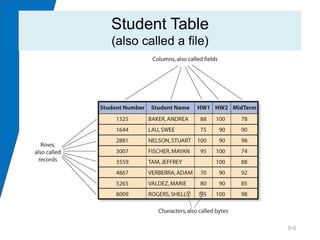
   – Bytes/data are grouped into columns/fields
   – Columns grouped into rows/records
   – Rows are grouped into tables/files
• Collection of tables plus relationships among rows
   – Also includes “metadata”
      • Describes the structure of the database

• A database is a structured collection of records or
  data that is stored in a computer system so that a
  computer program or person using a query
  language can consult it to answer queries.


                                                        5-4
Student Table
(also called a file)


                       5-5
Relationships Among Records
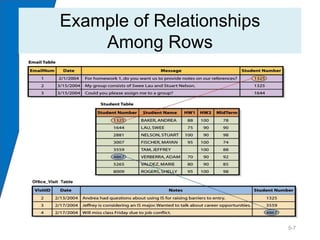
• Values in one table may relate to rows/records in
  other tables
• Keys
   – Column(s) that identify unique row in table
   – Each table has a key
• Foreign keys
   – Keys of a different table than the one in which they reside
• Relational databases
   – Databases using tables, keys, and foreign keys


                                                                   5-6
Example of Relationships
    Among Rows


Figure 5-6


                           5-7
Metadata
• Database is self-describing
  – Contains descriptions of its data
• Metadata
  – Data that describe data
  – Make databases more useful
  – Make databases easier to use
• Describe data
  – Data type
  – Field name
  – Field properties


                                        5-8
Q3: What Is a DBMS and
    What Does It Do?
• Database management system (DBMS)
   – Program that creates, processes, and administers database
   – Usually licensed from vendors
   – Examples: Microsoft Access, Oracle, MySQL, DB2

• DBMS and database are two different things
   – Database is a structured collection of records or data that is
     stored in a computer system so that a computer program or
     person using a query language can consult it to answer
     queries. The computer program used to manage and query
     a database is known as a database management system
     (DBMS).


                                                                      5-9
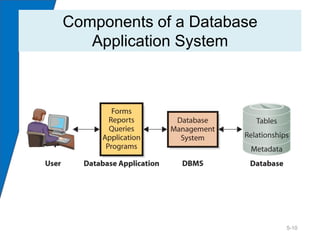
Components of a Database
   Application System


                           5-10
Database Management Systems

• DBMS used to create tables, relationships in
  databases

• Applications use DBMS to read, insert,
  modify, and delete data
  – Structured Query Language (SQL)
     • International standard for processing database


                                                        5-11
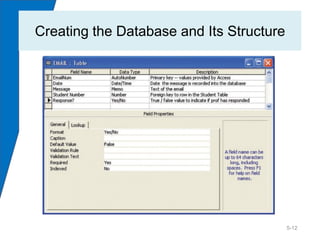
Creating the Database and Its Structure


                                          5-12
Processing the Database

• Four DBMS operations
  1.   Read data
  2.   Insert data
  3.   Modify data
  4.   Delete data
• Structured Query Language
  INSERT INTO Student
  ([Student Number], [Student Name], HW1, HW2,
      MidTerm)
  VALUES
  (1000, ‘Franklin, Benjamin’, 90, 95, 100)

                                                 5-13
Administering the Database

• DBMS security features used to set up user
  accounts, passwords, permissions,
  processing limits
  – Permissions – data access rights for specific users
    or groups of users
• Database backup and replication, adding
  structures, removing unneeded data


                                                     5-14
Q4: What Is a Database Application?

• Collection of forms, reports, queries, and
  application programs that process a database
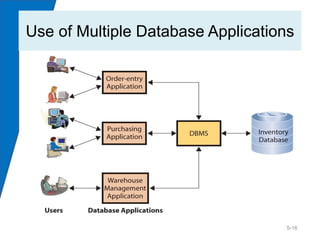
• Databases can have multiple applications
• Applications can have multiple users


                                             5-15
Use of Multiple Database Applications


                                   5-16
Forms, Reports, and Queries
• Forms
  – Used to read, insert, modify, and delete data
• Reports
  – Show data in structured context
  – May compute values
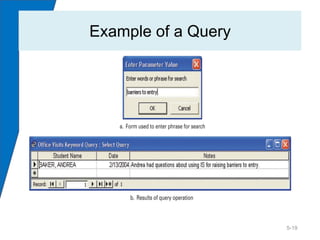
• Queries
  – Are a means of getting answers from database
    data


                                                    5-17
Database Application Programs
• Application programs
  – Process logic specific to a business need
  – May enable database processing over Internet
    to:
     • Serve as intermediary between Web server and
       database
     • Respond to events
     • Read, insert, modify, delete data


                                                      5-18
Example of a Query


                     5-19
Q5: What Is the Difference Between an
    Enterprise DBMS and a Personal DBMS?

 • Enterprise DBMS
   – Processes large organizational and workgroup
     databases
   – Supports many users (thousands plus)
   – Examples: DB2, SQL Server, Oracle, DB2

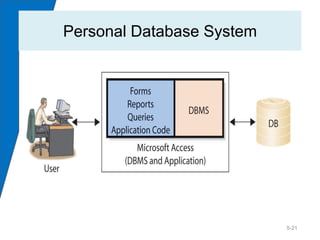
 • Personal DBMS
   – Designed for smaller, simpler database
     applications
   – Supports fewer than 100 users
   – Examples: Access, dBase, FoxPro, Paradox, R-
     Base

                                                    5-20
Personal Database System


                           5-21
How Does the Knowledge in This
    Chapter Help Dee and You?
Helps to:
• Know what a DBMS is and what roles it can play
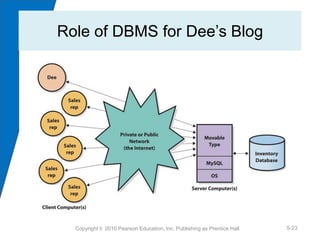
• Understand the diagram of the role of the DBMS for
  her blog
   – System is isolated from rest of databases
   – Uses MySQL as part of functionality of her application
• Be better able to explain what she wants, and that it is
  no threat or exception to Oracle standard
• Maybe avoid hiring a consultant


            Copyright © 2010 Pearson Education, Inc. Publishing as Prentice Hall   5-22
Role of DBMS for Dee’s Blog


  Copyright © 2010 Pearson Education, Inc. Publishing as Prentice Hall   5-23
Guide: No, Thanks, I’ll Use a
           Spreadsheet
• Databases take time to build
• Complicated to operate
   – May require use of multiple applications
• Need IS people to create it and keep it
  running
• Will share data that you may not want to
  expose
• Spreadsheets may be a better option in some
  cases

                                           5-24

Case mis ch05

  • 1.
  • 2.
    This Could Happento You • Dee selected Movable Type application program • Needs database program to store blog – Consultant suggested MySQL – Network standardized on Oracle • May not be able to run Movable Type • Will require revision of labor estimates – IT resists installing MySQL 5-2
  • 3.
    Q1: What Isthe Purpose of a Database? • To organize and keep track of things • Spreadsheets do that too – Keep lists of single concept – Example: Student test scores in a course • Databases – Keep lists that involve multiple themes/concepts – Examples: Student grades, grades for all courses in a department, courses offered in all departments, faculty records, and so on 5-3
  • 4.
    Q2: What Doesa Database Contain? • Self-describing collection of integrated records • Hierarchy of data elements – Bytes/data are grouped into columns/fields – Columns grouped into rows/records – Rows are grouped into tables/files • Collection of tables plus relationships among rows – Also includes “metadata” • Describes the structure of the database • A database is a structured collection of records or data that is stored in a computer system so that a computer program or person using a query language can consult it to answer queries. 5-4
  • 5.
  • 6.
    Relationships Among Records •Values in one table may relate to rows/records in other tables • Keys – Column(s) that identify unique row in table – Each table has a key • Foreign keys – Keys of a different table than the one in which they reside • Relational databases – Databases using tables, keys, and foreign keys 5-6
  • 7.
    Example of Relationships Among Rows Figure 5-6 5-7
  • 8.
    Metadata • Database isself-describing – Contains descriptions of its data • Metadata – Data that describe data – Make databases more useful – Make databases easier to use • Describe data – Data type – Field name – Field properties 5-8
  • 9.
    Q3: What Isa DBMS and What Does It Do? • Database management system (DBMS) – Program that creates, processes, and administers database – Usually licensed from vendors – Examples: Microsoft Access, Oracle, MySQL, DB2 • DBMS and database are two different things – Database is a structured collection of records or data that is stored in a computer system so that a computer program or person using a query language can consult it to answer queries. The computer program used to manage and query a database is known as a database management system (DBMS). 5-9
  • 10.
    Components of aDatabase Application System 5-10
  • 11.
    Database Management Systems •DBMS used to create tables, relationships in databases • Applications use DBMS to read, insert, modify, and delete data – Structured Query Language (SQL) • International standard for processing database 5-11
  • 12.
    Creating the Databaseand Its Structure 5-12
  • 13.
    Processing the Database •Four DBMS operations 1. Read data 2. Insert data 3. Modify data 4. Delete data • Structured Query Language INSERT INTO Student ([Student Number], [Student Name], HW1, HW2, MidTerm) VALUES (1000, ‘Franklin, Benjamin’, 90, 95, 100) 5-13
  • 14.
    Administering the Database •DBMS security features used to set up user accounts, passwords, permissions, processing limits – Permissions – data access rights for specific users or groups of users • Database backup and replication, adding structures, removing unneeded data 5-14
  • 15.
    Q4: What Isa Database Application? • Collection of forms, reports, queries, and application programs that process a database • Databases can have multiple applications • Applications can have multiple users 5-15
  • 16.
    Use of MultipleDatabase Applications 5-16
  • 17.
    Forms, Reports, andQueries • Forms – Used to read, insert, modify, and delete data • Reports – Show data in structured context – May compute values • Queries – Are a means of getting answers from database data 5-17
  • 18.
    Database Application Programs •Application programs – Process logic specific to a business need – May enable database processing over Internet to: • Serve as intermediary between Web server and database • Respond to events • Read, insert, modify, delete data 5-18
  • 19.
    Example of aQuery 5-19
  • 20.
    Q5: What Isthe Difference Between an Enterprise DBMS and a Personal DBMS? • Enterprise DBMS – Processes large organizational and workgroup databases – Supports many users (thousands plus) – Examples: DB2, SQL Server, Oracle, DB2 • Personal DBMS – Designed for smaller, simpler database applications – Supports fewer than 100 users – Examples: Access, dBase, FoxPro, Paradox, R- Base 5-20
  • 21.
  • 22.
    How Does theKnowledge in This Chapter Help Dee and You? Helps to: • Know what a DBMS is and what roles it can play • Understand the diagram of the role of the DBMS for her blog – System is isolated from rest of databases – Uses MySQL as part of functionality of her application • Be better able to explain what she wants, and that it is no threat or exception to Oracle standard • Maybe avoid hiring a consultant Copyright © 2010 Pearson Education, Inc. Publishing as Prentice Hall 5-22
  • 23.
    Role of DBMSfor Dee’s Blog Copyright © 2010 Pearson Education, Inc. Publishing as Prentice Hall 5-23
  • 24.
    Guide: No, Thanks,I’ll Use a Spreadsheet • Databases take time to build • Complicated to operate – May require use of multiple applications • Need IS people to create it and keep it running • Will share data that you may not want to expose • Spreadsheets may be a better option in some cases 5-24