Management Information Systems,
        Sixth Edition


          Chapter 5:
       Business Software
Objectives

• Explain the difference between application
  software and system software
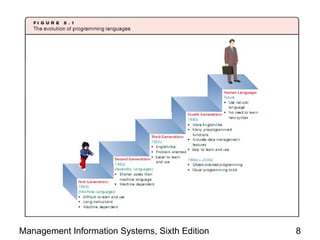
• Enumerate the different generations of
  programming languages and explain how they
  differ
• Cite the latest major developments in application
  and system software
• Identify and explain the roles of Web
  programming languages

Management Information Systems, Sixth Edition     2
Objectives (continued)

• Explain the types and uses of Web site design
  tools
• Clarify the differences between proprietary
  software and open source software
• List characteristics that are important in
  evaluating packaged software applications for
  business use
• Understand the problem of software piracy and
  how it affects businesses and consumers

Management Information Systems, Sixth Edition     3
Software: Instructions to the Hardware

• Applications: computer programs that
  contribute to productivity
• Software: a series of instructions to a computer
  to execute processes
• Two major categories of software:
   – Application software: enables task completion
   – System software:
       • Enables applications to run on a computer
       • Manages components and devices

Management Information Systems, Sixth Edition        4
Programming Languages
    and Software Development Tools
• Programs are needed for every computer
  operation
• Programming: process of writing programs
• Machine language: the only language that
  hardware understands
   – Consists of long strings of 0s and 1s
• Assembly language: easier to program than
  machine language because it uses words for
  commands
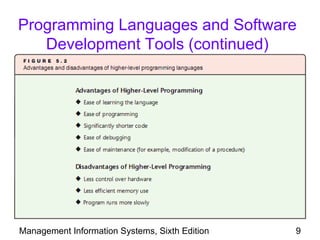
• High-level programming languages: use
  English-like statements
Management Information Systems, Sixth Edition   5
Programming Languages and Software
   Development Tools (continued)
• Software development tools: develop software
  with little knowledge of programming languages
• Third-generation languages (3GLs): known as
  “procedural” languages
   – Programmer must detail logical procedure
   – Includes languages such as COBOL, FORTRAN,
     BASIC, RPG, Pascal, and C
   – One 3GL statement = five to 10 assembly
     language statements


Management Information Systems, Sixth Edition   6
Programming Languages and Software
   Development Tools (continued)
• Fourth-generation languages (4GLs): use
  more English-like statements
   –   Speed up the development process
   –   Built around database management systems
   –   Include many preprogrammed procedures
   –   One 4GL statement = several 3GL statements
• Debugging: process of locating and fixing
  program errors


Management Information Systems, Sixth Edition       7
Management Information Systems, Sixth Edition   8
Programming Languages and Software
   Development Tools (continued)


Management Information Systems, Sixth Edition   9
Visual Programming
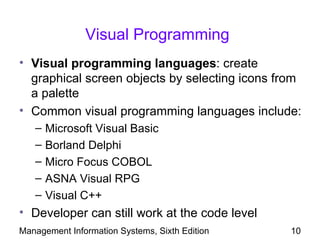
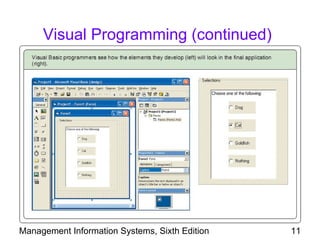
• Visual programming languages: create
  graphical screen objects by selecting icons from
  a palette
• Common visual programming languages include:
   –   Microsoft Visual Basic
   –   Borland Delphi
   –   Micro Focus COBOL
   –   ASNA Visual RPG
   –   Visual C++
• Developer can still work at the code level
Management Information Systems, Sixth Edition   10
Visual Programming (continued)


Management Information Systems, Sixth Edition   11
Object-Oriented Programming

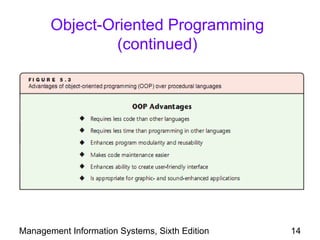
• Object-oriented programming (OOP): modular
  approach to programming
• Advantages:
   – Ease of maintenance
   – Efficiency in application development
• Object: contains data elements (data members)
  and the methods to manipulate that data
   – Data members can only be accessed through the
     object’s methods

Management Information Systems, Sixth Edition   12
Object-Oriented Programming
                (continued)
• Objects are reusable and are combined to create
  complex programs
• Popular OOP languages include Smalltalk, C++,
  Object Pascal, and Java
• Increasing amount of software developed for the
  Web using languages such as Java, JavaScript,
  J2EE, and PHP
• Applet: code produced by a Web programming
  language
   – Runs same way on different operating systems

Management Information Systems, Sixth Edition       13
Object-Oriented Programming
                (continued)


Management Information Systems, Sixth Edition   14
Language Translation:
          Compilers and Interpreters
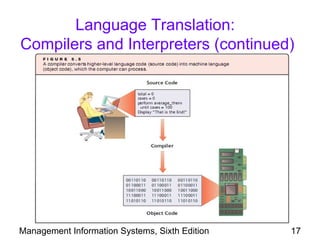
• Source code: program as originally written by
  the developer
• Object code: program in machine language that
  can be run by the computer
• Procedural languages need programs to
  translate source code to object code
• Two types of language translators:
   – Compilers
   – Interpreters
Management Information Systems, Sixth Edition   15
Language Translation:
Compilers and Interpreters (continued)

• Compiler: translates entire source code to
  object code but does not execute the code
   – Scans for syntax errors
   – Generates error messages if syntax errors found
• Interpreter: scans one statement at a time
   – If error-free, interprets and executes the
     statement
   – Goes through the program until an error or end of
     program is encountered
Management Information Systems, Sixth Edition       16
Language Translation:
Compilers and Interpreters (continued)


Management Information Systems, Sixth Edition   17
Application Software
• Application software allows nonprogrammers to
  develop their own tools
• Application-specific software: programs
  designed to perform specific jobs
• General-purpose application software:
  programs that serve multiple purposes
   – Usually comes as packaged software
• Packaged software: software that is ready to
  install from external storage media such as CDs

Management Information Systems, Sixth Edition   18
Office Productivity Applications
• Productivity tools: assist normal office work
   – Include word processors, spreadsheets,
     presentation tools, file/database software,
     graphics programs, desktop publishing tools, and
     project management applications
• Word processors: used to create text
  documents
• Spreadsheets: store numbers and perform
  complex mathematical, statistical, and financial
  analysis functions

Management Information Systems, Sixth Edition        19
Office Productivity Applications
                (continued)
• Presentation tools: develop impressive
  presentations quickly
• File/database management tools: create and
  manipulate local or shared databases
• Graphics programs: create intricate graphical
  images and manipulate digital photographs
• Desktop publishing tools: develop items for
  publication, such as pamphlets, newsletters,
  cards, calendars, etc.

Management Information Systems, Sixth Edition     20
Office Productivity Applications
                (continued)
• Project management tools: help plan projects
  and track progress
• Suite: collection of various applications that
  perform multiple interrelated functions
   – Includes Microsoft Office, Lotus SmartSuite,
     OpenOffice.org, ThinkFree


Management Information Systems, Sixth Edition       21
Hypermedia and Multimedia

• Hypermedia: a feature that enables users to
  access information by clicking text or graphics
• Web page authoring tools: enable hypermedia
  features
   – Often part of other applications such as word
     processors and presentation tools


Management Information Systems, Sixth Edition        22
Hypermedia and Multimedia
               (continued)
• Multimedia software: handles many different
  types of data
• Often used in:
   – Education: lessons presented in multimedia
   – Training exercises
   – Compiling and integrating data for business
     situations


Management Information Systems, Sixth Edition      23
Mashups

• Mashup: an integrated application containing
  some or all features from several applications
   – Provides enhanced features for the end user
• Web site design tools: used to change the
  content of Web pages
   – Includes FrontPage, SharePoint Designer,
     Expression Web from Microsoft, Adobe
     Dreamweaver, and GoLive


Management Information Systems, Sixth Edition      24
Groupware

• Groupware: an application that enables workers
  to collaborate in real time over Web
   – Integration of multimedia technology and Web
     technology
   – Allows for remote collaboration
   – Eliminates travel times and facilitates expression
     and exchange of ideas


Management Information Systems, Sixth Edition         25
Virtual Reality
• Virtual reality (VR): an application that mimics
  sensory reality using software
   – Simulates sight, hearing, and touch
   – Uses equipment such as goggles, gloves,
     earphones, and moving bases
• VR devices provide two elements:
   – Immersion: user senses that she/he is
     surrounded by the simulated environment
   – Interaction: allows users to simulate changes in
     the environment using VR devices

Management Information Systems, Sixth Edition        26
Virtual Reality (continued)
• VR environment senses movement, responds to
  signals, and provides feedback to user
• Businesses use VR to decrease cost of planning
  buildings, machines, and vehicles
• Avatar: an imaginary figure used to represent
  real person
• VR on the Web includes public gathering
  applications
   – Second Life: an imaginary world using avatars to
     allow real people to meet and communicate
Management Information Systems, Sixth Edition       27
3D Geographic Software
• Similar to virtual reality
• Used to develop three-dimensional models
  of geographic locations
• Models are created from land and aerial
  photographs
• Helps with navigation when tied to global
  positioning system software
• Useful for city planners, service agencies,
  tourism, and travel agencies
Management Information Systems, Sixth Edition   28
System Software

• System software: deals with essential
  operations between the user and computer such
  as:
   –   Loading, copying, and deleting files
   –   Managing memory resources
   –   Operating peripheral equipment
   –   Encompasses compilers and interpreters
• Applications must be compatible with system
  software

Management Information Systems, Sixth Edition   29
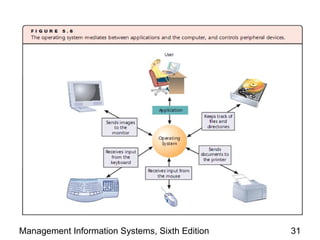
Operating Systems
• Operating system (OS): most important
  program on the computer
   –   Recognizes input from keyboard and mouse
   –   Sends output to computer display
   –   Keeps track of files and directories
   –   Runs applications
   –   Manages memory
• Usually developed using low-level programming
  languages such as assembly languages
• Also known as “platforms”
Management Information Systems, Sixth Edition     30
Management Information Systems, Sixth Edition   31
Operating Systems (continued)
• Application program interfaces (APIs):
  software included in the OS that can be used by
  application program developers
• Utilities: perform other OS functions such as:
   – Hardware diagnostics
   – Disk check
   – File sorting


Management Information Systems, Sixth Edition   32
Operating Systems (continued)

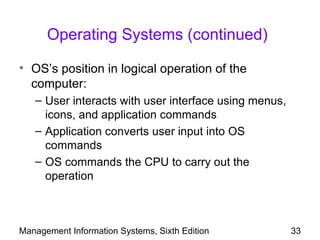
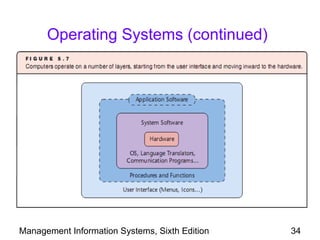
• OS’s position in logical operation of the
  computer:
   – User interacts with user interface using menus,
     icons, and application commands
   – Application converts user input into OS
     commands
   – OS commands the CPU to carry out the
     operation


Management Information Systems, Sixth Edition          33
Operating Systems (continued)


Management Information Systems, Sixth Edition   34
Operating Systems (continued)
• OS must manage the system by allocating
  hardware resources to applications
• OS provides several services, including:
   – User interface
   – Memory allocation, including the use of virtual
     memory (hard disk used as an extension of
     RAM)
   – Plug-and-play (PnP): recognize and run a
     device as soon as it is physically attached


Management Information Systems, Sixth Edition          35
Operating Systems (continued)

• Driver: software that enables OS to control a
  device
• Additional OS services include:
   – Database management
   – Networking
   – Security
• Different computers and types of
  microprocessors use different OSs


Management Information Systems, Sixth Edition     36
Operating Systems (continued)

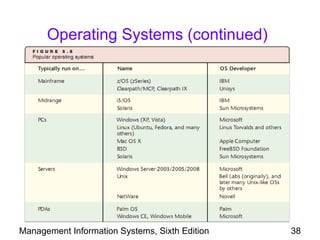
• Popular PC operating systems
   – Windows XP and Windows Vista
   – Linux
   – Mac OS
• Popular network OSs that are compatible with
  DOS, Windows, and MAC clients include:
   – Netware
   – Windows Server
• Linux: a free OS based on UNIX

Management Information Systems, Sixth Edition    37
Operating Systems (continued)


Management Information Systems, Sixth Edition   38
Other System Software
• Other types of system software include:
   –   Compilers and interpreters
   –   Communications software
   –   Utilities
   –   Database management systems
• Communications software: supports
  transmission and reception of data across
  computer networks
• Utilities include antivirus programs, firewalls, and
  antispyware/antiadware programs
Management Information Systems, Sixth Edition       39
Open Source Software
• Proprietary software: sold/licensed for profit
   – Source code is private and not available
   – Developer retains all rights to the software; user
     purchases a license to use the software
• Open source software: free source code
   – Developed through voluntary collaboration of
     programmers
   – Fewer bugs because many programmers review
     the code
• Popular open source software includes Mozilla
  Firefox, Thunderbird, MySQL, and PERL
Management Information Systems, Sixth Edition             40
Open Source Software (continued)

• Not all free software is open source
   – Microsoft Internet Explorer is free but proprietary
• Linux: best known open source OS
   – Includes free versions and versions that charge
     for support and additional features
   – Popular because of its versatility, but has limited
     number of applications that run on it
   – Runs on mainframes, PCs, handhelds, and
     electronic devices

Management Information Systems, Sixth Edition          41
Software Licensing
• Software is usually licensed
• Licensed software: provides limited permission
  to use the software
   – Time-limited license requires annual fees
• Several licensing models
   – Permissive model: anyone can use and sell
     modified versions of the software
   – General public license (GPL): anyone can use
     and make modified versions, but cannot sell
     modified versions for profit
Management Information Systems, Sixth Edition    42
Considerations for Packaged Software
• Many goals and custom requirements are
  considered during development process of in-
  house software
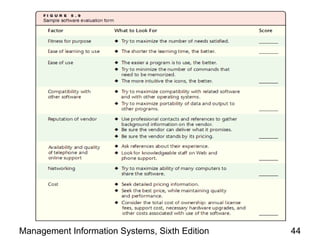
• Factors when purchasing large software
  packages are more complex, including:
   –   Cost
   –   Time to implement
   –   Cost of interrupting operations
   –   Modification costs to customize the software


Management Information Systems, Sixth Edition         43
Management Information Systems, Sixth Edition   44
Summary
• Software: a collective term for computer
  programs
• Two categories of software: system or application
• Programming languages and software
  development tools are used to develop software
• Increasing amount of software is linked to the
  Internet
• Code written in non-machine language must be
  translated by compilers or interpreters


Management Information Systems, Sixth Edition   45
Summary (continued)
• Some application programs are custom
  designed, and many are packaged
• Office productivity tools such as word
  processors and spreadsheets help improve
  worker efficiency
• Hypermedia and multimedia technology are
  useful for training, education, research, and
  business


Management Information Systems, Sixth Edition     46
Summary (continued)
• Groupware combines hypermedia and
  multimedia with Web technologies for
  collaboration
• Virtual reality tools help build models of products
  and structures
• Three-dimensional geographic software helps
  model maps and locations
• Many applications support Web services and
  access to information on the Web

Management Information Systems, Sixth Edition      47
Summary (continued)

• Most important system software is operating
  system
• Open source software is distributed freely via the
  Web
• Software is either purchased or licensed
• Purchase decisions should evaluate suitability,
  ease of learning, ease of use, vendor reputation,
  expected quality of vendor support
• Software piracy is still a significant problem

Management Information Systems, Sixth Edition     48

ITE 101 - Week 5

  • 1.
    Management Information Systems, Sixth Edition Chapter 5: Business Software
  • 2.
    Objectives • Explain thedifference between application software and system software • Enumerate the different generations of programming languages and explain how they differ • Cite the latest major developments in application and system software • Identify and explain the roles of Web programming languages Management Information Systems, Sixth Edition 2
  • 3.
    Objectives (continued) • Explainthe types and uses of Web site design tools • Clarify the differences between proprietary software and open source software • List characteristics that are important in evaluating packaged software applications for business use • Understand the problem of software piracy and how it affects businesses and consumers Management Information Systems, Sixth Edition 3
  • 4.
    Software: Instructions tothe Hardware • Applications: computer programs that contribute to productivity • Software: a series of instructions to a computer to execute processes • Two major categories of software: – Application software: enables task completion – System software: • Enables applications to run on a computer • Manages components and devices Management Information Systems, Sixth Edition 4
  • 5.
    Programming Languages and Software Development Tools • Programs are needed for every computer operation • Programming: process of writing programs • Machine language: the only language that hardware understands – Consists of long strings of 0s and 1s • Assembly language: easier to program than machine language because it uses words for commands • High-level programming languages: use English-like statements Management Information Systems, Sixth Edition 5
  • 6.
    Programming Languages andSoftware Development Tools (continued) • Software development tools: develop software with little knowledge of programming languages • Third-generation languages (3GLs): known as “procedural” languages – Programmer must detail logical procedure – Includes languages such as COBOL, FORTRAN, BASIC, RPG, Pascal, and C – One 3GL statement = five to 10 assembly language statements Management Information Systems, Sixth Edition 6
  • 7.
    Programming Languages andSoftware Development Tools (continued) • Fourth-generation languages (4GLs): use more English-like statements – Speed up the development process – Built around database management systems – Include many preprogrammed procedures – One 4GL statement = several 3GL statements • Debugging: process of locating and fixing program errors Management Information Systems, Sixth Edition 7
  • 8.
  • 9.
    Programming Languages andSoftware Development Tools (continued) Management Information Systems, Sixth Edition 9
  • 10.
    Visual Programming • Visualprogramming languages: create graphical screen objects by selecting icons from a palette • Common visual programming languages include: – Microsoft Visual Basic – Borland Delphi – Micro Focus COBOL – ASNA Visual RPG – Visual C++ • Developer can still work at the code level Management Information Systems, Sixth Edition 10
  • 11.
    Visual Programming (continued) ManagementInformation Systems, Sixth Edition 11
  • 12.
    Object-Oriented Programming • Object-orientedprogramming (OOP): modular approach to programming • Advantages: – Ease of maintenance – Efficiency in application development • Object: contains data elements (data members) and the methods to manipulate that data – Data members can only be accessed through the object’s methods Management Information Systems, Sixth Edition 12
  • 13.
    Object-Oriented Programming (continued) • Objects are reusable and are combined to create complex programs • Popular OOP languages include Smalltalk, C++, Object Pascal, and Java • Increasing amount of software developed for the Web using languages such as Java, JavaScript, J2EE, and PHP • Applet: code produced by a Web programming language – Runs same way on different operating systems Management Information Systems, Sixth Edition 13
  • 14.
    Object-Oriented Programming (continued) Management Information Systems, Sixth Edition 14
  • 15.
    Language Translation: Compilers and Interpreters • Source code: program as originally written by the developer • Object code: program in machine language that can be run by the computer • Procedural languages need programs to translate source code to object code • Two types of language translators: – Compilers – Interpreters Management Information Systems, Sixth Edition 15
  • 16.
    Language Translation: Compilers andInterpreters (continued) • Compiler: translates entire source code to object code but does not execute the code – Scans for syntax errors – Generates error messages if syntax errors found • Interpreter: scans one statement at a time – If error-free, interprets and executes the statement – Goes through the program until an error or end of program is encountered Management Information Systems, Sixth Edition 16
  • 17.
    Language Translation: Compilers andInterpreters (continued) Management Information Systems, Sixth Edition 17
  • 18.
    Application Software • Applicationsoftware allows nonprogrammers to develop their own tools • Application-specific software: programs designed to perform specific jobs • General-purpose application software: programs that serve multiple purposes – Usually comes as packaged software • Packaged software: software that is ready to install from external storage media such as CDs Management Information Systems, Sixth Edition 18
  • 19.
    Office Productivity Applications •Productivity tools: assist normal office work – Include word processors, spreadsheets, presentation tools, file/database software, graphics programs, desktop publishing tools, and project management applications • Word processors: used to create text documents • Spreadsheets: store numbers and perform complex mathematical, statistical, and financial analysis functions Management Information Systems, Sixth Edition 19
  • 20.
    Office Productivity Applications (continued) • Presentation tools: develop impressive presentations quickly • File/database management tools: create and manipulate local or shared databases • Graphics programs: create intricate graphical images and manipulate digital photographs • Desktop publishing tools: develop items for publication, such as pamphlets, newsletters, cards, calendars, etc. Management Information Systems, Sixth Edition 20
  • 21.
    Office Productivity Applications (continued) • Project management tools: help plan projects and track progress • Suite: collection of various applications that perform multiple interrelated functions – Includes Microsoft Office, Lotus SmartSuite, OpenOffice.org, ThinkFree Management Information Systems, Sixth Edition 21
  • 22.
    Hypermedia and Multimedia •Hypermedia: a feature that enables users to access information by clicking text or graphics • Web page authoring tools: enable hypermedia features – Often part of other applications such as word processors and presentation tools Management Information Systems, Sixth Edition 22
  • 23.
    Hypermedia and Multimedia (continued) • Multimedia software: handles many different types of data • Often used in: – Education: lessons presented in multimedia – Training exercises – Compiling and integrating data for business situations Management Information Systems, Sixth Edition 23
  • 24.
    Mashups • Mashup: anintegrated application containing some or all features from several applications – Provides enhanced features for the end user • Web site design tools: used to change the content of Web pages – Includes FrontPage, SharePoint Designer, Expression Web from Microsoft, Adobe Dreamweaver, and GoLive Management Information Systems, Sixth Edition 24
  • 25.
    Groupware • Groupware: anapplication that enables workers to collaborate in real time over Web – Integration of multimedia technology and Web technology – Allows for remote collaboration – Eliminates travel times and facilitates expression and exchange of ideas Management Information Systems, Sixth Edition 25
  • 26.
    Virtual Reality • Virtualreality (VR): an application that mimics sensory reality using software – Simulates sight, hearing, and touch – Uses equipment such as goggles, gloves, earphones, and moving bases • VR devices provide two elements: – Immersion: user senses that she/he is surrounded by the simulated environment – Interaction: allows users to simulate changes in the environment using VR devices Management Information Systems, Sixth Edition 26
  • 27.
    Virtual Reality (continued) •VR environment senses movement, responds to signals, and provides feedback to user • Businesses use VR to decrease cost of planning buildings, machines, and vehicles • Avatar: an imaginary figure used to represent real person • VR on the Web includes public gathering applications – Second Life: an imaginary world using avatars to allow real people to meet and communicate Management Information Systems, Sixth Edition 27
  • 28.
    3D Geographic Software •Similar to virtual reality • Used to develop three-dimensional models of geographic locations • Models are created from land and aerial photographs • Helps with navigation when tied to global positioning system software • Useful for city planners, service agencies, tourism, and travel agencies Management Information Systems, Sixth Edition 28
  • 29.
    System Software • Systemsoftware: deals with essential operations between the user and computer such as: – Loading, copying, and deleting files – Managing memory resources – Operating peripheral equipment – Encompasses compilers and interpreters • Applications must be compatible with system software Management Information Systems, Sixth Edition 29
  • 30.
    Operating Systems • Operatingsystem (OS): most important program on the computer – Recognizes input from keyboard and mouse – Sends output to computer display – Keeps track of files and directories – Runs applications – Manages memory • Usually developed using low-level programming languages such as assembly languages • Also known as “platforms” Management Information Systems, Sixth Edition 30
  • 31.
  • 32.
    Operating Systems (continued) •Application program interfaces (APIs): software included in the OS that can be used by application program developers • Utilities: perform other OS functions such as: – Hardware diagnostics – Disk check – File sorting Management Information Systems, Sixth Edition 32
  • 33.
    Operating Systems (continued) •OS’s position in logical operation of the computer: – User interacts with user interface using menus, icons, and application commands – Application converts user input into OS commands – OS commands the CPU to carry out the operation Management Information Systems, Sixth Edition 33
  • 34.
    Operating Systems (continued) ManagementInformation Systems, Sixth Edition 34
  • 35.
    Operating Systems (continued) •OS must manage the system by allocating hardware resources to applications • OS provides several services, including: – User interface – Memory allocation, including the use of virtual memory (hard disk used as an extension of RAM) – Plug-and-play (PnP): recognize and run a device as soon as it is physically attached Management Information Systems, Sixth Edition 35
  • 36.
    Operating Systems (continued) •Driver: software that enables OS to control a device • Additional OS services include: – Database management – Networking – Security • Different computers and types of microprocessors use different OSs Management Information Systems, Sixth Edition 36
  • 37.
    Operating Systems (continued) •Popular PC operating systems – Windows XP and Windows Vista – Linux – Mac OS • Popular network OSs that are compatible with DOS, Windows, and MAC clients include: – Netware – Windows Server • Linux: a free OS based on UNIX Management Information Systems, Sixth Edition 37
  • 38.
    Operating Systems (continued) ManagementInformation Systems, Sixth Edition 38
  • 39.
    Other System Software •Other types of system software include: – Compilers and interpreters – Communications software – Utilities – Database management systems • Communications software: supports transmission and reception of data across computer networks • Utilities include antivirus programs, firewalls, and antispyware/antiadware programs Management Information Systems, Sixth Edition 39
  • 40.
    Open Source Software •Proprietary software: sold/licensed for profit – Source code is private and not available – Developer retains all rights to the software; user purchases a license to use the software • Open source software: free source code – Developed through voluntary collaboration of programmers – Fewer bugs because many programmers review the code • Popular open source software includes Mozilla Firefox, Thunderbird, MySQL, and PERL Management Information Systems, Sixth Edition 40
  • 41.
    Open Source Software(continued) • Not all free software is open source – Microsoft Internet Explorer is free but proprietary • Linux: best known open source OS – Includes free versions and versions that charge for support and additional features – Popular because of its versatility, but has limited number of applications that run on it – Runs on mainframes, PCs, handhelds, and electronic devices Management Information Systems, Sixth Edition 41
  • 42.
    Software Licensing • Softwareis usually licensed • Licensed software: provides limited permission to use the software – Time-limited license requires annual fees • Several licensing models – Permissive model: anyone can use and sell modified versions of the software – General public license (GPL): anyone can use and make modified versions, but cannot sell modified versions for profit Management Information Systems, Sixth Edition 42
  • 43.
    Considerations for PackagedSoftware • Many goals and custom requirements are considered during development process of in- house software • Factors when purchasing large software packages are more complex, including: – Cost – Time to implement – Cost of interrupting operations – Modification costs to customize the software Management Information Systems, Sixth Edition 43
  • 44.
  • 45.
    Summary • Software: acollective term for computer programs • Two categories of software: system or application • Programming languages and software development tools are used to develop software • Increasing amount of software is linked to the Internet • Code written in non-machine language must be translated by compilers or interpreters Management Information Systems, Sixth Edition 45
  • 46.
    Summary (continued) • Someapplication programs are custom designed, and many are packaged • Office productivity tools such as word processors and spreadsheets help improve worker efficiency • Hypermedia and multimedia technology are useful for training, education, research, and business Management Information Systems, Sixth Edition 46
  • 47.
    Summary (continued) • Groupwarecombines hypermedia and multimedia with Web technologies for collaboration • Virtual reality tools help build models of products and structures • Three-dimensional geographic software helps model maps and locations • Many applications support Web services and access to information on the Web Management Information Systems, Sixth Edition 47
  • 48.
    Summary (continued) • Mostimportant system software is operating system • Open source software is distributed freely via the Web • Software is either purchased or licensed • Purchase decisions should evaluate suitability, ease of learning, ease of use, vendor reputation, expected quality of vendor support • Software piracy is still a significant problem Management Information Systems, Sixth Edition 48