General Concepts 
• Database definition 
– Organized collection of logically related data 
• Data 
– Known facts 
– Types: text, graphics, images, sound, videos 
• Database management system (DBMS) 
– Software package for defining and managing a 
database
Introduction to DBMS 
Data 
Consists of raw facts, and when organized may be 
transformed into information 
Database 
A collection of related data organized to meet users 
needs 
Database management system (DBMS) 
A group of programs that manipulate the database 
and provide an interface between the database and 
the user of the database. 
A Database Management System (DBMS) is a 
software system designed to store, manage, and 
facilitate access to databases.
Flat Files 
Characteristics: 
• Data is stored as records in regular files 
• Records usually have a simple structure and fixed 
number of fields 
• For fast access may support indexing of fields in the 
records 
• No mechanisms for relating data between files 
• One needs special programs in order to access and 
manipulate the data
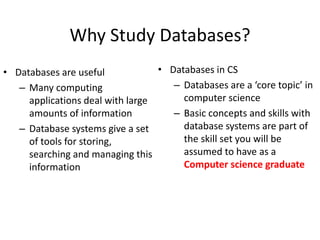
Why Study Databases? 
• Databases are useful 
– Many computing 
applications deal with large 
amounts of information 
– Database systems give a set 
of tools for storing, 
searching and managing this 
information 
• Databases in CS 
– Databases are a ‘core topic’ in 
computer science 
– Basic concepts and skills with 
database systems are part of 
the skill set you will be 
assumed to have as a 
Computer science graduate
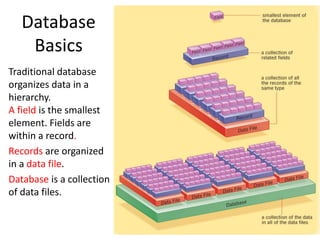
Database 
Basics 
Traditional database 
organizes data in a 
hierarchy. 
A field is the smallest 
element. Fields are 
within a record. 
Records are organized 
in a data file. 
Database is a collection 
of data files.
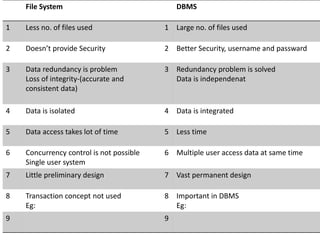
File System DBMS 
1 Less no. of files used 1 Large no. of files used 
2 Doesn’t provide Security 2 Better Security, username and passward 
3 Data redundancy is problem 
Loss of integrity-(accurate and 
consistent data) 
3 Redundancy problem is solved 
Data is independenat 
4 Data is isolated 4 Data is integrated 
5 Data access takes lot of time 5 Less time 
6 Concurrency control is not possible 
Single user system 
6 Multiple user access data at same time 
7 Little preliminary design 7 Vast permanent design 
8 Transaction concept not used 
Eg: 
8 Important in DBMS 
Eg: 
9 9
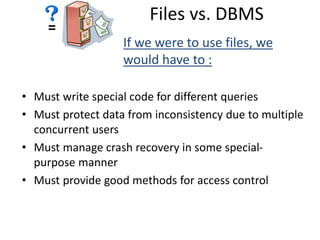
= 
Files vs. DBMS 
If we were to use files, we 
would have to : 
• Must write special code for different queries 
• Must protect data from inconsistency due to multiple 
concurrent users 
• Must manage crash recovery in some special-purpose 
manner 
• Must provide good methods for access control
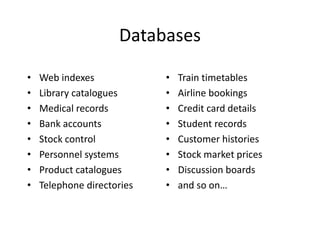
Databases 
• Web indexes 
• Library catalogues 
• Medical records 
• Bank accounts 
• Stock control 
• Personnel systems 
• Product catalogues 
• Telephone directories 
• Train timetables 
• Airline bookings 
• Credit card details 
• Student records 
• Customer histories 
• Stock market prices 
• Discussion boards 
• and so on…
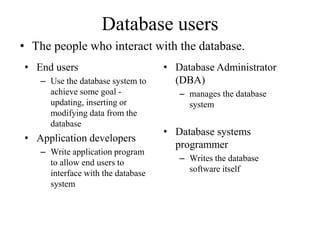
Database users 
• The people who interact with the database. 
• End users 
– Use the database system to 
achieve some goal - 
updating, inserting or 
modifying data from the 
database 
• Application developers 
– Write application program 
to allow end users to 
interface with the database 
system 
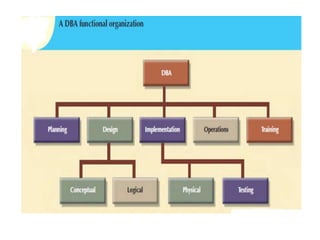
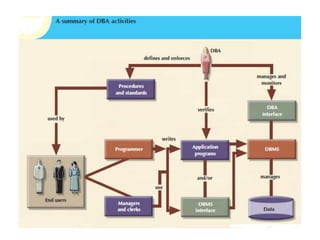
• Database Administrator 
(DBA) 
– manages the database 
system 
• Database systems 
programmer 
– Writes the database 
software itself
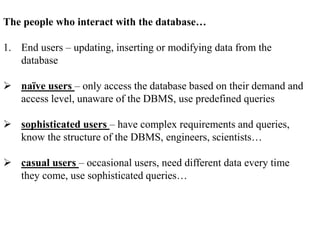
The people who interact with the database… 
1. End users – updating, inserting or modifying data from the 
database 
 naïve users – only access the database based on their demand and 
access level, unaware of the DBMS, use predefined queries 
 sophisticated users – have complex requirements and queries, 
know the structure of the DBMS, engineers, scientists… 
 casual users – occasional users, need different data every time 
they come, use sophisticated queries…
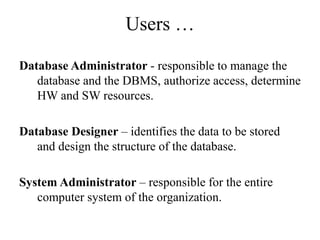
Users … 
Database Administrator - responsible to manage the 
database and the DBMS, authorize access, determine 
HW and SW resources. 
Database Designer – identifies the data to be stored 
and design the structure of the database. 
System Administrator – responsible for the entire 
computer system of the organization.
Why not text files, Spreadsheets..?? 
• Data integrity 
• Redundancy 
• Outdated data 
• Data size 
• Retrieval 
• Searching 
• Filtering 
• Protecting data from unauthorized use 
• Protecting data from becoming corrupt
Why Study Databases?? 
• Shift from computation to information 
– always true for corporate computing 
– Web made this point for personal computing 
– more and more true for scientific computing 
• Need for DBMS has exploded in the last years 
– Corporate: retail swipe, “customer relationship mgmt”, 
“supply chain mgmt”, “data warehouses”, etc. 
– Scientific: digital libraries, Human Genome project, 
NASA Mission to Planet Earth, physical sensors, grid 
physics network
Why Use a DBMS? 
• Reduced application development time. 
• Data independence 
• Efficient data access. 
• Data integrity under updates. 
• Concurrent access 
• Recovery from crashes. 
• Security 
• Uniform data administration.
Databases make these people happy ... 
• DBMS vendors, programmers 
– Oracle, IBM, MS, Sybase, … 
• End users in many fields 
– Business, education, science, … 
• DB application programmers 
– Build enterprise applications on top of DBMSs 
– Build web services that run off DBMSs 
• Database administrators (DBAs) 
– Design logical/physical schemas 
– Handle security and authorization 
– Data availability, crash recovery 
– Database tuning as needs evolve
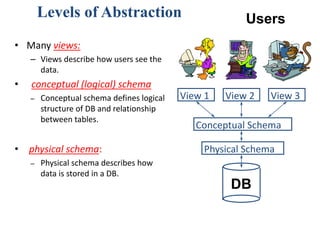
Levels of Abstraction 
Users 
View 1 View 2 View 3 
Conceptual Schema 
Physical Schema 
DB 
• Many views: 
– Views describe how users see the 
data. 
• conceptual (logical) schema 
– Conceptual schema defines logical 
structure of DB and relationship 
between tables. 
• physical schema: 
– Physical schema describes how 
data is stored in a DB.
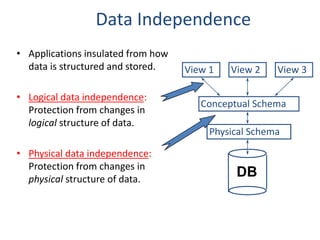
Data Independence 
• Applications insulated from how 
data is structured and stored. 
• Logical data independence: 
Protection from changes in 
logical structure of data. 
• Physical data independence: 
Protection from changes in 
physical structure of data. 
View 1 View 2 View 3 
Conceptual Schema 
Physical Schema 
DB
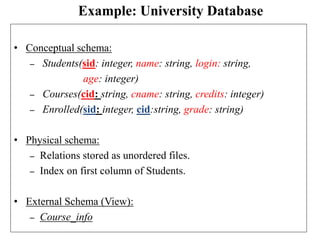
Example: University Database 
• Conceptual schema: 
– Students(sid: integer, name: string, login: string, 
age: integer) 
– Courses(cid: string, cname: string, credits: integer) 
– Enrolled(sid: integer, cid:string, grade: string) 
• Physical schema: 
– Relations stored as unordered files. 
– Index on first column of Students. 
• External Schema (View): 
– Course_info
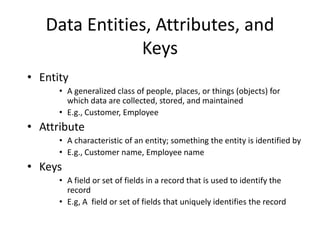
Data Entities, Attributes, and 
Keys 
• Entity 
• A generalized class of people, places, or things (objects) for 
which data are collected, stored, and maintained 
• E.g., Customer, Employee 
• Attribute 
• A characteristic of an entity; something the entity is identified by 
• E.g., Customer name, Employee name 
• Keys 
• A field or set of fields in a record that is used to identify the 
record 
• E.g, A field or set of fields that uniquely identifies the record
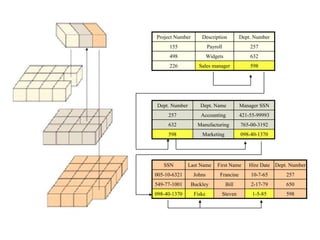
Project Number Description Dept. Number 
155 Payroll 257 
498 Widgets 632 
226 Sales manager 598 
Dept. Number Dept. Name Manager SSN 
257 Accounting 421-55-99993 
632 Manufacturing 765-00-3192 
598 Marketing 098-40-1370 
SSN Last Name First Name Hire Date Dept. Number 
005-10-6321 Johns Francine 10-7-65 257 
549-77-1001 Buckley Bill 2-17-79 650 
098-40-1370 Fiske Steven 1-5-85 598
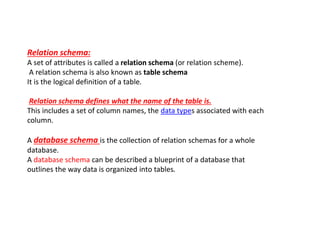
Relation schema: 
A set of attributes is called a relation schema (or relation scheme). 
A relation schema is also known as table schema 
It is the logical definition of a table. 
Relation schema defines what the name of the table is. 
This includes a set of column names, the data types associated with each 
column. 
A database schema is the collection of relation schemas for a whole 
database. 
A database schema can be described a blueprint of a database that 
outlines the way data is organized into tables.
SQL statements are divided into two major categories: 
data definition language (DDL) and 
data manipulation language (DML). 
Data Definition Language (DDL) statements are used 
to define the database structure or schema. Some examples: 
* CREATE - to create objects in the database 
* ALTER - alters the structure of the database 
* DROP - delete objects from the database 
* TRUNCATE - remove all records from a table, including 
all spaces allocated for the records are removed 
* COMMENT - add comments to the data dictionary 
* RENAME - rename an object
Data Manipulation Language (DML) statements are 
used for managing data within schema objects. 
Some examples: 
* SELECT - retrieve data from the a database 
* INSERT - insert data into a table 
* UPDATE - updates existing data within a table 
* DELETE - deletes all records from a table, the space for the 
records remain 
* MERGE - UPSERT operation (insert or update) 
* EXPLAIN PLAN - explain access path to data 
* LOCK TABLE - control concurrency
Data Control Language (DCL) statements. 
* GRANT - gives user's access privileges to database 
* REVOKE - withdraw access privileges given with the 
GRANT command
Transaction Control (TCL) statements are used to 
manage the changes made by DML statements. 
* COMMIT - save work done 
* SAVEPOINT - identify a point in a transaction to which you 
can later roll back 
* ROLLBACK - restore database to original since the last 
COMMIT
What are Data Models? 
Type of Data Models. 
A model is a representation of reality, 'real world' objects and events, 
associations. It is an abstraction 
Types: 
Object Based Data Models 
Record Based Data Models 
Physical Data Models
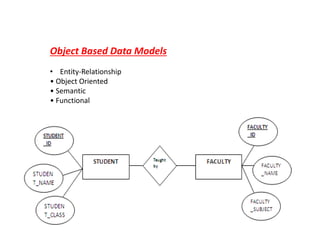
Object Based Data Models 
• Entity-Relationship 
• Object Oriented 
• Semantic 
• Functional
Record Based Logical Models 
Record based logical models are used in describing data at the logical and 
view levels. 
Each record type defines a fixed number of fields, or attributes, and each field 
is usually of a fixed length. 
The three most widely accepted record based data models are: 
• Hierarchical Model 
• Network Model 
• Relational Model
Physical Data Models 
Physical data models describe how data is stored in the 
computer, representing information such as record 
structures, record ordering, and access paths. There are 
not as many physical data models as logical data models, 
the most common one being the Unifying Model.
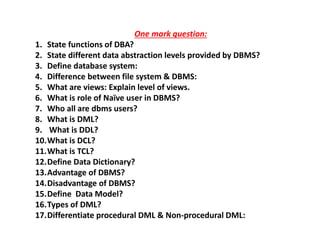
One mark question: 
1. State functions of DBA? 
2. State different data abstraction levels provided by DBMS? 
3. Define database system: 
4. Difference between file system & DBMS: 
5. What are views: Explain level of views. 
6. What is role of Naïve user in DBMS? 
7. Who all are dbms users? 
8. What is DML? 
9. What is DDL? 
10.What is DCL? 
11.What is TCL? 
12.Define Data Dictionary? 
13.Advantage of DBMS? 
14.Disadvantage of DBMS? 
15.Define Data Model? 
16.Types of DML? 
17.Differentiate procedural DML & Non-procedural DML:
Five mark question:

Ch 2-introduction to dbms

  • 1.
    General Concepts •Database definition – Organized collection of logically related data • Data – Known facts – Types: text, graphics, images, sound, videos • Database management system (DBMS) – Software package for defining and managing a database
  • 2.
    Introduction to DBMS Data Consists of raw facts, and when organized may be transformed into information Database A collection of related data organized to meet users needs Database management system (DBMS) A group of programs that manipulate the database and provide an interface between the database and the user of the database. A Database Management System (DBMS) is a software system designed to store, manage, and facilitate access to databases.
  • 3.
    Flat Files Characteristics: • Data is stored as records in regular files • Records usually have a simple structure and fixed number of fields • For fast access may support indexing of fields in the records • No mechanisms for relating data between files • One needs special programs in order to access and manipulate the data
  • 4.
    Why Study Databases? • Databases are useful – Many computing applications deal with large amounts of information – Database systems give a set of tools for storing, searching and managing this information • Databases in CS – Databases are a ‘core topic’ in computer science – Basic concepts and skills with database systems are part of the skill set you will be assumed to have as a Computer science graduate
  • 5.
    Database Basics Traditionaldatabase organizes data in a hierarchy. A field is the smallest element. Fields are within a record. Records are organized in a data file. Database is a collection of data files.
  • 6.
    File System DBMS 1 Less no. of files used 1 Large no. of files used 2 Doesn’t provide Security 2 Better Security, username and passward 3 Data redundancy is problem Loss of integrity-(accurate and consistent data) 3 Redundancy problem is solved Data is independenat 4 Data is isolated 4 Data is integrated 5 Data access takes lot of time 5 Less time 6 Concurrency control is not possible Single user system 6 Multiple user access data at same time 7 Little preliminary design 7 Vast permanent design 8 Transaction concept not used Eg: 8 Important in DBMS Eg: 9 9
  • 7.
    = Files vs.DBMS If we were to use files, we would have to : • Must write special code for different queries • Must protect data from inconsistency due to multiple concurrent users • Must manage crash recovery in some special-purpose manner • Must provide good methods for access control
  • 9.
    Databases • Webindexes • Library catalogues • Medical records • Bank accounts • Stock control • Personnel systems • Product catalogues • Telephone directories • Train timetables • Airline bookings • Credit card details • Student records • Customer histories • Stock market prices • Discussion boards • and so on…
  • 10.
    Database users •The people who interact with the database. • End users – Use the database system to achieve some goal - updating, inserting or modifying data from the database • Application developers – Write application program to allow end users to interface with the database system • Database Administrator (DBA) – manages the database system • Database systems programmer – Writes the database software itself
  • 11.
    The people whointeract with the database… 1. End users – updating, inserting or modifying data from the database  naïve users – only access the database based on their demand and access level, unaware of the DBMS, use predefined queries  sophisticated users – have complex requirements and queries, know the structure of the DBMS, engineers, scientists…  casual users – occasional users, need different data every time they come, use sophisticated queries…
  • 12.
    Users … DatabaseAdministrator - responsible to manage the database and the DBMS, authorize access, determine HW and SW resources. Database Designer – identifies the data to be stored and design the structure of the database. System Administrator – responsible for the entire computer system of the organization.
  • 13.
    Why not textfiles, Spreadsheets..?? • Data integrity • Redundancy • Outdated data • Data size • Retrieval • Searching • Filtering • Protecting data from unauthorized use • Protecting data from becoming corrupt
  • 14.
    Why Study Databases?? • Shift from computation to information – always true for corporate computing – Web made this point for personal computing – more and more true for scientific computing • Need for DBMS has exploded in the last years – Corporate: retail swipe, “customer relationship mgmt”, “supply chain mgmt”, “data warehouses”, etc. – Scientific: digital libraries, Human Genome project, NASA Mission to Planet Earth, physical sensors, grid physics network
  • 15.
    Why Use aDBMS? • Reduced application development time. • Data independence • Efficient data access. • Data integrity under updates. • Concurrent access • Recovery from crashes. • Security • Uniform data administration.
  • 16.
    Databases make thesepeople happy ... • DBMS vendors, programmers – Oracle, IBM, MS, Sybase, … • End users in many fields – Business, education, science, … • DB application programmers – Build enterprise applications on top of DBMSs – Build web services that run off DBMSs • Database administrators (DBAs) – Design logical/physical schemas – Handle security and authorization – Data availability, crash recovery – Database tuning as needs evolve
  • 17.
    Levels of Abstraction Users View 1 View 2 View 3 Conceptual Schema Physical Schema DB • Many views: – Views describe how users see the data. • conceptual (logical) schema – Conceptual schema defines logical structure of DB and relationship between tables. • physical schema: – Physical schema describes how data is stored in a DB.
  • 18.
    Data Independence •Applications insulated from how data is structured and stored. • Logical data independence: Protection from changes in logical structure of data. • Physical data independence: Protection from changes in physical structure of data. View 1 View 2 View 3 Conceptual Schema Physical Schema DB
  • 19.
    Example: University Database • Conceptual schema: – Students(sid: integer, name: string, login: string, age: integer) – Courses(cid: string, cname: string, credits: integer) – Enrolled(sid: integer, cid:string, grade: string) • Physical schema: – Relations stored as unordered files. – Index on first column of Students. • External Schema (View): – Course_info
  • 20.
    Data Entities, Attributes,and Keys • Entity • A generalized class of people, places, or things (objects) for which data are collected, stored, and maintained • E.g., Customer, Employee • Attribute • A characteristic of an entity; something the entity is identified by • E.g., Customer name, Employee name • Keys • A field or set of fields in a record that is used to identify the record • E.g, A field or set of fields that uniquely identifies the record
  • 21.
    Project Number DescriptionDept. Number 155 Payroll 257 498 Widgets 632 226 Sales manager 598 Dept. Number Dept. Name Manager SSN 257 Accounting 421-55-99993 632 Manufacturing 765-00-3192 598 Marketing 098-40-1370 SSN Last Name First Name Hire Date Dept. Number 005-10-6321 Johns Francine 10-7-65 257 549-77-1001 Buckley Bill 2-17-79 650 098-40-1370 Fiske Steven 1-5-85 598
  • 22.
    Relation schema: Aset of attributes is called a relation schema (or relation scheme). A relation schema is also known as table schema It is the logical definition of a table. Relation schema defines what the name of the table is. This includes a set of column names, the data types associated with each column. A database schema is the collection of relation schemas for a whole database. A database schema can be described a blueprint of a database that outlines the way data is organized into tables.
  • 23.
    SQL statements aredivided into two major categories: data definition language (DDL) and data manipulation language (DML). Data Definition Language (DDL) statements are used to define the database structure or schema. Some examples: * CREATE - to create objects in the database * ALTER - alters the structure of the database * DROP - delete objects from the database * TRUNCATE - remove all records from a table, including all spaces allocated for the records are removed * COMMENT - add comments to the data dictionary * RENAME - rename an object
  • 24.
    Data Manipulation Language(DML) statements are used for managing data within schema objects. Some examples: * SELECT - retrieve data from the a database * INSERT - insert data into a table * UPDATE - updates existing data within a table * DELETE - deletes all records from a table, the space for the records remain * MERGE - UPSERT operation (insert or update) * EXPLAIN PLAN - explain access path to data * LOCK TABLE - control concurrency
  • 25.
    Data Control Language(DCL) statements. * GRANT - gives user's access privileges to database * REVOKE - withdraw access privileges given with the GRANT command
  • 26.
    Transaction Control (TCL)statements are used to manage the changes made by DML statements. * COMMIT - save work done * SAVEPOINT - identify a point in a transaction to which you can later roll back * ROLLBACK - restore database to original since the last COMMIT
  • 27.
    What are DataModels? Type of Data Models. A model is a representation of reality, 'real world' objects and events, associations. It is an abstraction Types: Object Based Data Models Record Based Data Models Physical Data Models
  • 28.
    Object Based DataModels • Entity-Relationship • Object Oriented • Semantic • Functional
  • 29.
    Record Based LogicalModels Record based logical models are used in describing data at the logical and view levels. Each record type defines a fixed number of fields, or attributes, and each field is usually of a fixed length. The three most widely accepted record based data models are: • Hierarchical Model • Network Model • Relational Model
  • 30.
    Physical Data Models Physical data models describe how data is stored in the computer, representing information such as record structures, record ordering, and access paths. There are not as many physical data models as logical data models, the most common one being the Unifying Model.
  • 33.
    One mark question: 1. State functions of DBA? 2. State different data abstraction levels provided by DBMS? 3. Define database system: 4. Difference between file system & DBMS: 5. What are views: Explain level of views. 6. What is role of Naïve user in DBMS? 7. Who all are dbms users? 8. What is DML? 9. What is DDL? 10.What is DCL? 11.What is TCL? 12.Define Data Dictionary? 13.Advantage of DBMS? 14.Disadvantage of DBMS? 15.Define Data Model? 16.Types of DML? 17.Differentiate procedural DML & Non-procedural DML:
  • 34.