UNIT 1
Basic Concepts
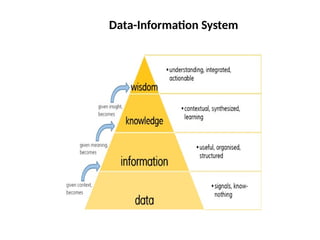
Data-Information System
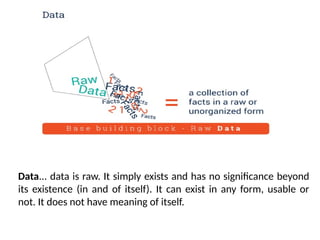
Data... data is raw. It simply exists and has no significance beyond
its existence (in and of itself). It can exist in any form, usable or
not. It does not have meaning of itself.
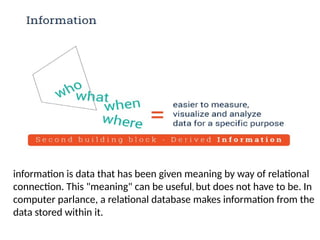
information is data that has been given meaning by way of relational
connection. This "meaning" can be useful, but does not have to be. In
computer parlance, a relational database makes information from the
data stored within it.
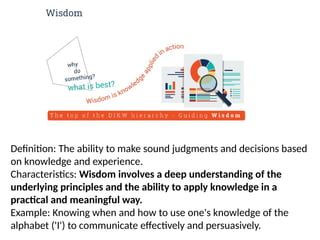
Definition: The ability to make sound judgments and decisions based
on knowledge and experience.
Characteristics: Wisdom involves a deep understanding of the
underlying principles and the ability to apply knowledge in a
practical and meaningful way.
Example: Knowing when and how to use one's knowledge of the
alphabet ('I') to communicate effectively and persuasively.
What is Database?
•A database approach is a well-organized collection of data
that are related in a meaningful way which can be accessed
by different users but stored only once in a system. The
various operations performed by the DBMS system are:
Insertion, deletion, selection, sorting etc
•Databases are designed to facilitate the organization and
manipulation of large volumes of data, making it easier to
store, retrieve, update, and manage information.
•It can be managed through a
Database Management System (DBMS), a software used to
manage data. Database refers to related data in a structured
Types of Databases
 Relational databases
• Relational databases have been around since the 1970s. The name
comes from the way that data is stored in multiple, related tables.
Within the tables, data is stored in rows and columns.
• The relational database management system (RDBMS) is the
program that allows you to create, update, and administer a
relational database.
• Structured Query Language (SQL) is the most common language for
reading, creating, updating and deleting data. Relational databases
are very reliable.
• They are compliant with ACID (Atomicity, Consistency, Isolation,
Durability), which is a standard set of properties for reliable
database transactions.
• Relational databases work well with structured data. Organizations
that have a lot of unstructured or semi-structured data should not
be considering a relational database.
Examples: Microsoft SQL Server, Oracle Database, MySQL, PostgreSQL
and IBM Db2
 NoSQL databases
• NoSQL is a broad category that includes any database that doesn’t
use SQL as its primary data access language.
• These types of databases are also sometimes referred to as non-
relational databases. Unlike in relational databases, data in a NoSQL
database doesn’t have to conform to a pre-defined schema, so these
types of databases are great for organizations seeking to store
unstructured or semi-structured data.
• One advantage of NoSQL databases is that developers can make
changes to the database on the fly, without affecting applications
that are using the database.
Examples: Apache Cassandra, MongoDB, CouchDB, and CouchBase
 Cloud databases
A cloud database refers to any database that’s designed to run in the
cloud. Like other cloud-based applications, cloud databases offer
flexibility and scalability, along with high availability.
Cloud databases are also often low-maintenance, since many are
offered via a SaaS model.
Examples: Microsoft Azure SQL Database, Amazon Relational
Database Service, Oracle Autonomous Database.
 Object-oriented databases
An object-oriented database is based on object-oriented programming,
so data and all of its attributes, are tied together as an object. Object-
oriented databases are managed by object-oriented database
management systems (OODBMS).
These databases work well with object-oriented programming
languages, such as C++ and Java. Like relational databases, object-
oriented databases conform to ACID standards.
Examples: Wakanda, ObjectStore
Key-value databases
One of the simplest types of NoSQL databases, key-value databases
save data as a group of key-value pairs made up of two data items
each.
They’re also sometimes referred to as a key-value store.
Key-value databases are highly scalable and can handle high
volumes of traffic, making them ideal for processes such as session
management for web applications, user sessions for massive multi-
player online games, and online shopping carts.
Examples: Amazon DynamoDB, Redis
What is Database
Management Systems (DBMS)?
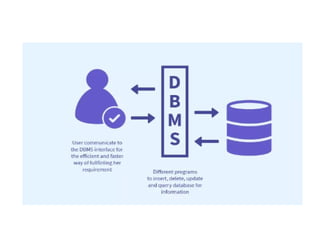
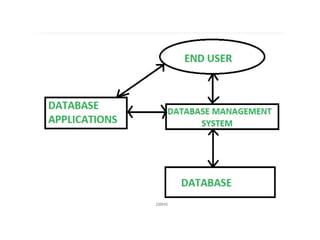
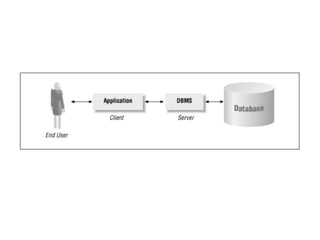
Database Management Systems (DBMS) are software systems
used to store, retrieve, and run queries on data. A DBMS
serves as an interface between an end-user and a database,
allowing users to create, read, update, and delete data in the
database.
What is Database Management System (DBMS)?
• Collection of interrelated data
• Set of programs to access the data
• It provides a convenient and efficient way to
store, retrieve and modify information.
• Application programs request DBMS to
retrieve, modify/insert/delete data for them
and thus it acts as a layer of abstraction
between the application programs and the file
system.
Data modelling: A DBMS provides tools for creating and
modifying data models, which define the structure and
relationships of the data in a database.
Data storage and retrieval: A DBMS is responsible for storing and
retrieving data from the database, and can provide various
methods for searching and querying the data.
Concurrency control: A DBMS provides mechanisms for
controlling concurrent access to the database, to ensure that
multiple users can access the data without conflicting with each
other.
Data integrity and security: A DBMS provides tools for enforcing
data integrity and security constraints, such as constraints on the
values of data and access controls that restrict who can access the
data.
Key Features of DBMS
Backup and recovery: A DBMS provides mechanisms for backing up
and recovering the data in the event of a system failure.
DBMS can be classified into two types: Relational Database
Management System (RDBMS) and Non-Relational Database
Management System (NoSQL or Non-SQL)
RDBMS: Data is organized in the form of tables and each table has a
set of rows and columns. The data are related to each other through
primary and foreign keys.
NoSQL: Data is organized in the form of key-value pairs, documents,
graphs, or column-based. These are designed to handle large-scale,
high-performance scenarios.
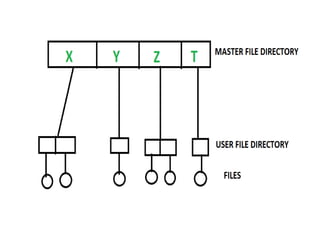
File System Approach
•The file system is basically a way of arranging the files in a storage
medium like a hard disk.
•The file system organizes the files and helps in the retrieval of files
when they are required.
•File systems consist of different files which are grouped into
directories. The directories further contain other folders and files.
The file system performs basic operations like management, file
naming, giving access rules, etc.
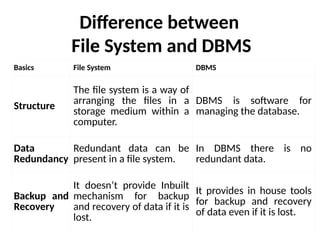
Difference between
File System and DBMS
Basics File System DBMS
Structure
The file system is a way of
arranging the files in a
storage medium within a
computer.
DBMS is software for
managing the database.
Data
Redundancy
Redundant data can be
present in a file system.
In DBMS there is no
redundant data.
Backup and
Recovery
It doesn’t provide Inbuilt
mechanism for backup
and recovery of data if it is
lost.
It provides in house tools
for backup and recovery
of data even if it is lost.
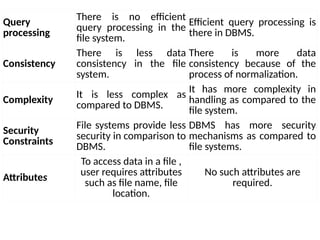
Query
processing
There is no efficient
query processing in the
file system.
Efficient query processing is
there in DBMS.
Consistency
There is less data
consistency in the file
system.
There is more data
consistency because of the
process of normalization.
Complexity It is less complex as
compared to DBMS.
It has more complexity in
handling as compared to the
file system.
Security
Constraints
File systems provide less
security in comparison to
DBMS.
DBMS has more security
mechanisms as compared to
file systems.
Attributes
To access data in a file ,
user requires attributes
such as file name, file
location.
No such attributes are
required.
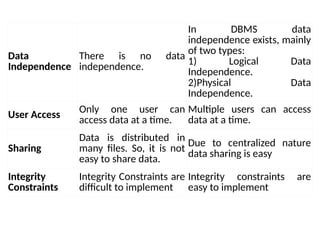
Data
Independence
There is no data
independence.
In DBMS data
independence exists, mainly
of two types:
1) Logical Data
Independence.
2)Physical Data
Independence.
User Access
Only one user can
access data at a time.
Multiple users can access
data at a time.
Sharing
Data is distributed in
many files. So, it is not
easy to share data.
Due to centralized nature
data sharing is easy
Integrity
Constraints
Integrity Constraints are
difficult to implement
Integrity constraints are
easy to implement
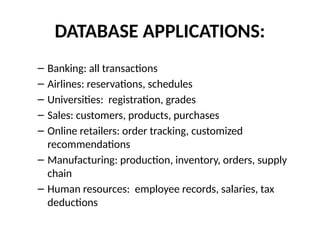
DATABASE APPLICATIONS:
– Banking: all transactions
– Airlines: reservations, schedules
– Universities: registration, grades
– Sales: customers, products, purchases
– Online retailers: order tracking, customized
recommendations
– Manufacturing: production, inventory, orders, supply
chain
– Human resources: employee records, salaries, tax
deductions
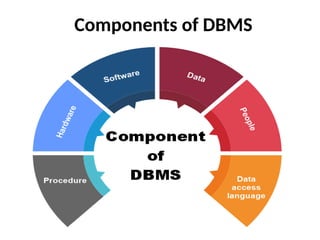
Components of DBMS
Let us discuss the components one by one clearly.
Hardware
The hardware is the actual computer system used for
keeping and accessing the database. The conventional
DBMS hardware consists of secondary storage devices such
as hard disks. Databases run on the range of machines from
micro computers to mainframes.
Software
Software is the actual DBMS between the physical database
and the users of the system. All the requests from the user
for accessing the database are handled by DBMS.
Data
It is an important component of the database management
system. The main task of DBMS is to process the data. Databases
are used to store the data, retrieved, and updated to and from
the databases.
Users
There are a number of users who can access or retrieve the data
on demand using the application and the interfaces provided by
the DBMS.
Procedures
Procedures refer to general instructions to use a database
management system. This includes procedures to set up and install
a DBMS, To login and logout of DBMS software, manage
databases, take backups, generate reports etc.
Database Access Language
Database Access Language is a simple language that allows
users to write commands to perform the desired operations
on the data that is stored in the database.
Database Access Language is a language used to write
commands to access, insert, and delete data stored in a
database.
Examples of database languages are SQL(structured query
language)

Basic of Database Management System(DBMS)

  • 1.
  • 2.
  • 3.
    Data... data israw. It simply exists and has no significance beyond its existence (in and of itself). It can exist in any form, usable or not. It does not have meaning of itself.
  • 4.
    information is datathat has been given meaning by way of relational connection. This "meaning" can be useful, but does not have to be. In computer parlance, a relational database makes information from the data stored within it.
  • 6.
    Definition: The abilityto make sound judgments and decisions based on knowledge and experience. Characteristics: Wisdom involves a deep understanding of the underlying principles and the ability to apply knowledge in a practical and meaningful way. Example: Knowing when and how to use one's knowledge of the alphabet ('I') to communicate effectively and persuasively.
  • 7.
    What is Database? •Adatabase approach is a well-organized collection of data that are related in a meaningful way which can be accessed by different users but stored only once in a system. The various operations performed by the DBMS system are: Insertion, deletion, selection, sorting etc •Databases are designed to facilitate the organization and manipulation of large volumes of data, making it easier to store, retrieve, update, and manage information. •It can be managed through a Database Management System (DBMS), a software used to manage data. Database refers to related data in a structured
  • 8.
    Types of Databases Relational databases • Relational databases have been around since the 1970s. The name comes from the way that data is stored in multiple, related tables. Within the tables, data is stored in rows and columns. • The relational database management system (RDBMS) is the program that allows you to create, update, and administer a relational database. • Structured Query Language (SQL) is the most common language for reading, creating, updating and deleting data. Relational databases are very reliable.
  • 9.
    • They arecompliant with ACID (Atomicity, Consistency, Isolation, Durability), which is a standard set of properties for reliable database transactions. • Relational databases work well with structured data. Organizations that have a lot of unstructured or semi-structured data should not be considering a relational database. Examples: Microsoft SQL Server, Oracle Database, MySQL, PostgreSQL and IBM Db2
  • 10.
     NoSQL databases •NoSQL is a broad category that includes any database that doesn’t use SQL as its primary data access language. • These types of databases are also sometimes referred to as non- relational databases. Unlike in relational databases, data in a NoSQL database doesn’t have to conform to a pre-defined schema, so these types of databases are great for organizations seeking to store unstructured or semi-structured data. • One advantage of NoSQL databases is that developers can make changes to the database on the fly, without affecting applications that are using the database. Examples: Apache Cassandra, MongoDB, CouchDB, and CouchBase
  • 11.
     Cloud databases Acloud database refers to any database that’s designed to run in the cloud. Like other cloud-based applications, cloud databases offer flexibility and scalability, along with high availability. Cloud databases are also often low-maintenance, since many are offered via a SaaS model. Examples: Microsoft Azure SQL Database, Amazon Relational Database Service, Oracle Autonomous Database.
  • 12.
     Object-oriented databases Anobject-oriented database is based on object-oriented programming, so data and all of its attributes, are tied together as an object. Object- oriented databases are managed by object-oriented database management systems (OODBMS). These databases work well with object-oriented programming languages, such as C++ and Java. Like relational databases, object- oriented databases conform to ACID standards. Examples: Wakanda, ObjectStore
  • 13.
    Key-value databases One ofthe simplest types of NoSQL databases, key-value databases save data as a group of key-value pairs made up of two data items each. They’re also sometimes referred to as a key-value store. Key-value databases are highly scalable and can handle high volumes of traffic, making them ideal for processes such as session management for web applications, user sessions for massive multi- player online games, and online shopping carts. Examples: Amazon DynamoDB, Redis
  • 14.
    What is Database ManagementSystems (DBMS)? Database Management Systems (DBMS) are software systems used to store, retrieve, and run queries on data. A DBMS serves as an interface between an end-user and a database, allowing users to create, read, update, and delete data in the database.
  • 16.
    What is DatabaseManagement System (DBMS)? • Collection of interrelated data • Set of programs to access the data • It provides a convenient and efficient way to store, retrieve and modify information. • Application programs request DBMS to retrieve, modify/insert/delete data for them and thus it acts as a layer of abstraction between the application programs and the file system.
  • 19.
    Data modelling: ADBMS provides tools for creating and modifying data models, which define the structure and relationships of the data in a database. Data storage and retrieval: A DBMS is responsible for storing and retrieving data from the database, and can provide various methods for searching and querying the data. Concurrency control: A DBMS provides mechanisms for controlling concurrent access to the database, to ensure that multiple users can access the data without conflicting with each other. Data integrity and security: A DBMS provides tools for enforcing data integrity and security constraints, such as constraints on the values of data and access controls that restrict who can access the data. Key Features of DBMS
  • 20.
    Backup and recovery:A DBMS provides mechanisms for backing up and recovering the data in the event of a system failure. DBMS can be classified into two types: Relational Database Management System (RDBMS) and Non-Relational Database Management System (NoSQL or Non-SQL) RDBMS: Data is organized in the form of tables and each table has a set of rows and columns. The data are related to each other through primary and foreign keys. NoSQL: Data is organized in the form of key-value pairs, documents, graphs, or column-based. These are designed to handle large-scale, high-performance scenarios.
  • 21.
    File System Approach •Thefile system is basically a way of arranging the files in a storage medium like a hard disk. •The file system organizes the files and helps in the retrieval of files when they are required. •File systems consist of different files which are grouped into directories. The directories further contain other folders and files. The file system performs basic operations like management, file naming, giving access rules, etc.
  • 23.
    Difference between File Systemand DBMS Basics File System DBMS Structure The file system is a way of arranging the files in a storage medium within a computer. DBMS is software for managing the database. Data Redundancy Redundant data can be present in a file system. In DBMS there is no redundant data. Backup and Recovery It doesn’t provide Inbuilt mechanism for backup and recovery of data if it is lost. It provides in house tools for backup and recovery of data even if it is lost.
  • 24.
    Query processing There is noefficient query processing in the file system. Efficient query processing is there in DBMS. Consistency There is less data consistency in the file system. There is more data consistency because of the process of normalization. Complexity It is less complex as compared to DBMS. It has more complexity in handling as compared to the file system. Security Constraints File systems provide less security in comparison to DBMS. DBMS has more security mechanisms as compared to file systems. Attributes To access data in a file , user requires attributes such as file name, file location. No such attributes are required.
  • 25.
    Data Independence There is nodata independence. In DBMS data independence exists, mainly of two types: 1) Logical Data Independence. 2)Physical Data Independence. User Access Only one user can access data at a time. Multiple users can access data at a time. Sharing Data is distributed in many files. So, it is not easy to share data. Due to centralized nature data sharing is easy Integrity Constraints Integrity Constraints are difficult to implement Integrity constraints are easy to implement
  • 26.
    DATABASE APPLICATIONS: – Banking:all transactions – Airlines: reservations, schedules – Universities: registration, grades – Sales: customers, products, purchases – Online retailers: order tracking, customized recommendations – Manufacturing: production, inventory, orders, supply chain – Human resources: employee records, salaries, tax deductions
  • 27.
  • 28.
    Let us discussthe components one by one clearly. Hardware The hardware is the actual computer system used for keeping and accessing the database. The conventional DBMS hardware consists of secondary storage devices such as hard disks. Databases run on the range of machines from micro computers to mainframes. Software Software is the actual DBMS between the physical database and the users of the system. All the requests from the user for accessing the database are handled by DBMS.
  • 29.
    Data It is animportant component of the database management system. The main task of DBMS is to process the data. Databases are used to store the data, retrieved, and updated to and from the databases. Users There are a number of users who can access or retrieve the data on demand using the application and the interfaces provided by the DBMS.
  • 30.
    Procedures Procedures refer togeneral instructions to use a database management system. This includes procedures to set up and install a DBMS, To login and logout of DBMS software, manage databases, take backups, generate reports etc. Database Access Language Database Access Language is a simple language that allows users to write commands to perform the desired operations on the data that is stored in the database. Database Access Language is a language used to write commands to access, insert, and delete data stored in a database. Examples of database languages are SQL(structured query language)