Search Engine Optimization Audit
Report by Lisa Gelhaus
June 2015
Review of Careerly
Site Statistics
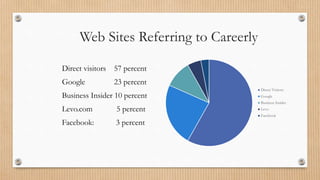
Web Sites Referring to Careerly
Direct visitors 57 percent
Google 23 percent
Business Insider 10 percent
Levo.com 5 percent
Facebook: 3 percent
Direct Visitors
Google
Business Insider
Levo
Facebook
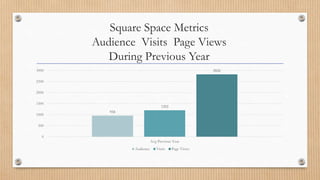
Square Space Metrics
Audience Visits Page Views
During Previous Year
958
1202
2826
0
500
1000
1500
2000
2500
3000
Avg Previous Year
Audience Visits Page Views
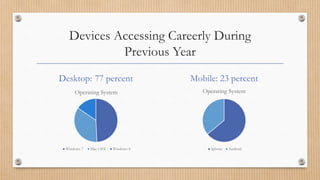
Devices Accessing Careerly During
Previous Year
Desktop: 77 percent
Operating System
Windows 7 Mac OSX Windows 8
Mobile: 23 percent
Operating System
Iphone Android
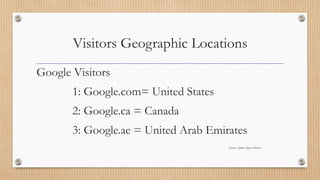
Visitors Geographic Locations
Google Visitors
1: Google.com= United States
2: Google.ca = Canada
3: Google.ae = United Arab Emirates
Source: Square Space Metrics
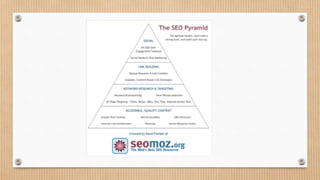
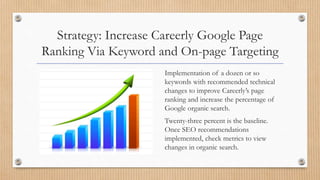
Strategy: Increase Careerly Google Page
Ranking Via Keyword and On-page Targeting
Implementation of a dozen or so
keywords with recommended technical
changes to improve Careerly’s page
ranking and increase the percentage of
Google organic search.
Twenty-three percent is the baseline.
Once SEO recommendations
implemented, check metrics to view
changes in organic search.
Google Keyword
Research Results
Keyword Research
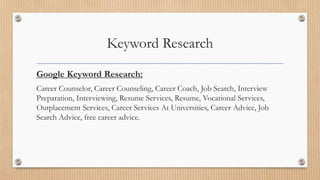
Google Keyword Research:
Career Counselor, Career Counseling, Career Coach, Job Search, Interview
Preparation, Interviewing, Resume Services, Resume, Vocational Services,
Outplacement Services, Career Services At Universities, Career Advice, Job
Search Advice, free career advice.
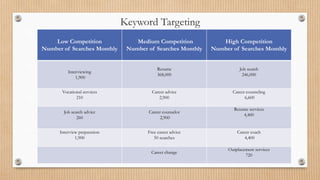
Keyword Targeting
Low Competition
Number of Searches Monthly
Medium Competition
Number of Searches Monthly
High Competition
Number of Searches Monthly
Interviewing
1,900
Resume
368,000
Job search
246,000
Vocational services
210
Career advice
2,900
Career counseling
6,600
Job search advice
260
Career counselor
2,900
Resume services
4,400
Interview preparation
1,900
Free career advice
50 searches
Career coach
4,400
Career change
Outplacement services
720
Keyword Selection and Usage
Best practices for writing descriptions, titles or content.
Pick two or three keywords per webpage.
Pick keywords from each category: High, Medium, and Low.
Add Text And Keywords
Issue: Pages on Careerly site are dominated by photographs and few
words.
Recommendation: Add 200 to 300 additional words of “value” to
pages with less than 100 words. Consider adding text to landing page.
Why It’s Important: Google’s website bots can’t read photographs.
Local competitors are benefitting from organic search by using more
keywords on their webpages.
On-Page Targeting
Good News!
Careerly has page titles.
Page titles are major factor in search engine results.
Missing Meta Descriptions
• Issue: web pages missing Meta descriptions.
• Why it’s important: This is the advertising opportunity for your page
because well-written descriptions encourage search engine users to click on
your page.
• Recommendation: Add missing meta descriptions to web pages.
Add Meta Descriptions
• Guidance on how to fix:
• Add a description that is between 150 and 160 characters.
• Make it unique and compelling..
• Choose a proper key word for the description..
• Caution: A heavy use of keywords can result in penalty and being barred from out of
ranking.
• See Notes Page View for recommended pages missing Meta Descriptions.
Meta Descriptions That
Need Shortening Or Lengthening
• Issue: Some pages need an increase in the number of characters on the link.
• Why It’s Important: Google and other search engines tend to shorten the
appearance of your meta description in search results.
• Recommendation: Decrease or increase the meta description on pages that
are either below between 70 characters or above 156 characters.
Meta Descriptions Over 155
• Recommendation: Change description to be unique and under 155.
• Issue: 19 pages need description shortening. Pages requiring changes can be
found in Notes Page View
Add Text to Photograph ALT Tags
Issue: Careerly’s website photographs have no ALT tags text and no key word
connections to career counseling, Careerly, career coach, job search, or career advice.
Why It’s Important: Google’s bot can’t crawl photos unless there is a description of
the photo.
Recommendations: Add a description to the header photograph files used on
Careerly’s webpages. Header photos are at the top of the page.
How To Fix It: Add unique description of photo. Add keyword or brand name to Alt
tags on photographs.
Recommendation for Website Usage
• Issue: No available data to determine visitors’ behavior on Careerly site.
• Rationale: Need more detailed information about website visitors.
• Recommendation: Add Google Analytics to your site.
Next Steps
Careerly determines which short term strategy
recommendations to implement and in what order.
Long Term Strategy Ideas
• Implement Careerly reviews on third party site.
• Pursue high-authority linking opportunities.
• Improve social content strategy.
Questions
Call or Email
Lisa Gelhaus
202-898-2825
Lisa.Gelhaus@gmail.com

Careerly SEO Audit LinkedIn

  • 1.
    Search Engine OptimizationAudit Report by Lisa Gelhaus June 2015
  • 2.
  • 3.
    Web Sites Referringto Careerly Direct visitors 57 percent Google 23 percent Business Insider 10 percent Levo.com 5 percent Facebook: 3 percent Direct Visitors Google Business Insider Levo Facebook
  • 4.
    Square Space Metrics AudienceVisits Page Views During Previous Year 958 1202 2826 0 500 1000 1500 2000 2500 3000 Avg Previous Year Audience Visits Page Views
  • 5.
    Devices Accessing CareerlyDuring Previous Year Desktop: 77 percent Operating System Windows 7 Mac OSX Windows 8 Mobile: 23 percent Operating System Iphone Android
  • 6.
    Visitors Geographic Locations GoogleVisitors 1: Google.com= United States 2: Google.ca = Canada 3: Google.ae = United Arab Emirates Source: Square Space Metrics
  • 8.
    Strategy: Increase CareerlyGoogle Page Ranking Via Keyword and On-page Targeting Implementation of a dozen or so keywords with recommended technical changes to improve Careerly’s page ranking and increase the percentage of Google organic search. Twenty-three percent is the baseline. Once SEO recommendations implemented, check metrics to view changes in organic search.
  • 9.
  • 10.
    Keyword Research Google KeywordResearch: Career Counselor, Career Counseling, Career Coach, Job Search, Interview Preparation, Interviewing, Resume Services, Resume, Vocational Services, Outplacement Services, Career Services At Universities, Career Advice, Job Search Advice, free career advice.
  • 11.
    Keyword Targeting Low Competition Numberof Searches Monthly Medium Competition Number of Searches Monthly High Competition Number of Searches Monthly Interviewing 1,900 Resume 368,000 Job search 246,000 Vocational services 210 Career advice 2,900 Career counseling 6,600 Job search advice 260 Career counselor 2,900 Resume services 4,400 Interview preparation 1,900 Free career advice 50 searches Career coach 4,400 Career change Outplacement services 720
  • 12.
    Keyword Selection andUsage Best practices for writing descriptions, titles or content. Pick two or three keywords per webpage. Pick keywords from each category: High, Medium, and Low.
  • 13.
    Add Text AndKeywords Issue: Pages on Careerly site are dominated by photographs and few words. Recommendation: Add 200 to 300 additional words of “value” to pages with less than 100 words. Consider adding text to landing page. Why It’s Important: Google’s website bots can’t read photographs. Local competitors are benefitting from organic search by using more keywords on their webpages.
  • 14.
  • 15.
    Good News! Careerly haspage titles. Page titles are major factor in search engine results.
  • 16.
    Missing Meta Descriptions •Issue: web pages missing Meta descriptions. • Why it’s important: This is the advertising opportunity for your page because well-written descriptions encourage search engine users to click on your page. • Recommendation: Add missing meta descriptions to web pages.
  • 17.
    Add Meta Descriptions •Guidance on how to fix: • Add a description that is between 150 and 160 characters. • Make it unique and compelling.. • Choose a proper key word for the description.. • Caution: A heavy use of keywords can result in penalty and being barred from out of ranking. • See Notes Page View for recommended pages missing Meta Descriptions.
  • 18.
    Meta Descriptions That NeedShortening Or Lengthening • Issue: Some pages need an increase in the number of characters on the link. • Why It’s Important: Google and other search engines tend to shorten the appearance of your meta description in search results. • Recommendation: Decrease or increase the meta description on pages that are either below between 70 characters or above 156 characters.
  • 19.
    Meta Descriptions Over155 • Recommendation: Change description to be unique and under 155. • Issue: 19 pages need description shortening. Pages requiring changes can be found in Notes Page View
  • 20.
    Add Text toPhotograph ALT Tags Issue: Careerly’s website photographs have no ALT tags text and no key word connections to career counseling, Careerly, career coach, job search, or career advice. Why It’s Important: Google’s bot can’t crawl photos unless there is a description of the photo. Recommendations: Add a description to the header photograph files used on Careerly’s webpages. Header photos are at the top of the page. How To Fix It: Add unique description of photo. Add keyword or brand name to Alt tags on photographs.
  • 21.
    Recommendation for WebsiteUsage • Issue: No available data to determine visitors’ behavior on Careerly site. • Rationale: Need more detailed information about website visitors. • Recommendation: Add Google Analytics to your site.
  • 22.
    Next Steps Careerly determineswhich short term strategy recommendations to implement and in what order.
  • 23.
    Long Term StrategyIdeas • Implement Careerly reviews on third party site. • Pursue high-authority linking opportunities. • Improve social content strategy.
  • 24.
    Questions Call or Email LisaGelhaus 202-898-2825 Lisa.Gelhaus@gmail.com