What does good SEO look like on
          a website?
Pritesh Patel


                Digital Marketing Manager

                7 years working for product
                manufacturers, 2.5 years agency side


                Responsible for auditing, strategy
                planning and measuring performance
What is SEO?
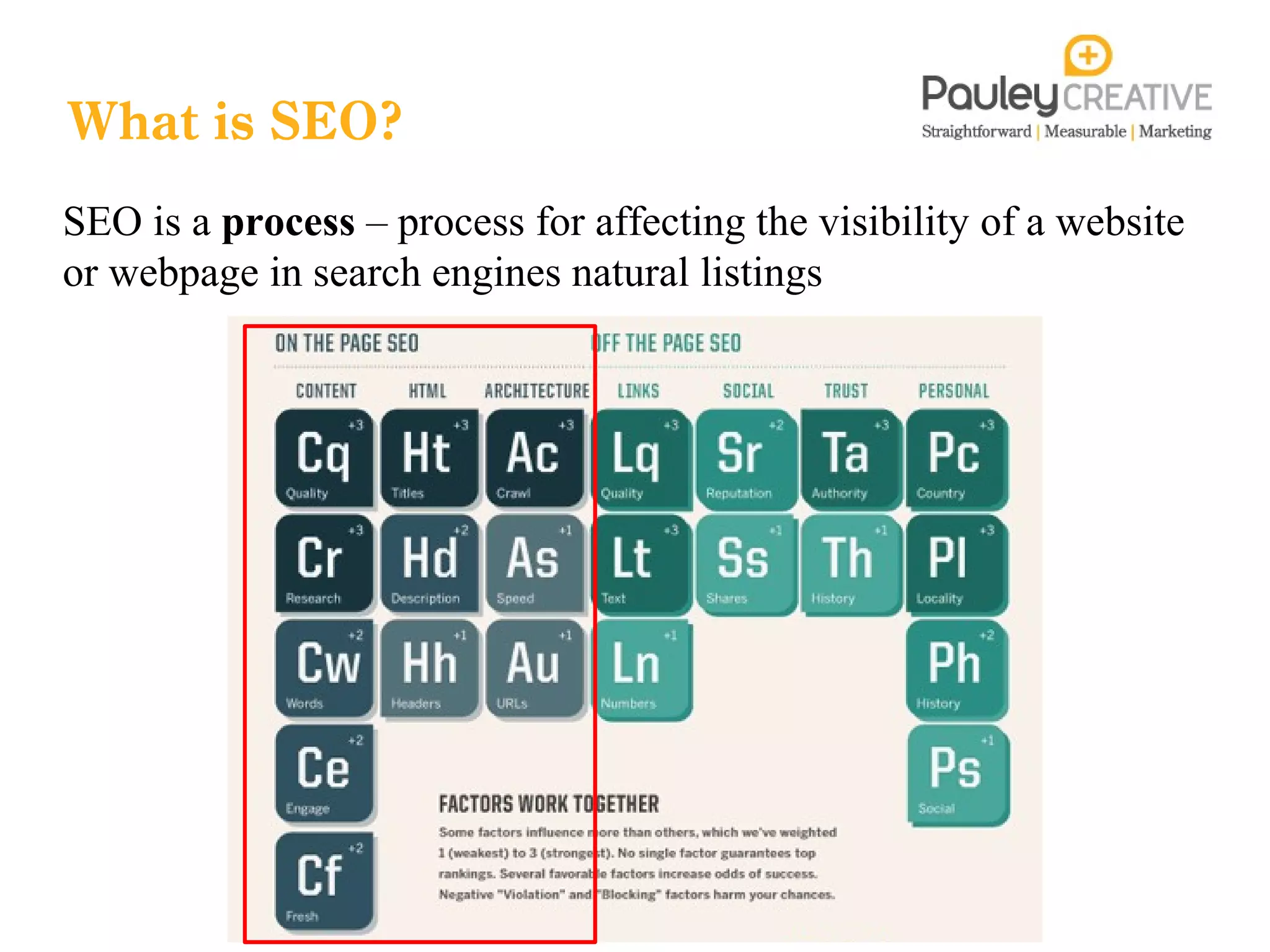
SEO is a process – process for affecting the visibility of a website
or webpage in search engines natural listings
Objectives for SEO


To grow and generate better quality traffic to our site from non-branded
search terms (raise brand awareness)


To diversify our range of keywords to target topics, markets or themes such
as Green Deal, CFSH, Contemporary Architecture or BSXXXX
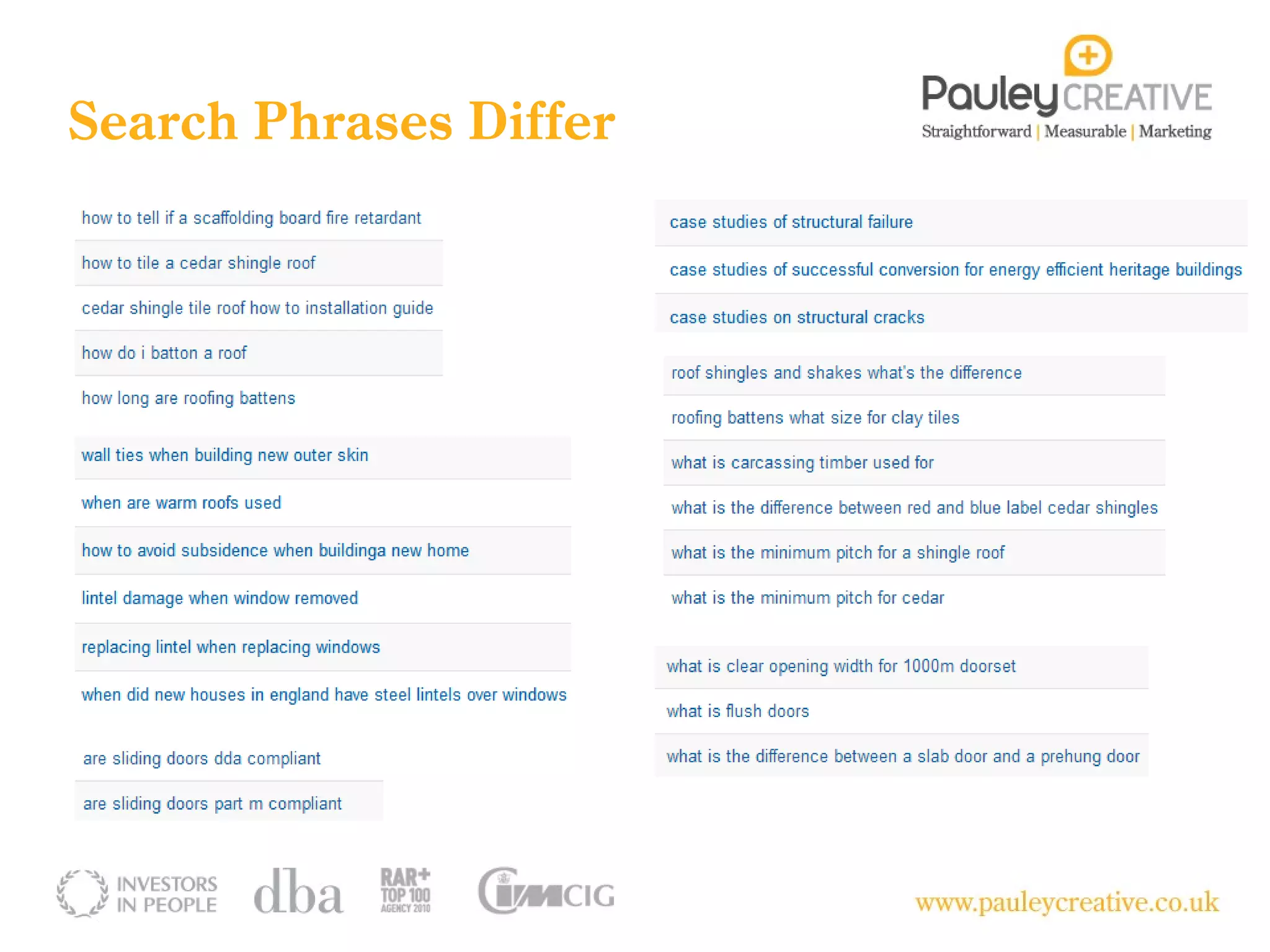
Search Phrases Differ
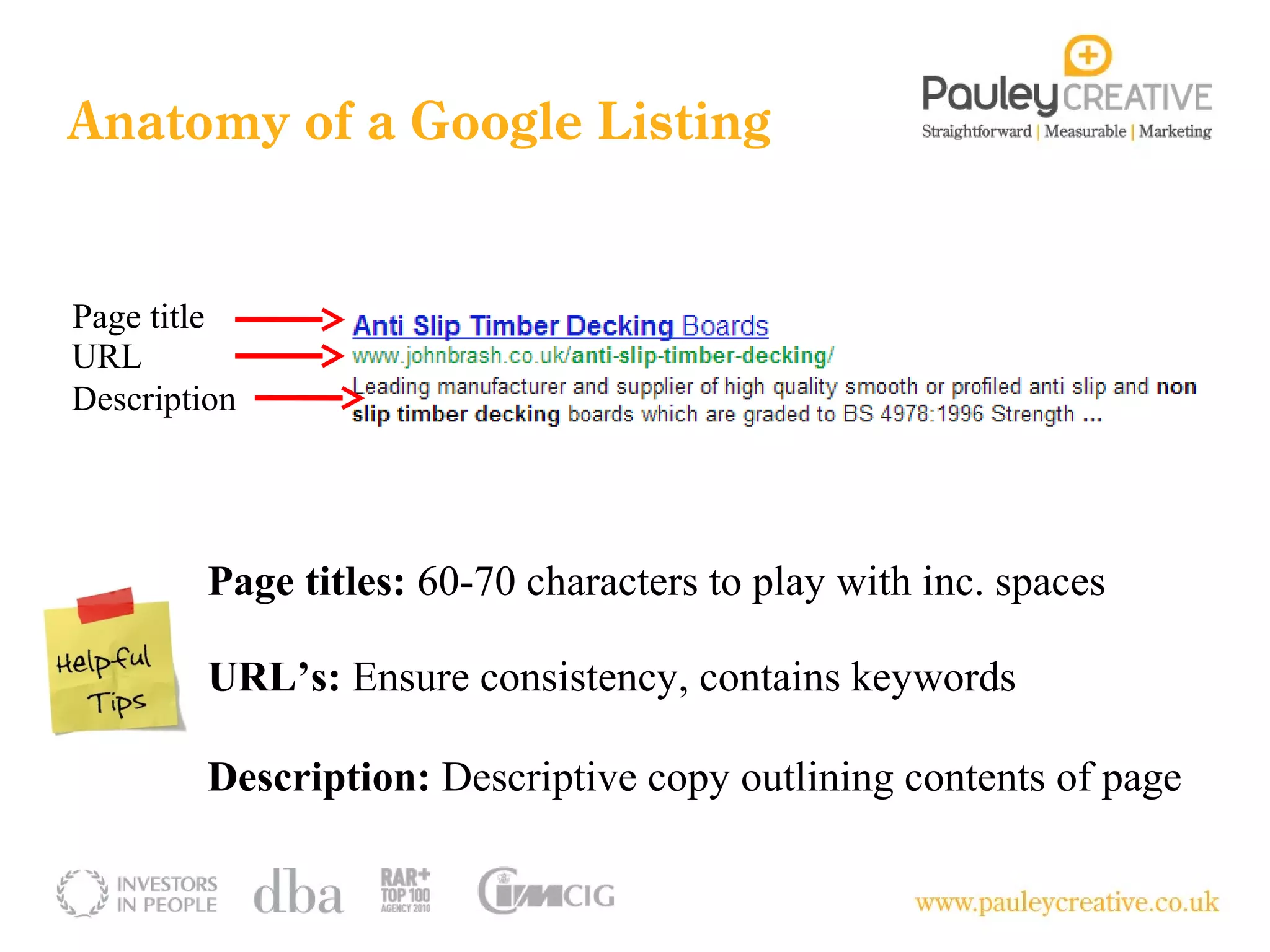
Anatomy of a Google Listing


Page title
URL
Description


         Page titles: 60-70 characters to play with inc. spaces

         URL’s: Ensure consistency, contains keywords

         Description: Descriptive copy outlining contents of page
7 things you can do today to check if
 your website has the basics of SEO
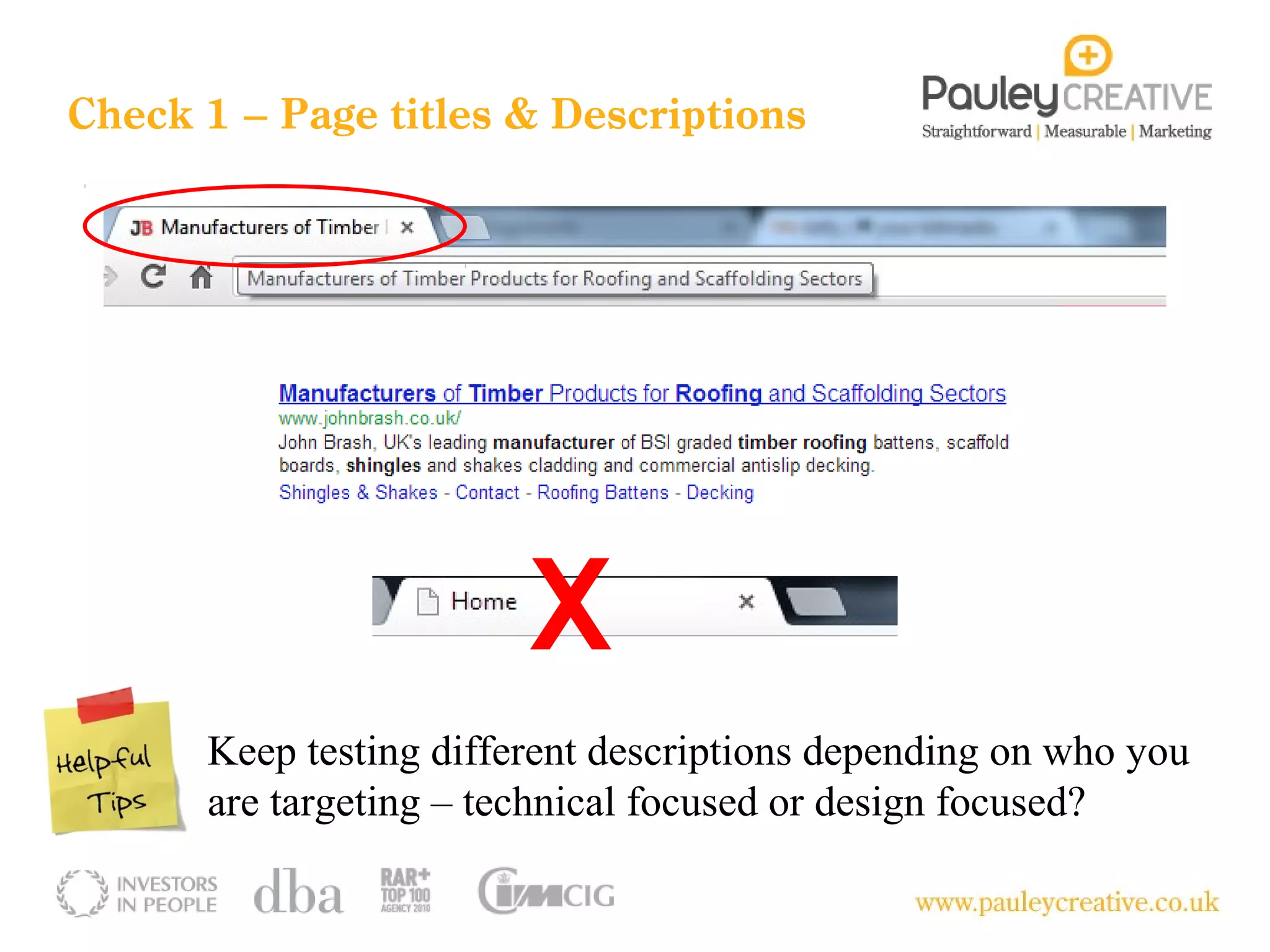
Check 1 – Page titles & Descriptions


                        X
      Keep testing different descriptions depending on who you
      are targeting – technical focused or design focused?
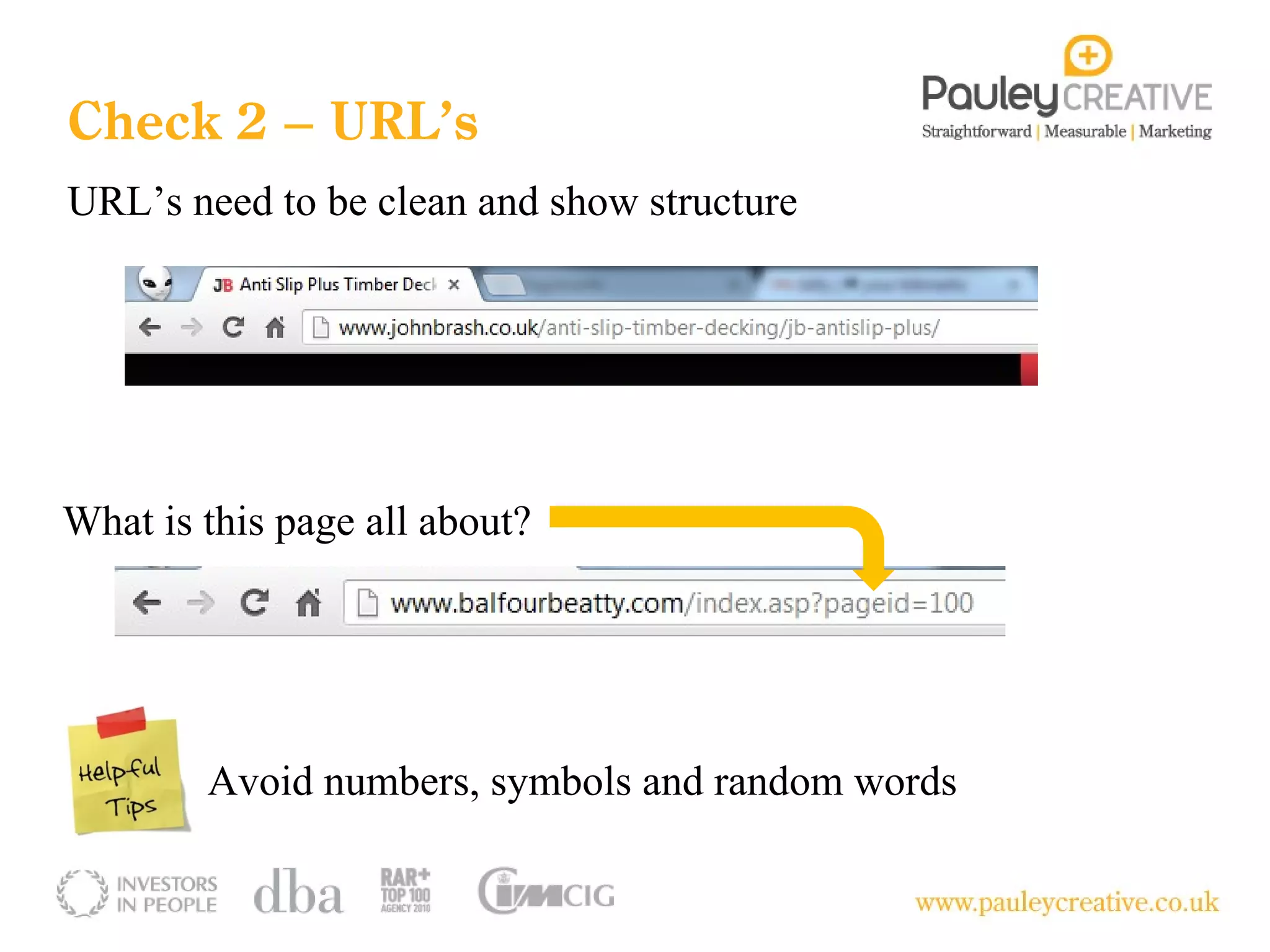
Check 2 – URL’s
URL’s need to be clean and show structure


What is this page all about?


        Avoid numbers, symbols and random words
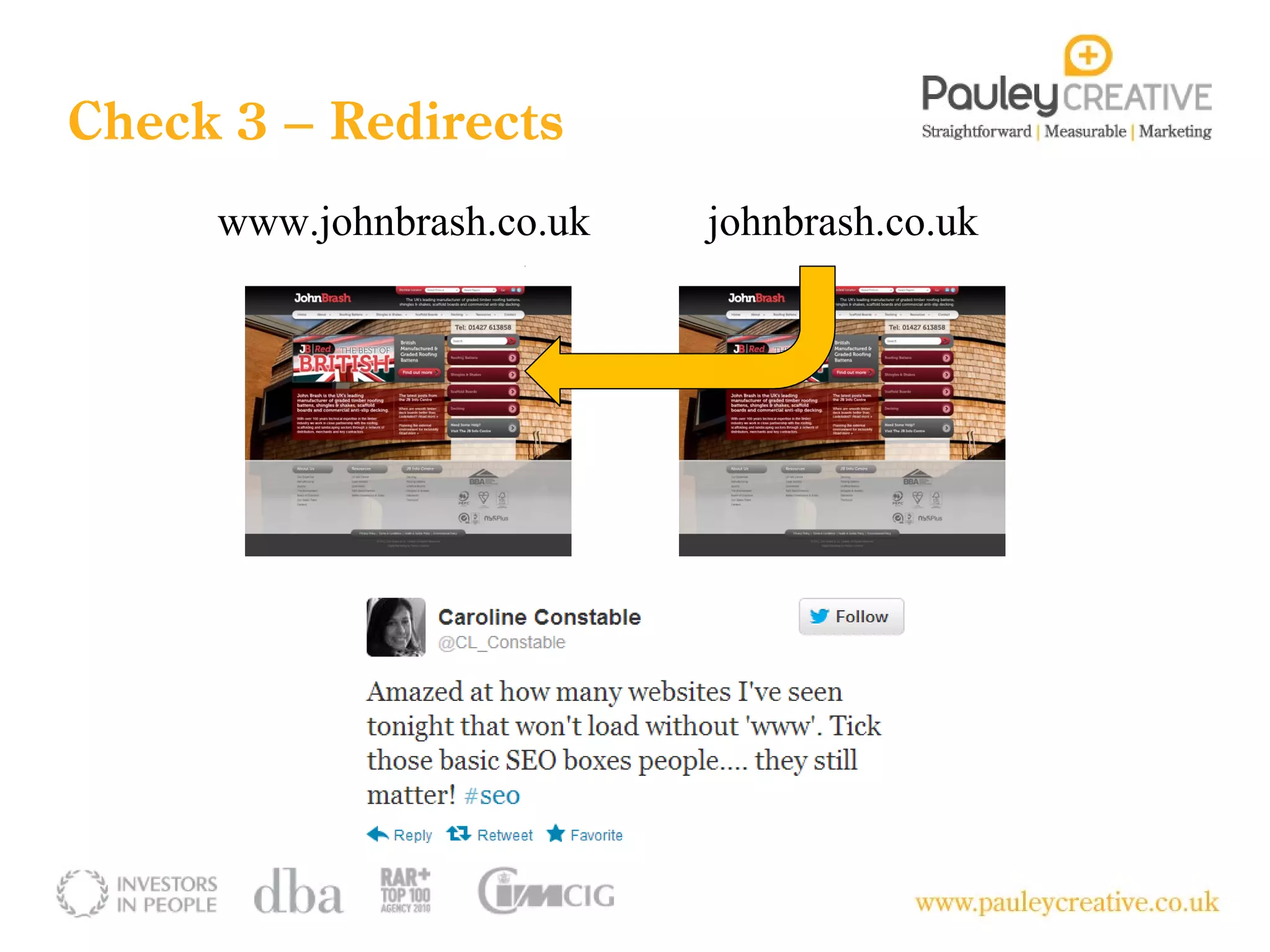
Check 3 – Redirects
     www.johnbrash.co.uk   johnbrash.co.uk
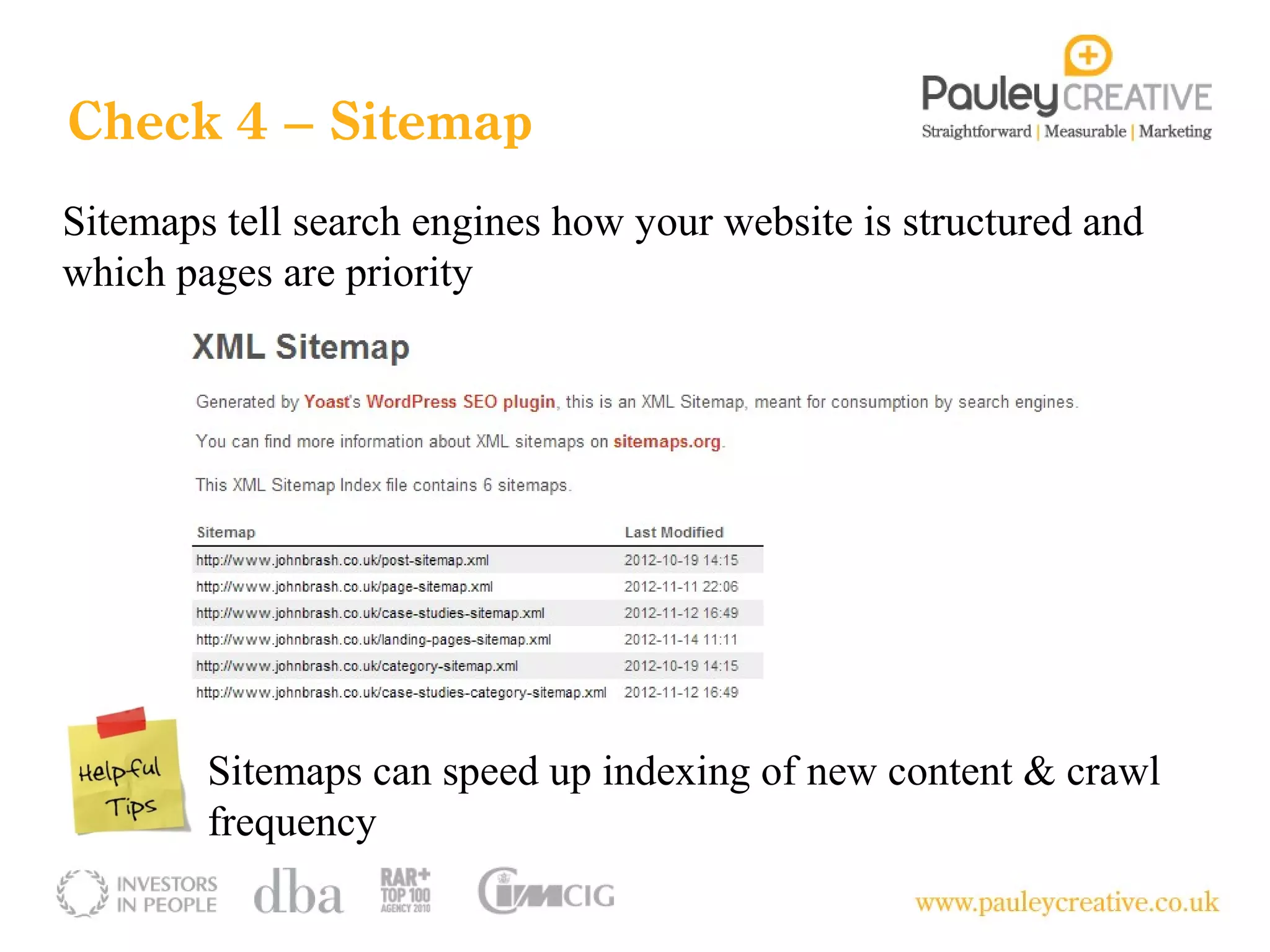
Check 4 – Sitemap
Sitemaps tell search engines how your website is structured and
which pages are priority


        Sitemaps can speed up indexing of new content & crawl
        frequency
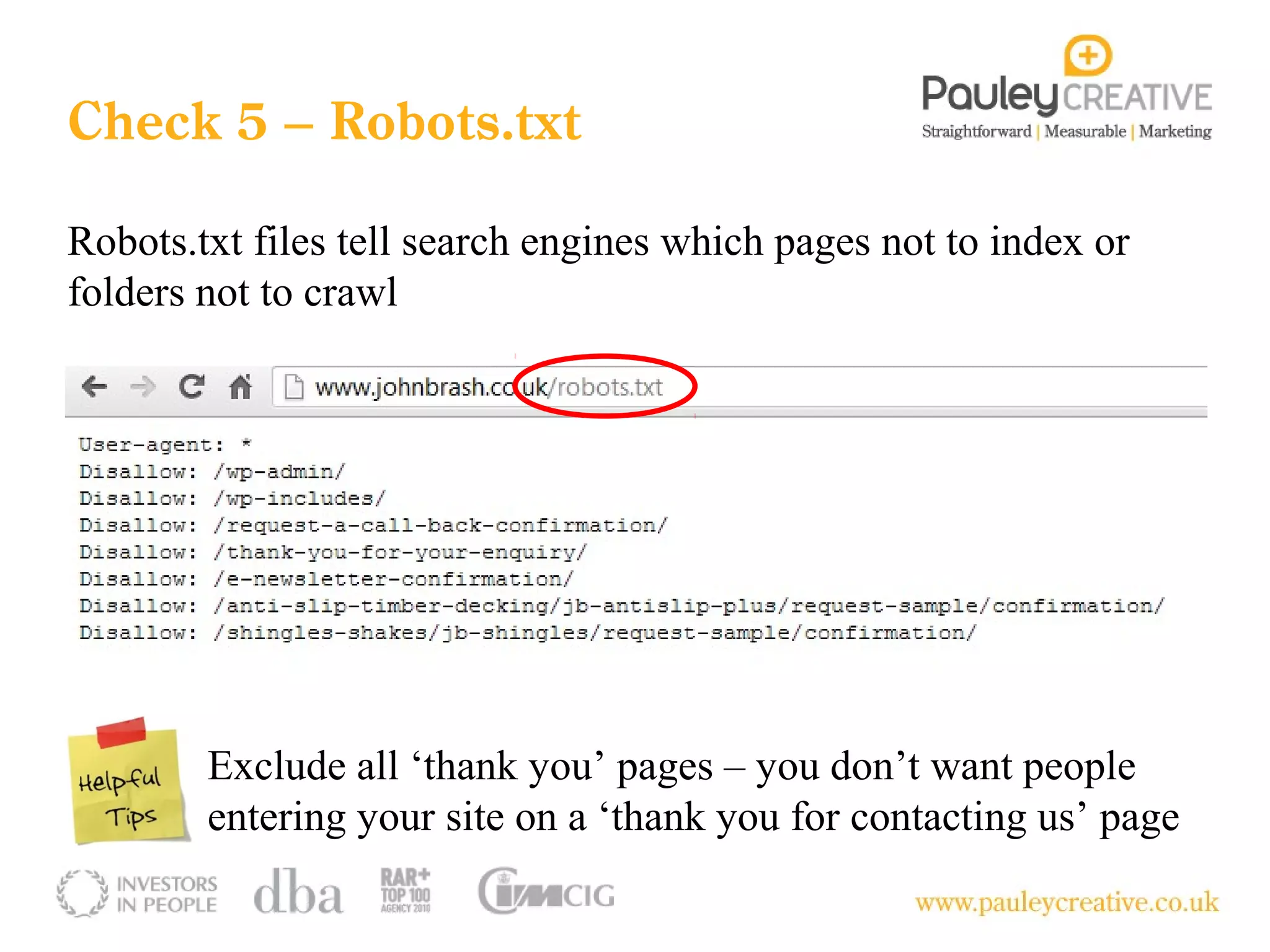
Check 5 – Robots.txt

Robots.txt files tell search engines which pages not to index or
folders not to crawl


        Exclude all ‘thank you’ pages – you don’t want people
        entering your site on a ‘thank you for contacting us’ page
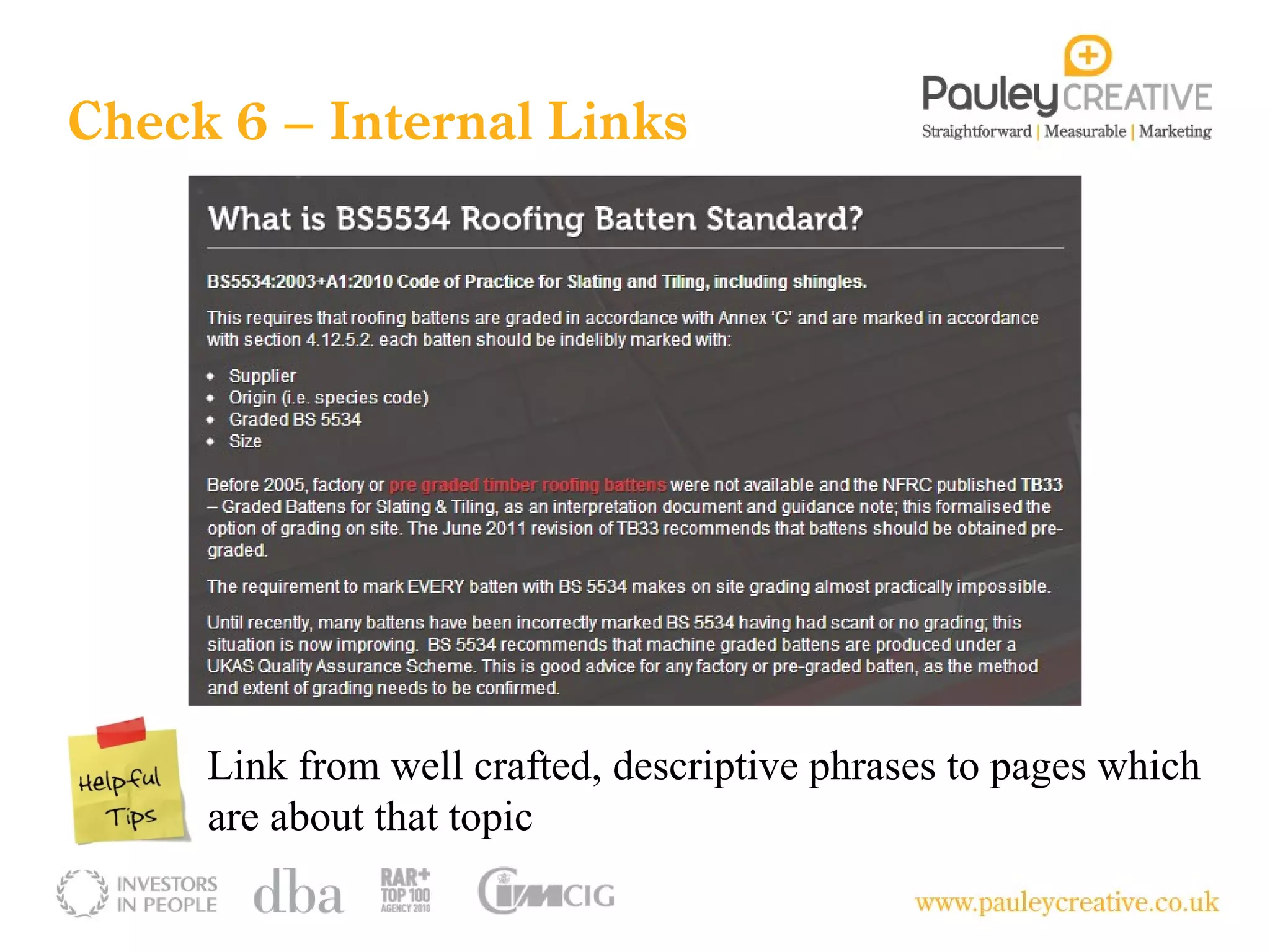
Check 6 – Internal Links


     Link from well crafted, descriptive phrases to pages which
     are about that topic
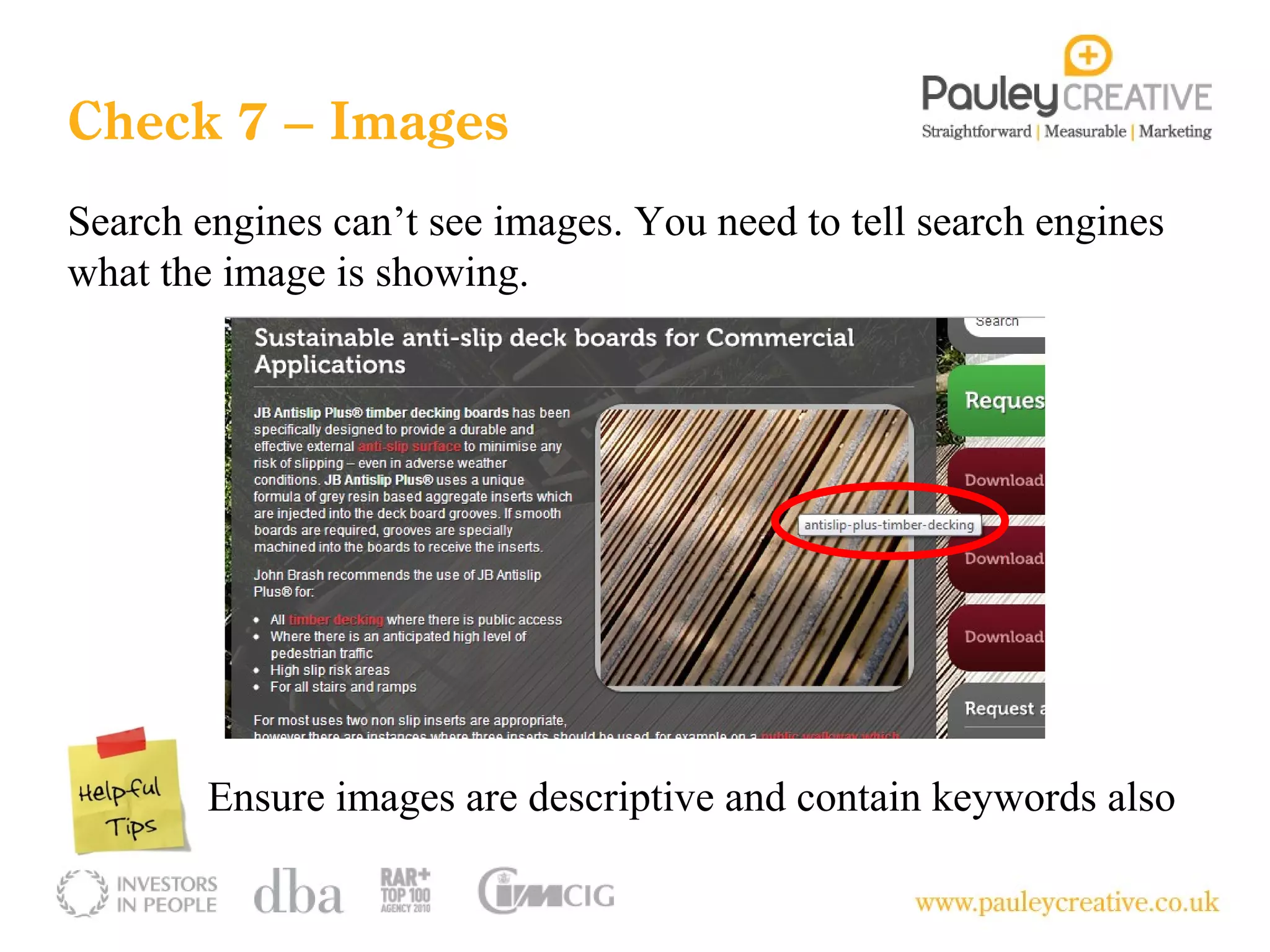
Check 7 – Images
Search engines can’t see images. You need to tell search engines
what the image is showing.


        Ensure images are descriptive and contain keywords also
Summary
1. Page titles, descriptions and headers are descriptive

2. URL’s are clean and well structured

3. Redirects are in place – www and non-www’s

4. Sitemap is present, no error occurs or 404 page

5. Robots.txt file is found, no error page

6. Body copy on every page has 2-3 internal links to other key pages

7. Images have descriptive ‘alt tags’ & contain keywords
Let’s do those 7 things on a site
Questions to Ask
  Will my CMS allow me               What are my top 10 non-
  to change page titles,             branded search terms for
  descriptions and headers           traffic and enquiries/sign
  without affecting other            ups/downloads?
  elements of the page?


          Where are the                      Who are my competitors
          opportunities for growth           online and what can you
          and how will we do it?             tell me about their SEO
                                             efforts?
Measurement

Measure SEO using the following metrics:

   Traffic from non-branded search terms

   # of search terms (total)

   # of non-branded search terms

   # of website goals generated from non-brand search traffic

  Search Engine Rankings (only panic if your ranking drops by >10 listings)
Measurement
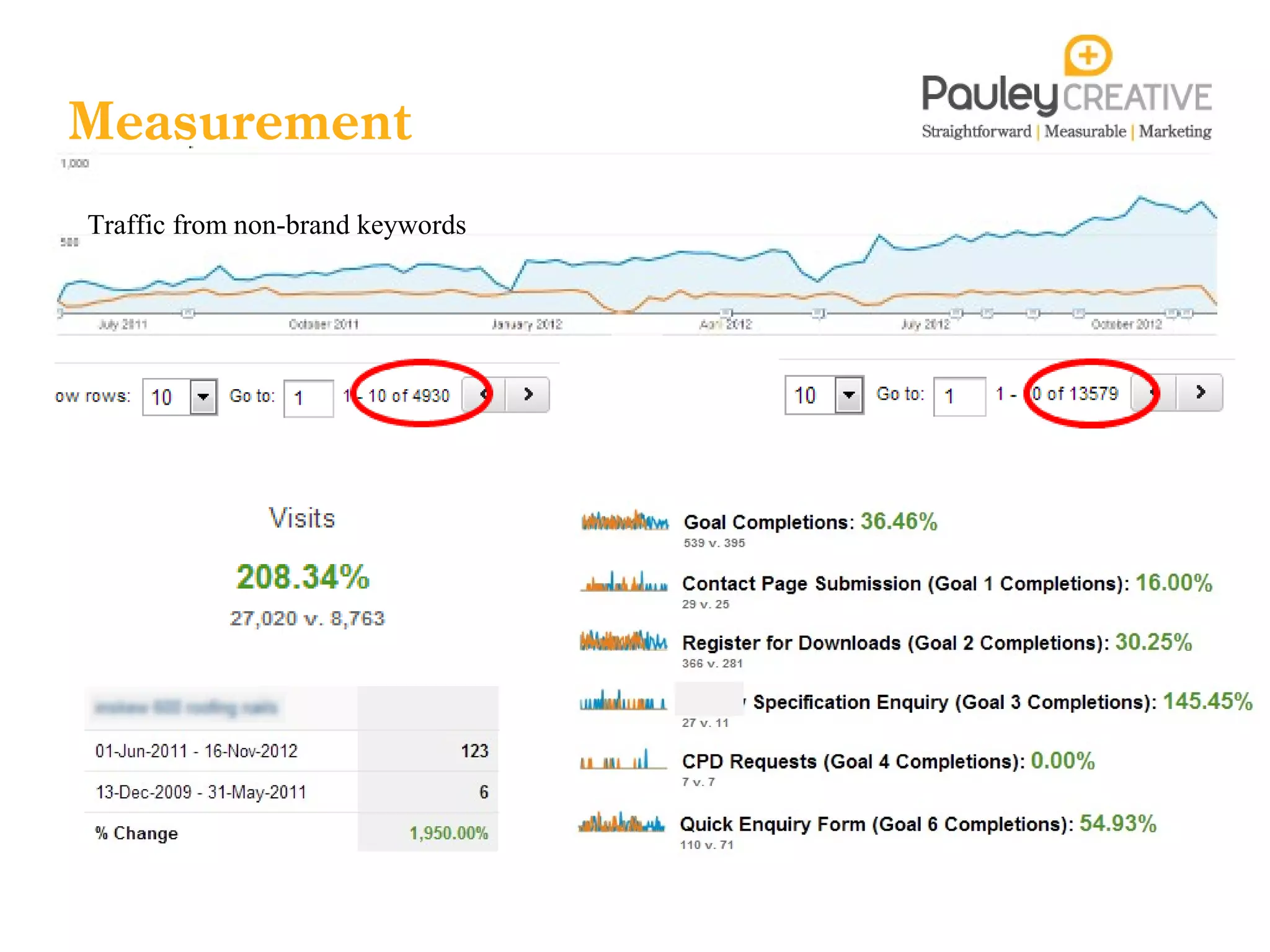
Traffic from non-brand keywords
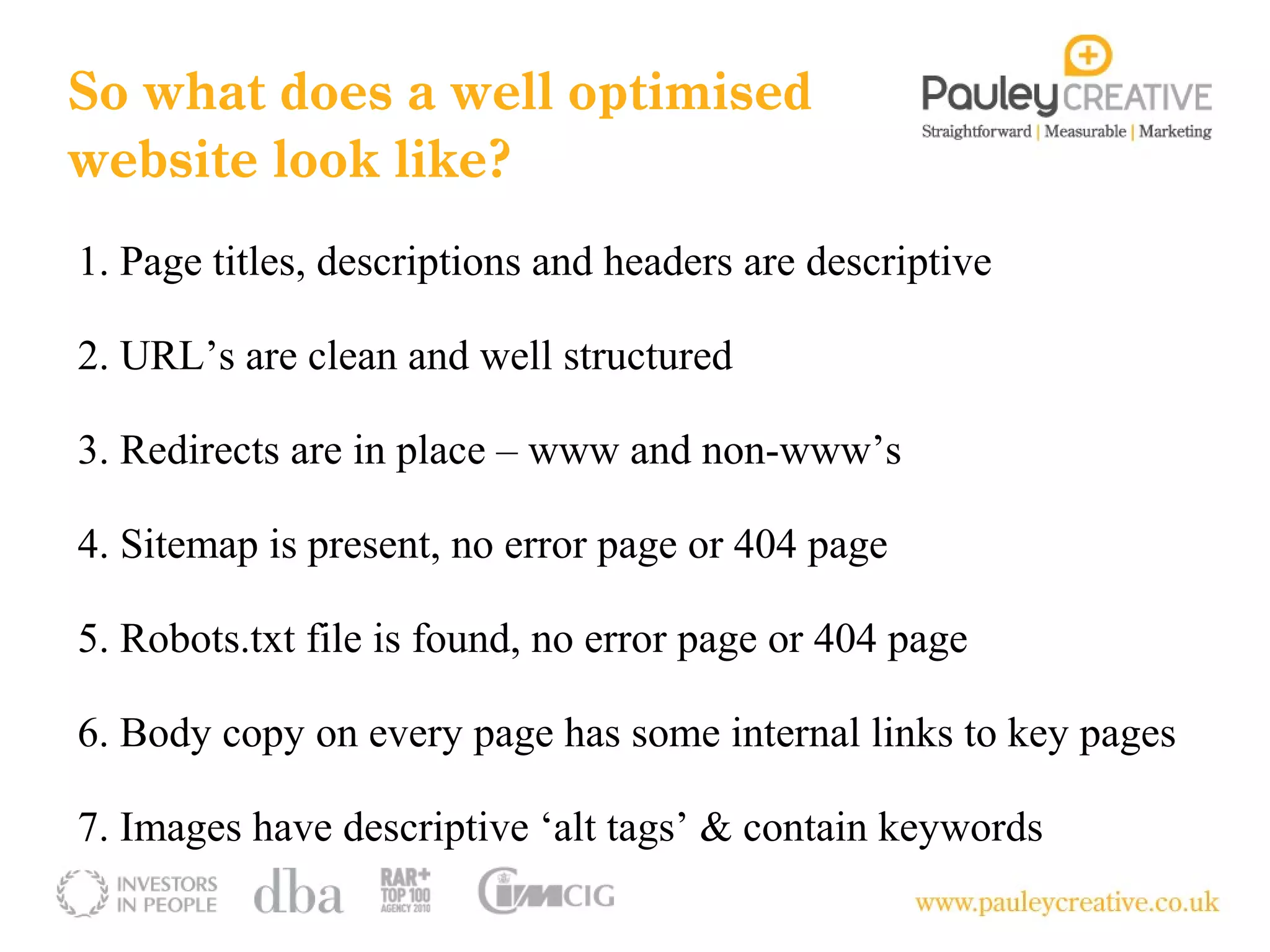
So what does a well optimised
website look like?
1. Page titles, descriptions and headers are descriptive

2. URL’s are clean and well structured

3. Redirects are in place – www and non-www’s

4. Sitemap is present, no error page or 404 page

5. Robots.txt file is found, no error page or 404 page

6. Body copy on every page has some internal links to key pages

7. Images have descriptive ‘alt tags’ & contain keywords
Any Questions…

                 @priteshpatel9

                 /priteshpatel9
                 /pauley-creative
                 pritesh.patel@pauleycreative.co.uk
                 /pauleycreative
                 www.pauleycreative.co.uk/blog

What does good SEO look like?

  • 1.
    What does goodSEO look like on a website?
  • 2.
    Pritesh Patel Digital Marketing Manager 7 years working for product manufacturers, 2.5 years agency side Responsible for auditing, strategy planning and measuring performance
  • 3.
    What is SEO? SEOis a process – process for affecting the visibility of a website or webpage in search engines natural listings
  • 4.
    Objectives for SEO Togrow and generate better quality traffic to our site from non-branded search terms (raise brand awareness) To diversify our range of keywords to target topics, markets or themes such as Green Deal, CFSH, Contemporary Architecture or BSXXXX
  • 5.
  • 6.
    Anatomy of aGoogle Listing Page title URL Description Page titles: 60-70 characters to play with inc. spaces URL’s: Ensure consistency, contains keywords Description: Descriptive copy outlining contents of page
  • 7.
    7 things youcan do today to check if your website has the basics of SEO
  • 8.
    Check 1 –Page titles & Descriptions X Keep testing different descriptions depending on who you are targeting – technical focused or design focused?
  • 9.
    Check 2 –URL’s URL’s need to be clean and show structure What is this page all about? Avoid numbers, symbols and random words
  • 10.
    Check 3 –Redirects www.johnbrash.co.uk johnbrash.co.uk
  • 11.
    Check 4 –Sitemap Sitemaps tell search engines how your website is structured and which pages are priority Sitemaps can speed up indexing of new content & crawl frequency
  • 12.
    Check 5 –Robots.txt Robots.txt files tell search engines which pages not to index or folders not to crawl Exclude all ‘thank you’ pages – you don’t want people entering your site on a ‘thank you for contacting us’ page
  • 13.
    Check 6 –Internal Links Link from well crafted, descriptive phrases to pages which are about that topic
  • 14.
    Check 7 –Images Search engines can’t see images. You need to tell search engines what the image is showing. Ensure images are descriptive and contain keywords also
  • 15.
    Summary 1. Page titles,descriptions and headers are descriptive 2. URL’s are clean and well structured 3. Redirects are in place – www and non-www’s 4. Sitemap is present, no error occurs or 404 page 5. Robots.txt file is found, no error page 6. Body copy on every page has 2-3 internal links to other key pages 7. Images have descriptive ‘alt tags’ & contain keywords
  • 16.
    Let’s do those7 things on a site
  • 17.
    Questions to Ask Will my CMS allow me What are my top 10 non- to change page titles, branded search terms for descriptions and headers traffic and enquiries/sign without affecting other ups/downloads? elements of the page? Where are the Who are my competitors opportunities for growth online and what can you and how will we do it? tell me about their SEO efforts?
  • 18.
    Measurement Measure SEO usingthe following metrics: Traffic from non-branded search terms # of search terms (total) # of non-branded search terms # of website goals generated from non-brand search traffic Search Engine Rankings (only panic if your ranking drops by >10 listings)
  • 19.
  • 20.
    So what doesa well optimised website look like? 1. Page titles, descriptions and headers are descriptive 2. URL’s are clean and well structured 3. Redirects are in place – www and non-www’s 4. Sitemap is present, no error page or 404 page 5. Robots.txt file is found, no error page or 404 page 6. Body copy on every page has some internal links to key pages 7. Images have descriptive ‘alt tags’ & contain keywords
  • 21.
    Any Questions… @priteshpatel9 /priteshpatel9 /pauley-creative pritesh.patel@pauleycreative.co.uk /pauleycreative www.pauleycreative.co.uk/blog

Editor's Notes

  • #2 Welcome folks Why doing this webinar…..give you 7 quick things you can check to see if your website (and your competitors) have any SEO signals.
  • #4 SEO is a process Starts of with understanding your audience, key behaviours, information needs. Choosing the right keywords – measuring Optimise the site Off page is SEO away from your website – in the main its link building Reporting which we’ll cover later on And then reviewing – are the keywords we chose working? Any other opportunities we have discovered?
  • #5 SEO can be used for increasing visibility in order to increase traffic to the website Utimately you also
  • #7 Elements of a Google listing Page title is a key on-site ranking factor – how descriptive and relevant is the page title to the users search term ? URLs Description – acts as a snippet of what’s on the following page – brief overview.
  • #9 Page titles appear at the top of the browser In the code of the website Appears as the blue text on a listing Test different descriptions to see which descriptions increase traffic – maybe one that is written with a specifier in mind gets more traffic than a homeowner. These elements should be controlled by your CMS
  • #10 URL’s need to be clean, structured and contain keywords – don’t stuff Example of a bad URL – no indication of what the page is about
  • #11 Quite complex this one. Canonicalization is the process of picking the best url when there are several choices, and it usually refers to home pages. Essentially what we are doing is to see if a redirect is in place from the non-www. to the www. version of the website. This tells SE’s which one is preferred Johnbrash.co.uk is a homepage www.johnbrash.co.uk is a homepage too So is www.johnbrash.co.uk/index.html Essentially, it’s the same content on two different domains according to search engines.
  • #12 A sitemap tells search engines how your website is structured and all the pages on your site A sitemap is submitted to search engines and they use this to crawl the website Not all of the website is crawled all of the time – some pages may never get discovered. Check if your website has a sitemap by typing /sitemap.xml or /sitem_index.xml for WP sites
  • #13 Robots.txt files tell search engines which pages and folders in your site not to crawl and index. Security and accessibility. Don’t want people coming in on a confirmation page – thank you for registering.
  • #14 Internal links is another important on-site ranking factor Use descriptive phrases to link to other key pages Helps search engines find and connect relevant pages together
  • #15 Images need to be optimised also. Google can’t see remember – it can read though. So all of your images need to have descriptive ‘alt tags’ which are the tags images use to describe what the image is about/shown Some visually minded people may search using Google images – architects, landscapers, interior designers.
  • #18 If you’re planning a new site – you need to have full control over page titles Ensure the website is well structured and there is a clear hierarchy of categories and products Ensure you know what the opportunities are for growth – sometimes some phrases just don’t work out so you need to change course Knowing who your competition is online – not the same as competition offline – and learn about why they are there in the results pages. Are you competing against e-commerce sites aimed at the residential market?