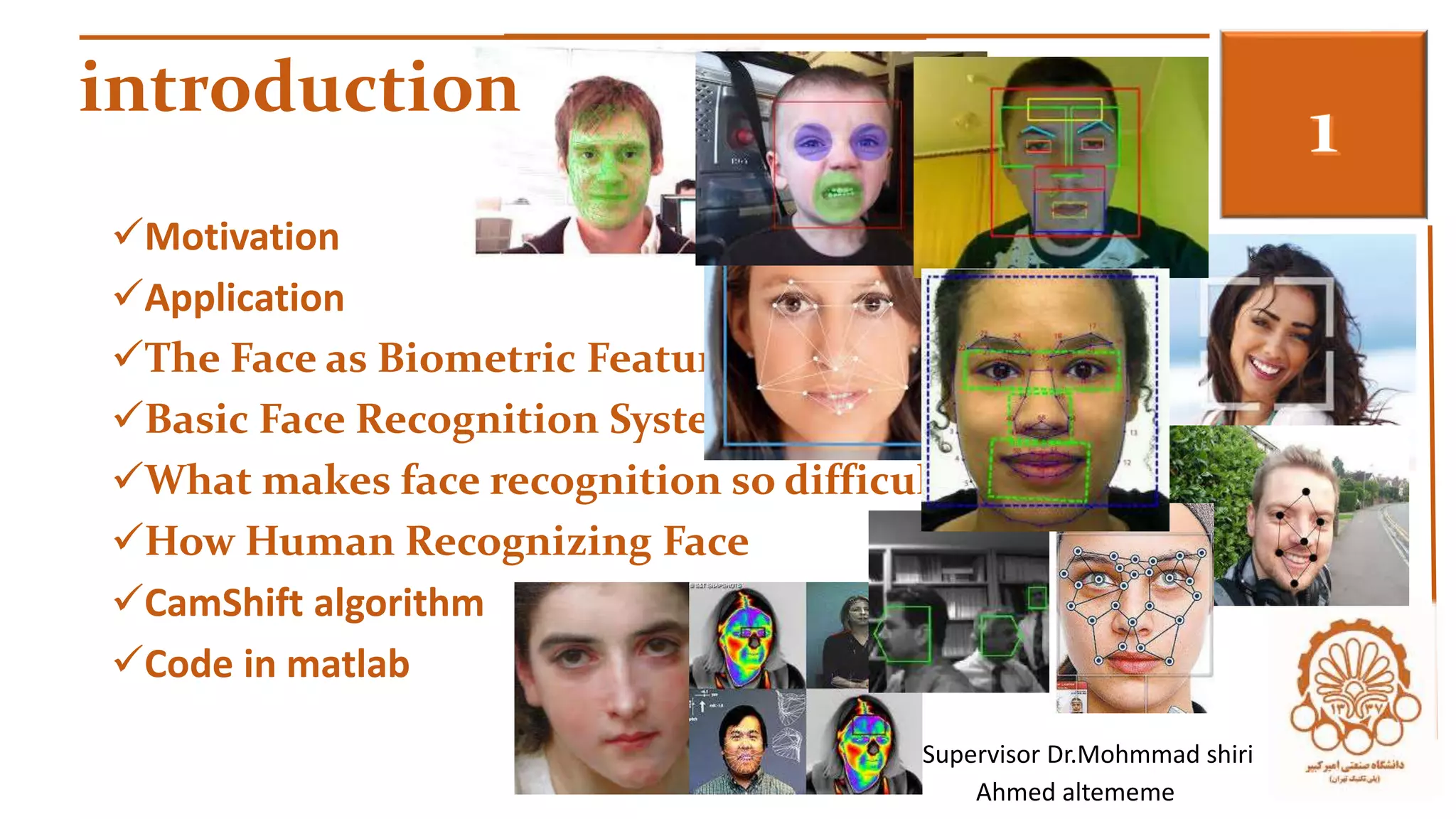


introduction 3 
Motivation 
Application 
The Face as Biometric Feature 
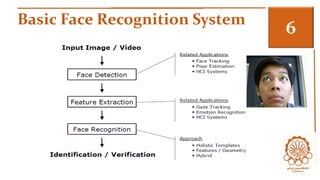
Basic Face Recognition System 
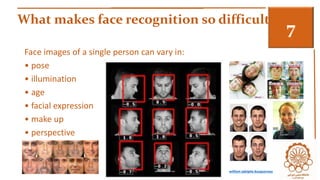
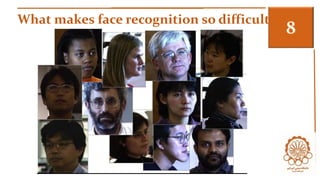
What makes face recognition so difficult ? 
How Human Recognizing Face 
CamShift algorithm 
Code in matlab 
Supervisor Dr.Mohmmad shiri 
Ahmed altememe
Motivation 3 
In any object recognition system, there are two major problems 
that need to be solved : 
that of detecting the object in a scene 
 that of recognizing it. 
 General challenge for Computer Vision 
Faces are highly variable.
Applications 3 
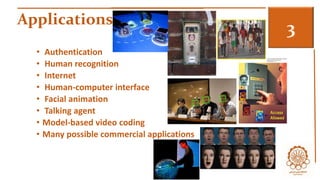
• Authentication 
• Human recognition 
• Internet 
• Human-computer interface 
• Facial animation 
• Talking agent 
• Model-based video coding 
• Many possible commercial applications
Applications etc.. 3 
Entertainment: 
Video Game / Virtual Reality / Training Programs/Human-Computer-Interaction / 
Human-Robotics / Family Photo Album / Virtual Makeup 
Smart Cards: 
Drivers’ Licenses / Passports / Voter Registrations /Entitlement Programs / Welfare 
Fraud /Information TV Parental control / Desktop Logon / 
Security : 
Personal Device (Cell phone etc) Logon /Medical Records / Internet Access 
Law Enforcement Advanced Video & Surveillance : 
CCTV Control Shoplifting / Drug Trafficking / Portal Control
The Face as Biometric Feature 3 
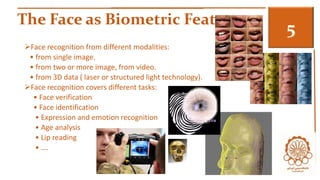
Face recognition from different modalities: 
• from single image. 
• from two or more image, from video. 
• from 3D data ( laser or structured light technology). 
Face recognition covers different tasks: 
• Face verification 
• Face identification 
• Expression and emotion recognition 
• Age analysis 
• Lip reading 
• ….
Basic Face Recognition System 3
What makes face recognition so difficult ? 3 
Face images of a single person can vary in: 
• pose 
• illumination 
• age 
• facial expression 
• make up 
• perspective 
william adolphe bouguereau
What makes face recognition so difficult ? 3
3
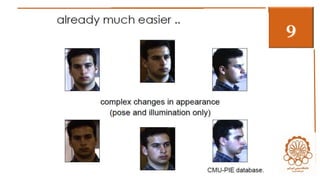
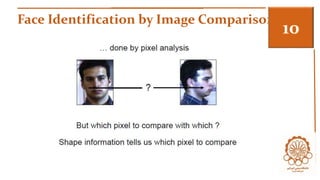
Face Identification by Image Comparison3
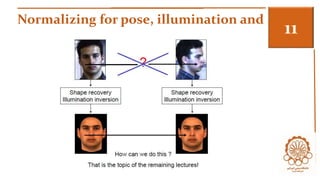
Normalizing for pose, illumination and …3
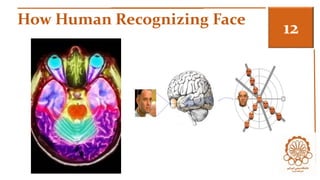
How Human Recognizing Face 3
3 
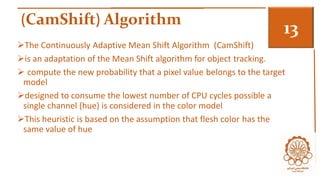
(CamShift) Algorithm
(CamShift) Algorithm 
3 
The Continuously Adaptive Mean Shift Algorithm (CamShift) 
is an adaptation of the Mean Shift algorithm for object tracking. 
 compute the new probability that a pixel value belongs to the target 
model 
designed to consume the lowest number of CPU cycles possible a 
single channel (hue) is considered in the color model 
This heuristic is based on the assumption that flesh color has the 
same value of hue
Difficulty 3 
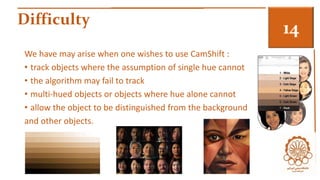
We have may arise when one wishes to use CamShift : 
• track objects where the assumption of single hue cannot 
• the algorithm may fail to track 
• multi-hued objects or objects where hue alone cannot 
• allow the object to be distinguished from the background 
and other objects.
The Mean Shift Algorithm 3 
History for evolution the algorithm 
The Mean Shift algorithm is a robust, non-parametric 
technique that climbs the gradient of a probability distribution to find 
the mode (peak) of the distribution (Fukunaga, 1990). 
problem of mode seeking Cheng (1995). 
Particle filtering based on color distributions and Mean Shift is 
described and extended Isard and Blake (1998 
 is primarily intended to perform efficient head and face tracking in a 
perceptual user interface (Bradski,1998)
Compare between CAMshift and meam 3 
• uses continuously adaptive probability distributions that may be 
recomputed for each frame) 
• while Mean Shift : is based on static distributions, which are not 
updated 
• unless the target experiences significant changes in shape, size or 
color.
Algorithm CAMshift 3 1. Set the region of interest (ROI) of the probability distribution 
image to the entire image. 
2. Select an initial location of the Mean Shift search window. 
The selected location is the target distribution to be tracked. 
3. Calculate a color probability distribution of the region centred at the Mean 
Shift search window. 
4. Iterate Mean Shift algorithm to find the centroid of the probability image. 
Store the zero moment (distribution area) and centroid location. 
5. For the following frame, center the search window at the mean location 
found in Step 4 and set the window size to a function of the zero moment. 
Go to Step 3
Some Definition 3 
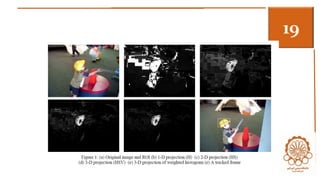
• Histogram Back-Projection: is a primitive operation that associates the 
pixel values in the image with the value of the corresponding histogram 
bin 
• Mass Centre Calculation: 
• implemented by continually recomputing new values of (xc, yc) for the 
window position computed in the previous frame until there is no 
significant shift in position. 
• The maximum number of Mean Shift iterations is usually taken to be 10-20 
iterations. 
• Moments to determine the scale and orientation of a distribution in 
robot and computer vision is described in Horn (1986). 
• for head and face orientation and tracking (Bradski, 1998)
3
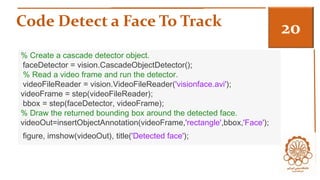
Code Detect a Face To Track 3 
% Create a cascade detector object. 
faceDetector = vision.CascadeObjectDetector(); 
% Read a video frame and run the detector. 
videoFileReader = vision.VideoFileReader('visionface.avi'); 
videoFrame = step(videoFileReader); 
bbox = step(faceDetector, videoFrame); 
% Draw the returned bounding box around the detected face. 
videoOut=insertObjectAnnotation(videoFrame,'rectangle',bbox,'Face'); 
figure, imshow(videoOut), title('Detected face');
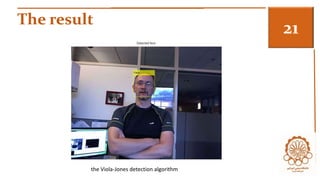
The result 3 
the Viola-Jones detection algorithm
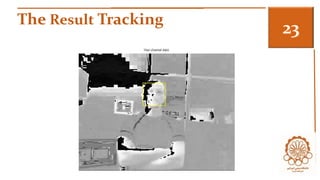
Step 2: Identify Facial Features To Track 3 
% Get the skin tone information by extracting the Hue from the video frame 
% converted to the HSV color space. 
[hueChannel,~,~] = rgb2hsv(videoFrame); 
% Display the Hue Channel data and draw the bounding box around the 
face. 
figure, imshow(hueChannel), title('Hue channel data'); 
rectangle('Position',bbox(1,:),'LineWidth',2,'EdgeColor',[1 1 0])
The Result Tracking 3
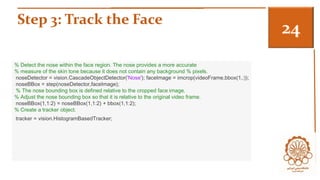
Step 3: Track the Face 3 
% Detect the nose within the face region. The nose provides a more accurate 
% measure of the skin tone because it does not contain any background % pixels. 
noseDetector = vision.CascadeObjectDetector('Nose'); faceImage = imcrop(videoFrame,bbox(1,:)); 
noseBBox = step(noseDetector,faceImage); 
% The nose bounding box is defined relative to the cropped face image. 
% Adjust the nose bounding box so that it is relative to the original video frame. 
noseBBox(1,1:2) = noseBBox(1,1:2) + bbox(1,1:2); 
% Create a tracker object. 
tracker = vision.HistogramBasedTracker;
Summary For example 3 
• We created a simple face tracking system that automatically detects 
and tracks a single face. 
• Try changing the input video and see 
• if you are able to track a face. 
• If you notice poor tracking results, 
• check the Hue channel data to see 
• If there is enough contrast between the face region and the 
background.
References 3 
Intel Corporation (2001): Open Source Computer Vision Library Reference 
Manual, 123456-001 
Comaniciu, D. and Meer, P. (1996): Robust Analysis of Feature Spaces: Color 
Image Segmentation. CVPR’97, pp. 750-755.and Gesture Recognition, pp. 176- 
181, 1996. 
Fukunaga, K. (1990): Introduction to Statistical Pattern Recognition, 2nd Edition. 
Academic Press, New York, 1990. 
Cheng, Y. (1995): Mean shift, mode seeking, and clustering, IEEE Trans. Pattern 
Anal. Machine Intell., 17:790-799, 1995. 
Comaniciu, D., Ramesh, V. and Meer, P: (2003): Kernel-Based Object Tracking, 
IEEE Trans. Pattern Analysis Machine Intell., Vol. 25, No. 5, 564-575, 2003 
http://www.mathworks.com/help/vision/examples/face-detection-and-tracking-using- 
camshift.html
Questions & 
Thank you for listing

Camshaft

  • 1.
    introduction 3 Motivation Application The Face as Biometric Feature Basic Face Recognition System What makes face recognition so difficult ? How Human Recognizing Face CamShift algorithm Code in matlab Supervisor Dr.Mohmmad shiri Ahmed altememe
  • 2.
    Motivation 3 Inany object recognition system, there are two major problems that need to be solved : that of detecting the object in a scene  that of recognizing it.  General challenge for Computer Vision Faces are highly variable.
  • 3.
    Applications 3 •Authentication • Human recognition • Internet • Human-computer interface • Facial animation • Talking agent • Model-based video coding • Many possible commercial applications
  • 4.
    Applications etc.. 3 Entertainment: Video Game / Virtual Reality / Training Programs/Human-Computer-Interaction / Human-Robotics / Family Photo Album / Virtual Makeup Smart Cards: Drivers’ Licenses / Passports / Voter Registrations /Entitlement Programs / Welfare Fraud /Information TV Parental control / Desktop Logon / Security : Personal Device (Cell phone etc) Logon /Medical Records / Internet Access Law Enforcement Advanced Video & Surveillance : CCTV Control Shoplifting / Drug Trafficking / Portal Control
  • 5.
    The Face asBiometric Feature 3 Face recognition from different modalities: • from single image. • from two or more image, from video. • from 3D data ( laser or structured light technology). Face recognition covers different tasks: • Face verification • Face identification • Expression and emotion recognition • Age analysis • Lip reading • ….
  • 6.
  • 7.
    What makes facerecognition so difficult ? 3 Face images of a single person can vary in: • pose • illumination • age • facial expression • make up • perspective william adolphe bouguereau
  • 8.
    What makes facerecognition so difficult ? 3
  • 9.
  • 10.
    Face Identification byImage Comparison3
  • 11.
    Normalizing for pose,illumination and …3
  • 12.
  • 13.
  • 14.
    (CamShift) Algorithm 3 The Continuously Adaptive Mean Shift Algorithm (CamShift) is an adaptation of the Mean Shift algorithm for object tracking.  compute the new probability that a pixel value belongs to the target model designed to consume the lowest number of CPU cycles possible a single channel (hue) is considered in the color model This heuristic is based on the assumption that flesh color has the same value of hue
  • 15.
    Difficulty 3 Wehave may arise when one wishes to use CamShift : • track objects where the assumption of single hue cannot • the algorithm may fail to track • multi-hued objects or objects where hue alone cannot • allow the object to be distinguished from the background and other objects.
  • 16.
    The Mean ShiftAlgorithm 3 History for evolution the algorithm The Mean Shift algorithm is a robust, non-parametric technique that climbs the gradient of a probability distribution to find the mode (peak) of the distribution (Fukunaga, 1990). problem of mode seeking Cheng (1995). Particle filtering based on color distributions and Mean Shift is described and extended Isard and Blake (1998  is primarily intended to perform efficient head and face tracking in a perceptual user interface (Bradski,1998)
  • 17.
    Compare between CAMshiftand meam 3 • uses continuously adaptive probability distributions that may be recomputed for each frame) • while Mean Shift : is based on static distributions, which are not updated • unless the target experiences significant changes in shape, size or color.
  • 18.
    Algorithm CAMshift 31. Set the region of interest (ROI) of the probability distribution image to the entire image. 2. Select an initial location of the Mean Shift search window. The selected location is the target distribution to be tracked. 3. Calculate a color probability distribution of the region centred at the Mean Shift search window. 4. Iterate Mean Shift algorithm to find the centroid of the probability image. Store the zero moment (distribution area) and centroid location. 5. For the following frame, center the search window at the mean location found in Step 4 and set the window size to a function of the zero moment. Go to Step 3
  • 19.
    Some Definition 3 • Histogram Back-Projection: is a primitive operation that associates the pixel values in the image with the value of the corresponding histogram bin • Mass Centre Calculation: • implemented by continually recomputing new values of (xc, yc) for the window position computed in the previous frame until there is no significant shift in position. • The maximum number of Mean Shift iterations is usually taken to be 10-20 iterations. • Moments to determine the scale and orientation of a distribution in robot and computer vision is described in Horn (1986). • for head and face orientation and tracking (Bradski, 1998)
  • 20.
  • 21.
    Code Detect aFace To Track 3 % Create a cascade detector object. faceDetector = vision.CascadeObjectDetector(); % Read a video frame and run the detector. videoFileReader = vision.VideoFileReader('visionface.avi'); videoFrame = step(videoFileReader); bbox = step(faceDetector, videoFrame); % Draw the returned bounding box around the detected face. videoOut=insertObjectAnnotation(videoFrame,'rectangle',bbox,'Face'); figure, imshow(videoOut), title('Detected face');
  • 22.
    The result 3 the Viola-Jones detection algorithm
  • 23.
    Step 2: IdentifyFacial Features To Track 3 % Get the skin tone information by extracting the Hue from the video frame % converted to the HSV color space. [hueChannel,~,~] = rgb2hsv(videoFrame); % Display the Hue Channel data and draw the bounding box around the face. figure, imshow(hueChannel), title('Hue channel data'); rectangle('Position',bbox(1,:),'LineWidth',2,'EdgeColor',[1 1 0])
  • 24.
  • 25.
    Step 3: Trackthe Face 3 % Detect the nose within the face region. The nose provides a more accurate % measure of the skin tone because it does not contain any background % pixels. noseDetector = vision.CascadeObjectDetector('Nose'); faceImage = imcrop(videoFrame,bbox(1,:)); noseBBox = step(noseDetector,faceImage); % The nose bounding box is defined relative to the cropped face image. % Adjust the nose bounding box so that it is relative to the original video frame. noseBBox(1,1:2) = noseBBox(1,1:2) + bbox(1,1:2); % Create a tracker object. tracker = vision.HistogramBasedTracker;
  • 26.
    Summary For example3 • We created a simple face tracking system that automatically detects and tracks a single face. • Try changing the input video and see • if you are able to track a face. • If you notice poor tracking results, • check the Hue channel data to see • If there is enough contrast between the face region and the background.
  • 27.
    References 3 IntelCorporation (2001): Open Source Computer Vision Library Reference Manual, 123456-001 Comaniciu, D. and Meer, P. (1996): Robust Analysis of Feature Spaces: Color Image Segmentation. CVPR’97, pp. 750-755.and Gesture Recognition, pp. 176- 181, 1996. Fukunaga, K. (1990): Introduction to Statistical Pattern Recognition, 2nd Edition. Academic Press, New York, 1990. Cheng, Y. (1995): Mean shift, mode seeking, and clustering, IEEE Trans. Pattern Anal. Machine Intell., 17:790-799, 1995. Comaniciu, D., Ramesh, V. and Meer, P: (2003): Kernel-Based Object Tracking, IEEE Trans. Pattern Analysis Machine Intell., Vol. 25, No. 5, 564-575, 2003 http://www.mathworks.com/help/vision/examples/face-detection-and-tracking-using- camshift.html
  • 28.
    Questions & Thankyou for listing