Outlines
 Introduction
 History
 Applications
 Types of comparisons
 Components of Face Recognition
 How Face Recognition works
 Face Recognition techniques
 Popular Face Recognition algorithms
 Databases
 Advantages and disadvantages
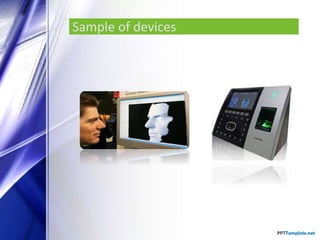
 Sample of devices
 Important things
 Conclusions
Introduction
 Facial recognition (or face recognition) is a type
of biometric software application that can identify a
specific individual in a digital image by analyzing and
comparing patterns This growth in electronic transactions
results in great demand for fast and accurate user
identification and authentication.
 Facial recognition systems are commonly used for security
purposes but are increasingly being used in a variety of
other applications. For example, Facebook uses facial
recognition software to help automate user tagging in
photographs.
History
 In 1960s, the first semi-automated system for facial
recognition to locate the features(such as eyes, ears,
nose and mouth) on the photographs.
 In 1970s, Goldstein and Harmon used 21 specific
subjective markers such as hair color and lip thickness to
automate the recognition.
 In 1988, Kirby and Sirovich used standard linear algebra
technique, to the face recognition
Applications
 Security/Counterterrorism. Access control, comparing
surveillance images to Know terrorist.
 Day Care: Verify identity of individuals picking up the
children.
 Residential Security: Alert homeowners of approaching
personnel
 Voter verification: Where eligible politicians are required
to verify their identity during a voting process this is
intended to stop voting where the vote may not go as
expected.
 Banking using ATM: The software is able to quickly verify
a customer’s face.
Types of comparisons
In Facial recognition there are two types of comparisons:-
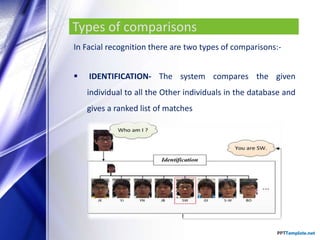
 IDENTIFICATION- The system compares the given
individual to all the Other individuals in the database and
gives a ranked list of matches
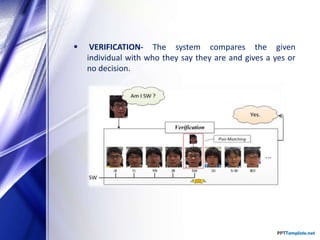
 VERIFICATION- The system compares the given
individual with who they say they are and gives a yes or
no decision.
Stages of identification
 Capture- Capture the behavioral and physical sample.
 Extraction- Unique data is extracted from the sample and
a template is created.
 Comparison- The template is compared with a new
sample.
 Match/non match- The system decides whether the new
samples are matched or not
 Accept/Project
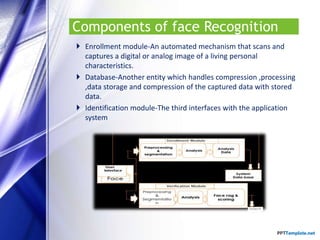
Components of face Recognition
 Enrollment module-An automated mechanism that scans and
captures a digital or analog image of a living personal
characteristics.
 Database-Another entity which handles compression ,processing
,data storage and compression of the captured data with stored
data.
 Identification module-The third interfaces with the application
system
How Face Recognition works
 Facial recognition software is based on the ability to first
recognize faces, which is a technological feat in itself.
 If you look at the mirror, you can see that your face has certain
distinguishable landmarks. These are the peaks and valleys that
make up the different facial features.
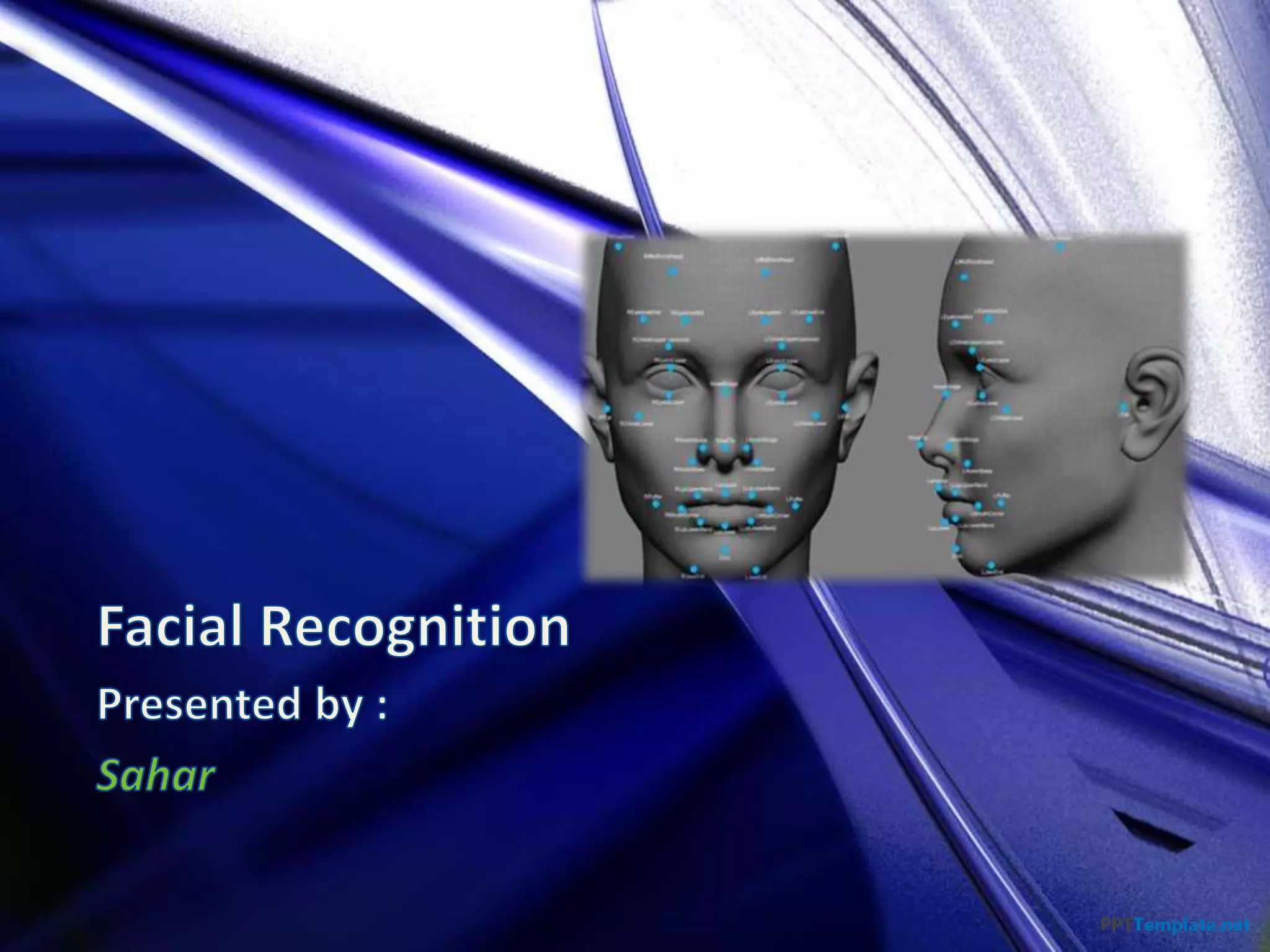
 There are about 80 nodal points on a human face.
 Here are few nodal points that are measured by the
software :
• Distance between the eyes
• Width of the nose
• Depth of the eye socket
• Cheekbones
• Jaw line and
• Chin
 Detection- when the system is attached to a video surveillance
system, the recognition software searches the field of view of a
video camera for faces. If there is a face in the view, it is
detected within a fraction of a second. A multi-scale algorithm is
used to search for faces in low resolution. The system switches
to a high-resolution search only after a head-like shape is
detected.
 Alignment- Once a face is detected, the system determines the
head's position, size and pose. A face needs to be turned at
least 35 degrees toward the camera for the system to register it.
 Normalization-The image of the head is scaled and rotated so
that it can be registered and mapped into an appropriate size and
pose. Normalization is performed regardless of the head's
location and distance from the camera. Light does not impact the
normalization process.
 Representation-The system translates the facial data into a
unique code. This coding process allows for easier comparison of
the newly acquired facial data to stored facial data.
 Matching- The newly acquired facial data is compared to the
stored data and (ideally) linked to at least one stored facial
representation.
Face Recognition Techniques
1 . Feature-based methods :Properties and geometric relations such
as the areas, distances, and angles between the facial feature
points are used as descriptors for face recognition.
Face Recognition Techniques
2 . Appearance-based methods: appearance-based methods
consider the global properties of the face image intensity pattern.
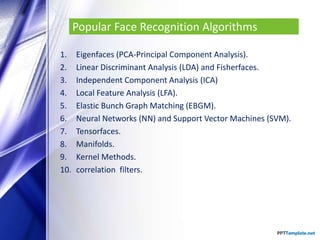
Popular Face Recognition Algorithms
1. Eigenfaces (PCA-Principal Component Analysis).
2. Linear Discriminant Analysis (LDA) and Fisherfaces.
3. Independent Component Analysis (ICA)
4. Local Feature Analysis (LFA).
5. Elastic Bunch Graph Matching (EBGM).
6. Neural Networks (NN) and Support Vector Machines (SVM).
7. Tensorfaces.
8. Manifolds.
9. Kernel Methods.
10. correlation filters.
Databases
There are several publicly available face databases for the research
community to use for algorithm development, which provide a standard
benchmark when reporting results.
• Face Recognition Grand Challenge (FRGC) database
• FERET database
• Pose Illumination Expression (PIE) data base
• AR database
• Yale Face database
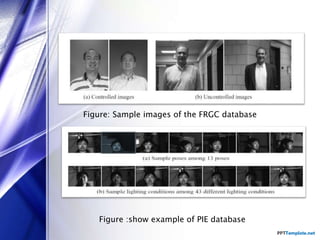
Figure: Sample images of the FRGC database
Figure :show example of PIE database
Advantages and Disadvantages
ADVANTAGES
• Convenient, social acceptability.
• More user friendly.
• Inexpensive technique of identification.
Advantages and Disadvantages
DISADVANTAGES
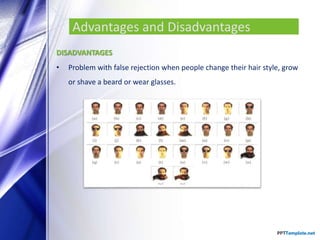
• Problem with false rejection when people change their hair style, grow
or shave a beard or wear glasses.
Advantages and Disadvantages
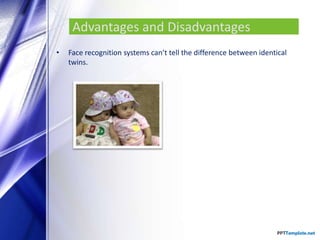
• Face recognition systems can’t tell the difference between identical
twins.
Advantages and Disadvantages
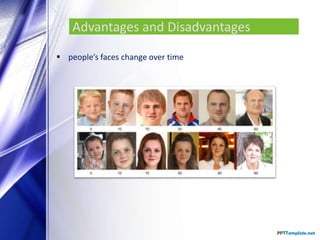
 people’s faces change over time
Sample of devices
Important things
 Cost : Face recognition is also one of the most inexpensive biometric in
the market .
 Easiest: It easy to use( camera take a picture ) .
 Authentication : It is authenticate because is it not use password(my be
forget ) or card ( my be loss) .
 Identification : It Identification from the face .
 Physiological and/or behavioral characteristics : It is Physiological
characteristics.
Important things
 Ability to applied: One of it applications is for attendance register.
 Community Acceptance: It is accepted because its Fast and convenient
in identifying a person , Great use in society.
 Automatic real time : System is online because the Verification Speed
less than one Second ( Real time ).
 Life cycle : database need update because human face changing.
 Maintenance requirement : maintenance for the hardware and
software .
Conclusion
Face recognition technologies have been associated generally with
very costly top secure applications. Today the core technologies have
evolved and the cost of equipment is going down dramatically due to
the integration and the increasing processing power. Certain
applications of face recognition technology are now cost effective,
reliable and highly accurate .
THANK YOU

Pattern recognition facial recognition

  • 2.
    Outlines  Introduction  History Applications  Types of comparisons  Components of Face Recognition  How Face Recognition works  Face Recognition techniques  Popular Face Recognition algorithms  Databases  Advantages and disadvantages  Sample of devices  Important things  Conclusions
  • 3.
    Introduction  Facial recognition(or face recognition) is a type of biometric software application that can identify a specific individual in a digital image by analyzing and comparing patterns This growth in electronic transactions results in great demand for fast and accurate user identification and authentication.  Facial recognition systems are commonly used for security purposes but are increasingly being used in a variety of other applications. For example, Facebook uses facial recognition software to help automate user tagging in photographs.
  • 4.
    History  In 1960s,the first semi-automated system for facial recognition to locate the features(such as eyes, ears, nose and mouth) on the photographs.  In 1970s, Goldstein and Harmon used 21 specific subjective markers such as hair color and lip thickness to automate the recognition.  In 1988, Kirby and Sirovich used standard linear algebra technique, to the face recognition
  • 5.
    Applications  Security/Counterterrorism. Accesscontrol, comparing surveillance images to Know terrorist.  Day Care: Verify identity of individuals picking up the children.  Residential Security: Alert homeowners of approaching personnel  Voter verification: Where eligible politicians are required to verify their identity during a voting process this is intended to stop voting where the vote may not go as expected.  Banking using ATM: The software is able to quickly verify a customer’s face.
  • 6.
    Types of comparisons InFacial recognition there are two types of comparisons:-  IDENTIFICATION- The system compares the given individual to all the Other individuals in the database and gives a ranked list of matches
  • 7.
     VERIFICATION- Thesystem compares the given individual with who they say they are and gives a yes or no decision.
  • 8.
    Stages of identification Capture- Capture the behavioral and physical sample.  Extraction- Unique data is extracted from the sample and a template is created.  Comparison- The template is compared with a new sample.  Match/non match- The system decides whether the new samples are matched or not  Accept/Project
  • 9.
    Components of faceRecognition  Enrollment module-An automated mechanism that scans and captures a digital or analog image of a living personal characteristics.  Database-Another entity which handles compression ,processing ,data storage and compression of the captured data with stored data.  Identification module-The third interfaces with the application system
  • 10.
    How Face Recognitionworks  Facial recognition software is based on the ability to first recognize faces, which is a technological feat in itself.  If you look at the mirror, you can see that your face has certain distinguishable landmarks. These are the peaks and valleys that make up the different facial features.  There are about 80 nodal points on a human face.
  • 11.
     Here arefew nodal points that are measured by the software : • Distance between the eyes • Width of the nose • Depth of the eye socket • Cheekbones • Jaw line and • Chin
  • 12.
     Detection- whenthe system is attached to a video surveillance system, the recognition software searches the field of view of a video camera for faces. If there is a face in the view, it is detected within a fraction of a second. A multi-scale algorithm is used to search for faces in low resolution. The system switches to a high-resolution search only after a head-like shape is detected.  Alignment- Once a face is detected, the system determines the head's position, size and pose. A face needs to be turned at least 35 degrees toward the camera for the system to register it.
  • 13.
     Normalization-The imageof the head is scaled and rotated so that it can be registered and mapped into an appropriate size and pose. Normalization is performed regardless of the head's location and distance from the camera. Light does not impact the normalization process.  Representation-The system translates the facial data into a unique code. This coding process allows for easier comparison of the newly acquired facial data to stored facial data.  Matching- The newly acquired facial data is compared to the stored data and (ideally) linked to at least one stored facial representation.
  • 14.
    Face Recognition Techniques 1. Feature-based methods :Properties and geometric relations such as the areas, distances, and angles between the facial feature points are used as descriptors for face recognition.
  • 15.
    Face Recognition Techniques 2. Appearance-based methods: appearance-based methods consider the global properties of the face image intensity pattern.
  • 16.
    Popular Face RecognitionAlgorithms 1. Eigenfaces (PCA-Principal Component Analysis). 2. Linear Discriminant Analysis (LDA) and Fisherfaces. 3. Independent Component Analysis (ICA) 4. Local Feature Analysis (LFA). 5. Elastic Bunch Graph Matching (EBGM). 6. Neural Networks (NN) and Support Vector Machines (SVM). 7. Tensorfaces. 8. Manifolds. 9. Kernel Methods. 10. correlation filters.
  • 17.
    Databases There are severalpublicly available face databases for the research community to use for algorithm development, which provide a standard benchmark when reporting results. • Face Recognition Grand Challenge (FRGC) database • FERET database • Pose Illumination Expression (PIE) data base • AR database • Yale Face database
  • 18.
    Figure: Sample imagesof the FRGC database Figure :show example of PIE database
  • 19.
    Advantages and Disadvantages ADVANTAGES •Convenient, social acceptability. • More user friendly. • Inexpensive technique of identification.
  • 20.
    Advantages and Disadvantages DISADVANTAGES •Problem with false rejection when people change their hair style, grow or shave a beard or wear glasses.
  • 21.
    Advantages and Disadvantages •Face recognition systems can’t tell the difference between identical twins.
  • 22.
    Advantages and Disadvantages people’s faces change over time
  • 23.
  • 24.
    Important things  Cost: Face recognition is also one of the most inexpensive biometric in the market .  Easiest: It easy to use( camera take a picture ) .  Authentication : It is authenticate because is it not use password(my be forget ) or card ( my be loss) .  Identification : It Identification from the face .  Physiological and/or behavioral characteristics : It is Physiological characteristics.
  • 25.
    Important things  Abilityto applied: One of it applications is for attendance register.  Community Acceptance: It is accepted because its Fast and convenient in identifying a person , Great use in society.  Automatic real time : System is online because the Verification Speed less than one Second ( Real time ).  Life cycle : database need update because human face changing.  Maintenance requirement : maintenance for the hardware and software .
  • 26.
    Conclusion Face recognition technologieshave been associated generally with very costly top secure applications. Today the core technologies have evolved and the cost of equipment is going down dramatically due to the integration and the increasing processing power. Certain applications of face recognition technology are now cost effective, reliable and highly accurate .
  • 27.