Page 1
C++ Tokens by Ms. Amrit Kaur
• What is Program?
– A program is organized set of instructions, written to perform a
specified task with a computer.
• What is Programming?
– the process of writing computer programs.
• What is Programming Language?
– a formal constructed language designed to communicate
instructions to a computer.
– Programming languages can be used to create programs to control
the behavior of a computer or to express algorithms or formulas.
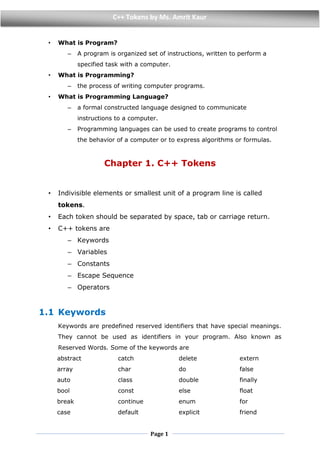
Chapter 1. C++ Tokens
• Indivisible elements or smallest unit of a program line is called
tokens.
• Each token should be separated by space, tab or carriage return.
• C++ tokens are
– Keywords
– Variables
– Constants
– Escape Sequence
– Operators
1.1 Keywords
Keywords are predefined reserved identifiers that have special meanings.
They cannot be used as identifiers in your program. Also known as
Reserved Words. Some of the keywords are
abstract
array
auto
bool
break
case
catch
char
class
const
continue
default
delete
do
double
else
enum
explicit
extern
false
finally
float
for
friend
Page 2
C++ Tokens by Ms. Amrit Kaur
goto
if
inline
int
literal
long
namespace
new
private
protected
public
register
return
short
signed
sizeof
static
struct
switch
template
this
throw
true
try
typedef
union
unsigned
virtual
void
volatile
while
1.2 Variables
 Definition: A memory location to store data or value.
 Properties
– Used to store and manipulate data in a program.
– Value of variable changes throughout the program execution.
– Variable store only one data at a time.
– Variables can be accessed locally or globally.
– All the variables must be declared before use.
 Variable naming Rules helps in avoiding ERRORS
– It can consist of any sequence of alphabets, digits and
underscore.
– First letter should be an alphabet or underscore.
– Special character (including space like + “ @ ! # % ^ & * ( ) -
= { } [ ] ; : “ “ < > , . ? ?) are not allowed.
– Keywords cannot be used as name of variable.
– Must be unique and case sensitive. Upper case and lowercase
are considered as different.
Page 3
C++ Tokens by Ms. Amrit Kaur
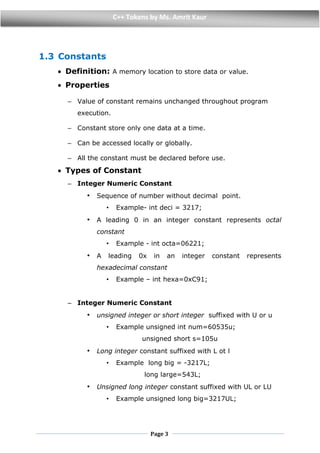
1.3 Constants
 Definition: A memory location to store data or value.
 Properties
– Value of constant remains unchanged throughout program
execution.
– Constant store only one data at a time.
– Can be accessed locally or globally.
– All the constant must be declared before use.
 Types of Constant
– Integer Numeric Constant
• Sequence of number without decimal point.
• Example- int deci = 3217;
• A leading 0 in an integer constant represents octal
constant
• Example - int octa=06221;
• A leading 0x in an integer constant represents
hexadecimal constant
• Example – int hexa=0xC91;
– Integer Numeric Constant
• unsigned integer or short integer suffixed with U or u
• Example unsigned int num=60535u;
unsigned short s=105u
• Long integer constant suffixed with L ot l
• Example long big = -3217L;
long large=543L;
• Unsigned long integer constant suffixed with UL or LU
• Example unsigned long big=3217UL;
Page 4
C++ Tokens by Ms. Amrit Kaur
– Floating Point Constant
• Sequence of numeric digits with decimal point
• Suffixed with f
• Example float a=0.00063f;
float b=6.2f;
float c=8E4f; // means 8 X 10⁴ or 80000
float d=-1.45e+56f; // means -1.45 X 10+56
float e=5.12E-4f; //means 5.12 X 10⁻⁴ or 0.000512
– Character Constant
• Any single character within single quotes.
• Example ‘A’, ‘1’, ‘&’, ‘*’ escape sequence etc.
char alpha=‘t’;
– String Constant
• Any sequence of zero or more character enclosed within
double quotes.
• Example “Good Morning” , “1234”, “1234,56”,” ****”
char str[5]=“Hello”;
• Arithmetic operations cannot be performed on Character
constant or string Constant
1.4 Escape Sequence
– Represented by backslash() followed by single character.
– They are Character constant.
– Some Escape sequence characters are
– o End of string
– n End of Line or new line
– t Horizontal tab
– v Vertical tab
– r Carriage Return
– a Alert
Page 5
C++ Tokens by Ms. Amrit Kaur
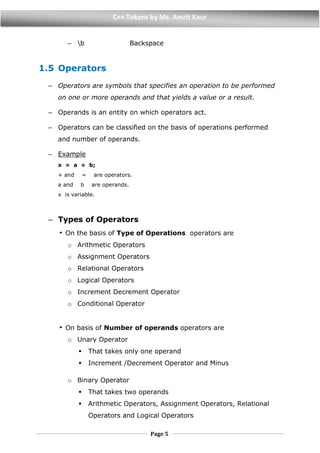
– b Backspace
1.5 Operators
– Operators are symbols that specifies an operation to be performed
on one or more operands and that yields a value or a result.
– Operands is an entity on which operators act.
– Operators can be classified on the basis of operations performed
and number of operands.
– Example
x = a + b;
+ and = are operators.
a and b are operands.
x is variable.
– Types of Operators
• On the basis of Type of Operations operators are
o Arithmetic Operators
o Assignment Operators
o Relational Operators
o Logical Operators
o Increment Decrement Operator
o Conditional Operator
• On basis of Number of operands operators are
o Unary Operator
 That takes only one operand
 Increment /Decrement Operator and Minus
o Binary Operator
 That takes two operands
 Arithmetic Operators, Assignment Operators, Relational
Operators and Logical Operators
Page 6
C++ Tokens by Ms. Amrit Kaur
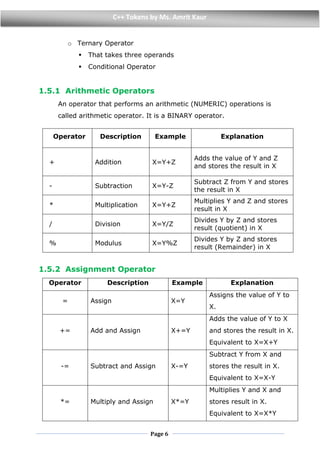
o Ternary Operator
 That takes three operands
 Conditional Operator
1.5.1 Arithmetic Operators
An operator that performs an arithmetic (NUMERIC) operations is
called arithmetic operator. It is a BINARY operator.
1.5.2 Assignment Operator
Operator Description Example Explanation
= Assign X=Y
Assigns the value of Y to
X.
+= Add and Assign X+=Y
Adds the value of Y to X
and stores the result in X.
Equivalent to X=X+Y
-= Subtract and Assign X-=Y
Subtract Y from X and
stores the result in X.
Equivalent to X=X-Y
*= Multiply and Assign X*=Y
Multiplies Y and X and
stores result in X.
Equivalent to X=X*Y
Operator Description Example Explanation
+ Addition X=Y+Z
Adds the value of Y and Z
and stores the result in X
- Subtraction X=Y-Z
Subtract Z from Y and stores
the result in X
* Multiplication X=Y+Z
Multiplies Y and Z and stores
result in X
/ Division X=Y/Z
Divides Y by Z and stores
result (quotient) in X
% Modulus X=Y%Z
Divides Y by Z and stores
result (Remainder) in X
Page 7
C++ Tokens by Ms. Amrit Kaur
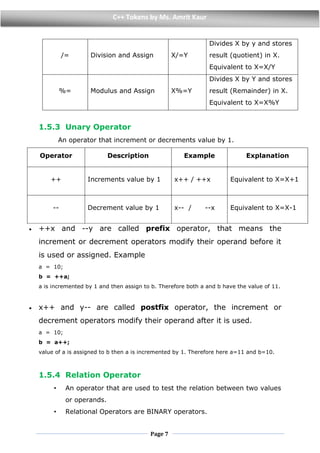
/= Division and Assign X/=Y
Divides X by y and stores
result (quotient) in X.
Equivalent to X=X/Y
%= Modulus and Assign X%=Y
Divides X by Y and stores
result (Remainder) in X.
Equivalent to X=X%Y
1.5.3 Unary Operator
An operator that increment or decrements value by 1.
Operator Description Example Explanation
++ Increments value by 1 x++ / ++x Equivalent to X=X+1
-- Decrement value by 1 x-- / --x Equivalent to X=X-1
 ++x and --y are called prefix operator, that means the
increment or decrement operators modify their operand before it
is used or assigned. Example
a = 10;
b = ++a;
a is incremented by 1 and then assign to b. Therefore both a and b have the value of 11.
 x++ and y-- are called postfix operator, the increment or
decrement operators modify their operand after it is used.
a = 10;
b = a++;
value of a is assigned to b then a is incremented by 1. Therefore here a=11 and b=10.
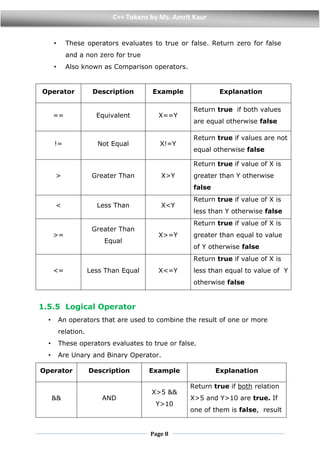
1.5.4 Relation Operator
• An operator that are used to test the relation between two values
or operands.
• Relational Operators are BINARY operators.
Page 8
C++ Tokens by Ms. Amrit Kaur
• These operators evaluates to true or false. Return zero for false
and a non zero for true
• Also known as Comparison operators.
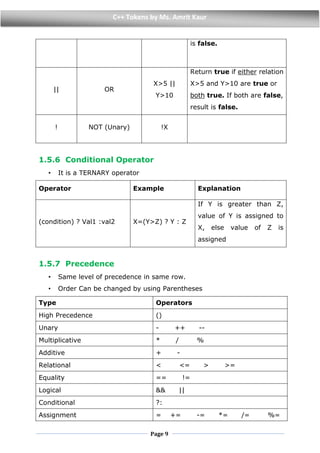
1.5.5 Logical Operator
• An operators that are used to combine the result of one or more
relation.
• These operators evaluates to true or false.
• Are Unary and Binary Operator.
Operator Description Example Explanation
&& AND
X>5 &&
Y>10
Return true if both relation
X>5 and Y>10 are true. If
one of them is false, result
Operator Description Example Explanation
== Equivalent X==Y
Return true if both values
are equal otherwise false
!= Not Equal X!=Y
Return true if values are not
equal otherwise false
> Greater Than X>Y
Return true if value of X is
greater than Y otherwise
false
< Less Than X<Y
Return true if value of X is
less than Y otherwise false
>=
Greater Than
Equal
X>=Y
Return true if value of X is
greater than equal to value
of Y otherwise false
<= Less Than Equal X<=Y
Return true if value of X is
less than equal to value of Y
otherwise false
Page 9
C++ Tokens by Ms. Amrit Kaur
is false.
|| OR
X>5 ||
Y>10
Return true if either relation
X>5 and Y>10 are true or
both true. If both are false,
result is false.
! NOT (Unary) !X
1.5.6 Conditional Operator
• It is a TERNARY operator
Operator Example Explanation
(condition) ? Val1 :val2 X=(Y>Z) ? Y : Z
If Y is greater than Z,
value of Y is assigned to
X, else value of Z is
assigned
1.5.7 Precedence
• Same level of precedence in same row.
• Order Can be changed by using Parentheses
Type Operators
High Precedence ()
Unary - ++ --
Multiplicative * / %
Additive + -
Relational < <= > >=
Equality == !=
Logical && ||
Conditional ?:
Assignment = += -= *= /= %=
Page
10
C++ Tokens by Ms. Amrit Kaur
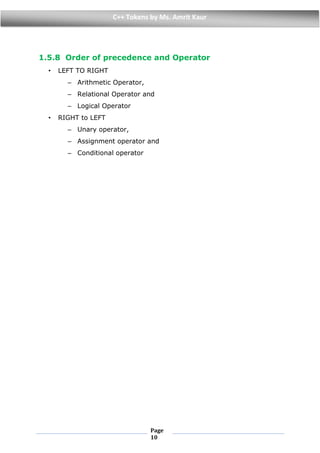
1.5.8 Order of precedence and Operator
• LEFT TO RIGHT
– Arithmetic Operator,
– Relational Operator and
– Logical Operator
• RIGHT to LEFT
– Unary operator,
– Assignment operator and
– Conditional operator

C++ Tokens

  • 1.
    Page 1 C++ Tokensby Ms. Amrit Kaur • What is Program? – A program is organized set of instructions, written to perform a specified task with a computer. • What is Programming? – the process of writing computer programs. • What is Programming Language? – a formal constructed language designed to communicate instructions to a computer. – Programming languages can be used to create programs to control the behavior of a computer or to express algorithms or formulas. Chapter 1. C++ Tokens • Indivisible elements or smallest unit of a program line is called tokens. • Each token should be separated by space, tab or carriage return. • C++ tokens are – Keywords – Variables – Constants – Escape Sequence – Operators 1.1 Keywords Keywords are predefined reserved identifiers that have special meanings. They cannot be used as identifiers in your program. Also known as Reserved Words. Some of the keywords are abstract array auto bool break case catch char class const continue default delete do double else enum explicit extern false finally float for friend
  • 2.
    Page 2 C++ Tokensby Ms. Amrit Kaur goto if inline int literal long namespace new private protected public register return short signed sizeof static struct switch template this throw true try typedef union unsigned virtual void volatile while 1.2 Variables  Definition: A memory location to store data or value.  Properties – Used to store and manipulate data in a program. – Value of variable changes throughout the program execution. – Variable store only one data at a time. – Variables can be accessed locally or globally. – All the variables must be declared before use.  Variable naming Rules helps in avoiding ERRORS – It can consist of any sequence of alphabets, digits and underscore. – First letter should be an alphabet or underscore. – Special character (including space like + “ @ ! # % ^ & * ( ) - = { } [ ] ; : “ “ < > , . ? ?) are not allowed. – Keywords cannot be used as name of variable. – Must be unique and case sensitive. Upper case and lowercase are considered as different.
  • 3.
    Page 3 C++ Tokensby Ms. Amrit Kaur 1.3 Constants  Definition: A memory location to store data or value.  Properties – Value of constant remains unchanged throughout program execution. – Constant store only one data at a time. – Can be accessed locally or globally. – All the constant must be declared before use.  Types of Constant – Integer Numeric Constant • Sequence of number without decimal point. • Example- int deci = 3217; • A leading 0 in an integer constant represents octal constant • Example - int octa=06221; • A leading 0x in an integer constant represents hexadecimal constant • Example – int hexa=0xC91; – Integer Numeric Constant • unsigned integer or short integer suffixed with U or u • Example unsigned int num=60535u; unsigned short s=105u • Long integer constant suffixed with L ot l • Example long big = -3217L; long large=543L; • Unsigned long integer constant suffixed with UL or LU • Example unsigned long big=3217UL;
  • 4.
    Page 4 C++ Tokensby Ms. Amrit Kaur – Floating Point Constant • Sequence of numeric digits with decimal point • Suffixed with f • Example float a=0.00063f; float b=6.2f; float c=8E4f; // means 8 X 10⁴ or 80000 float d=-1.45e+56f; // means -1.45 X 10+56 float e=5.12E-4f; //means 5.12 X 10⁻⁴ or 0.000512 – Character Constant • Any single character within single quotes. • Example ‘A’, ‘1’, ‘&’, ‘*’ escape sequence etc. char alpha=‘t’; – String Constant • Any sequence of zero or more character enclosed within double quotes. • Example “Good Morning” , “1234”, “1234,56”,” ****” char str[5]=“Hello”; • Arithmetic operations cannot be performed on Character constant or string Constant 1.4 Escape Sequence – Represented by backslash() followed by single character. – They are Character constant. – Some Escape sequence characters are – o End of string – n End of Line or new line – t Horizontal tab – v Vertical tab – r Carriage Return – a Alert
  • 5.
    Page 5 C++ Tokensby Ms. Amrit Kaur – b Backspace 1.5 Operators – Operators are symbols that specifies an operation to be performed on one or more operands and that yields a value or a result. – Operands is an entity on which operators act. – Operators can be classified on the basis of operations performed and number of operands. – Example x = a + b; + and = are operators. a and b are operands. x is variable. – Types of Operators • On the basis of Type of Operations operators are o Arithmetic Operators o Assignment Operators o Relational Operators o Logical Operators o Increment Decrement Operator o Conditional Operator • On basis of Number of operands operators are o Unary Operator  That takes only one operand  Increment /Decrement Operator and Minus o Binary Operator  That takes two operands  Arithmetic Operators, Assignment Operators, Relational Operators and Logical Operators
  • 6.
    Page 6 C++ Tokensby Ms. Amrit Kaur o Ternary Operator  That takes three operands  Conditional Operator 1.5.1 Arithmetic Operators An operator that performs an arithmetic (NUMERIC) operations is called arithmetic operator. It is a BINARY operator. 1.5.2 Assignment Operator Operator Description Example Explanation = Assign X=Y Assigns the value of Y to X. += Add and Assign X+=Y Adds the value of Y to X and stores the result in X. Equivalent to X=X+Y -= Subtract and Assign X-=Y Subtract Y from X and stores the result in X. Equivalent to X=X-Y *= Multiply and Assign X*=Y Multiplies Y and X and stores result in X. Equivalent to X=X*Y Operator Description Example Explanation + Addition X=Y+Z Adds the value of Y and Z and stores the result in X - Subtraction X=Y-Z Subtract Z from Y and stores the result in X * Multiplication X=Y+Z Multiplies Y and Z and stores result in X / Division X=Y/Z Divides Y by Z and stores result (quotient) in X % Modulus X=Y%Z Divides Y by Z and stores result (Remainder) in X
  • 7.
    Page 7 C++ Tokensby Ms. Amrit Kaur /= Division and Assign X/=Y Divides X by y and stores result (quotient) in X. Equivalent to X=X/Y %= Modulus and Assign X%=Y Divides X by Y and stores result (Remainder) in X. Equivalent to X=X%Y 1.5.3 Unary Operator An operator that increment or decrements value by 1. Operator Description Example Explanation ++ Increments value by 1 x++ / ++x Equivalent to X=X+1 -- Decrement value by 1 x-- / --x Equivalent to X=X-1  ++x and --y are called prefix operator, that means the increment or decrement operators modify their operand before it is used or assigned. Example a = 10; b = ++a; a is incremented by 1 and then assign to b. Therefore both a and b have the value of 11.  x++ and y-- are called postfix operator, the increment or decrement operators modify their operand after it is used. a = 10; b = a++; value of a is assigned to b then a is incremented by 1. Therefore here a=11 and b=10. 1.5.4 Relation Operator • An operator that are used to test the relation between two values or operands. • Relational Operators are BINARY operators.
  • 8.
    Page 8 C++ Tokensby Ms. Amrit Kaur • These operators evaluates to true or false. Return zero for false and a non zero for true • Also known as Comparison operators. 1.5.5 Logical Operator • An operators that are used to combine the result of one or more relation. • These operators evaluates to true or false. • Are Unary and Binary Operator. Operator Description Example Explanation && AND X>5 && Y>10 Return true if both relation X>5 and Y>10 are true. If one of them is false, result Operator Description Example Explanation == Equivalent X==Y Return true if both values are equal otherwise false != Not Equal X!=Y Return true if values are not equal otherwise false > Greater Than X>Y Return true if value of X is greater than Y otherwise false < Less Than X<Y Return true if value of X is less than Y otherwise false >= Greater Than Equal X>=Y Return true if value of X is greater than equal to value of Y otherwise false <= Less Than Equal X<=Y Return true if value of X is less than equal to value of Y otherwise false
  • 9.
    Page 9 C++ Tokensby Ms. Amrit Kaur is false. || OR X>5 || Y>10 Return true if either relation X>5 and Y>10 are true or both true. If both are false, result is false. ! NOT (Unary) !X 1.5.6 Conditional Operator • It is a TERNARY operator Operator Example Explanation (condition) ? Val1 :val2 X=(Y>Z) ? Y : Z If Y is greater than Z, value of Y is assigned to X, else value of Z is assigned 1.5.7 Precedence • Same level of precedence in same row. • Order Can be changed by using Parentheses Type Operators High Precedence () Unary - ++ -- Multiplicative * / % Additive + - Relational < <= > >= Equality == != Logical && || Conditional ?: Assignment = += -= *= /= %=
  • 10.
    Page 10 C++ Tokens byMs. Amrit Kaur 1.5.8 Order of precedence and Operator • LEFT TO RIGHT – Arithmetic Operator, – Relational Operator and – Logical Operator • RIGHT to LEFT – Unary operator, – Assignment operator and – Conditional operator