C++ Language
By : Shrirang Pinjarkar
Email : shrirang.pinjarkar@gmail.com
UNIT -2
DATA TYPES ,
VARIABLES AND
OPERATORS
Overview
Objectives
C++ data types, constant and variable
C++ keywords
Input Output : cin, cout
Hands On!
DATA TYPE
 A data type determines the type of the
data that will be stored, usually, in the
computer memory (RAM).
 Type statements in C++ are used to allow
the compiler to:
 reserve blocks of memory to store information
 give the reserved blocks of memory a symbolic
name so that the data contained in this block of
memory can be manipulated by referring to this
name in future C++ statements.
Data Types
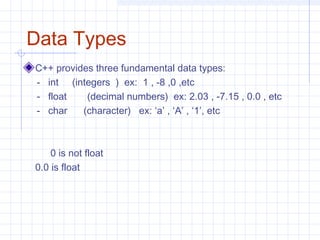
C++ provides three fundamental data types:
- int (integers ) ex: 1 , -8 ,0 ,etc
- float (decimal numbers) ex: 2.03 , -7.15 , 0.0 , etc
- char (character) ex: ‘a’ , ‘A’ , ‘1’, etc
0 is not float
0.0 is float
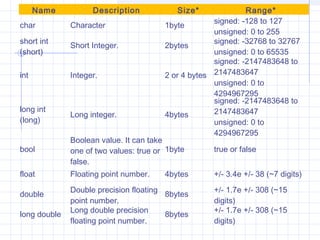
Name Description Size* Range*
char Character 1byte
signed: -128 to 127
unsigned: 0 to 255
short int
(short)
Short Integer. 2bytes
signed: -32768 to 32767
unsigned: 0 to 65535
int Integer. 2 or 4 bytes
signed: -2147483648 to
2147483647
unsigned: 0 to
4294967295
long int
(long)
Long integer. 4bytes
signed: -2147483648 to
2147483647
unsigned: 0 to
4294967295
bool
Boolean value. It can take
one of two values: true or
false.
1byte true or false
float Floating point number. 4bytes +/- 3.4e +/- 38 (~7 digits)
double
Double precision floating
point number.
8bytes
+/- 1.7e +/- 308 (~15
digits)
long double
Long double precision
floating point number.
8bytes
+/- 1.7e +/- 308 (~15
digits)
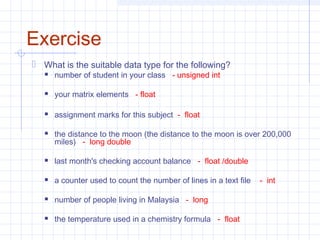
Exercise
 What is the suitable data type for the following?
 number of student in your class - unsigned int
 your matrix elements - float
 assignment marks for this subject - float
 the distance to the moon (the distance to the moon is over 200,000
miles) - long double
 last month's checking account balance - float /double
 a counter used to count the number of lines in a text file - int
 number of people living in Malaysia - long
 the temperature used in a chemistry formula - float
Variables
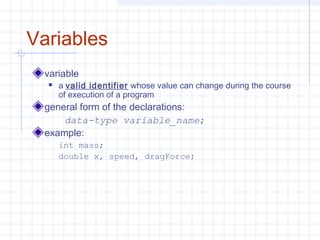
variable
 a valid identifier whose value can change during the course
of execution of a program
general form of the declarations:
data-type variable_name;
example:
int mass;
double x, speed, dragForce;
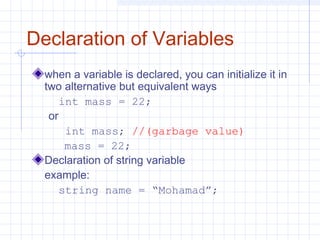
Declaration of Variables
when a variable is declared, you can initialize it in
two alternative but equivalent ways
int mass = 22;
or
int mass; //(garbage value)
mass = 22;
Declaration of string variable
example:
string name = “Mohamad”;
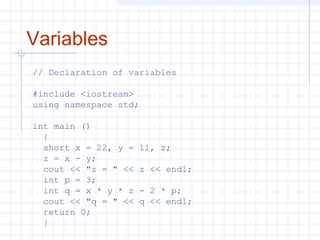
Variables
// Declaration of variables
#include <iostream>
using namespace std;
int main ()
{
short x = 22, y = 11, z;
z = x - y;
cout << "z = " << z << endl;
int p = 3;
int q = x * y * z - 2 * p;
cout << "q = " << q << endl;
return 0;
}
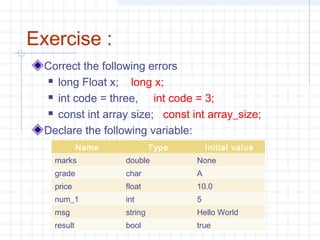
Exercise :
Correct the following errors
 long Float x; long x;
 int code = three, int code = 3;
 const int array size; const int array_size;
Declare the following variable:
Name Type Initial value
marks double None
grade char A
price float 10.0
num_1 int 5
msg string Hello World
result bool true
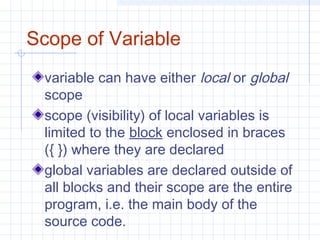
Scope of Variable
variable can have either local or global
scope
scope (visibility) of local variables is
limited to the block enclosed in braces
({ }) where they are declared
global variables are declared outside of
all blocks and their scope are the entire
program, i.e. the main body of the
source code.
What is the Scope of A
variable ?
Scope refers to the visibility of variables. In
otherwords, which parts of your program can see
or use it. Normally, every variable has a global
scope. Once defined, every part of your program
can access a variable.
A scope is a region of the program and broadly speaking there
are three places, where variables can be declared:
Inside a function or a block which is called local
variables,
In the definition of function parameters which is called
formal parameters.
Outside of all functions which is called global
variables.
Operators in C++
An operator is a symbol that tells the compiler to
perform specific mathematical or logical
manipulations. C++ is rich in built-in operators
and provides the following types of operators:
Arithmetic Operators
Relational Operators
Logical Operators
Bitwise Operators
Assignment Operators
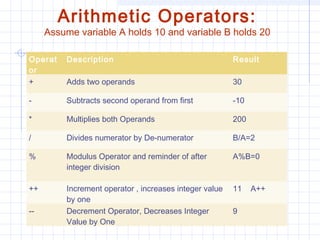
Arithmetic Operators:
Assume variable A holds 10 and variable B holds 20
Operat
or
Description Result
+ Adds two operands 30
- Subtracts second operand from first -10
* Multiplies both Operands 200
/ Divides numerator by De-numerator B/A=2
% Modulus Operator and reminder of after
integer division
A%B=0
++ Increment operator , increases integer value
by one
11 A++
-- Decrement Operator, Decreases Integer
Value by One
9
7/8/2014
By Himanshu Kaushik |
ApplicationDeveloper.in |
Himanshukaushik.in
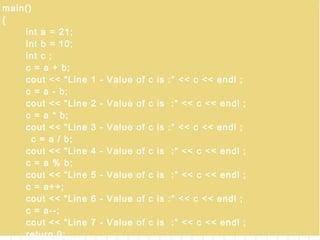
main()
{
int a = 21;
int b = 10;
int c ;
c = a + b;
cout << "Line 1 - Value of c is :" << c << endl ;
c = a - b;
cout << "Line 2 - Value of c is :" << c << endl ;
c = a * b;
cout << "Line 3 - Value of c is :" << c << endl ;
c = a / b;
cout << "Line 4 - Value of c is :" << c << endl ;
c = a % b;
cout << "Line 5 - Value of c is :" << c << endl ;
c = a++;
cout << "Line 6 - Value of c is :" << c << endl ;
c = a--;
cout << "Line 7 - Value of c is :" << c << endl ;
return 0;
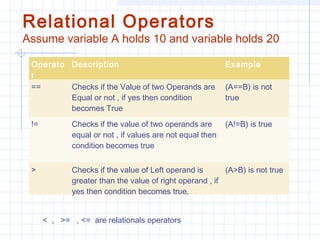
Relational Operators
Assume variable A holds 10 and variable holds 20
Operato
r
Description Example
== Checks if the Value of two Operands are
Equal or not , if yes then condition
becomes True
(A==B) is not
true
!= Checks if the value of two operands are
equal or not , if values are not equal then
condition becomes true
(A!=B) is true
> Checks if the value of Left operand is
greater than the value of right operand , if
yes then condition becomes true,
(A>B) is not true
< , >= , <= are relationals operators
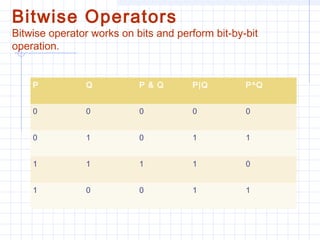
Bitwise Operators
Bitwise operator works on bits and perform bit-by-bit
operation.
P Q P & Q P|Q P^Q
0 0 0 0 0
0 1 0 1 1
1 1 1 1 0
1 0 0 1 1
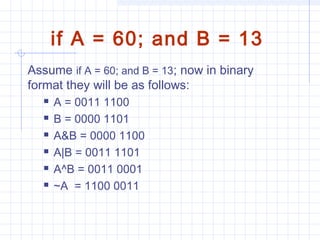
if A = 60; and B = 13
Assume if A = 60; and B = 13; now in binary
format they will be as follows:
 A = 0011 1100
 B = 0000 1101
 A&B = 0000 1100
 A|B = 0011 1101
 A^B = 0011 0001
 ~A  = 1100 0011
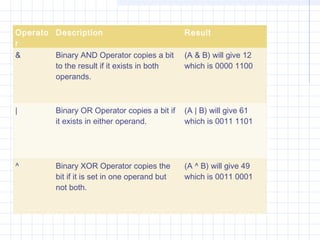
Operato
r
Description Result
& Binary AND Operator copies a bit
to the result if it exists in both
operands.
(A & B) will give 12
which is 0000 1100
| Binary OR Operator copies a bit if
it exists in either operand.
(A | B) will give 61
which is 0011 1101
^ Binary XOR Operator copies the
bit if it is set in one operand but
not both.
(A ^ B) will give 49
which is 0011 0001
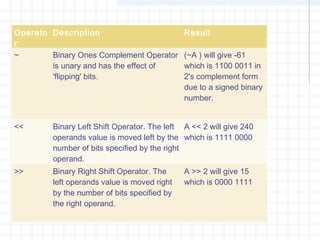
Operato
r
Description Result
~ Binary Ones Complement Operator
is unary and has the effect of
'flipping' bits.
(~A ) will give -61
which is 1100 0011 in
2's complement form
due to a signed binary
number.
<< Binary Left Shift Operator. The left
operands value is moved left by the
number of bits specified by the right
operand.
A << 2 will give 240
which is 1111 0000
>> Binary Right Shift Operator. The
left operands value is moved right
by the number of bits specified by
the right operand.
A >> 2 will give 15
which is 0000 1111
By Himanshu Kaushik |
ApplicationDeveloper.in |
Himanshukaushik.in
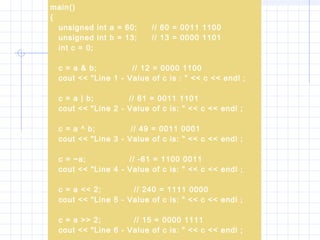
main()
{
unsigned int a = 60; // 60 = 0011 1100
unsigned int b = 13; // 13 = 0000 1101
int c = 0;
c = a & b; // 12 = 0000 1100
cout << "Line 1 - Value of c is : " << c << endl ;
c = a | b; // 61 = 0011 1101
cout << "Line 2 - Value of c is: " << c << endl ;
c = a ^ b; // 49 = 0011 0001
cout << "Line 3 - Value of c is: " << c << endl ;
c = ~a; // -61 = 1100 0011
cout << "Line 4 - Value of c is: " << c << endl ;
c = a << 2; // 240 = 1111 0000
cout << "Line 5 - Value of c is: " << c << endl ;
c = a >> 2; // 15 = 0000 1111
cout << "Line 6 - Value of c is: " << c << endl ;
Assignment Operators
By Himanshu Kaushik |
ApplicationDeveloper.in |
Himanshukaushik.in
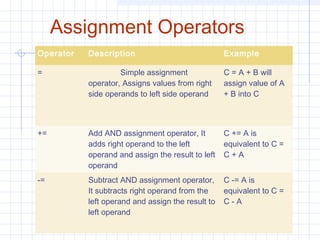
Operator Description Example
= Simple assignment
operator, Assigns values from right
side operands to left side operand
C = A + B will
assign value of A
+ B into C
+= Add AND assignment operator, It
adds right operand to the left
operand and assign the result to left
operand
C += A is
equivalent to C =
C + A
-= Subtract AND assignment operator,
It subtracts right operand from the
left operand and assign the result to
left operand
C -= A is
equivalent to C =
C - A
Assignment Operators
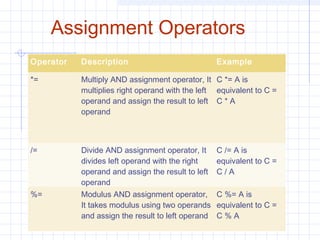
Operator Description Example
*= Multiply AND assignment operator, It
multiplies right operand with the left
operand and assign the result to left
operand
C *= A is
equivalent to C =
C * A
/= Divide AND assignment operator, It
divides left operand with the right
operand and assign the result to left
operand
C /= A is
equivalent to C =
C / A
%= Modulus AND assignment operator,
It takes modulus using two operands
and assign the result to left operand
C %= A is
equivalent to C =
C % A
7/8/2014
By Himanshu Kaushik |
ApplicationDeveloper.in |
Himanshukaushik.in
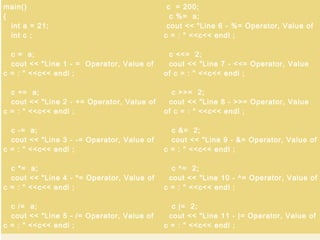
main()
{
int a = 21;
int c ;
c = a;
cout << "Line 1 - = Operator, Value of
c = : " <<c<< endl ;
c += a;
cout << "Line 2 - += Operator, Value of
c = : " <<c<< endl ;
c -= a;
cout << "Line 3 - -= Operator, Value of
c = : " <<c<< endl ;
c *= a;
cout << "Line 4 - *= Operator, Value of
c = : " <<c<< endl ;
c /= a;
cout << "Line 5 - /= Operator, Value of
c = : " <<c<< endl ;
c = 200;
c %= a;
cout << "Line 6 - %= Operator, Value of
c = : " <<c<< endl ;
c <<= 2;
cout << "Line 7 - <<= Operator, Value
of c = : " <<c<< endl ;
c >>= 2;
cout << "Line 8 - >>= Operator, Value
of c = : " <<c<< endl ;
c &= 2;
cout << "Line 9 - &= Operator, Value of
c = : " <<c<< endl ;
c ^= 2;
cout << "Line 10 - ^= Operator, Value of
c = : " <<c<< endl ;
c |= 2;
cout << "Line 11 - |= Operator, Value of
c = : " <<c<< endl ;
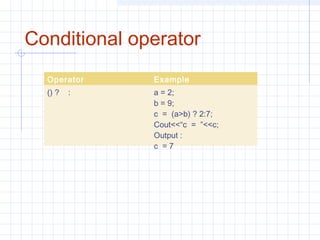
Conditional operator
Operator Example
() ? : a = 2;
b = 9;
c = (a>b) ? 2:7;
Cout<<“c = ”<<c;
Output :
c = 7
Arrays
It is continuous memory of same data
types
Array can be of int , float or char
Syntax :
data_type variable_name[n];
where n is size of array
For example,
int arry[5] ;
Initilization of array
int a[3];
a[0] = 0; a[1] = 1; a[2] = 3;
OR
int a[3] = {0,1,2};
THANK
YOU

C++ chapter 2

  • 1.
    C++ Language By :Shrirang Pinjarkar Email : shrirang.pinjarkar@gmail.com
  • 2.
    UNIT -2 DATA TYPES, VARIABLES AND OPERATORS
  • 3.
    Overview Objectives C++ data types,constant and variable C++ keywords Input Output : cin, cout Hands On!
  • 4.
    DATA TYPE  Adata type determines the type of the data that will be stored, usually, in the computer memory (RAM).  Type statements in C++ are used to allow the compiler to:  reserve blocks of memory to store information  give the reserved blocks of memory a symbolic name so that the data contained in this block of memory can be manipulated by referring to this name in future C++ statements.
  • 5.
    Data Types C++ providesthree fundamental data types: - int (integers ) ex: 1 , -8 ,0 ,etc - float (decimal numbers) ex: 2.03 , -7.15 , 0.0 , etc - char (character) ex: ‘a’ , ‘A’ , ‘1’, etc 0 is not float 0.0 is float
  • 6.
    Name Description Size*Range* char Character 1byte signed: -128 to 127 unsigned: 0 to 255 short int (short) Short Integer. 2bytes signed: -32768 to 32767 unsigned: 0 to 65535 int Integer. 2 or 4 bytes signed: -2147483648 to 2147483647 unsigned: 0 to 4294967295 long int (long) Long integer. 4bytes signed: -2147483648 to 2147483647 unsigned: 0 to 4294967295 bool Boolean value. It can take one of two values: true or false. 1byte true or false float Floating point number. 4bytes +/- 3.4e +/- 38 (~7 digits) double Double precision floating point number. 8bytes +/- 1.7e +/- 308 (~15 digits) long double Long double precision floating point number. 8bytes +/- 1.7e +/- 308 (~15 digits)
  • 7.
    Exercise  What isthe suitable data type for the following?  number of student in your class - unsigned int  your matrix elements - float  assignment marks for this subject - float  the distance to the moon (the distance to the moon is over 200,000 miles) - long double  last month's checking account balance - float /double  a counter used to count the number of lines in a text file - int  number of people living in Malaysia - long  the temperature used in a chemistry formula - float
  • 8.
    Variables variable  a valididentifier whose value can change during the course of execution of a program general form of the declarations: data-type variable_name; example: int mass; double x, speed, dragForce;
  • 9.
    Declaration of Variables whena variable is declared, you can initialize it in two alternative but equivalent ways int mass = 22; or int mass; //(garbage value) mass = 22; Declaration of string variable example: string name = “Mohamad”;
  • 10.
    Variables // Declaration ofvariables #include <iostream> using namespace std; int main () { short x = 22, y = 11, z; z = x - y; cout << "z = " << z << endl; int p = 3; int q = x * y * z - 2 * p; cout << "q = " << q << endl; return 0; }
  • 11.
    Exercise : Correct thefollowing errors  long Float x; long x;  int code = three, int code = 3;  const int array size; const int array_size; Declare the following variable: Name Type Initial value marks double None grade char A price float 10.0 num_1 int 5 msg string Hello World result bool true
  • 12.
    Scope of Variable variablecan have either local or global scope scope (visibility) of local variables is limited to the block enclosed in braces ({ }) where they are declared global variables are declared outside of all blocks and their scope are the entire program, i.e. the main body of the source code.
  • 13.
    What is theScope of A variable ? Scope refers to the visibility of variables. In otherwords, which parts of your program can see or use it. Normally, every variable has a global scope. Once defined, every part of your program can access a variable.
  • 14.
    A scope isa region of the program and broadly speaking there are three places, where variables can be declared: Inside a function or a block which is called local variables, In the definition of function parameters which is called formal parameters. Outside of all functions which is called global variables.
  • 15.
    Operators in C++ Anoperator is a symbol that tells the compiler to perform specific mathematical or logical manipulations. C++ is rich in built-in operators and provides the following types of operators: Arithmetic Operators Relational Operators Logical Operators Bitwise Operators Assignment Operators
  • 16.
    Arithmetic Operators: Assume variableA holds 10 and variable B holds 20 Operat or Description Result + Adds two operands 30 - Subtracts second operand from first -10 * Multiplies both Operands 200 / Divides numerator by De-numerator B/A=2 % Modulus Operator and reminder of after integer division A%B=0 ++ Increment operator , increases integer value by one 11 A++ -- Decrement Operator, Decreases Integer Value by One 9
  • 17.
    7/8/2014 By Himanshu Kaushik| ApplicationDeveloper.in | Himanshukaushik.in main() { int a = 21; int b = 10; int c ; c = a + b; cout << "Line 1 - Value of c is :" << c << endl ; c = a - b; cout << "Line 2 - Value of c is :" << c << endl ; c = a * b; cout << "Line 3 - Value of c is :" << c << endl ; c = a / b; cout << "Line 4 - Value of c is :" << c << endl ; c = a % b; cout << "Line 5 - Value of c is :" << c << endl ; c = a++; cout << "Line 6 - Value of c is :" << c << endl ; c = a--; cout << "Line 7 - Value of c is :" << c << endl ; return 0;
  • 18.
    Relational Operators Assume variableA holds 10 and variable holds 20 Operato r Description Example == Checks if the Value of two Operands are Equal or not , if yes then condition becomes True (A==B) is not true != Checks if the value of two operands are equal or not , if values are not equal then condition becomes true (A!=B) is true > Checks if the value of Left operand is greater than the value of right operand , if yes then condition becomes true, (A>B) is not true < , >= , <= are relationals operators
  • 19.
    Bitwise Operators Bitwise operatorworks on bits and perform bit-by-bit operation. P Q P & Q P|Q P^Q 0 0 0 0 0 0 1 0 1 1 1 1 1 1 0 1 0 0 1 1
  • 20.
    if A =60; and B = 13 Assume if A = 60; and B = 13; now in binary format they will be as follows:  A = 0011 1100  B = 0000 1101  A&B = 0000 1100  A|B = 0011 1101  A^B = 0011 0001  ~A  = 1100 0011
  • 21.
    Operato r Description Result & BinaryAND Operator copies a bit to the result if it exists in both operands. (A & B) will give 12 which is 0000 1100 | Binary OR Operator copies a bit if it exists in either operand. (A | B) will give 61 which is 0011 1101 ^ Binary XOR Operator copies the bit if it is set in one operand but not both. (A ^ B) will give 49 which is 0011 0001
  • 22.
    Operato r Description Result ~ BinaryOnes Complement Operator is unary and has the effect of 'flipping' bits. (~A ) will give -61 which is 1100 0011 in 2's complement form due to a signed binary number. << Binary Left Shift Operator. The left operands value is moved left by the number of bits specified by the right operand. A << 2 will give 240 which is 1111 0000 >> Binary Right Shift Operator. The left operands value is moved right by the number of bits specified by the right operand. A >> 2 will give 15 which is 0000 1111
  • 23.
    By Himanshu Kaushik| ApplicationDeveloper.in | Himanshukaushik.in main() { unsigned int a = 60; // 60 = 0011 1100 unsigned int b = 13; // 13 = 0000 1101 int c = 0; c = a & b; // 12 = 0000 1100 cout << "Line 1 - Value of c is : " << c << endl ; c = a | b; // 61 = 0011 1101 cout << "Line 2 - Value of c is: " << c << endl ; c = a ^ b; // 49 = 0011 0001 cout << "Line 3 - Value of c is: " << c << endl ; c = ~a; // -61 = 1100 0011 cout << "Line 4 - Value of c is: " << c << endl ; c = a << 2; // 240 = 1111 0000 cout << "Line 5 - Value of c is: " << c << endl ; c = a >> 2; // 15 = 0000 1111 cout << "Line 6 - Value of c is: " << c << endl ;
  • 24.
    Assignment Operators By HimanshuKaushik | ApplicationDeveloper.in | Himanshukaushik.in Operator Description Example = Simple assignment operator, Assigns values from right side operands to left side operand C = A + B will assign value of A + B into C += Add AND assignment operator, It adds right operand to the left operand and assign the result to left operand C += A is equivalent to C = C + A -= Subtract AND assignment operator, It subtracts right operand from the left operand and assign the result to left operand C -= A is equivalent to C = C - A
  • 25.
    Assignment Operators Operator DescriptionExample *= Multiply AND assignment operator, It multiplies right operand with the left operand and assign the result to left operand C *= A is equivalent to C = C * A /= Divide AND assignment operator, It divides left operand with the right operand and assign the result to left operand C /= A is equivalent to C = C / A %= Modulus AND assignment operator, It takes modulus using two operands and assign the result to left operand C %= A is equivalent to C = C % A
  • 26.
    7/8/2014 By Himanshu Kaushik| ApplicationDeveloper.in | Himanshukaushik.in main() { int a = 21; int c ; c = a; cout << "Line 1 - = Operator, Value of c = : " <<c<< endl ; c += a; cout << "Line 2 - += Operator, Value of c = : " <<c<< endl ; c -= a; cout << "Line 3 - -= Operator, Value of c = : " <<c<< endl ; c *= a; cout << "Line 4 - *= Operator, Value of c = : " <<c<< endl ; c /= a; cout << "Line 5 - /= Operator, Value of c = : " <<c<< endl ; c = 200; c %= a; cout << "Line 6 - %= Operator, Value of c = : " <<c<< endl ; c <<= 2; cout << "Line 7 - <<= Operator, Value of c = : " <<c<< endl ; c >>= 2; cout << "Line 8 - >>= Operator, Value of c = : " <<c<< endl ; c &= 2; cout << "Line 9 - &= Operator, Value of c = : " <<c<< endl ; c ^= 2; cout << "Line 10 - ^= Operator, Value of c = : " <<c<< endl ; c |= 2; cout << "Line 11 - |= Operator, Value of c = : " <<c<< endl ;
  • 27.
    Conditional operator Operator Example ()? : a = 2; b = 9; c = (a>b) ? 2:7; Cout<<“c = ”<<c; Output : c = 7
  • 28.
    Arrays It is continuousmemory of same data types Array can be of int , float or char Syntax : data_type variable_name[n]; where n is size of array For example, int arry[5] ;
  • 29.
    Initilization of array inta[3]; a[0] = 0; a[1] = 1; a[2] = 3; OR int a[3] = {0,1,2};
  • 30.

Editor's Notes

  • #6 wchar_t: for special character eg: symbol/international language wchar_t myChar1 = L&amp;apos;Ω&amp;apos;; wchar_t myString1[] = L&amp;quot;♠♣♥♦&amp;quot;;